
It isn’t Containers vs VMs. It is About Applications
Steve Wilson
VP– Converged Infrastructure Group
August 2015
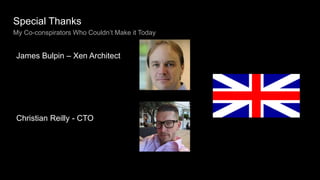
Special Thanks
My Co-conspirators Who Couldn’t Make it Today
James Bulpin – Xen Architect
Christian Reilly - CTO
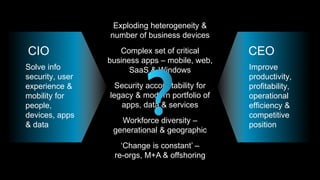
Exploding heterogeneity &
number of business devices
Complex set of critical
business apps – mobile, web,
SaaS & Windows
Security accountability for
legacy & modern portfolio of
apps, data & services
Workforce diversity –
generational & geographic
‘Change is constant’ –
re-orgs, M+A & offshoring
Improve
productivity,
profitability,
operational
efficiency &
competitive
position
Solve info
security, user
experience &
mobility for
people,
devices, apps
& data
CIO CEO
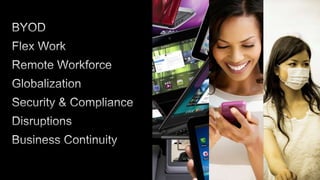
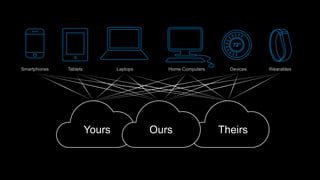
Yours TheirsOurs
Smartphones Tablets Laptops Home Computers
72°
Devices Wearables
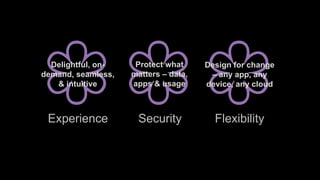
Experience Security Flexibility
Protect what
matters – data,
apps & usage
Delightful, on-
demand, seamless,
& intuitive
Design for change
– any app, any
device, any cloud
© 2015 Citrix.9
Photo by Håkan Dahlström, CC-by-2.0-licensed
© 2015 Citrix.10
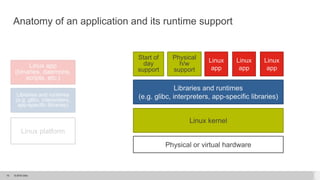
Anatomy of an application and its runtime support
Linux app
(binaries, daemons,
scripts, etc.)
Libraries and runtimes
(e.g. glibc, interpreters,
app-specific libraries)
Linux platform
Linux
app
Libraries and runtimes
(e.g. glibc, interpreters, app-specific libraries)
Linux
app
Linux
app
Start of
day
support
Physical
h/w
support
Linux kernel
Physical or virtual hardware
© 2015 Citrix.11
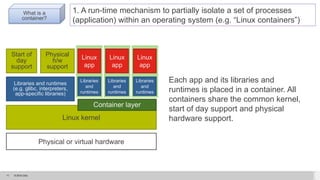
1. A run-time mechanism to partially isolate a set of processes
(application) within an operating system (e.g. “Linux containers”)
What is a
container?
Each app and its libraries and
runtimes is placed in a container. All
containers share the common kernel,
start of day support and physical
hardware support.
Linux
app
Libraries and runtimes
(e.g. glibc, interpreters,
app-specific libraries)
Linux
app
Linux
app
Start of
day
support
Physical
h/w
support
Linux kernel
Physical or virtual hardware
Libraries
and
runtimes
Libraries
and
runtimes
Libraries
and
runtimes
Container layer
© 2015 Citrix.12
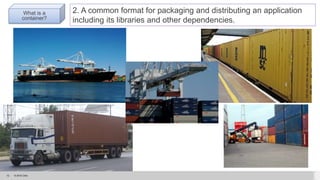
2. A common format for packaging and distributing an application
including its libraries and other dependencies.
What is a
container?
© 2015 Citrix.13
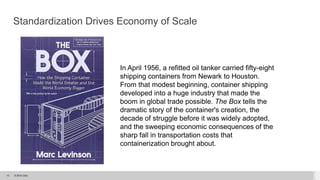
Standardization Drives Economy of Scale
In April 1956, a refitted oil tanker carried fifty-eight
shipping containers from Newark to Houston.
From that modest beginning, container shipping
developed into a huge industry that made the
boom in global trade possible. The Box tells the
dramatic story of the container's creation, the
decade of struggle before it was widely adopted,
and the sweeping economic consequences of the
sharp fall in transportation costs that
containerization brought about.
© 2015 Citrix.14
http://diginomica.com/2014/07/02/virtualization-dead-long-live-containerization/
© 2015 Citrix.15
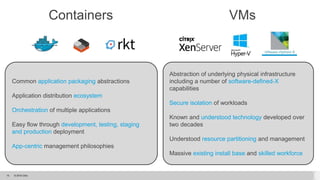
Common application packaging abstractions
Application distribution ecosystem
Orchestration of multiple applications
Easy flow through development, testing, staging
and production deployment
App-centric management philosophies
Abstraction of underlying physical infrastructure
including a number of software-defined-X
capabilities
Secure isolation of workloads
Known and understood technology developed over
two decades
Understood resource partitioning and management
Massive existing install base and skilled workforce
Containers VMs
© 2015 Citrix.16
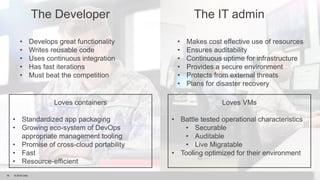
The Developer The IT admin
• Develops great functionality
• Writes reusable code
• Uses continuous integration
• Has fast iterations
• Must beat the competition
• Makes cost effective use of resources
• Ensures auditability
• Continuous uptime for infrastructure
• Provides a secure environment
• Protects from external threats
• Plans for disaster recovery
Loves containers
• Standardized app packaging
• Growing eco-system of DevOps
appropriate management tooling
• Promise of cross-cloud portability
• Fast
• Resource-efficient
Loves VMs
• Battle tested operational characteristics
• Securable
• Auditable
• Live Migratable
• Tooling optimized for their environment
© 2015 Citrix.17
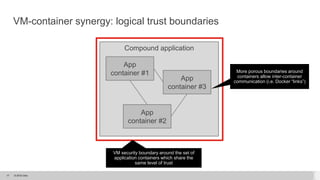
VM-container synergy: logical trust boundaries
Compound application
App
container #1
App
container #2
App
container #3
VM security boundary around the set of
application containers which share the
same level of trust
More porous boundaries around
containers allow inter-container
communication (i.e. Docker “links”)
© 2015 Citrix.18
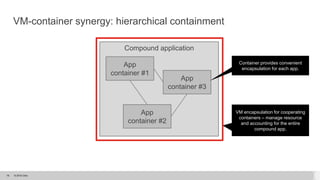
Compound application
App
container #1
App
container #2
App
container #3
Container provides convenient
encapsulation for each app.
VM-container synergy: hierarchical containment
VM encapsulation for cooperating
containers – manage resource
and accounting for the entire
compound app.
© 2015 Citrix.19
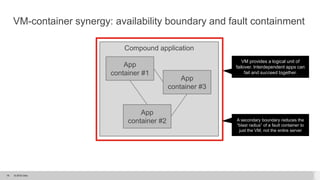
Compound application
App
container #1
App
container #2
App
container #3
VM-container synergy: availability boundary and fault containment
VM provides a logical unit of
failover. Interdependent apps can
fail and succeed together.
A secondary boundary reduces the
“blast radius” of a fault container to
just the VM, not the entire server
© 2015 Citrix.20
“”
“A programmer gets famous when he does something
good and an administrator if he does something bad.”
Unknown Source
© 2015 Citrix.21
Docker Containers and XenServer
Why add support to XenServer?
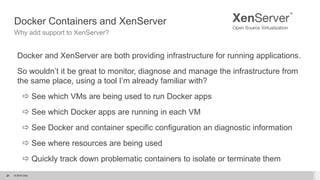
Docker and XenServer are both providing infrastructure for running applications.
So wouldn’t it be great to monitor, diagnose and manage the infrastructure from
the same place, using a tool I’m already familiar with?
 See which VMs are being used to run Docker apps
 See which Docker apps are running in each VM
 See Docker and container specific configuration an diagnostic information
 See where resources are being used
 Quickly track down problematic containers to isolate or terminate them
21
© 2015 Citrix.22
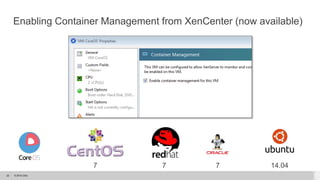
Enabling Container Management from XenCenter (now available)
14.04777
© 2015 Citrix.23
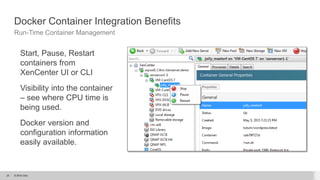
Docker Container Integration Benefits
Run-Time Container Management
Start, Pause, Restart
containers from
XenCenter UI or CLI
Visibility into the container
– see where CPU time is
being used.
Docker version and
configuration information
easily available.
© 2015 Citrix.24
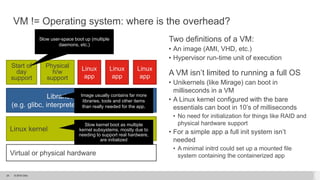
VM != Operating system: where is the overhead?
Two definitions of a VM:
• An image (AMI, VHD, etc.)
• Hypervisor run-time unit of execution
A VM isn’t limited to running a full OS
• Unikernels (like Mirage) can boot in
milliseconds in a VM
• A Linux kernel configured with the bare
essentials can boot in 10’s of milliseconds
• No need for initialization for things like RAID and
physical hardware support
• For a simple app a full init system isn’t
needed
• A minimal initrd could set up a mounted file
system containing the containerized app
Linux
app
Libraries and runtimes
(e.g. glibc, interpreters, app-specific libraries)
Linux
app
Linux
app
Start of
day
support
Physical
h/w
support
Linux kernel
Virtual or physical hardware
Slow user-space boot up (multiple
daemons, etc.)
Slow kernel boot as multiple
kernel subsystems, mostly due to
needing to support real hardware,
are initialized
Image usually contains far more
libraries, tools and other items
than really needed for the app.
© 2015 Citrix.25
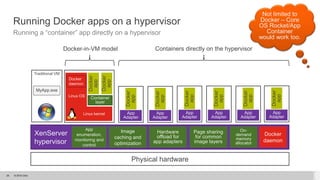
Running Docker apps on a hypervisor
Running a “container” app directly on a hypervisor
Physical hardware
XenServer
hypervisor
Traditional VM
MyApp.exe
App
Adapter
Docker
app
App
Adapter
Docker
app
Container
layer
Linux kernel
Docker
daemon
Linux OS
Docker
app
Docker
app
On-
demand
memory
allocator
App
Adapter
Docker
app
App
Adapter
Docker
app
App
Adapter
Docker
app
Page sharing
for common
image layers
Hardware
offload for
app adapters
Image
caching and
optimization
App
enumeration,
monitoring and
control
Docker-in-VM model Containers directly on the hypervisor
App
Adapter
Docker
app
Docker
daemon
Not limited to
Docker – Core
OS Rocket/App
Container
would work too.
© 2015 Citrix.26
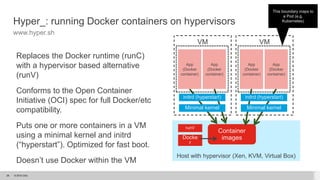
Hyper_: running Docker containers on hypervisors
www.hyper.sh
Replaces the Docker runtime (runC)
with a hypervisor based alternative
(runV)
Conforms to the Open Container
Initiative (OCI) spec for full Docker/etc
compatibility.
Puts one or more containers in a VM
using a minimal kernel and initrd
(“hyperstart”). Optimized for fast boot.
Doesn’t use Docker within the VM
Host with hypervisor (Xen, KVM, Virtual Box)
This boundary maps to
a Pod (e.g.
Kubernetes)
Docke
r
Container
images
runV
VM
Minimal kernel
initrd (hyperstart)
App
(Docker
container)
App
(Docker
container)
VM
Minimal kernel
initrd (hyperstart)
App
(Docker
container)
App
(Docker
container)
© 2015 Citrix.27
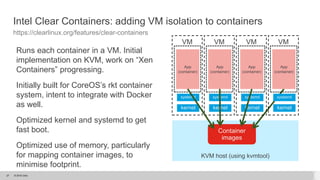
Intel Clear Containers: adding VM isolation to containers
https://clearlinux.org/features/clear-containers
Runs each container in a VM. Initial
implementation on KVM, work on “Xen
Containers” progressing.
Initially built for CoreOS’s rkt container
system, intent to integrate with Docker
as well.
Optimized kernel and systemd to get
fast boot.
Optimized use of memory, particularly
for mapping container images, to
minimise footprint.
KVM host (using kvmtool)
Container
images
VM
kernel
systemd
App
(container)
VM
kernel
systemd
App
(container)
VM
kernel
systemd
App
(container)
VM
kernel
systemd
App
(container)
© 2015 Citrix.28
Come See Citrix at Booth E1
Learn about our Solutions that work with OpenStack
© 2015 Citrix.29
WORK BETTER. LIVE BETTER.

Containers vs. VMs: It's All About the Apps!

  • 1.
    It isn’t Containersvs VMs. It is About Applications Steve Wilson VP– Converged Infrastructure Group August 2015
  • 2.
    Special Thanks My Co-conspiratorsWho Couldn’t Make it Today James Bulpin – Xen Architect Christian Reilly - CTO
  • 4.
    Exploding heterogeneity & numberof business devices Complex set of critical business apps – mobile, web, SaaS & Windows Security accountability for legacy & modern portfolio of apps, data & services Workforce diversity – generational & geographic ‘Change is constant’ – re-orgs, M+A & offshoring Improve productivity, profitability, operational efficiency & competitive position Solve info security, user experience & mobility for people, devices, apps & data CIO CEO
  • 5.
    Yours TheirsOurs Smartphones TabletsLaptops Home Computers 72° Devices Wearables
  • 8.
    Experience Security Flexibility Protectwhat matters – data, apps & usage Delightful, on- demand, seamless, & intuitive Design for change – any app, any device, any cloud
  • 9.
    © 2015 Citrix.9 Photoby Håkan Dahlström, CC-by-2.0-licensed
  • 10.
    © 2015 Citrix.10 Anatomyof an application and its runtime support Linux app (binaries, daemons, scripts, etc.) Libraries and runtimes (e.g. glibc, interpreters, app-specific libraries) Linux platform Linux app Libraries and runtimes (e.g. glibc, interpreters, app-specific libraries) Linux app Linux app Start of day support Physical h/w support Linux kernel Physical or virtual hardware
  • 11.
    © 2015 Citrix.11 1.A run-time mechanism to partially isolate a set of processes (application) within an operating system (e.g. “Linux containers”) What is a container? Each app and its libraries and runtimes is placed in a container. All containers share the common kernel, start of day support and physical hardware support. Linux app Libraries and runtimes (e.g. glibc, interpreters, app-specific libraries) Linux app Linux app Start of day support Physical h/w support Linux kernel Physical or virtual hardware Libraries and runtimes Libraries and runtimes Libraries and runtimes Container layer
  • 12.
    © 2015 Citrix.12 2.A common format for packaging and distributing an application including its libraries and other dependencies. What is a container?
  • 13.
    © 2015 Citrix.13 StandardizationDrives Economy of Scale In April 1956, a refitted oil tanker carried fifty-eight shipping containers from Newark to Houston. From that modest beginning, container shipping developed into a huge industry that made the boom in global trade possible. The Box tells the dramatic story of the container's creation, the decade of struggle before it was widely adopted, and the sweeping economic consequences of the sharp fall in transportation costs that containerization brought about.
  • 14.
  • 15.
    © 2015 Citrix.15 Commonapplication packaging abstractions Application distribution ecosystem Orchestration of multiple applications Easy flow through development, testing, staging and production deployment App-centric management philosophies Abstraction of underlying physical infrastructure including a number of software-defined-X capabilities Secure isolation of workloads Known and understood technology developed over two decades Understood resource partitioning and management Massive existing install base and skilled workforce Containers VMs
  • 16.
    © 2015 Citrix.16 TheDeveloper The IT admin • Develops great functionality • Writes reusable code • Uses continuous integration • Has fast iterations • Must beat the competition • Makes cost effective use of resources • Ensures auditability • Continuous uptime for infrastructure • Provides a secure environment • Protects from external threats • Plans for disaster recovery Loves containers • Standardized app packaging • Growing eco-system of DevOps appropriate management tooling • Promise of cross-cloud portability • Fast • Resource-efficient Loves VMs • Battle tested operational characteristics • Securable • Auditable • Live Migratable • Tooling optimized for their environment
  • 17.
    © 2015 Citrix.17 VM-containersynergy: logical trust boundaries Compound application App container #1 App container #2 App container #3 VM security boundary around the set of application containers which share the same level of trust More porous boundaries around containers allow inter-container communication (i.e. Docker “links”)
  • 18.
    © 2015 Citrix.18 Compoundapplication App container #1 App container #2 App container #3 Container provides convenient encapsulation for each app. VM-container synergy: hierarchical containment VM encapsulation for cooperating containers – manage resource and accounting for the entire compound app.
  • 19.
    © 2015 Citrix.19 Compoundapplication App container #1 App container #2 App container #3 VM-container synergy: availability boundary and fault containment VM provides a logical unit of failover. Interdependent apps can fail and succeed together. A secondary boundary reduces the “blast radius” of a fault container to just the VM, not the entire server
  • 20.
    © 2015 Citrix.20 “” “Aprogrammer gets famous when he does something good and an administrator if he does something bad.” Unknown Source
  • 21.
    © 2015 Citrix.21 DockerContainers and XenServer Why add support to XenServer? Docker and XenServer are both providing infrastructure for running applications. So wouldn’t it be great to monitor, diagnose and manage the infrastructure from the same place, using a tool I’m already familiar with?  See which VMs are being used to run Docker apps  See which Docker apps are running in each VM  See Docker and container specific configuration an diagnostic information  See where resources are being used  Quickly track down problematic containers to isolate or terminate them 21
  • 22.
    © 2015 Citrix.22 EnablingContainer Management from XenCenter (now available) 14.04777
  • 23.
    © 2015 Citrix.23 DockerContainer Integration Benefits Run-Time Container Management Start, Pause, Restart containers from XenCenter UI or CLI Visibility into the container – see where CPU time is being used. Docker version and configuration information easily available.
  • 24.
    © 2015 Citrix.24 VM!= Operating system: where is the overhead? Two definitions of a VM: • An image (AMI, VHD, etc.) • Hypervisor run-time unit of execution A VM isn’t limited to running a full OS • Unikernels (like Mirage) can boot in milliseconds in a VM • A Linux kernel configured with the bare essentials can boot in 10’s of milliseconds • No need for initialization for things like RAID and physical hardware support • For a simple app a full init system isn’t needed • A minimal initrd could set up a mounted file system containing the containerized app Linux app Libraries and runtimes (e.g. glibc, interpreters, app-specific libraries) Linux app Linux app Start of day support Physical h/w support Linux kernel Virtual or physical hardware Slow user-space boot up (multiple daemons, etc.) Slow kernel boot as multiple kernel subsystems, mostly due to needing to support real hardware, are initialized Image usually contains far more libraries, tools and other items than really needed for the app.
  • 25.
    © 2015 Citrix.25 RunningDocker apps on a hypervisor Running a “container” app directly on a hypervisor Physical hardware XenServer hypervisor Traditional VM MyApp.exe App Adapter Docker app App Adapter Docker app Container layer Linux kernel Docker daemon Linux OS Docker app Docker app On- demand memory allocator App Adapter Docker app App Adapter Docker app App Adapter Docker app Page sharing for common image layers Hardware offload for app adapters Image caching and optimization App enumeration, monitoring and control Docker-in-VM model Containers directly on the hypervisor App Adapter Docker app Docker daemon Not limited to Docker – Core OS Rocket/App Container would work too.
  • 26.
    © 2015 Citrix.26 Hyper_:running Docker containers on hypervisors www.hyper.sh Replaces the Docker runtime (runC) with a hypervisor based alternative (runV) Conforms to the Open Container Initiative (OCI) spec for full Docker/etc compatibility. Puts one or more containers in a VM using a minimal kernel and initrd (“hyperstart”). Optimized for fast boot. Doesn’t use Docker within the VM Host with hypervisor (Xen, KVM, Virtual Box) This boundary maps to a Pod (e.g. Kubernetes) Docke r Container images runV VM Minimal kernel initrd (hyperstart) App (Docker container) App (Docker container) VM Minimal kernel initrd (hyperstart) App (Docker container) App (Docker container)
  • 27.
    © 2015 Citrix.27 IntelClear Containers: adding VM isolation to containers https://clearlinux.org/features/clear-containers Runs each container in a VM. Initial implementation on KVM, work on “Xen Containers” progressing. Initially built for CoreOS’s rkt container system, intent to integrate with Docker as well. Optimized kernel and systemd to get fast boot. Optimized use of memory, particularly for mapping container images, to minimise footprint. KVM host (using kvmtool) Container images VM kernel systemd App (container) VM kernel systemd App (container) VM kernel systemd App (container) VM kernel systemd App (container)
  • 28.
    © 2015 Citrix.28 ComeSee Citrix at Booth E1 Learn about our Solutions that work with OpenStack
  • 29.
    © 2015 Citrix.29 WORKBETTER. LIVE BETTER.

Editor's Notes

  • #10 (Photo licensed for commercial use according to CC-by-2.0 license. Only change made is a slight crop to fit a slide.)