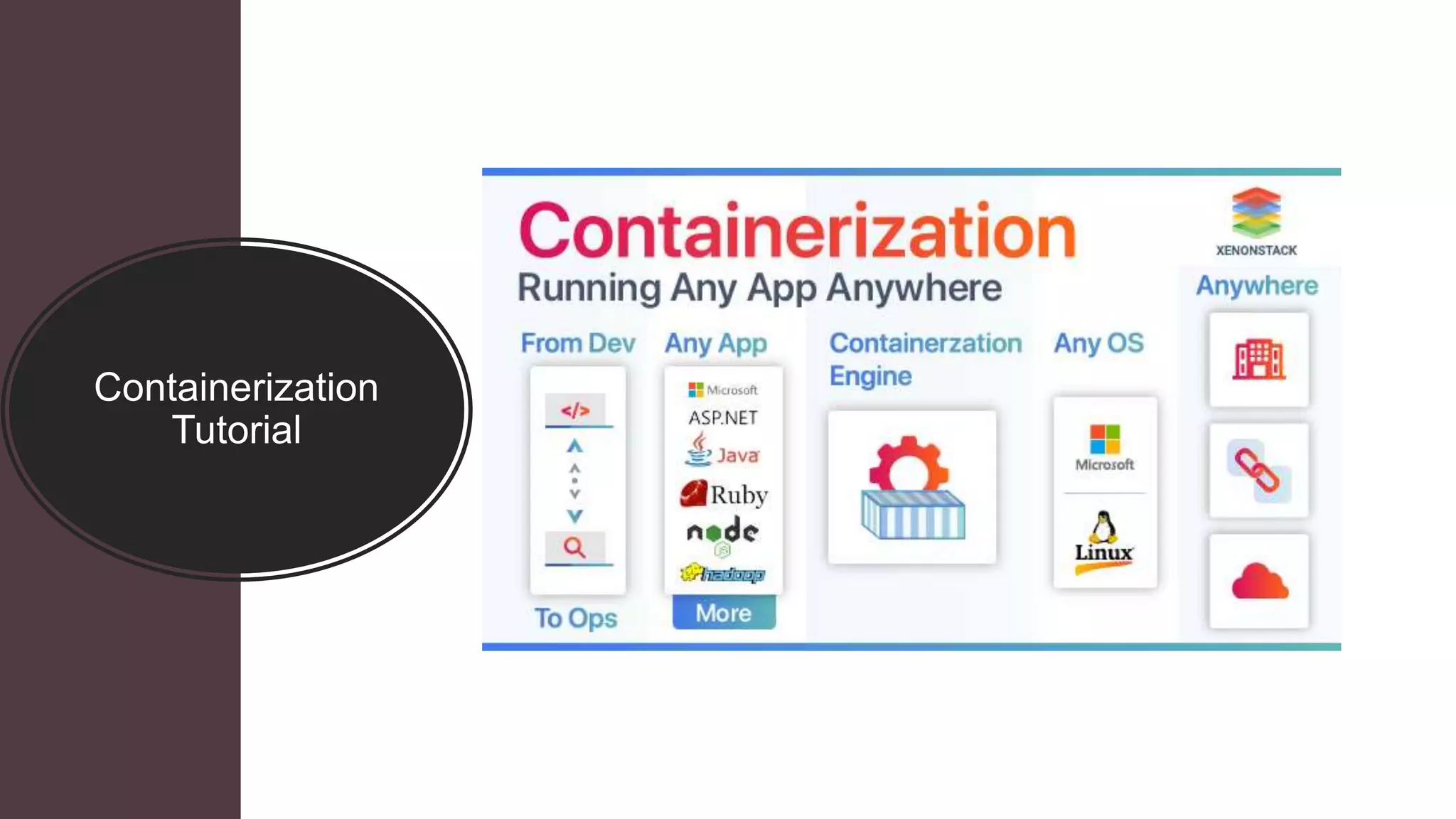

Containerization
Tutorial
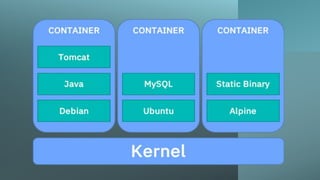
Containers are often referred to as “lightweight,” meaning they share the machine’s
operating system kernel and do not require the overhead of associating an
operating system within each application. Containers are inherently smaller in
capacity than a VM and require less start-up time, allowing far more containers to
run on the same compute capacity as a single VM. This drives higher server
efficiencies and, in turn, reduces server and licensing costs.
Put simply, containerization allows applications to be “written once and run
anywhere.” This portability is important in terms of the development process and
vendor compatibility. It also offers other notable benefits, like fault isolation, ease
of management and security, to name a few.
The abstraction from the host operating system makes containerized applications
portable and able to run uniformly and consistently across any platform or cloud.
Containers can be easily transported from a desktop computer to a virtual
machine (VM) or from a Linux to a Windows operating system, and they will run
consistently on virtualized infrastructures or on traditional “bare metal” servers,
either on-premise or in the cloud. This ensures that software developers can
continue using the tools and processes they are most comfortable with.
Containers are often compared to virtual machines (VMs) because both
technologies enable significant compute efficiencies by allowing multiple types
of software (Linux- or Windows-based) to be run in a single environment.
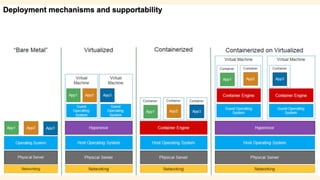
Virtualization technology allows multiple operating systems and software
applications to run simultaneously and share the resources of a single physical
computer. For example, an IT organization can run both Windows and Linux or
multiple versions of an operating system, along with multiple applications on
the same server. Each application and its related files, libraries, and
dependencies, including a copy of the operating system (OS), are packaged
together as a VM. With multiple VMs running on a single physical machine, it’s
possible to achieve significant savings in capital, operational, and energy costs.
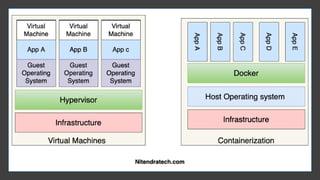
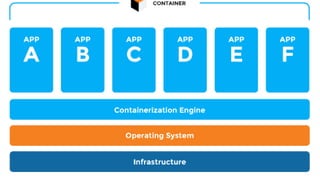
Containerization, on the other hand, uses compute resources even more
efficiently. A container creates a single executable package of software that
bundles application code together with all of the related configuration files,
libraries, and dependencies required for it to run. Unlike VMs, however,
containers do not bundle in a copy of the OS. Instead, the container runtime
engine is installed on the host system’s operating system, becoming the conduit
through which all containers on the computing system share the same OS.
There are some challenges with virtualization approaches:
•Environment consistency – Deployment of applications/packages to
VMs
•OS dependency – Deployed apps are able to run on compatible OS
only
•Isolation level – Unable to provide instant Sandbox above OS level
•Compute consumption granularity – Unable to deploy multiple
replicated apps and load balance on application layer only within the
single machine (not OS layer)
•Patching of images in production-grade environments – blue-green
and canary deployments are not flexible on a cluster level and are
hard to manage across multiple regions
What is containerization?
Containerization has become a major trend in software development as an
an alternative or companion to virtualization. It involves encapsulating or
packaging up software code and all its dependencies so that it can run
uniformly and consistently on any infrastructure.
Containerization allows developers to create and deploy applications faster and
faster and more securely. With traditional methods, code is developed in a
a specific computing environment which, when transferred to a new location,
location, often results in bugs and errors.
Containerization eliminates this problem by bundling the application code
code together with the related configuration files, libraries, and dependencies
dependencies required for it to run. This single package of software or
“container” is abstracted away from the host operating system, and hence, it
hence, it stands alone and becomes portable—able to run across any platform
platform or cloud, free of issues.
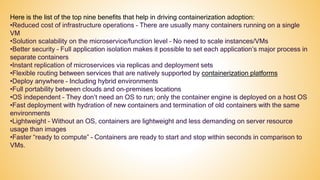
Here is the list of the top nine benefits that help in driving containerization adoption:
•Reduced cost of infrastructure operations – There are usually many containers running on a single
VM
•Solution scalability on the microservice/function level – No need to scale instances/VMs
•Better security – Full application isolation makes it possible to set each application’s major process in
separate containers
•Instant replication of microservices via replicas and deployment sets
•Flexible routing between services that are natively supported by containerization platforms
•Deploy anywhere – Including hybrid environments
•Full portability between clouds and on-premises locations
•OS independent – They don’t need an OS to run; only the container engine is deployed on a host OS
•Fast deployment with hydration of new containers and termination of old containers with the same
environments
•Lightweight – Without an OS, containers are lightweight and less demanding on server resource
usage than images
•Faster “ready to compute” – Containers are ready to start and stop within seconds in comparison to
VMs.
THANK YOU
Like the Video and Subscribe the Channel

Containerization tutorial Containerization Explained

  • 1.
  • 2.
    Containers are oftenreferred to as “lightweight,” meaning they share the machine’s operating system kernel and do not require the overhead of associating an operating system within each application. Containers are inherently smaller in capacity than a VM and require less start-up time, allowing far more containers to run on the same compute capacity as a single VM. This drives higher server efficiencies and, in turn, reduces server and licensing costs. Put simply, containerization allows applications to be “written once and run anywhere.” This portability is important in terms of the development process and vendor compatibility. It also offers other notable benefits, like fault isolation, ease of management and security, to name a few. The abstraction from the host operating system makes containerized applications portable and able to run uniformly and consistently across any platform or cloud. Containers can be easily transported from a desktop computer to a virtual machine (VM) or from a Linux to a Windows operating system, and they will run consistently on virtualized infrastructures or on traditional “bare metal” servers, either on-premise or in the cloud. This ensures that software developers can continue using the tools and processes they are most comfortable with.
  • 4.
    Containers are oftencompared to virtual machines (VMs) because both technologies enable significant compute efficiencies by allowing multiple types of software (Linux- or Windows-based) to be run in a single environment. Virtualization technology allows multiple operating systems and software applications to run simultaneously and share the resources of a single physical computer. For example, an IT organization can run both Windows and Linux or multiple versions of an operating system, along with multiple applications on the same server. Each application and its related files, libraries, and dependencies, including a copy of the operating system (OS), are packaged together as a VM. With multiple VMs running on a single physical machine, it’s possible to achieve significant savings in capital, operational, and energy costs. Containerization, on the other hand, uses compute resources even more efficiently. A container creates a single executable package of software that bundles application code together with all of the related configuration files, libraries, and dependencies required for it to run. Unlike VMs, however, containers do not bundle in a copy of the OS. Instead, the container runtime engine is installed on the host system’s operating system, becoming the conduit through which all containers on the computing system share the same OS.
  • 5.
    There are somechallenges with virtualization approaches: •Environment consistency – Deployment of applications/packages to VMs •OS dependency – Deployed apps are able to run on compatible OS only •Isolation level – Unable to provide instant Sandbox above OS level •Compute consumption granularity – Unable to deploy multiple replicated apps and load balance on application layer only within the single machine (not OS layer) •Patching of images in production-grade environments – blue-green and canary deployments are not flexible on a cluster level and are hard to manage across multiple regions
  • 7.
    What is containerization? Containerizationhas become a major trend in software development as an an alternative or companion to virtualization. It involves encapsulating or packaging up software code and all its dependencies so that it can run uniformly and consistently on any infrastructure. Containerization allows developers to create and deploy applications faster and faster and more securely. With traditional methods, code is developed in a a specific computing environment which, when transferred to a new location, location, often results in bugs and errors. Containerization eliminates this problem by bundling the application code code together with the related configuration files, libraries, and dependencies dependencies required for it to run. This single package of software or “container” is abstracted away from the host operating system, and hence, it hence, it stands alone and becomes portable—able to run across any platform platform or cloud, free of issues.
  • 10.
    Here is thelist of the top nine benefits that help in driving containerization adoption: •Reduced cost of infrastructure operations – There are usually many containers running on a single VM •Solution scalability on the microservice/function level – No need to scale instances/VMs •Better security – Full application isolation makes it possible to set each application’s major process in separate containers •Instant replication of microservices via replicas and deployment sets •Flexible routing between services that are natively supported by containerization platforms •Deploy anywhere – Including hybrid environments •Full portability between clouds and on-premises locations •OS independent – They don’t need an OS to run; only the container engine is deployed on a host OS •Fast deployment with hydration of new containers and termination of old containers with the same environments •Lightweight – Without an OS, containers are lightweight and less demanding on server resource usage than images •Faster “ready to compute” – Containers are ready to start and stop within seconds in comparison to VMs.
  • 11.
    THANK YOU Like theVideo and Subscribe the Channel