Containerization
Contents
•Introduction
•How Containers Work?
•Architecture
•Different Tools
•Containerization Vs Virtualization
•Services
•Advantages
•Disadvantages
•Conclusion
Introduction Of Containerization
•Containerization is defined as a form of operating system virtualization,
through which applications are run in isolated user spaces called containers,
all using the same shared operating system (OS). A container is essentially a
fully packaged and portable computing environment:
•Everything an application needs to run – its binaries, libraries, configuration
files and dependencies – is encapsulated and isolated in its container.
•The container itself is abstracted away from the host OS, with only limited
access to underlying resources – much like a lightweight virtual machine
(VM).
How Containers Work?
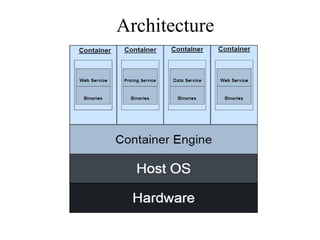
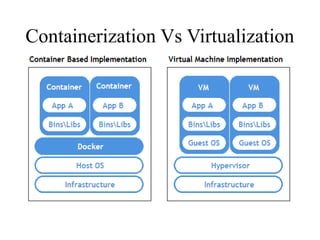
• Each container is an executable package of software, running on top of a host OS. A host(s)
may support many containers (tens, hundreds or even thousands).
• At the bottom, there is the hardware including its CPU, disk storage and network interfaces.
• Above that, there is the host OS and its kernel – the latter serves as a bridge between the
software of the OS and the hardware of the underlying system.
• The container engine and its minimal guest OS, which are particular to the containerization
technology being used, sit atop the host OS.
• At the very top are the binaries and libraries (bins/libs) for each application and the apps
themselves, running in their isolated user spaces (containers).
Architecture
Tools Used in Containerization
•Docker
•Kubernetes
•AWS ECS
•Azure Container Service
Docker
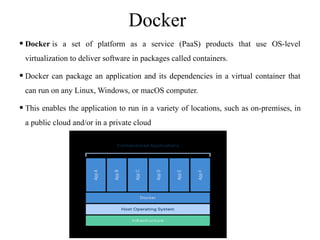
•Docker is a set of platform as a service (PaaS) products that use OS-level
virtualization to deliver software in packages called containers.
•Docker can package an application and its dependencies in a virtual container that
can run on any Linux, Windows, or macOS computer.
•This enables the application to run in a variety of locations, such as on-premises, in
a public cloud and/or in a private cloud
Kubernetes
•Kubernetes is an open-source container-orchestration system for automating
computer application deployment, scaling, and management.
•It was originally designed by Google and is now maintained by the Cloud Native
Computing Foundation It aims to provide a "platform for automating deployment,
scaling, and operations of application containers across clusters of hosts".
AWS ECS
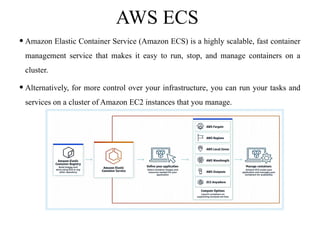
•Amazon Elastic Container Service (Amazon ECS) is a highly scalable, fast container
management service that makes it easy to run, stop, and manage containers on a
cluster.
•Alternatively, for more control over your infrastructure, you can run your tasks and
services on a cluster of Amazon EC2 instances that you manage.
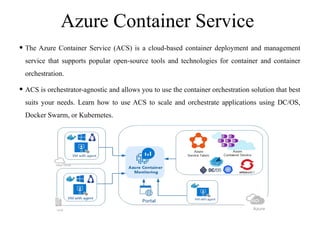
Azure Container Service
• The Azure Container Service (ACS) is a cloud-based container deployment and management
service that supports popular open-source tools and technologies for container and container
orchestration.
• ACS is orchestrator-agnostic and allows you to use the container orchestration solution that best
suits your needs. Learn how to use ACS to scale and orchestrate applications using DC/OS,
Docker Swarm, or Kubernetes.
Containerization Vs Virtualization
Services Of Containerization
•Containers as a Service ( CaaS ) is a cloud-based service that allows software
developers and IT departments to upload, organize, run, scale, and manage containers
by using container-based virtualization.
•A container is a package of software that includes all dependencies: code, runtime,
configuration, and system libraries so that it can run on any host system.
•CaaS enables software teams to rapidly deploy and scale containerized applications
to high availability cloud infrastructures.
•CaaS differs from Platform as a Service (PaaS) since it relies on the use of
containers. PaaS is concerned with explicit ‘language stack’ deployments like Ruby
on Rails, or Node.js, whereas CaaS can deploy multiple stacks per container.
Advantages
• Portability : The main advantage of a container is its independent nature, which differs from virtual
machines. The idea behind it is to provide the whole environment without even getting dependent
upon the host hardware, limiting the problem of specification, and covering efficient resource usage.
• 2. Light Weight : Not being dependent upon the hardware means it is not having any overhead or OS
associated with it. This container property helps you transfer your application from one environment to
another without any overhead problem.
• 3. Speed : The speed associated with containers gives out the solution to many problems. For
example, if you have deployed an application through containers, then usage and the functionality
associated with the application would be way much more efficient than that same application used
through Virtual Machines.
• 4. Cost-Efficient :The cost-efficiency of containers is very much the sole reason companies adopt this
technology and make their applications more containerized
Disadvantages
•1. Security : One can not ignore the security issues with the container and
associated containers. In reality, hackers can penetrate its OS-level virtualization.
Yes, they do have this flaw, but it is not that easy to breach containers' security.
While in the case of Virtual Machines, you have a hypervisor that provides a
petite point of the breach, which is more secure than that of the container's
surface.
•2. Monitoring : Sometimes, there could be a chance that many containers are
working on the same server, which is a good thing. But when you look at the
maintenance side, you will find it very hard to manage it all. This could lead to
many mishaps around the system.
Conclusion
•Various containerization tools are available in the market that could best
suit our requirements. The power of containers helps them get the desired
output, irrespective of the OS at the client-side or other dependencies.
•In the lifecycle of software, there could be multiple rolling updates
necessary for creating the best software. Now, you get to choose which
containers are the best fit and capable of updating very easily and quickly
on the go for you.
containerization1. introduction to contain

containerization1. introduction to contain

  • 1.
  • 2.
    Contents •Introduction •How Containers Work? •Architecture •DifferentTools •Containerization Vs Virtualization •Services •Advantages •Disadvantages •Conclusion
  • 3.
    Introduction Of Containerization •Containerizationis defined as a form of operating system virtualization, through which applications are run in isolated user spaces called containers, all using the same shared operating system (OS). A container is essentially a fully packaged and portable computing environment: •Everything an application needs to run – its binaries, libraries, configuration files and dependencies – is encapsulated and isolated in its container. •The container itself is abstracted away from the host OS, with only limited access to underlying resources – much like a lightweight virtual machine (VM).
  • 4.
    How Containers Work? •Each container is an executable package of software, running on top of a host OS. A host(s) may support many containers (tens, hundreds or even thousands). • At the bottom, there is the hardware including its CPU, disk storage and network interfaces. • Above that, there is the host OS and its kernel – the latter serves as a bridge between the software of the OS and the hardware of the underlying system. • The container engine and its minimal guest OS, which are particular to the containerization technology being used, sit atop the host OS. • At the very top are the binaries and libraries (bins/libs) for each application and the apps themselves, running in their isolated user spaces (containers).
  • 5.
  • 6.
    Tools Used inContainerization •Docker •Kubernetes •AWS ECS •Azure Container Service
  • 7.
    Docker •Docker is aset of platform as a service (PaaS) products that use OS-level virtualization to deliver software in packages called containers. •Docker can package an application and its dependencies in a virtual container that can run on any Linux, Windows, or macOS computer. •This enables the application to run in a variety of locations, such as on-premises, in a public cloud and/or in a private cloud
  • 8.
    Kubernetes •Kubernetes is anopen-source container-orchestration system for automating computer application deployment, scaling, and management. •It was originally designed by Google and is now maintained by the Cloud Native Computing Foundation It aims to provide a "platform for automating deployment, scaling, and operations of application containers across clusters of hosts".
  • 9.
    AWS ECS •Amazon ElasticContainer Service (Amazon ECS) is a highly scalable, fast container management service that makes it easy to run, stop, and manage containers on a cluster. •Alternatively, for more control over your infrastructure, you can run your tasks and services on a cluster of Amazon EC2 instances that you manage.
  • 10.
    Azure Container Service •The Azure Container Service (ACS) is a cloud-based container deployment and management service that supports popular open-source tools and technologies for container and container orchestration. • ACS is orchestrator-agnostic and allows you to use the container orchestration solution that best suits your needs. Learn how to use ACS to scale and orchestrate applications using DC/OS, Docker Swarm, or Kubernetes.
  • 11.
  • 12.
    Services Of Containerization •Containersas a Service ( CaaS ) is a cloud-based service that allows software developers and IT departments to upload, organize, run, scale, and manage containers by using container-based virtualization. •A container is a package of software that includes all dependencies: code, runtime, configuration, and system libraries so that it can run on any host system. •CaaS enables software teams to rapidly deploy and scale containerized applications to high availability cloud infrastructures. •CaaS differs from Platform as a Service (PaaS) since it relies on the use of containers. PaaS is concerned with explicit ‘language stack’ deployments like Ruby on Rails, or Node.js, whereas CaaS can deploy multiple stacks per container.
  • 13.
    Advantages • Portability :The main advantage of a container is its independent nature, which differs from virtual machines. The idea behind it is to provide the whole environment without even getting dependent upon the host hardware, limiting the problem of specification, and covering efficient resource usage. • 2. Light Weight : Not being dependent upon the hardware means it is not having any overhead or OS associated with it. This container property helps you transfer your application from one environment to another without any overhead problem. • 3. Speed : The speed associated with containers gives out the solution to many problems. For example, if you have deployed an application through containers, then usage and the functionality associated with the application would be way much more efficient than that same application used through Virtual Machines. • 4. Cost-Efficient :The cost-efficiency of containers is very much the sole reason companies adopt this technology and make their applications more containerized
  • 14.
    Disadvantages •1. Security :One can not ignore the security issues with the container and associated containers. In reality, hackers can penetrate its OS-level virtualization. Yes, they do have this flaw, but it is not that easy to breach containers' security. While in the case of Virtual Machines, you have a hypervisor that provides a petite point of the breach, which is more secure than that of the container's surface. •2. Monitoring : Sometimes, there could be a chance that many containers are working on the same server, which is a good thing. But when you look at the maintenance side, you will find it very hard to manage it all. This could lead to many mishaps around the system.
  • 15.
    Conclusion •Various containerization toolsare available in the market that could best suit our requirements. The power of containers helps them get the desired output, irrespective of the OS at the client-side or other dependencies. •In the lifecycle of software, there could be multiple rolling updates necessary for creating the best software. Now, you get to choose which containers are the best fit and capable of updating very easily and quickly on the go for you.