PRE-TEST
Direction: TRUE OR FALSE. Write T if the statement is
correct and F if the statement is wrong.
1. Your knees should be sent at comfortable angle and
greater than 90 degrees flexion when sitting in front of the
computer.
2. A well designed mouse should not cause undue pressure
on the wrist and forehead muscles.
3. Set the eye to screen distance that permits you to most
easily focus on the screen.
4. Changing posture at frequent intervals maximizes fatigue
when using a computer.
5. Place the keyboard in a position that allows the forearms
to be close to the horizontal and the wrists to be straight.
6. It is recommended that operators avoid spending more
than 5 hours a day on keyboard duties and no longer than 50
minutes per hour without a postural/stretching break.
7. To detect whether there are reflections from the desk
surface and asses the change in reflected glare from the
screen.
8. 10,000-12,000 keystrokes per hour is considered an
acceptable standard in typing.
9. Good posture is essential for all users of computers.
10. The solution is to increase the refresh rate of the monitor
at least 75hz.
COMPUTER WORKSTATION
ERGONOMICS
Introduction
• There are various health problems associated
with the regular use of computers, such as stress,
eyestrain, and injuries to the wrists, neck and
back.
• Employers must take steps to protect employees
whose work involves the regular use of
computers.
What is Ergonomics?
• It is a discipline that studies the interaction
between human activity and the components of
this activity to develop systems that allow people
to work in conditions of optimal efficiency, safety
and comfort.
What is Computer Ergonomics?
• Is the discipline of matching the task to the
worker using the most appropriate equipment to
optimize human well-being and overall
performance.
•This can be simplified to “Modify the workplace,
not the individual”.
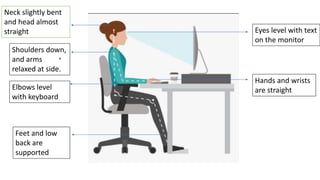
Neck slightly bent
and head almost
straight Eyes level with text
on the monitor
Hands and wrists
are straight
Shoulders down,
and arms
relaxed at side.
Elbows level
with keyboard
Feet and low
back are
supported
Consideration should be given to:
• The accessories required to operate properly
• The layout of the equipment on the desk
• The location of furniture in the room.
COMPUTER WORKPLACE
What are the things to consider in computer
workplace?
•Work surface height
•Chair
•Keyboard Placement
•Screen Placement
•Desktop Layout
• Document holder
• Posture and the
environment
• Lighting
• Glare and reflection
• Using a mouse
THAT’S ALL. THANKYOU!
QUIZ
Direction. Supply the missing statement.
1
. 2
3
4
5
.
6
7-10. As an ICT student what is the importance of
knowing the Computer Workstation Ergonomics.

Computer-Workstation-Ergonomics.pptx

  • 2.
    PRE-TEST Direction: TRUE ORFALSE. Write T if the statement is correct and F if the statement is wrong.
  • 3.
    1. Your kneesshould be sent at comfortable angle and greater than 90 degrees flexion when sitting in front of the computer. 2. A well designed mouse should not cause undue pressure on the wrist and forehead muscles. 3. Set the eye to screen distance that permits you to most easily focus on the screen. 4. Changing posture at frequent intervals maximizes fatigue when using a computer. 5. Place the keyboard in a position that allows the forearms to be close to the horizontal and the wrists to be straight.
  • 4.
    6. It isrecommended that operators avoid spending more than 5 hours a day on keyboard duties and no longer than 50 minutes per hour without a postural/stretching break. 7. To detect whether there are reflections from the desk surface and asses the change in reflected glare from the screen. 8. 10,000-12,000 keystrokes per hour is considered an acceptable standard in typing. 9. Good posture is essential for all users of computers. 10. The solution is to increase the refresh rate of the monitor at least 75hz.
  • 5.
  • 6.
    Introduction • There arevarious health problems associated with the regular use of computers, such as stress, eyestrain, and injuries to the wrists, neck and back. • Employers must take steps to protect employees whose work involves the regular use of computers.
  • 7.
    What is Ergonomics? •It is a discipline that studies the interaction between human activity and the components of this activity to develop systems that allow people to work in conditions of optimal efficiency, safety and comfort.
  • 8.
    What is ComputerErgonomics? • Is the discipline of matching the task to the worker using the most appropriate equipment to optimize human well-being and overall performance. •This can be simplified to “Modify the workplace, not the individual”.
  • 9.
    Neck slightly bent andhead almost straight Eyes level with text on the monitor Hands and wrists are straight Shoulders down, and arms relaxed at side. Elbows level with keyboard Feet and low back are supported
  • 10.
    Consideration should begiven to: • The accessories required to operate properly • The layout of the equipment on the desk • The location of furniture in the room.
  • 11.
  • 12.
    What are thethings to consider in computer workplace? •Work surface height •Chair •Keyboard Placement •Screen Placement •Desktop Layout • Document holder • Posture and the environment • Lighting • Glare and reflection • Using a mouse
  • 13.
  • 14.
    QUIZ Direction. Supply themissing statement. 1 . 2 3 4 5 . 6
  • 15.
    7-10. As anICT student what is the importance of knowing the Computer Workstation Ergonomics.