By Pau-Pau
• a kilobyte is 1,000 bytes in
decimal notation
• a kilobyte = 1,024 bytes is the
appropriate notation
The Binary System in
Computer’s Memory
1 Bit = Binary Digit
Bit: A Bit is the smallest unit of
data that a computer uses. It
can be used to represent two
states of information, such as
Yes or No.
Byte: A Byte is equal to 8 Bits.
1 Byte could be equal to one
character. 10 Bytes could be
equal to a word. 100 Bytes
would equal an average
sentence.
 Megabyte: A Megabyte is
approximately 1,000 Kilobytes. In
the early days of computing, a
Megabyte was considered to be a
large amount of data.
 These days with a 500 Gigabyte hard
drive on a computer being common, a
Megabyte doesn't seem like much
anymore.
 One of those old 3-1/2 inch floppy
disks can hold 1.44 Megabytes or the
equivalent of a small book.
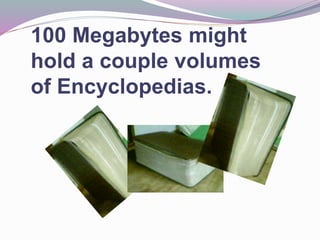
100 Megabytes might
hold a couple volumes
of Encyclopedias.
Computer's memory
Computer's memory
Computer's memory
Computer's memory
Computer's memory
Computer's memory
Computer's memory
Computer's memory
Computer's memory

Computer's memory

  • 1.
  • 2.
    • a kilobyteis 1,000 bytes in decimal notation • a kilobyte = 1,024 bytes is the appropriate notation
  • 3.
    The Binary Systemin Computer’s Memory
  • 4.
    1 Bit =Binary Digit Bit: A Bit is the smallest unit of data that a computer uses. It can be used to represent two states of information, such as Yes or No.
  • 5.
    Byte: A Byteis equal to 8 Bits. 1 Byte could be equal to one character. 10 Bytes could be equal to a word. 100 Bytes would equal an average sentence.
  • 9.
     Megabyte: AMegabyte is approximately 1,000 Kilobytes. In the early days of computing, a Megabyte was considered to be a large amount of data.  These days with a 500 Gigabyte hard drive on a computer being common, a Megabyte doesn't seem like much anymore.  One of those old 3-1/2 inch floppy disks can hold 1.44 Megabytes or the equivalent of a small book.
  • 10.
    100 Megabytes might holda couple volumes of Encyclopedias.