Computer
Programming 2
Lesson 1 – JAVA BASIC SYNTAX
Prepared by: Analyn G. Regaton
Definition of
Java program
It can be defined as a collection of
objects that communicate via
invoking each other's methods.
Overview of
class, objects
and methods
Let us now briefly look into what do class, object, methods, and
instance variables mean.
 Object − Objects have states and behaviors. Example: A dog has
states - color, name, breed as well as behavior such as wagging
their tail, barking, eating. An object is an instance of a class.
 Class − A class can be defined as a template/blueprint that
describes the behavior/state that the object of its type supports.
 Methods − A method is basically a behavior. A class can contain
many methods. It is in methods where the logics are written,
data is manipulated and all the actions are executed.
 Instance Variables − Each object has its unique set of instance
variables. An object's state is created by the values assigned to
these instance variables.
BasicSyntax
 Case Sensitivity − Java is case sensitive, which means
identifier Hello and hello would have different meaning in Java.
 Class Names − For all class names the first letter should be in Upper Case.
If several words are used to form a name of the class, each inner word's
first letter should be in Upper Case.
Example: class MyFirstJavaClass
 Method Names − All method names should start with a Lower Case letter.
If several words are used to form the name of the method, then each
inner word's first letter should be in Upper Case.
Example: public void myMethodName()
 Program File Name − Name of the program file should exactly match
the class name.
Example: Assume 'MyFirstJavaProgram' is the class name. Then the file
should be saved as 'MyFirstJavaProgram.java’
 public static void main(String args[]) − Java program processing starts
from the main() method which is a mandatory part of every Java
program.
FIRSTJAVA
PROGRAM
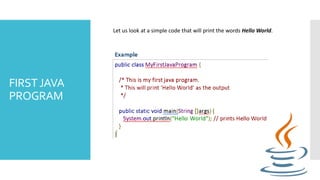
Let us look at a simple code that will print the words Hello World.
JAVA
IDENTIFIER
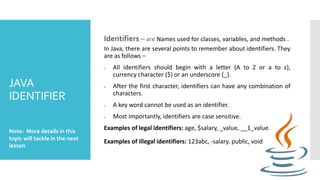
Identifiers – are Names used for classes, variables, and methods .
In Java, there are several points to remember about identifiers. They
are as follows −
 All identifiers should begin with a letter (A to Z or a to z),
currency character ($) or an underscore (_).
 After the first character, identifiers can have any combination of
characters.
 A key word cannot be used as an identifier.
 Most importantly, identifiers are case sensitive.
Examples of legal identifiers: age, $salary, _value, __1_value.
Examples of illegal identifiers: 123abc, -salary. public, void
Note: More details in this
topic will tackle in the next
lesson
JAVA ENUM
 Enums were introduced in Java 5.0. Enums restrict a variable to
have one of only a few predefined values. The values in this
enumerated list are called enums.
 With the use of enums it is possible to reduce the number of bugs
in your code.
 For example, if we consider an application for a fresh juice shop, it
would be possible to restrict the glass size to small, medium, and
large. This would make sure that it would not allow anyone to order
any size other than small, medium, or large.
JAVA ENUM
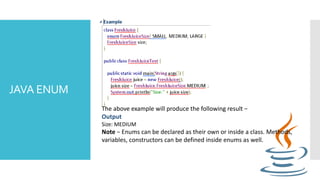
The above example will produce the following result −
Output
Size: MEDIUM
Note − Enums can be declared as their own or inside a class. Methods,
variables, constructors can be defined inside enums as well.
JAVA
KEYWORDS
abstract assert boolean break
byte case catch char
class const continue default
do double else enum
extends final finally float
for goto if implements
import instanceof int interface
long native new package
private protected public return
short static strictfp super
switch synchronized this throw
throws transient try void
volatile while
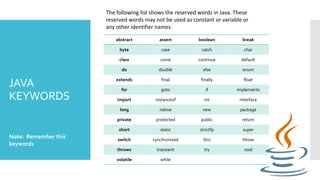
The following list shows the reserved words in Java. These
reserved words may not be used as constant or variable or
any other identifier names.
Note: Remember this
keywords
JAVA
COMMENTS
Java supports single-line and multi-line comments very similar to C
and C++. All characters available inside any comment are ignored by
Java compiler.
public class MyFirstJavaProgram
{
/* This is my first java program.
This will print 'Hello World' as the output
* This is an example of multi-line comments.
*/
public static void main(String []args) {
// This is an example of single line comment
/* This is also an example of single line comment. */
System.out.println("Hello World");
}
}
Note : // and /* */ are comments
Output
Hello World

Computer programming 2 chapter 1

  • 1.
    Computer Programming 2 Lesson 1– JAVA BASIC SYNTAX Prepared by: Analyn G. Regaton
  • 2.
    Definition of Java program Itcan be defined as a collection of objects that communicate via invoking each other's methods.
  • 3.
    Overview of class, objects andmethods Let us now briefly look into what do class, object, methods, and instance variables mean.  Object − Objects have states and behaviors. Example: A dog has states - color, name, breed as well as behavior such as wagging their tail, barking, eating. An object is an instance of a class.  Class − A class can be defined as a template/blueprint that describes the behavior/state that the object of its type supports.  Methods − A method is basically a behavior. A class can contain many methods. It is in methods where the logics are written, data is manipulated and all the actions are executed.  Instance Variables − Each object has its unique set of instance variables. An object's state is created by the values assigned to these instance variables.
  • 4.
    BasicSyntax  Case Sensitivity− Java is case sensitive, which means identifier Hello and hello would have different meaning in Java.  Class Names − For all class names the first letter should be in Upper Case. If several words are used to form a name of the class, each inner word's first letter should be in Upper Case. Example: class MyFirstJavaClass  Method Names − All method names should start with a Lower Case letter. If several words are used to form the name of the method, then each inner word's first letter should be in Upper Case. Example: public void myMethodName()  Program File Name − Name of the program file should exactly match the class name. Example: Assume 'MyFirstJavaProgram' is the class name. Then the file should be saved as 'MyFirstJavaProgram.java’  public static void main(String args[]) − Java program processing starts from the main() method which is a mandatory part of every Java program.
  • 5.
    FIRSTJAVA PROGRAM Let us lookat a simple code that will print the words Hello World.
  • 6.
    JAVA IDENTIFIER Identifiers – areNames used for classes, variables, and methods . In Java, there are several points to remember about identifiers. They are as follows −  All identifiers should begin with a letter (A to Z or a to z), currency character ($) or an underscore (_).  After the first character, identifiers can have any combination of characters.  A key word cannot be used as an identifier.  Most importantly, identifiers are case sensitive. Examples of legal identifiers: age, $salary, _value, __1_value. Examples of illegal identifiers: 123abc, -salary. public, void Note: More details in this topic will tackle in the next lesson
  • 7.
    JAVA ENUM  Enumswere introduced in Java 5.0. Enums restrict a variable to have one of only a few predefined values. The values in this enumerated list are called enums.  With the use of enums it is possible to reduce the number of bugs in your code.  For example, if we consider an application for a fresh juice shop, it would be possible to restrict the glass size to small, medium, and large. This would make sure that it would not allow anyone to order any size other than small, medium, or large.
  • 8.
    JAVA ENUM The aboveexample will produce the following result − Output Size: MEDIUM Note − Enums can be declared as their own or inside a class. Methods, variables, constructors can be defined inside enums as well.
  • 9.
    JAVA KEYWORDS abstract assert booleanbreak byte case catch char class const continue default do double else enum extends final finally float for goto if implements import instanceof int interface long native new package private protected public return short static strictfp super switch synchronized this throw throws transient try void volatile while The following list shows the reserved words in Java. These reserved words may not be used as constant or variable or any other identifier names. Note: Remember this keywords
  • 10.
    JAVA COMMENTS Java supports single-lineand multi-line comments very similar to C and C++. All characters available inside any comment are ignored by Java compiler. public class MyFirstJavaProgram { /* This is my first java program. This will print 'Hello World' as the output * This is an example of multi-line comments. */ public static void main(String []args) { // This is an example of single line comment /* This is also an example of single line comment. */ System.out.println("Hello World"); } } Note : // and /* */ are comments Output Hello World