Understanding Computers: Today and Tomorrow, 13th Edition
1
Data vs. Information
• Data
– Raw, unorganized facts
– Can be in the form of text, graphics, audio, or
video
• Information
– Data that has been processed into a meaningful
form
• Information processing
– Converting data into information
Understanding Computers: Today and Tomorrow, 13th Edition
2
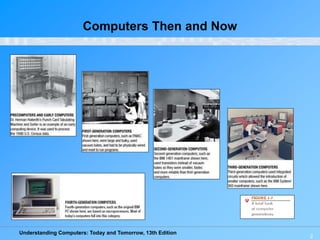
Computers Then and Now
Understanding Computers: Today and Tomorrow, 13th Edition
3
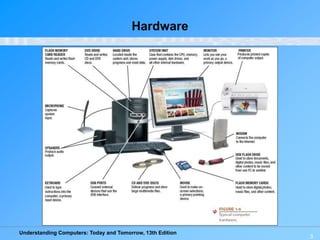
Hardware
Understanding Computers: Today and Tomorrow, 13th Edition
4
Software
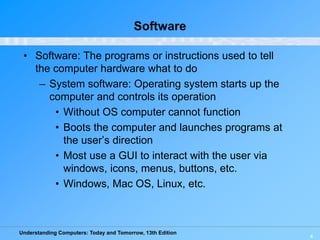
• Software: The programs or instructions used to tell
the computer hardware what to do
– System software: Operating system starts up the
computer and controls its operation
• Without OS computer cannot function
• Boots the computer and launches programs at
the user’s direction
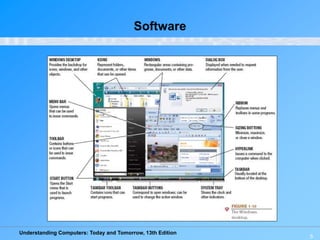
• Most use a GUI to interact with the user via
windows, icons, menus, buttons, etc.
• Windows, Mac OS, Linux, etc.
Understanding Computers: Today and Tomorrow, 13th Edition
5
Software
Understanding Computers: Today and Tomorrow, 13th Edition
6
Application Software
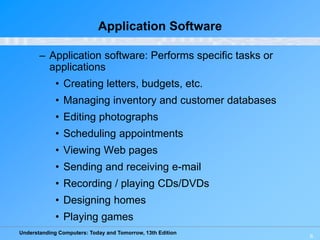
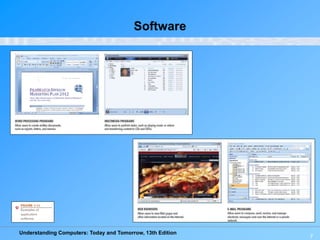
– Application software: Performs specific tasks or
applications
• Creating letters, budgets, etc.
• Managing inventory and customer databases
• Editing photographs
• Scheduling appointments
• Viewing Web pages
• Sending and receiving e-mail
• Recording / playing CDs/DVDs
• Designing homes
• Playing games
Understanding Computers: Today and Tomorrow, 13th Edition
7
Software
Understanding Computers: Today and Tomorrow, 13th Edition
8
Computer Users and Professionals
• Computer users (end users): People who use a
computer to obtain information
• Computer professionals include:
– Programmers
– Systems analysts
– Computer operations personnel
– Security specialists
Understanding Computers: Today and Tomorrow, 13th Edition
9
Quick Quiz
1. A tablet PC is an example of a(n) _____________.
a. Desktop computer
b. Portable PC
c. Internet appliance
2. True or False: The terms mainframe computer and
supercomputer are interchangeable; both refer to the
largest, most powerful computers.
3. A smartphone is an example of a(n) _____________.
Understanding Computers: Today and Tomorrow, 13th Edition
10
Computer Networks and the Internet
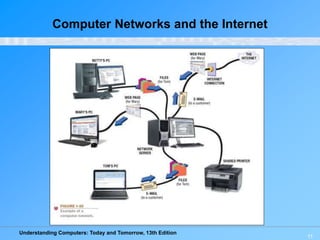
• Computer network: A collection of hardware and
other devices that are connected together.
– Users can share hardware, software, and data
– Users can communicate with each other
• Network servers: Manage resources on a network
• Clients: Access resources through the network server
• Computer networks exist in many sizes and types
– Home networks
– School and small business networks
– Large corporate
– Public wireless networks
– The Internet
Understanding Computers: Today and Tomorrow, 13th Edition
11
Computer Networks and the Internet
Understanding Computers: Today and Tomorrow, 13th Edition
12
What Are the Internet and the
World Wide Web?
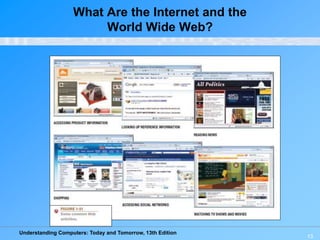
• Internet: The largest and most well-known computer
network in the world
• Individuals connect to the Internet using an Internet
service provider (ISP)
• World Wide Web: One resource (a vast collection of
Web pages) available through the Internet
– Web sites contain Web pages stored on Web
servers
– Web pages viewed using a Web browser (Internet
Explorer, Chrome, Safari, Firefox, Opera, etc.)
• A wide variety of information is available through the
Web
Understanding Computers: Today and Tomorrow, 13th Edition
13
What Are the Internet and the
World Wide Web?
Understanding Computers: Today and Tomorrow, 13th Edition
14
Accessing a Network or the Internet
• Need a modem or network adapter
• Some networks require a username and password
• Internet connections can be:
– Direct (always-on) connections
– Dial-up connections
• Internet addresses are used to access resources on
the Internet
– IP address: Numeric address that identifies computers
(207.46.197.32)
– Domain name: Text-based address that identifies
computers (microsoft.com)
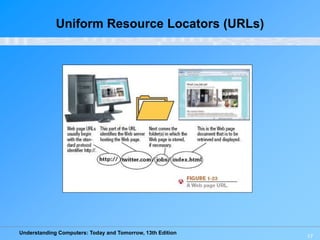
– Uniform resource locator (URL): Identifies Web pages
(http://twitter.com/jobs/index.html)
– E-mail address: Identifies people for e-mail exchange
(jsmith@cengage.com)
Understanding Computers: Today and Tomorrow, 13th Edition
15
IP Addresses and Domain Names
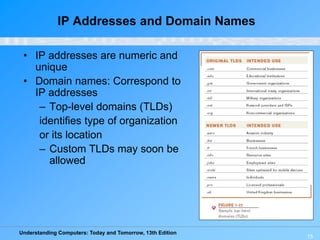
• IP addresses are numeric and
unique
• Domain names: Correspond to
IP addresses
– Top-level domains (TLDs)
identifies type of organization
or its location
– Custom TLDs may soon be
allowed
Understanding Computers: Today and Tomorrow, 13th Edition
16
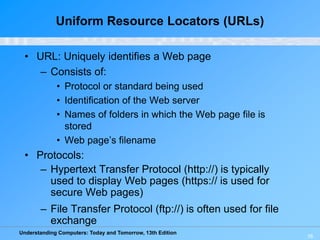
Uniform Resource Locators (URLs)
• URL: Uniquely identifies a Web page
– Consists of:
• Protocol or standard being used
• Identification of the Web server
• Names of folders in which the Web page file is
stored
• Web page’s filename
• Protocols:
– Hypertext Transfer Protocol (http://) is typically
used to display Web pages (https:// is used for
secure Web pages)
– File Transfer Protocol (ftp://) is often used for file
exchange
Understanding Computers: Today and Tomorrow, 13th Edition
17
Uniform Resource Locators (URLs)
Understanding Computers: Today and Tomorrow, 13th Edition
18
E-Mail Addresses
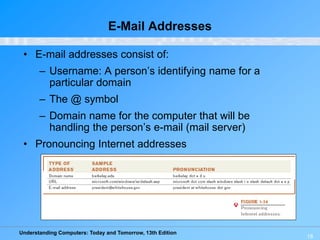
• E-mail addresses consist of:
– Username: A person’s identifying name for a
particular domain
– The @ symbol
– Domain name for the computer that will be
handling the person’s e-mail (mail server)
• Pronouncing Internet addresses
Understanding Computers: Today and Tomorrow, 13th Edition
19
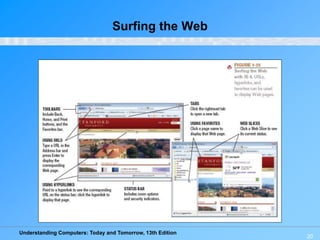
Surfing the Web
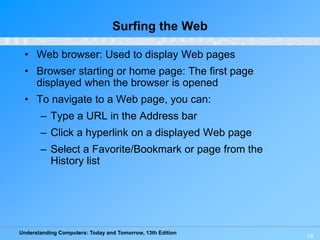
• Web browser: Used to display Web pages
• Browser starting or home page: The first page
displayed when the browser is opened
• To navigate to a Web page, you can:
– Type a URL in the Address bar
– Click a hyperlink on a displayed Web page
– Select a Favorite/Bookmark or page from the
History list
Understanding Computers: Today and Tomorrow, 13th Edition
20
Surfing the Web
Understanding Computers: Today and Tomorrow, 13th Edition
21
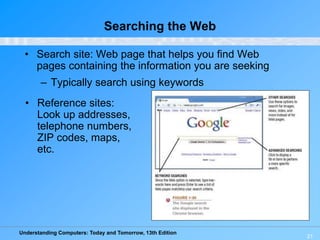
Searching the Web
• Search site: Web page that helps you find Web
pages containing the information you are seeking
– Typically search using keywords
• Reference sites:
Look up addresses,
telephone numbers,
ZIP codes, maps,
etc.
Understanding Computers: Today and Tomorrow, 13th Edition
22
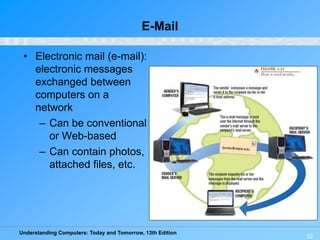
E-Mail
• Electronic mail (e-mail):
electronic messages
exchanged between
computers on a
network
– Can be conventional
or Web-based
– Can contain photos,
attached files, etc.
Understanding Computers: Today and Tomorrow, 13th Edition
23
Computers and Society
• The vast improvements in technology over the past
decade have had a distinct impact on daily life, both
at home and at work
• Many benefits of a computer-oriented society:
– Ability to design products before construction
leads to safer products
– Earlier medical diagnoses
– Devices that allow challenged people to perform
job tasks
– Documents e-mailed or faxed in moments
– Download information, music, programs, movies,
and more on demand
Understanding Computers: Today and Tomorrow, 13th Edition
Computers and Society
• Computer-oriented society also has risks
– Computer viruses and malware
– Identity theft and phishing
– Privacy issues
• Differences in online communications
– Less formal than traditional
– Netiquette
– Emoticons
• The anonymity factor
• Information Integrity
– Check your source, not all information on the Internet is
accurate.

ICT-Lecture-01a Hardware software.ppt

  • 1.
    Understanding Computers: Todayand Tomorrow, 13th Edition 1 Data vs. Information • Data – Raw, unorganized facts – Can be in the form of text, graphics, audio, or video • Information – Data that has been processed into a meaningful form • Information processing – Converting data into information
  • 2.
    Understanding Computers: Todayand Tomorrow, 13th Edition 2 Computers Then and Now
  • 3.
    Understanding Computers: Todayand Tomorrow, 13th Edition 3 Hardware
  • 4.
    Understanding Computers: Todayand Tomorrow, 13th Edition 4 Software • Software: The programs or instructions used to tell the computer hardware what to do – System software: Operating system starts up the computer and controls its operation • Without OS computer cannot function • Boots the computer and launches programs at the user’s direction • Most use a GUI to interact with the user via windows, icons, menus, buttons, etc. • Windows, Mac OS, Linux, etc.
  • 5.
    Understanding Computers: Todayand Tomorrow, 13th Edition 5 Software
  • 6.
    Understanding Computers: Todayand Tomorrow, 13th Edition 6 Application Software – Application software: Performs specific tasks or applications • Creating letters, budgets, etc. • Managing inventory and customer databases • Editing photographs • Scheduling appointments • Viewing Web pages • Sending and receiving e-mail • Recording / playing CDs/DVDs • Designing homes • Playing games
  • 7.
    Understanding Computers: Todayand Tomorrow, 13th Edition 7 Software
  • 8.
    Understanding Computers: Todayand Tomorrow, 13th Edition 8 Computer Users and Professionals • Computer users (end users): People who use a computer to obtain information • Computer professionals include: – Programmers – Systems analysts – Computer operations personnel – Security specialists
  • 9.
    Understanding Computers: Todayand Tomorrow, 13th Edition 9 Quick Quiz 1. A tablet PC is an example of a(n) _____________. a. Desktop computer b. Portable PC c. Internet appliance 2. True or False: The terms mainframe computer and supercomputer are interchangeable; both refer to the largest, most powerful computers. 3. A smartphone is an example of a(n) _____________.
  • 10.
    Understanding Computers: Todayand Tomorrow, 13th Edition 10 Computer Networks and the Internet • Computer network: A collection of hardware and other devices that are connected together. – Users can share hardware, software, and data – Users can communicate with each other • Network servers: Manage resources on a network • Clients: Access resources through the network server • Computer networks exist in many sizes and types – Home networks – School and small business networks – Large corporate – Public wireless networks – The Internet
  • 11.
    Understanding Computers: Todayand Tomorrow, 13th Edition 11 Computer Networks and the Internet
  • 12.
    Understanding Computers: Todayand Tomorrow, 13th Edition 12 What Are the Internet and the World Wide Web? • Internet: The largest and most well-known computer network in the world • Individuals connect to the Internet using an Internet service provider (ISP) • World Wide Web: One resource (a vast collection of Web pages) available through the Internet – Web sites contain Web pages stored on Web servers – Web pages viewed using a Web browser (Internet Explorer, Chrome, Safari, Firefox, Opera, etc.) • A wide variety of information is available through the Web
  • 13.
    Understanding Computers: Todayand Tomorrow, 13th Edition 13 What Are the Internet and the World Wide Web?
  • 14.
    Understanding Computers: Todayand Tomorrow, 13th Edition 14 Accessing a Network or the Internet • Need a modem or network adapter • Some networks require a username and password • Internet connections can be: – Direct (always-on) connections – Dial-up connections • Internet addresses are used to access resources on the Internet – IP address: Numeric address that identifies computers (207.46.197.32) – Domain name: Text-based address that identifies computers (microsoft.com) – Uniform resource locator (URL): Identifies Web pages (http://twitter.com/jobs/index.html) – E-mail address: Identifies people for e-mail exchange (jsmith@cengage.com)
  • 15.
    Understanding Computers: Todayand Tomorrow, 13th Edition 15 IP Addresses and Domain Names • IP addresses are numeric and unique • Domain names: Correspond to IP addresses – Top-level domains (TLDs) identifies type of organization or its location – Custom TLDs may soon be allowed
  • 16.
    Understanding Computers: Todayand Tomorrow, 13th Edition 16 Uniform Resource Locators (URLs) • URL: Uniquely identifies a Web page – Consists of: • Protocol or standard being used • Identification of the Web server • Names of folders in which the Web page file is stored • Web page’s filename • Protocols: – Hypertext Transfer Protocol (http://) is typically used to display Web pages (https:// is used for secure Web pages) – File Transfer Protocol (ftp://) is often used for file exchange
  • 17.
    Understanding Computers: Todayand Tomorrow, 13th Edition 17 Uniform Resource Locators (URLs)
  • 18.
    Understanding Computers: Todayand Tomorrow, 13th Edition 18 E-Mail Addresses • E-mail addresses consist of: – Username: A person’s identifying name for a particular domain – The @ symbol – Domain name for the computer that will be handling the person’s e-mail (mail server) • Pronouncing Internet addresses
  • 19.
    Understanding Computers: Todayand Tomorrow, 13th Edition 19 Surfing the Web • Web browser: Used to display Web pages • Browser starting or home page: The first page displayed when the browser is opened • To navigate to a Web page, you can: – Type a URL in the Address bar – Click a hyperlink on a displayed Web page – Select a Favorite/Bookmark or page from the History list
  • 20.
    Understanding Computers: Todayand Tomorrow, 13th Edition 20 Surfing the Web
  • 21.
    Understanding Computers: Todayand Tomorrow, 13th Edition 21 Searching the Web • Search site: Web page that helps you find Web pages containing the information you are seeking – Typically search using keywords • Reference sites: Look up addresses, telephone numbers, ZIP codes, maps, etc.
  • 22.
    Understanding Computers: Todayand Tomorrow, 13th Edition 22 E-Mail • Electronic mail (e-mail): electronic messages exchanged between computers on a network – Can be conventional or Web-based – Can contain photos, attached files, etc.
  • 23.
    Understanding Computers: Todayand Tomorrow, 13th Edition 23 Computers and Society • The vast improvements in technology over the past decade have had a distinct impact on daily life, both at home and at work • Many benefits of a computer-oriented society: – Ability to design products before construction leads to safer products – Earlier medical diagnoses – Devices that allow challenged people to perform job tasks – Documents e-mailed or faxed in moments – Download information, music, programs, movies, and more on demand
  • 24.
    Understanding Computers: Todayand Tomorrow, 13th Edition Computers and Society • Computer-oriented society also has risks – Computer viruses and malware – Identity theft and phishing – Privacy issues • Differences in online communications – Less formal than traditional – Netiquette – Emoticons • The anonymity factor • Information Integrity – Check your source, not all information on the Internet is accurate.

Editor's Notes

  • #10 Answers: 1) b; 2) False; 3) mobile device