BASIC
COMPUTER
CONCEPTS
What is a
computer
?
A computer is an electronic device
that processes data and performs
tasks according to a set of
instructions called a program..
History of
Computers
3
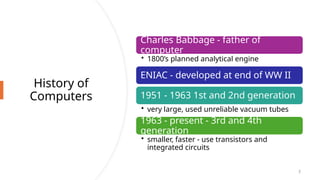
Charles Babbage - father of
computer
• 1800’s planned analytical engine
ENIAC - developed at end of WW II
1951 - 1963 1st and 2nd generation
• very large, used unreliable vacuum tubes
1963 - present - 3rd and 4th
generation
• smaller, faster - use transistors and
integrated circuits
History -
Microcomput
ers
4
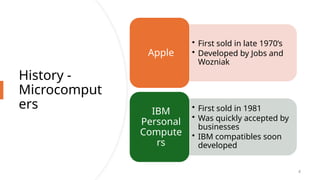
• First sold in late 1970’s
• Developed by Jobs and
Wozniak
Apple
• First sold in 1981
• Was quickly accepted by
businesses
• IBM compatibles soon
developed
IBM
Personal
Compute
rs
Computer - Social Impact
• Threat to privacy
• Reduce personal interactions
• Displace workers and change workplace
• Create two-tiered society
• Computer failures cause great damage
• Artificial Intelligence
• Create a “new life form”
• Machines smarter than their creators
5
6
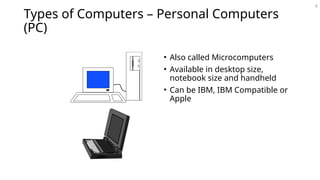
Types of Computers – Personal Computers
(PC)
• Also called Microcomputers
• Available in desktop size,
notebook size and handheld
• Can be IBM, IBM Compatible or
Apple
Types of Computers - Minicomputers
• Size of filing cabinet
• Used by small and medium size companies and institutions
• Operated by computer specialist
• Terminals allow many people to use
7
Types of Computers - Mainframes
• Very powerful
• Very fast
• Used by large corporations and governmental agencies
• Operated by computer specialist
8
Types of Computers- Supercomputers
• Most powerful
• Fastest
• Most expensive
• Several million dollars each
• Used only by
• Governmental agencies
• Large international corporations
9
10
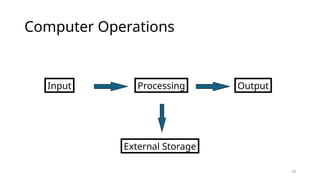
Computer Operations
Input Processing Output
External Storage
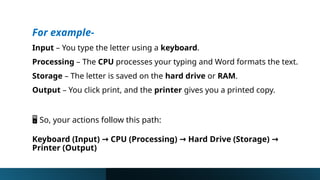
For example-
Input – You type the letter using a keyboard.
Processing – The CPU processes your typing and Word formats the text.
Storage – The letter is saved on the hard drive or RAM.
Output – You click print, and the printer gives you a printed copy.
️
🖥️So, your actions follow this path:
Keyboard (Input) CPU (Processing) Hard Drive (Storage)
→ → →
Printer (Output)
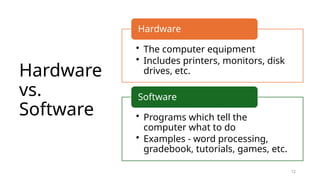
Hardware
vs.
Software
12
• The computer equipment
• Includes printers, monitors, disk
drives, etc.
Hardware
• Programs which tell the
computer what to do
• Examples - word processing,
gradebook, tutorials, games, etc.
Software
Basic
hardware
of a PC
system
• Central Processing Unit (CPU)
• Memory Unit
• Input Devices
• Output Devices
• Secondary Storage Devices
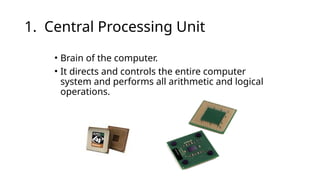
1. Central Processing Unit
• Brain of the computer.
• It directs and controls the entire computer
system and performs all arithmetic and logical
operations.
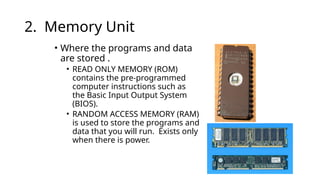
2. Memory Unit
• Where the programs and data
are stored .
• READ ONLY MEMORY (ROM)
contains the pre-programmed
computer instructions such as
the Basic Input Output System
(BIOS).
• RANDOM ACCESS MEMORY (RAM)
is used to store the programs and
data that you will run. Exists only
when there is power.
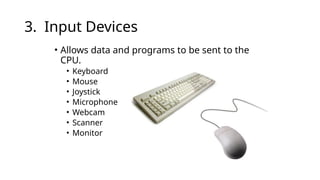
3. Input Devices
• Allows data and programs to be sent to the
CPU.
• Keyboard
• Mouse
• Joystick
• Microphone
• Webcam
• Scanner
• Monitor
4. Output Devices
• Media used by the computer in displaying its responses to
our requests and instructions.
• Monitor
• Audio Speakers
• Printer
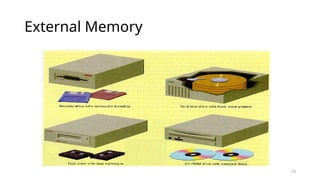
5. Secondary Storage Devices
• Attached to the computer system to allow you to store
programs and data permanently for the purpose of
retrieving them for future use.
• Floppy disk, Hard disk, CD Rom
19
External Memory
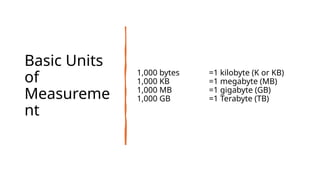
Basic Units
of
Measureme
nt
1,000 bytes =1 kilobyte (K or KB)
1,000 KB =1 megabyte (MB)
1,000 MB =1 gigabyte (GB)
1,000 GB =1 Terabyte (TB)
21
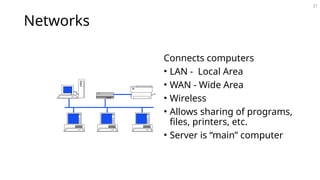
Networks
Connects computers
• LAN - Local Area
• WAN - Wide Area
• Wireless
• Allows sharing of programs,
files, printers, etc.
• Server is “main” computer
22
Software
A set of instructions and its documentations that tells a
computer what to do or how to perform a task.
Software and programs are interchangeable.
Two major types:
System and Applications
Kinds of Software
1. System software is software designed to
provide a platform for other software. Examples
of system software include operating systems
like macOS, Linux OS and Microsoft windows.
2. Application software is a program or group of
programs designed for end users. Examples of
an application include a word processor, a
spreadsheet, an accounting application, a web
browser, an email client.
25
Systems Software
• Run fundamental operations
• Loading and running programs
• Saving and retrieving data
• Communicating with printers, modems, etc.
• Examples of systems software
• DOS
• Windows 3.1, 95, 98, Me, 2000, and XP
• Unix
• Linux
26
Applications Software
• Helps you to accomplish a certain task
• Examples
• Word processing - memos, reports, etc.
• Spreadsheets - budgets, etc.
• Database - search, sort, select data
• Educational - simulations, practice
• Graphics - charts, diagrams
• Desktop publishing - pamphlets, etc.
27
Software - Legal Issues
• Commercial software
• Can only make backup copies for yourself
• Can only use on one machine at a time
• Site license - use on more that one machine
• Shareware
• Can use - make copies and give to anyone
• Should pay if you continue to use
• Freeware – can copy and use indefinitely
28
Software Viruses
• Illegal code added to a program
• May spread to many computers
• Copy files from one computer to another
• Download files by modem
• E-mail attachments
• Virus may be relatively harmless
• Writes “You’ve been stoned” on screen
• Virus may also be very damaging
• Erases everything on hard drive
29
Virus Protection
• Be careful where you copy files from
• Do not open e-mail attachments unless you are sure that it
is safe
• Use virus protection program
• Detects and removes illegal code
• Should be updated often
Computer fundamentals and basic components

Computer fundamentals and basic components

  • 1.
  • 2.
    What is a computer ? Acomputer is an electronic device that processes data and performs tasks according to a set of instructions called a program..
  • 3.
    History of Computers 3 Charles Babbage- father of computer • 1800’s planned analytical engine ENIAC - developed at end of WW II 1951 - 1963 1st and 2nd generation • very large, used unreliable vacuum tubes 1963 - present - 3rd and 4th generation • smaller, faster - use transistors and integrated circuits
  • 4.
    History - Microcomput ers 4 • Firstsold in late 1970’s • Developed by Jobs and Wozniak Apple • First sold in 1981 • Was quickly accepted by businesses • IBM compatibles soon developed IBM Personal Compute rs
  • 5.
    Computer - SocialImpact • Threat to privacy • Reduce personal interactions • Displace workers and change workplace • Create two-tiered society • Computer failures cause great damage • Artificial Intelligence • Create a “new life form” • Machines smarter than their creators 5
  • 6.
    6 Types of Computers– Personal Computers (PC) • Also called Microcomputers • Available in desktop size, notebook size and handheld • Can be IBM, IBM Compatible or Apple
  • 7.
    Types of Computers- Minicomputers • Size of filing cabinet • Used by small and medium size companies and institutions • Operated by computer specialist • Terminals allow many people to use 7
  • 8.
    Types of Computers- Mainframes • Very powerful • Very fast • Used by large corporations and governmental agencies • Operated by computer specialist 8
  • 9.
    Types of Computers-Supercomputers • Most powerful • Fastest • Most expensive • Several million dollars each • Used only by • Governmental agencies • Large international corporations 9
  • 10.
  • 11.
    For example- Input –You type the letter using a keyboard. Processing – The CPU processes your typing and Word formats the text. Storage – The letter is saved on the hard drive or RAM. Output – You click print, and the printer gives you a printed copy. ️ 🖥️So, your actions follow this path: Keyboard (Input) CPU (Processing) Hard Drive (Storage) → → → Printer (Output)
  • 12.
    Hardware vs. Software 12 • The computerequipment • Includes printers, monitors, disk drives, etc. Hardware • Programs which tell the computer what to do • Examples - word processing, gradebook, tutorials, games, etc. Software
  • 13.
    Basic hardware of a PC system •Central Processing Unit (CPU) • Memory Unit • Input Devices • Output Devices • Secondary Storage Devices
  • 14.
    1. Central ProcessingUnit • Brain of the computer. • It directs and controls the entire computer system and performs all arithmetic and logical operations.
  • 15.
    2. Memory Unit •Where the programs and data are stored . • READ ONLY MEMORY (ROM) contains the pre-programmed computer instructions such as the Basic Input Output System (BIOS). • RANDOM ACCESS MEMORY (RAM) is used to store the programs and data that you will run. Exists only when there is power.
  • 16.
    3. Input Devices •Allows data and programs to be sent to the CPU. • Keyboard • Mouse • Joystick • Microphone • Webcam • Scanner • Monitor
  • 17.
    4. Output Devices •Media used by the computer in displaying its responses to our requests and instructions. • Monitor • Audio Speakers • Printer
  • 18.
    5. Secondary StorageDevices • Attached to the computer system to allow you to store programs and data permanently for the purpose of retrieving them for future use. • Floppy disk, Hard disk, CD Rom
  • 19.
  • 20.
    Basic Units of Measureme nt 1,000 bytes=1 kilobyte (K or KB) 1,000 KB =1 megabyte (MB) 1,000 MB =1 gigabyte (GB) 1,000 GB =1 Terabyte (TB)
  • 21.
    21 Networks Connects computers • LAN- Local Area • WAN - Wide Area • Wireless • Allows sharing of programs, files, printers, etc. • Server is “main” computer
  • 22.
  • 23.
    Software A set ofinstructions and its documentations that tells a computer what to do or how to perform a task. Software and programs are interchangeable. Two major types: System and Applications
  • 24.
    Kinds of Software 1.System software is software designed to provide a platform for other software. Examples of system software include operating systems like macOS, Linux OS and Microsoft windows. 2. Application software is a program or group of programs designed for end users. Examples of an application include a word processor, a spreadsheet, an accounting application, a web browser, an email client.
  • 25.
    25 Systems Software • Runfundamental operations • Loading and running programs • Saving and retrieving data • Communicating with printers, modems, etc. • Examples of systems software • DOS • Windows 3.1, 95, 98, Me, 2000, and XP • Unix • Linux
  • 26.
    26 Applications Software • Helpsyou to accomplish a certain task • Examples • Word processing - memos, reports, etc. • Spreadsheets - budgets, etc. • Database - search, sort, select data • Educational - simulations, practice • Graphics - charts, diagrams • Desktop publishing - pamphlets, etc.
  • 27.
    27 Software - LegalIssues • Commercial software • Can only make backup copies for yourself • Can only use on one machine at a time • Site license - use on more that one machine • Shareware • Can use - make copies and give to anyone • Should pay if you continue to use • Freeware – can copy and use indefinitely
  • 28.
    28 Software Viruses • Illegalcode added to a program • May spread to many computers • Copy files from one computer to another • Download files by modem • E-mail attachments • Virus may be relatively harmless • Writes “You’ve been stoned” on screen • Virus may also be very damaging • Erases everything on hard drive
  • 29.
    29 Virus Protection • Becareful where you copy files from • Do not open e-mail attachments unless you are sure that it is safe • Use virus protection program • Detects and removes illegal code • Should be updated often