Basic Concepts Of Information
Technology (IT)
Dheeraj Mehrotra
www.computerscienceexpertise.com
The Basics – What is Information?
• Information is data processed for some purpose
• Information can only be considered to be 'real'
Info if it meets certain criteria i.e.
• 1. it must be communicated to the recipient
• 2. it must be in a language that is understood
• 3. it must be in a suitable form
• 4. it must be relevant for achieving some
purpose
Information -
zis any form of communication
that provides understandable
and useful knowledge for the
person receiving it.
What Is A Computer?
z A computer is a general purpose,
programmable device that is used
for the production and processing of
information
z capable of calculating and storing
results
What do we mean by general
purpose?
z Most devices can be described by their function e.g
Washing Machine, DVD Player
z Computers, however, can be used for almost any
purpose:
- typewriter
- video editor
- accounts tracker
- database / address book
- DVD / CD Player
- and many others…
Computers Are Programmable
z Computers repond to instructions in the form of
programs
z Programs are written in order to make
computers behave in specific ways i.e. word
processor, systems control
z Programs are stored in the Computer memory
How computers process information
z Computers accept inputs ( i.e. data)
z The input is translated into binary numbers and
‘processed’
z The process produces output (i.e information)
z This sequence can repeat endlessly: outputs
can be inputs!
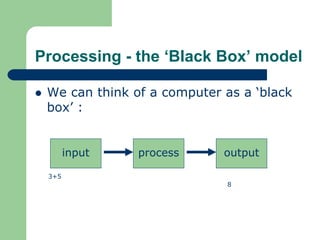
z Illustrating this - the ‘Black Box’ model
Processing - the ‘Black Box’ model
z We can think of a computer as a ‘black
box’ :
3+5
input process output
8
Components of a Computer System
z Computer Systems are made up of:
z Hardware – the physical parts
z Software - the instructions or programs that
control the hardware
z The Human Being – the brains behind the
whole system!
Types Of Computer
z Mainframe Computer
z Minicomputer
z Personal Computer (Microcomputer / Desktop)
z Laptop
z Network Computer / Server
– Uses two types of terminal: “Dumb” and “Intelligent”
Computer Organisation – the Von
Neumann model
z Most Computers are based on a model
proposed by John Von Neumann in 1946
z The ‘logical’ units of this model are:
– Stored program
– Central Processing Unit: fetches and executes the
program instructions sequentially
– Memory
– Input and Output devices
Computer Hardware components
z A typical PC System is made up of:
– System Unit
– Keyboard
– Monitor (VDU)
– Mouse
– Printer
– Modem
– Multimedia Devices
Hardware – The System Unit
z The central component of the system
z Houses:
– The Processor: corresponds to the CPU
– Memory: RAM and ROM
– Storage: Hard Disk, Removable Storage devices
The Processor (CPU)
z Types include Intel Pentium series, Celerion,
AMD Athlon
z Chip at the heart of the computer- does the
calculations
z Speed is very important – measured in
megahertz (MHz): the faster the processor the
more calculations performed per second.
Memory
z A computer must be able to store its calculations
and programs
z Two types of memory: “Volatile” and permanent.
z Measured in bytes
z One byte = eight bits
Random Access Memory (RAM)
z Used by the Computer as the working area
z Holds the working program, the data being
processed and the interim results
z Volatile - contents are erased if power is cut
z Can be accessed randomly: can get any piece
of data directly.
z Faster than perminant storage
z Not to be confused with ROM (Read-Only
Memory)
Storage - Hard Disk
z Permanent Memory - records and stores all
programs and data / information magnetically
z Larger than RAM - average 12 - 120GB
z Slower - involves mechanical movement
(read/write head, revolving disk)
Other types of Storage
z Floppy Disks
z CD/DVD ROM
z Zip Drive
z Magnetic Tape
Input Devices
z Keyboard
z Mouse: used in conjunction with the GUI
(Graphical User Interface), point and click
z Other types of Input Devices:
– Trackballs
– Light Pens
– Touch Screens
– Tablets
Output Devices
z Monitor: also known as the Visual Display Unit
(VDU)
z Printers
– Laser Printer
– Inkjet Printer
– Impact
Software
z Generic name of all programs
z Made up of code interpreted by the hardware
z Written in programming languages - Java, C,
C++, Perl
z Two kinds of Software:
– System
– Application
System Software
z Concerned with the computer itself: devices,
file and storage management, error correction
z Main piece of SS: Operating System (OS)
z OS: the driving program of the computer
– communicates between all programs and the
hardware
– controls timing and sequence of events
– manages data to ensure security and integrity
– Examples: Windows, Mac OS, Unix
Applications Software
z Concerned with the world outside the computer
z Gives the computer its general purpose nature
z Used for the things you want the computer to
do
z Common Examples - Word, Excel, Internet
Explorer
z Applications can be more specialised: e.g.
Architecture package
How Software is made
z Involves a cycle of research, analysis,
development and testing
z Systems Analysts - study the business
processes and designs the software
z Programmers - develops the software
Problems with Software
z Software is complex
z Difficult to test comprehensivly
z Can have bugs: these can be trivial or major
z Symptoms of bugs
– hanging
– crashes
The Graphical User Interface (GUI)
z Represents all the program / computer
resources as icons
z Workspace represented graphically - creates
‘virtual’ documents
z More usable: led to wider use of computers
z Adds to the unique nature of the computer as
both a tool and a medium
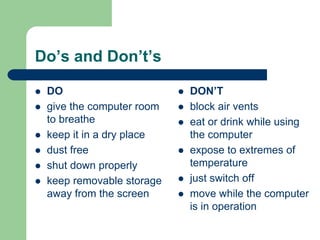
Do’s and Don’t’s
z DO
z give the computer room
to breathe
z keep it in a dry place
z dust free
z shut down properly
z keep removable storage
away from the screen
z DON’T
z block air vents
z eat or drink while using
the computer
z expose to extremes of
temperature
z just switch off
z move while the computer
is in operation
This book was distributed courtesy of:
For your own Unlimited Reading and FREE eBooks today, visit:
http://www.Free-eBooks.net
To show your appreciation to the author and help others have wonderful
reading experiences and find helpful information too, we'd be very
grateful if you'd kindly post your comments of this book here.
COPYRIGHT INFORMATION
Free-eBooks.net respects the intellectual property of others. When a book's copyright owner submits their work to Free-eBooks.net,
they are granting us permission to distribute such material. Unless otherwise stated in this book, this permission is not passed onto others.
As such, redistributing this book without the copyright owner's permission can constitute copyright infringement. If you believe that your work has been used in a
manner that constitutes copyright infringement, please follow our Notice and Procedure for Making Claims of Copyright Infringement as seen in our Terms of Service here:
http://www.free-ebooks.net/tos.html

İmportant information technology

  • 1.
    Basic Concepts OfInformation Technology (IT) Dheeraj Mehrotra www.computerscienceexpertise.com
  • 2.
    The Basics –What is Information? • Information is data processed for some purpose • Information can only be considered to be 'real' Info if it meets certain criteria i.e. • 1. it must be communicated to the recipient • 2. it must be in a language that is understood • 3. it must be in a suitable form • 4. it must be relevant for achieving some purpose
  • 3.
    Information - zis anyform of communication that provides understandable and useful knowledge for the person receiving it.
  • 4.
    What Is AComputer? z A computer is a general purpose, programmable device that is used for the production and processing of information z capable of calculating and storing results
  • 5.
    What do wemean by general purpose? z Most devices can be described by their function e.g Washing Machine, DVD Player z Computers, however, can be used for almost any purpose: - typewriter - video editor - accounts tracker - database / address book - DVD / CD Player - and many others…
  • 6.
    Computers Are Programmable zComputers repond to instructions in the form of programs z Programs are written in order to make computers behave in specific ways i.e. word processor, systems control z Programs are stored in the Computer memory
  • 7.
    How computers processinformation z Computers accept inputs ( i.e. data) z The input is translated into binary numbers and ‘processed’ z The process produces output (i.e information) z This sequence can repeat endlessly: outputs can be inputs! z Illustrating this - the ‘Black Box’ model
  • 8.
    Processing - the‘Black Box’ model z We can think of a computer as a ‘black box’ : 3+5 input process output 8
  • 9.
    Components of aComputer System z Computer Systems are made up of: z Hardware – the physical parts z Software - the instructions or programs that control the hardware z The Human Being – the brains behind the whole system!
  • 10.
    Types Of Computer zMainframe Computer z Minicomputer z Personal Computer (Microcomputer / Desktop) z Laptop z Network Computer / Server – Uses two types of terminal: “Dumb” and “Intelligent”
  • 11.
    Computer Organisation –the Von Neumann model z Most Computers are based on a model proposed by John Von Neumann in 1946 z The ‘logical’ units of this model are: – Stored program – Central Processing Unit: fetches and executes the program instructions sequentially – Memory – Input and Output devices
  • 12.
    Computer Hardware components zA typical PC System is made up of: – System Unit – Keyboard – Monitor (VDU) – Mouse – Printer – Modem – Multimedia Devices
  • 13.
    Hardware – TheSystem Unit z The central component of the system z Houses: – The Processor: corresponds to the CPU – Memory: RAM and ROM – Storage: Hard Disk, Removable Storage devices
  • 14.
    The Processor (CPU) zTypes include Intel Pentium series, Celerion, AMD Athlon z Chip at the heart of the computer- does the calculations z Speed is very important – measured in megahertz (MHz): the faster the processor the more calculations performed per second.
  • 15.
    Memory z A computermust be able to store its calculations and programs z Two types of memory: “Volatile” and permanent. z Measured in bytes z One byte = eight bits
  • 16.
    Random Access Memory(RAM) z Used by the Computer as the working area z Holds the working program, the data being processed and the interim results z Volatile - contents are erased if power is cut z Can be accessed randomly: can get any piece of data directly. z Faster than perminant storage z Not to be confused with ROM (Read-Only Memory)
  • 17.
    Storage - HardDisk z Permanent Memory - records and stores all programs and data / information magnetically z Larger than RAM - average 12 - 120GB z Slower - involves mechanical movement (read/write head, revolving disk)
  • 18.
    Other types ofStorage z Floppy Disks z CD/DVD ROM z Zip Drive z Magnetic Tape
  • 19.
    Input Devices z Keyboard zMouse: used in conjunction with the GUI (Graphical User Interface), point and click z Other types of Input Devices: – Trackballs – Light Pens – Touch Screens – Tablets
  • 20.
    Output Devices z Monitor:also known as the Visual Display Unit (VDU) z Printers – Laser Printer – Inkjet Printer – Impact
  • 21.
    Software z Generic nameof all programs z Made up of code interpreted by the hardware z Written in programming languages - Java, C, C++, Perl z Two kinds of Software: – System – Application
  • 22.
    System Software z Concernedwith the computer itself: devices, file and storage management, error correction z Main piece of SS: Operating System (OS) z OS: the driving program of the computer – communicates between all programs and the hardware – controls timing and sequence of events – manages data to ensure security and integrity – Examples: Windows, Mac OS, Unix
  • 23.
    Applications Software z Concernedwith the world outside the computer z Gives the computer its general purpose nature z Used for the things you want the computer to do z Common Examples - Word, Excel, Internet Explorer z Applications can be more specialised: e.g. Architecture package
  • 24.
    How Software ismade z Involves a cycle of research, analysis, development and testing z Systems Analysts - study the business processes and designs the software z Programmers - develops the software
  • 25.
    Problems with Software zSoftware is complex z Difficult to test comprehensivly z Can have bugs: these can be trivial or major z Symptoms of bugs – hanging – crashes
  • 26.
    The Graphical UserInterface (GUI) z Represents all the program / computer resources as icons z Workspace represented graphically - creates ‘virtual’ documents z More usable: led to wider use of computers z Adds to the unique nature of the computer as both a tool and a medium
  • 27.
    Do’s and Don’t’s zDO z give the computer room to breathe z keep it in a dry place z dust free z shut down properly z keep removable storage away from the screen z DON’T z block air vents z eat or drink while using the computer z expose to extremes of temperature z just switch off z move while the computer is in operation
  • 28.
    This book wasdistributed courtesy of: For your own Unlimited Reading and FREE eBooks today, visit: http://www.Free-eBooks.net To show your appreciation to the author and help others have wonderful reading experiences and find helpful information too, we'd be very grateful if you'd kindly post your comments of this book here. COPYRIGHT INFORMATION Free-eBooks.net respects the intellectual property of others. When a book's copyright owner submits their work to Free-eBooks.net, they are granting us permission to distribute such material. Unless otherwise stated in this book, this permission is not passed onto others. As such, redistributing this book without the copyright owner's permission can constitute copyright infringement. If you believe that your work has been used in a manner that constitutes copyright infringement, please follow our Notice and Procedure for Making Claims of Copyright Infringement as seen in our Terms of Service here: http://www.free-ebooks.net/tos.html