Energizing the ESL/EFL Classroom
   through Internet Activities
                     Dayna House,
         Senior English Language Fellow 2012
                U.S. State Department
http://argentina.usembassy.gov/english_teaching.html
Advantages of the Internet
• Keeping students interested and engaged in the
  current topic or activity is a daily challenge for
  teachers in the ESL/EFL classroom.
• The Internet provides new possibilities for
  assisting teachers to successfully meet this
  challenge. Internet-based activities can
  potentially energize the ESL/EFL classroom.
• Teachers need to set clear goals and strategies
  for activities.
Several kinds of Internet-based
         Activities and Strategies
Let’s look at four basic ways in which
the Internet can be used in the ESL/EFL
classroom as an educational tool and
describe some strategies to help
ensure that the activities will keep the
students' interest.
Create classroom Lessons around
songs, videos, on-line magazines or
language learning sites that provide
language input
(1) Search for and receive
Activities that are based on using the Internet as a
huge virtual library. In these activities students
search for and retrieve information from this
library.
• Activities in the ESL/EFL classroom that are based
   on searching the Internet for information are not
   as social as those that involve conversation. But,
   if activities are well planned, they can generate
   enthusiasm among students and provide
   excellent learning opportunities.
Searching the Internet - A Wealth of
              Activities

One Internet activity that falls in
the search category is a “Scavenger
or Treasure hunt” in which
students are given the task of
searching the Internet for some
kind of information in English.
“Finding Favorites”
An activity that requires the student to
practice: reading comprehension, comparing
information, and summarizing and reporting in
English.
This naturally engages the student's interest
because the student's search is directed
toward a topic that s/he is interested in.
You can use small groups of two or three if the
members of the group are interested in the
same subject.
Procedure
a. Students first chooses a topic of special interest-
   - a place, person, animal, event, hobby, sport, or
   movie - whatever subject the student finds
   appealing.
b. Then the students searches the Internet for
   three web sites that are related to that interest.
c. The students find web sites, read the material,
   and download one or two pages from the site to
   a Favorites folder.
Reporting on the activity
a. The students then make two short
   reports, either written or made orally
   to the class.
  i. The first report is an evaluation of
       the web sites, telling which were
       the most useful.
  ii. The second is a summary of the
       main information that was found.
Factors to Address
1. Students may get frustrated and lose
interest if they spend too much time
searching for web sites. Searching also
decreases the time available for the
linguistic tasks. It is important that
students know how to use search engines
before beginning this kind of activity. OR
Teachers can provides website addresses.
Factors to Address
Students can provide their topics of interest
to the teacher a few days before the activity
begins & teachers can prepare for the activity
by searching for and recording the addresses
of relevant sites for each interest.
These addresses can then be provided to the
students at the beginning of the activity or
held in reserve and given to students who
have trouble finding sites themselves.
Factors to Address
2. Students should be taught Internet concepts &
skills needed. Then, before the activity begins, the
teacher should briefly observe each student to
make sure that he or she is proficient in the
needed skills.
NOTE: Teachers should be aware of students, with
little computer experience, who find it more
difficult than others to understand and use the
Internet. These students will require additional
instruction and practice.
NOTE
•CUT AND PASTE ALL
 WEB ADDRESSES INTO
 YOUR BROWSER TO
 EXPLORE THE SITE
You tube videos

1. Real English - 4:12
http://www.youtube.com/watch?v=iiuy8P7Ps70
2. Que Hora Es? – 3:06
http://www.youtube.com/watch?v=4cKGyOE_jOI
GoAnimate: www.goanimate.com
Need an account to make videos. Easy and free to make an
account. Can make public or private.
Can do text to audio, record audio, create own video scenes,
characters, backgrounds, etc.
• (free account, can save and play video from within the
  account)
• Must have a paid account to download or export video

Tutorial
Video: http://www.youtube.com/watch?v=UCOCJKGi6xY

Uses: can be individual or colaborative activity for Ss.
• Debates, Virtual role-plays, Storytelling,
http://www.makebeliefscomix.co
          m/Comix/
Voicethread: www.voicethread.com
      You Don't need an account to just watch or listen.
However you must sign into your account to respond.
Accounts are easy and free to create; Just Name, e-mail &
password.
      Free account is limited to five (5) threads that have
the option to be public or private. You can use private
accounts for one-on-one work (teacher-student) or group
(teacher-students, student-student.
You can add text, audio, and video response options or
edit threads at any time. You can upload photos,
documents, videos, podcasts, PPTs, etc.
Uses: Discussions, Debates, Critiques, Teacher training
NOTE
•CUT AND PASTE ALL
 WEB ADDRESSES INTO
 YOUR BROWSER TO
 EXPLORE THE SITE
Sample (A day at school)


http://voicethread.com/?#q+esl.b125131
               5.i6727072
Tutorial video:
Voice Thread Simply Speaking
http://www.youtube.com/watch?v=yW2nb7FO7
p8
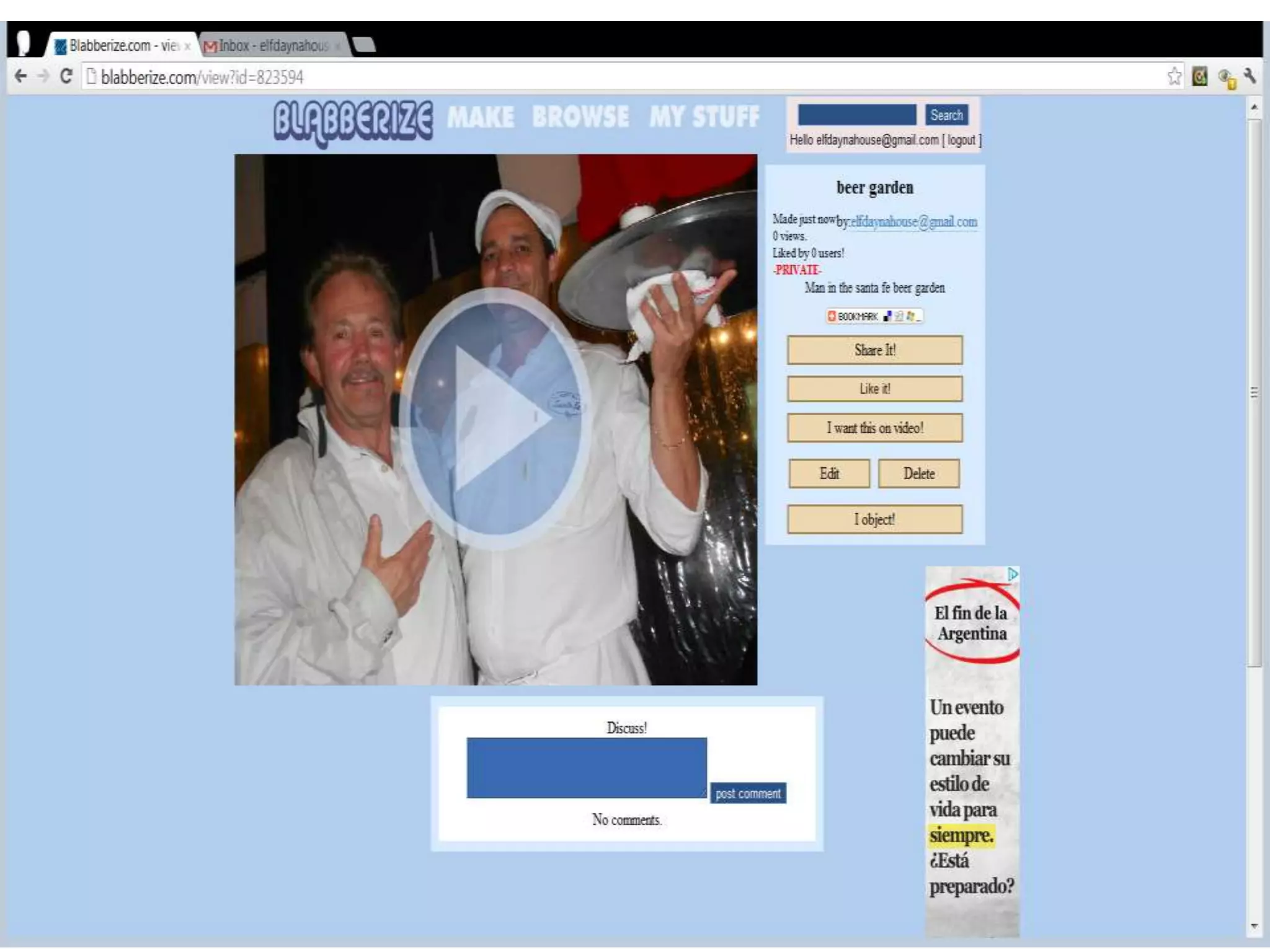
http://blabberize.com/
Need an account & Easy and free to make an
account
Examples: Ben Franklin (youtube)
video: http://www.youtube.com/watch?v=Ids
KOGXZ0aw&feature=related
My Stuff:
http://blabberize.com/view/id/823594
Uses: Introductions, Descriptions,
Auto/Biographies & Storytelling
Collaborate and learn
Joint projects that involve students in
two or more classrooms that might be
thousands of miles apart.
Collaboration between classrooms
almost always involves the use of email.
Also, it may include the joint publication
of web pages or joint search activities.
Voxopop: www.voxopop.com
• Don't need an account to listen but need an account to respond.
   Can be public, restricted, or private.
• Audio forums. Students will have access to all public threads (very
   little monitoring)
• Can set up a classroom.
• Possibility for international speaking exchanges.
   http://www.voxopop.com/topic/2789db87-bab2-4e09-a6a3-
   56a940890d39
Examples: "Favorite Food" discussion thread (public):
http://www.voxopop.com/topic/a868a341-d9f0-4063-883f-
bee0307aac40
Daily Routines: http://www.voxopop.com/topic/5e3d5192-b7d0-
4604-a867-335c138e105f
• Uses: Discussion threads, Polls/Surveys, Interviews, Debates
NOTE
•CUT AND PASTE ALL
 WEB ADDRESSES INTO
 YOUR BROWSER TO
 EXPLORE THE SITE
Zoom
• http://www.usinfo.pl/zoom/files/June2012/ju
  ne2012.pdf
www.aesopsfables.com
On line learning, Songs and Videos
1. On line Learning - http://www.learnenglish.de/
2. On line learning - http://www.esolcourses.com/
3. Songs -
http://www.esolcourses.com/topics/learn-english-
with-songs.html
4. Videos -
http://english.yabla.com/?gclid=CJqgo9Lz_7ACFQ
eR7Qod0gvVAQ
44
46
47
Spotlight - www.radio.english.net

•You don’t need to have
 an account but with an
 account you can post
NOTE
•CUT AND PASTE ALL
 WEB ADDRESSES INTO
 YOUR BROWSER TO
 EXPLORE THE SITE
http://www.learner.org/resource
        s/series71.html
        Connect with English
Publish and provide
Publication of information
activities.
This publishing is done on web
pages, which are the basic places
where information is stored on
the Internet.
Web Pages/blogs - Creating and
         Publishing in English
One of the most potentially valuable and
energizing Internet activities for students in the
ESL/EFL classroom is to create their own web
pages/blog in English and publish it.
The teacher must make many decisions about
the project before beginning.
1. Who decides on the theme and the overall
   design of the site, the Teacher or the entire
   class.
Web Pages/blogs
1. Pages on the site may be assigned either to
   individuals or to small groups of students. Some
   examples of kinds of web pages that students might
   compose for a class website are:
  i.   brief autobiographies, day-in-the-life pages that tell
       students' daily activities, and short stories.
  ii. Have a theme of the class's home city or country.
  iii. Different individuals or small groups might be asked to
       prepare pages of various kinds of information, such as
       geographic, economic, cultural, and so on.

NOTE: It is very important that student addresses and
phone numbers not be included in these.
Decisions about the Project
3. Teacher may allow students to design their pages or
for the students to write only the text and for the
teacher to manage the website.
-The advantage of allowing the students to manage
the website is that they will “own” the pages more
fully and take the project all the more seriously.
-However, too much time spent on page design can
reduce the value of the activity. If students are given
the opportunity to design their own pages, set limits
that will ensure that their focus stays on practicing
and developing their English writing skills.
Factors to Address
• One of the most exciting characteristics of a web
  publishing project is the students' knowledge that the
  pages they compose will be on the Internet for the
  whole world to see.
• Knowing this can lead them to try hard to do their
  best work.
• This may cause anxiety for some students because -
  as with email - they may fear making mistakes that
  can be seen by others.
• To reduce any anxiety, the teacher can go over
  students' work with them before it is published on
  the Internet.
Blogspot
• http://www.blogger.com/home
Talk to and reply-
Conversational activities that take
place via the Internet through
email correspondence and in chat
rooms. Strictly speaking, this
category could also include
Internet phone conversations.
Internet Conversations - An
        Inherently Social Function
• Email conversations provide a useful
  learning tool for the ESL/EFL classroom.
• Although students have never met
  except on the Internet, they are social
  activities, and social activities tend to
  engage students' interests especially if
  email correspondence turns into a
  close friends.
Internet Conversations
• Most email conversations are casual and will not
  develop into friendship. But they are still an
  opportunity for the ESL/EFL student to try to
  make himself or herself understood to another
  actual person (other than teacher or classmates).
• This makes the act of communicating in English
  not just a theoretical problem, but a practical
  one. The need to solve that practical problem can
  be a strong motivator for students to try hard to
  construct clear, grammatical messages that
  communicate their thoughts.
Factors to Address
1. Making Mistakes - Some students may be
capable of conversing in English via email but may
also be afraid of making mistakes that others will
see. This fear can reduce the student's enthusiasm
and may cause the Student to avoid doing it.
• Help reduce student anxiety about making
  mistakes by looking over and correcting email
  messages together before they are sent. Going
  over a student's message with him or her can be
  an excellent learning opportunity for the
  student.
Factors
2. Teachers should help students find
dependable email partners. Erratic replies can
decrease the students enthusiasm. Sending
email is easy, but finding a pen pal who will
reply consistently may be hard.
Here are some sites
NOTE
•CUT AND PASTE ALL
 WEB ADDRESSES INTO
 YOUR BROWSER TO
 EXPLORE THE SITE
Pen Pals
• http://www.epals.com - For K-12 classes,
  provides teachers information on classrooms
  around the world that are interested in email
  correspondence and collaborative projects.
• http://www.theteacherscorner.net/penpals/ -
  provides teachers information on classrooms
  around the world that are interested in email
  correspondence
72
73
One Word - http://oneword.com

• Oneword widget, an application
  that provides users with a one-
  word writing prompt in English
  and 60 seconds of writing time.
• You don’t have to sign up, it will
  let you participate without logging
  in.
Teacher resources
          U.S. Embassy websites
1. Forum Magazine and much more
http://argentina.usembassy.gov/english_teaching.
html

2. Facebook
https://www.facebook.com/EmbUSARG
Summary and Conclusion
        Internet activities can energize the ESL/EFL classroom by
offering new, interesting ways for students to practice and sharpen
their English skills.
        To ensure that students' interest is maintained & that they get
maximum value from these opportunities, follow these
recommendations:
• Make sure that students understand the basic concepts and have
   the hands-on practice that they need to perform Internet-based
   activities.
• Make sure that the assigned activity (e.g., use of email) is not
   linguistically too advanced for the student.
• For email correspondence, help students find partners to engage
   in a genuine conversation with.
• Avoid anxiety by checking students’ email or web pages and
   correct them before they are sent or published and make it a
   learning opportunity for students.
• When the activity is to create and publish web pages, be sure to
   keep the main focus on the language task, not on page design.
The END
Thank you for watching
E-mail elfdaynahouse@gmail.com
 with any question you may have
     about English Teaching

Energizing the EFL classroom through internet activities

  • 1.
    Energizing the ESL/EFLClassroom through Internet Activities Dayna House, Senior English Language Fellow 2012 U.S. State Department http://argentina.usembassy.gov/english_teaching.html
  • 2.
    Advantages of theInternet • Keeping students interested and engaged in the current topic or activity is a daily challenge for teachers in the ESL/EFL classroom. • The Internet provides new possibilities for assisting teachers to successfully meet this challenge. Internet-based activities can potentially energize the ESL/EFL classroom. • Teachers need to set clear goals and strategies for activities.
  • 3.
    Several kinds ofInternet-based Activities and Strategies Let’s look at four basic ways in which the Internet can be used in the ESL/EFL classroom as an educational tool and describe some strategies to help ensure that the activities will keep the students' interest. Create classroom Lessons around songs, videos, on-line magazines or language learning sites that provide language input
  • 4.
    (1) Search forand receive Activities that are based on using the Internet as a huge virtual library. In these activities students search for and retrieve information from this library. • Activities in the ESL/EFL classroom that are based on searching the Internet for information are not as social as those that involve conversation. But, if activities are well planned, they can generate enthusiasm among students and provide excellent learning opportunities.
  • 5.
    Searching the Internet- A Wealth of Activities One Internet activity that falls in the search category is a “Scavenger or Treasure hunt” in which students are given the task of searching the Internet for some kind of information in English.
  • 6.
    “Finding Favorites” An activitythat requires the student to practice: reading comprehension, comparing information, and summarizing and reporting in English. This naturally engages the student's interest because the student's search is directed toward a topic that s/he is interested in. You can use small groups of two or three if the members of the group are interested in the same subject.
  • 7.
    Procedure a. Students firstchooses a topic of special interest- - a place, person, animal, event, hobby, sport, or movie - whatever subject the student finds appealing. b. Then the students searches the Internet for three web sites that are related to that interest. c. The students find web sites, read the material, and download one or two pages from the site to a Favorites folder.
  • 8.
    Reporting on theactivity a. The students then make two short reports, either written or made orally to the class. i. The first report is an evaluation of the web sites, telling which were the most useful. ii. The second is a summary of the main information that was found.
  • 9.
    Factors to Address 1.Students may get frustrated and lose interest if they spend too much time searching for web sites. Searching also decreases the time available for the linguistic tasks. It is important that students know how to use search engines before beginning this kind of activity. OR Teachers can provides website addresses.
  • 10.
    Factors to Address Studentscan provide their topics of interest to the teacher a few days before the activity begins & teachers can prepare for the activity by searching for and recording the addresses of relevant sites for each interest. These addresses can then be provided to the students at the beginning of the activity or held in reserve and given to students who have trouble finding sites themselves.
  • 11.
    Factors to Address 2.Students should be taught Internet concepts & skills needed. Then, before the activity begins, the teacher should briefly observe each student to make sure that he or she is proficient in the needed skills. NOTE: Teachers should be aware of students, with little computer experience, who find it more difficult than others to understand and use the Internet. These students will require additional instruction and practice.
  • 12.
    NOTE •CUT AND PASTEALL WEB ADDRESSES INTO YOUR BROWSER TO EXPLORE THE SITE
  • 13.
    You tube videos 1.Real English - 4:12 http://www.youtube.com/watch?v=iiuy8P7Ps70 2. Que Hora Es? – 3:06 http://www.youtube.com/watch?v=4cKGyOE_jOI
  • 15.
    GoAnimate: www.goanimate.com Need anaccount to make videos. Easy and free to make an account. Can make public or private. Can do text to audio, record audio, create own video scenes, characters, backgrounds, etc. • (free account, can save and play video from within the account) • Must have a paid account to download or export video Tutorial Video: http://www.youtube.com/watch?v=UCOCJKGi6xY Uses: can be individual or colaborative activity for Ss. • Debates, Virtual role-plays, Storytelling,
  • 19.
  • 21.
    Voicethread: www.voicethread.com You Don't need an account to just watch or listen. However you must sign into your account to respond. Accounts are easy and free to create; Just Name, e-mail & password. Free account is limited to five (5) threads that have the option to be public or private. You can use private accounts for one-on-one work (teacher-student) or group (teacher-students, student-student. You can add text, audio, and video response options or edit threads at any time. You can upload photos, documents, videos, podcasts, PPTs, etc. Uses: Discussions, Debates, Critiques, Teacher training
  • 24.
    NOTE •CUT AND PASTEALL WEB ADDRESSES INTO YOUR BROWSER TO EXPLORE THE SITE
  • 25.
    Sample (A dayat school) http://voicethread.com/?#q+esl.b125131 5.i6727072
  • 27.
    Tutorial video: Voice ThreadSimply Speaking http://www.youtube.com/watch?v=yW2nb7FO7 p8
  • 28.
    http://blabberize.com/ Need an account& Easy and free to make an account Examples: Ben Franklin (youtube) video: http://www.youtube.com/watch?v=Ids KOGXZ0aw&feature=related My Stuff: http://blabberize.com/view/id/823594 Uses: Introductions, Descriptions, Auto/Biographies & Storytelling
  • 31.
    Collaborate and learn Jointprojects that involve students in two or more classrooms that might be thousands of miles apart. Collaboration between classrooms almost always involves the use of email. Also, it may include the joint publication of web pages or joint search activities.
  • 32.
    Voxopop: www.voxopop.com • Don'tneed an account to listen but need an account to respond. Can be public, restricted, or private. • Audio forums. Students will have access to all public threads (very little monitoring) • Can set up a classroom. • Possibility for international speaking exchanges. http://www.voxopop.com/topic/2789db87-bab2-4e09-a6a3- 56a940890d39 Examples: "Favorite Food" discussion thread (public): http://www.voxopop.com/topic/a868a341-d9f0-4063-883f- bee0307aac40 Daily Routines: http://www.voxopop.com/topic/5e3d5192-b7d0- 4604-a867-335c138e105f • Uses: Discussion threads, Polls/Surveys, Interviews, Debates
  • 35.
    NOTE •CUT AND PASTEALL WEB ADDRESSES INTO YOUR BROWSER TO EXPLORE THE SITE
  • 36.
  • 40.
  • 43.
    On line learning,Songs and Videos 1. On line Learning - http://www.learnenglish.de/ 2. On line learning - http://www.esolcourses.com/ 3. Songs - http://www.esolcourses.com/topics/learn-english- with-songs.html 4. Videos - http://english.yabla.com/?gclid=CJqgo9Lz_7ACFQ eR7Qod0gvVAQ
  • 44.
  • 46.
  • 47.
  • 48.
    Spotlight - www.radio.english.net •Youdon’t need to have an account but with an account you can post
  • 51.
    NOTE •CUT AND PASTEALL WEB ADDRESSES INTO YOUR BROWSER TO EXPLORE THE SITE
  • 52.
    http://www.learner.org/resource s/series71.html Connect with English
  • 55.
    Publish and provide Publicationof information activities. This publishing is done on web pages, which are the basic places where information is stored on the Internet.
  • 56.
    Web Pages/blogs -Creating and Publishing in English One of the most potentially valuable and energizing Internet activities for students in the ESL/EFL classroom is to create their own web pages/blog in English and publish it. The teacher must make many decisions about the project before beginning. 1. Who decides on the theme and the overall design of the site, the Teacher or the entire class.
  • 57.
    Web Pages/blogs 1. Pageson the site may be assigned either to individuals or to small groups of students. Some examples of kinds of web pages that students might compose for a class website are: i. brief autobiographies, day-in-the-life pages that tell students' daily activities, and short stories. ii. Have a theme of the class's home city or country. iii. Different individuals or small groups might be asked to prepare pages of various kinds of information, such as geographic, economic, cultural, and so on. NOTE: It is very important that student addresses and phone numbers not be included in these.
  • 58.
    Decisions about theProject 3. Teacher may allow students to design their pages or for the students to write only the text and for the teacher to manage the website. -The advantage of allowing the students to manage the website is that they will “own” the pages more fully and take the project all the more seriously. -However, too much time spent on page design can reduce the value of the activity. If students are given the opportunity to design their own pages, set limits that will ensure that their focus stays on practicing and developing their English writing skills.
  • 59.
    Factors to Address •One of the most exciting characteristics of a web publishing project is the students' knowledge that the pages they compose will be on the Internet for the whole world to see. • Knowing this can lead them to try hard to do their best work. • This may cause anxiety for some students because - as with email - they may fear making mistakes that can be seen by others. • To reduce any anxiety, the teacher can go over students' work with them before it is published on the Internet.
  • 60.
  • 65.
    Talk to andreply- Conversational activities that take place via the Internet through email correspondence and in chat rooms. Strictly speaking, this category could also include Internet phone conversations.
  • 66.
    Internet Conversations -An Inherently Social Function • Email conversations provide a useful learning tool for the ESL/EFL classroom. • Although students have never met except on the Internet, they are social activities, and social activities tend to engage students' interests especially if email correspondence turns into a close friends.
  • 67.
    Internet Conversations • Mostemail conversations are casual and will not develop into friendship. But they are still an opportunity for the ESL/EFL student to try to make himself or herself understood to another actual person (other than teacher or classmates). • This makes the act of communicating in English not just a theoretical problem, but a practical one. The need to solve that practical problem can be a strong motivator for students to try hard to construct clear, grammatical messages that communicate their thoughts.
  • 68.
    Factors to Address 1.Making Mistakes - Some students may be capable of conversing in English via email but may also be afraid of making mistakes that others will see. This fear can reduce the student's enthusiasm and may cause the Student to avoid doing it. • Help reduce student anxiety about making mistakes by looking over and correcting email messages together before they are sent. Going over a student's message with him or her can be an excellent learning opportunity for the student.
  • 69.
    Factors 2. Teachers shouldhelp students find dependable email partners. Erratic replies can decrease the students enthusiasm. Sending email is easy, but finding a pen pal who will reply consistently may be hard. Here are some sites
  • 70.
    NOTE •CUT AND PASTEALL WEB ADDRESSES INTO YOUR BROWSER TO EXPLORE THE SITE
  • 71.
    Pen Pals • http://www.epals.com- For K-12 classes, provides teachers information on classrooms around the world that are interested in email correspondence and collaborative projects. • http://www.theteacherscorner.net/penpals/ - provides teachers information on classrooms around the world that are interested in email correspondence
  • 72.
  • 73.
  • 75.
    One Word -http://oneword.com • Oneword widget, an application that provides users with a one- word writing prompt in English and 60 seconds of writing time. • You don’t have to sign up, it will let you participate without logging in.
  • 80.
    Teacher resources U.S. Embassy websites 1. Forum Magazine and much more http://argentina.usembassy.gov/english_teaching. html 2. Facebook https://www.facebook.com/EmbUSARG
  • 85.
    Summary and Conclusion Internet activities can energize the ESL/EFL classroom by offering new, interesting ways for students to practice and sharpen their English skills. To ensure that students' interest is maintained & that they get maximum value from these opportunities, follow these recommendations: • Make sure that students understand the basic concepts and have the hands-on practice that they need to perform Internet-based activities. • Make sure that the assigned activity (e.g., use of email) is not linguistically too advanced for the student. • For email correspondence, help students find partners to engage in a genuine conversation with. • Avoid anxiety by checking students’ email or web pages and correct them before they are sent or published and make it a learning opportunity for students. • When the activity is to create and publish web pages, be sure to keep the main focus on the language task, not on page design.
  • 86.
    The END Thank youfor watching E-mail elfdaynahouse@gmail.com with any question you may have about English Teaching