The wonderful world of
Composer
Transforming from Older PHP to Modern PHP
 PHP community: Huge but extremely isolated libraries, we do not reuse code ,Do we
?.
 Issues faced while using shared code:
 How do I autoload the PHP classes in the code , without using require or include
statements? Which version of file to include according to my installed PHP version ?
 We need to know if this library depends on any other libraries, if YES then that’s yet another library
I need to download & configure
 How should I store the library in my project? Should I use Git submodules? Just
commit the entire lib code into my project?
Composer sets out to solve this situation by positioning itself as "the glue between all projects" -
meaning that packages can be written, developed and shared in a format that other developers
can plug into other applications with ease.
Contents
Introduction & Basic Usage
1. Composer Introduction
2. Installing
3. Basic Usage & commands
4. Packagist Repository
5. Specifying package versions
Namespacing
1. Namespacing Introduction
2. Using the namespaced class
Autoloading you own code
1. Using classmap
2. Using PSR-0 standard
3. Using PSR-4 standard
4. PSR-0 vs PSR-4
Final Summary : Basic Commands & composer.json schema
Introduction
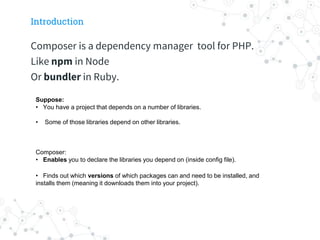
Composer is a dependency manager tool for PHP.
Like npm in Node
Or bundler in Ruby.
Suppose:
• You have a project that depends on a number of libraries.
• Some of those libraries depend on other libraries.
Composer:
• Enables you to declare the libraries you depend on (inside config file).
• Finds out which versions of which packages can and need to be installed, and
installs them (meaning it downloads them into your project).
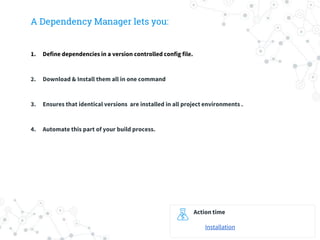
A Dependency Manager lets you:
1. Define dependencies in a version controlled config file.
2. Download & Install them all in one command
3. Ensures that identical versions are installed in all project environments .
4. Automate this part of your build process.
Action time
Installation
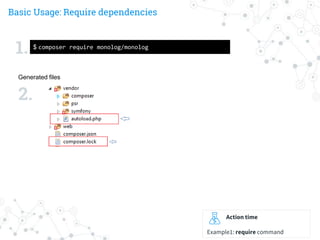
Basic Usage: Require dependencies
Action time
Example1: require command
Generated files
1.
2.
$ composer require monolog/monolog
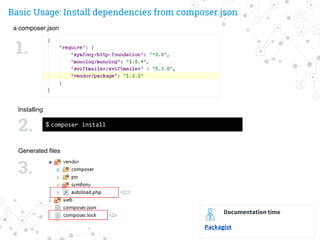
Basic Usage: Install dependencies from composer.json
a composer.json
$ composer install
Installing
Generated files
1.
2.
3.
Documentation time
Packagist
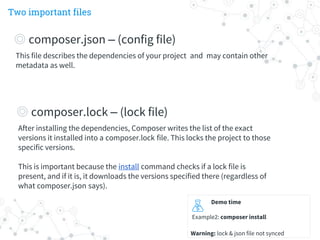
Two important files
Demo time
Example2: composer install
Warning: lock & json file not synced
This file describes the dependencies of your project and may contain other
metadata as well.
◎ composer.json – (config file)
After installing the dependencies, Composer writes the list of the exact
versions it installed into a composer.lock file. This locks the project to those
specific versions.
This is important because the install command checks if a lock file is
present, and if it is, it downloads the versions specified there (regardless of
what composer.json says).
◎ composer.lock – (lock file)
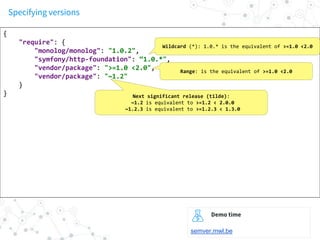
Specifying versions
{
"require": {
"monolog/monolog": "1.0.2",
"symfony/http-foundation": “1.0.*",
"vendor/package": ">=1.0 <2.0",
"vendor/package": "~1.2"
}
}
Wildcard (*): 1.0.* is the equivalent of >=1.0 <2.0
Range: is the equivalent of >=1.0 <2.0
Next significant release (tilde):
~1.2 is equivalent to >=1.2 < 2.0.0
~1.2.3 is equivalent to >=1.2.3 < 1.3.0
Demo time
semver.mwl.be
Namespacing
Technique for
organizing your code &
prevent naming
conflicts between
classes.
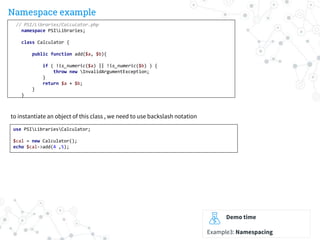
Namespace example
Demo time
Example3: Namespacing
// PSI/Libraries/Calculator.php
namespace PSILibraries;
class Calculator {
public function add($a, $b){
if ( !is_numeric($a) || !is_numeric($b) ) {
throw new InvalidArgumentException;
}
return $a + $b;
}
}
use PSILibrariesCalculator;
$cal = new Calculator();
echo $cal->add(4 ,5);
to instantiate an object of this class , we need to use backslash notation
Autoloading
Autoloading allows us to use PHP classes
without the need to require() or
include() them and is considered a hallmark
of modern-day programming.
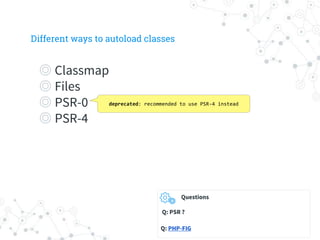
Different ways to autoload classes
◎ Classmap
◎ Files
◎ PSR-0
◎ PSR-4
deprecated: recommended to use PSR-4 instead
Questions
Q: PSR ?
Q: PHP-FIG
Autoloading using classmap
a composer.json
$ composer dump-autoload
Generate autoload files
Generated files
1.
2.
3.
Action time
example4: autoload classmap
{
"autoload": {
"classmap": ["src/", "lib/", "Something.php"]
}
}
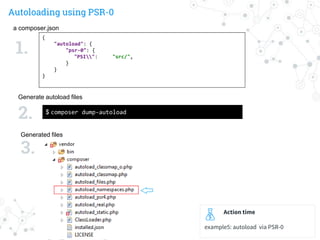
Autoloading using PSR-0
a composer.json
$ composer dump-autoload
Generate autoload files
Generated files
1.
2.
3.
Action time
example5: autoload via PSR-0
{
"autoload": {
"psr-0": {
"PSI": "src/",
}
}
}
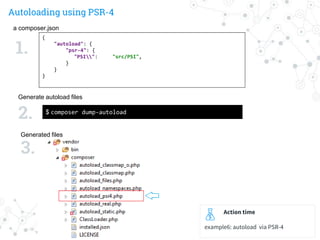
Autoloading using PSR-4
a composer.json
$ composer dump-autoload
Generate autoload files
Generated files
1.
2.
3.
Action time
example6: autoload via PSR-4
{
"autoload": {
"psr-4": {
"PSI": "src/PSI",
}
}
}
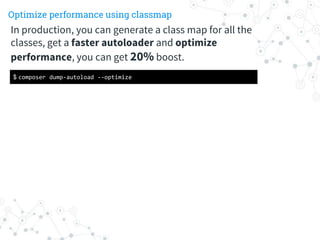
Optimize performance using classmap
$ composer dump-autoload --optimize
In production, you can generate a class map for all the
classes, get a faster autoloader and optimize
performance, you can get 20% boost.
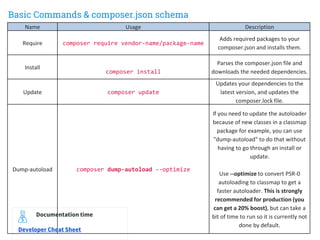
Basic Commands & composer.json schema
Name Usage Description
Require composer require vendor-name/package-name
Adds required packages to your
composer.json and installs them.
Install
composer install
Parses the composer.json file and
downloads the needed dependencies.
Update composer update
Updates your dependencies to the
latest version, and updates the
composer.lock file.
Dump-autoload composer dump-autoload --optimize
If you need to update the autoloader
because of new classes in a classmap
package for example, you can use
"dump-autoload" to do that without
having to go through an install or
update.
Use --optimize to convert PSR-0
autoloading to classmap to get a
faster autoloader. This is strongly
recommended for production (you
can get a 20% boost), but can take a
bit of time to run so it is currently not
done by default.
Documentation time
Developer Cheat Sheet
References
Special thanks to all the people who made and released
these awesome resources for free:
◎ https://getcomposer.org/
◎ http://www.php-fig.org/
◎ Optimizing composer autoloader performance
Thanks!
Any questions?
You can find me at:
deepak.chandani@thepsi.com

Composer namespacing

  • 1.
  • 2.
    Transforming from OlderPHP to Modern PHP  PHP community: Huge but extremely isolated libraries, we do not reuse code ,Do we ?.  Issues faced while using shared code:  How do I autoload the PHP classes in the code , without using require or include statements? Which version of file to include according to my installed PHP version ?  We need to know if this library depends on any other libraries, if YES then that’s yet another library I need to download & configure  How should I store the library in my project? Should I use Git submodules? Just commit the entire lib code into my project? Composer sets out to solve this situation by positioning itself as "the glue between all projects" - meaning that packages can be written, developed and shared in a format that other developers can plug into other applications with ease.
  • 3.
    Contents Introduction & BasicUsage 1. Composer Introduction 2. Installing 3. Basic Usage & commands 4. Packagist Repository 5. Specifying package versions Namespacing 1. Namespacing Introduction 2. Using the namespaced class Autoloading you own code 1. Using classmap 2. Using PSR-0 standard 3. Using PSR-4 standard 4. PSR-0 vs PSR-4 Final Summary : Basic Commands & composer.json schema
  • 4.
    Introduction Composer is adependency manager tool for PHP. Like npm in Node Or bundler in Ruby. Suppose: • You have a project that depends on a number of libraries. • Some of those libraries depend on other libraries. Composer: • Enables you to declare the libraries you depend on (inside config file). • Finds out which versions of which packages can and need to be installed, and installs them (meaning it downloads them into your project).
  • 5.
    A Dependency Managerlets you: 1. Define dependencies in a version controlled config file. 2. Download & Install them all in one command 3. Ensures that identical versions are installed in all project environments . 4. Automate this part of your build process. Action time Installation
  • 6.
    Basic Usage: Requiredependencies Action time Example1: require command Generated files 1. 2. $ composer require monolog/monolog
  • 7.
    Basic Usage: Installdependencies from composer.json a composer.json $ composer install Installing Generated files 1. 2. 3. Documentation time Packagist
  • 8.
    Two important files Demotime Example2: composer install Warning: lock & json file not synced This file describes the dependencies of your project and may contain other metadata as well. ◎ composer.json – (config file) After installing the dependencies, Composer writes the list of the exact versions it installed into a composer.lock file. This locks the project to those specific versions. This is important because the install command checks if a lock file is present, and if it is, it downloads the versions specified there (regardless of what composer.json says). ◎ composer.lock – (lock file)
  • 9.
    Specifying versions { "require": { "monolog/monolog":"1.0.2", "symfony/http-foundation": “1.0.*", "vendor/package": ">=1.0 <2.0", "vendor/package": "~1.2" } } Wildcard (*): 1.0.* is the equivalent of >=1.0 <2.0 Range: is the equivalent of >=1.0 <2.0 Next significant release (tilde): ~1.2 is equivalent to >=1.2 < 2.0.0 ~1.2.3 is equivalent to >=1.2.3 < 1.3.0 Demo time semver.mwl.be
  • 10.
    Namespacing Technique for organizing yourcode & prevent naming conflicts between classes.
  • 11.
    Namespace example Demo time Example3:Namespacing // PSI/Libraries/Calculator.php namespace PSILibraries; class Calculator { public function add($a, $b){ if ( !is_numeric($a) || !is_numeric($b) ) { throw new InvalidArgumentException; } return $a + $b; } } use PSILibrariesCalculator; $cal = new Calculator(); echo $cal->add(4 ,5); to instantiate an object of this class , we need to use backslash notation
  • 12.
    Autoloading Autoloading allows usto use PHP classes without the need to require() or include() them and is considered a hallmark of modern-day programming.
  • 13.
    Different ways toautoload classes ◎ Classmap ◎ Files ◎ PSR-0 ◎ PSR-4 deprecated: recommended to use PSR-4 instead Questions Q: PSR ? Q: PHP-FIG
  • 14.
    Autoloading using classmap acomposer.json $ composer dump-autoload Generate autoload files Generated files 1. 2. 3. Action time example4: autoload classmap { "autoload": { "classmap": ["src/", "lib/", "Something.php"] } }
  • 15.
    Autoloading using PSR-0 acomposer.json $ composer dump-autoload Generate autoload files Generated files 1. 2. 3. Action time example5: autoload via PSR-0 { "autoload": { "psr-0": { "PSI": "src/", } } }
  • 16.
    Autoloading using PSR-4 acomposer.json $ composer dump-autoload Generate autoload files Generated files 1. 2. 3. Action time example6: autoload via PSR-4 { "autoload": { "psr-4": { "PSI": "src/PSI", } } }
  • 17.
    Optimize performance usingclassmap $ composer dump-autoload --optimize In production, you can generate a class map for all the classes, get a faster autoloader and optimize performance, you can get 20% boost.
  • 18.
    Basic Commands &composer.json schema Name Usage Description Require composer require vendor-name/package-name Adds required packages to your composer.json and installs them. Install composer install Parses the composer.json file and downloads the needed dependencies. Update composer update Updates your dependencies to the latest version, and updates the composer.lock file. Dump-autoload composer dump-autoload --optimize If you need to update the autoloader because of new classes in a classmap package for example, you can use "dump-autoload" to do that without having to go through an install or update. Use --optimize to convert PSR-0 autoloading to classmap to get a faster autoloader. This is strongly recommended for production (you can get a 20% boost), but can take a bit of time to run so it is currently not done by default. Documentation time Developer Cheat Sheet
  • 19.
    References Special thanks toall the people who made and released these awesome resources for free: ◎ https://getcomposer.org/ ◎ http://www.php-fig.org/ ◎ Optimizing composer autoloader performance
  • 20.
    Thanks! Any questions? You canfind me at: deepak.chandani@thepsi.com