Instruction Manual
Copyright © Chromatiscope
Introductionto Colorimetry:
Colorimetry is an optical method used to determine the concentration of solutions using
visible light. In this method, a device shines a bright colored light through a liquid
sample and measures how much light exits. More concentrated solutions let less light
exit. The ratio between the amount of light that enters a sample and the amount that
exits a sample is known as transmittance, denoted as T.
T = (Amount of Light that exits sample)/(Amount of light that enters sample)
The relationship between solution concentration and transmittance can be expressed by
the linear equation known as the Beer-Lambert Law, which states:
A = log10(1/T) = ϵ*l*c
Where A is Absorbance, a number related to transmittance, ϵ is molar absorptivity of the
solution, which is assumed constant, l is how far the light travels through the solution,
which is also assumed constant, and c is concentration. Thus, we can see that there is
a linear relationship between A and c. We can simplify this equation to:
A = m*c
Where m is a constant.
This equation works for any solution whose concentration can be expressed in molarity.
This can be concentration of contaminants in the tap water, the amount of glucose in
your blood, the quality of the brass in your doorknobs, or the concentration of caffeine in
the most popular energy drinks. Even things like beer color is determined through
colorimetry.
Colorimetry also works for determining biological cell density in liquid. However, these
measurements do not use the Beer-Lambert Law, as cell density cannot be expressed
in molarity. Instead, an absorbance-like measurement known as OD600 is used instead.
There is no single equation that can relate OD600 to cell concentration, and thus is
used as relative measurements. Despite this, absorbance measurements are still useful
in determining growth rates of various microbial organisms. OD600 is often described
linearly in relation to time.
Experiments:
Food Dye Experiment
The exact color of many liquids depends on the amount and type of solutes and solvent
contained within each solution. For colored solutions, the more concentrated it
becomes, the darker it appears and the more light it absorbs. A good example this can
be seen in is with soda. As a soda dispenser runs out of syrup, the liquid that is
dispensed is of a lighter shade. This experiment lets students determine with
reasonable accuracy the amount of solute in a solution through the use of light and
optics rather than through chemical reactions.
Materials:
● 1 bottle of food dye, purchasable from most supermarkets
● 1 Liter of Water, distilled
● Cuvettes, clean (7 per group)
● 1 Graduated cylinder, 100 mL
● 1 Flask, 150 mL
● 1 Pipette, 1 mL
● Graphing calculator or graphing software
● Chromatiscope
● Smart Phone
Preparing the stock solution (done by instructor)
1. Pipette exactly 1 mL of food dye into the flask
2. Pour exactly 99 mL of water into the graduated cylinder.
3. Pour all the water in the graduated cylinder into the flask
4. Swirl the flask until the dye and water mix fully
Creating the standard solutions (done by either student or instructor)
1. Take 6 clean cuvettes
2. In the first clean cuvette, add 1 mL of water using the pipette.
a. This is the blank for the experiment. Do not lose this cuvette.
3. In the second clean cuvette, add 0.8 mL of water and 0.2 mL of stock solution
using the pipette.
a. This is the first standard solution.
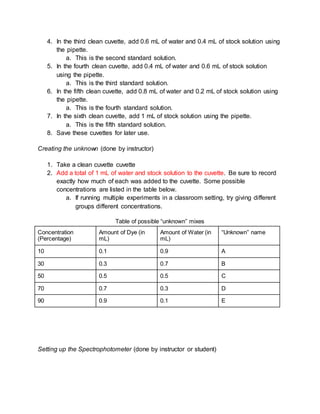
4. In the third clean cuvette, add 0.6 mL of water and 0.4 mL of stock solution using
the pipette.
a. This is the second standard solution.
5. In the fourth clean cuvette, add 0.4 mL of water and 0.6 mL of stock solution
using the pipette.
a. This is the third standard solution.
6. In the fifth clean cuvette, add 0.8 mL of water and 0.2 mL of stock solution using
the pipette.
a. This is the fourth standard solution.
7. In the sixth clean cuvette, add 1 mL of stock solution using the pipette.
a. This is the fifth standard solution.
8. Save these cuvettes for later use.
Creating the unknown (done by instructor)
1. Take a clean cuvette cuvette
2. Add a total of 1 mL of water and stock solution to the cuvette. Be sure to record
exactly how much of each was added to the cuvette. Some possible
concentrations are listed in the table below.
a. If running multiple experiments in a classroom setting, try giving different
groups different concentrations.
Table of possible “unknown” mixes
Concentration
(Percentage)
Amount of Dye (in
mL)
Amount of Water (in
mL)
“Unknown” name
10 0.1 0.9 A
30 0.3 0.7 B
50 0.5 0.5 C
70 0.7 0.3 D
90 0.9 0.1 E
Setting up the Spectrophotometer (done by instructor or student)
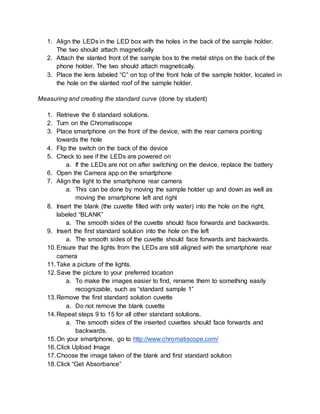
1. Align the LEDs in the LED box with the holes in the back of the sample holder.
The two should attach magnetically
2. Attach the slanted front of the sample box to the metal strips on the back of the
phone holder. The two should attach magnetically.
3. Place the lens labeled “C” on top of the front hole of the sample holder, located in
the hole on the slanted roof of the sample holder.
Measuring and creating the standard curve (done by student)
1. Retrieve the 6 standard solutions.
2. Turn on the Chromatiscope
3. Place smartphone on the front of the device, with the rear camera pointing
towards the hole
4. Flip the switch on the back of the device
5. Check to see if the LEDs are powered on
a. If the LEDs are not on after switching on the device, replace the battery
6. Open the Camera app on the smartphone
7. Align the light to the smartphone rear camera
a. This can be done by moving the sample holder up and down as well as
moving the smartphone left and right
8. Insert the blank (the cuvette filled with only water) into the hole on the right,
labeled “BLANK”
a. The smooth sides of the cuvette should face forwards and backwards.
9. Insert the first standard solution into the hole on the left
a. The smooth sides of the cuvette should face forwards and backwards.
10.Ensure that the lights from the LEDs are still aligned with the smartphone rear
camera
11.Take a picture of the lights.
12.Save the picture to your preferred location
a. To make the images easier to find, rename them to something easily
recognizable, such as “standard sample 1”
13.Remove the first standard solution cuvette
a. Do not remove the blank cuvette
14.Repeat steps 9 to 15 for all other standard solutions.
a. The smooth sides of the inserted cuvettes should face forwards and
backwards.
15.On your smartphone, go to http://www.chromatiscope.com/
16.Click Upload Image
17.Choose the image taken of the blank and first standard solution
18.Click “Get Absorbance”
19.Record the number given along with the concentration of the first standard
solution. This can be recorded in a notebook or excel table.
20.Repeat steps 18 to 21 for all other images of the standard solutions
21.Using a graphing calculator or desired computer program, create a line of best fit
22.Record the linear equation for later use
Measuring and determining the unknown concentration (done by student)
1. Obtain an unknown from the instructor.
a. Record which unknown you have if there are multiple kinds of unknowns
2. Ensure that the LEDs are still on
a. If the LEDs are not on, ensure the switch is flipped on
b. If the switch is flipped on and the LEDs are still off, replace the battery
3. Ensure the blank is still inserted into the right slot labeled “BLANK”
4. Insert the unknown into the hole on the left
5. Place smartphone on the front of the device, with the rear camera pointing
towards the hole
6. Open the Camera app on the smartphone
7. Align the light to the smartphone rear camera
a. This can be done by moving the sample holder up and down as well as
moving the smartphone left and right
8. Take a picture of the lights.
9. Save the picture to your preferred location
a. To make the images easier to find, rename them to something easily
recognizable, such as “standard sample 1”
10.On your smartphone, go to http://www.chromatiscope.com/
11.Click Upload Image
12.Choose the image taken of the blank and unknown
13.Click “Get Absorbance”
14.Record the absorbance
15.Using the equation obtained when creating the standard curve and the
absorbance of the unknown, determine the experimental concentration from the
absorbance.
a. This can be done with basic algebra on the linear equation, which is in the
form A = m*c + b, with t being the only unknown variable.
16.Ask the instructor for the actual concentration of the unknown
17.Calculate the error of your experimental concentration with this equation:
Error = [(calculated concentration) - (actual concentration)]/(actual concentration)
Clean up (Done by students)
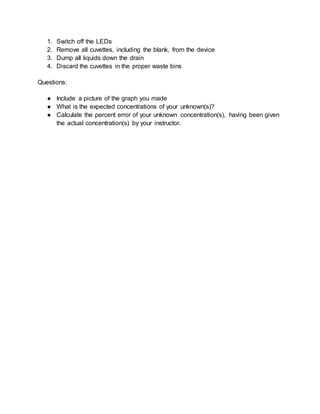
1. Switch off the LEDs
2. Remove all cuvettes, including the blank, from the device
3. Dump all liquids down the drain
4. Discard the cuvettes in the proper waste bins
Questions:
● Include a picture of the graph you made
● What is the expected concentrations of your unknown(s)?
● Calculate the percent error of your unknown concentration(s), having been given
the actual concentration(s) by your instructor.
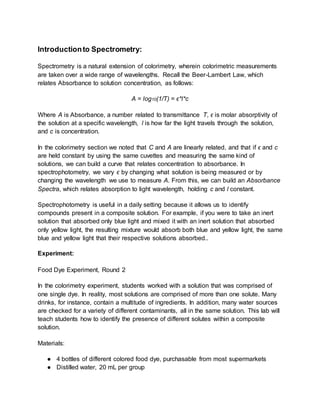
Introductionto Spectrometry:
Spectrometry is a natural extension of colorimetry, wherein colorimetric measurements
are taken over a wide range of wavelengths. Recall the Beer-Lambert Law, which
relates Absorbance to solution concentration, as follows:
A = log10(1/T) = ϵ*l*c
Where A is Absorbance, a number related to transmittance T, ϵ is molar absorptivity of
the solution at a specific wavelength, l is how far the light travels through the solution,
and c is concentration.
In the colorimetry section we noted that C and A are linearly related, and that if ϵ and c
are held constant by using the same cuvettes and measuring the same kind of
solutions, we can build a curve that relates concentration to absorbance. In
spectrophotometry, we vary ϵ by changing what solution is being measured or by
changing the wavelength we use to measure A. From this, we can build an Absorbance
Spectra, which relates absorption to light wavelength, holding c and l constant.
Spectrophotometry is useful in a daily setting because it allows us to identify
compounds present in a composite solution. For example, if you were to take an inert
solution that absorbed only blue light and mixed it with an inert solution that absorbed
only yellow light, the resulting mixture would absorb both blue and yellow light, the same
blue and yellow light that their respective solutions absorbed..
Experiment:
Food Dye Experiment, Round 2
In the colorimetry experiment, students worked with a solution that was comprised of
one single dye. In reality, most solutions are comprised of more than one solute. Many
drinks, for instance, contain a multitude of ingredients. In addition, many water sources
are checked for a variety of different contaminants, all in the same solution. This lab will
teach students how to identify the presence of different solutes within a composite
solution.
Materials:
● 4 bottles of different colored food dye, purchasable from most supermarkets
● Distilled water, 20 mL per group
● Cuvettes, clean (10 per group)
● Graphing calculator or graphing software
● Chromatiscope
● Smart Phone
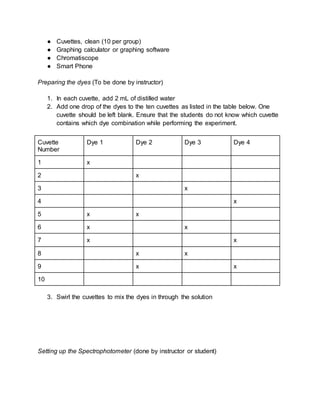
Preparing the dyes (To be done by instructor)
1. In each cuvette, add 2 mL of distilled water
2. Add one drop of the dyes to the ten cuvettes as listed in the table below. One
cuvette should be left blank. Ensure that the students do not know which cuvette
contains which dye combination while performing the experiment.
Cuvette
Number
Dye 1 Dye 2 Dye 3 Dye 4
1 x
2 x
3 x
4 x
5 x x
6 x x
7 x x
8 x x
9 x x
10
3. Swirl the cuvettes to mix the dyes in through the solution
Setting up the Spectrophotometer (done by instructor or student)
1. Align the LEDs in the LED box with the holes in the back of the sample holder.
The two should attach magnetically
2. Attach the slanted front of the sample box to the metal strips on the back of the
phone holder. The two should attach magnetically.
3. Place the lens labeled “S” on top of the front hole of the sample holder, located in
the hole on the slanted roof of the sample holder.
Measuring and creating the standard curve (done by student)
1. Retrieve the 10 standard solutions.
2. Turn on the Chromatiscope
3. Place smartphone on the front of the device, with the rear camera pointing
towards the hole
4. Flip the switch on the back of the device
5. Check to see if the LEDs are powered on
a. If the LEDs are not on after switching on the device, replace the battery
6. Open the Camera app on the smartphone
7. Align the light to the smartphone rear camera
a. This can be done by moving the sample holder up and down as well as
moving the smartphone left and right
8. Insert the filter labeled “Spectroscope” into the rear slit.
a. The label should be facing frontwards
9. Insert the first cuvette into the hole on the left
a. The smooth sides of the cuvette should face forwards and backwards.
10.Ensure that the lights from the LEDs are still aligned with the smartphone rear
camera
11.Take a picture of the lights.
12.Save the picture to your preferred location
a. To make the images easier to find, rename them to something easily
recognizable, such as “standard sample 1”
13.Remove the first standard solution cuvette
a. Do not remove the blank cuvette
14.Repeat steps 9 to 15 for all other standard solutions.
a. The smooth sides of the inserted cuvettes should face forwards and
backwards.
15.On your smartphone, go to http://www.chromatiscope.com/
16.Click Upload Image
17.Choose the image taken of the blank and first standard solution
18.Look at the spectra and record what colors you are able to see
19.Repeat steps 18 to 21 for all other images of the standard solutions
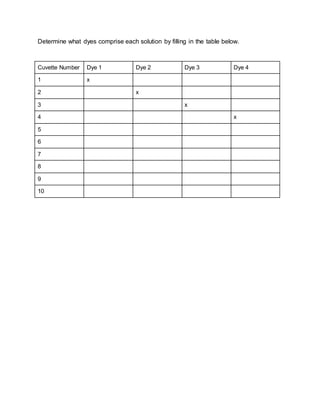
Determine what dyes comprise each solution by filling in the table below.
Cuvette Number Dye 1 Dye 2 Dye 3 Dye 4
1 x
2 x
3 x
4 x
5
6
7
8
9
10
Cell Growth Measurement Experiment
In this lab, students learn how to measure and perform cell growth in media. Culturing
cells is an important skill to know in many biotechnology labs. In addition, students learn
that cell growth is nonlinear, both in the exponential initial growth phase and the
logarithmic phase when the media is saturated. In this lab, students predict how long it
takes for a culture of cells to reach saturation.
Materials:
● 10 g Bacto-Tryptone
● 5 g Bacto-Yeast extract
● 10 g NaCl
● 1 L Distilled or deionized water
● pH meter
● 1 Liter glass bottle
● 1 tube of K12 E.Coli (or equivalent)
● Cuvettes, cleaned (6 per group)
● Incubator, set to 37 degrees Celsius (98 degrees Fahrenheit)
● Chromatiscope
● Smart phone
Creating 1 Liter of LB Media stock (Done by instructor)
1. Add 10 g Bacto-Tryptone, 5 g Bacto-Yeast extract, and 10 g NaCl into a 1 L
bottle.
2. Add 950 mL of distilled or deionized water into the bottle
3. Insert the pH meter into bottle
4. Titrate with 5M NaOH until pH of 7 is reached
5. Remove the pH meter
6. Fill to the 1 L mark with distilled or deionized water
7. Autoclave to sterilize the LB media
Setting up the Spectrophotometer (done by instructor or student)
1. Align the LEDs in the LED box with the holes in the back of the sample holder.
The two should attach magnetically.
2. Attach the slanted front of the sample box to the metal strips on the back of the
phone holder. The two should attach magnetically.
3. Place the lens labeled “C” on top of the front hole of the sample holder, located in
the hole on the slanted roof of the sample holder. The two should attach
magentically.
4. Add 1 mL of sterile LB media to a clean cuvette
a. This is the blank for the experiment. Do not lose this cuvette.
5. Turn on the Chromatiscope
6. Place smartphone on the front of the device, with the rear camera pointing
towards the hole
7. Flip the switch on the back of the device
8. Check to see if the LEDs are powered on
a. If the LEDs are not on after switching on the device, replace the battery
9. Open the Camera app on the smartphone
10.Align the light to the smartphone rear camera
a. This can be done by moving the sample holder up and down as well as
moving the smartphone left and right
11.Insert the blank (the cuvette filled with sterile LB Media) into the hole on the right,
labeled “BLANK”
a. The smooth sides of the cuvette should face forwards and backwards.
Creating and measuring the Cell Culture (Done by students)
1. Add 1 tube of bacteria to the 1 Liter bottle
2. Place in incubator and let sit
3. After half an hour, collect 1 mL of LB from the bottle in the incubator
4. Put sample in a clean cuvette
5. Insert the cuvette with cultured bacteria into the slot on the left
a. The smooth sides of the cuvette should face forwards and backwards.
6. Ensure that the lights from the LEDs are still aligned with the smartphone rear
camera
7. Take a picture of the lights.
8. Save the picture to your preferred location
a. To make the images easier to find, rename them to something easily
recognizable, such as “sample 1”
9. Remove the sample cuvette
a. Do not remove the blank cuvette
10.Repeat steps 3 to 11 three more times, such that there is a sample collected
after a half hour, an hour, an hour and a half, and two hours after the start of
incubation
11.Leave the 1 Liter in the incubator
12.On your smartphone, go to http://www.chromatiscope.com/
13.Click Upload Image
14.Choose the image taken of the blank and first sample
15.Click “Get Absorbance”
16.Record the number given along with the time elapsed of the first sample
17.Repeat steps 13 to 16 for all other images of the standard solutions
18.Using a graphing calculator or program, create a line of best fit
19.Save the linear equation and blank for later use.
Preparing the saturated bacterial solution (Done by instructor)
1. Remove the 1 L bottle from the incubator
a. Only do this after it has incubated for about 6 hours total
2. Put in a 4 degree Celsius (40 degree Fahrenheit) fridge to chill and stop growth
3. Let chill until the class reconvenes
Determining time to saturation (Done by student)
1. Collect 1 mL of saturated bacteria culture from the 1 Liter bottle
2. Place the sample into a clean cuvette
3. Obtain the Chromatiscope
4. Turn on the Chromatiscope
5. Place smartphone on the front of the device, with the rear camera pointing
towards the hole
6. Flip the switch on the back of the device
7. Check to see if the LEDs are powered on
a. If the LEDs are not on after switching on the device, replace the battery
8. Open the Camera app on the smartphone
9. Align the light to the smartphone rear camera
a. This can be done by moving the sample holder up and down as well as
moving the smartphone left and right
10.Place the saved blank into the hole on the right, labeled “BLANK”
11.Place the sample into the hole on the left
12.Ensure that the lights from the LEDs are still aligned with the smartphone rear
camera
13.Take a picture of the lights.
14.Save the picture to your preferred location
a. To make the images easier to find, rename them to something easily
recognizable, such as “saturated sample”
15.On your smartphone, go to http://www.chromatiscope.com/
16.Click Upload Image
17.Choose the image taken of the blank and first sample
18.Click “Get Absorbance”
19.Using the linear equation obtained from creating the curve and the absorbance of
the saturated sample, find the amount of time it took for the bacteria to reach
saturation
a. This can be done with basic algebra on the linear equation, which is in the
form A = m*t + b, with t being the only unknown variable.
Clean up (Done by students)
5. Switch off the LEDs
6. Remove all cuvettes, including the blank, from the device
7. Dump all liquids down the drain
8. Discard the cuvettes in the proper waste bins
Microscopy
The Chromatiscope can also be set up to be used as a microscope.
Setting up the Chromatiscope in Microscope configuration
1. Unfold the front and back flaps of the Phone Holder
2. Place the slanted front side of the Sample Holder against the metal strips located
behind the Phone Holder
a. Ensure that the Sample Holder is magnetically secured to the Phone
Holder
3. Place the LED box to the rear of the Sample Holder
a. Ensure that the battery case is on top of the LED Box, and that the box is
magnetically secured to the Sample Holder
4. Place the lens labeled “Microscope Rear” on top of the fiber optic cable
Using the Microscope to take pictures
1. Place phone on the front of the phone holder
a. The rear camera must be over the central hole on the slanted roof.
2. Align the rear camera over the microscope lens
a. This can be done by sliding the sample holder up and down and moving
the phone left and right. This can be done through use of the camera app.
3. Insert prepared slide into the thin slit on the side of the phone holder
a. Ensure that the slide has a slide cover and is properly prepared for use in
a standard microscope
4. Remove the phone
5. Place lens labeled “Microscope Front” on top of the slide
6. Replace the phone and realign the rear camera.
7. Go to www.chromatiscope.com
8. Navigate to the “Microscope” tab
9. Click “Upload Image”
10.Select your camera app from a list of options
11.Take a picture of your sample
12.Tap “OK.” The image should now be contained within the image frame on the
webapp for analysis.
Alternatively, you can take a picture of your sample using your camera app if you wish
to have the image saved to your phone.
Compiled manual version 1

Compiled manual version 1

  • 1.
  • 2.
    Copyright © Chromatiscope IntroductiontoColorimetry: Colorimetry is an optical method used to determine the concentration of solutions using visible light. In this method, a device shines a bright colored light through a liquid sample and measures how much light exits. More concentrated solutions let less light exit. The ratio between the amount of light that enters a sample and the amount that exits a sample is known as transmittance, denoted as T. T = (Amount of Light that exits sample)/(Amount of light that enters sample) The relationship between solution concentration and transmittance can be expressed by the linear equation known as the Beer-Lambert Law, which states: A = log10(1/T) = ϵ*l*c
  • 3.
    Where A isAbsorbance, a number related to transmittance, ϵ is molar absorptivity of the solution, which is assumed constant, l is how far the light travels through the solution, which is also assumed constant, and c is concentration. Thus, we can see that there is a linear relationship between A and c. We can simplify this equation to: A = m*c Where m is a constant. This equation works for any solution whose concentration can be expressed in molarity. This can be concentration of contaminants in the tap water, the amount of glucose in your blood, the quality of the brass in your doorknobs, or the concentration of caffeine in the most popular energy drinks. Even things like beer color is determined through colorimetry. Colorimetry also works for determining biological cell density in liquid. However, these measurements do not use the Beer-Lambert Law, as cell density cannot be expressed in molarity. Instead, an absorbance-like measurement known as OD600 is used instead. There is no single equation that can relate OD600 to cell concentration, and thus is used as relative measurements. Despite this, absorbance measurements are still useful in determining growth rates of various microbial organisms. OD600 is often described linearly in relation to time.
  • 4.
    Experiments: Food Dye Experiment Theexact color of many liquids depends on the amount and type of solutes and solvent contained within each solution. For colored solutions, the more concentrated it becomes, the darker it appears and the more light it absorbs. A good example this can be seen in is with soda. As a soda dispenser runs out of syrup, the liquid that is dispensed is of a lighter shade. This experiment lets students determine with reasonable accuracy the amount of solute in a solution through the use of light and optics rather than through chemical reactions. Materials: ● 1 bottle of food dye, purchasable from most supermarkets ● 1 Liter of Water, distilled ● Cuvettes, clean (7 per group) ● 1 Graduated cylinder, 100 mL ● 1 Flask, 150 mL ● 1 Pipette, 1 mL ● Graphing calculator or graphing software ● Chromatiscope ● Smart Phone Preparing the stock solution (done by instructor) 1. Pipette exactly 1 mL of food dye into the flask 2. Pour exactly 99 mL of water into the graduated cylinder. 3. Pour all the water in the graduated cylinder into the flask 4. Swirl the flask until the dye and water mix fully Creating the standard solutions (done by either student or instructor) 1. Take 6 clean cuvettes 2. In the first clean cuvette, add 1 mL of water using the pipette. a. This is the blank for the experiment. Do not lose this cuvette. 3. In the second clean cuvette, add 0.8 mL of water and 0.2 mL of stock solution using the pipette. a. This is the first standard solution.
  • 5.
    4. In thethird clean cuvette, add 0.6 mL of water and 0.4 mL of stock solution using the pipette. a. This is the second standard solution. 5. In the fourth clean cuvette, add 0.4 mL of water and 0.6 mL of stock solution using the pipette. a. This is the third standard solution. 6. In the fifth clean cuvette, add 0.8 mL of water and 0.2 mL of stock solution using the pipette. a. This is the fourth standard solution. 7. In the sixth clean cuvette, add 1 mL of stock solution using the pipette. a. This is the fifth standard solution. 8. Save these cuvettes for later use. Creating the unknown (done by instructor) 1. Take a clean cuvette cuvette 2. Add a total of 1 mL of water and stock solution to the cuvette. Be sure to record exactly how much of each was added to the cuvette. Some possible concentrations are listed in the table below. a. If running multiple experiments in a classroom setting, try giving different groups different concentrations. Table of possible “unknown” mixes Concentration (Percentage) Amount of Dye (in mL) Amount of Water (in mL) “Unknown” name 10 0.1 0.9 A 30 0.3 0.7 B 50 0.5 0.5 C 70 0.7 0.3 D 90 0.9 0.1 E Setting up the Spectrophotometer (done by instructor or student)
  • 6.
    1. Align theLEDs in the LED box with the holes in the back of the sample holder. The two should attach magnetically 2. Attach the slanted front of the sample box to the metal strips on the back of the phone holder. The two should attach magnetically. 3. Place the lens labeled “C” on top of the front hole of the sample holder, located in the hole on the slanted roof of the sample holder. Measuring and creating the standard curve (done by student) 1. Retrieve the 6 standard solutions. 2. Turn on the Chromatiscope 3. Place smartphone on the front of the device, with the rear camera pointing towards the hole 4. Flip the switch on the back of the device 5. Check to see if the LEDs are powered on a. If the LEDs are not on after switching on the device, replace the battery 6. Open the Camera app on the smartphone 7. Align the light to the smartphone rear camera a. This can be done by moving the sample holder up and down as well as moving the smartphone left and right 8. Insert the blank (the cuvette filled with only water) into the hole on the right, labeled “BLANK” a. The smooth sides of the cuvette should face forwards and backwards. 9. Insert the first standard solution into the hole on the left a. The smooth sides of the cuvette should face forwards and backwards. 10.Ensure that the lights from the LEDs are still aligned with the smartphone rear camera 11.Take a picture of the lights. 12.Save the picture to your preferred location a. To make the images easier to find, rename them to something easily recognizable, such as “standard sample 1” 13.Remove the first standard solution cuvette a. Do not remove the blank cuvette 14.Repeat steps 9 to 15 for all other standard solutions. a. The smooth sides of the inserted cuvettes should face forwards and backwards. 15.On your smartphone, go to http://www.chromatiscope.com/ 16.Click Upload Image 17.Choose the image taken of the blank and first standard solution 18.Click “Get Absorbance”
  • 7.
    19.Record the numbergiven along with the concentration of the first standard solution. This can be recorded in a notebook or excel table. 20.Repeat steps 18 to 21 for all other images of the standard solutions 21.Using a graphing calculator or desired computer program, create a line of best fit 22.Record the linear equation for later use Measuring and determining the unknown concentration (done by student) 1. Obtain an unknown from the instructor. a. Record which unknown you have if there are multiple kinds of unknowns 2. Ensure that the LEDs are still on a. If the LEDs are not on, ensure the switch is flipped on b. If the switch is flipped on and the LEDs are still off, replace the battery 3. Ensure the blank is still inserted into the right slot labeled “BLANK” 4. Insert the unknown into the hole on the left 5. Place smartphone on the front of the device, with the rear camera pointing towards the hole 6. Open the Camera app on the smartphone 7. Align the light to the smartphone rear camera a. This can be done by moving the sample holder up and down as well as moving the smartphone left and right 8. Take a picture of the lights. 9. Save the picture to your preferred location a. To make the images easier to find, rename them to something easily recognizable, such as “standard sample 1” 10.On your smartphone, go to http://www.chromatiscope.com/ 11.Click Upload Image 12.Choose the image taken of the blank and unknown 13.Click “Get Absorbance” 14.Record the absorbance 15.Using the equation obtained when creating the standard curve and the absorbance of the unknown, determine the experimental concentration from the absorbance. a. This can be done with basic algebra on the linear equation, which is in the form A = m*c + b, with t being the only unknown variable. 16.Ask the instructor for the actual concentration of the unknown 17.Calculate the error of your experimental concentration with this equation: Error = [(calculated concentration) - (actual concentration)]/(actual concentration) Clean up (Done by students)
  • 8.
    1. Switch offthe LEDs 2. Remove all cuvettes, including the blank, from the device 3. Dump all liquids down the drain 4. Discard the cuvettes in the proper waste bins Questions: ● Include a picture of the graph you made ● What is the expected concentrations of your unknown(s)? ● Calculate the percent error of your unknown concentration(s), having been given the actual concentration(s) by your instructor.
  • 9.
    Introductionto Spectrometry: Spectrometry isa natural extension of colorimetry, wherein colorimetric measurements are taken over a wide range of wavelengths. Recall the Beer-Lambert Law, which relates Absorbance to solution concentration, as follows: A = log10(1/T) = ϵ*l*c Where A is Absorbance, a number related to transmittance T, ϵ is molar absorptivity of the solution at a specific wavelength, l is how far the light travels through the solution, and c is concentration. In the colorimetry section we noted that C and A are linearly related, and that if ϵ and c are held constant by using the same cuvettes and measuring the same kind of solutions, we can build a curve that relates concentration to absorbance. In spectrophotometry, we vary ϵ by changing what solution is being measured or by changing the wavelength we use to measure A. From this, we can build an Absorbance Spectra, which relates absorption to light wavelength, holding c and l constant. Spectrophotometry is useful in a daily setting because it allows us to identify compounds present in a composite solution. For example, if you were to take an inert solution that absorbed only blue light and mixed it with an inert solution that absorbed only yellow light, the resulting mixture would absorb both blue and yellow light, the same blue and yellow light that their respective solutions absorbed.. Experiment: Food Dye Experiment, Round 2 In the colorimetry experiment, students worked with a solution that was comprised of one single dye. In reality, most solutions are comprised of more than one solute. Many drinks, for instance, contain a multitude of ingredients. In addition, many water sources are checked for a variety of different contaminants, all in the same solution. This lab will teach students how to identify the presence of different solutes within a composite solution. Materials: ● 4 bottles of different colored food dye, purchasable from most supermarkets ● Distilled water, 20 mL per group
  • 10.
    ● Cuvettes, clean(10 per group) ● Graphing calculator or graphing software ● Chromatiscope ● Smart Phone Preparing the dyes (To be done by instructor) 1. In each cuvette, add 2 mL of distilled water 2. Add one drop of the dyes to the ten cuvettes as listed in the table below. One cuvette should be left blank. Ensure that the students do not know which cuvette contains which dye combination while performing the experiment. Cuvette Number Dye 1 Dye 2 Dye 3 Dye 4 1 x 2 x 3 x 4 x 5 x x 6 x x 7 x x 8 x x 9 x x 10 3. Swirl the cuvettes to mix the dyes in through the solution Setting up the Spectrophotometer (done by instructor or student)
  • 11.
    1. Align theLEDs in the LED box with the holes in the back of the sample holder. The two should attach magnetically 2. Attach the slanted front of the sample box to the metal strips on the back of the phone holder. The two should attach magnetically. 3. Place the lens labeled “S” on top of the front hole of the sample holder, located in the hole on the slanted roof of the sample holder. Measuring and creating the standard curve (done by student) 1. Retrieve the 10 standard solutions. 2. Turn on the Chromatiscope 3. Place smartphone on the front of the device, with the rear camera pointing towards the hole 4. Flip the switch on the back of the device 5. Check to see if the LEDs are powered on a. If the LEDs are not on after switching on the device, replace the battery 6. Open the Camera app on the smartphone 7. Align the light to the smartphone rear camera a. This can be done by moving the sample holder up and down as well as moving the smartphone left and right 8. Insert the filter labeled “Spectroscope” into the rear slit. a. The label should be facing frontwards 9. Insert the first cuvette into the hole on the left a. The smooth sides of the cuvette should face forwards and backwards. 10.Ensure that the lights from the LEDs are still aligned with the smartphone rear camera 11.Take a picture of the lights. 12.Save the picture to your preferred location a. To make the images easier to find, rename them to something easily recognizable, such as “standard sample 1” 13.Remove the first standard solution cuvette a. Do not remove the blank cuvette 14.Repeat steps 9 to 15 for all other standard solutions. a. The smooth sides of the inserted cuvettes should face forwards and backwards. 15.On your smartphone, go to http://www.chromatiscope.com/ 16.Click Upload Image 17.Choose the image taken of the blank and first standard solution 18.Look at the spectra and record what colors you are able to see 19.Repeat steps 18 to 21 for all other images of the standard solutions
  • 12.
    Determine what dyescomprise each solution by filling in the table below. Cuvette Number Dye 1 Dye 2 Dye 3 Dye 4 1 x 2 x 3 x 4 x 5 6 7 8 9 10
  • 13.
    Cell Growth MeasurementExperiment In this lab, students learn how to measure and perform cell growth in media. Culturing cells is an important skill to know in many biotechnology labs. In addition, students learn that cell growth is nonlinear, both in the exponential initial growth phase and the logarithmic phase when the media is saturated. In this lab, students predict how long it takes for a culture of cells to reach saturation. Materials: ● 10 g Bacto-Tryptone ● 5 g Bacto-Yeast extract ● 10 g NaCl ● 1 L Distilled or deionized water ● pH meter ● 1 Liter glass bottle ● 1 tube of K12 E.Coli (or equivalent) ● Cuvettes, cleaned (6 per group) ● Incubator, set to 37 degrees Celsius (98 degrees Fahrenheit) ● Chromatiscope ● Smart phone Creating 1 Liter of LB Media stock (Done by instructor) 1. Add 10 g Bacto-Tryptone, 5 g Bacto-Yeast extract, and 10 g NaCl into a 1 L bottle. 2. Add 950 mL of distilled or deionized water into the bottle 3. Insert the pH meter into bottle 4. Titrate with 5M NaOH until pH of 7 is reached 5. Remove the pH meter 6. Fill to the 1 L mark with distilled or deionized water 7. Autoclave to sterilize the LB media Setting up the Spectrophotometer (done by instructor or student) 1. Align the LEDs in the LED box with the holes in the back of the sample holder. The two should attach magnetically. 2. Attach the slanted front of the sample box to the metal strips on the back of the phone holder. The two should attach magnetically.
  • 14.
    3. Place thelens labeled “C” on top of the front hole of the sample holder, located in the hole on the slanted roof of the sample holder. The two should attach magentically. 4. Add 1 mL of sterile LB media to a clean cuvette a. This is the blank for the experiment. Do not lose this cuvette. 5. Turn on the Chromatiscope 6. Place smartphone on the front of the device, with the rear camera pointing towards the hole 7. Flip the switch on the back of the device 8. Check to see if the LEDs are powered on a. If the LEDs are not on after switching on the device, replace the battery 9. Open the Camera app on the smartphone 10.Align the light to the smartphone rear camera a. This can be done by moving the sample holder up and down as well as moving the smartphone left and right 11.Insert the blank (the cuvette filled with sterile LB Media) into the hole on the right, labeled “BLANK” a. The smooth sides of the cuvette should face forwards and backwards. Creating and measuring the Cell Culture (Done by students) 1. Add 1 tube of bacteria to the 1 Liter bottle 2. Place in incubator and let sit 3. After half an hour, collect 1 mL of LB from the bottle in the incubator 4. Put sample in a clean cuvette 5. Insert the cuvette with cultured bacteria into the slot on the left a. The smooth sides of the cuvette should face forwards and backwards. 6. Ensure that the lights from the LEDs are still aligned with the smartphone rear camera 7. Take a picture of the lights. 8. Save the picture to your preferred location a. To make the images easier to find, rename them to something easily recognizable, such as “sample 1” 9. Remove the sample cuvette a. Do not remove the blank cuvette 10.Repeat steps 3 to 11 three more times, such that there is a sample collected after a half hour, an hour, an hour and a half, and two hours after the start of incubation 11.Leave the 1 Liter in the incubator 12.On your smartphone, go to http://www.chromatiscope.com/
  • 15.
    13.Click Upload Image 14.Choosethe image taken of the blank and first sample 15.Click “Get Absorbance” 16.Record the number given along with the time elapsed of the first sample 17.Repeat steps 13 to 16 for all other images of the standard solutions 18.Using a graphing calculator or program, create a line of best fit 19.Save the linear equation and blank for later use. Preparing the saturated bacterial solution (Done by instructor) 1. Remove the 1 L bottle from the incubator a. Only do this after it has incubated for about 6 hours total 2. Put in a 4 degree Celsius (40 degree Fahrenheit) fridge to chill and stop growth 3. Let chill until the class reconvenes Determining time to saturation (Done by student) 1. Collect 1 mL of saturated bacteria culture from the 1 Liter bottle 2. Place the sample into a clean cuvette 3. Obtain the Chromatiscope 4. Turn on the Chromatiscope 5. Place smartphone on the front of the device, with the rear camera pointing towards the hole 6. Flip the switch on the back of the device 7. Check to see if the LEDs are powered on a. If the LEDs are not on after switching on the device, replace the battery 8. Open the Camera app on the smartphone 9. Align the light to the smartphone rear camera a. This can be done by moving the sample holder up and down as well as moving the smartphone left and right 10.Place the saved blank into the hole on the right, labeled “BLANK” 11.Place the sample into the hole on the left 12.Ensure that the lights from the LEDs are still aligned with the smartphone rear camera 13.Take a picture of the lights. 14.Save the picture to your preferred location a. To make the images easier to find, rename them to something easily recognizable, such as “saturated sample” 15.On your smartphone, go to http://www.chromatiscope.com/ 16.Click Upload Image 17.Choose the image taken of the blank and first sample
  • 16.
    18.Click “Get Absorbance” 19.Usingthe linear equation obtained from creating the curve and the absorbance of the saturated sample, find the amount of time it took for the bacteria to reach saturation a. This can be done with basic algebra on the linear equation, which is in the form A = m*t + b, with t being the only unknown variable. Clean up (Done by students) 5. Switch off the LEDs 6. Remove all cuvettes, including the blank, from the device 7. Dump all liquids down the drain 8. Discard the cuvettes in the proper waste bins
  • 17.
    Microscopy The Chromatiscope canalso be set up to be used as a microscope. Setting up the Chromatiscope in Microscope configuration 1. Unfold the front and back flaps of the Phone Holder 2. Place the slanted front side of the Sample Holder against the metal strips located behind the Phone Holder a. Ensure that the Sample Holder is magnetically secured to the Phone Holder 3. Place the LED box to the rear of the Sample Holder a. Ensure that the battery case is on top of the LED Box, and that the box is magnetically secured to the Sample Holder 4. Place the lens labeled “Microscope Rear” on top of the fiber optic cable Using the Microscope to take pictures 1. Place phone on the front of the phone holder a. The rear camera must be over the central hole on the slanted roof. 2. Align the rear camera over the microscope lens a. This can be done by sliding the sample holder up and down and moving the phone left and right. This can be done through use of the camera app. 3. Insert prepared slide into the thin slit on the side of the phone holder a. Ensure that the slide has a slide cover and is properly prepared for use in a standard microscope 4. Remove the phone 5. Place lens labeled “Microscope Front” on top of the slide 6. Replace the phone and realign the rear camera. 7. Go to www.chromatiscope.com 8. Navigate to the “Microscope” tab 9. Click “Upload Image” 10.Select your camera app from a list of options 11.Take a picture of your sample 12.Tap “OK.” The image should now be contained within the image frame on the webapp for analysis. Alternatively, you can take a picture of your sample using your camera app if you wish to have the image saved to your phone.