UNIONS IN C
UNIONS
• A union is a special data type available in C that allows to store
different data types in the same memory location.
• You can define a union with many members, but only one member can
contain a value at any given time.
• Unions provide an efficient way of using the same memory location
for multiple-purpose.
DEFINING A UNION
• To define a union, you must use the union statement in the same way as you
did while defining a structure.
• The union statement defines a new data type with more than one member for
your program. The format of the union statement is as follows −
union [union tag] {
member definition;
member definition;
...
member definition;
} [one or more union variables];
CREATING A UNION VARIABLE
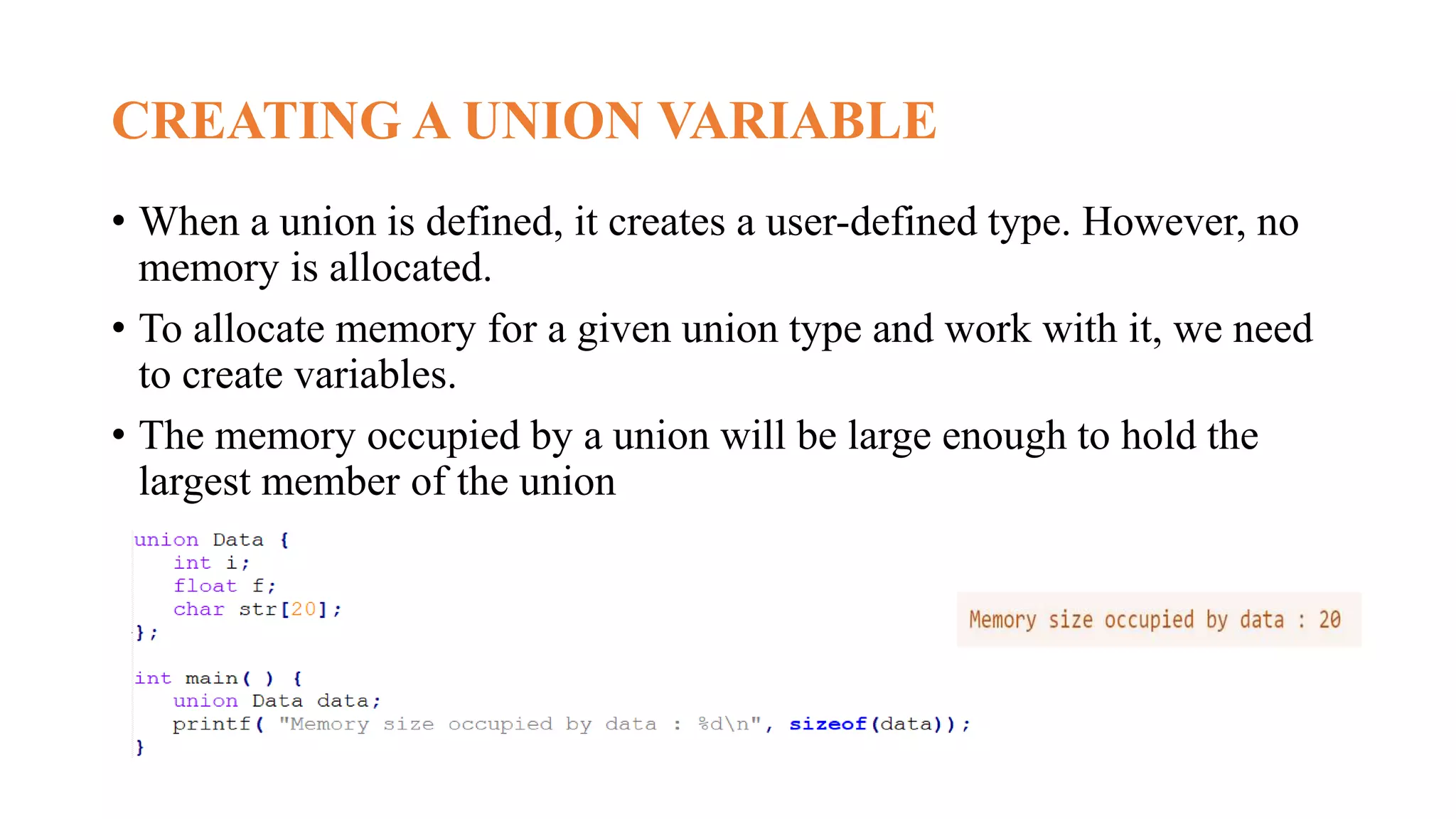
• When a union is defined, it creates a user-defined type. However, no
memory is allocated.
• To allocate memory for a given union type and work with it, we need
to create variables.
• The memory occupied by a union will be large enough to hold the
largest member of the union
ACCESSING UNION MEMBERS
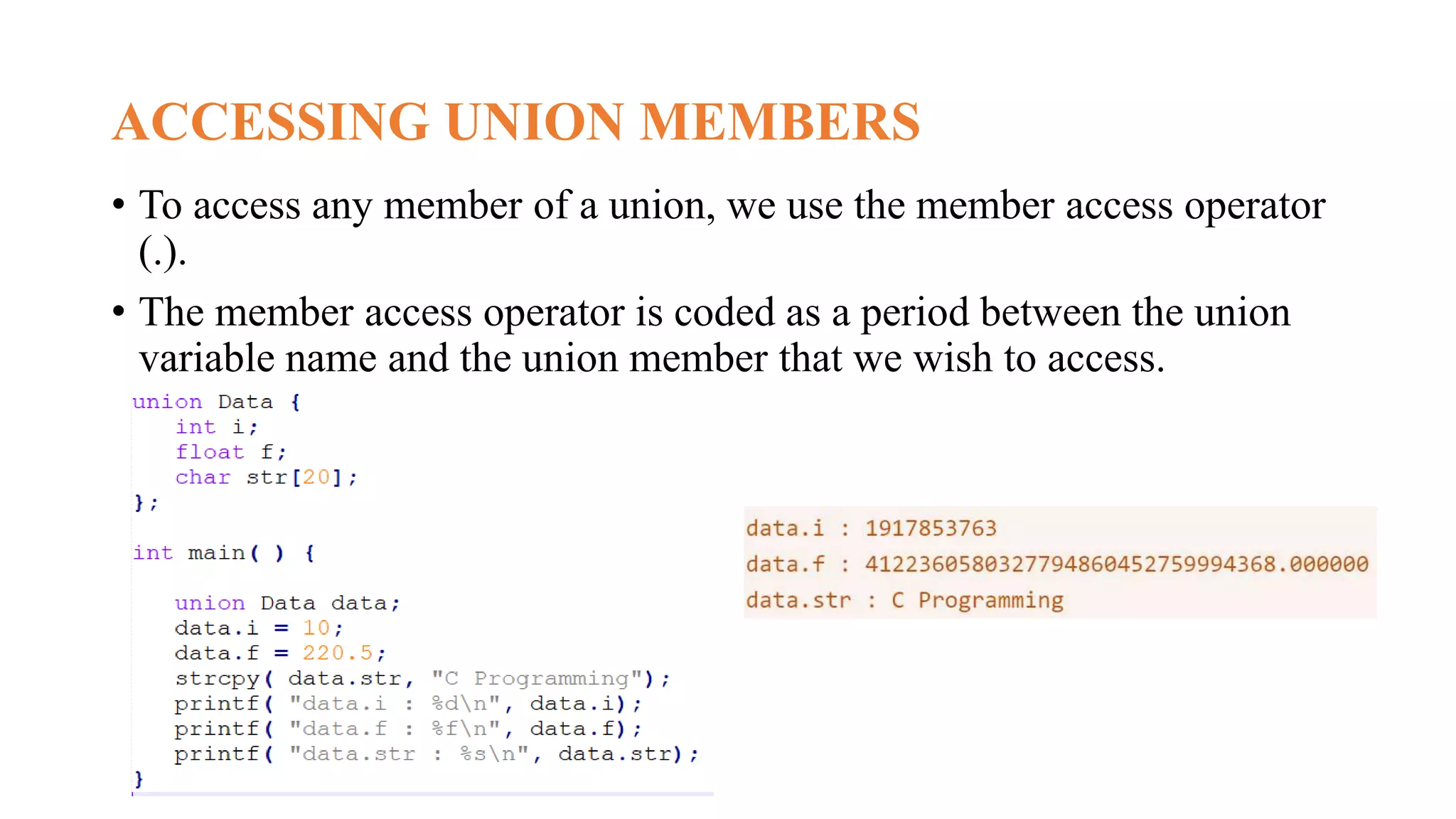
• To access any member of a union, we use the member access operator
(.).
• The member access operator is coded as a period between the union
variable name and the union member that we wish to access.
SIZE OF UNION
• The size of the union is based on the size of
the largest member of the union.
• As we know, the size of int is 4 bytes, size
of char is 1 byte, size of float is 4 bytes, and
the size of double is 8 bytes.
• Since the double variable occupies the
largest memory among all the four
variables, so total 8 bytes will be allocated
in the memory.
• Therefore, the output of the program would
be 8 bytes.
ACCESSING MEMBERS USING POINTERS
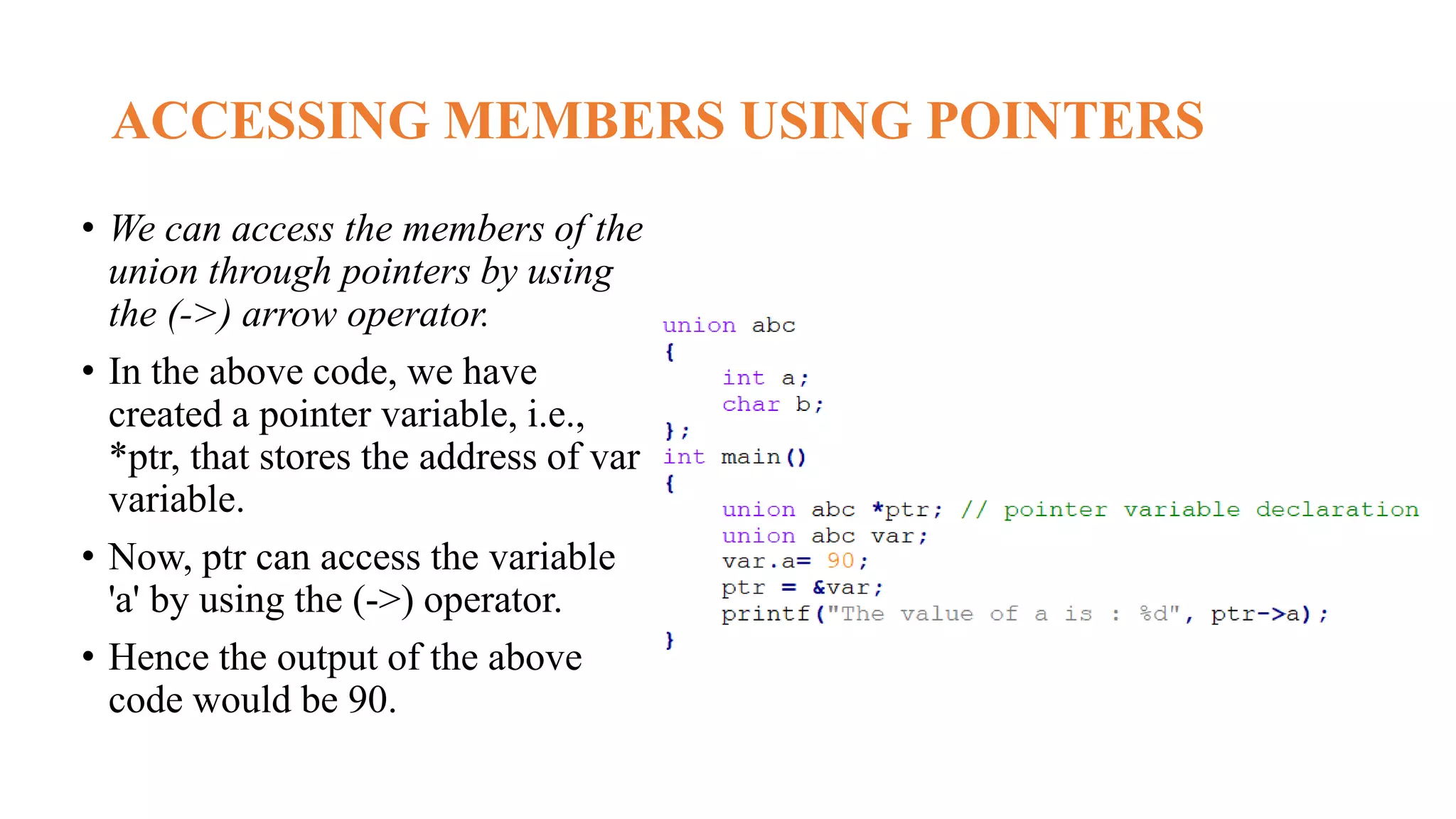
• We can access the members of the
union through pointers by using
the (->) arrow operator.
• In the above code, we have
created a pointer variable, i.e.,
*ptr, that stores the address of var
variable.
• Now, ptr can access the variable
'a' by using the (->) operator.
• Hence the output of the above
code would be 90.
STRUCTURE V/S UNION
11
UNIONS IN C.pptx
UNIONS IN C.pptx

UNIONS IN C.pptx

  • 1.
  • 2.
    UNIONS • A unionis a special data type available in C that allows to store different data types in the same memory location. • You can define a union with many members, but only one member can contain a value at any given time. • Unions provide an efficient way of using the same memory location for multiple-purpose.
  • 3.
    DEFINING A UNION •To define a union, you must use the union statement in the same way as you did while defining a structure. • The union statement defines a new data type with more than one member for your program. The format of the union statement is as follows − union [union tag] { member definition; member definition; ... member definition; } [one or more union variables];
  • 4.
    CREATING A UNIONVARIABLE • When a union is defined, it creates a user-defined type. However, no memory is allocated. • To allocate memory for a given union type and work with it, we need to create variables. • The memory occupied by a union will be large enough to hold the largest member of the union
  • 5.
    ACCESSING UNION MEMBERS •To access any member of a union, we use the member access operator (.). • The member access operator is coded as a period between the union variable name and the union member that we wish to access.
  • 6.
    SIZE OF UNION •The size of the union is based on the size of the largest member of the union. • As we know, the size of int is 4 bytes, size of char is 1 byte, size of float is 4 bytes, and the size of double is 8 bytes. • Since the double variable occupies the largest memory among all the four variables, so total 8 bytes will be allocated in the memory. • Therefore, the output of the program would be 8 bytes.
  • 7.
    ACCESSING MEMBERS USINGPOINTERS • We can access the members of the union through pointers by using the (->) arrow operator. • In the above code, we have created a pointer variable, i.e., *ptr, that stores the address of var variable. • Now, ptr can access the variable 'a' by using the (->) operator. • Hence the output of the above code would be 90.
  • 8.
  • 11.