The Central processingUnit
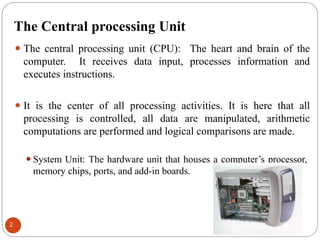
⚫ The central processing unit (CPU): The heart and brain of the
computer. It receives data input, processes information and
executes instructions.
⚫ It is the center of all processing activities. It is here that all
processing is controlled, all data are manipulated, arithmetic
computations are performed and logical comparisons are made.
⚫System Unit: The hardware unit that houses a computer’s processor,
memory chips, ports, and add-in boards.
2
3.
CPU components
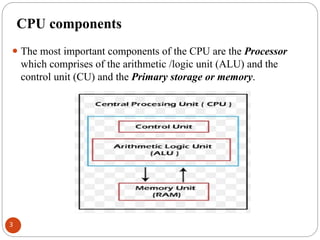
⚫ Themost important components of the CPU are the Processor
which comprises of the arithmetic /logic unit (ALU) and the
control unit (CU) and the Primary storage or memory.
3
4.
Control Unit
⚫ TheControl Unit regulates the computer operations much as a
“traffic cop” would. Its main functions are:
⚫select and interpret instructions and to send appropriate signals to other
units in the computer for their execution.
⚫direct the flow of data through the CPU, and to and from other devices.
⚫control, supervise, and oversees all the activities of a computer and
monitors the execution of any program processed.
⚫ The control unit can execute only one instruction at a time, but it
can execute instructions so quickly (millions per second) that it
can appear to do many different things simultaneously.
4
5.
Arithmetic/Logic Unit
⚫ Thearithmetic/logic unit (ALU) performs the four basic
arithmetic operations of addition, subtraction, multiplication and
division as well as the logical operations of the comparison
between two pieces of data i.e. Greater Than (>), Less Than (<),
Equal To (=)
⚫ All computer applications - from weather predictions to word
processing are achieved through these five simple operations.
⚫ The ALU operations are performed sequentially (one after
another), based on instructions from the control unit.
5
6.
Primary Storage
⚫ Primarystorage or main memory (RAM) stores data and program
statements for the CPU. It has four basic purposes;
⚫To store data that have been input until they are transferred to
the arithmetic/logic unit for processing.
⚫To store data and results during intermediate
stages of processing.
⚫To hold data after processing until they are transferred
to an
output device.
⚫To hold program statements or instructions received from input
devices and from secondary storage.
6
7.
Primary Storage cont’d
⚫The larger the memory area, the larger the programs that can be
stored and executed.
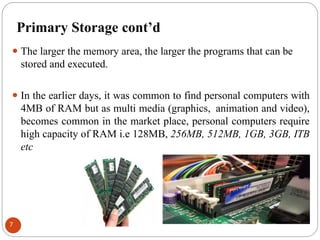
⚫ In the earlier days, it was common to find personal computers with
4MB of RAM but as multi media (graphics, animation and video),
becomes common in the market place, personal computers require
high capacity of RAM i.e 128MB, 256MB, 512MB, 1GB, 3GB, ITB
etc
7
8.
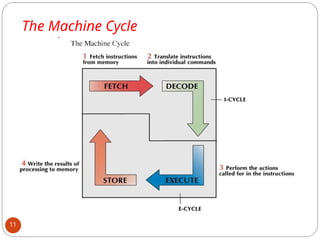
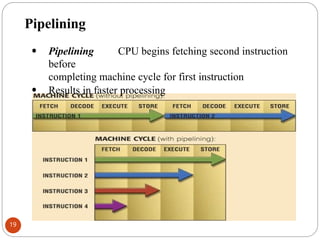
The processing sequence- Machine cycle
⚫ The CPU follows a set of steps-called a machine cycle for each
instruction it carries out.
⚫ By using a technique called pipelining, many CPUs can
process more than one instruction at a time.
⚫ The machine cycle includes two smaller cycles:
◦ The instruction cycle
◦ The execution cycle.
8
9.
Instruction cycle
⚫ Fetching:Before the CPU can execute an instruction, the
control unit must retrieve (or “fetch”) a command or data from
the computers memory.
⚫ Decoding: Before a command can be executed, the control
unit must break down (decode) the command into instructions
that correspond to those in the instruction set, and then sends to
ALU.
9
10.
Execution cycle
⚫ Executioncycle. The data is manipulated (worked on) by
the computer.
⚫ The results of the manipulations are stored memory.
⚫ After the execution cycle, the process begins the next instruction.
This process continues until the last instruction of the program
has been executed.
10
System Clock
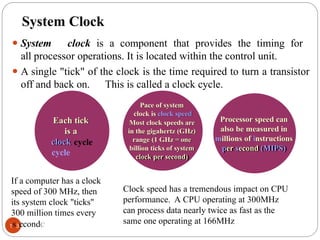
⚫ Systemclock is a component that provides the timing for
all processor operations. It is located within the control unit.
⚫ A single "tick" of the clock is the time required to turn a transistor
off and back on. This is called a clock cycle.
Each tick
is a
clock
cycle
Pace of system
clock is clock speed
Most clock speeds are
in the gigahertz (GHz)
range (1 GHz = one
billion ticks of system
clock per second)
Processor speed can
also be measured in
millions of instructions
per second (MIPS)
Clock speed has a tremendous impact on CPU
performance. A CPU operating at 300MHz
can process data nearly twice as fast as the
same one operating at 166MHz
If a computer has a clock
speed of 300 MHz, then
its system clock "ticks"
300 million times every
1s3econdC
14.
Bus Width
⚫ Abus is a path between the components of a computer.
⚫ There are two main buses in a computer: the internal (or system
bus) and the external or (expansion) bus.
⚫The system bus resides on the motherboard and
connects the CPU to other devices that resides on the
motherboard.
⚫An expansion bus connects external devices, such as
keyboard, mouse, modem, printer, etc to the CPU.
⚫The system bus has two parts: the data bus and the address
bus.
14
15.
Bus cont’d…
⚫ TheData bus is an electrical path composed of parallel wires that
connects the CPU, memory, and the other hardware devices on the
motherboard.
⚫ The address bus is a set of wires similar to the data bus. The
address bus connects CPU to memory and carries only memory
address
⚫ Requests for data are sent from the CPU to RAM along the address bus.
The requests consist of a memory address.
⚫ The data comes back to the CPU via the data bus.
⚫ The number of wires in the bus affects the speed at which data
can travel between hardware components.
⚫ Because each wire can transfer 1 bit of data at a time, an 8-wire
bus can move 8 bits at a time which is a full byte.
15
16.
Registers
⚫ Registers arehigh speed memory locations built directly into
the ALU and used to hold instructions and data currently being
processed.
⚫ The size of the registers (also called word size) determines the
amount of data with which the computer can work at any
given time.
⚫ The bigger the word size, the more quickly the computer
can process a set of data.
⚫Modern PCs today most often have 32-bit or 64-bit registers and
are referred to as the 32-bit processors and 64-bit processors.
⚫ This indicates the size or width of the processor's registers and
the amount of data the processor can handle in a single
operation.
16
17.
Cache memory
⚫ Movingdata between RAM and the CPU’s registers is one of
the most time consuming operations a CPU must perform.
⚫ A partial solution to this problem is to include a cache memory
in the CPU.
⚫ Cache memory is similar to RAM, except that it is extremely
fast compared to normal memory and it is used in a different
way.
⚫ When a program is running and the CPU needs to read data
from RAM, the CPU checks first to see whether the data is in
cache memory.
⚫ If the data is not there, the CPU reads it from RAM into its
registers but also keeps a copy of the data in cache
memory.
17
18.
Cache memory
⚫The nexttime the CPU needs the same data, it finds it in
the cache memory and saves the time needed to load
that data from RAM.
⚫Therefore, cache memory speeds up processing by
storing frequently used data or instructions in its
high speed memory.
⚫Cache memory is sometimes described in levels of
closeness and accessibility to the
microprocessor.
⚫Cache built into the CPU itself is referred to as Level 1
(L1) cache and sometimes Level 2 (L2). Cache that
resides on a the motherboard is also called Level 3
(L3) cache.
18
19.
Pipelining
• Pipelining CPUbegins fetching second instruction
before
completing machine cycle for first instruction
• Results in faster processing
19
20.
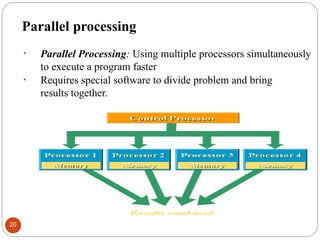
Parallel processing
• ParallelProcessing: Using multiple processors simultaneously
to execute a program faster
• Requires special software to divide problem and bring
results together.
20
21.
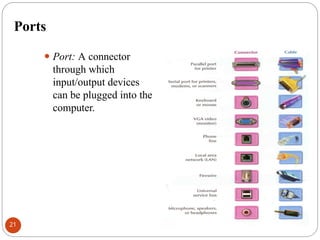
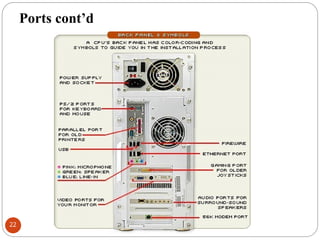
Ports
⚫ Port: Aconnector
through which
input/output devices
can be plugged into the
computer.
21
Universal Serial Bus
⚫UniversalSerial Bus (USB): A general purpose port that can
connect up to 128 devices, and also hot swappable, meaning
that devices can be plugged in or unplugged without having
to shut down or reboot the system.
⚫Plug and Play: The ability to install devices into a computer
when the computer itself makes any necessary
internal adjustments.
23
24.
Note
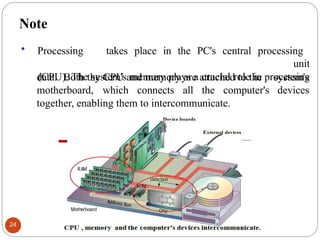
• Processing takesplace in the PC's central processing
unit
(CPU). The system's memory plays a crucial role in processing
system's
devices
data. Both the CPU and memory are attached to the
motherboard, which connects all the computer's
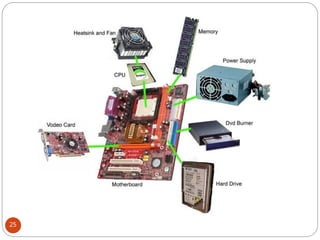
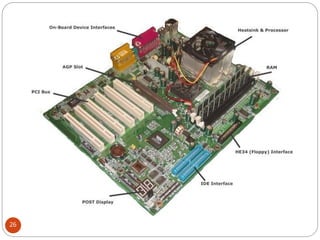
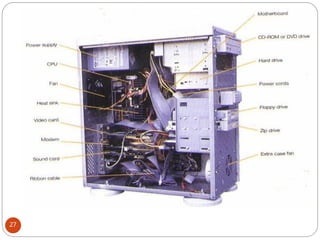
together, enabling them to intercommunicate.
24
Discussion questions
1. Discussthe different types of Random Access Memory (RAM)
2. Define the following computer concepts/terms:
⚫Information Technology (IT)
⚫Motherboard
⚫Smartphone
⚫Teleworking
⚫Spooling
3. State the difference between impact printers and non-impact
printers?
4. Compare and contrast the features of CRT (Cathode Ray
Tube) monitors and liquid crystal displays (LCD) monitors?
5. Discuss two ways to measure the performance of a hard
disk?
28
![Lecture_2_-_Looking_Inside_the_CPU[1].ppt](https://cdn.slidesharecdn.com/ss_thumbnails/lecture2-lookinginsidethecpu1-250528091117-adfe95d0-thumbnail.jpg?width=640&height=640&fit=bounds)


