Essential Network Hardware for Business
Success
This guide outlines the critical network hardware components every business needs to build a reliable, secure, and
scalable digital infrastructure. From basic connectivity devices to advanced security systems, we'll explore the ten
essential elements that form the backbone of your business operations4whether you're a small office or a multi-
site enterprise. Understanding these components will help you make informed decisions about your network
architecture, ensuring business continuity and positioning your company for future growth.
Internet Connectivity: Modems and Routers
Modems
A modem serves as the gateway between your
internal network and your Internet Service Provider
(ISP). This device converts digital data from your
network into signals compatible with your internet
connection type (cable, DSL, fiber). While modems are
typically provided by your ISP, businesses should
ensure they have sufficient bandwidth capacity for
their operations.
For optimal performance, verify that your modem
supports your subscribed internet speed and consider
requesting an upgrade if your business expands or
internet needs increase.
Business-Grade Routers
Unlike basic home routers, business environments
require enterprise-grade routers that offer advanced
features. These include support for Virtual Private
Networks (VPNs), Virtual Local Area Networks
(VLANs), Quality of Service (QoS) management, and
multi-WAN failover for redundancy.
Manufacturers like Cisco, Juniper, and Fortinet offer
routers specifically designed for business
environments, with the Cisco Integrated Services
Router (ISR) series being particularly popular for its
reliability and scalability.
Network Switches: The Connectivity Hub
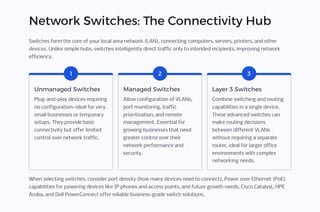
Switches form the core of your local area network (LAN), connecting computers, servers, printers, and other
devices. Unlike simple hubs, switches intelligently direct traffic only to intended recipients, improving network
efficiency.
1
Unmanaged Switches
Plug-and-play devices requiring
no configuration4ideal for very
small businesses or temporary
setups. They provide basic
connectivity but offer limited
control over network traffic.
2
Managed Switches
Allow configuration of VLANs,
port monitoring, traffic
prioritization, and remote
management. Essential for
growing businesses that need
greater control over their
network performance and
security.
3
Layer 3 Switches
Combine switching and routing
capabilities in a single device.
These advanced switches can
make routing decisions
between different VLANs
without requiring a separate
router, ideal for larger office
environments with complex
networking needs.
When selecting switches, consider port density (how many devices need to connect), Power over Ethernet (PoE)
capabilities for powering devices like IP phones and access points, and future growth needs. Cisco Catalyst, HPE
Aruba, and Dell PowerConnect offer reliable business-grade switch solutions.
Wireless Connectivity: Access Points
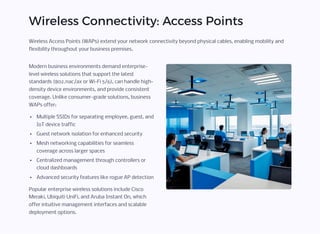
Wireless Access Points (WAPs) extend your network connectivity beyond physical cables, enabling mobility and
flexibility throughout your business premises.
Modern business environments demand enterprise-
level wireless solutions that support the latest
standards (802.11ac/ax or Wi-Fi 5/6), can handle high-
density device environments, and provide consistent
coverage. Unlike consumer-grade solutions, business
WAPs offer:
Multiple SSIDs for separating employee, guest, and
IoT device traffic
Guest network isolation for enhanced security
Mesh networking capabilities for seamless
coverage across larger spaces
Centralized management through controllers or
cloud dashboards
Advanced security features like rogue AP detection
Popular enterprise wireless solutions include Cisco
Meraki, Ubiquiti UniFi, and Aruba Instant On, which
offer intuitive management interfaces and scalable
deployment options.
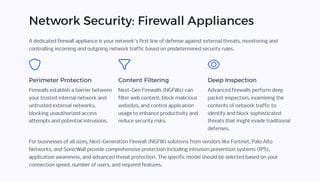
Network Security: Firewall Appliances
A dedicated firewall appliance is your network's first line of defense against external threats, monitoring and
controlling incoming and outgoing network traffic based on predetermined security rules.
Perimeter Protection
Firewalls establish a barrier between
your trusted internal network and
untrusted external networks,
blocking unauthorized access
attempts and potential intrusions.
Content Filtering
Next-Gen Firewalls (NGFWs) can
filter web content, block malicious
websites, and control application
usage to enhance productivity and
reduce security risks.
Deep Inspection
Advanced firewalls perform deep
packet inspection, examining the
contents of network traffic to
identify and block sophisticated
threats that might evade traditional
defenses.
For businesses of all sizes, Next-Generation Firewall (NGFW) solutions from vendors like Fortinet, Palo Alto
Networks, and SonicWall provide comprehensive protection including intrusion prevention systems (IPS),
application awareness, and advanced threat protection. The specific model should be selected based on your
connection speed, number of users, and required features.
Data Storage: NAS and File Servers
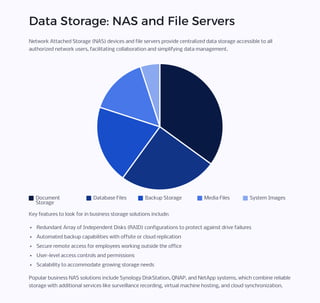
Network Attached Storage (NAS) devices and file servers provide centralized data storage accessible to all
authorized network users, facilitating collaboration and simplifying data management.
Document
Storage
Database Files Backup Storage Media Files System Images
Key features to look for in business storage solutions include:
Redundant Array of Independent Disks (RAID) configurations to protect against drive failures
Automated backup capabilities with offsite or cloud replication
Secure remote access for employees working outside the office
User-level access controls and permissions
Scalability to accommodate growing storage needs
Popular business NAS solutions include Synology DiskStation, QNAP, and NetApp systems, which combine reliable
storage with additional services like surveillance recording, virtual machine hosting, and cloud synchronization.
Centralized Management: Network
Controllers
As networks grow more complex, centralized management platforms become essential for efficient oversight and
administration of network components.
Unified Administration
Network controllers provide a
single interface for configuring,
monitoring, and updating
multiple network devices
including switches, routers, and
access points4eliminating the
need to manage each device
individually.
Real-Time Visibility
These platforms offer
comprehensive dashboards
showing network health, traffic
patterns, connected devices,
and potential issues4enabling
proactive management and
faster troubleshooting.
Automated Operations
Advanced controllers can
automate routine tasks like
firmware updates, security
policy enforcement, and
onboarding of new devices4
reducing IT workload and
human error.
Cloud-based management platforms like Cisco Meraki Dashboard, Ubiquiti UniFi Controller, or Aruba Central allow
administrators to manage networks from anywhere, while on-premises solutions like Cisco DNA Center offer
greater control for organizations with strict data sovereignty requirements.
Physical Infrastructure: Cabling and
Organization
Structured Cabling
A well-designed physical infrastructure is essential for
network reliability and future expansion. Proper
structured cabling includes:
Category-rated cables (Cat6/6a or higher for new
installations)
Standardized wall outlets and patch panels
Cable management systems to prevent tangling
and damage
Proper labeling for easy identification
Adherence to TIA/EIA standards for installation
For growing businesses, implementing structured
cabling with patch panels in a centralized equipment
rack simplifies troubleshooting and reconfiguration
while minimizing downtime.
Network Equipment Housing
Properly housing network equipment protects your
investment and ensures optimal operation. Consider:
Server racks or cabinets with proper ventilation
Cable management accessories
Environmental monitoring for temperature and
humidity
Secure access to prevent unauthorized tampering
Proper grounding to prevent electrical damage
Small businesses might start with a wall-mounted
rack, while larger organizations typically require full
equipment cabinets or dedicated server rooms with
advanced cooling and power systems.
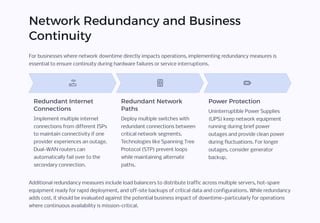
Network Redundancy and Business
Continuity
For businesses where network downtime directly impacts operations, implementing redundancy measures is
essential to ensure continuity during hardware failures or service interruptions.
Redundant Internet
Connections
Implement multiple internet
connections from different ISPs
to maintain connectivity if one
provider experiences an outage.
Dual-WAN routers can
automatically fail over to the
secondary connection.
Redundant Network
Paths
Deploy multiple switches with
redundant connections between
critical network segments.
Technologies like Spanning Tree
Protocol (STP) prevent loops
while maintaining alternate
paths.
Power Protection
Uninterruptible Power Supplies
(UPS) keep network equipment
running during brief power
outages and provide clean power
during fluctuations. For longer
outages, consider generator
backup.
Additional redundancy measures include load balancers to distribute traffic across multiple servers, hot-spare
equipment ready for rapid deployment, and off-site backups of critical data and configurations. While redundancy
adds cost, it should be evaluated against the potential business impact of downtime4particularly for operations
where continuous availability is mission-critical.
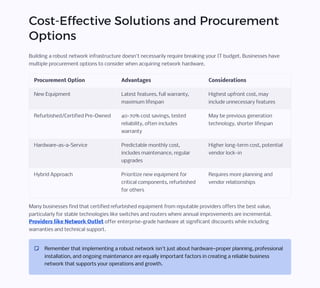
Cost-Effective Solutions and Procurement
Options
Building a robust network infrastructure doesn't necessarily require breaking your IT budget. Businesses have
multiple procurement options to consider when acquiring network hardware.
Procurement Option Advantages Considerations
New Equipment Latest features, full warranty,
maximum lifespan
Highest upfront cost, may
include unnecessary features
Refurbished/Certified Pre-Owned 40-70% cost savings, tested
reliability, often includes
warranty
May be previous generation
technology, shorter lifespan
Hardware-as-a-Service Predictable monthly cost,
includes maintenance, regular
upgrades
Higher long-term cost, potential
vendor lock-in
Hybrid Approach Prioritize new equipment for
critical components, refurbished
for others
Requires more planning and
vendor relationships
Many businesses find that certified refurbished equipment from reputable providers offers the best value,
particularly for stable technologies like switches and routers where annual improvements are incremental.
Providers like Network Outlet offer enterprise-grade hardware at significant discounts while including
warranties and technical support.
Remember that implementing a robust network isn't just about hardware4proper planning, professional
installation, and ongoing maintenance are equally important factors in creating a reliable business
network that supports your operations and growth.

Essential-Network-Hardware-for-Business-Success.pdf

  • 1.
    Essential Network Hardwarefor Business Success This guide outlines the critical network hardware components every business needs to build a reliable, secure, and scalable digital infrastructure. From basic connectivity devices to advanced security systems, we'll explore the ten essential elements that form the backbone of your business operations4whether you're a small office or a multi- site enterprise. Understanding these components will help you make informed decisions about your network architecture, ensuring business continuity and positioning your company for future growth.
  • 2.
    Internet Connectivity: Modemsand Routers Modems A modem serves as the gateway between your internal network and your Internet Service Provider (ISP). This device converts digital data from your network into signals compatible with your internet connection type (cable, DSL, fiber). While modems are typically provided by your ISP, businesses should ensure they have sufficient bandwidth capacity for their operations. For optimal performance, verify that your modem supports your subscribed internet speed and consider requesting an upgrade if your business expands or internet needs increase. Business-Grade Routers Unlike basic home routers, business environments require enterprise-grade routers that offer advanced features. These include support for Virtual Private Networks (VPNs), Virtual Local Area Networks (VLANs), Quality of Service (QoS) management, and multi-WAN failover for redundancy. Manufacturers like Cisco, Juniper, and Fortinet offer routers specifically designed for business environments, with the Cisco Integrated Services Router (ISR) series being particularly popular for its reliability and scalability.
  • 3.
    Network Switches: TheConnectivity Hub Switches form the core of your local area network (LAN), connecting computers, servers, printers, and other devices. Unlike simple hubs, switches intelligently direct traffic only to intended recipients, improving network efficiency. 1 Unmanaged Switches Plug-and-play devices requiring no configuration4ideal for very small businesses or temporary setups. They provide basic connectivity but offer limited control over network traffic. 2 Managed Switches Allow configuration of VLANs, port monitoring, traffic prioritization, and remote management. Essential for growing businesses that need greater control over their network performance and security. 3 Layer 3 Switches Combine switching and routing capabilities in a single device. These advanced switches can make routing decisions between different VLANs without requiring a separate router, ideal for larger office environments with complex networking needs. When selecting switches, consider port density (how many devices need to connect), Power over Ethernet (PoE) capabilities for powering devices like IP phones and access points, and future growth needs. Cisco Catalyst, HPE Aruba, and Dell PowerConnect offer reliable business-grade switch solutions.
  • 4.
    Wireless Connectivity: AccessPoints Wireless Access Points (WAPs) extend your network connectivity beyond physical cables, enabling mobility and flexibility throughout your business premises. Modern business environments demand enterprise- level wireless solutions that support the latest standards (802.11ac/ax or Wi-Fi 5/6), can handle high- density device environments, and provide consistent coverage. Unlike consumer-grade solutions, business WAPs offer: Multiple SSIDs for separating employee, guest, and IoT device traffic Guest network isolation for enhanced security Mesh networking capabilities for seamless coverage across larger spaces Centralized management through controllers or cloud dashboards Advanced security features like rogue AP detection Popular enterprise wireless solutions include Cisco Meraki, Ubiquiti UniFi, and Aruba Instant On, which offer intuitive management interfaces and scalable deployment options.
  • 5.
    Network Security: FirewallAppliances A dedicated firewall appliance is your network's first line of defense against external threats, monitoring and controlling incoming and outgoing network traffic based on predetermined security rules. Perimeter Protection Firewalls establish a barrier between your trusted internal network and untrusted external networks, blocking unauthorized access attempts and potential intrusions. Content Filtering Next-Gen Firewalls (NGFWs) can filter web content, block malicious websites, and control application usage to enhance productivity and reduce security risks. Deep Inspection Advanced firewalls perform deep packet inspection, examining the contents of network traffic to identify and block sophisticated threats that might evade traditional defenses. For businesses of all sizes, Next-Generation Firewall (NGFW) solutions from vendors like Fortinet, Palo Alto Networks, and SonicWall provide comprehensive protection including intrusion prevention systems (IPS), application awareness, and advanced threat protection. The specific model should be selected based on your connection speed, number of users, and required features.
  • 6.
    Data Storage: NASand File Servers Network Attached Storage (NAS) devices and file servers provide centralized data storage accessible to all authorized network users, facilitating collaboration and simplifying data management. Document Storage Database Files Backup Storage Media Files System Images Key features to look for in business storage solutions include: Redundant Array of Independent Disks (RAID) configurations to protect against drive failures Automated backup capabilities with offsite or cloud replication Secure remote access for employees working outside the office User-level access controls and permissions Scalability to accommodate growing storage needs Popular business NAS solutions include Synology DiskStation, QNAP, and NetApp systems, which combine reliable storage with additional services like surveillance recording, virtual machine hosting, and cloud synchronization.
  • 7.
    Centralized Management: Network Controllers Asnetworks grow more complex, centralized management platforms become essential for efficient oversight and administration of network components. Unified Administration Network controllers provide a single interface for configuring, monitoring, and updating multiple network devices including switches, routers, and access points4eliminating the need to manage each device individually. Real-Time Visibility These platforms offer comprehensive dashboards showing network health, traffic patterns, connected devices, and potential issues4enabling proactive management and faster troubleshooting. Automated Operations Advanced controllers can automate routine tasks like firmware updates, security policy enforcement, and onboarding of new devices4 reducing IT workload and human error. Cloud-based management platforms like Cisco Meraki Dashboard, Ubiquiti UniFi Controller, or Aruba Central allow administrators to manage networks from anywhere, while on-premises solutions like Cisco DNA Center offer greater control for organizations with strict data sovereignty requirements.
  • 8.
    Physical Infrastructure: Cablingand Organization Structured Cabling A well-designed physical infrastructure is essential for network reliability and future expansion. Proper structured cabling includes: Category-rated cables (Cat6/6a or higher for new installations) Standardized wall outlets and patch panels Cable management systems to prevent tangling and damage Proper labeling for easy identification Adherence to TIA/EIA standards for installation For growing businesses, implementing structured cabling with patch panels in a centralized equipment rack simplifies troubleshooting and reconfiguration while minimizing downtime. Network Equipment Housing Properly housing network equipment protects your investment and ensures optimal operation. Consider: Server racks or cabinets with proper ventilation Cable management accessories Environmental monitoring for temperature and humidity Secure access to prevent unauthorized tampering Proper grounding to prevent electrical damage Small businesses might start with a wall-mounted rack, while larger organizations typically require full equipment cabinets or dedicated server rooms with advanced cooling and power systems.
  • 9.
    Network Redundancy andBusiness Continuity For businesses where network downtime directly impacts operations, implementing redundancy measures is essential to ensure continuity during hardware failures or service interruptions. Redundant Internet Connections Implement multiple internet connections from different ISPs to maintain connectivity if one provider experiences an outage. Dual-WAN routers can automatically fail over to the secondary connection. Redundant Network Paths Deploy multiple switches with redundant connections between critical network segments. Technologies like Spanning Tree Protocol (STP) prevent loops while maintaining alternate paths. Power Protection Uninterruptible Power Supplies (UPS) keep network equipment running during brief power outages and provide clean power during fluctuations. For longer outages, consider generator backup. Additional redundancy measures include load balancers to distribute traffic across multiple servers, hot-spare equipment ready for rapid deployment, and off-site backups of critical data and configurations. While redundancy adds cost, it should be evaluated against the potential business impact of downtime4particularly for operations where continuous availability is mission-critical.
  • 10.
    Cost-Effective Solutions andProcurement Options Building a robust network infrastructure doesn't necessarily require breaking your IT budget. Businesses have multiple procurement options to consider when acquiring network hardware. Procurement Option Advantages Considerations New Equipment Latest features, full warranty, maximum lifespan Highest upfront cost, may include unnecessary features Refurbished/Certified Pre-Owned 40-70% cost savings, tested reliability, often includes warranty May be previous generation technology, shorter lifespan Hardware-as-a-Service Predictable monthly cost, includes maintenance, regular upgrades Higher long-term cost, potential vendor lock-in Hybrid Approach Prioritize new equipment for critical components, refurbished for others Requires more planning and vendor relationships Many businesses find that certified refurbished equipment from reputable providers offers the best value, particularly for stable technologies like switches and routers where annual improvements are incremental. Providers like Network Outlet offer enterprise-grade hardware at significant discounts while including warranties and technical support. Remember that implementing a robust network isn't just about hardware4proper planning, professional installation, and ongoing maintenance are equally important factors in creating a reliable business network that supports your operations and growth.