


 An independent SQL Consultant
 A user of SQL Server from version 2000 onwards with 12+ years
experience.
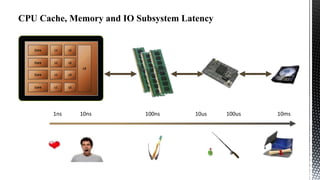
CPU Cache, Memory and IO Subsystem Latency

Core

L1

L2

Core

L1

L2

L3
Core

L1

L2

Core

L1

L2

1ns

10ns

100ns

10us

100us

10ms
C

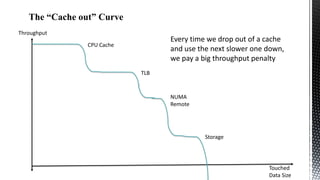
The “Cache out” Curve
Throughput

Every time we drop out of a cache
and use the next slower one down,
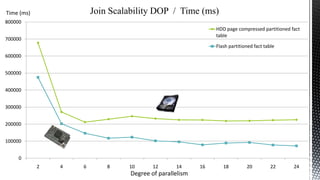
we pay a big throughput penalty

CPU Cache

TLB

NUMA
Remote

Storage

Touched
Data Size
CPCaches

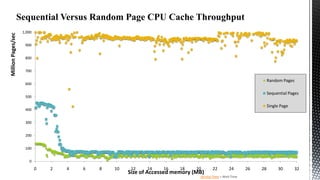
Sequential Versus Random Page CPU Cache Throughput

Million Pages/sec

C

1,000
900
800
700

Random Pages

600

Sequential Pages

500

Single Page

400
300
200
100
0

0

2

4

6

8

10

12

14

16

18

20

Size of Accessed memory (MB)

22

24

Service Time + Wait Time

26

28

30

32
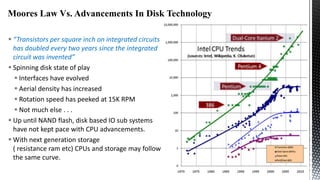
Moores Law Vs. Advancements In Disk Technology
 “Transistors per square inch on integrated circuits
has doubled every two years since the integrated
circuit was invented”
 Spinning disk state of play
 Interfaces have evolved
 Aerial density has increased
 Rotation speed has peeked at 15K RPM
 Not much else . . .
 Up until NAND flash, disk based IO sub systems
have not kept pace with CPU advancements.
 With next generation storage
( resistance ram etc) CPUs and storage may follow
the same curve.
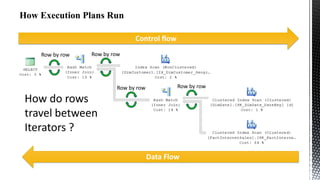
Control flow
Row by row

Row by row

Row by row

Row by row

How do rows
travel between
Iterators ?
Data Flow






Query execution which leverages
CPU caches.
Break through levels of compression
to bridge the performance gap
between IO subsystems and
modern processors.
Better query execution scalability
as the degree of parallelism
increase.
 First introduced in SQL Server 2012, greatly enhanced in 2014
 A batch is roughly 1000 rows in size and it is designed to fit into the L2/3
cache of the CPU, remember the slide on latency.
 Moving batches around is very efficient*:
One test showed that regular row-mode hash join consumed about
600 instructions per row while the batch-mode hash join needed
about 85 instructions per row and in the best case (small, dense
join domain) was a low as 16 instructions per row.
* From: Enhancements To SQL Server Column Stores
Microsoft Research
xperf –on base –stackwalk profile

SELECT p.EnglishProductName
,SUM([OrderQuantity])
,SUM([UnitPrice])
,SUM([ExtendedAmount])
,SUM([UnitPriceDiscountPct])
,SUM([DiscountAmount])
,SUM([ProductStandardCost])
,SUM([TotalProductCost])
,SUM([SalesAmount])
,SUM([TaxAmt])
,SUM([Freight])
FROM [dbo].[FactInternetSales] f
JOIN [dbo].[DimProduct] p
ON
f.ProductKey = p.ProductKey
GOUP BY p.EnglishProductName

xperfview stackwalk.etl
xperf –d stackwalk.etl
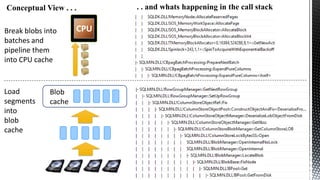
Conceptual View . . .
Break blobs into
batches and
pipeline them
into CPU cache

Load
segments
into
blob
cache

Blob
cache

CPU

. . and whats happening in the call stack
SELECT p.EnglishProductName
,SUM([OrderQuantity])
,SUM([UnitPrice])
,SUM([ExtendedAmount])
,SUM([UnitPriceDiscountPct])
,SUM([DiscountAmount])
,SUM([ProductStandardCost])
,SUM([TotalProductCost])
,SUM([SalesAmount])
,SUM([TaxAmt])
,SUM([Freight])
FROM [dbo].[FactInternetSalesFio] f
JOIN [dbo].[DimProduct] p
ON
f.ProductKey = p.ProductKey
GROUP BY p.EnglishProductName

x12

Batch

at
DOP 2
Row mode
Batch

Row mode

0

100

200

300

400

500
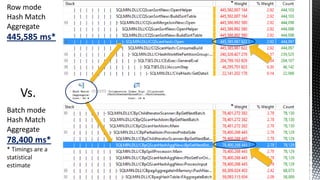
Row mode
Hash Match
Aggregate

445,585 ms*

Vs.
Batch mode
Hash Match
Aggregate

78,400 ms*
* Timings are a
statistical
estimate





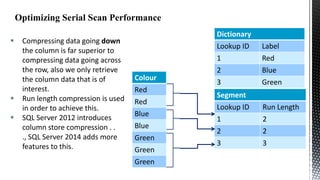
Compressing data going down
the column is far superior to
compressing data going across
the row, also we only retrieve
the column data that is of
interest.
Run length compression is used
in order to achieve this.
SQL Server 2012 introduces
column store compression . .
., SQL Server 2014 adds more
features to this.

Dictionary
Lookup ID
1
Colour
Red
Red

Blue
Blue
Green
Green
Green

Label
Red

2
3

Blue
Green

Segment
Lookup ID
1

Run Length
2

2
3

2
3
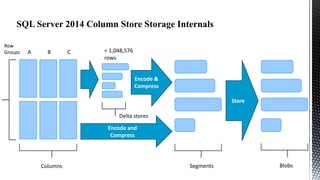
SQL Server 2014 Column Store Storage Internals
Row
Groups

A

B

C

< 1,048,576
rows

Encode &
Compress

Store
Delta stores
Encode and
Compress

Columns

Segments

Blobs
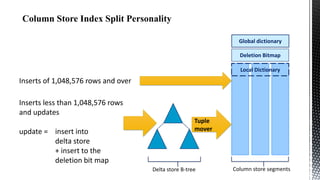
Global dictionary
Deletion Bitmap

Local Dictionary

Inserts of 1,048,576 rows and over
Inserts less than 1,048,576 rows
and updates
update = insert into
delta store
+ insert to the
deletion bit map

Tuple
mover

Delta store B-tree

Column store segments
SELECT

[ProductKey]
,[OrderDateKey]
,[DueDateKey]
,[ShipDateKey]
,[CustomerKey]
,[PromotionKey]
,[CurrencyKey]
.
.
INTO
FactInternetSalesBig
FROM
[dbo].[FactInternetSales]
CROSS JOIN master..spt_values AS a
CROSS JOIN master..spt_values AS b
WHERE
a.type
= 'p'
AND
b.type
= 'p'
AND
a.number <= 80
AND
b.number <= 100

494,116,038 rows

Size
(Mb)

80,000

70,000

60,000

57 %

50,000

74 %

92 %

94 %

40,000

30,000

20,000

10,000

0
Heap

Row compression

Page compression
Clustered column Column store archive compression
store index
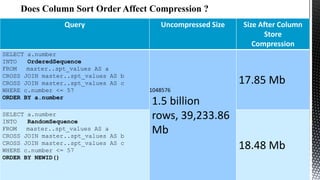
Query

SELECT a.number
INTO
OrderedSequence
FROM
master..spt_values AS a
CROSS JOIN master..spt_values AS b
CROSS JOIN master..spt_values AS c
WHERE c.number <= 57
ORDER BY a.number
SELECT a.number
INTO
RandomSequence
FROM
master..spt_values AS a
CROSS JOIN master..spt_values AS b
CROSS JOIN master..spt_values AS c
WHERE c.number <= 57
ORDER BY NEWID()

Uncompressed Size

Size After Column
Store
Compression

17.85 Mb
1048576

1.5 billion
rows, 39,233.86
Mb
18.48 Mb
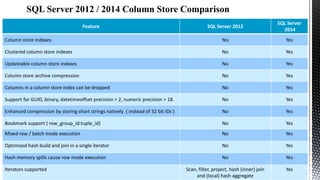
SQL Server 2012

SQL Server
2014

Column store indexes

Yes

Yes

Clustered column store indexes

No

Yes

Updateable column store indexes

No

Yes

Column store archive compression

No

Yes

Columns in a column store index can be dropped

No

Yes

Support for GUID, binary, datetimeoffset precision > 2, numeric precision > 18.

No

Yes

Enhanced compression by storing short strings natively ( instead of 32 bit IDs )

No

Yes

Bookmark support ( row_group_id:tuple_id)

No

Yes

Mixed row / batch mode execution

No

Yes

Optimized hash build and join in a single iterator

No

Yes

Hash memory spills cause row mode execution

No

Yes

Scan, filter, project, hash (inner) join
and (local) hash aggregate

Yes

Feature

Iterators supported
Disclaimer: your own mileage may vary depending on your data, hardware
and queries
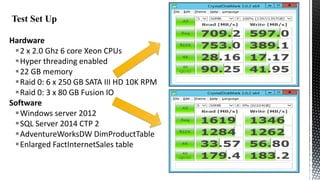
Hardware
2 x 2.0 Ghz 6 core Xeon CPUs
Hyper threading enabled
22 GB memory
Raid 0: 6 x 250 GB SATA III HD 10K RPM
Raid 0: 3 x 80 GB Fusion IO
Software
Windows server 2012
SQL Server 2014 CTP 2
AdventureWorksDW DimProductTable
Enlarged FactInternetSales table
Compression Type / Time (ms)
300000
Time (ms)

SELECT SUM([OrderQuantity])
,SUM([UnitPrice])
,SUM([ExtendedAmount])
,SUM([UnitPriceDiscountPct])
,SUM([DiscountAmount])
,SUM([ProductStandardCost])
,SUM([TotalProductCost])
,SUM([SalesAmount])
,SUM([TaxAmt])
,SUM([Freight])
FROM [dbo].[FactInternetSales]

250000

200000

150000

100000

2050Mb/s
85% CPU

50000

678Mb/s
98% CPU

256Mb/s
98% CPU

0
No compression

Row
compression

Page
No compression
Row
compression
compression

Page
compression
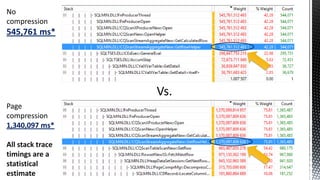
No
compression

545,761 ms*

Vs.
Page
compression
1,340,097 ms*
All stack trace
timings are a
statistical
estimate
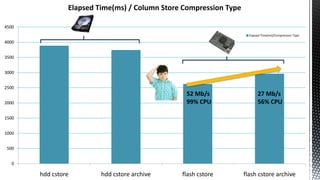
Elapsed Time(ms) / Column Store Compression Type
4500
Elapsed Time(ms)/Compression Type

4000

3500
3000
2500

52 Mb/s
99% CPU

2000

27 Mb/s
56% CPU

flash cstore

flash cstore archive

1500
1000
500
0

hdd cstore

hdd cstore archive
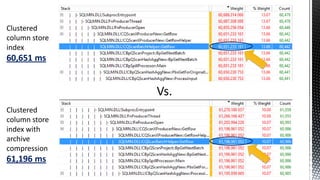
Clustered
column store
index

60,651 ms

Vs.
Clustered
column store
index with
archive
compression

61,196 ms
We will look at the best we can
do without column store indexes:
Partitioned heap fact table with page
compression for spinning disk
Partitioned heap fact table without
any compression our flash storage
Non partitioned column store indexes
on both types of store with and without
archive compression.

SELECT p.EnglishProductName
,SUM([OrderQuantity])
,SUM([UnitPrice])
,SUM([ExtendedAmount])
,SUM([UnitPriceDiscountPct])
,SUM([DiscountAmount])
,SUM([ProductStandardCost])
,SUM([TotalProductCost])
,SUM([SalesAmount])
,SUM([TaxAmt])
,SUM([Freight])
FROM [dbo].[FactInternetSales] f
JOIN [dbo].[DimProduct] p
ON
f.ProductKey = p.ProductKey
GROUP BY p.EnglishProductName
Join Scalability DOP / Time (ms)

Time (ms)
800000

HDD page compressed partitioned fact
table

700000

Flash partitioned fact table

600000
500000
400000
300000
200000
100000
0
2

4

6

8

10

12

14

Degree of parallelism

16

18

20

22

24
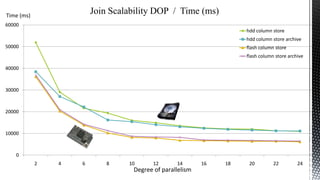
Join Scalability DOP / Time (ms)

Time (ms)
60000

hdd column store
hdd column store archive

50000

flash column store
flash column store archive

40000

30000

20000

10000

0

2

4

6

8

10

12

14

Degree of parallelism

16

18

20

22

24
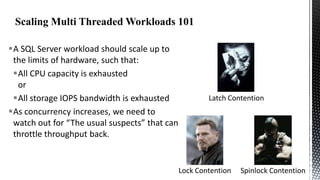
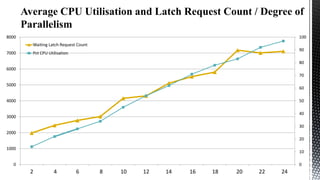
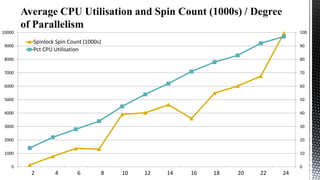
A SQL Server workload should scale up to
the limits of hardware, such that:
All CPU capacity is exhausted
or
All storage IOPS bandwidth is exhausted
As concurrency increases, we need to
watch out for “The usual suspects” that can
throttle throughput back.

Latch Contention

Lock Contention

Spinlock Contention
40000

120
Elapsed Time (ms)
Pct CPU Utilisation

35000

100

30000
80

25000

20000

60

15000

40

10000
20

5000
0

0
1
2

2
4

3
6

4
8

5
10

6
12

7
14

8
16

9
18

10
20

11
22

12
24
8000

100
Waiting Latch Request Count

7000

90

Pct CPU Utilisation

80
6000
70

5000

60

4000

50
40

3000

30
2000
20
1000

10

0

0
1
2

2
4

3
6

4
8

5
10

6
12

7
14

8
16

9
18

10
20

11
22

12
24
10000
9000

100

Spinlock Spin Count (1000s)
Pct CPU Utilisation

90

8000

80

7000

70

6000

60

5000

50

4000

40

3000

30

2000

20

1000

10

0

0
12

24

36

48

10
5

12
6

14
7

16
8

18
9

20
10

22
11

24
12
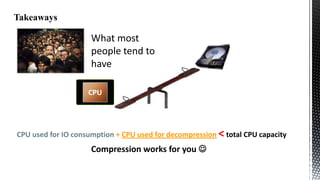
What most
people tend to
have
CPU

CPU used for IO consumption + CPU used for decompression < total CPU capacity

Compression works for you 
CPU

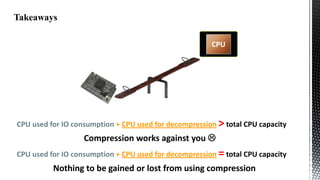
CPU used for IO consumption + CPU used for decompression > total CPU capacity

Compression works against you 
CPU used for IO consumption + CPU used for decompression = total CPU capacity

Nothing to be gained or lost from using compression
No significant difference in terms of performance between column store
compression and column store archive compression.
Pre-sorting the data makes little difference to compression ratios.
Batch mode
Provides a tremendous performance boost with just two schedulers.
Does not provide linear scalability with the hardware available.
Does provide an order of magnitude performance increase in JOIN
performance.
Performs marginally better with column store indexes which do not use
archive compression.
 Enhancements To Column Store Indexes
(SQL Server 2014 ) Microsoft Research
 SQL Server Clustered Columnstore Tuple Mover
Remus Rasanu
 SQL Server Columnstore Indexes at Teched 2013
Remus Rasanu
 The Effect of CPU Caches and Memory Access Patterns
Thomas Kejser
Thomas Kejser
Former SQL CAT member
and CTO of Livedrive
ChrisAdkin8

chris1adkin@yahoo.co.uk

http://uk.linkedin.com/in/wollatondba
Column store indexes and batch processing mode (nx power lite)

Column store indexes and batch processing mode (nx power lite)

  • 2.
     An independentSQL Consultant  A user of SQL Server from version 2000 onwards with 12+ years experience.
  • 4.
    CPU Cache, Memoryand IO Subsystem Latency Core L1 L2 Core L1 L2 L3 Core L1 L2 Core L1 L2 1ns 10ns 100ns 10us 100us 10ms
  • 5.
    C The “Cache out”Curve Throughput Every time we drop out of a cache and use the next slower one down, we pay a big throughput penalty CPU Cache TLB NUMA Remote Storage Touched Data Size
  • 6.
    CPCaches Sequential Versus RandomPage CPU Cache Throughput Million Pages/sec C 1,000 900 800 700 Random Pages 600 Sequential Pages 500 Single Page 400 300 200 100 0 0 2 4 6 8 10 12 14 16 18 20 Size of Accessed memory (MB) 22 24 Service Time + Wait Time 26 28 30 32
  • 7.
    Moores Law Vs.Advancements In Disk Technology  “Transistors per square inch on integrated circuits has doubled every two years since the integrated circuit was invented”  Spinning disk state of play  Interfaces have evolved  Aerial density has increased  Rotation speed has peeked at 15K RPM  Not much else . . .  Up until NAND flash, disk based IO sub systems have not kept pace with CPU advancements.  With next generation storage ( resistance ram etc) CPUs and storage may follow the same curve.
  • 8.
    Control flow Row byrow Row by row Row by row Row by row How do rows travel between Iterators ? Data Flow
  • 9.
       Query execution whichleverages CPU caches. Break through levels of compression to bridge the performance gap between IO subsystems and modern processors. Better query execution scalability as the degree of parallelism increase.
  • 10.
     First introducedin SQL Server 2012, greatly enhanced in 2014  A batch is roughly 1000 rows in size and it is designed to fit into the L2/3 cache of the CPU, remember the slide on latency.  Moving batches around is very efficient*: One test showed that regular row-mode hash join consumed about 600 instructions per row while the batch-mode hash join needed about 85 instructions per row and in the best case (small, dense join domain) was a low as 16 instructions per row. * From: Enhancements To SQL Server Column Stores Microsoft Research
  • 11.
    xperf –on base–stackwalk profile SELECT p.EnglishProductName ,SUM([OrderQuantity]) ,SUM([UnitPrice]) ,SUM([ExtendedAmount]) ,SUM([UnitPriceDiscountPct]) ,SUM([DiscountAmount]) ,SUM([ProductStandardCost]) ,SUM([TotalProductCost]) ,SUM([SalesAmount]) ,SUM([TaxAmt]) ,SUM([Freight]) FROM [dbo].[FactInternetSales] f JOIN [dbo].[DimProduct] p ON f.ProductKey = p.ProductKey GOUP BY p.EnglishProductName xperfview stackwalk.etl xperf –d stackwalk.etl
  • 13.
    Conceptual View .. . Break blobs into batches and pipeline them into CPU cache Load segments into blob cache Blob cache CPU . . and whats happening in the call stack
  • 14.
  • 15.
    Row mode Hash Match Aggregate 445,585ms* Vs. Batch mode Hash Match Aggregate 78,400 ms* * Timings are a statistical estimate
  • 16.
       Compressing data goingdown the column is far superior to compressing data going across the row, also we only retrieve the column data that is of interest. Run length compression is used in order to achieve this. SQL Server 2012 introduces column store compression . . ., SQL Server 2014 adds more features to this. Dictionary Lookup ID 1 Colour Red Red Blue Blue Green Green Green Label Red 2 3 Blue Green Segment Lookup ID 1 Run Length 2 2 3 2 3
  • 17.
    SQL Server 2014Column Store Storage Internals Row Groups A B C < 1,048,576 rows Encode & Compress Store Delta stores Encode and Compress Columns Segments Blobs
  • 18.
    Global dictionary Deletion Bitmap LocalDictionary Inserts of 1,048,576 rows and over Inserts less than 1,048,576 rows and updates update = insert into delta store + insert to the deletion bit map Tuple mover Delta store B-tree Column store segments
  • 19.
    SELECT [ProductKey] ,[OrderDateKey] ,[DueDateKey] ,[ShipDateKey] ,[CustomerKey] ,[PromotionKey] ,[CurrencyKey] . . INTO FactInternetSalesBig FROM [dbo].[FactInternetSales] CROSS JOIN master..spt_valuesAS a CROSS JOIN master..spt_values AS b WHERE a.type = 'p' AND b.type = 'p' AND a.number <= 80 AND b.number <= 100 494,116,038 rows Size (Mb) 80,000 70,000 60,000 57 % 50,000 74 % 92 % 94 % 40,000 30,000 20,000 10,000 0 Heap Row compression Page compression Clustered column Column store archive compression store index
  • 20.
    Query SELECT a.number INTO OrderedSequence FROM master..spt_values ASa CROSS JOIN master..spt_values AS b CROSS JOIN master..spt_values AS c WHERE c.number <= 57 ORDER BY a.number SELECT a.number INTO RandomSequence FROM master..spt_values AS a CROSS JOIN master..spt_values AS b CROSS JOIN master..spt_values AS c WHERE c.number <= 57 ORDER BY NEWID() Uncompressed Size Size After Column Store Compression 17.85 Mb 1048576 1.5 billion rows, 39,233.86 Mb 18.48 Mb
  • 21.
    SQL Server 2012 SQLServer 2014 Column store indexes Yes Yes Clustered column store indexes No Yes Updateable column store indexes No Yes Column store archive compression No Yes Columns in a column store index can be dropped No Yes Support for GUID, binary, datetimeoffset precision > 2, numeric precision > 18. No Yes Enhanced compression by storing short strings natively ( instead of 32 bit IDs ) No Yes Bookmark support ( row_group_id:tuple_id) No Yes Mixed row / batch mode execution No Yes Optimized hash build and join in a single iterator No Yes Hash memory spills cause row mode execution No Yes Scan, filter, project, hash (inner) join and (local) hash aggregate Yes Feature Iterators supported
  • 22.
    Disclaimer: your ownmileage may vary depending on your data, hardware and queries
  • 23.
    Hardware 2 x 2.0Ghz 6 core Xeon CPUs Hyper threading enabled 22 GB memory Raid 0: 6 x 250 GB SATA III HD 10K RPM Raid 0: 3 x 80 GB Fusion IO Software Windows server 2012 SQL Server 2014 CTP 2 AdventureWorksDW DimProductTable Enlarged FactInternetSales table
  • 24.
    Compression Type /Time (ms) 300000 Time (ms) SELECT SUM([OrderQuantity]) ,SUM([UnitPrice]) ,SUM([ExtendedAmount]) ,SUM([UnitPriceDiscountPct]) ,SUM([DiscountAmount]) ,SUM([ProductStandardCost]) ,SUM([TotalProductCost]) ,SUM([SalesAmount]) ,SUM([TaxAmt]) ,SUM([Freight]) FROM [dbo].[FactInternetSales] 250000 200000 150000 100000 2050Mb/s 85% CPU 50000 678Mb/s 98% CPU 256Mb/s 98% CPU 0 No compression Row compression Page No compression Row compression compression Page compression
  • 25.
    No compression 545,761 ms* Vs. Page compression 1,340,097 ms* Allstack trace timings are a statistical estimate
  • 26.
    Elapsed Time(ms) /Column Store Compression Type 4500 Elapsed Time(ms)/Compression Type 4000 3500 3000 2500 52 Mb/s 99% CPU 2000 27 Mb/s 56% CPU flash cstore flash cstore archive 1500 1000 500 0 hdd cstore hdd cstore archive
  • 27.
    Clustered column store index 60,651 ms Vs. Clustered columnstore index with archive compression 61,196 ms
  • 28.
    We will lookat the best we can do without column store indexes: Partitioned heap fact table with page compression for spinning disk Partitioned heap fact table without any compression our flash storage Non partitioned column store indexes on both types of store with and without archive compression. SELECT p.EnglishProductName ,SUM([OrderQuantity]) ,SUM([UnitPrice]) ,SUM([ExtendedAmount]) ,SUM([UnitPriceDiscountPct]) ,SUM([DiscountAmount]) ,SUM([ProductStandardCost]) ,SUM([TotalProductCost]) ,SUM([SalesAmount]) ,SUM([TaxAmt]) ,SUM([Freight]) FROM [dbo].[FactInternetSales] f JOIN [dbo].[DimProduct] p ON f.ProductKey = p.ProductKey GROUP BY p.EnglishProductName
  • 29.
    Join Scalability DOP/ Time (ms) Time (ms) 800000 HDD page compressed partitioned fact table 700000 Flash partitioned fact table 600000 500000 400000 300000 200000 100000 0 2 4 6 8 10 12 14 Degree of parallelism 16 18 20 22 24
  • 30.
    Join Scalability DOP/ Time (ms) Time (ms) 60000 hdd column store hdd column store archive 50000 flash column store flash column store archive 40000 30000 20000 10000 0 2 4 6 8 10 12 14 Degree of parallelism 16 18 20 22 24
  • 32.
    A SQL Serverworkload should scale up to the limits of hardware, such that: All CPU capacity is exhausted or All storage IOPS bandwidth is exhausted As concurrency increases, we need to watch out for “The usual suspects” that can throttle throughput back. Latch Contention Lock Contention Spinlock Contention
  • 33.
    40000 120 Elapsed Time (ms) PctCPU Utilisation 35000 100 30000 80 25000 20000 60 15000 40 10000 20 5000 0 0 1 2 2 4 3 6 4 8 5 10 6 12 7 14 8 16 9 18 10 20 11 22 12 24
  • 34.
    8000 100 Waiting Latch RequestCount 7000 90 Pct CPU Utilisation 80 6000 70 5000 60 4000 50 40 3000 30 2000 20 1000 10 0 0 1 2 2 4 3 6 4 8 5 10 6 12 7 14 8 16 9 18 10 20 11 22 12 24
  • 35.
    10000 9000 100 Spinlock Spin Count(1000s) Pct CPU Utilisation 90 8000 80 7000 70 6000 60 5000 50 4000 40 3000 30 2000 20 1000 10 0 0 12 24 36 48 10 5 12 6 14 7 16 8 18 9 20 10 22 11 24 12
  • 36.
    What most people tendto have CPU CPU used for IO consumption + CPU used for decompression < total CPU capacity Compression works for you 
  • 37.
    CPU CPU used forIO consumption + CPU used for decompression > total CPU capacity Compression works against you  CPU used for IO consumption + CPU used for decompression = total CPU capacity Nothing to be gained or lost from using compression
  • 38.
    No significant differencein terms of performance between column store compression and column store archive compression. Pre-sorting the data makes little difference to compression ratios. Batch mode Provides a tremendous performance boost with just two schedulers. Does not provide linear scalability with the hardware available. Does provide an order of magnitude performance increase in JOIN performance. Performs marginally better with column store indexes which do not use archive compression.
  • 39.
     Enhancements ToColumn Store Indexes (SQL Server 2014 ) Microsoft Research  SQL Server Clustered Columnstore Tuple Mover Remus Rasanu  SQL Server Columnstore Indexes at Teched 2013 Remus Rasanu  The Effect of CPU Caches and Memory Access Patterns Thomas Kejser
  • 40.
    Thomas Kejser Former SQLCAT member and CTO of Livedrive
  • 41.

Editor's Notes

  • #5 Note the difference in latency between accessing the on CPU cache and main memory, accessing main memory incurs a large penalty in terms of lost CPU cycles, this is important and one of the drivers behind the new optimizer mode that was introduced in SQL Server 2012 in order to support column store indexes.
  • #6 This slide follows on from the previous one and quantifies what we lose in terms of throughput as we drop out of the different caches and IO sub systems in the cache / memory / IO sub system hierarchy.
  • #9 Each operator has an open(), close(), next() method. An operator pulls data through the plan by calling the next() method on the next operator down. The ‘Root’ operator drives the control flow for the whole plan. Data is moved row by row throughout the entire plan; inefficient in terms of CPU instructions per row and prone to expensive CPU cache misses.
  • #12 Xperf can provide deep insights into the database engine that other tools cannot, in this case we can walk the stack associated with query execution and observe the total CPU consumption up to any point in the stack in milliseconds
  • #14 According to the Microsoft research paper on improvements made to column store indexes and batch mode in SQL 2014, the large object cache is new and it stores blob data contiguously in memory without any page breaks. The reason for this is that sequential page access for a CPU cache gives twice the throughput compared to single page access. Refer to slide 73 of “Super Scaling SQL Server Diagnosing and Fixing Hard Problems” by Thomas Kejser.
  • #15 The slides on cache, memory and disk latency and “The cache out curve” have been building up to this one particular slide. It is the leveraging the on die CPU cache that make this speed up possible. The one big takeaway of using column store indexes in on this slide, the fact that based on two logical CPUs alone, there are tremendous performance improvements to be had through batch mode.
  • #16 This slide illustrates the efficiency of the batch mode hash aggregate versus its row mode counterpart, also consider that the time of 78,400 ms is split across two logical CPUs ( schedulers ).
  • #17 Run length compression is a generic term that pre-dates the column store functionality in SQL Server, it alludes to the techniques of compressing data by converting sequences of values into encoded “Run lengths”. The database engine scans down a column and stores each unique value it encounters in a dictionary, this can be local to a segment, ( the basic column store unit of storage; containing roughly 1 million rows ) and / or the dictionary can be global to the column store. Where sequences of values are found these are stored as encoded run lengths. In the example above the sequence of two red values is stored as 1, 2 etc . . .
  • #18 Delta stores are new to SQL Server 2014 and they provide the means via which existing column stores can be inserted into. SQL Server 2014 also introduces column store archive compression. Writes to blobs, which row groups are stored as, are sequential in nature, for trickle inserts the presence of a delta store (b-tree) to act as a buffer mitigates against this. Updates take place by the deletion bit map for the column store being set and a new row being inserted into the column store via a delta store.
  • #21 Not much difference, why ?. Column stores do not store data in sorted order, however the encoding and compression process can reorder data in order to help achieve better levels of compression.
  • #25 Something on this slide, specifically around compression on flash requires further investigation. As the level of compression goes up on flash, IO throughput goes down and CPU consumption goes up, hypothesis: the flash throughput is so high that the CPU resources required to perform the decompression becomes a factor and throttles IO throughput back, the net effect being that elapsed execution time is longer.
  • #27 This is subtly different to the scenario we had with row and page compression, the hypothesis for sustained CPU consumption going down when column store archive compression is used, is that column store archive decompression does not scale that well across multiple schedulers and / or the process of decompression individual segments is single threaded in nature.
  • #30 Something strange happens around a DOP of 10 which I have not had the chance to investigate as yet.
  • #31 With the flash clustered column store index ( with/ / without archive compression ) we get reasonable scalability up to a DOP of 10, with the partitioned table on the previous slide, we only got to a DOP of 8, before we started getting diminishing returns.
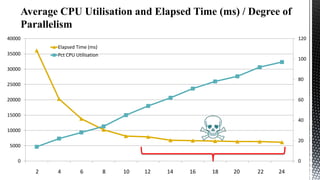
  • #34 Elapsed time should decrease in a linear fashion as CPU consumption increases in a linear manner, the obvious explanation for this is that we are burning CPU cycles in a non production manner.
  • #37 If your IO sub system does not have enough throughput to keep you processors busy, there is value to be had in using compression. On the other hand, if your IO sub system can keep up with your CPUs and then some, the use of compression can send performance backwards.
  • #38 If your IO sub system does not have enough throughput to keep you processors busy, there is value to be had in using compression. On the other hand, if your IO sub system can keep up with your CPUs and then some, the use of compression can send performance backwards.