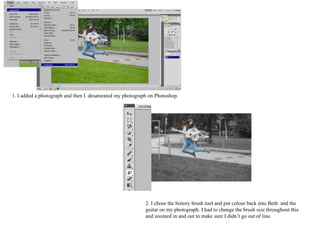
1. I added a photograph and then I desaturated my photograph on Photoshop.
2. I chose the history brush tool and put colour back into Beth and the
guitar on my photograph. I had to change the brush size throughout this
and zoomed in and out to make sure I didn’t go out of line.
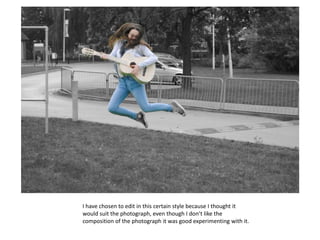
I have chosen to edit in this certain style because I thought it
would suit the photograph, even though I don’t like the
composition of the photograph it was good experimenting with it.
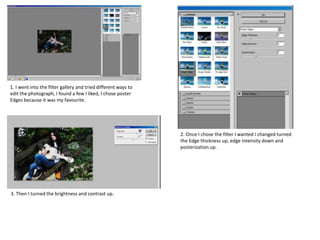
1. I went into the filter gallery and tried different ways to
edit the photograph, I found a few I liked, I chose poster
Edges because it was my favourite.
2. Once I chose the filter I wanted I changed turned
the Edge thickness up, edge intensity down and
posterization up.
3. Then I turned the brightness and contrast up.
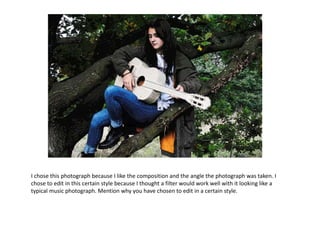
I chose this photograph because I like the composition and the angle the photograph was taken. I
chose to edit in this certain style because I thought a filter would work well with it looking like a
typical music photograph. Mention why you have chosen to edit in a certain style.
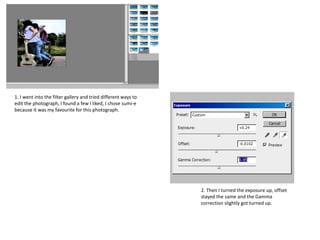
1. I went into the filter gallery and tried different ways to
edit the photograph, I found a few I liked, I chose sumi-e
because it was my favourite for this photograph.
2. Then I turned the exposure up, offset
stayed the same and the Gamma
correction slightly got turned up.
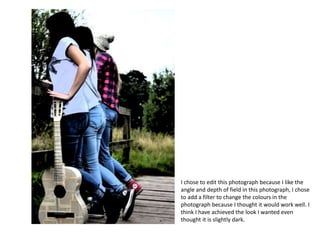
I chose to edit this photograph because I like the
angle and depth of field in this photograph, I chose
to add a filter to change the colours in the
photograph because I thought it would work well. I
think I have achieved the look I wanted even
thought it is slightly dark.
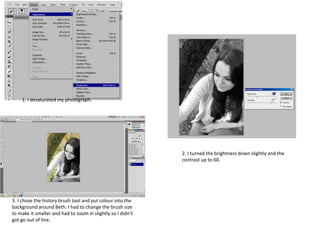
1. I desaturated my photograph.
2. I turned the brightness down slightly and the
contrast up to 60.
3. I chose the history brush tool and put colour into the
background around Beth. I had to change the brush size
to make it smaller and had to zoom in slightly so I didn’t
got go out of line.
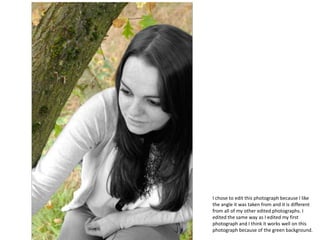
I chose to edit this photograph because I like
the angle it was taken from and it is different
from all of my other edited photographs. I
edited the same way as I edited my first
photograph and I think it works well on this
photograph because of the green background.
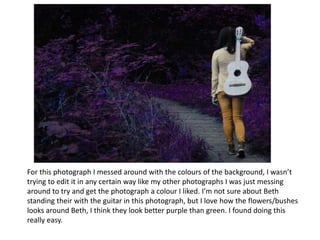
For this photograph I messed around with the colours of the background, I wasn’t
trying to edit it in any certain way like my other photographs I was just messing
around to try and get the photograph a colour I liked. I’m not sure about Beth
standing their with the guitar in this photograph, but I love how the flowers/bushes
looks around Beth, I think they look better purple than green. I found doing this
really easy.

College edits- slide1

  • 2.
    1. I addeda photograph and then I desaturated my photograph on Photoshop. 2. I chose the history brush tool and put colour back into Beth and the guitar on my photograph. I had to change the brush size throughout this and zoomed in and out to make sure I didn’t go out of line.
  • 3.
    I have chosento edit in this certain style because I thought it would suit the photograph, even though I don’t like the composition of the photograph it was good experimenting with it.
  • 4.
    1. I wentinto the filter gallery and tried different ways to edit the photograph, I found a few I liked, I chose poster Edges because it was my favourite. 2. Once I chose the filter I wanted I changed turned the Edge thickness up, edge intensity down and posterization up. 3. Then I turned the brightness and contrast up.
  • 5.
    I chose thisphotograph because I like the composition and the angle the photograph was taken. I chose to edit in this certain style because I thought a filter would work well with it looking like a typical music photograph. Mention why you have chosen to edit in a certain style.
  • 6.
    1. I wentinto the filter gallery and tried different ways to edit the photograph, I found a few I liked, I chose sumi-e because it was my favourite for this photograph. 2. Then I turned the exposure up, offset stayed the same and the Gamma correction slightly got turned up.
  • 7.
    I chose toedit this photograph because I like the angle and depth of field in this photograph, I chose to add a filter to change the colours in the photograph because I thought it would work well. I think I have achieved the look I wanted even thought it is slightly dark.
  • 8.
    1. I desaturatedmy photograph. 2. I turned the brightness down slightly and the contrast up to 60. 3. I chose the history brush tool and put colour into the background around Beth. I had to change the brush size to make it smaller and had to zoom in slightly so I didn’t got go out of line.
  • 9.
    I chose toedit this photograph because I like the angle it was taken from and it is different from all of my other edited photographs. I edited the same way as I edited my first photograph and I think it works well on this photograph because of the green background.
  • 10.
    For this photographI messed around with the colours of the background, I wasn’t trying to edit it in any certain way like my other photographs I was just messing around to try and get the photograph a colour I liked. I’m not sure about Beth standing their with the guitar in this photograph, but I love how the flowers/bushes looks around Beth, I think they look better purple than green. I found doing this really easy.