Collabograte: An Integration Platform
   for Collaboration Components

                   Kartik Subbarao
                     Consultant

               kartiksubbarao.com
             subbarao@computer.org


 Code: https://github.com/kartiksubbarao/collabograte
Mailing list: http://groups.google.com/group/collabograte
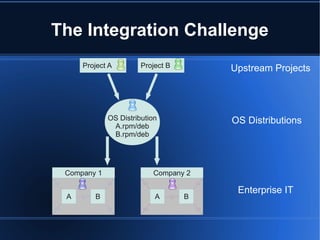
The Integration Challenge
     Project A         Project B       Upstream Projects


             OS Distribution           OS Distributions
              A.rpm/deb
              B.rpm/deb


 Company 1                Company 2

                                        Enterprise IT
 A      B                  A       B
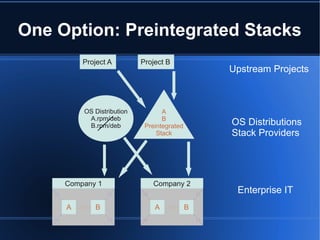
One Option: Preintegrated Stacks
         Project A         Project B
                                                Upstream Projects


         OS Distribution          A
          A.rpm/deb               B
          B.rpm/deb         Preintegrated       OS Distributions
                                Stack           Stack Providers


     Company 1                Company 2
                                                 Enterprise IT
     A      B                  A            B
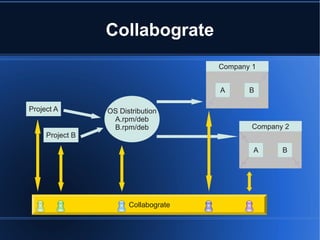
Collabograte
                                      Company 1


                                      A      B

Project A        OS Distribution
                  A.rpm/deb
                  B.rpm/deb                   Company 2
     Project B

                                              A      B


                       Collabograte
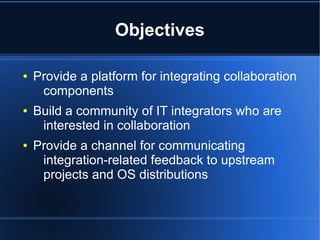
Objectives

●   Provide a platform for integrating collaboration
     components
●   Build a community of IT integrators who are
     interested in collaboration
●   Provide a channel for communicating
     integration-related feedback to upstream
     projects and OS distributions
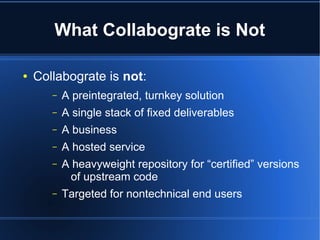
What Collabograte is Not

●   Collabograte is not:
       –   A preintegrated, turnkey solution
       –   A single stack of fixed deliverables
       –   A business
       –   A hosted service
       –   A heavyweight repository for “certified” versions
             of upstream code
       –   Targeted for nontechnical end users
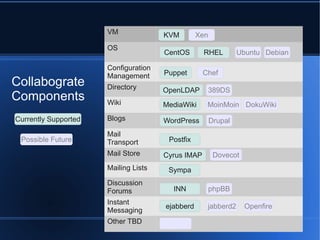
VM              KVM        Xen
                      OS
                                      CentOS       RHEL         Ubuntu Debian

                      Configuration
                      Management      Puppet       Chef
Collabograte          Directory       OpenLDAP      389DS
Components            Wiki            MediaWiki     MoinMoin DokuWiki

Currently Supported   Blogs           WordPress        Drupal
                      Mail
 Possible Future      Transport        Postfix
                      Mail Store      Cyrus IMAP        Dovecot
                      Mailing Lists    Sympa
                      Discussion
                      Forums            INN            phpBB
                      Instant
                                      ejabberd      jabberd2      Openfire
                      Messaging
                      Other TBD
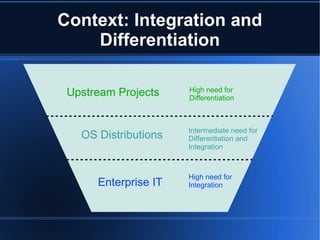
Context: Integration and
    Differentiation

 Upstream Projects    High need for
                      Differentiation


                      Intermediate need for
   OS Distributions   Differentiation and
                      Integration


                      High need for
      Enterprise IT   Integration
Guiding Principles
Use and Contribute to Actively
          Maintained Work
●   Use existing OS packages wherever possible,
     and seek to improve them where necessary
●   Contribute integration-friendly features to
     upstream projects
●   Maximize both technical and collaborative
     benefits
Maximize User Freedom

●   Enable as many useful
     platforms/components/tools as possible
●   Choose dependencies as consciously as
     possible
●   Open Source – FreeBSD license
Minimize Footprint of
         Configuration Changes
●   Change only those things that need to be
     changed
●   Keep in mind that integration is rarely a one-
     time event, while managing current
     requirements
●   Pay attention to evolving application defaults
●   Treat configuration files as collections of
      objects and make targeted modifications –
      Augeas is a valuable tool for this
Augeas Example

●   Given the following in /etc/hosts:
     192.168.122.10     example.com
●   The following Augeas command:
    set /files/etc/hosts/*[canonical = 'example.com']
      /alias[last()+1] lists.example.com
●   Looks for the /etc/hosts entry with a canonical
     hostname of example.com, and adds
     lists.example.com as an alias:
     192.168.122.10     example.com lists.example.com
●   More info at http://augeas.net
Flexibility and Structure

●   Both flexibility and structure are valuable
●   Integration often involves the art of adapting
      something without changing it too much
●   It may make sense to selectively override
       principles as a tradeoff
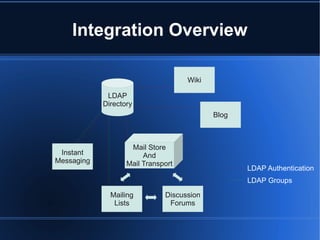
Integration Overview
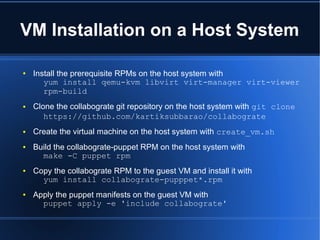
VM Installation on a Host System

●   Install the prerequisite RPMs on the host system with
       yum install qemu-kvm libvirt virt-manager virt-viewer
       rpm-build
●   Clone the collabograte git repository on the host system with git clone
       https://github.com/kartiksubbarao/collabograte
●   Create the virtual machine on the host system with create_vm.sh
●   Build the collabograte-puppet RPM on the host system with
      make -C puppet rpm
●   Copy the collabograte RPM to the guest VM and install it with
      yum install collabograte-pupppet*.rpm
●   Apply the puppet manifests on the guest VM with
      puppet apply -e 'include collabograte'
Common Module

●   Module for configurations/settings that are
     referenced/required across multiple modules
●   Host/Domain name
●   Common utility packages
●   Administrative usernames and passwords
●   Syslog configuration
LDAP Directory

●   Currently supports OpenLDAP
●   Sample LDIF and additional schema sourced
     from the Fedora 389 Directory Server Project
●   Username and password authentication
●   Groups used as mailing lists and IM groups
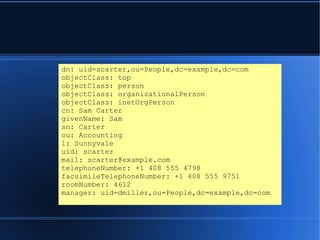
dn: uid=scarter,ou=People,dc=example,dc=com
objectClass: top
objectClass: person
objectClass: organizationalPerson
objectClass: inetOrgPerson
cn: Sam Carter
givenName: Sam
sn: Carter
ou: Accounting
l: Sunnyvale
uid: scarter
mail: scarter@example.com
telephoneNumber: +1 408 555 4798
facsimileTelephoneNumber: +1 408 555 9751
roomNumber: 4612
manager: uid=dmiller,ou=People,dc=example,dc=com
Wiki

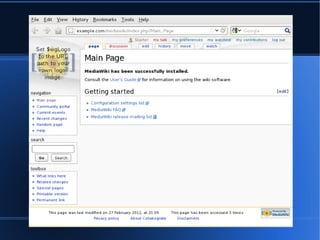
●   Currently supports MediaWiki
●   Uses the LdapAuthentication extension to
     integrate with the LDAP Directory
●   Partially configured with WWW::Mechanize
Blogs

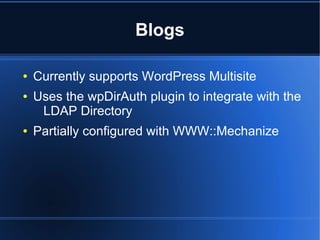
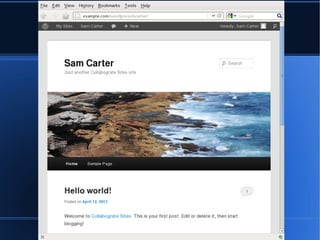
●   Currently supports WordPress Multisite
●   Uses the wpDirAuth plugin to integrate with the
     LDAP Directory
●   Partially configured with WWW::Mechanize
Mail Transport and Mail Store

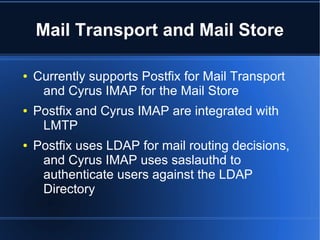
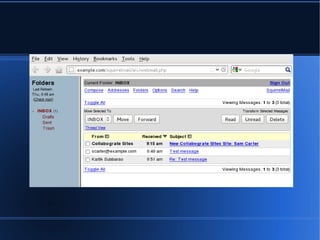
●   Currently supports Postfix for Mail Transport
     and Cyrus IMAP for the Mail Store
●   Postfix and Cyrus IMAP are integrated with
     LMTP
●   Postfix uses LDAP for mail routing decisions,
     and Cyrus IMAP uses saslauthd to
     authenticate users against the LDAP
     Directory
Mailing Lists and
           Discussion Forums
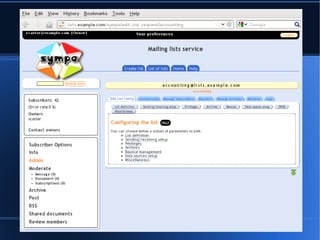
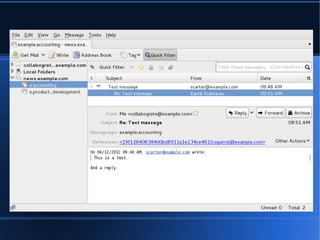
●   Currently supports Sympa for Mailing Lists and
     INN for Discussion Forums (Newsgroups)
●   Sympa uses LDAP for user authentication and
     authorization
●   Lists are maintained as groups in the LDAP
      directory
●   Sympa Lists are bidirectionally gatewayed to
     INN Newsgroups
Instant Messaging

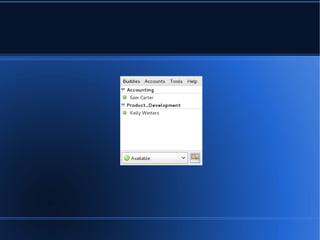
●   Currently supports ejabberd
●   Uses the LDAP Directory for authentication,
     authorization and roster membership
Git Tags and Branches

●   Git tags mark release versions for the project
     as a whole, or for one or more components
●   Git branches enable local customizations for
     specific components, to be managed
     alongside common configuration
●   The project community will evolve these
     conventions over time

Collabograte

  • 1.
    Collabograte: An IntegrationPlatform for Collaboration Components Kartik Subbarao Consultant kartiksubbarao.com subbarao@computer.org Code: https://github.com/kartiksubbarao/collabograte Mailing list: http://groups.google.com/group/collabograte
  • 2.
    The Integration Challenge Project A Project B Upstream Projects OS Distribution OS Distributions A.rpm/deb B.rpm/deb Company 1 Company 2 Enterprise IT A B A B
  • 3.
    One Option: PreintegratedStacks Project A Project B Upstream Projects OS Distribution A A.rpm/deb B B.rpm/deb Preintegrated OS Distributions Stack Stack Providers Company 1 Company 2 Enterprise IT A B A B
  • 4.
    Collabograte Company 1 A B Project A OS Distribution A.rpm/deb B.rpm/deb Company 2 Project B A B Collabograte
  • 5.
    Objectives ● Provide a platform for integrating collaboration components ● Build a community of IT integrators who are interested in collaboration ● Provide a channel for communicating integration-related feedback to upstream projects and OS distributions
  • 6.
    What Collabograte isNot ● Collabograte is not: – A preintegrated, turnkey solution – A single stack of fixed deliverables – A business – A hosted service – A heavyweight repository for “certified” versions of upstream code – Targeted for nontechnical end users
  • 7.
    VM KVM Xen OS CentOS RHEL Ubuntu Debian Configuration Management Puppet Chef Collabograte Directory OpenLDAP 389DS Components Wiki MediaWiki MoinMoin DokuWiki Currently Supported Blogs WordPress Drupal Mail Possible Future Transport Postfix Mail Store Cyrus IMAP Dovecot Mailing Lists Sympa Discussion Forums INN phpBB Instant ejabberd jabberd2 Openfire Messaging Other TBD
  • 8.
    Context: Integration and Differentiation Upstream Projects High need for Differentiation Intermediate need for OS Distributions Differentiation and Integration High need for Enterprise IT Integration
  • 9.
  • 10.
    Use and Contributeto Actively Maintained Work ● Use existing OS packages wherever possible, and seek to improve them where necessary ● Contribute integration-friendly features to upstream projects ● Maximize both technical and collaborative benefits
  • 11.
    Maximize User Freedom ● Enable as many useful platforms/components/tools as possible ● Choose dependencies as consciously as possible ● Open Source – FreeBSD license
  • 12.
    Minimize Footprint of Configuration Changes ● Change only those things that need to be changed ● Keep in mind that integration is rarely a one- time event, while managing current requirements ● Pay attention to evolving application defaults ● Treat configuration files as collections of objects and make targeted modifications – Augeas is a valuable tool for this
  • 13.
    Augeas Example ● Given the following in /etc/hosts: 192.168.122.10 example.com ● The following Augeas command: set /files/etc/hosts/*[canonical = 'example.com'] /alias[last()+1] lists.example.com ● Looks for the /etc/hosts entry with a canonical hostname of example.com, and adds lists.example.com as an alias: 192.168.122.10 example.com lists.example.com ● More info at http://augeas.net
  • 14.
    Flexibility and Structure ● Both flexibility and structure are valuable ● Integration often involves the art of adapting something without changing it too much ● It may make sense to selectively override principles as a tradeoff
  • 15.
  • 16.
    VM Installation ona Host System ● Install the prerequisite RPMs on the host system with yum install qemu-kvm libvirt virt-manager virt-viewer rpm-build ● Clone the collabograte git repository on the host system with git clone https://github.com/kartiksubbarao/collabograte ● Create the virtual machine on the host system with create_vm.sh ● Build the collabograte-puppet RPM on the host system with make -C puppet rpm ● Copy the collabograte RPM to the guest VM and install it with yum install collabograte-pupppet*.rpm ● Apply the puppet manifests on the guest VM with puppet apply -e 'include collabograte'
  • 17.
    Common Module ● Module for configurations/settings that are referenced/required across multiple modules ● Host/Domain name ● Common utility packages ● Administrative usernames and passwords ● Syslog configuration
  • 18.
    LDAP Directory ● Currently supports OpenLDAP ● Sample LDIF and additional schema sourced from the Fedora 389 Directory Server Project ● Username and password authentication ● Groups used as mailing lists and IM groups
  • 19.
    dn: uid=scarter,ou=People,dc=example,dc=com objectClass: top objectClass:person objectClass: organizationalPerson objectClass: inetOrgPerson cn: Sam Carter givenName: Sam sn: Carter ou: Accounting l: Sunnyvale uid: scarter mail: scarter@example.com telephoneNumber: +1 408 555 4798 facsimileTelephoneNumber: +1 408 555 9751 roomNumber: 4612 manager: uid=dmiller,ou=People,dc=example,dc=com
  • 20.
    Wiki ● Currently supports MediaWiki ● Uses the LdapAuthentication extension to integrate with the LDAP Directory ● Partially configured with WWW::Mechanize
  • 22.
    Blogs ● Currently supports WordPress Multisite ● Uses the wpDirAuth plugin to integrate with the LDAP Directory ● Partially configured with WWW::Mechanize
  • 24.
    Mail Transport andMail Store ● Currently supports Postfix for Mail Transport and Cyrus IMAP for the Mail Store ● Postfix and Cyrus IMAP are integrated with LMTP ● Postfix uses LDAP for mail routing decisions, and Cyrus IMAP uses saslauthd to authenticate users against the LDAP Directory
  • 26.
    Mailing Lists and Discussion Forums ● Currently supports Sympa for Mailing Lists and INN for Discussion Forums (Newsgroups) ● Sympa uses LDAP for user authentication and authorization ● Lists are maintained as groups in the LDAP directory ● Sympa Lists are bidirectionally gatewayed to INN Newsgroups
  • 29.
    Instant Messaging ● Currently supports ejabberd ● Uses the LDAP Directory for authentication, authorization and roster membership
  • 31.
    Git Tags andBranches ● Git tags mark release versions for the project as a whole, or for one or more components ● Git branches enable local customizations for specific components, to be managed alongside common configuration ● The project community will evolve these conventions over time