INOVASI
INFORMATIKA
INDONESIA
Running AutoScaling JBOSSRunning AutoScaling JBOSS
Cluster with OpenShiftCluster with OpenShift
Yusuf Hadiwinata Sutandar
●
What Problem Need to SolveWhat Problem Need to Solve
●
Container & Docker SolutionContainer & Docker Solution
●
Kubernetes & OpenShift SolutionKubernetes & OpenShift Solution
●
Building Simple Application with OpenshiftBuilding Simple Application with Openshift
●
Building JBOSS Cluster with OpenShiftBuilding JBOSS Cluster with OpenShift
●
Auto scaling JBOSS Node Cluster withAuto scaling JBOSS Node Cluster with
OpenshiftOpenshift
●
Bonus: Continues Integration and Delivery withBonus: Continues Integration and Delivery with
OpenShift, Jenkins, SonarQube, Nexus andOpenShift, Jenkins, SonarQube, Nexus and
GogsGogs
AgendaAgenda
BackgroundBackground
High availability and fail-over are very important featureHigh availability and fail-over are very important feature
for any kind of infrastructure. As the name suggests thefor any kind of infrastructure. As the name suggests the
services should be available at any given point of timeservices should be available at any given point of time
and requests should fail over if any component goesand requests should fail over if any component goes
down abruptly. You can have several parallel instance ofdown abruptly. You can have several parallel instance of
an application and can scale up and down depending onan application and can scale up and down depending on
the business requirement, without worrying much aboutthe business requirement, without worrying much about
the cost. Load is distributed across different servers, andthe cost. Load is distributed across different servers, and
even if one or more of the servers fails, the application iseven if one or more of the servers fails, the application is
still accessible via the other application instances. HA isstill accessible via the other application instances. HA is
crucial for scalable enterprise applications, as you cancrucial for scalable enterprise applications, as you can
improve performance by adding more pod/containerimprove performance by adding more pod/container
(which will be replica of your current one).(which will be replica of your current one).
Introduction to Container &Introduction to Container &
DockerDocker
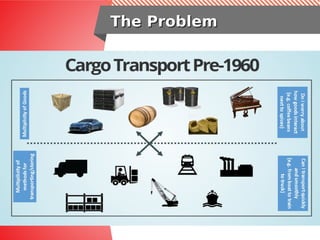
The ProblemThe Problem
Solution?Solution?
The Solution!!The Solution!!
90% of all cargo now shipped in a90% of all cargo now shipped in a
standard containerstandard container
Order of magnitude reduction in costOrder of magnitude reduction in cost
and time to load and unload ships,and time to load and unload ships,
trains, truckstrains, trucks
How about Application Development &How about Application Development &
Deployment???Deployment???
Another Question!!Another Question!!
The EvolutionThe Evolution
The App ProblemThe App Problem
The App SolutionThe App Solution
Advantages of ContainersAdvantages of Containers
● Low hardware footprint
– Uses OS internal features to create an isolated environment where
resources are managed using OS facilities such as namespaces and
cgroups. This approach minimizes the amount of CPU and memory
overhead compared to a virtual machine hypervisor. Running an
application in a VM is a way to create isolation from the running
environment, but it requires a heavy layer of services to support the
same low hardware footprint isolation provided by containers.
● Environment isolation
– Works in a closed environment where changes made to the host OS
or other applications do not affect the container. Because the
libraries needed by a container are self-contained, the application can
run without disruption. For example, each application can exist in its
own container with its own set of libraries. An update made to one
container does not affect other containers, which might not work with
the update.
Advantages of ContainersAdvantages of Containers
cont..cont..
● Quick deployment
– Deploys any container quickly because there is no need for a full OS
install or restart. Normally, to support the isolation, a new OS installation
is required on a physical host or VM, and any simple update might require
a full OS restart. A container only requires a restart without stopping any
services on the host OS.
● Multiple environment deployment
– In a traditional deployment scenario using a single host, any environment
differences might potentially break the application. Using containers,
however, the differences and incompatibilities are mitigated because the
same container image is used.
● Reusability
– The same container can be reused by multiple applications without the
need to set up a full OS. A database container can be used to create a set
of tables for a software application, and it can be quickly destroyed and
recreated without the need to run a set of housekeeping tasks.
Additionally, the same database container can be used by the production
environment to deploy an application.
Is not Virtualizaiton :)Is not Virtualizaiton :)
Linux Kernel
App1 App2 App3
Isolation, not Virtualization
•
Kernel
Namespaces
•
Process
•
Network
•
IPC
•
Mount
•
User
•
Resource Limits
•
Cgroups
•
Security
•
SELinux
Container SolutionContainer Solution
Virtual Machine and Container Complement each otherVirtual Machine and Container Complement each other
Containers
● Containers run as isolated processes in user
space of host OS
● They share the kernel with other container
(container-processes)
● Containers include the application and all of
its dependencies
● Not tied to specific infrastructure
Virtual Machine
● Virtual machines include the application, the
necessary binaries and libraries, and an entire guest
operating system
● Each Guest OS has its own Kernel and user space
Container ProblemContainer Problem
Containers before DockerContainers before Docker
● No standardized exchange format.
(No, a rootfs tarball is not a format!)
● Containers are hard to use for developers.
(Where's the equivalent of docker run debian?)
● No re-usable components, APIs, tools.
(At best: VM abstractions, e.g. libvirt.)
Analogy:
● Shipping containers are not just steel boxes.
● They are steel boxes that are a standard size,
with the same hooks and holes
Docker Solution!!Docker Solution!!
Containers after DockerContainers after Docker
● Standardize the container format, because
containers were not portable.
● Make containers easy to use for developers.
● Emphasis on re-usable components, APIs,
ecosystem of standard tools.
● Improvement over ad-hoc, in-house,
specific tools.
What IT`s Said about DockerWhat IT`s Said about Docker
Developer Say:
Build Once, Run Anywhere
Operator: Configure Once,
Run Anything
Advantages of ContainersAdvantages of Containers
Developer Say:
Build Once, Run Anywhere
A clean, safe, hygienic, portable runtime environment for your app.
No worries about missing dependencies, packages and other pain points
during subsequent deployments.
Run each app in its own isolated container, so you can run various versions of
libraries and other dependencies for each app without worrying.
Automate testing, integration, packaging...anything you can script.
Reduce/eliminate concerns about compatibility on different platforms,
either your own or your customers.
Cheap, zero-penalty containers to deploy services. A VM without the
overhead of a VM. Instant replay and reset of image snapshots.
Advantages of ContainersAdvantages of Containers
Operator: Configure
Once, Run Anything
Make the entire lifecycle more efficient, consistent, and repeatable
Increase the quality of code produced by developers.
Eliminate inconsistencies between development, test, production, and
customer environments.
Support segregation of duties.
Significantly improves the speed and reliability of continuous deployment and
continuous integration systems.
Because the containers are so lightweight, address significant performance,
costs, deployment, and portability issues normally associated with VMs.
Introduction to JBOSS EAPIntroduction to JBOSS EAP
Jboss Enterprise ApplicationJboss Enterprise Application
PlatformPlatform
Build once, deploy Java EE apps everywhere
Red Hat® JBoss® Enterprise Application Platform (JBoss EAP)
delivers enterprise-grade security, performance, and scalability in
any environment. Whether on-premise; virtual; or in private,
public, or hybrid clouds, JBoss EAP can help you deliver apps
faster, everywhere.
Jboss Enterprise ApplicationJboss Enterprise Application
PlatformPlatform
Optimized for cloud and containers
JBoss EAP 7 is built to provide simplified deployment and full
Java™ EE performance for applications in any environment.
Whether on-premise or in virtual, private, public, and hybrid
clouds, JBoss EAP features a modular architecture that starts
services only as they are required. The extreme low memory
footprint and fast startup times mean that JBoss EAP is ideal for
environments where efficient resource utilization is a priority, such
as Red Hat OpenShift.
Jboss Enterprise ApplicationJboss Enterprise Application
PlatformPlatform
More detail about JBOSS EAP please visit:
https://www.redhat.com/en/technologies/jboss-
middleware/application-platform
Jboss EAP Cluster TermJboss EAP Cluster Term
Clustering allows us to run an applications on
several parallel servers (a.k.a cluster nodes). The
load is distributed across different servers, and
even if any of the servers fails, the application is
still accessible via other cluster nodes. Clustering
is crucial for scalable enterprise applications, as
you can improve performance by simply adding
more nodes to the cluster.
JBOSS Cluster TopologyJBOSS Cluster Topology
Deploying JBOSS ClusterDeploying JBOSS Cluster
● Install Linux on 2 Server / VM – Duration 60 Minutes
● Install JBOSS on 2 Server / VM – Duration 35 Minutes
● Configure JBOSS Cluster & Testing Cluster – 35 Minutes
● Deploy Application and Configue Datastore – 20 Minutes
● Testing Application and Session Replication – 25 Minutes
● Configure Load Balancer for 2 JBOSS Server – 60 Minutes
Total Time: 235 Minute!! / 4 Hours for Deploying 2
Node JBOSS Cluster
Adding Another JBOSS Node to Cluster: +2 Hours
So... How to Reduce Deployment time???So... How to Reduce Deployment time???
Another Question!!Another Question!!
How to make JBOSS Cluster more easyHow to make JBOSS Cluster more easy
to Manage & Scale???to Manage & Scale???
Short Answer: Dockerize your JBOSS!!
We not only need Docker, we also need
orchestration
Its time to Openshift!!!Its time to Openshift!!!
Yess!!..its OpenShiftYess!!..its OpenShift
OpenShift is an auto-scalable Platform as a
Service. Auto-scalable means OpenShift can
horizontally scale your application up or down
depending on the number of concurrent
connections. OpenShift supports the JBoss
application server, which is a certified platform
for Java EE 6/7 development. As an OpenShift
user, you have access to both the community
version of JBoss and JBoss EAP 6/7(JBoss
Enterprise Application Platform) for free.
We Need more than justWe Need more than just
OrchestrationOrchestration
Self Service
-Templates
- Web Console
Multi-
Language
Automation
- Deploy
- Build
DevOps
Collaboration
Secure
- Namespaced
- RBAC
Scalable
- Integrated LB
Open Source
Enterprise
- Authentication
- Web Console
- Central Logging
OpenShift is Red Hat Container ApplicationOpenShift is Red Hat Container Application
Platform (PaaS)Platform (PaaS)
OpenShift=Enterprise K8sOpenShift=Enterprise K8s
OpenShift Build & DeployOpenShift Build & Deploy
ArchitectureArchitecture
OpenShift Cluster
Master
Node
Storage
Pod
Volume
Node
Service
Pod
Pod
etcd
SkyDNS
Replication
Controller
APIDev/Ops
Router
Deploy
Build
Policies
Registry
Image
VisitorLogging
EFK
Build & Deploy an ImageBuild & Deploy an Image
Cod
e
Deplo
y
Buil
d
Can configure
different
deployment
strategies like
A/B, Rolling
upgrade,
Automated base
updates, and
more.
Can configure
triggers for
automated
deployments,
builds, and more.
Source
2
Image Builder
Image
Develope
SCM
Container Image
Builder Images
•
Jboss-EAP
•
PHP
•
Python
•
Ruby
•
Jenkins
•
Customer
•
C++ / Go
•
S2I (bash) scripts
Triggers
•
Image Change (tagging)
•
Code Change (webhook)
•
Config Change
Continous IntegrationContinous Integration
Pipeline ExamplePipeline Example
Source Build Deploy
:test
:test
Deploy
:test-fw
Test Tag
:uat
Deploy
:uat
commit webhook
registry
ImageChange
registry
ImageChange
Approve Tag
:prod
Deploy
:prod
registry
ImageChange
ITIL
container
Demo time!!... Yeay...Demo time!!... Yeay...
Any Question?
Lets continue to
Openshift Demo..
Its time to Openshift!!!Its time to Openshift!!!
Deploying JBOSS EAPDeploying JBOSS EAP
oc delete project haexample
oc new-project haexample
oc policy add-role-to-user view system:serviceaccount:haexample:default -n
haexample
oc new-app --image-stream="openshift/jboss-eap70-openshift:latest"
https://github.com/isnuryusuf/haexample#master --name='haexample' -l
name='haexample' -e SELECTOR=haexample -e
OPENSHIFT_KUBE_PING_NAMESPACE=haexample
OPENSHIFT_KUBE_PING_LABELS=app=haexample
oc env dc/haexample -e OPENSHIFT_KUBE_PING_NAMESPACE=haexample
OPENSHIFT_KUBE_PING_LABELS=app=haexample
Create project, and assign cluster roles
Create App and Define Cluster Partition
Setting up ClusterSetting up Cluster
ports:
- containerPort: 8080
protocol: TCP
- containerPort: 8443
protocol: TCP
- containerPort: 8778
protocol: TCP
- name: ping
containerPort: 8888
protocol: TCP
[org.jgroups.protocols.openshift.KUBE_PING] (MSC service thread 1-5)
namespace [haexample] set; clustering enabled
[org.jgroups.protocols.openshift.KUBE_PING] (MSC service thread 1-4)
namespace [haexample] set; clustering enabled
[org.infinispan.remoting.transport.jgroups.JGroupsTransport] (MSC service
thread 1-5) ISPN000094: Received new cluster view for channel server:
[haexample-2-pxsd9|0] (1) [haexample-2-pxsd9]
Configuring Cluster on Openshift
Its Running!!!
Configure Auto ScaleConfigure Auto Scale
oc expose service haexample --name haexample
oc get svc
oc create -f limits.json -n haexample
oc describe limits mylimits
oc autoscale dc/haexample --min 1 --max 10 --cpu-percent=90
oc describe dc/haexample
oc get hpa
for i in {1..500}; do curl http://haexample-haexample.smartfintech.i3-
cloud.com/haexample ; done;
while true; do curl -s http://haexample-haexample.smartfintech.i3-
cloud.com/haexample | grep "haexample" | cut -c 55-95; sleep 2; done
Configuring Auto Scale
Testing Auto Scale
More DetailMore Detail
Complete Solution,
Please visit:
https://github.com/isnuryusuf/haexample
Thnks for ComingThnks for Coming
More about me
https://www.linkedin.com/in/yusuf-hadiwinata-sutandar-301
7aa41/
- https://www.facebook.com/yusuf.hadiwinata
- https://github.com/isnuryusuf/
Join me on:
- “Linux administrators” & “CentOS Indonesia Community”
Facebook Group
- Docker UG Indonesia: https://t.me/dockerid
Graha BIP 6th
Floor
Jl. Jend. Gatot Subroto Kav. 23
Jakarta 12930, Indonesia
Phone : (62) 21 290 23393
Fax : (62) 21 525 8065
info@i-3.co.id
www.i-3.co.id
INOVASI
INFORMATIKA
INDONESIA
Inovasi Informatika Indonesia I3_ID

create auto scale jboss cluster with openshift

  • 1.
    INOVASI INFORMATIKA INDONESIA Running AutoScaling JBOSSRunningAutoScaling JBOSS Cluster with OpenShiftCluster with OpenShift Yusuf Hadiwinata Sutandar
  • 2.
    ● What Problem Needto SolveWhat Problem Need to Solve ● Container & Docker SolutionContainer & Docker Solution ● Kubernetes & OpenShift SolutionKubernetes & OpenShift Solution ● Building Simple Application with OpenshiftBuilding Simple Application with Openshift ● Building JBOSS Cluster with OpenShiftBuilding JBOSS Cluster with OpenShift ● Auto scaling JBOSS Node Cluster withAuto scaling JBOSS Node Cluster with OpenshiftOpenshift ● Bonus: Continues Integration and Delivery withBonus: Continues Integration and Delivery with OpenShift, Jenkins, SonarQube, Nexus andOpenShift, Jenkins, SonarQube, Nexus and GogsGogs AgendaAgenda
  • 3.
    BackgroundBackground High availability andfail-over are very important featureHigh availability and fail-over are very important feature for any kind of infrastructure. As the name suggests thefor any kind of infrastructure. As the name suggests the services should be available at any given point of timeservices should be available at any given point of time and requests should fail over if any component goesand requests should fail over if any component goes down abruptly. You can have several parallel instance ofdown abruptly. You can have several parallel instance of an application and can scale up and down depending onan application and can scale up and down depending on the business requirement, without worrying much aboutthe business requirement, without worrying much about the cost. Load is distributed across different servers, andthe cost. Load is distributed across different servers, and even if one or more of the servers fails, the application iseven if one or more of the servers fails, the application is still accessible via the other application instances. HA isstill accessible via the other application instances. HA is crucial for scalable enterprise applications, as you cancrucial for scalable enterprise applications, as you can improve performance by adding more pod/containerimprove performance by adding more pod/container (which will be replica of your current one).(which will be replica of your current one).
  • 4.
    Introduction to Container&Introduction to Container & DockerDocker
  • 5.
  • 6.
  • 7.
    The Solution!!The Solution!! 90%of all cargo now shipped in a90% of all cargo now shipped in a standard containerstandard container Order of magnitude reduction in costOrder of magnitude reduction in cost and time to load and unload ships,and time to load and unload ships, trains, truckstrains, trucks
  • 8.
    How about ApplicationDevelopment &How about Application Development & Deployment???Deployment??? Another Question!!Another Question!!
  • 9.
  • 10.
    The App ProblemTheApp Problem
  • 11.
    The App SolutionTheApp Solution
  • 12.
    The App SolutionTheApp Solution
  • 13.
    Advantages of ContainersAdvantagesof Containers ● Low hardware footprint – Uses OS internal features to create an isolated environment where resources are managed using OS facilities such as namespaces and cgroups. This approach minimizes the amount of CPU and memory overhead compared to a virtual machine hypervisor. Running an application in a VM is a way to create isolation from the running environment, but it requires a heavy layer of services to support the same low hardware footprint isolation provided by containers. ● Environment isolation – Works in a closed environment where changes made to the host OS or other applications do not affect the container. Because the libraries needed by a container are self-contained, the application can run without disruption. For example, each application can exist in its own container with its own set of libraries. An update made to one container does not affect other containers, which might not work with the update.
  • 14.
    Advantages of ContainersAdvantagesof Containers cont..cont.. ● Quick deployment – Deploys any container quickly because there is no need for a full OS install or restart. Normally, to support the isolation, a new OS installation is required on a physical host or VM, and any simple update might require a full OS restart. A container only requires a restart without stopping any services on the host OS. ● Multiple environment deployment – In a traditional deployment scenario using a single host, any environment differences might potentially break the application. Using containers, however, the differences and incompatibilities are mitigated because the same container image is used. ● Reusability – The same container can be reused by multiple applications without the need to set up a full OS. A database container can be used to create a set of tables for a software application, and it can be quickly destroyed and recreated without the need to run a set of housekeeping tasks. Additionally, the same database container can be used by the production environment to deploy an application.
  • 15.
    Is not Virtualizaiton:)Is not Virtualizaiton :) Linux Kernel App1 App2 App3 Isolation, not Virtualization • Kernel Namespaces • Process • Network • IPC • Mount • User • Resource Limits • Cgroups • Security • SELinux
  • 16.
    Container SolutionContainer Solution VirtualMachine and Container Complement each otherVirtual Machine and Container Complement each other Containers ● Containers run as isolated processes in user space of host OS ● They share the kernel with other container (container-processes) ● Containers include the application and all of its dependencies ● Not tied to specific infrastructure Virtual Machine ● Virtual machines include the application, the necessary binaries and libraries, and an entire guest operating system ● Each Guest OS has its own Kernel and user space
  • 17.
    Container ProblemContainer Problem Containersbefore DockerContainers before Docker ● No standardized exchange format. (No, a rootfs tarball is not a format!) ● Containers are hard to use for developers. (Where's the equivalent of docker run debian?) ● No re-usable components, APIs, tools. (At best: VM abstractions, e.g. libvirt.) Analogy: ● Shipping containers are not just steel boxes. ● They are steel boxes that are a standard size, with the same hooks and holes
  • 18.
    Docker Solution!!Docker Solution!! Containersafter DockerContainers after Docker ● Standardize the container format, because containers were not portable. ● Make containers easy to use for developers. ● Emphasis on re-usable components, APIs, ecosystem of standard tools. ● Improvement over ad-hoc, in-house, specific tools.
  • 19.
    What IT`s Saidabout DockerWhat IT`s Said about Docker Developer Say: Build Once, Run Anywhere Operator: Configure Once, Run Anything
  • 20.
    Advantages of ContainersAdvantagesof Containers Developer Say: Build Once, Run Anywhere A clean, safe, hygienic, portable runtime environment for your app. No worries about missing dependencies, packages and other pain points during subsequent deployments. Run each app in its own isolated container, so you can run various versions of libraries and other dependencies for each app without worrying. Automate testing, integration, packaging...anything you can script. Reduce/eliminate concerns about compatibility on different platforms, either your own or your customers. Cheap, zero-penalty containers to deploy services. A VM without the overhead of a VM. Instant replay and reset of image snapshots.
  • 21.
    Advantages of ContainersAdvantagesof Containers Operator: Configure Once, Run Anything Make the entire lifecycle more efficient, consistent, and repeatable Increase the quality of code produced by developers. Eliminate inconsistencies between development, test, production, and customer environments. Support segregation of duties. Significantly improves the speed and reliability of continuous deployment and continuous integration systems. Because the containers are so lightweight, address significant performance, costs, deployment, and portability issues normally associated with VMs.
  • 22.
    Introduction to JBOSSEAPIntroduction to JBOSS EAP
  • 23.
    Jboss Enterprise ApplicationJbossEnterprise Application PlatformPlatform Build once, deploy Java EE apps everywhere Red Hat® JBoss® Enterprise Application Platform (JBoss EAP) delivers enterprise-grade security, performance, and scalability in any environment. Whether on-premise; virtual; or in private, public, or hybrid clouds, JBoss EAP can help you deliver apps faster, everywhere.
  • 24.
    Jboss Enterprise ApplicationJbossEnterprise Application PlatformPlatform Optimized for cloud and containers JBoss EAP 7 is built to provide simplified deployment and full Java™ EE performance for applications in any environment. Whether on-premise or in virtual, private, public, and hybrid clouds, JBoss EAP features a modular architecture that starts services only as they are required. The extreme low memory footprint and fast startup times mean that JBoss EAP is ideal for environments where efficient resource utilization is a priority, such as Red Hat OpenShift.
  • 25.
    Jboss Enterprise ApplicationJbossEnterprise Application PlatformPlatform More detail about JBOSS EAP please visit: https://www.redhat.com/en/technologies/jboss- middleware/application-platform
  • 26.
    Jboss EAP ClusterTermJboss EAP Cluster Term Clustering allows us to run an applications on several parallel servers (a.k.a cluster nodes). The load is distributed across different servers, and even if any of the servers fails, the application is still accessible via other cluster nodes. Clustering is crucial for scalable enterprise applications, as you can improve performance by simply adding more nodes to the cluster.
  • 27.
  • 28.
  • 29.
    Deploying JBOSS ClusterDeployingJBOSS Cluster ● Install Linux on 2 Server / VM – Duration 60 Minutes ● Install JBOSS on 2 Server / VM – Duration 35 Minutes ● Configure JBOSS Cluster & Testing Cluster – 35 Minutes ● Deploy Application and Configue Datastore – 20 Minutes ● Testing Application and Session Replication – 25 Minutes ● Configure Load Balancer for 2 JBOSS Server – 60 Minutes Total Time: 235 Minute!! / 4 Hours for Deploying 2 Node JBOSS Cluster Adding Another JBOSS Node to Cluster: +2 Hours
  • 30.
    So... How toReduce Deployment time???So... How to Reduce Deployment time??? Another Question!!Another Question!! How to make JBOSS Cluster more easyHow to make JBOSS Cluster more easy to Manage & Scale???to Manage & Scale??? Short Answer: Dockerize your JBOSS!! We not only need Docker, we also need orchestration
  • 31.
    Its time toOpenshift!!!Its time to Openshift!!!
  • 32.
    Yess!!..its OpenShiftYess!!..its OpenShift OpenShiftis an auto-scalable Platform as a Service. Auto-scalable means OpenShift can horizontally scale your application up or down depending on the number of concurrent connections. OpenShift supports the JBoss application server, which is a certified platform for Java EE 6/7 development. As an OpenShift user, you have access to both the community version of JBoss and JBoss EAP 6/7(JBoss Enterprise Application Platform) for free.
  • 33.
    We Need morethan justWe Need more than just OrchestrationOrchestration Self Service -Templates - Web Console Multi- Language Automation - Deploy - Build DevOps Collaboration Secure - Namespaced - RBAC Scalable - Integrated LB Open Source Enterprise - Authentication - Web Console - Central Logging OpenShift is Red Hat Container ApplicationOpenShift is Red Hat Container Application Platform (PaaS)Platform (PaaS)
  • 34.
  • 35.
    OpenShift Build &DeployOpenShift Build & Deploy ArchitectureArchitecture OpenShift Cluster Master Node Storage Pod Volume Node Service Pod Pod etcd SkyDNS Replication Controller APIDev/Ops Router Deploy Build Policies Registry Image VisitorLogging EFK
  • 36.
    Build & Deployan ImageBuild & Deploy an Image Cod e Deplo y Buil d Can configure different deployment strategies like A/B, Rolling upgrade, Automated base updates, and more. Can configure triggers for automated deployments, builds, and more. Source 2 Image Builder Image Develope SCM Container Image Builder Images • Jboss-EAP • PHP • Python • Ruby • Jenkins • Customer • C++ / Go • S2I (bash) scripts Triggers • Image Change (tagging) • Code Change (webhook) • Config Change
  • 37.
    Continous IntegrationContinous Integration PipelineExamplePipeline Example Source Build Deploy :test :test Deploy :test-fw Test Tag :uat Deploy :uat commit webhook registry ImageChange registry ImageChange Approve Tag :prod Deploy :prod registry ImageChange ITIL container
  • 38.
    Demo time!!... Yeay...Demotime!!... Yeay... Any Question? Lets continue to Openshift Demo..
  • 39.
    Its time toOpenshift!!!Its time to Openshift!!!
  • 40.
    Deploying JBOSS EAPDeployingJBOSS EAP oc delete project haexample oc new-project haexample oc policy add-role-to-user view system:serviceaccount:haexample:default -n haexample oc new-app --image-stream="openshift/jboss-eap70-openshift:latest" https://github.com/isnuryusuf/haexample#master --name='haexample' -l name='haexample' -e SELECTOR=haexample -e OPENSHIFT_KUBE_PING_NAMESPACE=haexample OPENSHIFT_KUBE_PING_LABELS=app=haexample oc env dc/haexample -e OPENSHIFT_KUBE_PING_NAMESPACE=haexample OPENSHIFT_KUBE_PING_LABELS=app=haexample Create project, and assign cluster roles Create App and Define Cluster Partition
  • 41.
    Setting up ClusterSettingup Cluster ports: - containerPort: 8080 protocol: TCP - containerPort: 8443 protocol: TCP - containerPort: 8778 protocol: TCP - name: ping containerPort: 8888 protocol: TCP [org.jgroups.protocols.openshift.KUBE_PING] (MSC service thread 1-5) namespace [haexample] set; clustering enabled [org.jgroups.protocols.openshift.KUBE_PING] (MSC service thread 1-4) namespace [haexample] set; clustering enabled [org.infinispan.remoting.transport.jgroups.JGroupsTransport] (MSC service thread 1-5) ISPN000094: Received new cluster view for channel server: [haexample-2-pxsd9|0] (1) [haexample-2-pxsd9] Configuring Cluster on Openshift Its Running!!!
  • 42.
    Configure Auto ScaleConfigureAuto Scale oc expose service haexample --name haexample oc get svc oc create -f limits.json -n haexample oc describe limits mylimits oc autoscale dc/haexample --min 1 --max 10 --cpu-percent=90 oc describe dc/haexample oc get hpa for i in {1..500}; do curl http://haexample-haexample.smartfintech.i3- cloud.com/haexample ; done; while true; do curl -s http://haexample-haexample.smartfintech.i3- cloud.com/haexample | grep "haexample" | cut -c 55-95; sleep 2; done Configuring Auto Scale Testing Auto Scale
  • 43.
    More DetailMore Detail CompleteSolution, Please visit: https://github.com/isnuryusuf/haexample
  • 44.
    Thnks for ComingThnksfor Coming More about me https://www.linkedin.com/in/yusuf-hadiwinata-sutandar-301 7aa41/ - https://www.facebook.com/yusuf.hadiwinata - https://github.com/isnuryusuf/ Join me on: - “Linux administrators” & “CentOS Indonesia Community” Facebook Group - Docker UG Indonesia: https://t.me/dockerid
  • 45.
    Graha BIP 6th Floor Jl.Jend. Gatot Subroto Kav. 23 Jakarta 12930, Indonesia Phone : (62) 21 290 23393 Fax : (62) 21 525 8065 info@i-3.co.id www.i-3.co.id INOVASI INFORMATIKA INDONESIA Inovasi Informatika Indonesia I3_ID