3
Single-Row Functions
Objectives

After completing this lesson, you should
be able to do the following:
  • Describe various types of functions
    available in SQL
  • Use character, number, and date
    functions in SELECT statements
  • Describe the use of conversion
    functions

3-2
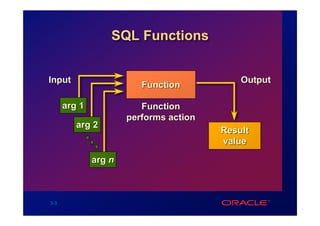
SQL Functions


Input                                       Output
                         Function

      arg 1              Function
                      performs action
         arg 2
                                        Result
                                        value

              arg n


3-3
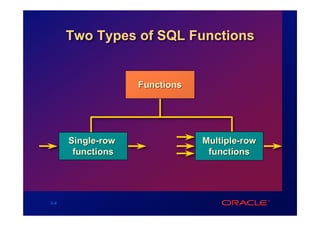
Two Types of SQL Functions


                   Functions


      Single-row               Multiple-row
       functions                functions


3-4
Single-Row Functions
  • Manipulate data items
  • Accept arguments and return one value
  • Act on each row returned
  • Return one result per row
  • May modify the datatype
  • Can be nested
 function_name (column|expression, [arg1, arg2,...])


3-5
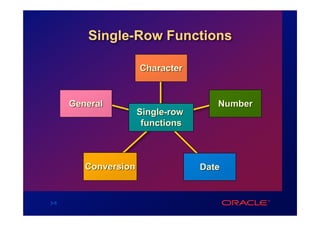
Single-Row Functions

                      Character


      General                         Number
                      Single-row
                       functions


         Conversion                Date


3-6
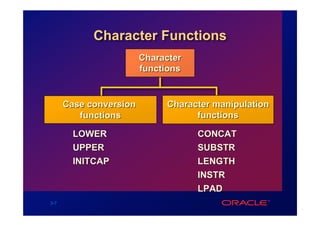
Character Functions
                        Character
                        functions


      Case conversion        Character manipulation
         functions                 functions

        LOWER                       CONCAT
        UPPER                       SUBSTR
        INITCAP                     LENGTH
                                    INSTR
                                    LPAD
3-7
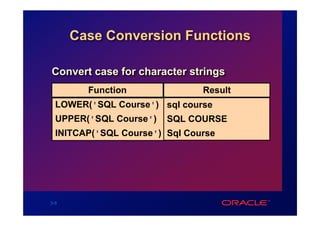
Case Conversion Functions

Convert case for character strings
        Function               Result
  LOWER('SQL Course') sql course
  UPPER('SQL Course')   SQL COURSE
  INITCAP('SQL Course') Sql Course


3-8
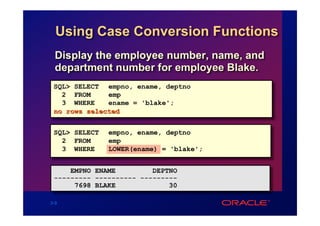
Using Case Conversion Functions
  Display the employee number, name, and
  department number for employee Blake.
 SQL> SELECT empno, ename, deptno
   2 FROM     emp
   3 WHERE    ename = 'blake';
 no rows selected


 SQL> SELECT   empno, ename, deptno
   2 FROM      emp
   3 WHERE     LOWER(ename) = 'blake';


     EMPNO ENAME         DEPTNO
 --------- ---------- ---------
      7698 BLAKE             30

3-9
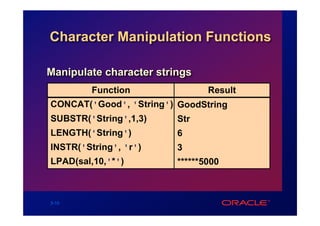
Character Manipulation Functions

Manipulate character strings
         Function               Result
CONCAT('Good', 'String') GoodString
SUBSTR('String',1,3)     Str
LENGTH('String')         6
INSTR('String', 'r')     3
LPAD(sal,10,'*')         ******5000


3-10
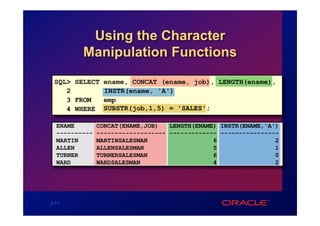
Using the Character
         Manipulation Functions

 SQL> SELECT ename, CONCAT (ename, job), LENGTH(ename),
    2        INSTR(ename, 'A')
    3 FROM   emp
    4 WHERE SUBSTR(job,1,5) = 'SALES';

  ENAME        CONCAT(ENAME,JOB)   LENGTH(ENAME) INSTR(ENAME,'A')
  ----------   ------------------- ------------- ----------------
  MARTIN       MARTINSALESMAN                  6                2
  ALLEN        ALLENSALESMAN                   5                1
  TURNER       TURNERSALESMAN                  6                0
  WARD         WARDSALESMAN                    4                2


3-11
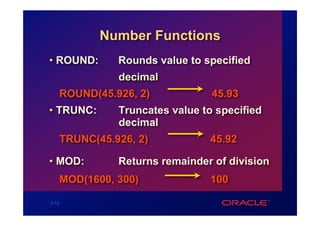
Number Functions
• ROUND:     Rounds value to specified
             decimal
   ROUND(45.926, 2)            45.93
• TRUNC:     Truncates value to specified
             decimal
   TRUNC(45.926, 2)           45.92

• MOD:       Returns remainder of division
   MOD(1600, 300)             100

3-12
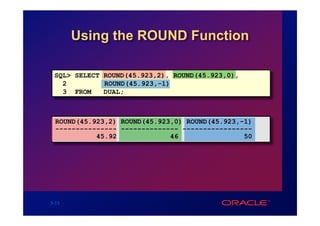
Using the ROUND Function

 SQL> SELECT ROUND(45.923,2), ROUND(45.923,0),
   2         ROUND(45.923,-1)
   3 FROM    DUAL;


  ROUND(45.923,2) ROUND(45.923,0) ROUND(45.923,-1)
  --------------- -------------- -----------------
            45.92             46                50


3-13
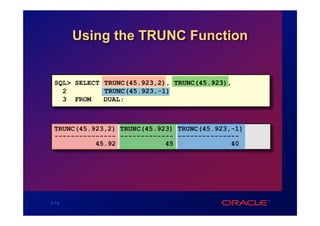
Using the TRUNC Function


 SQL> SELECT TRUNC(45.923,2), TRUNC(45.923),
   2         TRUNC(45.923,-1)
   3 FROM    DUAL;


 TRUNC(45.923,2) TRUNC(45.923) TRUNC(45.923,-1)
 --------------- ------------- ---------------
           45.92            45              40


3-14
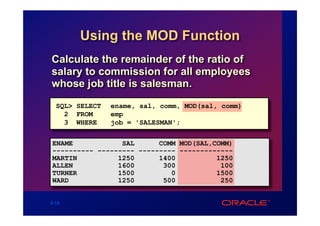
Using the MOD Function
Calculate the remainder of the ratio of
salary to commission for all employees
whose job title is salesman.
  SQL> SELECT   ename, sal, comm, MOD(sal, comm)
    2 FROM      emp
    3 WHERE     job = 'SALESMAN';


ENAME            SAL      COMM MOD(SAL,COMM)
---------- --------- --------- -------------
MARTIN          1250      1400          1250
ALLEN           1600       300           100
TURNER          1500         0          1500
WARD            1250       500           250


3-15
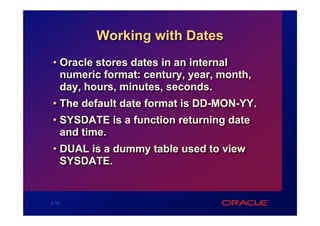
Working with Dates
 • Oracle stores dates in an internal
   numeric format: century, year, month,
   day, hours, minutes, seconds.
 • The default date format is DD-MON-YY.
 • SYSDATE is a function returning date
   and time.
 • DUAL is a dummy table used to view
   SYSDATE.


3-16
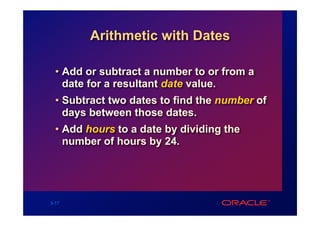
Arithmetic with Dates

  • Add or subtract a number to or from a
    date for a resultant date value.
  • Subtract two dates to find the number of
    days between those dates.
  • Add hours to a date by dividing the
    number of hours by 24.


3-17
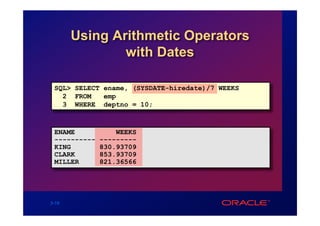
Using Arithmetic Operators
               with Dates

 SQL> SELECT ename, (SYSDATE-hiredate)/7 WEEKS
   2 FROM    emp
   3 WHERE deptno = 10;


 ENAME            WEEKS
 ----------   ---------
 KING         830.93709
 CLARK        853.93709
 MILLER       821.36566


3-18
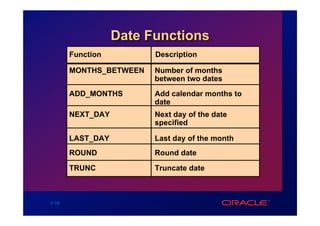
Date Functions
       Function         Description

       MONTHS_BETWEEN   Number of months
                        between two dates
       ADD_MONTHS       Add calendar months to
                        date
       NEXT_DAY         Next day of the date
                        specified

       LAST_DAY         Last day of the month
       ROUND            Round date

       TRUNC            Truncate date


3-19
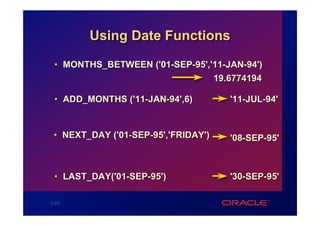
Using Date Functions

 • MONTHS_BETWEEN ('01-SEP-95','11-JAN-94')
                                19.6774194

 • ADD_MONTHS ('11-JAN-94',6)        '11-JUL-94'


 • NEXT_DAY ('01-SEP-95','FRIDAY')   '08-SEP-95'


 • LAST_DAY('01-SEP-95')             '30-SEP-95'

3-20
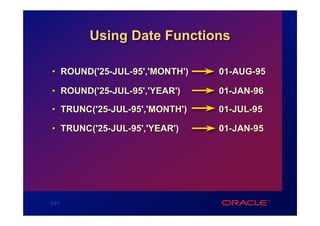
Using Date Functions

• ROUND('25-JUL-95','MONTH')   01-AUG-95

• ROUND('25-JUL-95','YEAR')    01-JAN-96

• TRUNC('25-JUL-95','MONTH')   01-JUL-95

• TRUNC('25-JUL-95','YEAR')    01-JAN-95


3-21
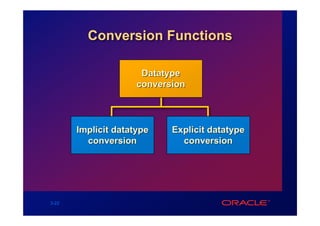
Conversion Functions

                      Datatype
                     conversion


       Implicit datatype    Explicit datatype
         conversion           conversion


3-22
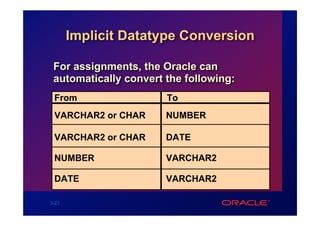
Implicit Datatype Conversion

 For assignments, the Oracle can
 automatically convert the following:
 From                  To
 VARCHAR2 or CHAR      NUMBER

 VARCHAR2 or CHAR      DATE

 NUMBER                VARCHAR2

 DATE                  VARCHAR2

3-23
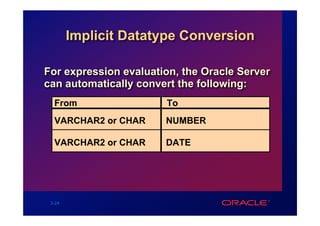
Implicit Datatype Conversion

For expression evaluation, the Oracle Server
can automatically convert the following:
  From                 To
  VARCHAR2 or CHAR     NUMBER

  VARCHAR2 or CHAR     DATE


 3-24
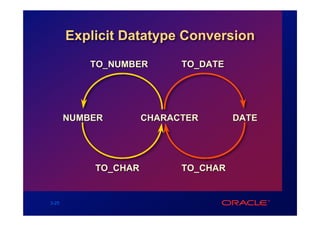
Explicit Datatype Conversion
           TO_NUMBER       TO_DATE


       NUMBER        CHARACTER       DATE


           TO_CHAR         TO_CHAR


3-25
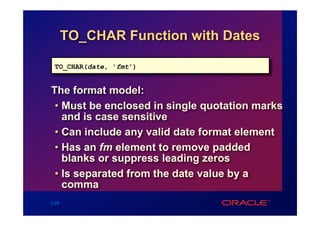
TO_CHAR Function with Dates

 TO_CHAR(date, 'fmt')


The format model:
 • Must be enclosed in single quotation marks
   and is case sensitive
 • Can include any valid date format element
 • Has an fm element to remove padded
   blanks or suppress leading zeros
 • Is separated from the date value by a
   comma
3-26
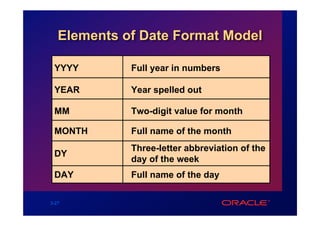
Elements of Date Format Model

 YYYY        Full year in numbers

 YEAR        Year spelled out

 MM          Two-digit value for month

 MONTH       Full name of the month
             Three-letter abbreviation of the
 DY
             day of the week
 DAY         Full name of the day

3-27
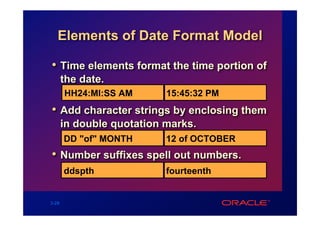
Elements of Date Format Model

• Time elements format the time portion of
       the date.
       HH24:MI:SS AM       15:45:32 PM
• Add character strings by enclosing them
       in double quotation marks.
       DD "of" MONTH       12 of OCTOBER
• Number suffixes spell out numbers.
       ddspth              fourteenth


3-28
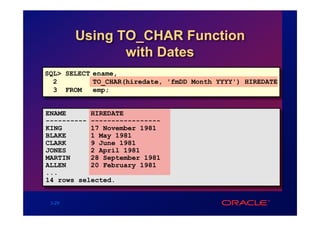
Using TO_CHAR Function
               with Dates
SQL> SELECT ename,
  2         TO_CHAR(hiredate, 'fmDD Month YYYY') HIREDATE
  3 FROM    emp;


ENAME      HIREDATE
---------- -----------------
KING       17 November 1981
BLAKE      1 May 1981
CLARK      9 June 1981
JONES      2 April 1981
MARTIN     28 September 1981
ALLEN      20 February 1981
...
14 rows selected.


 3-29
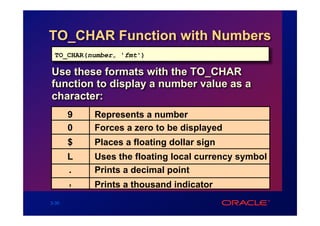
TO_CHAR Function with Numbers
 TO_CHAR(number, 'fmt')

Use these formats with the TO_CHAR
function to display a number value as a
character:
       9   Represents a number
       0   Forces a zero to be displayed
       $   Places a floating dollar sign
       L   Uses the floating local currency symbol
       .   Prints a decimal point
       ,   Prints a thousand indicator
3-30
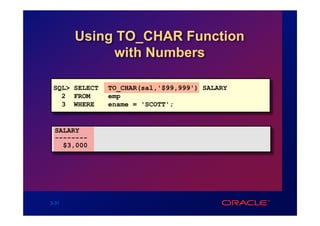
Using TO_CHAR Function
            with Numbers

 SQL> SELECT   TO_CHAR(sal,'$99,999') SALARY
   2 FROM      emp
   3 WHERE     ename = 'SCOTT';


 SALARY
 --------
   $3,000


3-31
TO_NUMBER and TO_DATE
              Functions
   • Convert a character string to a number
     format using the TO_NUMBER function

       TO_NUMBER(char[, 'fmt'])


   • Convert a character string to a date
     format using the TO_DATE function

       TO_DATE(char[, 'fmt'])


3-32
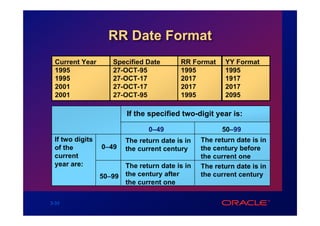
RR Date Format
  Current Year      Specified Date        RR Format     YY Format
  1995              27-OCT-95             1995          1995
  1995              27-OCT-17             2017          1917
  2001              27-OCT-17             2017          2017
  2001              27-OCT-95             1995          2095

                         If the specified two-digit year is:

                                0–49                   50–99
 If two digits           The return date is in   The return date is in
 of the          0–49    the current century     the century before
 current                                         the current one
 year are:               The return date is in   The return date is in
                 50–99   the century after       the current century
                         the current one

3-33
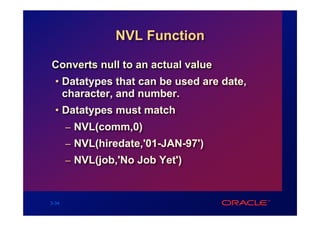
NVL Function

Converts null to an actual value
  • Datatypes that can be used are date,
    character, and number.
  • Datatypes must match
       – NVL(comm,0)
       – NVL(hiredate,'01-JAN-97')
       – NVL(job,'No Job Yet')


3-34
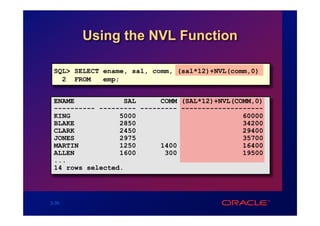
Using the NVL Function

 SQL> SELECT ename, sal, comm, (sal*12)+NVL(comm,0)
   2 FROM    emp;


 ENAME            SAL      COMM (SAL*12)+NVL(COMM,0)
 ---------- --------- --------- --------------------
 KING            5000                          60000
 BLAKE           2850                          34200
 CLARK           2450                          29400
 JONES           2975                          35700
 MARTIN          1250      1400                16400
 ALLEN           1600       300                19500
 ...
 14 rows selected.


3-35
DECODE Function

Facilitates conditional inquiries by doing
the work of a CASE or IF-THEN-ELSE
statement
 DECODE(col/expression, search1, result1
                        [, search2, result2,...,]
                        [, default])


3-36
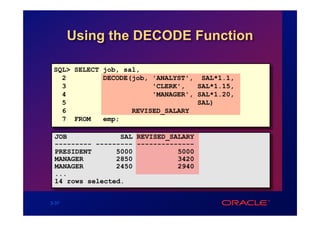
Using the DECODE Function

 SQL> SELECT job, sal,
   2         DECODE(job, 'ANALYST', SAL*1.1,
   3                     'CLERK',   SAL*1.15,
   4                     'MANAGER', SAL*1.20,
   5                                SAL)
   6                REVISED_SALARY
   7 FROM    emp;

 JOB             SAL REVISED_SALARY
 --------- --------- --------------
 PRESIDENT      5000           5000
 MANAGER        2850           3420
 MANAGER        2450           2940
 ...
 14 rows selected.


3-37
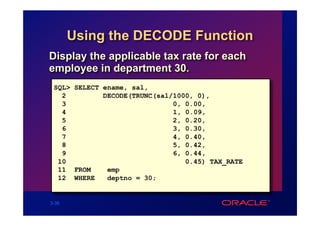
Using the DECODE Function
Display the applicable tax rate for each
employee in department 30.
 SQL> SELECT ename, sal,
   2         DECODE(TRUNC(sal/1000, 0),
   3                          0, 0.00,
   4                          1, 0.09,
   5                          2, 0.20,
   6                          3, 0.30,
   7                          4, 0.40,
   8                          5, 0.42,
   9                          6, 0.44,
  10                             0.45) TAX_RATE
  11 FROM     emp
  12 WHERE    deptno = 30;


3-38
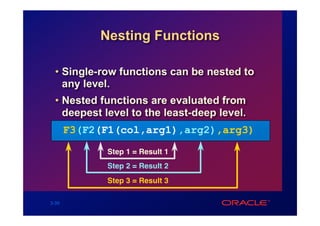
Nesting Functions

  • Single-row functions can be nested to
    any level.
  • Nested functions are evaluated from
    deepest level to the least-deep level.
       F3(F2(F1(col,arg1),arg2),arg3)
             Step 1 = Result 1
             Step 2 = Result 2
             Step 3 = Result 3

3-39
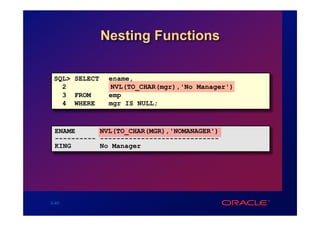
Nesting Functions

 SQL> SELECT    ename,
   2            NVL(TO_CHAR(mgr),'No Manager')
   3 FROM       emp
   4 WHERE      mgr IS NULL;


 ENAME      NVL(TO_CHAR(MGR),'NOMANAGER')
 ---------- -----------------------------
 KING       No Manager


3-40
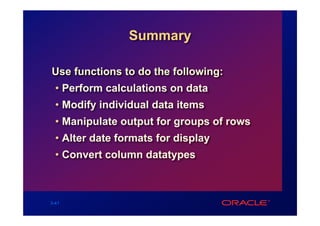
Summary

Use functions to do the following:
  • Perform calculations on data
  • Modify individual data items
  • Manipulate output for groups of rows
  • Alter date formats for display
  • Convert column datatypes


3-41

COIS 420 - Practice 03

  • 1.
  • 2.
    Objectives After completing thislesson, you should be able to do the following: • Describe various types of functions available in SQL • Use character, number, and date functions in SELECT statements • Describe the use of conversion functions 3-2
  • 3.
    SQL Functions Input Output Function arg 1 Function performs action arg 2 Result value arg n 3-3
  • 4.
    Two Types ofSQL Functions Functions Single-row Multiple-row functions functions 3-4
  • 5.
    Single-Row Functions • Manipulate data items • Accept arguments and return one value • Act on each row returned • Return one result per row • May modify the datatype • Can be nested function_name (column|expression, [arg1, arg2,...]) 3-5
  • 6.
    Single-Row Functions Character General Number Single-row functions Conversion Date 3-6
  • 7.
    Character Functions Character functions Case conversion Character manipulation functions functions LOWER CONCAT UPPER SUBSTR INITCAP LENGTH INSTR LPAD 3-7
  • 8.
    Case Conversion Functions Convertcase for character strings Function Result LOWER('SQL Course') sql course UPPER('SQL Course') SQL COURSE INITCAP('SQL Course') Sql Course 3-8
  • 9.
    Using Case ConversionFunctions Display the employee number, name, and department number for employee Blake. SQL> SELECT empno, ename, deptno 2 FROM emp 3 WHERE ename = 'blake'; no rows selected SQL> SELECT empno, ename, deptno 2 FROM emp 3 WHERE LOWER(ename) = 'blake'; EMPNO ENAME DEPTNO --------- ---------- --------- 7698 BLAKE 30 3-9
  • 10.
    Character Manipulation Functions Manipulatecharacter strings Function Result CONCAT('Good', 'String') GoodString SUBSTR('String',1,3) Str LENGTH('String') 6 INSTR('String', 'r') 3 LPAD(sal,10,'*') ******5000 3-10
  • 11.
    Using the Character Manipulation Functions SQL> SELECT ename, CONCAT (ename, job), LENGTH(ename), 2 INSTR(ename, 'A') 3 FROM emp 4 WHERE SUBSTR(job,1,5) = 'SALES'; ENAME CONCAT(ENAME,JOB) LENGTH(ENAME) INSTR(ENAME,'A') ---------- ------------------- ------------- ---------------- MARTIN MARTINSALESMAN 6 2 ALLEN ALLENSALESMAN 5 1 TURNER TURNERSALESMAN 6 0 WARD WARDSALESMAN 4 2 3-11
  • 12.
    Number Functions • ROUND: Rounds value to specified decimal ROUND(45.926, 2) 45.93 • TRUNC: Truncates value to specified decimal TRUNC(45.926, 2) 45.92 • MOD: Returns remainder of division MOD(1600, 300) 100 3-12
  • 13.
    Using the ROUNDFunction SQL> SELECT ROUND(45.923,2), ROUND(45.923,0), 2 ROUND(45.923,-1) 3 FROM DUAL; ROUND(45.923,2) ROUND(45.923,0) ROUND(45.923,-1) --------------- -------------- ----------------- 45.92 46 50 3-13
  • 14.
    Using the TRUNCFunction SQL> SELECT TRUNC(45.923,2), TRUNC(45.923), 2 TRUNC(45.923,-1) 3 FROM DUAL; TRUNC(45.923,2) TRUNC(45.923) TRUNC(45.923,-1) --------------- ------------- --------------- 45.92 45 40 3-14
  • 15.
    Using the MODFunction Calculate the remainder of the ratio of salary to commission for all employees whose job title is salesman. SQL> SELECT ename, sal, comm, MOD(sal, comm) 2 FROM emp 3 WHERE job = 'SALESMAN'; ENAME SAL COMM MOD(SAL,COMM) ---------- --------- --------- ------------- MARTIN 1250 1400 1250 ALLEN 1600 300 100 TURNER 1500 0 1500 WARD 1250 500 250 3-15
  • 16.
    Working with Dates • Oracle stores dates in an internal numeric format: century, year, month, day, hours, minutes, seconds. • The default date format is DD-MON-YY. • SYSDATE is a function returning date and time. • DUAL is a dummy table used to view SYSDATE. 3-16
  • 17.
    Arithmetic with Dates • Add or subtract a number to or from a date for a resultant date value. • Subtract two dates to find the number of days between those dates. • Add hours to a date by dividing the number of hours by 24. 3-17
  • 18.
    Using Arithmetic Operators with Dates SQL> SELECT ename, (SYSDATE-hiredate)/7 WEEKS 2 FROM emp 3 WHERE deptno = 10; ENAME WEEKS ---------- --------- KING 830.93709 CLARK 853.93709 MILLER 821.36566 3-18
  • 19.
    Date Functions Function Description MONTHS_BETWEEN Number of months between two dates ADD_MONTHS Add calendar months to date NEXT_DAY Next day of the date specified LAST_DAY Last day of the month ROUND Round date TRUNC Truncate date 3-19
  • 20.
    Using Date Functions • MONTHS_BETWEEN ('01-SEP-95','11-JAN-94') 19.6774194 • ADD_MONTHS ('11-JAN-94',6) '11-JUL-94' • NEXT_DAY ('01-SEP-95','FRIDAY') '08-SEP-95' • LAST_DAY('01-SEP-95') '30-SEP-95' 3-20
  • 21.
    Using Date Functions •ROUND('25-JUL-95','MONTH') 01-AUG-95 • ROUND('25-JUL-95','YEAR') 01-JAN-96 • TRUNC('25-JUL-95','MONTH') 01-JUL-95 • TRUNC('25-JUL-95','YEAR') 01-JAN-95 3-21
  • 22.
    Conversion Functions Datatype conversion Implicit datatype Explicit datatype conversion conversion 3-22
  • 23.
    Implicit Datatype Conversion For assignments, the Oracle can automatically convert the following: From To VARCHAR2 or CHAR NUMBER VARCHAR2 or CHAR DATE NUMBER VARCHAR2 DATE VARCHAR2 3-23
  • 24.
    Implicit Datatype Conversion Forexpression evaluation, the Oracle Server can automatically convert the following: From To VARCHAR2 or CHAR NUMBER VARCHAR2 or CHAR DATE 3-24
  • 25.
    Explicit Datatype Conversion TO_NUMBER TO_DATE NUMBER CHARACTER DATE TO_CHAR TO_CHAR 3-25
  • 26.
    TO_CHAR Function withDates TO_CHAR(date, 'fmt') The format model: • Must be enclosed in single quotation marks and is case sensitive • Can include any valid date format element • Has an fm element to remove padded blanks or suppress leading zeros • Is separated from the date value by a comma 3-26
  • 27.
    Elements of DateFormat Model YYYY Full year in numbers YEAR Year spelled out MM Two-digit value for month MONTH Full name of the month Three-letter abbreviation of the DY day of the week DAY Full name of the day 3-27
  • 28.
    Elements of DateFormat Model • Time elements format the time portion of the date. HH24:MI:SS AM 15:45:32 PM • Add character strings by enclosing them in double quotation marks. DD "of" MONTH 12 of OCTOBER • Number suffixes spell out numbers. ddspth fourteenth 3-28
  • 29.
    Using TO_CHAR Function with Dates SQL> SELECT ename, 2 TO_CHAR(hiredate, 'fmDD Month YYYY') HIREDATE 3 FROM emp; ENAME HIREDATE ---------- ----------------- KING 17 November 1981 BLAKE 1 May 1981 CLARK 9 June 1981 JONES 2 April 1981 MARTIN 28 September 1981 ALLEN 20 February 1981 ... 14 rows selected. 3-29
  • 30.
    TO_CHAR Function withNumbers TO_CHAR(number, 'fmt') Use these formats with the TO_CHAR function to display a number value as a character: 9 Represents a number 0 Forces a zero to be displayed $ Places a floating dollar sign L Uses the floating local currency symbol . Prints a decimal point , Prints a thousand indicator 3-30
  • 31.
    Using TO_CHAR Function with Numbers SQL> SELECT TO_CHAR(sal,'$99,999') SALARY 2 FROM emp 3 WHERE ename = 'SCOTT'; SALARY -------- $3,000 3-31
  • 32.
    TO_NUMBER and TO_DATE Functions • Convert a character string to a number format using the TO_NUMBER function TO_NUMBER(char[, 'fmt']) • Convert a character string to a date format using the TO_DATE function TO_DATE(char[, 'fmt']) 3-32
  • 33.
    RR Date Format Current Year Specified Date RR Format YY Format 1995 27-OCT-95 1995 1995 1995 27-OCT-17 2017 1917 2001 27-OCT-17 2017 2017 2001 27-OCT-95 1995 2095 If the specified two-digit year is: 0–49 50–99 If two digits The return date is in The return date is in of the 0–49 the current century the century before current the current one year are: The return date is in The return date is in 50–99 the century after the current century the current one 3-33
  • 34.
    NVL Function Converts nullto an actual value • Datatypes that can be used are date, character, and number. • Datatypes must match – NVL(comm,0) – NVL(hiredate,'01-JAN-97') – NVL(job,'No Job Yet') 3-34
  • 35.
    Using the NVLFunction SQL> SELECT ename, sal, comm, (sal*12)+NVL(comm,0) 2 FROM emp; ENAME SAL COMM (SAL*12)+NVL(COMM,0) ---------- --------- --------- -------------------- KING 5000 60000 BLAKE 2850 34200 CLARK 2450 29400 JONES 2975 35700 MARTIN 1250 1400 16400 ALLEN 1600 300 19500 ... 14 rows selected. 3-35
  • 36.
    DECODE Function Facilitates conditionalinquiries by doing the work of a CASE or IF-THEN-ELSE statement DECODE(col/expression, search1, result1 [, search2, result2,...,] [, default]) 3-36
  • 37.
    Using the DECODEFunction SQL> SELECT job, sal, 2 DECODE(job, 'ANALYST', SAL*1.1, 3 'CLERK', SAL*1.15, 4 'MANAGER', SAL*1.20, 5 SAL) 6 REVISED_SALARY 7 FROM emp; JOB SAL REVISED_SALARY --------- --------- -------------- PRESIDENT 5000 5000 MANAGER 2850 3420 MANAGER 2450 2940 ... 14 rows selected. 3-37
  • 38.
    Using the DECODEFunction Display the applicable tax rate for each employee in department 30. SQL> SELECT ename, sal, 2 DECODE(TRUNC(sal/1000, 0), 3 0, 0.00, 4 1, 0.09, 5 2, 0.20, 6 3, 0.30, 7 4, 0.40, 8 5, 0.42, 9 6, 0.44, 10 0.45) TAX_RATE 11 FROM emp 12 WHERE deptno = 30; 3-38
  • 39.
    Nesting Functions • Single-row functions can be nested to any level. • Nested functions are evaluated from deepest level to the least-deep level. F3(F2(F1(col,arg1),arg2),arg3) Step 1 = Result 1 Step 2 = Result 2 Step 3 = Result 3 3-39
  • 40.
    Nesting Functions SQL>SELECT ename, 2 NVL(TO_CHAR(mgr),'No Manager') 3 FROM emp 4 WHERE mgr IS NULL; ENAME NVL(TO_CHAR(MGR),'NOMANAGER') ---------- ----------------------------- KING No Manager 3-40
  • 41.
    Summary Use functions todo the following: • Perform calculations on data • Modify individual data items • Manipulate output for groups of rows • Alter date formats for display • Convert column datatypes 3-41