Single-Row Functions
Objectives After completing this lesson, you should be able to  do the following: Describe various types of functions available in SQL Use character, number, and date functions in  SELECT  statements Describe the use of conversion functions
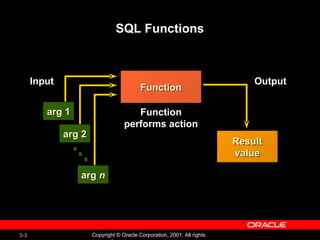
SQL Functions Function Function performs action Input arg 1 arg 2 arg  n Output Result value
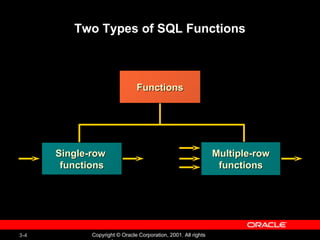
Two Types of SQL Functions Functions Single-row  functions Multiple-row functions
Single-Row Functions Single row functions: Manipulate data items Accept arguments and return one value Act on each row returned Return one result per row May modify the data type Can be nested Accept arguments which can be a column or an expression function_name  [( arg1, arg2,... )]
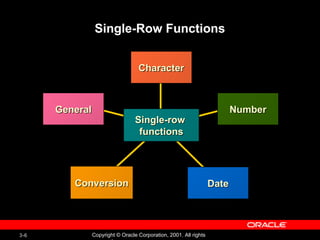
Single-Row Functions Conversion Character Number Date General Single-row  functions
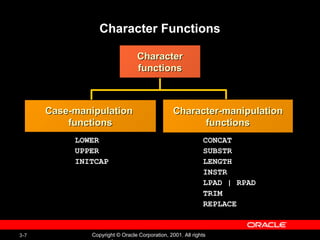
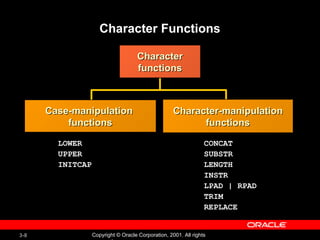
Character Functions Character functions LOWER UPPER INITCAP CONCAT SUBSTR LENGTH INSTR LPAD | RPAD TRIM REPLACE Case-manipulation  functions Character-manipulation functions
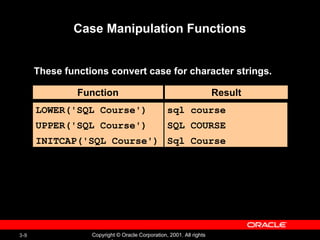
Case Manipulation Functions These functions convert case for character strings. Function Result LOWER('SQL Course') UPPER('SQL Course') INITCAP('SQL Course') sql course SQL COURSE Sql Course
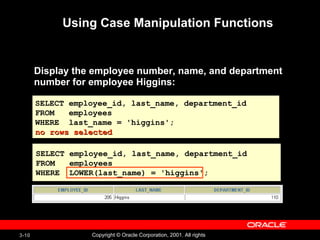
Using Case Manipulation Functions Display the employee number, name, and department number for employee Higgins: SELECT employee_id, last_name, department_id FROM  employees WHERE  last_name = 'higgins'; no rows selected SELECT employee_id, last_name, department_id FROM  employees WHERE  LOWER(last_name) = 'higgins';
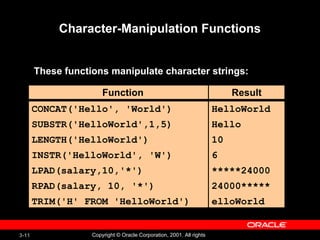
Character-Manipulation Functions These functions manipulate character strings: CONCAT('Hello', 'World') SUBSTR('HelloWorld',1,5) LENGTH('HelloWorld') INSTR('HelloWorld', 'W') LPAD(salary,10,'*') RPAD(salary, 10, '*') TRIM('H' FROM 'HelloWorld') HelloWorld Hello 10 6 *****24000 24000***** elloWorld Function Result
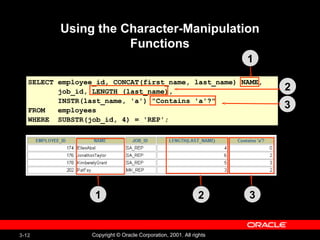
Using the Character-Manipulation Functions SELECT employee_id, CONCAT(first_name, last_name) NAME,  job_id, LENGTH (last_name),  INSTR(last_name, 'a') "Contains 'a'?" FROM  employees WHERE  SUBSTR(job_id, 4) = 'REP'; 1 2 3 1 2 3
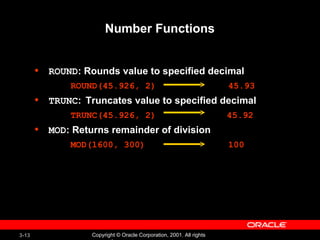
Number Functions ROUND : Rounds value to specified decimal ROUND(45.926, 2) 45.93 TRUNC :  Truncates value to specified decimal TRUNC(45.926, 2)   45.92 MOD : Returns remainder of division MOD(1600, 300) 100
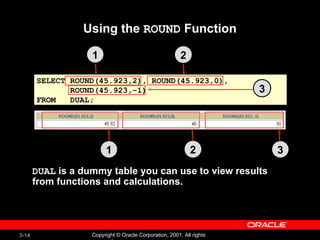
Using the  ROUND  Function SELECT ROUND(45.923,2), ROUND(45.923,0), ROUND(45.923,-1) FROM  DUAL; DUAL  is a dummy table you can use to view results  from functions and calculations. 1 2 3 3 1 2
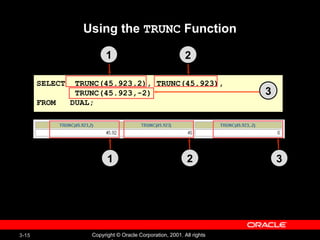
Using the  TRUNC  Function SELECT  TRUNC(45.923,2), TRUNC(45.923), TRUNC(45.923,-2) FROM  DUAL; 3 1 2 1 2 3
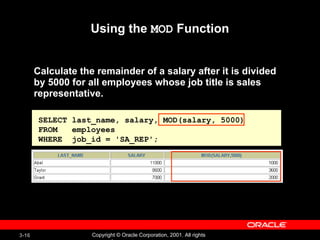
Using the  MOD  Function Calculate the remainder of a salary after it is divided by 5000 for all employees whose job title is sales representative. SELECT last_name, salary, MOD(salary, 5000) FROM  employees WHERE  job_id = 'SA_REP';
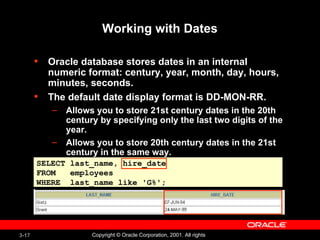
Working with Dates Oracle database stores dates in an internal numeric format: century, year, month, day, hours, minutes, seconds. The default date display format is DD-MON-RR. Allows you to store 21st century dates in the 20th century by specifying only the last two digits of the year.  Allows you to store 20th century dates in the 21st century in the same way.  SELECT last_name, hire_date FROM  employees WHERE  last_name like  ' G% ';
Working with Dates SYSDATE  is a function that returns: Date  Time
Arithmetic with Dates Add or subtract a number to or from a date for a resultant date value. Subtract two dates to find the number of days between those dates. Add hours to a date by dividing the number of hours by 24.
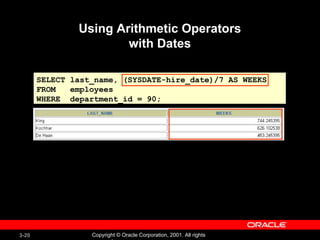
Using Arithmetic Operators with Dates SELECT last_name, (SYSDATE-hire_date)/7 AS WEEKS FROM  employees WHERE  department_id = 90;
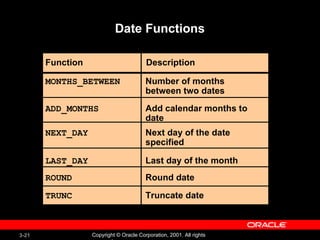
Date Functions Number of months between two dates MONTHS_BETWEEN ADD_MONTHS NEXT_DAY LAST_DAY ROUND TRUNC  Add calendar months to date Next day of the date specified Last day of the month Round date  Truncate date Function Description
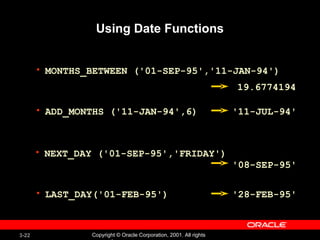
Using Date Functions MONTHS_BETWEEN ('01-SEP-95','11-JAN-94') ADD_MONTHS ('11-JAN-94',6) NEXT_DAY ('01-SEP-95','FRIDAY')  LAST_DAY('01-FEB-95') 19.6774194 '11-JUL-94' '08-SEP-95' '28-FEB-95'
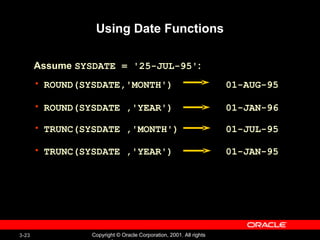
Using Date Functions ROUND(SYSDATE,'MONTH')  01-AUG-95 ROUND(SYSDATE ,'YEAR')  01-JAN-96 TRUNC(SYSDATE ,'MONTH')  01-JUL-95  TRUNC(SYSDATE ,'YEAR')  01-JAN-95 Assume  SYSDATE = '25-JUL-95' :
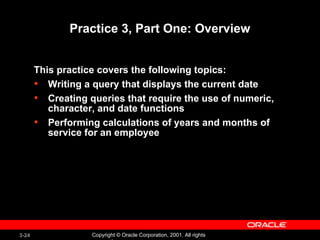
Practice 3, Part One: Overview This practice covers the following topics: Writing a query that displays the current date  Creating queries that require the use of numeric, character, and date functions Performing calculations of years and months of service for an employee
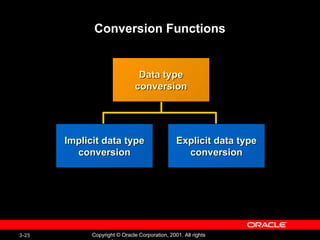
Conversion Functions Implicit data type conversion Explicit data type conversion Data type conversion
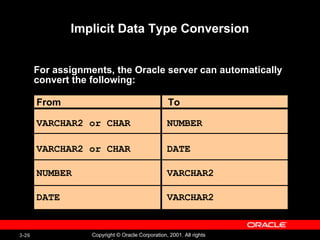
Implicit Data Type Conversion For assignments, the Oracle server can automatically convert the following: VARCHAR2 or CHAR From To VARCHAR2 or CHAR NUMBER DATE NUMBER DATE VARCHAR2 VARCHAR2
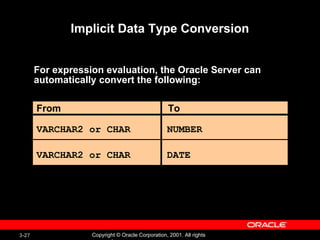
Implicit Data Type Conversion For expression evaluation, the Oracle Server can  automatically convert the following: VARCHAR2 or CHAR From To VARCHAR2 or CHAR NUMBER DATE
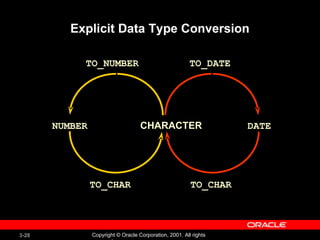
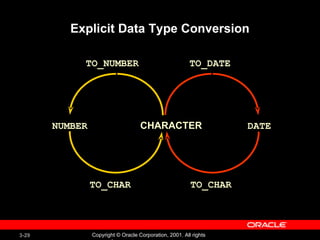
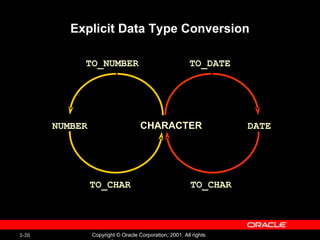
Explicit Data Type Conversion NUMBER CHARACTER TO_CHAR TO_NUMBER DATE TO_CHAR TO_DATE
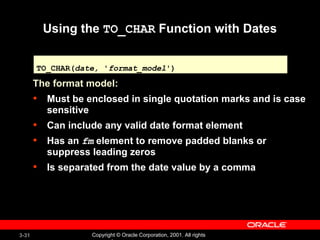
Using the  TO_CHAR  Function with Dates The format model: Must be enclosed in single quotation marks and is case sensitive Can include any valid date format element Has an  fm  element to remove padded blanks or suppress leading zeros Is separated from the date value by a comma TO_CHAR( date,  ' format_model ')
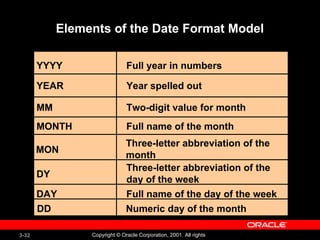
Elements of the Date Format Model YYYY YEAR MM MONTH DY DAY Full year in numbers Year spelled out Two-digit value for month Three-letter abbreviation of the day of the week Full name of the day of the week Full name of the month MON Three-letter abbreviation of the month DD Numeric day of the month
 
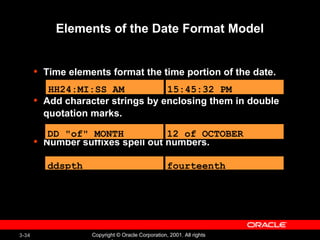
Elements of the Date Format Model Time elements format the time portion of the date. Add character strings by enclosing them in double quotation marks. Number suffixes spell out numbers. HH24:MI:SS AM 15:45:32 PM DD "of" MONTH 12 of OCTOBER ddspth fourteenth
 
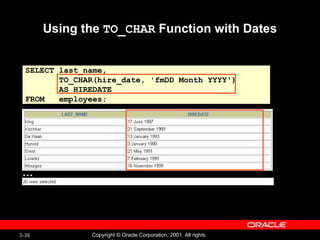
Using the  TO_CHAR  Function with Dates SELECT last_name, TO_CHAR(hire_date, 'fmDD Month YYYY') AS HIREDATE FROM  employees; …
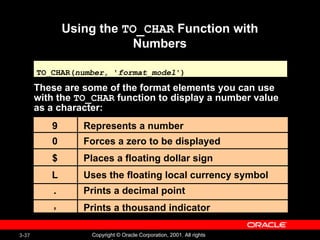
Using the  TO_CHAR  Function with Numbers These are some of the format elements you can use with the  TO_CHAR  function to display a number value as a character: TO_CHAR( number,  ' format_model ') 9 0 $ L . , Represents a number Forces a zero to be displayed Places a floating dollar sign Uses the floating local currency symbol Prints a decimal point Prints a thousand indicator
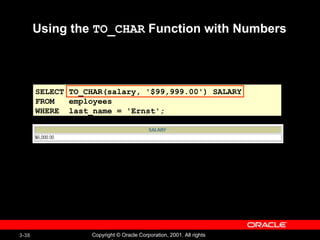
Using the  TO_CHAR  Function with Numbers SELECT TO_CHAR(salary, '$99,999.00') SALARY FROM  employees WHERE  last_name = 'Ernst';
Using the  TO_NUMBER  and  TO_DATE  Functions  Convert a character string to a number format using the  TO_NUMBER  function: Convert a character string to a date format using the  TO_DATE  function: These functions have an   fx  modifier. This modifier specifies the exact matching for the character argument and date format model of a  TO_DATE  function TO_NUMBER( char [ ,  ' format_model ']) TO_DATE( char [, ' format_model '])
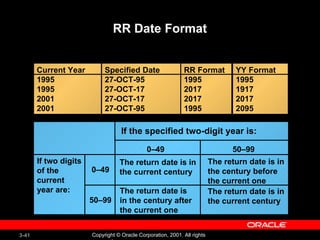
RR Date Format Current Year 1995 1995 2001 2001 Specified Date 27-OCT-95 27-OCT-17 27-OCT-17 27-OCT-95 RR Format 1995 2017 2017 1995 YY Format 1995 1917 2017 2095 If two digits of the current  year are: 0–49 0–49 50–99 50–99 The return date is in the current century The return date is in the century after the current one The return date is in the century before the current one The return date is in the current century If the specified two-digit year is:
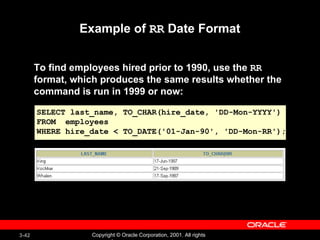
Example of  RR  Date Format To find employees hired prior to 1990, use the  RR   format, which produces the same results whether the  command is run in 1999 or now: SELECT last_name, TO_CHAR(hire_date, 'DD-Mon-YYYY') FROM  employees WHERE hire_date < TO_DATE('01-Jan-90', 'DD-Mon-RR');
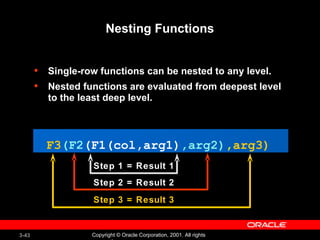
Nesting Functions Single-row functions can be nested to any level. Nested functions are evaluated from deepest level to the least deep level. F3 (F2 (F1(col,arg1) ,arg2) , arg3) Step 1 = Result 1 Step 2 = Result 2 Step 3 = Result 3
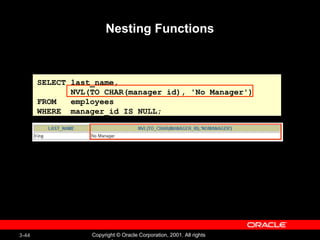
Nesting Functions SELECT last_name, NVL(TO_CHAR(manager_id), 'No Manager') FROM  employees WHERE  manager_id IS NULL;
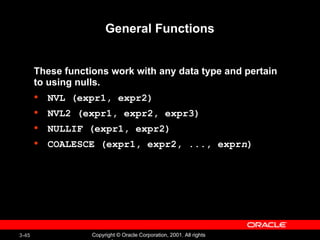
General Functions These functions work with any data type and pertain to using nulls. NVL (expr1, expr2) NVL2 (expr1, expr2, expr3) NULLIF (expr1, expr2) COALESCE (expr1, expr2, ..., expr n )
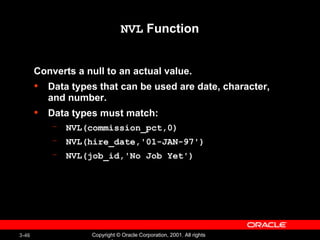
NVL  Function Converts a null to an actual value. Data types that can be used are date, character, and number. Data types must match: NVL(commission_pct,0) NVL(hire_date,'01-JAN-97') NVL(job_id,'No Job Yet')
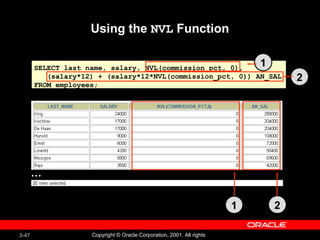
Using the  NVL  Function SELECT last_name, salary, NVL(commission_pct, 0), (salary*12) + (salary*12*NVL(commission_pct, 0)) AN_SAL FROM employees; … 1 2 1 2
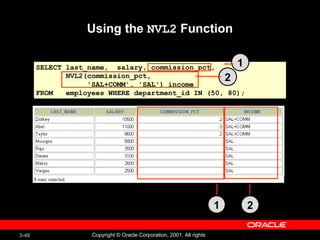
Using the  NVL2  Function SELECT last_name,  salary, commission_pct, NVL2(commission_pct,  'SAL+COMM', 'SAL') income FROM  employees WHERE department_id IN (50, 80); 1 2 1 2
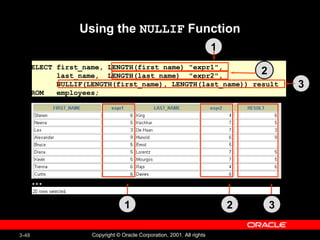
Using the  NULLIF  Function SELECT first_name, LENGTH(first_name) &quot;expr1&quot;,  last_name,  LENGTH(last_name)  &quot;expr2&quot;, NULLIF(LENGTH(first_name), LENGTH(last_name)) result FROM  employees; … 1 2 3 1 2 3
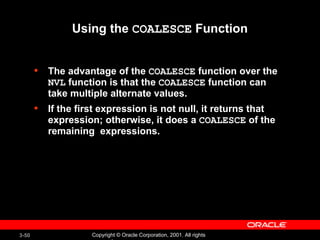
Using the  COALESCE  Function The advantage of the  COALESCE  function over the  NVL  function is that the  COALESCE  function can take multiple alternate values. If the first expression is not null, it returns that expression; otherwise, it does a  COALESCE  of the remaining  expressions.
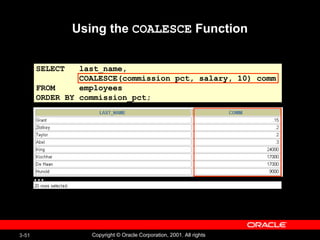
Using the  COALESCE  Function SELECT  last_name, COALESCE(commission_pct, salary, 10) comm FROM  employees ORDER BY commission_pct; …
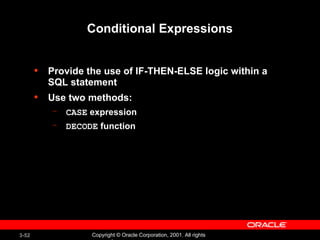
Conditional Expressions Provide the use of IF-THEN-ELSE logic within a SQL statement Use two methods: CASE  expression DECODE  function
The  CASE  Expression Facilitates conditional inquiries by doing the work of  an IF-THEN-ELSE statement: CASE  expr  WHEN  comparison_expr1  THEN  return_expr1 [WHEN  comparison_expr2  THEN  return_expr2 WHEN  comparison_exprn  THEN  return_exprn ELSE  else_expr ] END
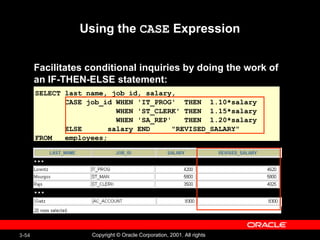
Using the  CASE  Expression Facilitates conditional inquiries by doing the work of  an IF-THEN-ELSE statement: SELECT last_name, job_id, salary, CASE job_id WHEN 'IT_PROG'  THEN  1.10*salary WHEN 'ST_CLERK' THEN  1.15*salary WHEN 'SA_REP'  THEN  1.20*salary ELSE  salary END  &quot;REVISED_SALARY&quot; FROM  employees; … …
The  DECODE  Function Facilitates conditional inquiries by doing the work of a  CASE  or IF-THEN-ELSE statement: DECODE( col|expression, search1, result1    [ , search2, result2,..., ]   [ , default ])
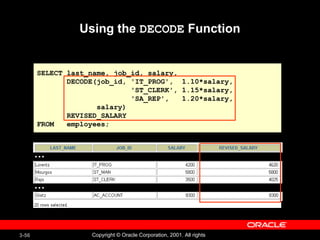
Using the  DECODE  Function SELECT last_name, job_id, salary, DECODE(job_id, 'IT_PROG',  1.10*salary, 'ST_CLERK', 1.15*salary, 'SA_REP',  1.20*salary, salary) REVISED_SALARY FROM  employees; … …
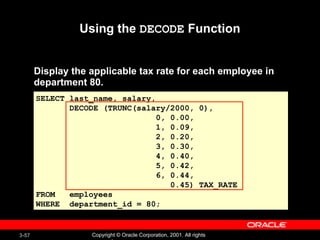
Using the  DECODE  Function Display the applicable tax rate for each employee in department 80. SELECT last_name, salary, DECODE (TRUNC(salary/2000, 0), 0, 0.00, 1, 0.09, 2, 0.20, 3, 0.30, 4, 0.40, 5, 0.42, 6, 0.44, 0.45) TAX_RATE FROM  employees WHERE  department_id = 80;
Summary In this lesson, you should have learned how to:  Perform calculations on data using functions Modify individual data items using functions Manipulate output for groups of rows using functions Alter date formats for display using functions Convert column data types using functions Use NVL functions Use IF-THEN-ELSE logic
Practice 3, Part Two: Overview This practice covers the following topics: Creating queries that require the use of numeric, character, and date functions Using concatenation with functions Writing case-insensitive queries to test the usefulness of character functions Performing calculations of years and months of service for an employee Determining the review date for an employee

Les03

  • 1.
  • 2.
    Objectives After completingthis lesson, you should be able to do the following: Describe various types of functions available in SQL Use character, number, and date functions in SELECT statements Describe the use of conversion functions
  • 3.
    SQL Functions FunctionFunction performs action Input arg 1 arg 2 arg n Output Result value
  • 4.
    Two Types ofSQL Functions Functions Single-row functions Multiple-row functions
  • 5.
    Single-Row Functions Singlerow functions: Manipulate data items Accept arguments and return one value Act on each row returned Return one result per row May modify the data type Can be nested Accept arguments which can be a column or an expression function_name [( arg1, arg2,... )]
  • 6.
    Single-Row Functions ConversionCharacter Number Date General Single-row functions
  • 7.
    Character Functions Characterfunctions LOWER UPPER INITCAP CONCAT SUBSTR LENGTH INSTR LPAD | RPAD TRIM REPLACE Case-manipulation functions Character-manipulation functions
  • 8.
    Character Functions Characterfunctions LOWER UPPER INITCAP CONCAT SUBSTR LENGTH INSTR LPAD | RPAD TRIM REPLACE Case-manipulation functions Character-manipulation functions
  • 9.
    Case Manipulation FunctionsThese functions convert case for character strings. Function Result LOWER('SQL Course') UPPER('SQL Course') INITCAP('SQL Course') sql course SQL COURSE Sql Course
  • 10.
    Using Case ManipulationFunctions Display the employee number, name, and department number for employee Higgins: SELECT employee_id, last_name, department_id FROM employees WHERE last_name = 'higgins'; no rows selected SELECT employee_id, last_name, department_id FROM employees WHERE LOWER(last_name) = 'higgins';
  • 11.
    Character-Manipulation Functions Thesefunctions manipulate character strings: CONCAT('Hello', 'World') SUBSTR('HelloWorld',1,5) LENGTH('HelloWorld') INSTR('HelloWorld', 'W') LPAD(salary,10,'*') RPAD(salary, 10, '*') TRIM('H' FROM 'HelloWorld') HelloWorld Hello 10 6 *****24000 24000***** elloWorld Function Result
  • 12.
    Using the Character-ManipulationFunctions SELECT employee_id, CONCAT(first_name, last_name) NAME, job_id, LENGTH (last_name), INSTR(last_name, 'a') &quot;Contains 'a'?&quot; FROM employees WHERE SUBSTR(job_id, 4) = 'REP'; 1 2 3 1 2 3
  • 13.
    Number Functions ROUND: Rounds value to specified decimal ROUND(45.926, 2) 45.93 TRUNC : Truncates value to specified decimal TRUNC(45.926, 2) 45.92 MOD : Returns remainder of division MOD(1600, 300) 100
  • 14.
    Using the ROUND Function SELECT ROUND(45.923,2), ROUND(45.923,0), ROUND(45.923,-1) FROM DUAL; DUAL is a dummy table you can use to view results from functions and calculations. 1 2 3 3 1 2
  • 15.
    Using the TRUNC Function SELECT TRUNC(45.923,2), TRUNC(45.923), TRUNC(45.923,-2) FROM DUAL; 3 1 2 1 2 3
  • 16.
    Using the MOD Function Calculate the remainder of a salary after it is divided by 5000 for all employees whose job title is sales representative. SELECT last_name, salary, MOD(salary, 5000) FROM employees WHERE job_id = 'SA_REP';
  • 17.
    Working with DatesOracle database stores dates in an internal numeric format: century, year, month, day, hours, minutes, seconds. The default date display format is DD-MON-RR. Allows you to store 21st century dates in the 20th century by specifying only the last two digits of the year. Allows you to store 20th century dates in the 21st century in the same way. SELECT last_name, hire_date FROM employees WHERE last_name like ' G% ';
  • 18.
    Working with DatesSYSDATE is a function that returns: Date Time
  • 19.
    Arithmetic with DatesAdd or subtract a number to or from a date for a resultant date value. Subtract two dates to find the number of days between those dates. Add hours to a date by dividing the number of hours by 24.
  • 20.
    Using Arithmetic Operatorswith Dates SELECT last_name, (SYSDATE-hire_date)/7 AS WEEKS FROM employees WHERE department_id = 90;
  • 21.
    Date Functions Numberof months between two dates MONTHS_BETWEEN ADD_MONTHS NEXT_DAY LAST_DAY ROUND TRUNC Add calendar months to date Next day of the date specified Last day of the month Round date Truncate date Function Description
  • 22.
    Using Date FunctionsMONTHS_BETWEEN ('01-SEP-95','11-JAN-94') ADD_MONTHS ('11-JAN-94',6) NEXT_DAY ('01-SEP-95','FRIDAY') LAST_DAY('01-FEB-95') 19.6774194 '11-JUL-94' '08-SEP-95' '28-FEB-95'
  • 23.
    Using Date FunctionsROUND(SYSDATE,'MONTH') 01-AUG-95 ROUND(SYSDATE ,'YEAR') 01-JAN-96 TRUNC(SYSDATE ,'MONTH') 01-JUL-95 TRUNC(SYSDATE ,'YEAR') 01-JAN-95 Assume SYSDATE = '25-JUL-95' :
  • 24.
    Practice 3, PartOne: Overview This practice covers the following topics: Writing a query that displays the current date Creating queries that require the use of numeric, character, and date functions Performing calculations of years and months of service for an employee
  • 25.
    Conversion Functions Implicitdata type conversion Explicit data type conversion Data type conversion
  • 26.
    Implicit Data TypeConversion For assignments, the Oracle server can automatically convert the following: VARCHAR2 or CHAR From To VARCHAR2 or CHAR NUMBER DATE NUMBER DATE VARCHAR2 VARCHAR2
  • 27.
    Implicit Data TypeConversion For expression evaluation, the Oracle Server can automatically convert the following: VARCHAR2 or CHAR From To VARCHAR2 or CHAR NUMBER DATE
  • 28.
    Explicit Data TypeConversion NUMBER CHARACTER TO_CHAR TO_NUMBER DATE TO_CHAR TO_DATE
  • 29.
    Explicit Data TypeConversion NUMBER CHARACTER TO_CHAR TO_NUMBER DATE TO_CHAR TO_DATE
  • 30.
    Explicit Data TypeConversion NUMBER CHARACTER TO_CHAR TO_NUMBER DATE TO_CHAR TO_DATE
  • 31.
    Using the TO_CHAR Function with Dates The format model: Must be enclosed in single quotation marks and is case sensitive Can include any valid date format element Has an fm element to remove padded blanks or suppress leading zeros Is separated from the date value by a comma TO_CHAR( date, ' format_model ')
  • 32.
    Elements of theDate Format Model YYYY YEAR MM MONTH DY DAY Full year in numbers Year spelled out Two-digit value for month Three-letter abbreviation of the day of the week Full name of the day of the week Full name of the month MON Three-letter abbreviation of the month DD Numeric day of the month
  • 33.
  • 34.
    Elements of theDate Format Model Time elements format the time portion of the date. Add character strings by enclosing them in double quotation marks. Number suffixes spell out numbers. HH24:MI:SS AM 15:45:32 PM DD &quot;of&quot; MONTH 12 of OCTOBER ddspth fourteenth
  • 35.
  • 36.
    Using the TO_CHAR Function with Dates SELECT last_name, TO_CHAR(hire_date, 'fmDD Month YYYY') AS HIREDATE FROM employees; …
  • 37.
    Using the TO_CHAR Function with Numbers These are some of the format elements you can use with the TO_CHAR function to display a number value as a character: TO_CHAR( number, ' format_model ') 9 0 $ L . , Represents a number Forces a zero to be displayed Places a floating dollar sign Uses the floating local currency symbol Prints a decimal point Prints a thousand indicator
  • 38.
    Using the TO_CHAR Function with Numbers SELECT TO_CHAR(salary, '$99,999.00') SALARY FROM employees WHERE last_name = 'Ernst';
  • 39.
    Using the TO_NUMBER and TO_DATE Functions Convert a character string to a number format using the TO_NUMBER function: Convert a character string to a date format using the TO_DATE function: These functions have an fx modifier. This modifier specifies the exact matching for the character argument and date format model of a TO_DATE function TO_NUMBER( char [ , ' format_model ']) TO_DATE( char [, ' format_model '])
  • 40.
    Using the TO_NUMBER and TO_DATE Functions Convert a character string to a number format using the TO_NUMBER function: Convert a character string to a date format using the TO_DATE function: These functions have an fx modifier. This modifier specifies the exact matching for the character argument and date format model of a TO_DATE function TO_NUMBER( char [ , ' format_model ']) TO_DATE( char [, ' format_model '])
  • 41.
    RR Date FormatCurrent Year 1995 1995 2001 2001 Specified Date 27-OCT-95 27-OCT-17 27-OCT-17 27-OCT-95 RR Format 1995 2017 2017 1995 YY Format 1995 1917 2017 2095 If two digits of the current year are: 0–49 0–49 50–99 50–99 The return date is in the current century The return date is in the century after the current one The return date is in the century before the current one The return date is in the current century If the specified two-digit year is:
  • 42.
    Example of RR Date Format To find employees hired prior to 1990, use the RR format, which produces the same results whether the command is run in 1999 or now: SELECT last_name, TO_CHAR(hire_date, 'DD-Mon-YYYY') FROM employees WHERE hire_date < TO_DATE('01-Jan-90', 'DD-Mon-RR');
  • 43.
    Nesting Functions Single-rowfunctions can be nested to any level. Nested functions are evaluated from deepest level to the least deep level. F3 (F2 (F1(col,arg1) ,arg2) , arg3) Step 1 = Result 1 Step 2 = Result 2 Step 3 = Result 3
  • 44.
    Nesting Functions SELECTlast_name, NVL(TO_CHAR(manager_id), 'No Manager') FROM employees WHERE manager_id IS NULL;
  • 45.
    General Functions Thesefunctions work with any data type and pertain to using nulls. NVL (expr1, expr2) NVL2 (expr1, expr2, expr3) NULLIF (expr1, expr2) COALESCE (expr1, expr2, ..., expr n )
  • 46.
    NVL FunctionConverts a null to an actual value. Data types that can be used are date, character, and number. Data types must match: NVL(commission_pct,0) NVL(hire_date,'01-JAN-97') NVL(job_id,'No Job Yet')
  • 47.
    Using the NVL Function SELECT last_name, salary, NVL(commission_pct, 0), (salary*12) + (salary*12*NVL(commission_pct, 0)) AN_SAL FROM employees; … 1 2 1 2
  • 48.
    Using the NVL2 Function SELECT last_name, salary, commission_pct, NVL2(commission_pct, 'SAL+COMM', 'SAL') income FROM employees WHERE department_id IN (50, 80); 1 2 1 2
  • 49.
    Using the NULLIF Function SELECT first_name, LENGTH(first_name) &quot;expr1&quot;, last_name, LENGTH(last_name) &quot;expr2&quot;, NULLIF(LENGTH(first_name), LENGTH(last_name)) result FROM employees; … 1 2 3 1 2 3
  • 50.
    Using the COALESCE Function The advantage of the COALESCE function over the NVL function is that the COALESCE function can take multiple alternate values. If the first expression is not null, it returns that expression; otherwise, it does a COALESCE of the remaining expressions.
  • 51.
    Using the COALESCE Function SELECT last_name, COALESCE(commission_pct, salary, 10) comm FROM employees ORDER BY commission_pct; …
  • 52.
    Conditional Expressions Providethe use of IF-THEN-ELSE logic within a SQL statement Use two methods: CASE expression DECODE function
  • 53.
    The CASE Expression Facilitates conditional inquiries by doing the work of an IF-THEN-ELSE statement: CASE expr WHEN comparison_expr1 THEN return_expr1 [WHEN comparison_expr2 THEN return_expr2 WHEN comparison_exprn THEN return_exprn ELSE else_expr ] END
  • 54.
    Using the CASE Expression Facilitates conditional inquiries by doing the work of an IF-THEN-ELSE statement: SELECT last_name, job_id, salary, CASE job_id WHEN 'IT_PROG' THEN 1.10*salary WHEN 'ST_CLERK' THEN 1.15*salary WHEN 'SA_REP' THEN 1.20*salary ELSE salary END &quot;REVISED_SALARY&quot; FROM employees; … …
  • 55.
    The DECODE Function Facilitates conditional inquiries by doing the work of a CASE or IF-THEN-ELSE statement: DECODE( col|expression, search1, result1 [ , search2, result2,..., ] [ , default ])
  • 56.
    Using the DECODE Function SELECT last_name, job_id, salary, DECODE(job_id, 'IT_PROG', 1.10*salary, 'ST_CLERK', 1.15*salary, 'SA_REP', 1.20*salary, salary) REVISED_SALARY FROM employees; … …
  • 57.
    Using the DECODE Function Display the applicable tax rate for each employee in department 80. SELECT last_name, salary, DECODE (TRUNC(salary/2000, 0), 0, 0.00, 1, 0.09, 2, 0.20, 3, 0.30, 4, 0.40, 5, 0.42, 6, 0.44, 0.45) TAX_RATE FROM employees WHERE department_id = 80;
  • 58.
    Summary In thislesson, you should have learned how to: Perform calculations on data using functions Modify individual data items using functions Manipulate output for groups of rows using functions Alter date formats for display using functions Convert column data types using functions Use NVL functions Use IF-THEN-ELSE logic
  • 59.
    Practice 3, PartTwo: Overview This practice covers the following topics: Creating queries that require the use of numeric, character, and date functions Using concatenation with functions Writing case-insensitive queries to test the usefulness of character functions Performing calculations of years and months of service for an employee Determining the review date for an employee

Editor's Notes

  • #2 Schedule: Timing Topic 55 minutes Lecture 30 minutes Practice 85 minutes Total