SQL for Pattern Matching 
LOGAN PALANISAMY
Agenda 
 Introduction to regular expressions 
 RegEx functions in Oracle 
 SQL for Pattern Matching
Meeting Basics 
 Put your phones/pagers on vibrate/mute 
 Messenger: Change the status to offline or 
in-meeting 
 Remote attendees: Mute yourself (*6). Ask 
questions via WebEx.
What are Regular Expressions? 
 A way to express patterns 
 credit cards, license plate numbers, vehicle identification 
numbers, voter id, driving license, SSNs, phone numbers 
 UNIX (grep, egrep), PHP, JAVA support Regular 
Expressions 
 PERL made it popular
Regular Expression Examples 
Example Meaning 
[0-9]{10,} 10 or more digits. 
[0-9]{3}-[0-9]{2}-[0-9]{4} Social Security number 
([0-9]{3})[1-9]{3}-[0-9]{4} Phone number (xxx)yyy-zzzz 
d{1,3}.d{1,3}.d{1,3}.d{1,3} Very basic IPv4 address format using 
Perl notation 
(d{4}[- ]?){3}d{4} Credit Card (three occurrences of four 
digits followed optionally by a space or 
dash, and one 4-digit series) 
[1-9][A-Z]{3}[0-9]{3} Car License Plate in California 
[A-Z][a-z]+(s+[A-Z][a-z]*)?s+[A-Z][ 
a-z]+ 
First name, optional Middle 
Initial/name, and Last name 
([01]?[0-9][0-9]?|2[0-4][0-9]|25[0- 
5].){3}([01]?[0-9][0-9]?|2[0-4][0- 
9]|25[0-5]) 
IPv4 address format
Regular Expression Meta Characters 
6 
Meta 
character 
Meaning 
. Matches any single "character" except newline. 
* Matches zero or more of the character preceding it 
e.g.: bugs*, table.* 
^ Denotes the beginning of the line. ^A denotes lines starting 
with A 
$ Denotes the end of the line. :$ denotes lines ending with : 
 Escape character (., *, [, , etc) 
[ ] matches one or more characters within the brackets. e.g. 
[aeiou], [a-z], [a-zA-Z], [0-9], [[:alpha:]], [a-z?,!] 
[^] negation - matches any characters other than the ones 
inside brackets. eg. ^[^13579] denotes all lines not starting 
with odd numbers, [^02468]$ denotes all lines not ending 
with even numbers
Extended Regular Expressions Meta Characters 
Meta character Meaning 
| alternation. e.g.: the(y|m), (they|them) 
+ one or more occurrences of previous character. 
? zero or one occurrences of previous character. 
{n} exactly n repetitions of the previous char or group 
{n,} n or more repetitions of the previous char or 
7 
group 
{n, m} n to m repetitions of previous char or group 
(....) grouping or subexpression 
n back referencing where n stands for the nth sub-expression. 
e.g.: 1 is the back reference for first 
sub-expression.
POSIX Character Classes 
POSIX Description 
[:alnum:] Alphanumeric characters 
[:alpha:] Alphabetic characters 
[:ascii:] ASCII characters 
[:blank:] Space and tab 
[:cntrl:] Control characters 
[:digit:] 
[:xdigit:] Digits, Hexadecimal digits 
[:graph:] Visible characters (i.e. anything except spaces, control characters, 
etc.) 
[:lower:] Lowercase letters 
[:print:] Visible characters and spaces (i.e. anything except control 
characters) 
[:punct:] Punctuation and symbols. 
[:space:] All whitespace characters, including line breaks 
[:upper:] Uppercase letters 
[:word:] Word characters (letters, numbers and underscores)
Perl Character Classes 
9 
Perl POSIX Description 
d [[:digit:]] [0-9] 
D [^[:digit:]] [^0-9] 
w [[:alnum:]_] [0-9a-zA-Z_] 
W [^[:alnum:]_] [^0-9a-zA-Z_] 
s [[:space:]] 
S [^[:space:]]
Tools to learn Regular Expressions 
 http://www.weitz.de/regex-coach/ 
 http://www.regexbuddy.com/
String operations before Regular Expression 
support in Oracle 
 Pull the data from DB and perform it in middle tier 
or FE 
 LIKE operator 
 OWA_PATTERN in 9i and before
LIKE operator 
 % matches zero or more of any character 
 _ matches exactly one character 
 Examples 
 WHERE col1 LIKE 'abc%'; 
 WHERE col1 LIKE '%abc'; 
 WHERE col1 LIKE 'ab_d'; 
 WHERE col1 LIKE '_%' escape ''; 
 WHERE col1 NOT LIKE 'abc%'; 
 Very limited functionality 
 Check whether first character is numeric: where c1 like '0%' OR c1 
like '1%' OR .. .. c1 like '9%' 
 Very trivial with Regular Exp: where regexp_like(c1, '^[0-9]')
REGEXP_* functions 
 Available from 10g onwards. 
 Powerful and flexible, but CPU-hungry. 
 Easy and elegant, but sometimes less performant 
 Usable on text literal, bind variable, or any column 
that holds character data such as CHAR, NCHAR, 
CLOB, NCLOB, NVARCHAR2, and VARCHAR2 
(but not LONG). 
 Useful as column constraint for data validation
REGEXP_LIKE 
 Determines whether pattern matches. 
 REGEXP_LIKE (source_str, pattern, 
[,match_parameter]) 
 Returns TRUE or FALSE. 
 Use in WHERE clause to return rows matching a pattern 
 Use as a constraint 
 alter table t add constraint alphanum check (regexp_like (x, 
'[[:alnum:]]')); 
 Use in PL/SQL to return a boolean. 
 IF (REGEXP_LIKE(v_name, '[[:alnum:]]')) THEN .. 
 Can't be used in SELECT clause 
 regexp_like.sql
REGEXP_SUBSTR 
 Extracts the matching pattern. Returns NULL when 
nothing matches 
 REGEXP_SUBSTR(source_str, pattern [, position [, 
occurrence [, match_parameter]]]) 
 position: character at which to begin the search. 
Default is 1 
 occurrence: The occurrence of pattern you want to 
extract 
 regexp_substr.sql
REGEXP_INSTR 
 Returns the location of match in a string 
 REGEXP_INSTR(source_str, pattern, [, position [, 
occurrence [, return_option [, match_parameter]]]]) 
 return_option: 
 0, the default, returns the position of the first character. 
 1 returns the position of the character following the occurence. 
 regexp_instr.sql
REGEXP_REPLACE 
 Search and Replace a pattern 
 REGEXP_REPLACE(source_str, pattern [, 
replace_str] [, position [, occurrence [, 
match_parameter]]]]) 
 If replace_str is not specified, pattern/search_str is 
replaced with empty string 
 occurence: 
 when 0, the default, replaces all occurrences of the match. 
 when n, any positive integer, replaces the nth occurrence. 
 regexp_replace.sql
REGEXP_COUNT 
 New in 11g 
 Returns the number of times a pattern appears in a 
string. 
 REGEXP_COUNT(source_str, pattern [,position 
[,match_param]]) 
 For simple patterns it is same as 
(LENGTH(source_str) – 
LENGTH(REPLACE(source_str, 
pattern)))/LENGTH(pattern) 
 regexp_count.sql
Why “SQL for Pattern Matching” 
 Deficiency of REGEXP_* functions 
 Retrieving contiguous rows that are inter-related. 
 Shortcoming of LEAD/LAG analytic functions
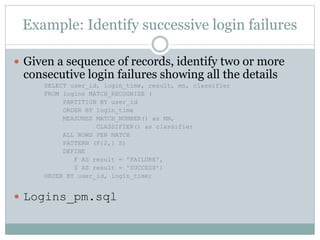
Example: Identify successive login failures 
 Given a sequence of records, identify two or more 
consecutive login failures showing all the details 
SELECT user_id, login_time, result, mn, classifier 
FROM logins MATCH_RECOGNIZE ( 
PARTITION BY user_id 
ORDER BY login_time 
MEASURES MATCH_NUMBER() as MN, 
CLASSIFIER() as classifier 
ALL ROWS PER MATCH 
PATTERN (F{2,} S) 
DEFINE 
F AS result = 'FAILURE', 
S AS result = 'SUCCESS’) 
ORDER BY user_id, login_time; 
 Logins_pm.sql
Components of SQL for pattern matching 
 PARTITION BY: Logically divides the rows into groups 
 ORDER BY: Orders the rows in a partition 
 [ONE ROW | ALL ROWS] PER MATCH: Chooses 
summaries or details for each match 
 MEASURES: Defines calculations for use in the query 
 PATTERN: Defines the row pattern to be matched 
 DEFINE: Defines primary pattern variables 
 AFTER MATCH SKIP: Defines where to restart the 
matching process after a match is found 
 SUBSET: Defines union row pattern variables
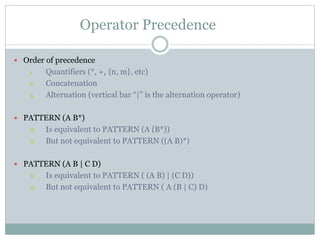
Operator Precedence 
 Order of precedence 
1. Quantifiers (*, +, {n, m}, etc) 
2. Concatenation 
3. Alternation (vertical bar “|” is the alternation operator) 
 PATTERN (A B*) 
 Is equivalent to PATTERN (A (B*)) 
 But not equivalent to PATTERN ((A B)*) 
 PATTERN (A B | C D) 
 Is equivalent to PATTERN ( (A B) | (C D)) 
 But not equivalent to PATTERN ( A (B | C) D)
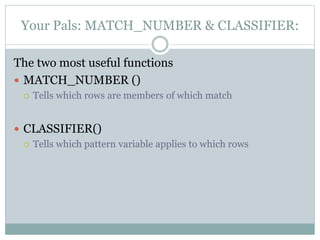
Your Pals: MATCH_NUMBER & CLASSIFIER: 
The two most useful functions 
 MATCH_NUMBER () 
 Tells which rows are members of which match 
 CLASSIFIER() 
 Tells which pattern variable applies to which rows
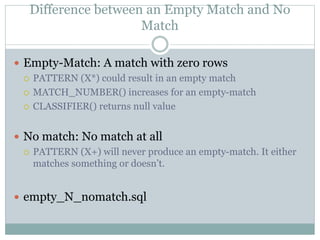
Difference between an Empty Match and No 
Match 
 Empty-Match: A match with zero rows 
 PATTERN (X*) could result in an empty match 
 MATCH_NUMBER() increases for an empty-match 
 CLASSIFIER() returns null value 
 No match: No match at all 
 PATTERN (X+) will never produce an empty-match. It either 
matches something or doesn’t. 
 empty_N_nomatch.sql
EMS Incident analysis 
 Show worst incident periods (e.g. series of 
Sev0/Sev1/Sev2s back to back) 
 Show series of incidents that affected multiple 
properties 
 Explain how the following thing work 
 PERMUTE (A, B, C) 
 Not displaying certain matched rows with {- -} 
 Incidents_pm.sql
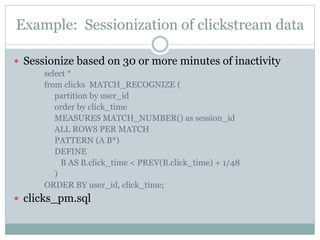
Example: Sessionization of clickstream data 
 Sessionize based on 30 or more minutes of inactivity 
select * 
from clicks MATCH_RECOGNIZE ( 
partition by user_id 
order by click_time 
MEASURES MATCH_NUMBER() as session_id 
ALL ROWS PER MATCH 
PATTERN (A B*) 
DEFINE 
B AS B.click_time < PREV(B.click_time) + 1/48 
) 
ORDER BY user_id, click_time; 
 clicks_pm.sql
Defining Where to Restart the Matching Process 
After a Match Is Found 
 AFTER MATCH SKIP TO NEXT ROW: Resume pattern 
matching at the row after the first row of the current 
match. 
 AFTER MATCH SKIP PAST LAST ROW: Resume pattern 
matching at the next row after the last row of the current 
match. The default 
 AFTER MATCH SKIP TO FIRST pattern_variable: 
Resume pattern matching at the first row that is mapped 
to the pattern variable. 
 AFTER MATCH SKIP TO LAST pattern_variable: 
Resume pattern matching at the last row that is mapped 
to the pattern variable.
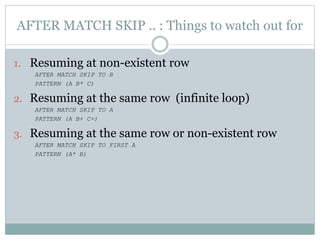
AFTER MATCH SKIP .. : Things to watch out for 
1. Resuming at non-existent row 
AFTER MATCH SKIP TO B 
PATTERN (A B* C) 
2. Resuming at the same row (infinite loop) 
AFTER MATCH SKIP TO A 
PATTERN (A B+ C+) 
3. Resuming at the same row or non-existent row 
AFTER MATCH SKIP TO FIRST A 
PATTERN (A* B)
Greedy Versus Reluctant quantifier 
 By default, quantifiers are greedy. They try to match 
as many instances of regular expression as possible. 
 A* or A+ will try to match as many instances of A as possible 
 Greedy behavior can be changed to reluctant by 
suffixing the quantifiers with a question mark 
 A*? Or A+? will match only as few instances of A as possible 
 It is also called Lazy match 
 greedy_vs_reluctant.sql
RUNNING vs FINAL Semantics 
 RUNNING semantics 
 Includes the rows from the beginning of the match to the 
currently matched rows. 
 This is the default 
 Could be used in MEASURES and DEFINE sections 
 FINAL semantics 
 Includes all rows in a match 
 Could be used only in MEASURES 
 running_vs_final.sql
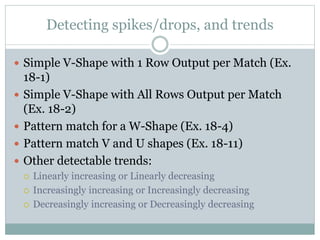
Detecting spikes/drops, and trends 
 Simple V-Shape with 1 Row Output per Match (Ex. 
18-1) 
 Simple V-Shape with All Rows Output per Match 
(Ex. 18-2) 
 Pattern match for a W-Shape (Ex. 18-4) 
 Pattern match V and U shapes (Ex. 18-11) 
 Other detectable trends: 
 Linearly increasing or Linearly decreasing 
 Increasingly increasing or Increasingly decreasing 
 Decreasingly increasing or Decreasingly decreasing
References 
 Oracle Data Warehousing Guide (12c), Chapter 18
Q&A

SQL for pattern matching (Oracle 12c)

  • 1.
    SQL for PatternMatching LOGAN PALANISAMY
  • 2.
    Agenda  Introductionto regular expressions  RegEx functions in Oracle  SQL for Pattern Matching
  • 3.
    Meeting Basics Put your phones/pagers on vibrate/mute  Messenger: Change the status to offline or in-meeting  Remote attendees: Mute yourself (*6). Ask questions via WebEx.
  • 4.
    What are RegularExpressions?  A way to express patterns  credit cards, license plate numbers, vehicle identification numbers, voter id, driving license, SSNs, phone numbers  UNIX (grep, egrep), PHP, JAVA support Regular Expressions  PERL made it popular
  • 5.
    Regular Expression Examples Example Meaning [0-9]{10,} 10 or more digits. [0-9]{3}-[0-9]{2}-[0-9]{4} Social Security number ([0-9]{3})[1-9]{3}-[0-9]{4} Phone number (xxx)yyy-zzzz d{1,3}.d{1,3}.d{1,3}.d{1,3} Very basic IPv4 address format using Perl notation (d{4}[- ]?){3}d{4} Credit Card (three occurrences of four digits followed optionally by a space or dash, and one 4-digit series) [1-9][A-Z]{3}[0-9]{3} Car License Plate in California [A-Z][a-z]+(s+[A-Z][a-z]*)?s+[A-Z][ a-z]+ First name, optional Middle Initial/name, and Last name ([01]?[0-9][0-9]?|2[0-4][0-9]|25[0- 5].){3}([01]?[0-9][0-9]?|2[0-4][0- 9]|25[0-5]) IPv4 address format
  • 6.
    Regular Expression MetaCharacters 6 Meta character Meaning . Matches any single "character" except newline. * Matches zero or more of the character preceding it e.g.: bugs*, table.* ^ Denotes the beginning of the line. ^A denotes lines starting with A $ Denotes the end of the line. :$ denotes lines ending with : Escape character (., *, [, , etc) [ ] matches one or more characters within the brackets. e.g. [aeiou], [a-z], [a-zA-Z], [0-9], [[:alpha:]], [a-z?,!] [^] negation - matches any characters other than the ones inside brackets. eg. ^[^13579] denotes all lines not starting with odd numbers, [^02468]$ denotes all lines not ending with even numbers
  • 7.
    Extended Regular ExpressionsMeta Characters Meta character Meaning | alternation. e.g.: the(y|m), (they|them) + one or more occurrences of previous character. ? zero or one occurrences of previous character. {n} exactly n repetitions of the previous char or group {n,} n or more repetitions of the previous char or 7 group {n, m} n to m repetitions of previous char or group (....) grouping or subexpression n back referencing where n stands for the nth sub-expression. e.g.: 1 is the back reference for first sub-expression.
  • 8.
    POSIX Character Classes POSIX Description [:alnum:] Alphanumeric characters [:alpha:] Alphabetic characters [:ascii:] ASCII characters [:blank:] Space and tab [:cntrl:] Control characters [:digit:] [:xdigit:] Digits, Hexadecimal digits [:graph:] Visible characters (i.e. anything except spaces, control characters, etc.) [:lower:] Lowercase letters [:print:] Visible characters and spaces (i.e. anything except control characters) [:punct:] Punctuation and symbols. [:space:] All whitespace characters, including line breaks [:upper:] Uppercase letters [:word:] Word characters (letters, numbers and underscores)
  • 9.
    Perl Character Classes 9 Perl POSIX Description d [[:digit:]] [0-9] D [^[:digit:]] [^0-9] w [[:alnum:]_] [0-9a-zA-Z_] W [^[:alnum:]_] [^0-9a-zA-Z_] s [[:space:]] S [^[:space:]]
  • 10.
    Tools to learnRegular Expressions  http://www.weitz.de/regex-coach/  http://www.regexbuddy.com/
  • 11.
    String operations beforeRegular Expression support in Oracle  Pull the data from DB and perform it in middle tier or FE  LIKE operator  OWA_PATTERN in 9i and before
  • 12.
    LIKE operator % matches zero or more of any character  _ matches exactly one character  Examples  WHERE col1 LIKE 'abc%';  WHERE col1 LIKE '%abc';  WHERE col1 LIKE 'ab_d';  WHERE col1 LIKE '_%' escape '';  WHERE col1 NOT LIKE 'abc%';  Very limited functionality  Check whether first character is numeric: where c1 like '0%' OR c1 like '1%' OR .. .. c1 like '9%'  Very trivial with Regular Exp: where regexp_like(c1, '^[0-9]')
  • 13.
    REGEXP_* functions Available from 10g onwards.  Powerful and flexible, but CPU-hungry.  Easy and elegant, but sometimes less performant  Usable on text literal, bind variable, or any column that holds character data such as CHAR, NCHAR, CLOB, NCLOB, NVARCHAR2, and VARCHAR2 (but not LONG).  Useful as column constraint for data validation
  • 14.
    REGEXP_LIKE  Determineswhether pattern matches.  REGEXP_LIKE (source_str, pattern, [,match_parameter])  Returns TRUE or FALSE.  Use in WHERE clause to return rows matching a pattern  Use as a constraint  alter table t add constraint alphanum check (regexp_like (x, '[[:alnum:]]'));  Use in PL/SQL to return a boolean.  IF (REGEXP_LIKE(v_name, '[[:alnum:]]')) THEN ..  Can't be used in SELECT clause  regexp_like.sql
  • 15.
    REGEXP_SUBSTR  Extractsthe matching pattern. Returns NULL when nothing matches  REGEXP_SUBSTR(source_str, pattern [, position [, occurrence [, match_parameter]]])  position: character at which to begin the search. Default is 1  occurrence: The occurrence of pattern you want to extract  regexp_substr.sql
  • 16.
    REGEXP_INSTR  Returnsthe location of match in a string  REGEXP_INSTR(source_str, pattern, [, position [, occurrence [, return_option [, match_parameter]]]])  return_option:  0, the default, returns the position of the first character.  1 returns the position of the character following the occurence.  regexp_instr.sql
  • 17.
    REGEXP_REPLACE  Searchand Replace a pattern  REGEXP_REPLACE(source_str, pattern [, replace_str] [, position [, occurrence [, match_parameter]]]])  If replace_str is not specified, pattern/search_str is replaced with empty string  occurence:  when 0, the default, replaces all occurrences of the match.  when n, any positive integer, replaces the nth occurrence.  regexp_replace.sql
  • 18.
    REGEXP_COUNT  Newin 11g  Returns the number of times a pattern appears in a string.  REGEXP_COUNT(source_str, pattern [,position [,match_param]])  For simple patterns it is same as (LENGTH(source_str) – LENGTH(REPLACE(source_str, pattern)))/LENGTH(pattern)  regexp_count.sql
  • 19.
    Why “SQL forPattern Matching”  Deficiency of REGEXP_* functions  Retrieving contiguous rows that are inter-related.  Shortcoming of LEAD/LAG analytic functions
  • 20.
    Example: Identify successivelogin failures  Given a sequence of records, identify two or more consecutive login failures showing all the details SELECT user_id, login_time, result, mn, classifier FROM logins MATCH_RECOGNIZE ( PARTITION BY user_id ORDER BY login_time MEASURES MATCH_NUMBER() as MN, CLASSIFIER() as classifier ALL ROWS PER MATCH PATTERN (F{2,} S) DEFINE F AS result = 'FAILURE', S AS result = 'SUCCESS’) ORDER BY user_id, login_time;  Logins_pm.sql
  • 21.
    Components of SQLfor pattern matching  PARTITION BY: Logically divides the rows into groups  ORDER BY: Orders the rows in a partition  [ONE ROW | ALL ROWS] PER MATCH: Chooses summaries or details for each match  MEASURES: Defines calculations for use in the query  PATTERN: Defines the row pattern to be matched  DEFINE: Defines primary pattern variables  AFTER MATCH SKIP: Defines where to restart the matching process after a match is found  SUBSET: Defines union row pattern variables
  • 22.
    Operator Precedence Order of precedence 1. Quantifiers (*, +, {n, m}, etc) 2. Concatenation 3. Alternation (vertical bar “|” is the alternation operator)  PATTERN (A B*)  Is equivalent to PATTERN (A (B*))  But not equivalent to PATTERN ((A B)*)  PATTERN (A B | C D)  Is equivalent to PATTERN ( (A B) | (C D))  But not equivalent to PATTERN ( A (B | C) D)
  • 23.
    Your Pals: MATCH_NUMBER& CLASSIFIER: The two most useful functions  MATCH_NUMBER ()  Tells which rows are members of which match  CLASSIFIER()  Tells which pattern variable applies to which rows
  • 24.
    Difference between anEmpty Match and No Match  Empty-Match: A match with zero rows  PATTERN (X*) could result in an empty match  MATCH_NUMBER() increases for an empty-match  CLASSIFIER() returns null value  No match: No match at all  PATTERN (X+) will never produce an empty-match. It either matches something or doesn’t.  empty_N_nomatch.sql
  • 25.
    EMS Incident analysis  Show worst incident periods (e.g. series of Sev0/Sev1/Sev2s back to back)  Show series of incidents that affected multiple properties  Explain how the following thing work  PERMUTE (A, B, C)  Not displaying certain matched rows with {- -}  Incidents_pm.sql
  • 26.
    Example: Sessionization ofclickstream data  Sessionize based on 30 or more minutes of inactivity select * from clicks MATCH_RECOGNIZE ( partition by user_id order by click_time MEASURES MATCH_NUMBER() as session_id ALL ROWS PER MATCH PATTERN (A B*) DEFINE B AS B.click_time < PREV(B.click_time) + 1/48 ) ORDER BY user_id, click_time;  clicks_pm.sql
  • 27.
    Defining Where toRestart the Matching Process After a Match Is Found  AFTER MATCH SKIP TO NEXT ROW: Resume pattern matching at the row after the first row of the current match.  AFTER MATCH SKIP PAST LAST ROW: Resume pattern matching at the next row after the last row of the current match. The default  AFTER MATCH SKIP TO FIRST pattern_variable: Resume pattern matching at the first row that is mapped to the pattern variable.  AFTER MATCH SKIP TO LAST pattern_variable: Resume pattern matching at the last row that is mapped to the pattern variable.
  • 28.
    AFTER MATCH SKIP.. : Things to watch out for 1. Resuming at non-existent row AFTER MATCH SKIP TO B PATTERN (A B* C) 2. Resuming at the same row (infinite loop) AFTER MATCH SKIP TO A PATTERN (A B+ C+) 3. Resuming at the same row or non-existent row AFTER MATCH SKIP TO FIRST A PATTERN (A* B)
  • 29.
    Greedy Versus Reluctantquantifier  By default, quantifiers are greedy. They try to match as many instances of regular expression as possible.  A* or A+ will try to match as many instances of A as possible  Greedy behavior can be changed to reluctant by suffixing the quantifiers with a question mark  A*? Or A+? will match only as few instances of A as possible  It is also called Lazy match  greedy_vs_reluctant.sql
  • 30.
    RUNNING vs FINALSemantics  RUNNING semantics  Includes the rows from the beginning of the match to the currently matched rows.  This is the default  Could be used in MEASURES and DEFINE sections  FINAL semantics  Includes all rows in a match  Could be used only in MEASURES  running_vs_final.sql
  • 31.
    Detecting spikes/drops, andtrends  Simple V-Shape with 1 Row Output per Match (Ex. 18-1)  Simple V-Shape with All Rows Output per Match (Ex. 18-2)  Pattern match for a W-Shape (Ex. 18-4)  Pattern match V and U shapes (Ex. 18-11)  Other detectable trends:  Linearly increasing or Linearly decreasing  Increasingly increasing or Increasingly decreasing  Decreasingly increasing or Decreasingly decreasing
  • 32.
    References  OracleData Warehousing Guide (12c), Chapter 18
  • 33.

Editor's Notes

  • #32 Explain how the STRT variable works How to find just U-shape?