Salesforce Developer Workshop
Speakers 
Keir Bowden 
CTO, BrightGen 
@bob_buzzard 
Peter Chittum 
Developer Evangelist 
@pchittum
Safe Harbor 
Safe harbor statement under the Private Securities Litigation Reform Act of 1995: 
This presentation may contain forward-looking statements that involve risks, uncertainties, and assumptions. If any such uncertainties materialize or if any of the 
assumptions proves incorrect, the results of salesforce.com, inc. could differ materially from the results expressed or implied by the forward-looking statements 
we make. All statements other than statements of historical fact could be deemed forward-looking, including any projections of product or service availability, 
subscriber growth, earnings, revenues, or other financial items and any statements regarding strategies or plans of management for future operations, 
statements of belief, any statements concerning new, planned, or upgraded services or technology developments and customer contracts or use of our 
services. 
The risks and uncertainties referred to above include – but are not limited to – risks associated with developing and delivering new functionality for our service, 
new products and services, our new business model, our past operating losses, possible fluctuations in our operating results and rate of growth, interruptions 
or delays in our Web hosting, breach of our security measures, the outcome of intellectual property and other litigation, risks associated with possible mergers 
and acquisitions, the immature market in which we operate, our relatively limited operating history, our ability to expand, retain, and motivate our employees 
and manage our growth, new releases of our service and successful customer deployment, our limited history reselling non-salesforce.com products, and 
utilization and selling to larger enterprise customers. Further information on potential factors that could affect the financial results of salesforce.com, inc. is 
included in our annual report on Form 10-Q for the most recent fiscal quarter ended July 31, 2012. This documents and others containing important disclosures 
are available on the SEC Filings section of the Investor Information section of our Web site. 
Any unreleased services or features referenced in this or other presentations, press releases or public statements are not currently available and may not be 
delivered on time or at all. Customers who purchase our services should make the purchase decisions based upon features that are currently available. 
Salesforce.com, inc. assumes no obligation and does not intend to update these forward-looking statements.
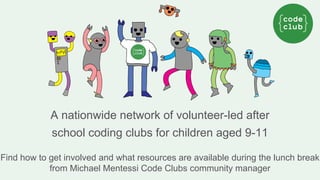
A nationwide network of volunteer-led after 
school coding clubs for children aged 9-11 
Find how to get involved and what resources are available during the lunch break 
from Michael Mentessi Code Clubs community manager
Salesforce University Promo 
• EMEA Region only 
•• 
15% Discount to all ELEVATE attendees. 
• For any public Salesforce University developer workshop 
• Must book and attend by week commencing 12 Jan, 2015 
http://developer.salesforce.com
Go Social! 
@salesforcedevs 
Salesforce Developers 
+Salesforce Developers
WIFI 
▪ SSID: elevate 
▪ Password: Salesforce1
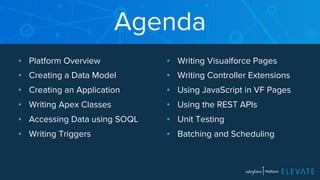
Agenda 
▪ Platform Overview 
▪ Creating a Data Model 
▪ Creating an Application 
▪ Writing Apex Classes 
▪ Accessing Data using SOQL 
▪ Writing Triggers 
▪ Writing Visualforce Pages 
▪ Writing Controller Extensions 
▪ Using JavaScript in VF Pages 
▪ Using the REST APIs 
▪ Unit Testing 
▪ Batching and Scheduling
http://ccoenraets.github. 
io/salesforce-developer-fasttrack/ 
http://bit.ly/sf-dev-quick
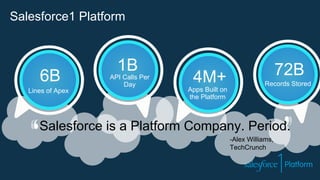
Salesforce is a Platform Company. Period. 
-Alex Williams, 
TechCrunch 
1B 
API Calls Per 
Day 6B 
Lines of Apex 
4M+ 
Apps Built on 
the Platform 
72B 
Records Stored 
Salesforce1 Platform
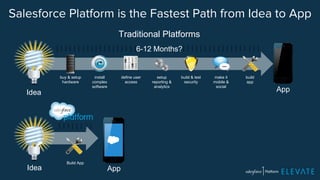
Salesforce Platform is the Fastest Path from Idea to App 
Idea 
buy & setup 
hardware 
Idea Build App 
install 
complex 
software 
define user 
access 
build & test 
security 
make it 
mobile & 
social 
setup 
reporting & 
analytics 
build 
app 
Traditional Platforms 
6-12 Months? 
App 
App
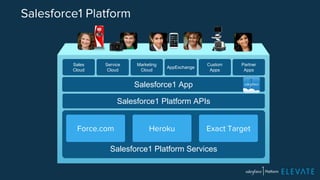
Salesforce1 Platform 
Salesforce1 App 
Salesforce1 Platform APIs 
Force.com Heroku Exact Target 
Salesforce1 Platform Services 
Sales 
Cloud 
Service 
Cloud 
Marketing 
Cloud AppExchange Custom 
Apps 
Partner 
Apps
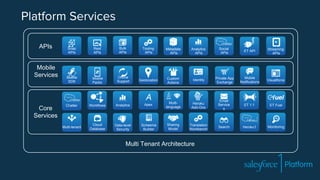
Platform Services 
Core 
Services 
Chatter 
Multi-language 
Translation 
Workbench 
Email 
Service 
s 
Analytics 
Workflows 
Cloud 
Database 
Apex 
Scheema 
Builder Search 
Visualforce 
Data-level 
Security 
Multi-tenant Monitoring 
APIs 
Mobile 
Services 
Social 
APIs 
Analytics 
APIs 
Bulk 
APIs 
Rest 
APIs 
Metadata 
APIs 
Soap 
APIs 
Private App 
Exchange 
Custom 
Actions 
Identity Mobile 
Notifications 
Tooling 
APIs 
Mobile 
Packs 
Mobile 
SDK 
Offline 
Support 
Streaming 
APIs 
Geolocation 
ET 1:1 ET Fuel 
Heroku1 
Heroku 
Add-Ons 
Sharing 
Model 
ET API 
Multi Tenant Architecture
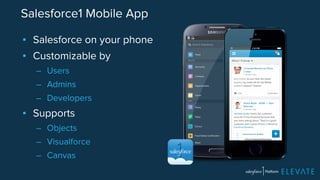
Salesforce1 Mobile App 
▪ Salesforce on your phone 
▪ Customizable by 
– Users 
– Admins 
– Developers 
▪ Supports 
– Objects 
– Visualforce 
– Canvas
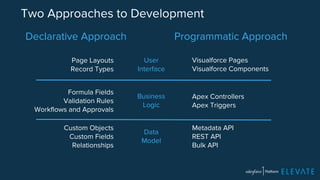
Two Approaches to Development 
Declarative Approach Programmatic Approach 
Visualforce Pages 
Visualforce Components 
Apex Controllers 
Apex Triggers 
Metadata API 
REST API 
Bulk API 
Page Layouts 
Record Types 
Formula Fields 
Validation Rules 
Workflows and Approvals 
Custom Objects 
Custom Fields 
Relationships 
User 
Interface 
Business 
Logic 
Data 
Model
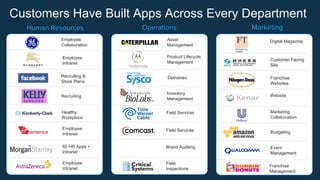
Customers Have Built Apps Across Every Department 
Human Resources Operations Marketing 
Employee 
Collaboration 
Employee 
Intranet 
Recruiting & 
Stock Plans 
Recruiting 
Healthy 
Workplace 
Employee 
Intranet 
60 HR Apps + 
Intranet 
Employee 
Intranet 
Asset 
Management 
Product Lifecycle 
Management 
Inventory 
Management 
Field Services 
Field Services 
Brand Auditing 
Field 
Inspections 
Digital Magazine 
Customer Facing 
Site 
Franchise 
Websites 
Website 
Deliveries 
Marketing 
Collaboration 
Budgeting 
Event 
Management 
Franchise 
Management
The Conference App 
▪ Manage sessions and speakers 
▪ Automatically send confirmation emails 
▪ Customized user interface with Visualforce Pages 
▪ Upload speaker pictures 
▪ Flickr integration (Apex) to show conference pictures 
▪ Google Maps integration (JS) to show conference hotels 
▪ Companion app (JS + REST) for conference attendees
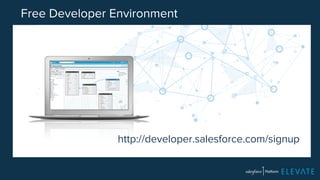
Free Developer Environment 
http://developer.salesforce.com/signup
Lab 1: Creating a Developer Edition Account 
http://developer.salesforce.com/signup
Module 2a: 
Creating the Data Model
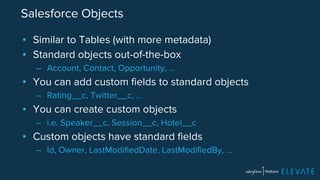
Salesforce Objects 
▪ Similar to Tables (with more metadata) 
▪ Standard objects out-of-the-box 
– Account, Contact, Opportunity, … 
▪ You can add custom fields to standard objects 
– Rating__c, Twitter__c, … 
▪ You can create custom objects 
– i.e. Speaker__c, Session__c, Hotel__c 
▪ Custom objects have standard fields 
– Id, Owner, LastModifiedDate, LastModifiedBy, …
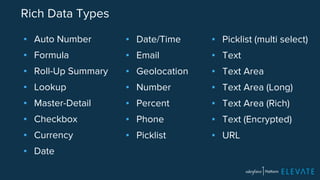
Rich Data Types 
▪ Auto Number 
▪ Formula 
▪ Roll-Up Summary 
▪ Lookup 
▪ Master-Detail 
▪ Checkbox 
▪ Currency 
▪ Date 
▪ Picklist (multi select) 
▪ Text 
▪ Text Area 
▪ Text Area (Long) 
▪ Text Area (Rich) 
▪ Text (Encrypted) 
▪ URL 
▪ Date/Time 
▪ Email 
▪ Geolocation 
▪ Number 
▪ Percent 
▪ Phone 
▪ Picklist
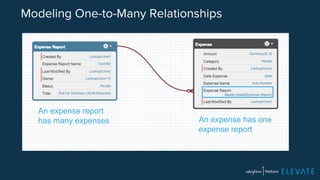
Modeling One-to-Many Relationships 
An expense has one 
expense report 
An expense report 
has many expenses
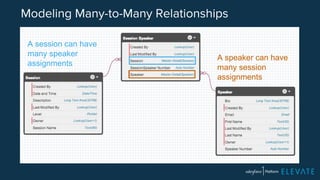
Modeling Many-to-Many Relationships 
A speaker can have 
many session 
assignments 
A session can have 
many speaker 
assignments
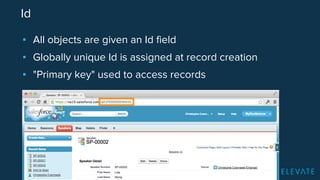
Id 
▪ All objects are given an Id field 
▪ Globally unique Id is assigned at record creation 
▪ "Primary key" used to access records
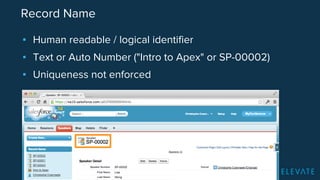
Record Name 
▪ Human readable / logical identifier 
▪ Text or Auto Number ("Intro to Apex" or SP-00002) 
▪ Uniqueness not enforced
When you create an Object, you get… 
▪ Security for Entity 
▪ A CRUD user interface 
▪ Instant Mobile App access (Salesforce1) 
▪ REST/SOAP/Bulk/Push APIs 
▪ Rich Metadata 
▪ Apex Class 
▪ Indexed Search 
▪ Reporting and Analytics
Module 2b: 
Creating the Application
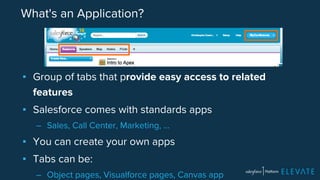
What's an Application? 
▪ Group of tabs that provide easy access to related 
features 
▪ Salesforce comes with standards apps 
– Sales, Call Center, Marketing, … 
▪ You can create your own apps 
▪ Tabs can be: 
– Object pages, Visualforce pages, Canvas app
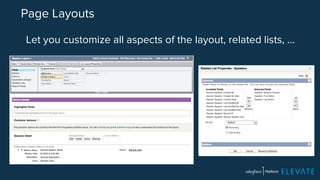
Page Layouts 
Let you customize all aspects of the layout, related lists, …
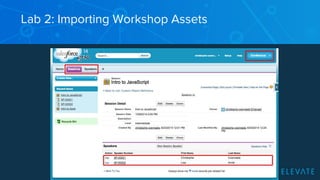
Lab 2: Importing Workshop Assets
Module 3: 
Writing Apex Classes
What is Apex? 
▪ Salesforce platform language 
▪ Similar to Java 
▪ Object-oriented 
▪ Strongly typed 
▪ Classes and Interfaces 
▪ Cloud based compiling, debugging and unit testing
Apex and Java 
Same 
▪ Primitive data types 
▪ Flow control (if, for, while, …) 
▪ Exception handling 
▪ Collections: Lists, Sets, … 
Different 
▪ Case insensitive 
▪ Single quote strings: 'Joe' 
▪ Id data type 
▪ Built-in support for data access
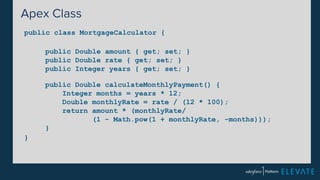
Apex Class 
public class MortgageCalculator { 
} 
public Double amount { get; set; } 
public Double rate { get; set; } 
public Integer years { get; set; } 
public Double calculateMonthlyPayment() { 
Integer months = years * 12; 
Double monthlyRate = rate / (12 * 100); 
return amount * (monthlyRate/ 
(1 - Math.pow(1 + monthlyRate, -months))); 
}
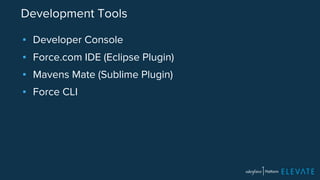
Development Tools 
▪ Developer Console 
▪ Force.com IDE (Eclipse Plugin) 
▪ Mavens Mate (Sublime Plugin) 
▪ Force CLI
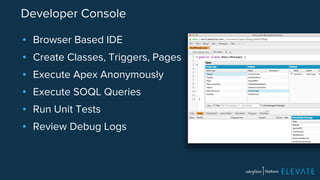
Developer Console 
▪ Browser Based IDE 
▪ Create Classes, Triggers, Pages 
▪ Execute Apex Anonymously 
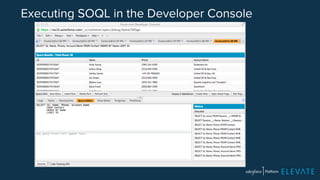
▪ Execute SOQL Queries 
▪ Run Unit Tests 
▪ Review Debug Logs
Lab 3: Creating an Apex Class 
▪ Create the EmailManager class 
▪ Send emails from the developer console 
http://bit.ly/sf-dev-quick
Module 4: 
Accessing Data with 
SOQL and DML
What's SOQL? 
▪ Salesforce Object Query language 
▪ Similar to SQL 
▪ Streamlined syntax to traverse object relationships 
▪ Built into Apex
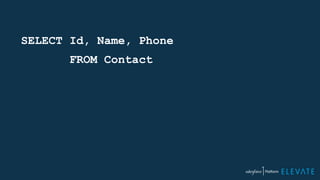
SELECT Id, Name, Phone 
FROM Contact
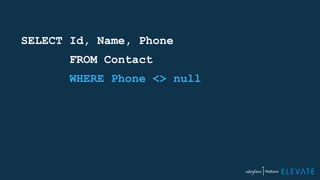
SELECT Id, Name, Phone 
FROM Contact 
WHERE Phone <> null
SELECT Id, Name, Phone 
FROM Contact 
WHERE Phone <> null 
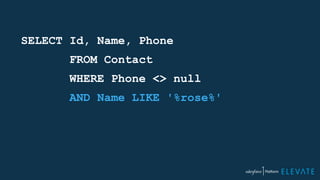
AND Name LIKE '%rose%'
SELECT Id, Name, Phone 
FROM Contact 
WHERE Phone <> null 
AND Name LIKE '%rose%' 
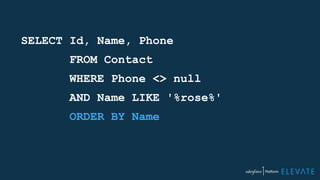
ORDER BY Name
SELECT Id, Name, Phone 
FROM Contact 
WHERE Phone <> null 
AND Name LIKE '%rose%' 
ORDER BY Name 
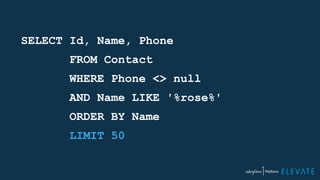
LIMIT 50
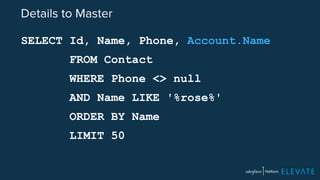
Details to Master 
SELECT Id, Name, Phone, Account.Name 
FROM Contact 
WHERE Phone <> null 
AND Name LIKE '%rose%' 
ORDER BY Name 
LIMIT 50
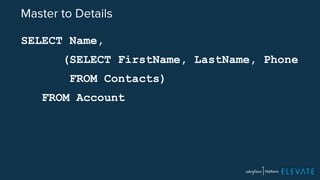
Master to Details 
SELECT Name, 
(SELECT FirstName, LastName, Phone 
FROM Contacts) 
FROM Account
Executing SOQL in the Developer Console
Inlining SOQL in Apex 
Integer i = [SELECT Count() FROM Session__c];
Inlining SOQL in Apex 
String level = 'Advanced'; 
List<Session__c> sessions = 
[SELECT Name, Level__c FROM Session__c 
WHERE Level__c = :level];
Inlining SOQL in Apex 
List<String> levels = new List<String>(); 
levels.add('Intermediate'); 
levels.add('Advanced'); 
List<Session__c> sessions = 
[SELECT Name, Level__c FROM Session__c 
WHERE Level__c IN :levels];
Inlining SOQL in Apex 
for (Speaker__c s : [SELECT Email__c FROM Speaker__c]) 
{ 
System.debug(s.email__c); 
}
What's DML? 
▪ Data Manipulation Language 
▪ Language used to create, update, delete records
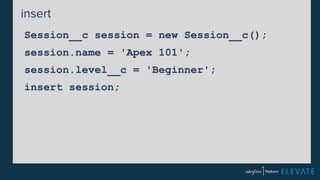
insert 
Session__c session = new Session__c(); 
session.name = 'Apex 101'; 
session.level__c = 'Beginner'; 
insert session;
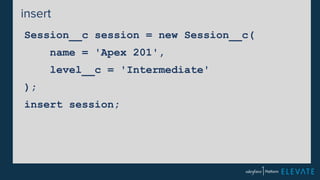
insert 
Session__c session = new Session__c( 
name = 'Apex 201', 
level__c = 'Intermediate' 
); 
insert session;
update 
String oldName = 'Apex 101'; 
String newName = 'Apex for Beginners'; 
Session__c session = 
[SELECT Id, Name FROM Session__c 
WHERE Name=:oldName]; 
session.name = newName; 
update session;
delete 
String name = 'Testing 501'; 
Session__c session = 
[SELECT Name FROM Session__c 
WHERE Name=:name]; 
delete session;
Lab 4: Accessing Data using SOQL and DML 
▪ Execute SOQL statements in the Query Editor 
▪ Execute DML statements in the Anonymous Window 
http://bit.ly/sf-dev-quick
Module 5: 
Writing Triggers
What's a Trigger? 
▪ Apex code executed on database events 
▪ Before or after: 
– Insert 
– Update 
– Delete 
– Undelete
Before or After? 
▪ Before 
– Update values before they are saved to the database 
– Example: Prevent double-booking of a speaker 
▪ After 
– Validate values before they are saved 
– Access values set by the database (Id, lastUpdated, …) 
– Example: Send speaker confirmation email
Bulk Mode 
▪ Triggers work on lists of records, not single records 
▪ This is to support bulk operations 
– Data Import, Bulk API, etc. 
▪ Context variables provide access to old and new values: 
– Trigger.old and Trigger.new (List) 
– Trigger.oldMap and Trigger.newMap (Map)
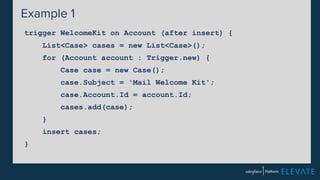
Example 1 
trigger WelcomeKit on Account (after insert) { 
List<Case> cases = new List<Case>(); 
for (Account account : Trigger.new) { 
Case case = new Case(); 
case.Subject = 'Mail Welcome Kit'; 
case.Account.Id = account.Id; 
cases.add(case); 
} 
insert cases; 
}
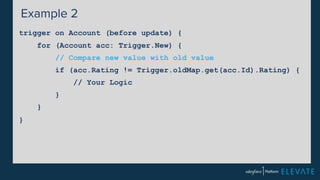
Example 2 
trigger on Account (before update) { 
for (Account acc: Trigger.New) { 
// Compare new value with old value 
if (acc.Rating != Trigger.oldMap.get(acc.Id).Rating) { 
// Your Logic 
} 
} 
}
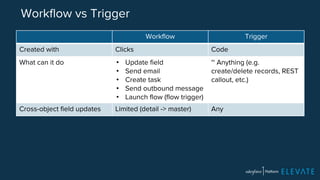
Workflow vs Trigger 
Workflow Trigger 
Created with Clicks Code 
What can it do • Update field 
• Send email 
• Create task 
• Send outbound message 
• Launch flow (flow trigger) 
~ Anything (e.g. 
create/delete records, REST 
callout, etc.) 
Cross-object field updates Limited (detail -> master) Any
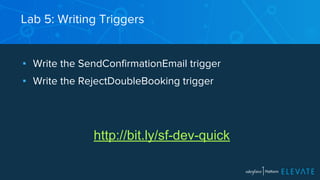
Lab 5: Writing Triggers 
▪ Write the SendConfirmationEmail trigger 
▪ Write the RejectDoubleBooking trigger 
http://bit.ly/sf-dev-quick
Module 6: 
Writing Visualforce Pages
What's a Visualforce Page? 
▪ HTML page with tags executed at the server-side to 
generate dynamic content 
▪ Similar to JSP and ASP 
▪ Can leverage JavaScript and CSS libraries 
▪ The View in MVC architecture
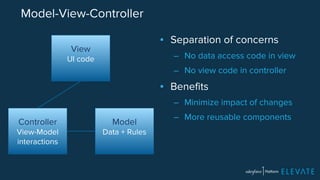
Model-View-Controller 
Model 
Data + Rules 
Controller 
View-Model 
interactions 
View 
UI code 
▪ Separation of concerns 
– No data access code in view 
– No view code in controller 
▪ Benefits 
– Minimize impact of changes 
– More reusable components
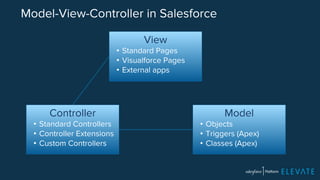
Model-View-Controller in Salesforce 
View 
• Standard Pages 
• Visualforce Pages 
• External apps 
Controller 
• Standard Controllers 
• Controller Extensions 
• Custom Controllers 
Model 
• Objects 
• Triggers (Apex) 
• Classes (Apex)
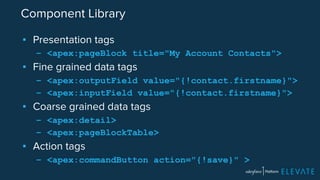
Component Library 
▪ Presentation tags 
– <apex:pageBlock title="My Account Contacts"> 
▪ Fine grained data tags 
– <apex:outputField value="{!contact.firstname}"> 
– <apex:inputField value="{!contact.firstname}"> 
▪ Coarse grained data tags 
– <apex:detail> 
– <apex:pageBlockTable> 
▪ Action tags 
– <apex:commandButton action="{!save}" >
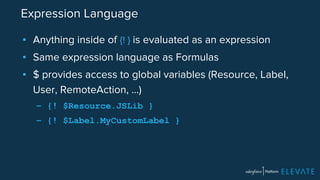
Expression Language 
▪ Anything inside of {! } is evaluated as an expression 
▪ Same expression language as Formulas 
▪ $ provides access to global variables (Resource, Label, 
User, RemoteAction, …) 
– {! $Resource.JSLib } 
– {! $Label.MyCustomLabel }
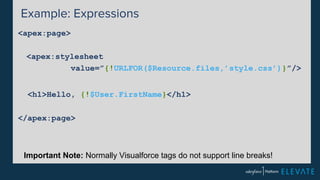
Example: Expressions 
<apex:page> 
<apex:stylesheet 
value=”{!URLFOR($Resource.files,’style.css’)}”/> 
<h1>Hello, {!$User.FirstName}</h1> 
</apex:page> 
Important Note: Normally Visualforce tags do not support line breaks!
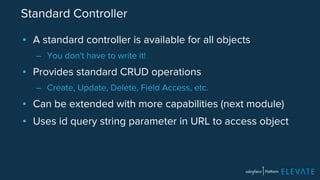
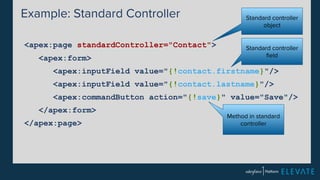
Standard Controller 
▪ A standard controller is available for all objects 
– You don't have to write it! 
▪ Provides standard CRUD operations 
– Create, Update, Delete, Field Access, etc. 
▪ Can be extended with more capabilities (next module) 
▪ Uses id query string parameter in URL to access object
Example: Standard Controller 
<apex:page standardController="Contact"> 
<apex:form> 
Standard controller 
object 
Standard controller 
field 
<apex:inputField value="{!contact.firstname}"/> 
<apex:inputField value="{!contact.lastname}"/> 
<apex:commandButton action="{!save}" value="Save"/> 
</apex:form> 
</apex:page> 
Method in standard 
controller
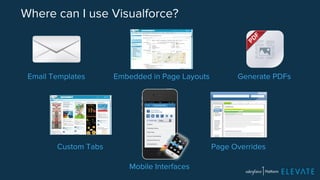
Email Templates Embedded in Page Layouts Generate PDFs 
Custom Tabs 
Mobile Interfaces 
Page Overrides 
Where can I use Visualforce?
Lab 6: Writing Visualforce Pages 
▪ Write the SpeakerForm Visualforce page 
▪ Set it as default for creating and editing speakers 
http://bit.ly/sf-dev-quick
Module 7: 
Writing Controller Extensions 
and Custom Controllers
What's a Controller Extension? 
▪ Custom class written in Apex 
▪ Implements constructor with controller parameter 
▪ Works on the same object as the standard controller 
▪ Used to extend or override standard controller behavior
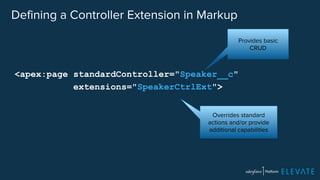
Defining a Controller Extension in Markup 
<apex:page standardController="Speaker__c" 
extensions="SpeakerCtrlExt"> 
Provides basic 
CRUD 
Overrides standard 
actions and/or provide 
additional capabilities
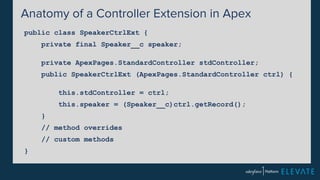
Anatomy of a Controller Extension in Apex 
public class SpeakerCtrlExt { 
private final Speaker__c speaker; 
private ApexPages.StandardController stdController; 
public SpeakerCtrlExt (ApexPages.StandardController ctrl) { 
this.stdController = ctrl; 
this.speaker = (Speaker__c)ctrl.getRecord(); 
} 
// method overrides 
// custom methods 
}
What's a Custom Controller? 
▪ Custom class written in Apex 
▪ Doesn't work on a specific object 
▪ Provides custom data 
▪ Provides custom behaviors 
▪ Can also work with an extension
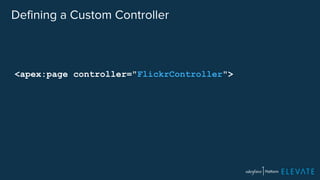
Defining a Custom Controller 
<apex:page controller="FlickrController">
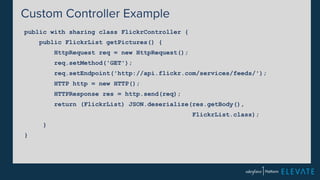
Custom Controller Example 
public with sharing class FlickrController { 
public FlickrList getPictures() { 
HttpRequest req = new HttpRequest(); 
req.setMethod('GET'); 
req.setEndpoint('http://api.flickr.com/services/feeds/'); 
HTTP http = new HTTP(); 
HTTPResponse res = http.send(req); 
return (FlickrList) JSON.deserialize(res.getBody(), 
FlickrList.class); 
} 
}
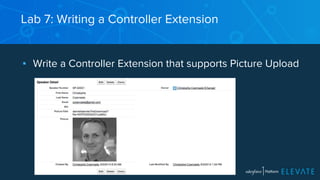
Lab 7: Writing a Controller Extension 
▪ Write a Controller Extension that supports Picture Upload
http://ccoenraets.github. 
io/salesforce-developer-advanced/ 
http://bit.ly/sf-dev-adv
Module 8: 
Using JavaScript in Visualforce 
Pages
Why Use JavaScript? 
▪ Build Engaging User Experiences 
▪ Leverage JavaScript Libraries 
▪ Build Custom Applications
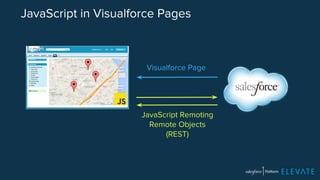
JavaScript in Visualforce Pages 
Visualforce Page 
JavaScript Remoting 
Remote Objects 
(REST)
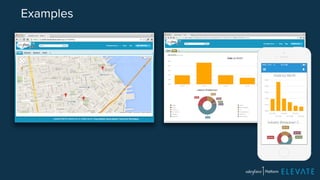
Examples
JavaScript Remoting - Server-Side 
global with sharing class HotelRemoter { 
@RemoteAction 
global static List<Hotel__c> findAll() { 
return [SELECT Id, 
Name, 
Location__Latitude__s, 
Location__Longitude__s 
FROM Hotel__c]; 
} 
}
"global with sharing"? 
▪ global 
– Available from outside of the application 
▪ with sharing 
– Run code with current user permissions. (Apex code runs in 
system context by default -- with access to all objects and fields)
JavaScript Remoting - Visualforce Page 
<script> 
Visualforce.remoting.Manager.invokeAction( 
'{!$RemoteAction.HotelRemoter.findAll}', 
function (result, event) { 
if (event.status) { 
for (var i = 0; i < result.length; i++) { 
var lat = result[i].Location__Latitude__s; 
var lng = result[i].Location__Longitude__s; 
addMarker(lat, lng); 
} 
} else { 
alert(event.message); 
} 
} 
); 
</script>
Using JavaScript and CSS Libraries 
▪ Hosted elsewhere 
<script src="https://maps.googleapis.com/maps/api/js"></script> 
▪ Hosted in Salesforce 
– Upload individual file or Zip file as Static Resource 
– Reference asset using special tags 
– Covered in Module 10
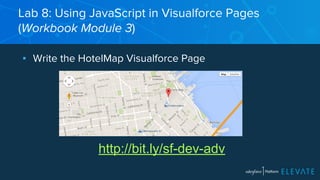
Lab 8: Using JavaScript in Visualforce Pages 
(Workbook Module 3) 
▪ Write the HotelMap Visualforce Page 
http://bit.ly/sf-dev-adv
Module 9: 
Using the REST APIs
When? 
Get access to Salesforce data from outside Salesforce: 
▪ Integrate Salesforce in existing apps 
▪ Build consumer apps 
▪ Device integration (Internet of Things)
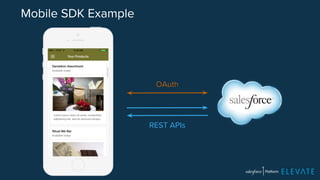
Mobile SDK Example 
OAuth 
REST APIs
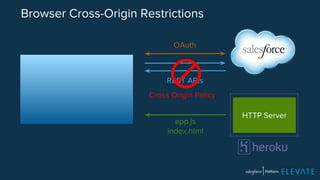
Browser Cross-Origin Restrictions 
OAuth 
REST APIs 
app.js 
index.html 
HTTP Server 
Cross Origin Policy
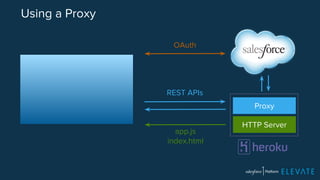
Using a Proxy 
OAuth 
REST APIs 
app.js 
index.html 
Proxy 
HTTP Server
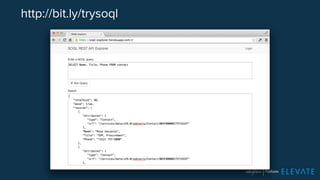
http://bit.ly/trysoql
https://contact-force.herokuapp.com
https://conference-force.herokuapp.com
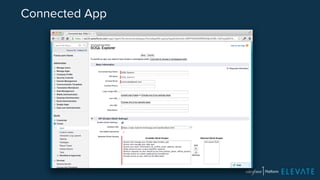
Connected App
Salesforce REST Toolkit 
https://github.com/developerforce/Force.com-JavaScript-REST-Toolkit
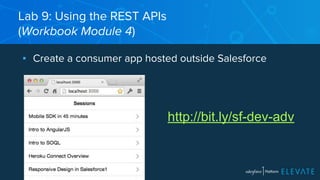
Lab 9: Using the REST APIs 
(Workbook Module 4) 
▪ Create a consumer app hosted outside Salesforce 
http://bit.ly/sf-dev-adv
Windows Users 
After installing Node.js: 
1. Add c:Program FilesNodejs to your path 
or 
Run "C:Program FilesNodejsnpm" install 
2. Create an "npm" directory in 
C:Users[yourname]AppdataRoaming
Module 10: 
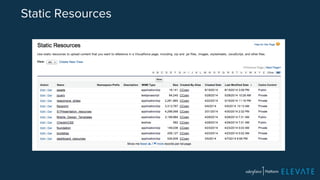
Using Static Resources
What are Static Resources? 
▪ Files uploaded to Salesforce instance for use in 
Visualforce pages 
– .js 
– .css 
– .jpg, .png, .gif, etc. 
▪ Can be uploaded individually or as archive (.zip or .jar)
Static Resources
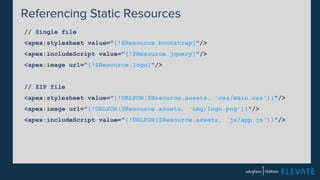
Referencing Static Resources 
// Single file 
<apex:stylesheet value="{!$Resource.bootstrap}"/> 
<apex:includeScript value="{!$Resource.jquery}"/> 
<apex:image url="{!$Resource.logo}"/> 
// ZIP file 
<apex:stylesheet value="{!URLFOR($Resource.assets, 'css/main.css')}"/> 
<apex:image url="{!URLFOR($Resource.assets, 'img/logo.png')}"/> 
<apex:includeScript value="{!URLFOR($Resource.assets, 'js/app.js')}"/>
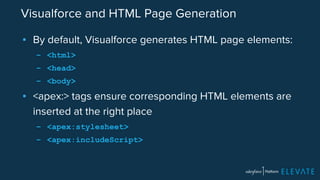
Visualforce and HTML Page Generation 
▪ By default, Visualforce generates HTML page elements: 
– <html> 
– <head> 
– <body> 
▪ <apex:> tags ensure corresponding HTML elements are 
inserted at the right place 
– <apex:stylesheet> 
– <apex:includeScript>
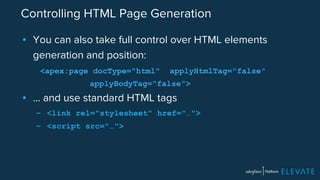
Controlling HTML Page Generation 
▪ You can also take full control over HTML elements 
generation and position: 
<apex:page docType="html" applyHtmlTag="false" 
applyBodyTag="false"> 
▪ … and use standard HTML tags 
– <link rel="stylesheet" href="…"> 
– <script src="…">
Lab 10: Static Resources 
(Workbook Module 5) 
▪ Host single page application in Visualforce page 
http://bit.ly/sf-dev-adv
Module 11: 
Using Canvas Applications
What is a Canvas App? 
▪ A web app integrated in your Salesforce environment 
▪ Can be written in any language 
– Java, .NET, PHP, Ruby on Rails, Node.js, etc. 
▪ Transparently authenticated 
▪ Context aware (logged in user, current object, etc.)
Use Cases 
▪ Internal App 
▪ Third-Party / Partner App 
▪ External systems with web facade
Where Can It Be Integrated? 
▪ Publisher 
▪ Page Layouts 
▪ Visualforce Pages 
▪ Tabs 
▪ Mobile Cards
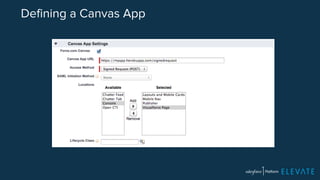
Defining a Canvas App
Transparent Authentication 
▪ When loading Canvas app, Salesforce instance posts 
Base64 encoded data to app endpoint including: 
– Authenticated token 
– Context (logged in user, current object, etc) 
▪ App decodes data using client secret 
▪ Can use authenticated token to make REST API calls
Node.js example 
var decode = require('salesforce-signed-request'); 
var secret = process.env.CONSUMER_SECRET; 
app.post('/signedrequest', function(req, res) { 
var signedRequest = req.body.signed_request; 
var decodedRequest = decode(signedRequest, secret); 
var oauthToken = decodedRequest.client.oauthToken; 
var instanceUrl = decodedRequest.client.instanceUrl; 
var context = decodedRequest.context; 
});
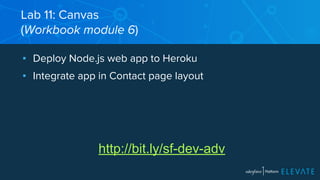
Lab 11: Canvas 
(Workbook module 6) 
▪ Deploy Node.js web app to Heroku 
▪ Integrate app in Contact page layout 
http://bit.ly/sf-dev-adv
Module 12: 
Writing Unit Tests
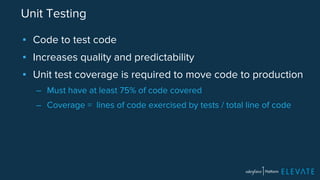
Unit Testing 
▪ Code to test code 
▪ Increases quality and predictability 
▪ Unit test coverage is required to move code to production 
– Must have at least 75% of code covered 
– Coverage = lines of code exercised by tests / total line of code
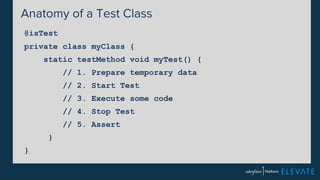
Anatomy of a Test Class 
@isTest 
private class myClass { 
static testMethod void myTest() { 
// 1. Prepare temporary data 
// 2. Start Test 
// 3. Execute some code 
// 4. Stop Test 
// 5. Assert 
} 
}
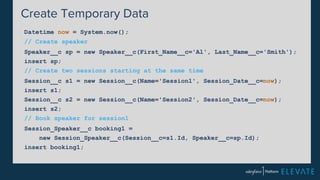
Create Temporary Data 
Datetime now = System.now(); 
// Create speaker 
Speaker__c sp = new Speaker__c(First_Name__c='Al', Last_Name__c='Smith'); 
insert sp; 
// Create two sessions starting at the same time 
Session__c s1 = new Session__c(Name='Session1', Session_Date__c=now); 
insert s1; 
Session__c s2 = new Session__c(Name='Session2', Session_Date__c=now); 
insert s2; 
// Book speaker for session1 
Session_Speaker__c booking1 = 
new Session_Speaker__c(Session__c=s1.Id, Speaker__c=sp.Id); 
insert booking1;
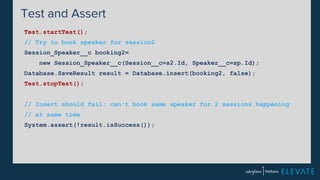
Test and Assert 
Test.startTest(); 
// Try to book speaker for session2 
Session_Speaker__c booking2= 
new Session_Speaker__c(Session__c=s2.Id, Speaker__c=sp.Id); 
Database.SaveResult result = Database.insert(booking2, false); 
Test.stopTest(); 
// Insert should fail: can't book same speaker for 2 sessions happening 
// at same time 
System.assert(!result.isSuccess());
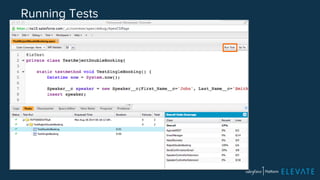
Running Tests
Lab 12: Unit Testing 
(Workbook Module 7) 
▪ Write the TestDoubleBooking class 
▪ Run the test 
http://bit.ly/sf-dev-adv
Module 13: 
Batch and Schedule
What's a Batch? 
▪ Long-running process that runs without manual 
intervention 
▪ Started programmatically
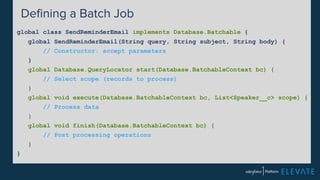
Defining a Batch Job 
global class SendReminderEmail implements Database.Batchable { 
global SendReminderEmail(String query, String subject, String body) { 
// Constructor: accept parameters 
} 
global Database.QueryLocator start(Database.BatchableContext bc) { 
// Select scope (records to process) 
} 
global void execute(Database.BatchableContext bc, List<Speaker__c> scope) { 
// Process data 
} 
global void finish(Database.BatchableContext bc) { 
// Post processing operations 
} 
}
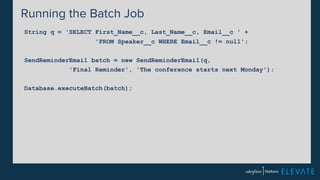
Running the Batch Job 
String q = 'SELECT First_Name__c, Last_Name__c, Email__c ' + 
'FROM Speaker__c WHERE Email__c != null'; 
SendReminderEmail batch = new SendReminderEmail(q, 
'Final Reminder', 'The conference starts next Monday'); 
Database.executeBatch(batch);
What's Scheduled Job? 
▪ Unattended background program execution 
▪ Occurs at a specified time 
▪ Optionally repeated at a specified interval
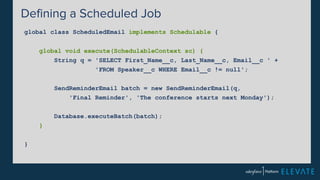
Defining a Scheduled Job 
global class ScheduledEmail implements Schedulable { 
global void execute(SchedulableContext sc) { 
String q = 'SELECT First_Name__c, Last_Name__c, Email__c ' + 
'FROM Speaker__c WHERE Email__c != null'; 
SendReminderEmail batch = new SendReminderEmail(q, 
'Final Reminder', 'The conference starts next Monday'); 
Database.executeBatch(batch); 
} 
}
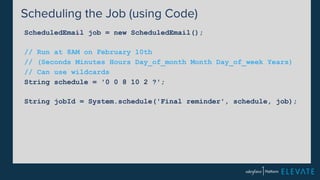
Scheduling the Job (using Code) 
ScheduledEmail job = new ScheduledEmail(); 
// Run at 8AM on February 10th 
// (Seconds Minutes Hours Day_of_month Month Day_of_week Years) 
// Can use wildcards 
String schedule = '0 0 8 10 2 ?'; 
String jobId = System.schedule('Final reminder', schedule, job);
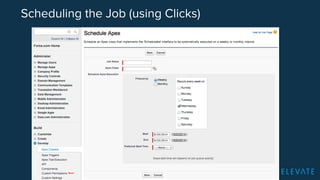
Scheduling the Job (using Clicks)
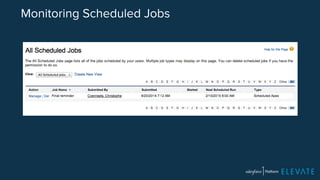
Monitoring Scheduled Jobs
Lab 13: Batching and Scheduling 
(Workbook Module 8) 
▪ Write the SendReminderEmail class 
▪ Run the batch 
http://bit.ly/sf-dev-adv
Survey 
Your feedback is crucial to the success 
of our workshops. Thank you! 
http://bit.ly/sf1-london-track2 
#forcewebinar
Upcoming London Events 
• December 11th: Next London Meetup with Salesforce 
developer and admin user groups 
• January 6th: London Meetup on Lightning Components! 
http://developer.salesforce.com
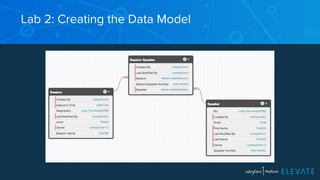
Lab 2: Creating the Data Model
Libraries 
▪ ForceTK 
– Salesforce REST API Toolkit 
▪ Nforce 
– node.js a REST API wrapper 
▪ ngForce 
– Visualforce Remoting integration in AngularJS 
▪ JSForce

Elevate london dec 2014.pptx

  • 1.
  • 2.
    Speakers Keir Bowden CTO, BrightGen @bob_buzzard Peter Chittum Developer Evangelist @pchittum
  • 3.
    Safe Harbor Safeharbor statement under the Private Securities Litigation Reform Act of 1995: This presentation may contain forward-looking statements that involve risks, uncertainties, and assumptions. If any such uncertainties materialize or if any of the assumptions proves incorrect, the results of salesforce.com, inc. could differ materially from the results expressed or implied by the forward-looking statements we make. All statements other than statements of historical fact could be deemed forward-looking, including any projections of product or service availability, subscriber growth, earnings, revenues, or other financial items and any statements regarding strategies or plans of management for future operations, statements of belief, any statements concerning new, planned, or upgraded services or technology developments and customer contracts or use of our services. The risks and uncertainties referred to above include – but are not limited to – risks associated with developing and delivering new functionality for our service, new products and services, our new business model, our past operating losses, possible fluctuations in our operating results and rate of growth, interruptions or delays in our Web hosting, breach of our security measures, the outcome of intellectual property and other litigation, risks associated with possible mergers and acquisitions, the immature market in which we operate, our relatively limited operating history, our ability to expand, retain, and motivate our employees and manage our growth, new releases of our service and successful customer deployment, our limited history reselling non-salesforce.com products, and utilization and selling to larger enterprise customers. Further information on potential factors that could affect the financial results of salesforce.com, inc. is included in our annual report on Form 10-Q for the most recent fiscal quarter ended July 31, 2012. This documents and others containing important disclosures are available on the SEC Filings section of the Investor Information section of our Web site. Any unreleased services or features referenced in this or other presentations, press releases or public statements are not currently available and may not be delivered on time or at all. Customers who purchase our services should make the purchase decisions based upon features that are currently available. Salesforce.com, inc. assumes no obligation and does not intend to update these forward-looking statements.
  • 4.
    A nationwide networkof volunteer-led after school coding clubs for children aged 9-11 Find how to get involved and what resources are available during the lunch break from Michael Mentessi Code Clubs community manager
  • 5.
    Salesforce University Promo • EMEA Region only •• 15% Discount to all ELEVATE attendees. • For any public Salesforce University developer workshop • Must book and attend by week commencing 12 Jan, 2015 http://developer.salesforce.com
  • 6.
    Go Social! @salesforcedevs Salesforce Developers Salesforce Developers Salesforce Developers +Salesforce Developers
  • 7.
    WIFI ▪ SSID:elevate ▪ Password: Salesforce1
  • 8.
    Agenda ▪ PlatformOverview ▪ Creating a Data Model ▪ Creating an Application ▪ Writing Apex Classes ▪ Accessing Data using SOQL ▪ Writing Triggers ▪ Writing Visualforce Pages ▪ Writing Controller Extensions ▪ Using JavaScript in VF Pages ▪ Using the REST APIs ▪ Unit Testing ▪ Batching and Scheduling
  • 9.
  • 10.
    Salesforce is aPlatform Company. Period. -Alex Williams, TechCrunch 1B API Calls Per Day 6B Lines of Apex 4M+ Apps Built on the Platform 72B Records Stored Salesforce1 Platform
  • 11.
    Salesforce Platform isthe Fastest Path from Idea to App Idea buy & setup hardware Idea Build App install complex software define user access build & test security make it mobile & social setup reporting & analytics build app Traditional Platforms 6-12 Months? App App
  • 12.
    Salesforce1 Platform Salesforce1App Salesforce1 Platform APIs Force.com Heroku Exact Target Salesforce1 Platform Services Sales Cloud Service Cloud Marketing Cloud AppExchange Custom Apps Partner Apps
  • 13.
    Platform Services Core Services Chatter Multi-language Translation Workbench Email Service s Analytics Workflows Cloud Database Apex Scheema Builder Search Visualforce Data-level Security Multi-tenant Monitoring APIs Mobile Services Social APIs Analytics APIs Bulk APIs Rest APIs Metadata APIs Soap APIs Private App Exchange Custom Actions Identity Mobile Notifications Tooling APIs Mobile Packs Mobile SDK Offline Support Streaming APIs Geolocation ET 1:1 ET Fuel Heroku1 Heroku Add-Ons Sharing Model ET API Multi Tenant Architecture
  • 14.
    Salesforce1 Mobile App ▪ Salesforce on your phone ▪ Customizable by – Users – Admins – Developers ▪ Supports – Objects – Visualforce – Canvas
  • 15.
    Two Approaches toDevelopment Declarative Approach Programmatic Approach Visualforce Pages Visualforce Components Apex Controllers Apex Triggers Metadata API REST API Bulk API Page Layouts Record Types Formula Fields Validation Rules Workflows and Approvals Custom Objects Custom Fields Relationships User Interface Business Logic Data Model
  • 16.
    Customers Have BuiltApps Across Every Department Human Resources Operations Marketing Employee Collaboration Employee Intranet Recruiting & Stock Plans Recruiting Healthy Workplace Employee Intranet 60 HR Apps + Intranet Employee Intranet Asset Management Product Lifecycle Management Inventory Management Field Services Field Services Brand Auditing Field Inspections Digital Magazine Customer Facing Site Franchise Websites Website Deliveries Marketing Collaboration Budgeting Event Management Franchise Management
  • 17.
    The Conference App ▪ Manage sessions and speakers ▪ Automatically send confirmation emails ▪ Customized user interface with Visualforce Pages ▪ Upload speaker pictures ▪ Flickr integration (Apex) to show conference pictures ▪ Google Maps integration (JS) to show conference hotels ▪ Companion app (JS + REST) for conference attendees
  • 18.
    Free Developer Environment http://developer.salesforce.com/signup
  • 19.
    Lab 1: Creatinga Developer Edition Account http://developer.salesforce.com/signup
  • 20.
    Module 2a: Creatingthe Data Model
  • 21.
    Salesforce Objects ▪Similar to Tables (with more metadata) ▪ Standard objects out-of-the-box – Account, Contact, Opportunity, … ▪ You can add custom fields to standard objects – Rating__c, Twitter__c, … ▪ You can create custom objects – i.e. Speaker__c, Session__c, Hotel__c ▪ Custom objects have standard fields – Id, Owner, LastModifiedDate, LastModifiedBy, …
  • 22.
    Rich Data Types ▪ Auto Number ▪ Formula ▪ Roll-Up Summary ▪ Lookup ▪ Master-Detail ▪ Checkbox ▪ Currency ▪ Date ▪ Picklist (multi select) ▪ Text ▪ Text Area ▪ Text Area (Long) ▪ Text Area (Rich) ▪ Text (Encrypted) ▪ URL ▪ Date/Time ▪ Email ▪ Geolocation ▪ Number ▪ Percent ▪ Phone ▪ Picklist
  • 23.
    Modeling One-to-Many Relationships An expense has one expense report An expense report has many expenses
  • 24.
    Modeling Many-to-Many Relationships A speaker can have many session assignments A session can have many speaker assignments
  • 25.
    Id ▪ Allobjects are given an Id field ▪ Globally unique Id is assigned at record creation ▪ "Primary key" used to access records
  • 26.
    Record Name ▪Human readable / logical identifier ▪ Text or Auto Number ("Intro to Apex" or SP-00002) ▪ Uniqueness not enforced
  • 27.
    When you createan Object, you get… ▪ Security for Entity ▪ A CRUD user interface ▪ Instant Mobile App access (Salesforce1) ▪ REST/SOAP/Bulk/Push APIs ▪ Rich Metadata ▪ Apex Class ▪ Indexed Search ▪ Reporting and Analytics
  • 28.
    Module 2b: Creatingthe Application
  • 29.
    What's an Application? ▪ Group of tabs that provide easy access to related features ▪ Salesforce comes with standards apps – Sales, Call Center, Marketing, … ▪ You can create your own apps ▪ Tabs can be: – Object pages, Visualforce pages, Canvas app
  • 30.
    Page Layouts Letyou customize all aspects of the layout, related lists, …
  • 31.
    Lab 2: ImportingWorkshop Assets
  • 32.
    Module 3: WritingApex Classes
  • 33.
    What is Apex? ▪ Salesforce platform language ▪ Similar to Java ▪ Object-oriented ▪ Strongly typed ▪ Classes and Interfaces ▪ Cloud based compiling, debugging and unit testing
  • 34.
    Apex and Java Same ▪ Primitive data types ▪ Flow control (if, for, while, …) ▪ Exception handling ▪ Collections: Lists, Sets, … Different ▪ Case insensitive ▪ Single quote strings: 'Joe' ▪ Id data type ▪ Built-in support for data access
  • 35.
    Apex Class publicclass MortgageCalculator { } public Double amount { get; set; } public Double rate { get; set; } public Integer years { get; set; } public Double calculateMonthlyPayment() { Integer months = years * 12; Double monthlyRate = rate / (12 * 100); return amount * (monthlyRate/ (1 - Math.pow(1 + monthlyRate, -months))); }
  • 36.
    Development Tools ▪Developer Console ▪ Force.com IDE (Eclipse Plugin) ▪ Mavens Mate (Sublime Plugin) ▪ Force CLI
  • 37.
    Developer Console ▪Browser Based IDE ▪ Create Classes, Triggers, Pages ▪ Execute Apex Anonymously ▪ Execute SOQL Queries ▪ Run Unit Tests ▪ Review Debug Logs
  • 38.
    Lab 3: Creatingan Apex Class ▪ Create the EmailManager class ▪ Send emails from the developer console http://bit.ly/sf-dev-quick
  • 39.
    Module 4: AccessingData with SOQL and DML
  • 40.
    What's SOQL? ▪Salesforce Object Query language ▪ Similar to SQL ▪ Streamlined syntax to traverse object relationships ▪ Built into Apex
  • 41.
    SELECT Id, Name,Phone FROM Contact
  • 42.
    SELECT Id, Name,Phone FROM Contact WHERE Phone <> null
  • 43.
    SELECT Id, Name,Phone FROM Contact WHERE Phone <> null AND Name LIKE '%rose%'
  • 44.
    SELECT Id, Name,Phone FROM Contact WHERE Phone <> null AND Name LIKE '%rose%' ORDER BY Name
  • 45.
    SELECT Id, Name,Phone FROM Contact WHERE Phone <> null AND Name LIKE '%rose%' ORDER BY Name LIMIT 50
  • 46.
    Details to Master SELECT Id, Name, Phone, Account.Name FROM Contact WHERE Phone <> null AND Name LIKE '%rose%' ORDER BY Name LIMIT 50
  • 47.
    Master to Details SELECT Name, (SELECT FirstName, LastName, Phone FROM Contacts) FROM Account
  • 48.
    Executing SOQL inthe Developer Console
  • 49.
    Inlining SOQL inApex Integer i = [SELECT Count() FROM Session__c];
  • 50.
    Inlining SOQL inApex String level = 'Advanced'; List<Session__c> sessions = [SELECT Name, Level__c FROM Session__c WHERE Level__c = :level];
  • 51.
    Inlining SOQL inApex List<String> levels = new List<String>(); levels.add('Intermediate'); levels.add('Advanced'); List<Session__c> sessions = [SELECT Name, Level__c FROM Session__c WHERE Level__c IN :levels];
  • 52.
    Inlining SOQL inApex for (Speaker__c s : [SELECT Email__c FROM Speaker__c]) { System.debug(s.email__c); }
  • 53.
    What's DML? ▪Data Manipulation Language ▪ Language used to create, update, delete records
  • 54.
    insert Session__c session= new Session__c(); session.name = 'Apex 101'; session.level__c = 'Beginner'; insert session;
  • 55.
    insert Session__c session= new Session__c( name = 'Apex 201', level__c = 'Intermediate' ); insert session;
  • 56.
    update String oldName= 'Apex 101'; String newName = 'Apex for Beginners'; Session__c session = [SELECT Id, Name FROM Session__c WHERE Name=:oldName]; session.name = newName; update session;
  • 57.
    delete String name= 'Testing 501'; Session__c session = [SELECT Name FROM Session__c WHERE Name=:name]; delete session;
  • 58.
    Lab 4: AccessingData using SOQL and DML ▪ Execute SOQL statements in the Query Editor ▪ Execute DML statements in the Anonymous Window http://bit.ly/sf-dev-quick
  • 59.
  • 60.
    What's a Trigger? ▪ Apex code executed on database events ▪ Before or after: – Insert – Update – Delete – Undelete
  • 61.
    Before or After? ▪ Before – Update values before they are saved to the database – Example: Prevent double-booking of a speaker ▪ After – Validate values before they are saved – Access values set by the database (Id, lastUpdated, …) – Example: Send speaker confirmation email
  • 62.
    Bulk Mode ▪Triggers work on lists of records, not single records ▪ This is to support bulk operations – Data Import, Bulk API, etc. ▪ Context variables provide access to old and new values: – Trigger.old and Trigger.new (List) – Trigger.oldMap and Trigger.newMap (Map)
  • 63.
    Example 1 triggerWelcomeKit on Account (after insert) { List<Case> cases = new List<Case>(); for (Account account : Trigger.new) { Case case = new Case(); case.Subject = 'Mail Welcome Kit'; case.Account.Id = account.Id; cases.add(case); } insert cases; }
  • 64.
    Example 2 triggeron Account (before update) { for (Account acc: Trigger.New) { // Compare new value with old value if (acc.Rating != Trigger.oldMap.get(acc.Id).Rating) { // Your Logic } } }
  • 65.
    Workflow vs Trigger Workflow Trigger Created with Clicks Code What can it do • Update field • Send email • Create task • Send outbound message • Launch flow (flow trigger) ~ Anything (e.g. create/delete records, REST callout, etc.) Cross-object field updates Limited (detail -> master) Any
  • 66.
    Lab 5: WritingTriggers ▪ Write the SendConfirmationEmail trigger ▪ Write the RejectDoubleBooking trigger http://bit.ly/sf-dev-quick
  • 67.
    Module 6: WritingVisualforce Pages
  • 68.
    What's a VisualforcePage? ▪ HTML page with tags executed at the server-side to generate dynamic content ▪ Similar to JSP and ASP ▪ Can leverage JavaScript and CSS libraries ▪ The View in MVC architecture
  • 69.
    Model-View-Controller Model Data+ Rules Controller View-Model interactions View UI code ▪ Separation of concerns – No data access code in view – No view code in controller ▪ Benefits – Minimize impact of changes – More reusable components
  • 70.
    Model-View-Controller in Salesforce View • Standard Pages • Visualforce Pages • External apps Controller • Standard Controllers • Controller Extensions • Custom Controllers Model • Objects • Triggers (Apex) • Classes (Apex)
  • 71.
    Component Library ▪Presentation tags – <apex:pageBlock title="My Account Contacts"> ▪ Fine grained data tags – <apex:outputField value="{!contact.firstname}"> – <apex:inputField value="{!contact.firstname}"> ▪ Coarse grained data tags – <apex:detail> – <apex:pageBlockTable> ▪ Action tags – <apex:commandButton action="{!save}" >
  • 72.
    Expression Language ▪Anything inside of {! } is evaluated as an expression ▪ Same expression language as Formulas ▪ $ provides access to global variables (Resource, Label, User, RemoteAction, …) – {! $Resource.JSLib } – {! $Label.MyCustomLabel }
  • 73.
    Example: Expressions <apex:page> <apex:stylesheet value=”{!URLFOR($Resource.files,’style.css’)}”/> <h1>Hello, {!$User.FirstName}</h1> </apex:page> Important Note: Normally Visualforce tags do not support line breaks!
  • 74.
    Standard Controller ▪A standard controller is available for all objects – You don't have to write it! ▪ Provides standard CRUD operations – Create, Update, Delete, Field Access, etc. ▪ Can be extended with more capabilities (next module) ▪ Uses id query string parameter in URL to access object
  • 75.
    Example: Standard Controller <apex:page standardController="Contact"> <apex:form> Standard controller object Standard controller field <apex:inputField value="{!contact.firstname}"/> <apex:inputField value="{!contact.lastname}"/> <apex:commandButton action="{!save}" value="Save"/> </apex:form> </apex:page> Method in standard controller
  • 76.
    Email Templates Embeddedin Page Layouts Generate PDFs Custom Tabs Mobile Interfaces Page Overrides Where can I use Visualforce?
  • 77.
    Lab 6: WritingVisualforce Pages ▪ Write the SpeakerForm Visualforce page ▪ Set it as default for creating and editing speakers http://bit.ly/sf-dev-quick
  • 78.
    Module 7: WritingController Extensions and Custom Controllers
  • 79.
    What's a ControllerExtension? ▪ Custom class written in Apex ▪ Implements constructor with controller parameter ▪ Works on the same object as the standard controller ▪ Used to extend or override standard controller behavior
  • 80.
    Defining a ControllerExtension in Markup <apex:page standardController="Speaker__c" extensions="SpeakerCtrlExt"> Provides basic CRUD Overrides standard actions and/or provide additional capabilities
  • 81.
    Anatomy of aController Extension in Apex public class SpeakerCtrlExt { private final Speaker__c speaker; private ApexPages.StandardController stdController; public SpeakerCtrlExt (ApexPages.StandardController ctrl) { this.stdController = ctrl; this.speaker = (Speaker__c)ctrl.getRecord(); } // method overrides // custom methods }
  • 82.
    What's a CustomController? ▪ Custom class written in Apex ▪ Doesn't work on a specific object ▪ Provides custom data ▪ Provides custom behaviors ▪ Can also work with an extension
  • 83.
    Defining a CustomController <apex:page controller="FlickrController">
  • 84.
    Custom Controller Example public with sharing class FlickrController { public FlickrList getPictures() { HttpRequest req = new HttpRequest(); req.setMethod('GET'); req.setEndpoint('http://api.flickr.com/services/feeds/'); HTTP http = new HTTP(); HTTPResponse res = http.send(req); return (FlickrList) JSON.deserialize(res.getBody(), FlickrList.class); } }
  • 85.
    Lab 7: Writinga Controller Extension ▪ Write a Controller Extension that supports Picture Upload
  • 86.
  • 87.
    Module 8: UsingJavaScript in Visualforce Pages
  • 88.
    Why Use JavaScript? ▪ Build Engaging User Experiences ▪ Leverage JavaScript Libraries ▪ Build Custom Applications
  • 89.
    JavaScript in VisualforcePages Visualforce Page JavaScript Remoting Remote Objects (REST)
  • 90.
  • 91.
    JavaScript Remoting -Server-Side global with sharing class HotelRemoter { @RemoteAction global static List<Hotel__c> findAll() { return [SELECT Id, Name, Location__Latitude__s, Location__Longitude__s FROM Hotel__c]; } }
  • 92.
    "global with sharing"? ▪ global – Available from outside of the application ▪ with sharing – Run code with current user permissions. (Apex code runs in system context by default -- with access to all objects and fields)
  • 93.
    JavaScript Remoting -Visualforce Page <script> Visualforce.remoting.Manager.invokeAction( '{!$RemoteAction.HotelRemoter.findAll}', function (result, event) { if (event.status) { for (var i = 0; i < result.length; i++) { var lat = result[i].Location__Latitude__s; var lng = result[i].Location__Longitude__s; addMarker(lat, lng); } } else { alert(event.message); } } ); </script>
  • 94.
    Using JavaScript andCSS Libraries ▪ Hosted elsewhere <script src="https://maps.googleapis.com/maps/api/js"></script> ▪ Hosted in Salesforce – Upload individual file or Zip file as Static Resource – Reference asset using special tags – Covered in Module 10
  • 95.
    Lab 8: UsingJavaScript in Visualforce Pages (Workbook Module 3) ▪ Write the HotelMap Visualforce Page http://bit.ly/sf-dev-adv
  • 96.
    Module 9: Usingthe REST APIs
  • 97.
    When? Get accessto Salesforce data from outside Salesforce: ▪ Integrate Salesforce in existing apps ▪ Build consumer apps ▪ Device integration (Internet of Things)
  • 98.
    Mobile SDK Example OAuth REST APIs
  • 99.
    Browser Cross-Origin Restrictions OAuth REST APIs app.js index.html HTTP Server Cross Origin Policy
  • 100.
    Using a Proxy OAuth REST APIs app.js index.html Proxy HTTP Server
  • 101.
  • 102.
  • 103.
  • 104.
  • 105.
    Salesforce REST Toolkit https://github.com/developerforce/Force.com-JavaScript-REST-Toolkit
  • 106.
    Lab 9: Usingthe REST APIs (Workbook Module 4) ▪ Create a consumer app hosted outside Salesforce http://bit.ly/sf-dev-adv
  • 107.
    Windows Users Afterinstalling Node.js: 1. Add c:Program FilesNodejs to your path or Run "C:Program FilesNodejsnpm" install 2. Create an "npm" directory in C:Users[yourname]AppdataRoaming
  • 108.
    Module 10: UsingStatic Resources
  • 109.
    What are StaticResources? ▪ Files uploaded to Salesforce instance for use in Visualforce pages – .js – .css – .jpg, .png, .gif, etc. ▪ Can be uploaded individually or as archive (.zip or .jar)
  • 110.
  • 111.
    Referencing Static Resources // Single file <apex:stylesheet value="{!$Resource.bootstrap}"/> <apex:includeScript value="{!$Resource.jquery}"/> <apex:image url="{!$Resource.logo}"/> // ZIP file <apex:stylesheet value="{!URLFOR($Resource.assets, 'css/main.css')}"/> <apex:image url="{!URLFOR($Resource.assets, 'img/logo.png')}"/> <apex:includeScript value="{!URLFOR($Resource.assets, 'js/app.js')}"/>
  • 112.
    Visualforce and HTMLPage Generation ▪ By default, Visualforce generates HTML page elements: – <html> – <head> – <body> ▪ <apex:> tags ensure corresponding HTML elements are inserted at the right place – <apex:stylesheet> – <apex:includeScript>
  • 113.
    Controlling HTML PageGeneration ▪ You can also take full control over HTML elements generation and position: <apex:page docType="html" applyHtmlTag="false" applyBodyTag="false"> ▪ … and use standard HTML tags – <link rel="stylesheet" href="…"> – <script src="…">
  • 114.
    Lab 10: StaticResources (Workbook Module 5) ▪ Host single page application in Visualforce page http://bit.ly/sf-dev-adv
  • 115.
    Module 11: UsingCanvas Applications
  • 116.
    What is aCanvas App? ▪ A web app integrated in your Salesforce environment ▪ Can be written in any language – Java, .NET, PHP, Ruby on Rails, Node.js, etc. ▪ Transparently authenticated ▪ Context aware (logged in user, current object, etc.)
  • 117.
    Use Cases ▪Internal App ▪ Third-Party / Partner App ▪ External systems with web facade
  • 118.
    Where Can ItBe Integrated? ▪ Publisher ▪ Page Layouts ▪ Visualforce Pages ▪ Tabs ▪ Mobile Cards
  • 119.
  • 120.
    Transparent Authentication ▪When loading Canvas app, Salesforce instance posts Base64 encoded data to app endpoint including: – Authenticated token – Context (logged in user, current object, etc) ▪ App decodes data using client secret ▪ Can use authenticated token to make REST API calls
  • 121.
    Node.js example vardecode = require('salesforce-signed-request'); var secret = process.env.CONSUMER_SECRET; app.post('/signedrequest', function(req, res) { var signedRequest = req.body.signed_request; var decodedRequest = decode(signedRequest, secret); var oauthToken = decodedRequest.client.oauthToken; var instanceUrl = decodedRequest.client.instanceUrl; var context = decodedRequest.context; });
  • 122.
    Lab 11: Canvas (Workbook module 6) ▪ Deploy Node.js web app to Heroku ▪ Integrate app in Contact page layout http://bit.ly/sf-dev-adv
  • 123.
  • 124.
    Unit Testing ▪Code to test code ▪ Increases quality and predictability ▪ Unit test coverage is required to move code to production – Must have at least 75% of code covered – Coverage = lines of code exercised by tests / total line of code
  • 125.
    Anatomy of aTest Class @isTest private class myClass { static testMethod void myTest() { // 1. Prepare temporary data // 2. Start Test // 3. Execute some code // 4. Stop Test // 5. Assert } }
  • 126.
    Create Temporary Data Datetime now = System.now(); // Create speaker Speaker__c sp = new Speaker__c(First_Name__c='Al', Last_Name__c='Smith'); insert sp; // Create two sessions starting at the same time Session__c s1 = new Session__c(Name='Session1', Session_Date__c=now); insert s1; Session__c s2 = new Session__c(Name='Session2', Session_Date__c=now); insert s2; // Book speaker for session1 Session_Speaker__c booking1 = new Session_Speaker__c(Session__c=s1.Id, Speaker__c=sp.Id); insert booking1;
  • 127.
    Test and Assert Test.startTest(); // Try to book speaker for session2 Session_Speaker__c booking2= new Session_Speaker__c(Session__c=s2.Id, Speaker__c=sp.Id); Database.SaveResult result = Database.insert(booking2, false); Test.stopTest(); // Insert should fail: can't book same speaker for 2 sessions happening // at same time System.assert(!result.isSuccess());
  • 128.
  • 129.
    Lab 12: UnitTesting (Workbook Module 7) ▪ Write the TestDoubleBooking class ▪ Run the test http://bit.ly/sf-dev-adv
  • 130.
    Module 13: Batchand Schedule
  • 131.
    What's a Batch? ▪ Long-running process that runs without manual intervention ▪ Started programmatically
  • 132.
    Defining a BatchJob global class SendReminderEmail implements Database.Batchable { global SendReminderEmail(String query, String subject, String body) { // Constructor: accept parameters } global Database.QueryLocator start(Database.BatchableContext bc) { // Select scope (records to process) } global void execute(Database.BatchableContext bc, List<Speaker__c> scope) { // Process data } global void finish(Database.BatchableContext bc) { // Post processing operations } }
  • 133.
    Running the BatchJob String q = 'SELECT First_Name__c, Last_Name__c, Email__c ' + 'FROM Speaker__c WHERE Email__c != null'; SendReminderEmail batch = new SendReminderEmail(q, 'Final Reminder', 'The conference starts next Monday'); Database.executeBatch(batch);
  • 134.
    What's Scheduled Job? ▪ Unattended background program execution ▪ Occurs at a specified time ▪ Optionally repeated at a specified interval
  • 135.
    Defining a ScheduledJob global class ScheduledEmail implements Schedulable { global void execute(SchedulableContext sc) { String q = 'SELECT First_Name__c, Last_Name__c, Email__c ' + 'FROM Speaker__c WHERE Email__c != null'; SendReminderEmail batch = new SendReminderEmail(q, 'Final Reminder', 'The conference starts next Monday'); Database.executeBatch(batch); } }
  • 136.
    Scheduling the Job(using Code) ScheduledEmail job = new ScheduledEmail(); // Run at 8AM on February 10th // (Seconds Minutes Hours Day_of_month Month Day_of_week Years) // Can use wildcards String schedule = '0 0 8 10 2 ?'; String jobId = System.schedule('Final reminder', schedule, job);
  • 137.
    Scheduling the Job(using Clicks)
  • 138.
  • 139.
    Lab 13: Batchingand Scheduling (Workbook Module 8) ▪ Write the SendReminderEmail class ▪ Run the batch http://bit.ly/sf-dev-adv
  • 140.
    Survey Your feedbackis crucial to the success of our workshops. Thank you! http://bit.ly/sf1-london-track2 #forcewebinar
  • 141.
    Upcoming London Events • December 11th: Next London Meetup with Salesforce developer and admin user groups • January 6th: London Meetup on Lightning Components! http://developer.salesforce.com
  • 142.
    Lab 2: Creatingthe Data Model
  • 143.
    Libraries ▪ ForceTK – Salesforce REST API Toolkit ▪ Nforce – node.js a REST API wrapper ▪ ngForce – Visualforce Remoting integration in AngularJS ▪ JSForce