




Intelligent
Room & Asset Data
Management
Capture Manage Validate Report
Coordinates and socialises BIM data during
project life cycle from inception to handover
without duplication of data or effort
Over 20 years managing non
graphical building data for
projects of all sizes and sectors
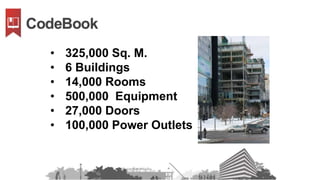
• 325,000 Sq. M.
• 6 Buildings
• 14,000 Rooms
• 500,000 Equipment
• 27,000 Doors
• 100,000 Power Outlets
`
50 Million
+
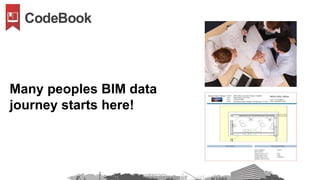
Many peoples BIM data
journey starts here!
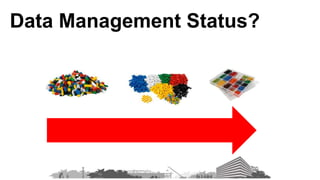
Data Management Status?
a
Schedule of
Accommodation
Schedule of
Fixtures, Fittings
& Equipment
Program
Coordinate Syncronize Validate Report Output
Data
Time
Design BuildEngineering Post Build
BIM Lifecycle
Schedule of
Accommodation
Schedule of
FFE
ProgramOwner
Architects
Interior
Designers
Engineers
Construction
Client
Authors
Owner Library
Designers
Library
Engineers
Library
Client Library
Revit Model (s)
Sources
Navisworks
Excel
Access
SQL
Word
PDF
Handwritten
Formats
Photos
Sketch's
RVT
DWG
NVS
Data
Rooms
FFE
Finishes
Doors
Windows
Services
Project
Revit Model
(s)
Outputs
Room Data Sheets
(RDS)
COBie
ESRI
XML
Access
SQL
Design BuildEngineering Post Build
BIM Data World
More, more and more meta data
• Rooms
• Furniture
• Equipment
• Finishes
• Doors
• MEP
• Activities
• Etc.
Datasets
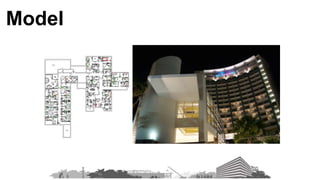
Model
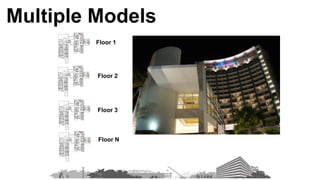
Floor 1
Floor 2
Floor 3
Floor N
Multiple Models
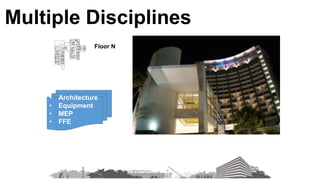
Floor N
• Architecture
• Equipment
• MEP
• FFE
Multiple Disciplines
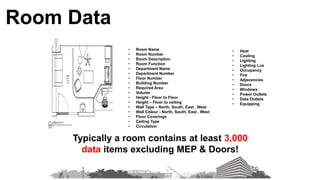
Typically a room contains at least 3,000
data items excluding MEP & Doors!
• Room Name
• Room Number
• Room Description
• Room Function
• Department Name
• Department Number
• Floor Number
• Building Number
• Required Area
• Volume
• Height - Floor to Floor
• Height – Floor to ceiling
• Wall Type – North, South, East , West
• Wall Colour - North, South, East , West
• Floor Coverings
• Ceiling Type
• Circulation
• Heat
• Cooling
• Lighting
• Lighting Lux
• Occupancy
• Fire
• Adjacencies
• Doors
• Windows
• Power Outlets
• Data Outlets
• Equipping
Room Data
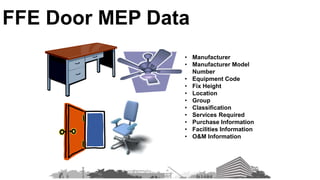
• Manufacturer
• Manufacturer Model
Number
• Equipment Code
• Fix Height
• Location
• Group
• Classification
• Services Required
• Purchase Information
• Facilities Information
• O&M Information
FFE Door MEP Data
Data Mixture
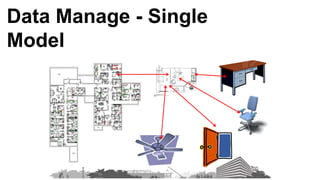
Data Manage - Single
Model
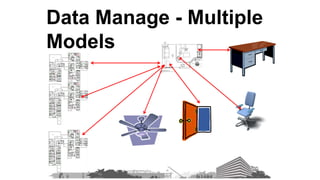
Data Manage - Multiple
Models
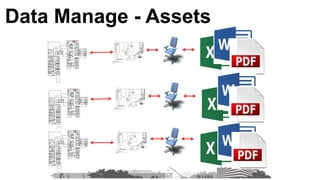
Data Manage - Assets
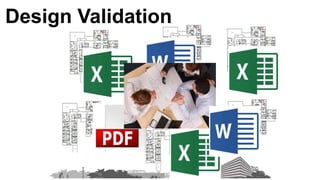
Design Validation
Our approach
Capture Manage Validate Report
Schedule of
Accommodation
Schedule of FFE
ProgramOwner
Architects
Interior
Designers
Engineers
Construction
Client
Authors
Owner Library
Designers
Library
Engineers
Library
Client Library
CodeBook
Data Model
Revit Model (s)
Sources
Navisworks
Excel
Access
SQL
Word
PDF
Handwritten
Formats
Photos
Sketch's
RVT
DWG
NVS
Data
Rooms
FFE
Finishes
Doors
Windows
Services
Project
Revit Model
(s)
Outputs
Room Data Sheets
COBie
ESRI
Maximo
XML
Access
SQL
Maximo
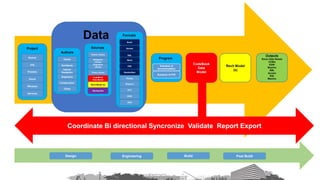
Coordinate Bi directional Syncronize Validate Report Export
CodeBook
Data
Model
Design BuildEngineering Post Build
Schedule of
Accommodation
Schedule of FFE
ProgramOwner
Architects
Interior
Designers
Engineers
Constructio
n
Client
Authors Owner
Library
Designers
Library
Engineers
Library
Client Library
CodeBook
Data Model
Revit Model
(s)
Sources
Navisworks
Excel
Access
SQL
Word
PDF
Handwritten
Formats
Photos
Sketch's
RVT
DWG
NVS
Data
Rooms
FFE
Finishes
Doors
Windows
Services
Project
Revit Model
(s)
Outputs
Room Data Sheets
COBie
ESRI
Maximo
XML
Access
SQL
Maximo
Coordinate Bi directional Syncronize Validate Report Export
CodeBook
Data
Model
Facilities
Management
Tool
Design BuildEngineering Post Build Operations
Room Data Collector
Project Room Data Manager
Codebook
Project Data
Model
Asset Data Collector
CodeBook Project Server
3rd Party Server
PC Client
Client On Premises Server
Room Data
Collector Project Room Data Manager
Reports
Word
Excel
PDF
C-Sheets
Crystal Export
SQL
Access
XML
COBie
ESRI
Maximo
FM
System
CodeBook
Project Data
Model
Asset Data
Collector
CAD /
3D
Models
Import
Wizard
Excel
Access
SQL
Manual
Input
Data Sources
Room & Asset Data Management Tools
API
Architect
Interior
Designers
Engineers Construction OwnerClient
Post
Build
OperationsPre Design Design Build
Room Data
Collector Project Room Data Manager
Reports
Word
Excel
PDF
C-Sheets
Crystal Export
SQL
Access
XML
COBie
ESRI
Maximo
FM
System
CodeBook
Project Data
Model
Asset Data
Collector
CAD /
3D
Models
Import
Wizard
Excel
Access
SQL
Manual
Input
Data Sources
Project Workflow
Stakeholders
API
Exemplar CodeBook
Workflow
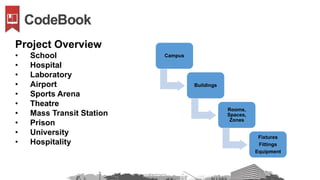
Campus
Buildings
Rooms,
Spaces,
Zones
Fixtures
Fittings
Equipment
Project Overview
• School
• Hospital
• Laboratory
• Airport
• Sports Arena
• Theatre
• Mass Transit Station
• Prison
• University
• Hospitality
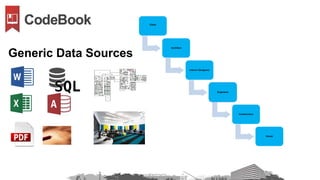
Client
Architect
Interior Designers
Engineers
Construction
Owner
Generic Data Sources
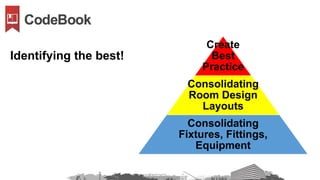
Create
Best
Practice
Consolidating
Room Design
Layouts
Consolidating
Fixtures, Fittings,
Equipment
Identifying the best!
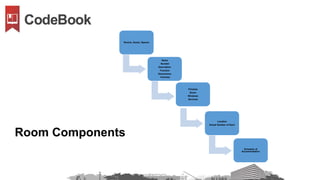
Rooms, Zones, Spaces
Name
Number
Description
Function
Dimensions
Volumes
Finishes
Doors
Windows
Services
Location
Actual Number of Each
Schedule of
Accommodation
Room Components
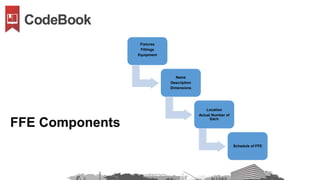
Fixtures
Fittings
Equipment
Name
Description
Dimensions
Location
Actual Number of
Each
Schedule of FFE
FFE Components
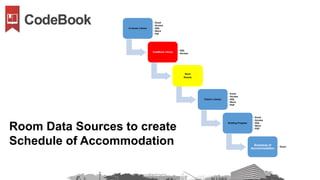
In-house Library
• Excel
• Access
• SQL
• Word
• Pdf
CodeBook Library
• SQL
• Access
Revit
Rooms
Client’s Library
• Excel
• Access
• SQL
• Word
• PDF
Briefing Program
• Excel
• Access
• SQL
• Word
• PDF
Schedule of
Accommodation
• Excel
Room Data Sources to create
Schedule of Accommodation
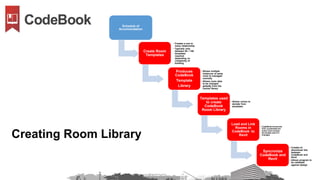
Schedule of
Accommodation
Create Room
Templates
• Creates a one to
many relationship
• Typically only
between 80 – 100
templates
required
depending on
complexity of
building
Produces
CodeBook
Template
Library
• Allows multiple
instances of same
room to managed
centrally
• Allows room data
to be changed
globally from the
central library
Templates used
to create
CodeBook
Room Library
• Allows rooms to
deviate from
templates
Load and Link
Rooms in
CodeBook to
Revit
• CodeBook knows the
XYZ coordinates for
every room across
all models and if it
changes
Syncronize
CodeBook and
Revit
• Creates bi
directional link
between
CodeBook and
Revit
• Allows program to
be validated
against design
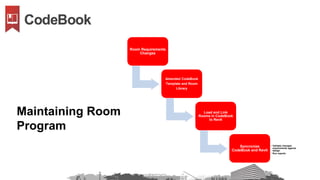
Creating Room Library
Room Requirements
Changes
Amended CodeBook
Template and Room
Library
Load and Link
Rooms in CodeBook
to Revit
Syncronize
CodeBook and Revit
• Validate changed
requirements against
design
• Run reports
Maintaining Room
Program
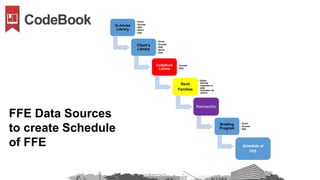
In-house
Library
• Excel
• Access
• SQL
• Word
• PDF
Client’s
Library
• Excel
• Access
• SQL
• Word
• PDF
CodeBook
Library
• Access
• SQL
Revit
Families
• Either
directly
imported or
data
imported via
wizard
Navisworks
Briefing
Program
• Excel
• Access
• SQL
Schedule of
FFE
FFE Data Sources
to create Schedule
of FFE
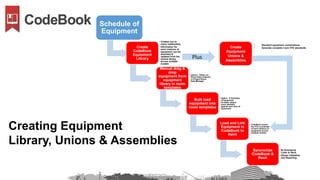
Schedule of
Equipment
Create
CodeBook
Equipment
Library
• Creates one to
many relationship
• Information for
each instance of
equipment can be
amended &
updated from the
central library
across multiple
models
Manual drag &
drop
equipment from
equipment
library in room
templates
• Option – Either via
Room Data Collector
or Project Room
Data Manager
Bulk load
equipment into
room templates
• Option - If Schedule
of Equipment
includes unique
room identifier
against each item of
equipment
Load and Link
Equipment in
CodeBook to
Revit
• CodeBook knows
the XYZ coordinate
of each instance of
equipment across
multiple models
Syncronize
CodeBook &
Revit
• Bi Directional
Links to Revit
• Allows Validation
and Reporting
Creating Equipment
Library, Unions & Assemblies
Create
Equipment
Unions &
Assemblies
Plus
• Standard equipment combinations
• Generate complete room FFE standards
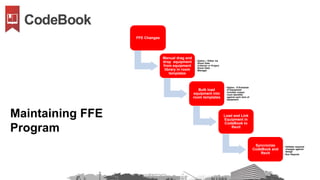
FFE Changes
Manual drag and
drop equipment
from equipment
library in room
templates
• Option – Either via
Room Data
Collector or Project
Room Data
Manager
Bulk load
equipment into
room templates
• Option - If Schedule
of Equipment
includes unique
room identifier
against each item of
equipment
Load and Link
Equipment in
CodeBook to
Revit
Syncronize
CodeBook and
Revit
• Validate required
changes against
design
• Run Reports
Maintaining FFE
Program
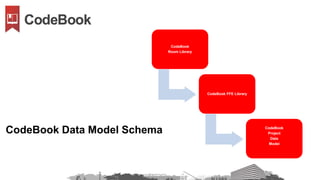
CodeBook
Room Library
CodeBook FFE Library
CodeBook
Project
Data
Model
CodeBook Data Model Schema
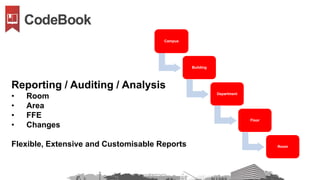
Campus
Building
Department
Floor
Room
Reporting / Auditing / Analysis
• Room
• Area
• FFE
• Changes
Flexible, Extensive and Customisable Reports
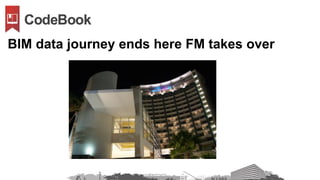
BIM data journey ends here FM takes over
CodeBook BIM Data Workflow

CodeBook BIM Data Workflow

  • 1.
    Intelligent Room & AssetData Management Capture Manage Validate Report
  • 3.
    Coordinates and socialisesBIM data during project life cycle from inception to handover without duplication of data or effort
  • 4.
    Over 20 yearsmanaging non graphical building data for projects of all sizes and sectors
  • 5.
    • 325,000 Sq.M. • 6 Buildings • 14,000 Rooms • 500,000 Equipment • 27,000 Doors • 100,000 Power Outlets
  • 6.
  • 7.
    Many peoples BIMdata journey starts here!
  • 8.
  • 9.
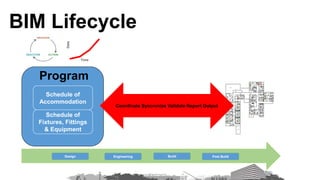
    a Schedule of Accommodation Schedule of Fixtures,Fittings & Equipment Program Coordinate Syncronize Validate Report Output Data Time Design BuildEngineering Post Build BIM Lifecycle
  • 10.
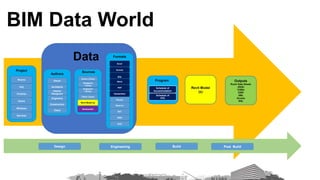
    Schedule of Accommodation Schedule of FFE ProgramOwner Architects Interior Designers Engineers Construction Client Authors OwnerLibrary Designers Library Engineers Library Client Library Revit Model (s) Sources Navisworks Excel Access SQL Word PDF Handwritten Formats Photos Sketch's RVT DWG NVS Data Rooms FFE Finishes Doors Windows Services Project Revit Model (s) Outputs Room Data Sheets (RDS) COBie ESRI XML Access SQL Design BuildEngineering Post Build BIM Data World
  • 11.
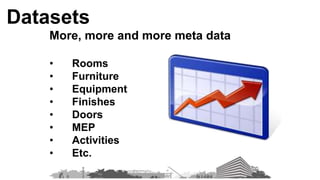
    More, more andmore meta data • Rooms • Furniture • Equipment • Finishes • Doors • MEP • Activities • Etc. Datasets
  • 12.
  • 13.
    Floor 1 Floor 2 Floor3 Floor N Multiple Models
  • 14.
    Floor N • Architecture •Equipment • MEP • FFE Multiple Disciplines
  • 15.
    Typically a roomcontains at least 3,000 data items excluding MEP & Doors! • Room Name • Room Number • Room Description • Room Function • Department Name • Department Number • Floor Number • Building Number • Required Area • Volume • Height - Floor to Floor • Height – Floor to ceiling • Wall Type – North, South, East , West • Wall Colour - North, South, East , West • Floor Coverings • Ceiling Type • Circulation • Heat • Cooling • Lighting • Lighting Lux • Occupancy • Fire • Adjacencies • Doors • Windows • Power Outlets • Data Outlets • Equipping Room Data
  • 16.
    • Manufacturer • ManufacturerModel Number • Equipment Code • Fix Height • Location • Group • Classification • Services Required • Purchase Information • Facilities Information • O&M Information FFE Door MEP Data
  • 17.
  • 18.
    Data Manage -Single Model
  • 19.
    Data Manage -Multiple Models
  • 20.
  • 21.
  • 22.
  • 23.
  • 24.
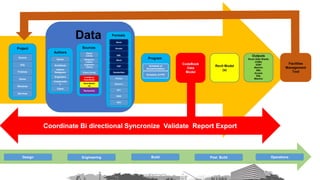
    Schedule of Accommodation Schedule ofFFE ProgramOwner Architects Interior Designers Engineers Construction Client Authors Owner Library Designers Library Engineers Library Client Library CodeBook Data Model Revit Model (s) Sources Navisworks Excel Access SQL Word PDF Handwritten Formats Photos Sketch's RVT DWG NVS Data Rooms FFE Finishes Doors Windows Services Project Revit Model (s) Outputs Room Data Sheets COBie ESRI Maximo XML Access SQL Maximo Coordinate Bi directional Syncronize Validate Report Export CodeBook Data Model Design BuildEngineering Post Build
  • 25.
    Schedule of Accommodation Schedule ofFFE ProgramOwner Architects Interior Designers Engineers Constructio n Client Authors Owner Library Designers Library Engineers Library Client Library CodeBook Data Model Revit Model (s) Sources Navisworks Excel Access SQL Word PDF Handwritten Formats Photos Sketch's RVT DWG NVS Data Rooms FFE Finishes Doors Windows Services Project Revit Model (s) Outputs Room Data Sheets COBie ESRI Maximo XML Access SQL Maximo Coordinate Bi directional Syncronize Validate Report Export CodeBook Data Model Facilities Management Tool Design BuildEngineering Post Build Operations
  • 26.
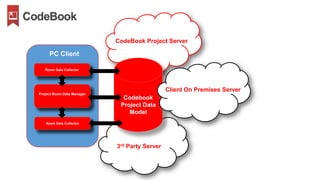
    Room Data Collector ProjectRoom Data Manager Codebook Project Data Model Asset Data Collector CodeBook Project Server 3rd Party Server PC Client Client On Premises Server
  • 27.
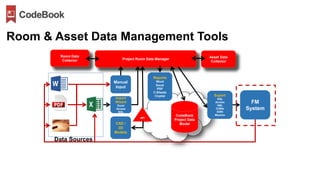
    Room Data Collector ProjectRoom Data Manager Reports Word Excel PDF C-Sheets Crystal Export SQL Access XML COBie ESRI Maximo FM System CodeBook Project Data Model Asset Data Collector CAD / 3D Models Import Wizard Excel Access SQL Manual Input Data Sources Room & Asset Data Management Tools API
  • 28.
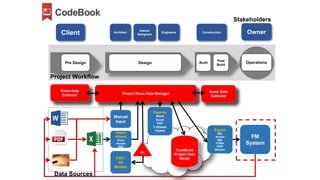
    Architect Interior Designers Engineers Construction OwnerClient Post Build OperationsPreDesign Design Build Room Data Collector Project Room Data Manager Reports Word Excel PDF C-Sheets Crystal Export SQL Access XML COBie ESRI Maximo FM System CodeBook Project Data Model Asset Data Collector CAD / 3D Models Import Wizard Excel Access SQL Manual Input Data Sources Project Workflow Stakeholders API
  • 29.
  • 30.
    Campus Buildings Rooms, Spaces, Zones Fixtures Fittings Equipment Project Overview • School •Hospital • Laboratory • Airport • Sports Arena • Theatre • Mass Transit Station • Prison • University • Hospitality
  • 31.
  • 32.
  • 33.
  • 34.
  • 35.
    In-house Library • Excel •Access • SQL • Word • Pdf CodeBook Library • SQL • Access Revit Rooms Client’s Library • Excel • Access • SQL • Word • PDF Briefing Program • Excel • Access • SQL • Word • PDF Schedule of Accommodation • Excel Room Data Sources to create Schedule of Accommodation
  • 36.
    Schedule of Accommodation Create Room Templates •Creates a one to many relationship • Typically only between 80 – 100 templates required depending on complexity of building Produces CodeBook Template Library • Allows multiple instances of same room to managed centrally • Allows room data to be changed globally from the central library Templates used to create CodeBook Room Library • Allows rooms to deviate from templates Load and Link Rooms in CodeBook to Revit • CodeBook knows the XYZ coordinates for every room across all models and if it changes Syncronize CodeBook and Revit • Creates bi directional link between CodeBook and Revit • Allows program to be validated against design Creating Room Library
  • 37.
    Room Requirements Changes Amended CodeBook Templateand Room Library Load and Link Rooms in CodeBook to Revit Syncronize CodeBook and Revit • Validate changed requirements against design • Run reports Maintaining Room Program
  • 38.
    In-house Library • Excel • Access •SQL • Word • PDF Client’s Library • Excel • Access • SQL • Word • PDF CodeBook Library • Access • SQL Revit Families • Either directly imported or data imported via wizard Navisworks Briefing Program • Excel • Access • SQL Schedule of FFE FFE Data Sources to create Schedule of FFE
  • 39.
    Schedule of Equipment Create CodeBook Equipment Library • Createsone to many relationship • Information for each instance of equipment can be amended & updated from the central library across multiple models Manual drag & drop equipment from equipment library in room templates • Option – Either via Room Data Collector or Project Room Data Manager Bulk load equipment into room templates • Option - If Schedule of Equipment includes unique room identifier against each item of equipment Load and Link Equipment in CodeBook to Revit • CodeBook knows the XYZ coordinate of each instance of equipment across multiple models Syncronize CodeBook & Revit • Bi Directional Links to Revit • Allows Validation and Reporting Creating Equipment Library, Unions & Assemblies Create Equipment Unions & Assemblies Plus • Standard equipment combinations • Generate complete room FFE standards
  • 40.
    FFE Changes Manual dragand drop equipment from equipment library in room templates • Option – Either via Room Data Collector or Project Room Data Manager Bulk load equipment into room templates • Option - If Schedule of Equipment includes unique room identifier against each item of equipment Load and Link Equipment in CodeBook to Revit Syncronize CodeBook and Revit • Validate required changes against design • Run Reports Maintaining FFE Program
  • 41.
    CodeBook Room Library CodeBook FFELibrary CodeBook Project Data Model CodeBook Data Model Schema
  • 42.
    Campus Building Department Floor Room Reporting / Auditing/ Analysis • Room • Area • FFE • Changes Flexible, Extensive and Customisable Reports
  • 43.
    BIM data journeyends here FM takes over

Editor's Notes

  • #28  Room Data Collector (RDC) – Capturing your clients requirements quicker, more easier and much earlier and which directly link into what we used to call CodeBook Pro, it’s an optional module [cost implications are required!] Asset Data Collector (ADC) – Capturing post construction information such as conformance, asset information relating to serial numbers, asset numbers, warranty, conditions, rework etc – the new product allows users to have this on a laptop, ultrabook or windows based tablet, as well as the Mobile Web Access option.  Again both are optional modules [cost implications are required!]
  • #29  Room Data Collector (RDC) – Capturing your clients requirements quicker, more easier and much earlier and which directly link into what we used to call CodeBook Pro, it’s an optional module [cost implications are required!] Asset Data Collector (ADC) – Capturing post construction information such as conformance, asset information relating to serial numbers, asset numbers, warranty, conditions, rework etc – the new product allows users to have this on a laptop, ultrabook or windows based tablet, as well as the Mobile Web Access option.  Again both are optional modules [cost implications are required!]
  • #30  Room Data Collector (RDC) – Capturing your clients requirements quicker, more easier and much earlier and which directly link into what we used to call CodeBook Pro, it’s an optional module [cost implications are required!] Asset Data Collector (ADC) – Capturing post construction information such as conformance, asset information relating to serial numbers, asset numbers, warranty, conditions, rework etc – the new product allows users to have this on a laptop, ultrabook or windows based tablet, as well as the Mobile Web Access option.  Again both are optional modules [cost implications are required!]