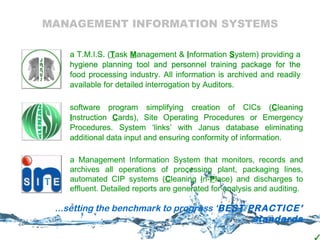
MANAGEMENT INFORMATION SYSTEMS a T.M.I.S. ( T ask  M anagement &  I nformation  S ystem) providing a hygiene planning tool and personnel training package for the food processing industry. All information is archived and readily available for detailed interrogation by Auditors. software program simplifying creation of CICs ( C leaning  I nstruction  C ards), Site Operating Procedures or Emergency Procedures. System ‘links’ with Janus database eliminating additional data input and ensuring conformity of information.  a T.M.I.S. ( T ask  M anagement &  I nformation  S ystem) providing a hygiene planning tool and personnel training package for the food processing industry. All information is archived and readily available for detailed interrogation by Auditors. software program simplifying creation of CICs ( C leaning  I nstruction  C ards), Site Operating Procedures or Emergency Procedures. System ‘links’ with Janus database eliminating additional data input and ensuring conformity of information.  a T.M.I.S. ( T ask  M anagement &  I nformation  S ystem) providing a hygiene planning tool and personnel training package for the food processing industry. All information is archived and readily available for detailed interrogation by Auditors. software program simplifying creation of CICs ( C leaning  I nstruction  C ards), Site Operating Procedures or Emergency Procedures. System ‘links’ with Janus database eliminating additional data input and ensuring conformity of information.  a Management Information System that monitors, records and archives  all operations of processing plant, packaging lines, automated CIP systems ( C leaning  I n- P lace) and discharges to effluent. Detailed reports are generated for analysis and auditing. ...setting the benchmark to progress ‘ BEST PRACTICE’ standards a Management Information System that monitors, records and archives  all operations of processing plant, packaging lines, automated CIP systems ( C leaning  I n- P lace) and discharges to effluent. Detailed reports are generated for analysis and auditing.
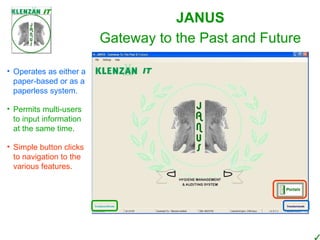
Gateway to the Past and Future Operates as either a paper-based or as a paperless system. Permits multi-users to input information at the same time. Simple button clicks to navigation to the various features.  JANUS
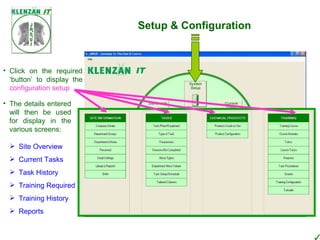
Setup & Configuration Click on the required ‘button’ to display the  configuration setup The details entered will then be used for display in the various screens: Site Overview Current Tasks Task History Training Required Training History Reports
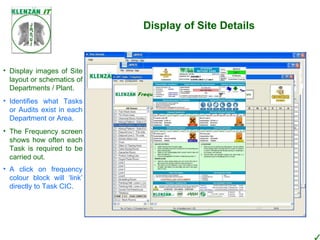
Display of Site Details Display images of Site layout or schematics of Departments / Plant. Identifies what Tasks or Audits exist in each Department or Area. The Frequency screen shows how often each Task is required to be carried out. A click on frequency colour block will ‘link’ directly to Task CIC.
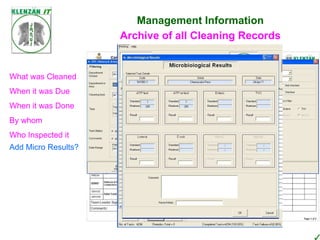
Management Information What needs cleaning When Using which CIC With which chemicals Specialist Training required? Who cleaned it ATP result? Current Tasks – active screen Sign-off sheets ~ daily ~ weekly Archive of all Cleaning Records Task Marking What was Cleaned When it was Due When it was Done By whom Who Inspected it Add Micro Results?
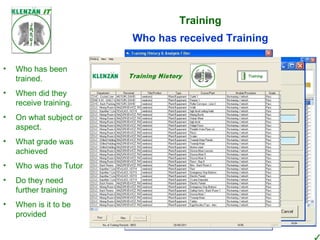
Training Training on What Cleaning Chemical Safety Basic Food Hygiene Micro Sampling First Aid Site Fire Drill Use of Equipment Plant Maintenance Etc. etc. Who needs to be Trained Who has received Training Who has been trained. When did they receive training. On what subject or aspect. What grade was achieved Who was the Tutor Do they need further training When is it to be provided
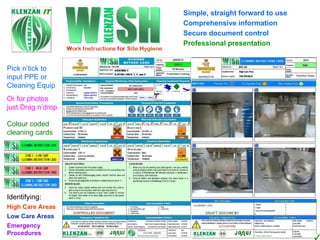
Simple, straight forward to use Or for photos just Drag n’drop Pick n’tick to input PPE or Cleaning Equip Comprehensive information Secure document control Professional presentation Colour coded cleaning cards Identifying: High Care Areas Low Care Areas Emergency Procedures
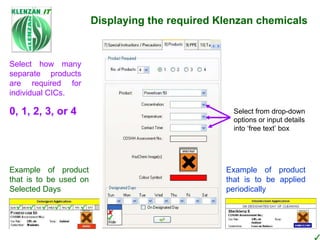
PPE ~ simply pick n’tick Cleaning Equipment ~  simply pick n’tick Program database stores 200+ items of Equipment  Displaying the required Klenzan chemicals Products have been pre-configured with correct CHIP and product colour symbols Database Janus Database Simple ‘tick’ the box against all products used on Site. Either WISH or Janus databases can be used to select products Select from drop-down options or input details into ‘free text’ box Example of product that is to be used on Selected Days Example of product that is to be applied periodically Select how many separate products are required for individual CICs. 0, 1, 2, 3, or 4
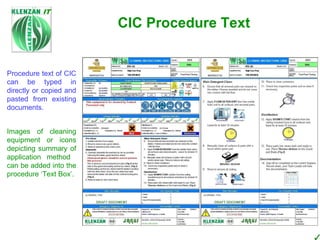
Procedure text of CIC can be typed in directly or copied and pasted from existing documents. CIC Procedure Text Images of cleaning equipment or icons depicting summary of application method  can be added into the procedure ‘Text Box’.
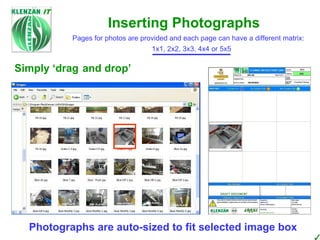
Pages for photos are provided and each page can have a different matrix: 1x1, 2x2, 3x3, 4x4 or 5x5 Inserting Photographs Simply ‘drag and drop’ Photographs are auto-sized to fit selected image box
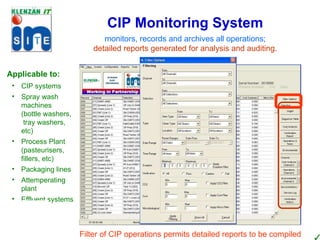
monitors, records and archives  all operations; detailed reports generated for analysis and auditing. CIP Monitoring System Filter of CIP operations permits detailed reports to be compiled Applicable to: CIP systems Spray wash machines  (bottle washers,  tray washers, etc) Process Plant (pasteurisers, fillers, etc) Packaging lines Attemperating plant Effluent systems
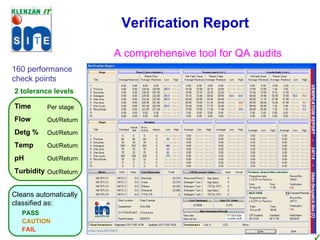
Verification Report 160 performance check points 2 tolerance levels A comprehensive tool for QA audits Time Flow Detg % Temp pH Turbidity  Per stage Out/Return Out/Return Out/Return Out/Return Out/Return  Cleans automatically classified as: PASS CAUTION FAIL
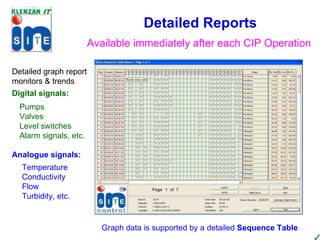
Detailed Reports Available immediately after each CIP Operation Detailed graph report monitors & trends Digital signals: Pumps Valves Level switches Alarm signals, etc. Graph Display can be ‘zoomed’ for greater detail to aid analysis Graph data is supported by a detailed  Sequence Table Temperature Conductivity Flow  Turbidity, etc. Analogue signals:
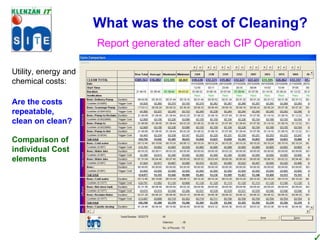
What was the cost of Cleaning? Utility, energy and chemical costs: Single Clean Monthly costs Are the costs repeatable, clean on clean? Comparison of individual Cost elements Report generated after each CIP Operation
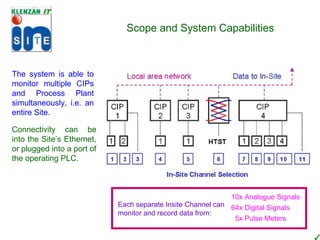
Environmental Report Impact of Pumps Impact of Heating Single Clean Monthly CO 2 Other reports generated after each CIP Operation & Times details how many times each pump/valve operated for and total duration they were active for. Maintenance identifies when a pump or valve has reach ‘service required’ trigger, (item text changes colour) Service Log records when each item of plant (pump/valve) was Serviced and details plant utilisation at time of Service Reports can be of a single operation or entire CIP channel Scope and System Capabilities The system is able to monitor multiple CIPs and Process Plant simultaneously, i.e. an entire Site. Connectivity can be into the Site’s Ethernet, or plugged into a port of the operating PLC. Verification archives all ‘out of spec’ occurrences, results can be analysed via filtering to establish if ‘faults’ occur each CIP operation – possible program fault. History Each separate Insite Channel can monitor and record data from: 10x Analogue Signals 64x Digital Signals 5x Pulse Meters
MANAGEMENT INFORMATION SYSTEMS ...we are passionate about delivering  BEST PRACTICE

Klenzan it [janus+wish+insite]

  • 1.
  • 2.
    MANAGEMENT INFORMATION SYSTEMSa T.M.I.S. ( T ask M anagement & I nformation S ystem) providing a hygiene planning tool and personnel training package for the food processing industry. All information is archived and readily available for detailed interrogation by Auditors. software program simplifying creation of CICs ( C leaning I nstruction C ards), Site Operating Procedures or Emergency Procedures. System ‘links’ with Janus database eliminating additional data input and ensuring conformity of information. a T.M.I.S. ( T ask M anagement & I nformation S ystem) providing a hygiene planning tool and personnel training package for the food processing industry. All information is archived and readily available for detailed interrogation by Auditors. software program simplifying creation of CICs ( C leaning I nstruction C ards), Site Operating Procedures or Emergency Procedures. System ‘links’ with Janus database eliminating additional data input and ensuring conformity of information. a T.M.I.S. ( T ask M anagement & I nformation S ystem) providing a hygiene planning tool and personnel training package for the food processing industry. All information is archived and readily available for detailed interrogation by Auditors. software program simplifying creation of CICs ( C leaning I nstruction C ards), Site Operating Procedures or Emergency Procedures. System ‘links’ with Janus database eliminating additional data input and ensuring conformity of information. a Management Information System that monitors, records and archives all operations of processing plant, packaging lines, automated CIP systems ( C leaning I n- P lace) and discharges to effluent. Detailed reports are generated for analysis and auditing. ...setting the benchmark to progress ‘ BEST PRACTICE’ standards a Management Information System that monitors, records and archives all operations of processing plant, packaging lines, automated CIP systems ( C leaning I n- P lace) and discharges to effluent. Detailed reports are generated for analysis and auditing.
  • 3.
    Gateway to thePast and Future Operates as either a paper-based or as a paperless system. Permits multi-users to input information at the same time. Simple button clicks to navigation to the various features. JANUS
  • 4.
    Setup & ConfigurationClick on the required ‘button’ to display the configuration setup The details entered will then be used for display in the various screens: Site Overview Current Tasks Task History Training Required Training History Reports
  • 5.
    Display of SiteDetails Display images of Site layout or schematics of Departments / Plant. Identifies what Tasks or Audits exist in each Department or Area. The Frequency screen shows how often each Task is required to be carried out. A click on frequency colour block will ‘link’ directly to Task CIC.
  • 6.
    Management Information Whatneeds cleaning When Using which CIC With which chemicals Specialist Training required? Who cleaned it ATP result? Current Tasks – active screen Sign-off sheets ~ daily ~ weekly Archive of all Cleaning Records Task Marking What was Cleaned When it was Due When it was Done By whom Who Inspected it Add Micro Results?
  • 7.
    Training Training onWhat Cleaning Chemical Safety Basic Food Hygiene Micro Sampling First Aid Site Fire Drill Use of Equipment Plant Maintenance Etc. etc. Who needs to be Trained Who has received Training Who has been trained. When did they receive training. On what subject or aspect. What grade was achieved Who was the Tutor Do they need further training When is it to be provided
  • 8.
    Simple, straight forwardto use Or for photos just Drag n’drop Pick n’tick to input PPE or Cleaning Equip Comprehensive information Secure document control Professional presentation Colour coded cleaning cards Identifying: High Care Areas Low Care Areas Emergency Procedures
  • 9.
    PPE ~ simplypick n’tick Cleaning Equipment ~ simply pick n’tick Program database stores 200+ items of Equipment Displaying the required Klenzan chemicals Products have been pre-configured with correct CHIP and product colour symbols Database Janus Database Simple ‘tick’ the box against all products used on Site. Either WISH or Janus databases can be used to select products Select from drop-down options or input details into ‘free text’ box Example of product that is to be used on Selected Days Example of product that is to be applied periodically Select how many separate products are required for individual CICs. 0, 1, 2, 3, or 4
  • 10.
    Procedure text ofCIC can be typed in directly or copied and pasted from existing documents. CIC Procedure Text Images of cleaning equipment or icons depicting summary of application method can be added into the procedure ‘Text Box’.
  • 11.
    Pages for photosare provided and each page can have a different matrix: 1x1, 2x2, 3x3, 4x4 or 5x5 Inserting Photographs Simply ‘drag and drop’ Photographs are auto-sized to fit selected image box
  • 12.
    monitors, records andarchives all operations; detailed reports generated for analysis and auditing. CIP Monitoring System Filter of CIP operations permits detailed reports to be compiled Applicable to: CIP systems Spray wash machines (bottle washers, tray washers, etc) Process Plant (pasteurisers, fillers, etc) Packaging lines Attemperating plant Effluent systems
  • 13.
    Verification Report 160performance check points 2 tolerance levels A comprehensive tool for QA audits Time Flow Detg % Temp pH Turbidity Per stage Out/Return Out/Return Out/Return Out/Return Out/Return Cleans automatically classified as: PASS CAUTION FAIL
  • 14.
    Detailed Reports Availableimmediately after each CIP Operation Detailed graph report monitors & trends Digital signals: Pumps Valves Level switches Alarm signals, etc. Graph Display can be ‘zoomed’ for greater detail to aid analysis Graph data is supported by a detailed Sequence Table Temperature Conductivity Flow Turbidity, etc. Analogue signals:
  • 15.
    What was thecost of Cleaning? Utility, energy and chemical costs: Single Clean Monthly costs Are the costs repeatable, clean on clean? Comparison of individual Cost elements Report generated after each CIP Operation
  • 16.
    Environmental Report Impactof Pumps Impact of Heating Single Clean Monthly CO 2 Other reports generated after each CIP Operation & Times details how many times each pump/valve operated for and total duration they were active for. Maintenance identifies when a pump or valve has reach ‘service required’ trigger, (item text changes colour) Service Log records when each item of plant (pump/valve) was Serviced and details plant utilisation at time of Service Reports can be of a single operation or entire CIP channel Scope and System Capabilities The system is able to monitor multiple CIPs and Process Plant simultaneously, i.e. an entire Site. Connectivity can be into the Site’s Ethernet, or plugged into a port of the operating PLC. Verification archives all ‘out of spec’ occurrences, results can be analysed via filtering to establish if ‘faults’ occur each CIP operation – possible program fault. History Each separate Insite Channel can monitor and record data from: 10x Analogue Signals 64x Digital Signals 5x Pulse Meters
  • 17.
    MANAGEMENT INFORMATION SYSTEMS...we are passionate about delivering BEST PRACTICE