
Cloud Computing Basics for Small
          Business
          November 1, 2012
About Us
• GWI
   –   www.gwi.net
   –   blog.gwi.net
   –   Facebook.com/GWIInc
   –   Twitter @gwimaine
   –   YouTube.com/gwimaine
• Trevor Jones, Director of Marketing and Product
  Development
   – Twitter: @trevorjones71
   – LinkedIn.com/in/trevordjones
• Brad Dormanen, Director of IT
   – Twitter: @braddormanen
   – linkedin.com/pub/brad-dormanen/28/751/5
Poll – Have You Used:

•   HubSpot?
•   Salesforce.com?
•   Hootsuite?
•   TweetDeck?
•   Google Apps? (Gmail, Drive, Docs, Calendar)
•   Control Panel Web Hosting?
•   Google Analytics?
•   Mozy or Carbonite?
•   DropBox?
Congratulations!


You’re using cloud computing!
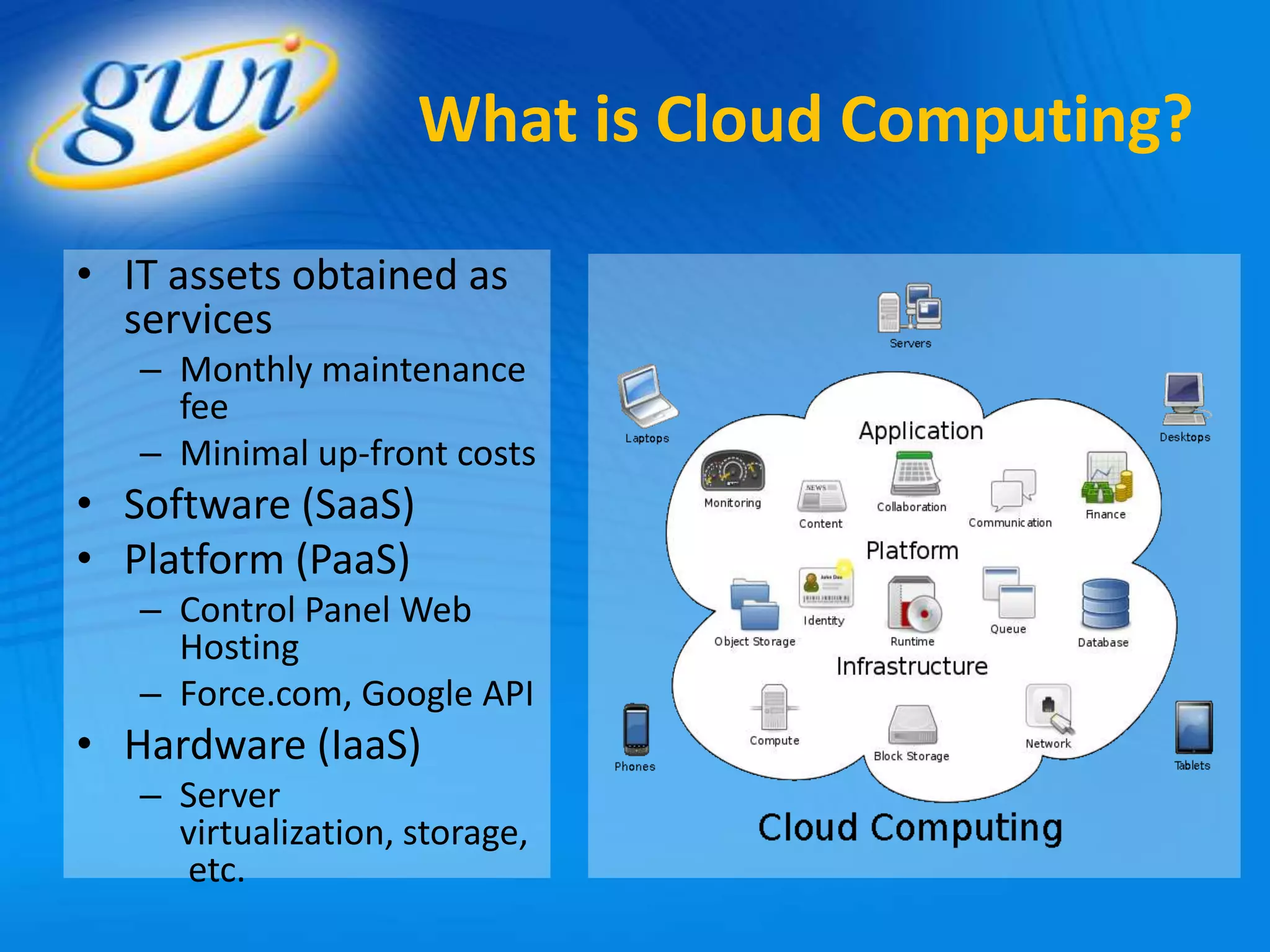
What is Cloud Computing?

• IT assets obtained as
  services
   – Monthly maintenance
     fee
   – Minimal up-front costs
• Software (SaaS)
• Platform (PaaS)
   – Control Panel Web
     Hosting
   – Force.com, Google API
• Hardware (IaaS)
   – Server
     virtualization, storage,
     etc.
Cloud Computing Benefits
                                        Financial

• Reduced Capital Costs
   – No servers to buy
   – No software licenses to buy
   – No unexpected investment needed due to equipment
     failure, obsolescence or disaster
• Reduced Overhead
   – Less need for specialized IT staff or consultants
   – Lower power consumption
   – Reduces the need for expensive private networks or hard to
     maintain VPN’s
• Scalability
   – Pay as you go per megabit or per seat
Cloud Computing Benefits
                                      Operational

• Work from anywhere
   – Username + Password access
     without VPN’s
• Best in class services for
  small business budgets
• Automatic updates
   – Lower Maintenance
   – Fewer risks from malware and
     intrusion
• Built in Disaster Recovery
   – No manual backup processes     Do what you do best, where you
   – Geo-diverse replication of     want to do it – let us deal with IT.
     data
A Few Examples of GWI
                 Cloud Computing Services

• Hosted PBX
• Hosted Storage
• Hosted Backup &
  Recovery
• Hosted Exchange
• HAVEN - Server
  Virtualization
• Data Center Services
Where the Cloud Lives


http://youtu.be/pp-cTdt3iEw
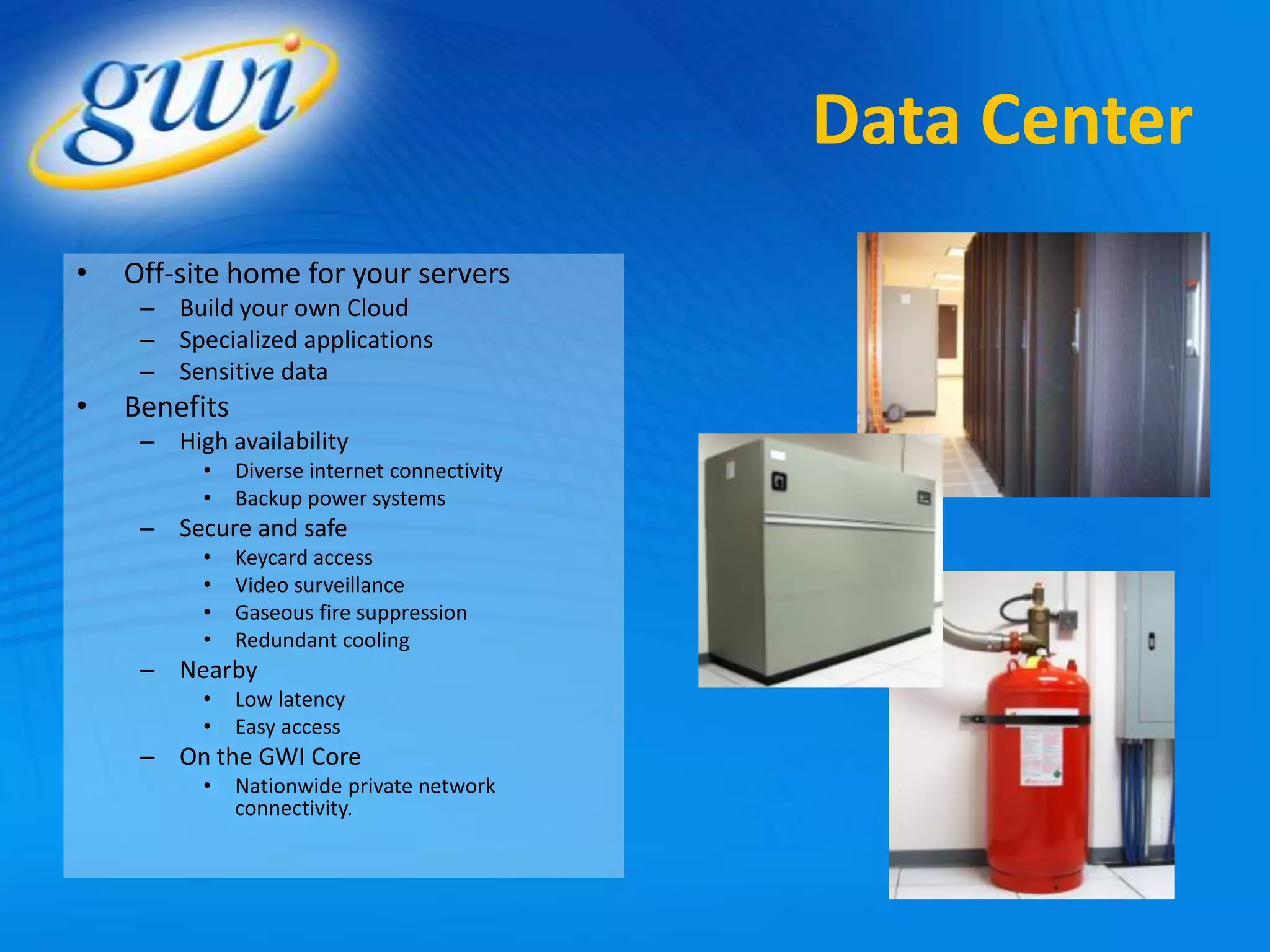
Data Center
•   Off-site home for your servers
     – Build your own Cloud
     – Specialized applications
     – Sensitive data
•   Benefits
     – High availability
          •    Diverse internet connectivity
          •    Backup power systems
     – Secure and safe
          •    Keycard access
          •    Video surveillance
          •    Gaseous fire suppression
          •    Redundant cooling
     – Nearby
          •    Low latency
          •    Easy access
     – On the GWI Core
          •    Nationwide private network
               connectivity.
Before You Jump In:
                                     Network Readiness
• Set up monitoring
   – Is your connection fast enough?
   – Are their performance issues with your network?
• Have wiring inspected
• Check wireless network configuration
   – Performance
   – Security
• Update out of date equipment
• Upgrade your connectivity
   – Consider a private connection
   – Consider backup Internet
• Install battery backups on network devices
Before you jump in:
                                              Partner Selection
• Control & Privacy
    – Understanding where copies are stored
    – Careful review of privacy policies
• Data Security
    – Ensure stored data is encrypted
    – Mistrust any partner who can decrypt your data for you
    – Data should be transmitted via a private network, SSH, or other encrypted
      tunnel
• Service Level Management
    – Mean time to recover/restore
    – Maintenance schedule
• Location matters for performance
• Consider carriers
    –   Connectivity can be managed for performance and security
    –   Savings through bundling with telecom services
    –   One-call, one-bill convenience
    –   Many have local support staff
Questions? Ask away!


  THANK YOU!

Cloud Computing Basics for Small Business

  • 1.
    Cloud Computing Basicsfor Small Business November 1, 2012
  • 2.
    About Us • GWI – www.gwi.net – blog.gwi.net – Facebook.com/GWIInc – Twitter @gwimaine – YouTube.com/gwimaine • Trevor Jones, Director of Marketing and Product Development – Twitter: @trevorjones71 – LinkedIn.com/in/trevordjones • Brad Dormanen, Director of IT – Twitter: @braddormanen – linkedin.com/pub/brad-dormanen/28/751/5
  • 3.
    Poll – HaveYou Used: • HubSpot? • Salesforce.com? • Hootsuite? • TweetDeck? • Google Apps? (Gmail, Drive, Docs, Calendar) • Control Panel Web Hosting? • Google Analytics? • Mozy or Carbonite? • DropBox?
  • 4.
  • 5.
    What is CloudComputing? • IT assets obtained as services – Monthly maintenance fee – Minimal up-front costs • Software (SaaS) • Platform (PaaS) – Control Panel Web Hosting – Force.com, Google API • Hardware (IaaS) – Server virtualization, storage, etc.
  • 6.
    Cloud Computing Benefits Financial • Reduced Capital Costs – No servers to buy – No software licenses to buy – No unexpected investment needed due to equipment failure, obsolescence or disaster • Reduced Overhead – Less need for specialized IT staff or consultants – Lower power consumption – Reduces the need for expensive private networks or hard to maintain VPN’s • Scalability – Pay as you go per megabit or per seat
  • 7.
    Cloud Computing Benefits Operational • Work from anywhere – Username + Password access without VPN’s • Best in class services for small business budgets • Automatic updates – Lower Maintenance – Fewer risks from malware and intrusion • Built in Disaster Recovery – No manual backup processes Do what you do best, where you – Geo-diverse replication of want to do it – let us deal with IT. data
  • 8.
    A Few Examplesof GWI Cloud Computing Services • Hosted PBX • Hosted Storage • Hosted Backup & Recovery • Hosted Exchange • HAVEN - Server Virtualization • Data Center Services
  • 9.
    Where the CloudLives http://youtu.be/pp-cTdt3iEw
  • 10.
    Data Center • Off-site home for your servers – Build your own Cloud – Specialized applications – Sensitive data • Benefits – High availability • Diverse internet connectivity • Backup power systems – Secure and safe • Keycard access • Video surveillance • Gaseous fire suppression • Redundant cooling – Nearby • Low latency • Easy access – On the GWI Core • Nationwide private network connectivity.
  • 11.
    Before You JumpIn: Network Readiness • Set up monitoring – Is your connection fast enough? – Are their performance issues with your network? • Have wiring inspected • Check wireless network configuration – Performance – Security • Update out of date equipment • Upgrade your connectivity – Consider a private connection – Consider backup Internet • Install battery backups on network devices
  • 12.
    Before you jumpin: Partner Selection • Control & Privacy – Understanding where copies are stored – Careful review of privacy policies • Data Security – Ensure stored data is encrypted – Mistrust any partner who can decrypt your data for you – Data should be transmitted via a private network, SSH, or other encrypted tunnel • Service Level Management – Mean time to recover/restore – Maintenance schedule • Location matters for performance • Consider carriers – Connectivity can be managed for performance and security – Savings through bundling with telecom services – One-call, one-bill convenience – Many have local support staff
  • 13.