What is cloud?
The cloud is a computing service that
charges you based only on the amount of
computing resources we use.
Pay as you go
What is cloud?
The cloud is a computing service that
charges you based only on the amount of
computing resources we use.
Pay as you go
:-By Roshan Bagdiya
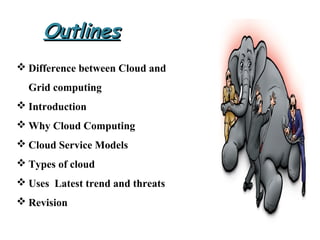
 Difference between Cloud and
Grid computing
 Introduction
 Why Cloud Computing
 Cloud Service Models
 Types of cloud
 Uses Latest trend and threats
 Revision
OutlinesOutlines
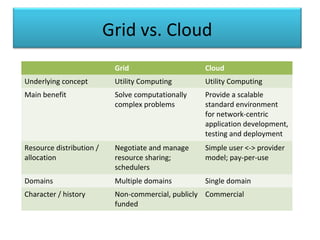
Grid vs. Cloud
Grid Cloud
Underlying concept Utility Computing Utility Computing
Main benefit Solve computationally
complex problems
Provide a scalable
standard environment
for network-centric
application development,
testing and deployment
Resource distribution /
allocation
Negotiate and manage
resource sharing;
schedulers
Simple user <-> provider
model; pay-per-use
Domains Multiple domains Single domain
Character / history Non-commercial, publicly
funded
Commercial
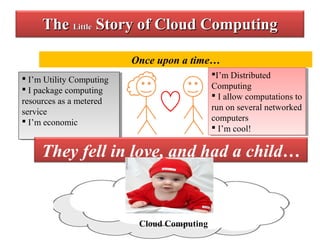
TheThe LittleLittle Story of Cloud ComputingStory of Cloud Computing
Once upon a time…
I’m Distributed
Computing
 I allow computations to
run on several networked
computers
 I’m cool!
I’m Distributed
Computing
 I allow computations to
run on several networked
computers
 I’m cool!
 I’m Utility Computing
 I package computing
resources as a metered
service
 I’m economic
 I’m Utility Computing
 I package computing
resources as a metered
service
 I’m economic
Cloud Computing
They fell in love, and had a child…
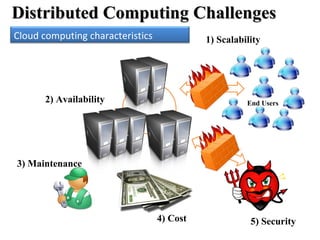
Distributed Computing ChallengesDistributed Computing Challenges
4) Cost 5) Security
2) Availability
3) Maintenance
End Users
1) ScalabilityCloud computing characteristics
Why Cloud Computing?Why Cloud Computing?
• Cloud Computing Is User Centric
• Cloud Computing Is Task-Centric
• Cloud Computing Is Powerful
• Cloud Computing Is Accessible
• Cloud Computing Is Intelligent
• Cloud Computing Is Programmable
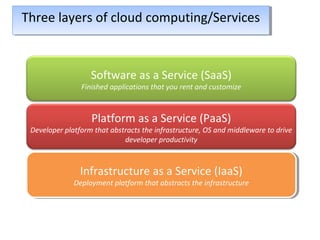
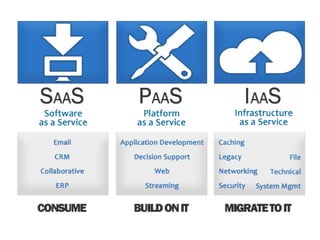
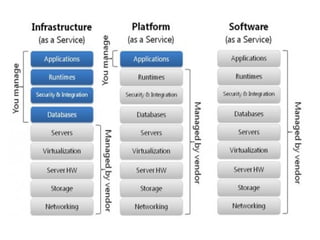
Three layers of cloud computing/ServicesThree layers of cloud computing/Services
Software as a Service (SaaS)
Finished applications that you rent and customize
Platform as a Service (PaaS)
Developer platform that abstracts the infrastructure, OS and middleware to drive
developer productivity
Infrastructure as a Service (IaaS)
Deployment platform that abstracts the infrastructure
Infrastructure as a Service (IaaS)
Deployment platform that abstracts the infrastructure
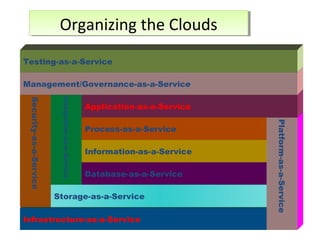
Infrastructure-as-a-Service
Security-as-a-Service
Storage-as-a-Service
Integration-as-a-Service
Database-as-a-Service
Information-as-a-Service
Process-as-a-Service
Platform-as-a-Service
Application-as-a-Service
Management/Governance-as-a-Service
Testing-as-a-Service
Organizing the CloudsOrganizing the Clouds
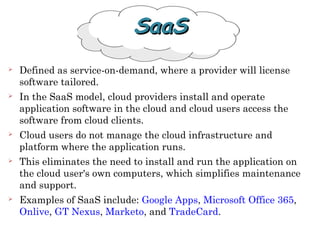
 Defined as service-on-demand, where a provider will license
software tailored.
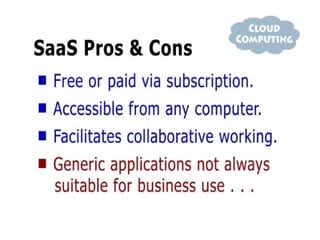
 In the SaaS model, cloud providers install and operate
application software in the cloud and cloud users access the
software from cloud clients.
 Cloud users do not manage the cloud infrastructure and
platform where the application runs.
 This eliminates the need to install and run the application on
the cloud user's own computers, which simplifies maintenance
and support.
 Examples of SaaS include: Google Apps, Microsoft Office 365,
Onlive, GT Nexus, Marketo, and TradeCard.
SaaSSaaS
PaaSPaaS
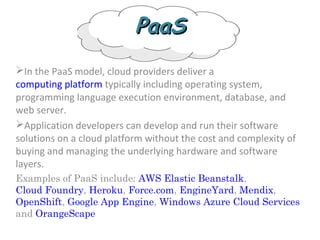
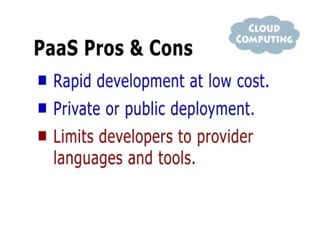
In the PaaS model, cloud providers deliver a
computing platform typically including operating system,
programming language execution environment, database, and
web server.
Application developers can develop and run their software
solutions on a cloud platform without the cost and complexity of
buying and managing the underlying hardware and software
layers.
Examples of PaaS include: AWS Elastic Beanstalk,
Cloud Foundry, Heroku, Force.com, EngineYard, Mendix,
OpenShift, Google App Engine, Windows Azure Cloud Services
and OrangeScape
IaaSIaaS
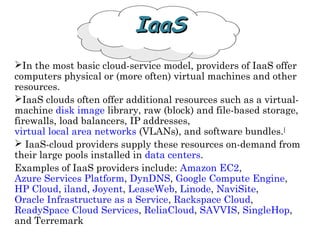
In the most basic cloud-service model, providers of IaaS offer
computers physical or (more often) virtual machines and other
resources.
IaaS clouds often offer additional resources such as a virtual-
machine disk image library, raw (block) and file-based storage,
firewalls, load balancers, IP addresses,
virtual local area networks (VLANs), and software bundles.[
 IaaS-cloud providers supply these resources on-demand from
their large pools installed in data centers.
Examples of IaaS providers include: Amazon EC2,
Azure Services Platform, DynDNS, Google Compute Engine,
HP Cloud, iland, Joyent, LeaseWeb, Linode, NaviSite,
Oracle Infrastructure as a Service, Rackspace Cloud,
ReadySpace Cloud Services, ReliaCloud, SAVVIS, SingleHop,
and Terremark
Cloud APIs
One of the key characteristics that
distinguishes cloud computing from standard
enterprise computing is that the infrastructure
itself is programmable.
Instead of physically deploying servers,
storage, and network resources to support
applications, developers specify how the same
virtual components are configured and
interconnected.
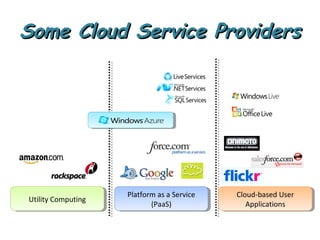
Some Cloud Service ProvidersSome Cloud Service Providers
Utility ComputingUtility Computing
Platform as a Service
(PaaS)
Platform as a Service
(PaaS)
Cloud-based User
Applications
Cloud-based User
Applications
GoogleApp Engine
Other Cloud ProvidersOther Cloud Providers
GoGrid Cloud Hosting
Joyent Accelerators
Mosso Cloud Hosting
 Hardware & Software which
Delivers cloud applications,
Consumes cloud services
Commercial Examples
 Web Browsers (IE, Firefox, Google Chrome)
Mobiles (iPhone, Android, Windows Mobile)
Cloud ClientsCloud Clients
Source: Wikipedia
Clear cloud
Rainy cloud
Entering in The cloud
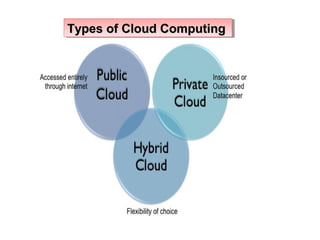
Types of Cloud ComputingTypes of Cloud ComputingTypes of Cloud ComputingTypes of Cloud Computing
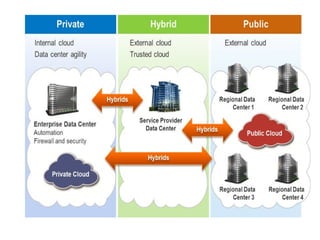
Private Cloud
 also known as internal cloud
Neologism
hosted services to a limited number of people
behind a firewall.
wants more control over their data
Public Cloud
 also known as external cloud.
 resources are dynamically
provisioned on a fine-grained
Self-service basis
Advantages
Uses
 Peer-to-peer / volunteer computing
(Bittorrent,Skype)
 Web application (Facebook)
 Software as a service (Google Apps, SAP )
 Software plus services (Microsoft Online Services)
Uses
 Peer-to-peer / volunteer computing
(Bittorrent,Skype)
 Web application (Facebook)
 Software as a service (Google Apps, SAP )
 Software plus services (Microsoft Online Services)
Disadvantages
Next?
Latest Trends
 Integrating more scripting languages
 Data center volumes
 Open source cloud computing (Red Hat)
Salesforce for Google apps
Latest Trends
 Integrating more scripting languages
 Data center volumes
 Open source cloud computing (Red Hat)
Salesforce for Google apps
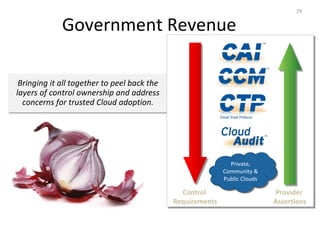
Government Revenue
Bringing it all together to peel back the
layers of control ownership and address
concerns for trusted Cloud adoption.
29
Control
Requirements
Provider
Assertions
Private,
Community &
Public Clouds
Private,
Community &
Public Clouds
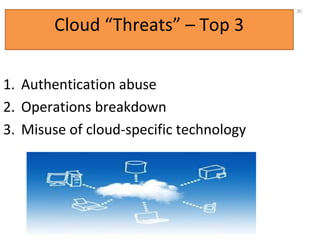
Cloud “Threats” – Top 3
1. Authentication abuse
2. Operations breakdown
3. Misuse of cloud-specific technology
30
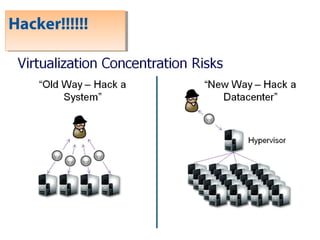
Hacker!!!!!!Hacker!!!!!!
Any Queries
REVISION
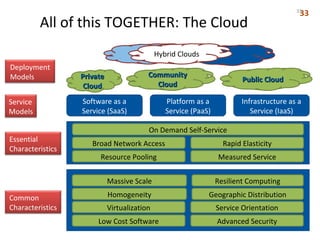
All of this TOGETHER: The Cloud
CommunityCommunity
CloudCloud
PrivatePrivate
CloudCloud
Public CloudPublic Cloud
Hybrid Clouds
Deployment
Models
Service
Models
Essential
Characteristics
Common
Characteristics
Software as a
Service (SaaS)
Platform as a
Service (PaaS)
Infrastructure as a
Service (IaaS)
Resource Pooling
Broad Network Access Rapid Elasticity
Measured Service
On Demand Self-Service
Low Cost Software
Virtualization Service Orientation
Advanced Security
Homogeneity
Massive Scale Resilient Computing
Geographic Distribution
3333
cloud computing

cloud computing

  • 1.
    What is cloud? Thecloud is a computing service that charges you based only on the amount of computing resources we use. Pay as you go What is cloud? The cloud is a computing service that charges you based only on the amount of computing resources we use. Pay as you go :-By Roshan Bagdiya
  • 2.
     Difference betweenCloud and Grid computing  Introduction  Why Cloud Computing  Cloud Service Models  Types of cloud  Uses Latest trend and threats  Revision OutlinesOutlines
  • 3.
    Grid vs. Cloud GridCloud Underlying concept Utility Computing Utility Computing Main benefit Solve computationally complex problems Provide a scalable standard environment for network-centric application development, testing and deployment Resource distribution / allocation Negotiate and manage resource sharing; schedulers Simple user <-> provider model; pay-per-use Domains Multiple domains Single domain Character / history Non-commercial, publicly funded Commercial
  • 4.
    TheThe LittleLittle Storyof Cloud ComputingStory of Cloud Computing Once upon a time… I’m Distributed Computing  I allow computations to run on several networked computers  I’m cool! I’m Distributed Computing  I allow computations to run on several networked computers  I’m cool!  I’m Utility Computing  I package computing resources as a metered service  I’m economic  I’m Utility Computing  I package computing resources as a metered service  I’m economic Cloud Computing They fell in love, and had a child…
  • 5.
    Distributed Computing ChallengesDistributedComputing Challenges 4) Cost 5) Security 2) Availability 3) Maintenance End Users 1) ScalabilityCloud computing characteristics
  • 6.
    Why Cloud Computing?WhyCloud Computing? • Cloud Computing Is User Centric • Cloud Computing Is Task-Centric • Cloud Computing Is Powerful • Cloud Computing Is Accessible • Cloud Computing Is Intelligent • Cloud Computing Is Programmable
  • 8.
    Three layers ofcloud computing/ServicesThree layers of cloud computing/Services Software as a Service (SaaS) Finished applications that you rent and customize Platform as a Service (PaaS) Developer platform that abstracts the infrastructure, OS and middleware to drive developer productivity Infrastructure as a Service (IaaS) Deployment platform that abstracts the infrastructure Infrastructure as a Service (IaaS) Deployment platform that abstracts the infrastructure
  • 9.
  • 11.
     Defined asservice-on-demand, where a provider will license software tailored.  In the SaaS model, cloud providers install and operate application software in the cloud and cloud users access the software from cloud clients.  Cloud users do not manage the cloud infrastructure and platform where the application runs.  This eliminates the need to install and run the application on the cloud user's own computers, which simplifies maintenance and support.  Examples of SaaS include: Google Apps, Microsoft Office 365, Onlive, GT Nexus, Marketo, and TradeCard. SaaSSaaS
  • 13.
    PaaSPaaS In the PaaSmodel, cloud providers deliver a computing platform typically including operating system, programming language execution environment, database, and web server. Application developers can develop and run their software solutions on a cloud platform without the cost and complexity of buying and managing the underlying hardware and software layers. Examples of PaaS include: AWS Elastic Beanstalk, Cloud Foundry, Heroku, Force.com, EngineYard, Mendix, OpenShift, Google App Engine, Windows Azure Cloud Services and OrangeScape
  • 15.
    IaaSIaaS In the mostbasic cloud-service model, providers of IaaS offer computers physical or (more often) virtual machines and other resources. IaaS clouds often offer additional resources such as a virtual- machine disk image library, raw (block) and file-based storage, firewalls, load balancers, IP addresses, virtual local area networks (VLANs), and software bundles.[  IaaS-cloud providers supply these resources on-demand from their large pools installed in data centers. Examples of IaaS providers include: Amazon EC2, Azure Services Platform, DynDNS, Google Compute Engine, HP Cloud, iland, Joyent, LeaseWeb, Linode, NaviSite, Oracle Infrastructure as a Service, Rackspace Cloud, ReadySpace Cloud Services, ReliaCloud, SAVVIS, SingleHop, and Terremark
  • 18.
    Cloud APIs One ofthe key characteristics that distinguishes cloud computing from standard enterprise computing is that the infrastructure itself is programmable. Instead of physically deploying servers, storage, and network resources to support applications, developers specify how the same virtual components are configured and interconnected.
  • 19.
    Some Cloud ServiceProvidersSome Cloud Service Providers Utility ComputingUtility Computing Platform as a Service (PaaS) Platform as a Service (PaaS) Cloud-based User Applications Cloud-based User Applications
  • 20.
    GoogleApp Engine Other CloudProvidersOther Cloud Providers GoGrid Cloud Hosting Joyent Accelerators Mosso Cloud Hosting
  • 21.
     Hardware &Software which Delivers cloud applications, Consumes cloud services Commercial Examples  Web Browsers (IE, Firefox, Google Chrome) Mobiles (iPhone, Android, Windows Mobile) Cloud ClientsCloud Clients
  • 22.
    Source: Wikipedia Clear cloud Rainycloud Entering in The cloud Types of Cloud ComputingTypes of Cloud ComputingTypes of Cloud ComputingTypes of Cloud Computing
  • 23.
    Types of CloudComputingTypes of Cloud ComputingTypes of Cloud ComputingTypes of Cloud Computing
  • 24.
    Private Cloud  alsoknown as internal cloud Neologism hosted services to a limited number of people behind a firewall. wants more control over their data
  • 25.
    Public Cloud  alsoknown as external cloud.  resources are dynamically provisioned on a fine-grained Self-service basis
  • 27.
    Advantages Uses  Peer-to-peer /volunteer computing (Bittorrent,Skype)  Web application (Facebook)  Software as a service (Google Apps, SAP )  Software plus services (Microsoft Online Services) Uses  Peer-to-peer / volunteer computing (Bittorrent,Skype)  Web application (Facebook)  Software as a service (Google Apps, SAP )  Software plus services (Microsoft Online Services) Disadvantages
  • 28.
    Next? Latest Trends  Integratingmore scripting languages  Data center volumes  Open source cloud computing (Red Hat) Salesforce for Google apps Latest Trends  Integrating more scripting languages  Data center volumes  Open source cloud computing (Red Hat) Salesforce for Google apps
  • 29.
    Government Revenue Bringing itall together to peel back the layers of control ownership and address concerns for trusted Cloud adoption. 29 Control Requirements Provider Assertions Private, Community & Public Clouds Private, Community & Public Clouds
  • 30.
    Cloud “Threats” –Top 3 1. Authentication abuse 2. Operations breakdown 3. Misuse of cloud-specific technology 30
  • 31.
  • 32.
  • 33.
    All of thisTOGETHER: The Cloud CommunityCommunity CloudCloud PrivatePrivate CloudCloud Public CloudPublic Cloud Hybrid Clouds Deployment Models Service Models Essential Characteristics Common Characteristics Software as a Service (SaaS) Platform as a Service (PaaS) Infrastructure as a Service (IaaS) Resource Pooling Broad Network Access Rapid Elasticity Measured Service On Demand Self-Service Low Cost Software Virtualization Service Orientation Advanced Security Homogeneity Massive Scale Resilient Computing Geographic Distribution 3333

Editor's Notes

  • #6 Cloud computing characterestics