This presentation provides an overview of cloud computing. It introduces the group members and defines cloud computing as delivering computing and application services over a network. The key characteristics of cloud computing are on-demand access, network access, shared resources, and scalability. The presentation describes the cloud computing architecture and models including deployment models of public, private, community and hybrid clouds. It also explains the service models of Infrastructure as a Service (IaaS), Platform as a Service (PaaS), and Software as a Service (SaaS).
Overview of the presentation and its group members, highlighting topics like history, characteristics, architecture, and models of cloud computing.
Discusses the evolution of cloud computing starting from 1950 with IBM's RJE and progressing to the launch of AWS by Amazon in 2006.
Defines cloud computing as a service-based model delivering computing resources over the internet.
Highlights on-demand services, network access, shared resources, and scalability as key features of cloud computing.
Introduces the basic concepts of cloud computing and outlines the essential service and deployment models.
Explains four deployment models: Public, Private, Community, and Hybrid Cloud, detailing their access types and security levels.
Categorizes service models into IaaS, PaaS, and SaaS, with an emphasis on their applications and infrastructure.Describes IaaS as on-demand virtualized computing resources, highlighting its scalability and typical billing practices.
Details PaaS as a runtime environment and development platform, facilitating application development and deployment.
Defines SaaS as providing software applications on demand, allowing accessibility from various devices without installations.
Lists benefits like reduced costs, improved performance, unlimited storage, and enhanced collaboration capabilities.
Reviews drawbacks including dependency on internet access, potential data loss, and security issues associated with cloud storage.
Introduces the process of creating accounts for cloud storage, emphasizing accessibility and organization of content.
Explains how to download cloud apps and sync files with cloud storage, emphasizing easy accessibility from any internet connection.
History
Concept evolvedin 1950(IBM) called RJE (Remote Job Entry Process).
In 2006 Amazon provided First public cloud AWS(Amazon Web Service).
5.
What is cloudcomputing?
Cloud computing is a type of computing that delivers computing, storage and even
application as a services across a network.
6.
Characteristics
On DemandService: You use it when you need it.
Network Access: Uses internet as a medium.
Shared Resources: Resources are pooled together and used by multiple clients.
Scalability: Allows elasticity of resources.
Basic Concepts
There arecertain services and models working behind the scene making the cloud
computing feasible and accessible to end users. Bellow are the working models for cloud
computing-
1. Deployment Models
2. Service Models
9.
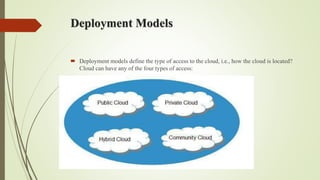
Deployment Models
Deploymentmodels define the type of access to the cloud, i.e., how the cloud is located?
Cloud can have any of the four types of access:
10.
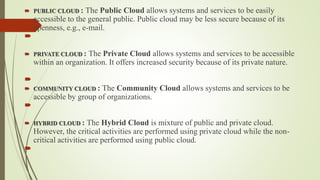
PUBLIC CLOUD: The Public Cloud allows systems and services to be easily
accessible to the general public. Public cloud may be less secure because of its
openness, e.g., e-mail.
PRIVATE CLOUD : The Private Cloud allows systems and services to be accessible
within an organization. It offers increased security because of its private nature.
COMMUNITY CLOUD : The Community Cloud allows systems and services to be
accessible by group of organizations.
HYBRID CLOUD : The Hybrid Cloud is mixture of public and private cloud.
However, the critical activities are performed using private cloud while the non-
critical activities are performed using public cloud.
11.
Service Models
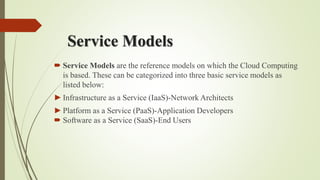
ServiceModels are the reference models on which the Cloud Computing
is based. These can be categorized into three basic service models as
listed below:
►Infrastructure as a Service (IaaS)-Network Architects
►Platform as a Service (PaaS)-Application Developers
Software as a Service (SaaS)-End Users
12.
Infrastructure as aService (IaaS)
Infrastructure as a service(IaaS) is a form of cloud computing that provides
virtualized computing resources over the internet.
IaaS is the delivery of technology infrastructure as an on demand scalable service.
IaaS provides access to fundamental resources such as physical machines, virtual
machines, virtual storage, etc.
Usually billed based on usage
Usually multi tenant virtualized environment
Can be coupled with Managed Services for OS and application support
Infrastructure as a service(IaaS) is a form of cloud computing that provides
virtualized computing resources over the internet.
Platform as aService (PaaS)
PaaS provides the runtime environment for applications, development &
deployment tools, etc.
PaaS provides all of the facilities required to support the complete life
cycle of building and delivering web applications and services entirely
from the Internet.
► In the PaaS model, cloud providers deliver a computing platform and/or
solution stack typically including operating system, programming
language execution environment, database, and web server.
► It is a platform for developers to write and create their own SaaS i.e.
applications.
Software as aService (SaaS)
SaaS model allows to use software applications as a service to end
users.
On demand service: Pay per use of application software to users.
Independent platform: Don’t need to install software on pc.
Multiple end users: Available for multiple end users.
It is an application that can be accessed from anywhere on the world
as long as you can have an computer with an Internet Connection.
We can access this cloud hosted application without any additional
hardware or software.
Disadvantages
Requires aconstant Internet connection
Does not work well with low-speed connections
Features might be limited
Can be slow
Stored data can be lost
Stored data might not be secure
20.
Cloud Storage
Createan Account User name and password.
Content lives with the account in the cloud.
Log onto any computer with Wi-Fi to find your
content
21.
Download For Storage
Download a cloud based app to on your computer
The app lives on your Computer
Save files to the app
When connected to the Internet it will sync with the cloud
The Cloud can be accessed from any Internet connection