Closing the
Performance Gap with
Detailed HVAC
Modelling & In-Use
Performance Modelling
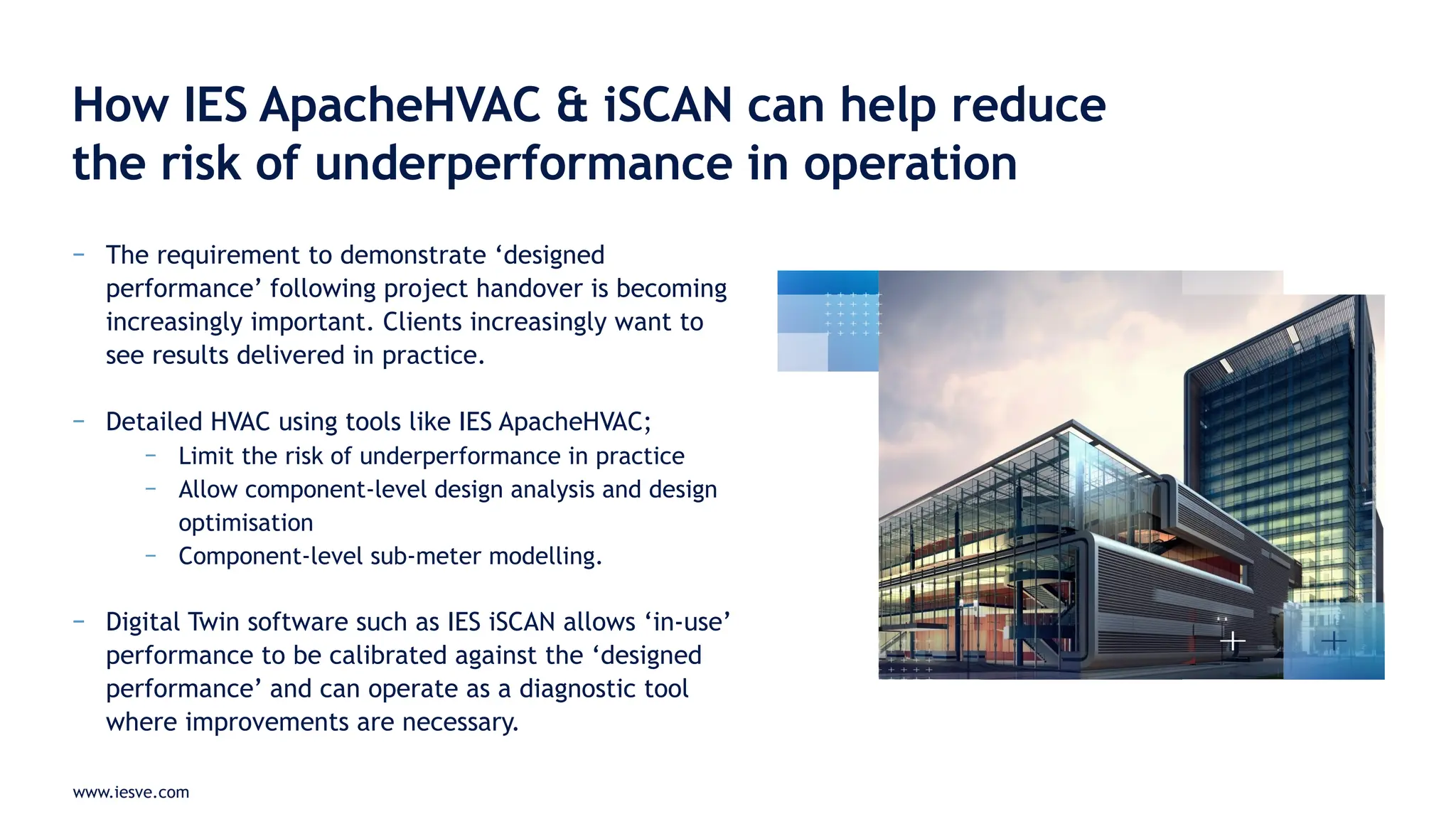
How IES ApacheHVAC & iSCAN can help reduce
the risk of underperformance in operation
Richard Tibenham – UK Business Development Manager, IES
www.iesve.com
− What are IES ApacheHVAC & IES iSCAN?
− What is their use case?
− When should we apply IES ApacheHVAC to a project?
− What are the differences between IES ApacheSim and IES
ApacheHVAC?
− When should in-use monitoring & Digital Twin assembly take
place using IES iSCAN?
− Q&A
Agenda
www.iesve.com
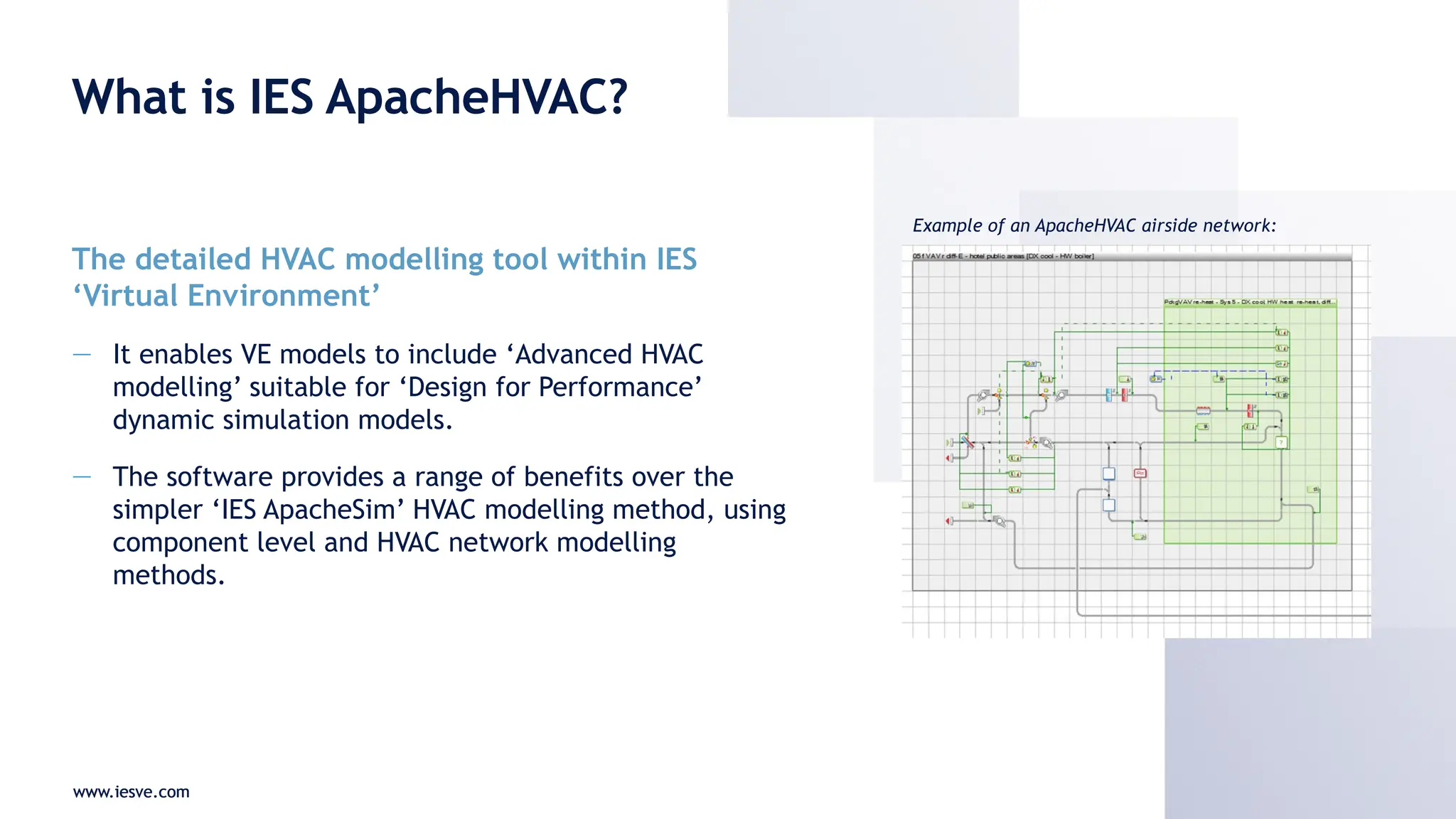
What is IES ApacheHVAC?
The detailed HVAC modelling tool within IES
‘Virtual Environment’
— It enables VE models to include ‘Advanced HVAC
modelling’ suitable for ‘Design for Performance’
dynamic simulation models.
— The software provides a range of benefits over the
simpler ‘IES ApacheSim’ HVAC modelling method, using
component level and HVAC network modelling
methods.
www.iesve.com
Example of an ApacheHVAC airside network:
www.iesve.com
What is IES iSCAN?
IES’ Digital Twin platform
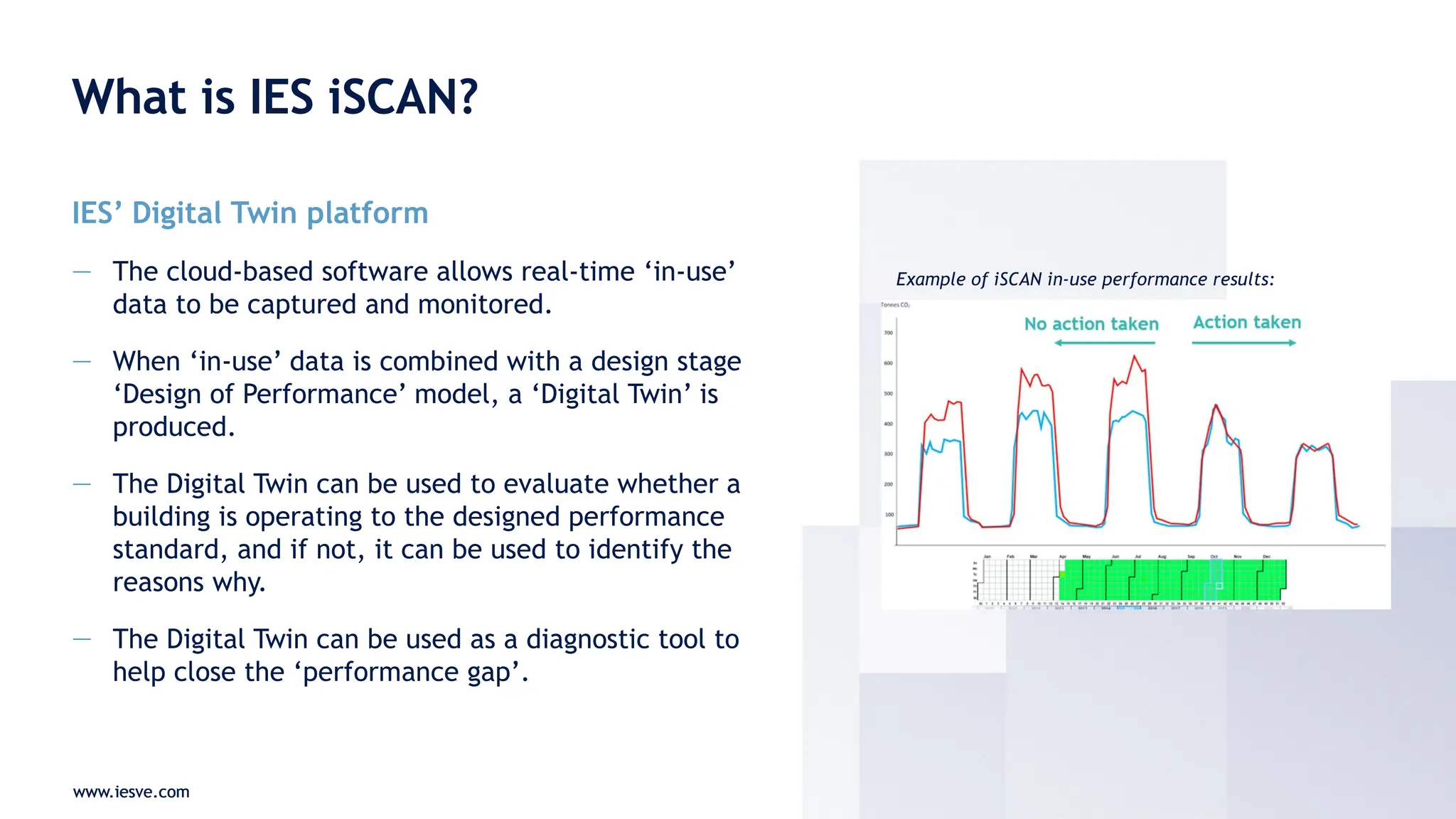
— The cloud-based software allows real-time ‘in-use’
data to be captured and monitored.
— When ‘in-use’ data is combined with a design stage
‘Design of Performance’ model, a ‘Digital Twin’ is
produced.
— The Digital Twin can be used to evaluate whether a
building is operating to the designed performance
standard, and if not, it can be used to identify the
reasons why.
— The Digital Twin can be used as a diagnostic tool to
help close the ‘performance gap’.
www.iesve.com
Example of iSCAN in-use performance results:
www.iesve.com
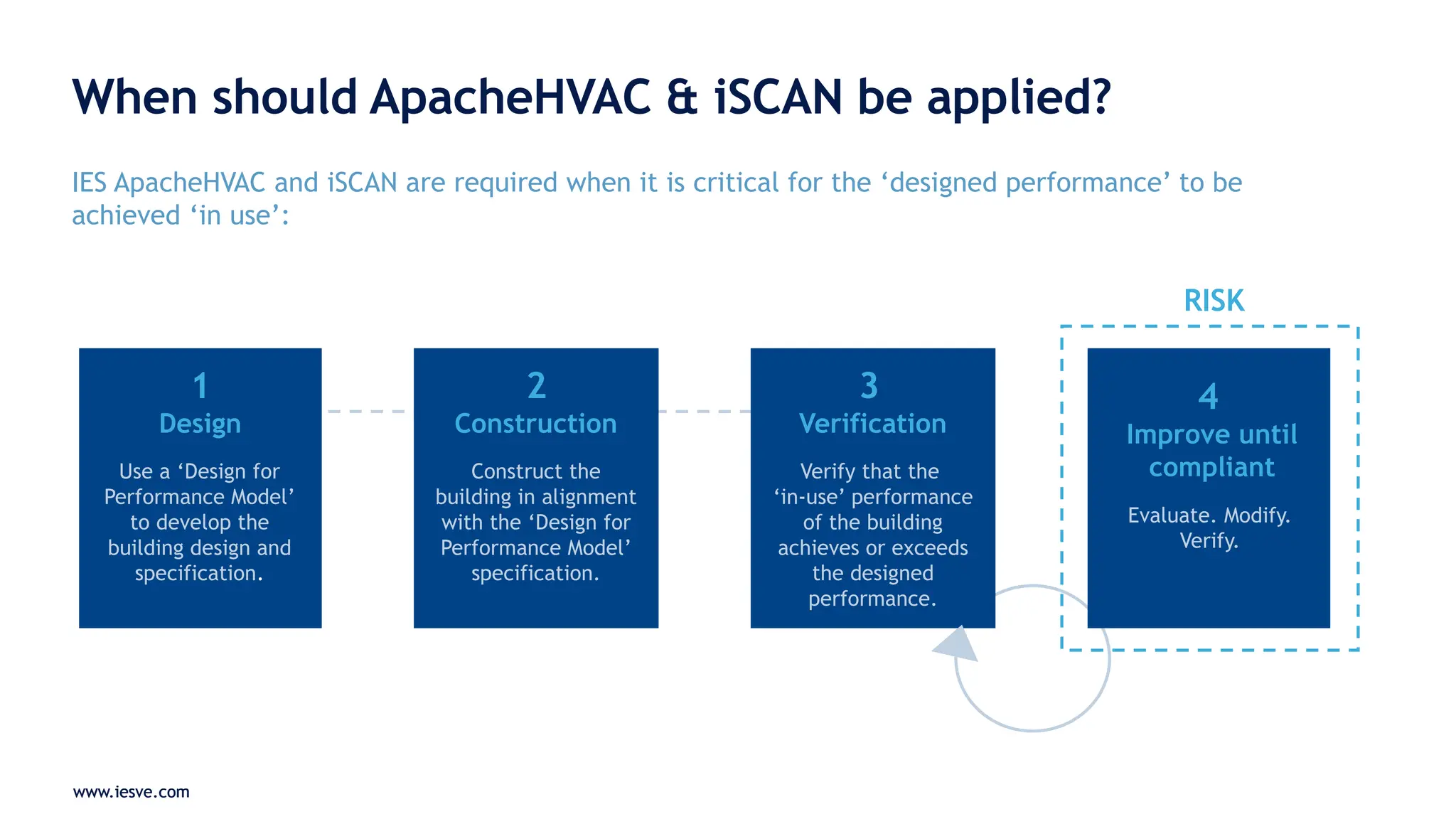
When should ApacheHVAC & iSCAN be applied?
IES ApacheHVAC and iSCAN are required when it is critical for the ‘designed performance’ to be
achieved ‘in use’:
www.iesve.com
1
Design
Use a ‘Design for
Performance Model’
to develop the
building design and
specification.
RISK
2
Construction
Construct the
building in alignment
with the ‘Design for
Performance Model’
specification.
3
Verification
Verify that the
‘in-use’ performance
of the building
achieves or exceeds
the designed
performance.
4
Improve until
compliant
Evaluate. Modify.
Verify.
www.iesve.com
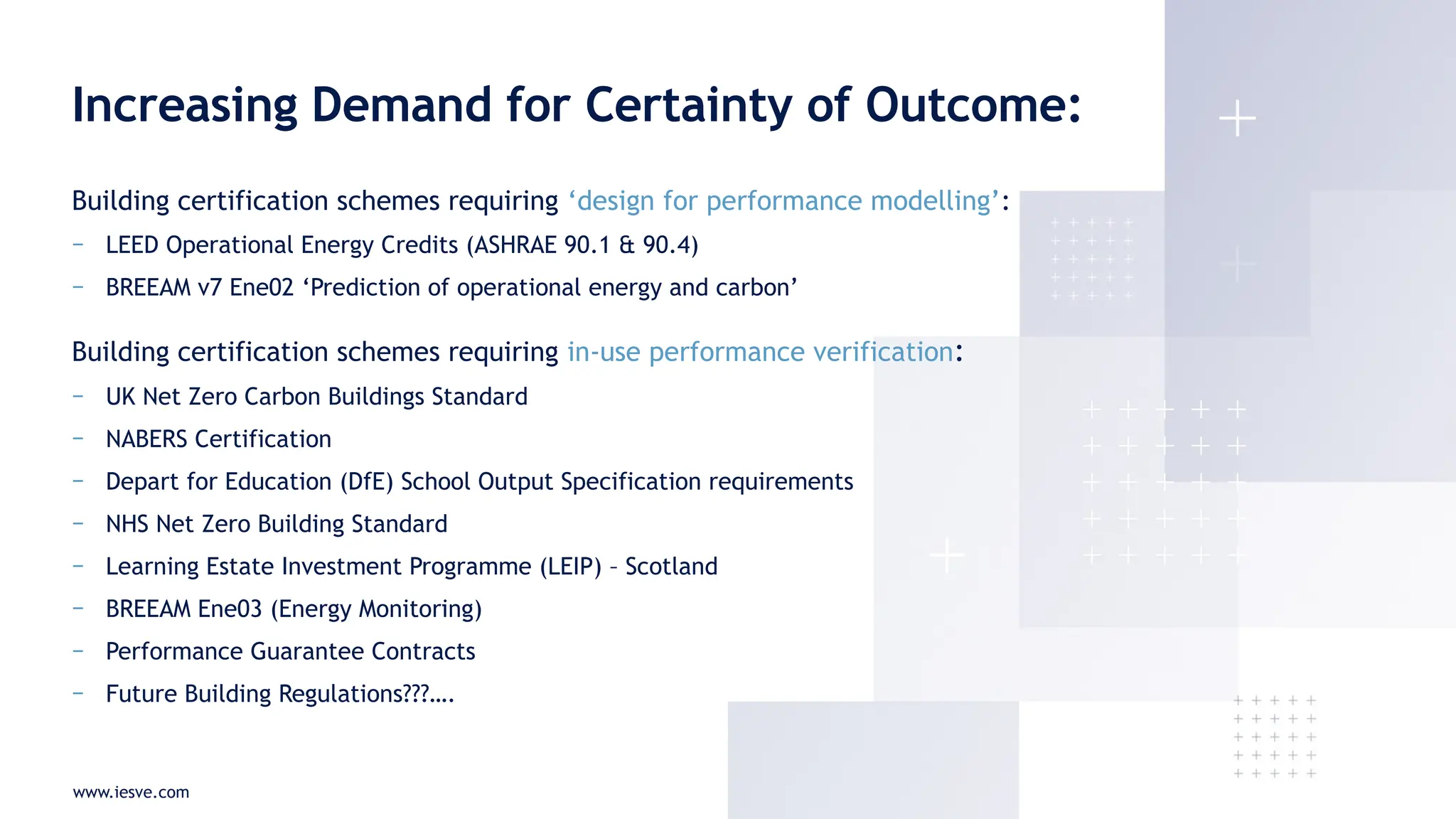
Building certification schemes requiring ‘design for performance modelling’:
− LEED Operational Energy Credits (ASHRAE 90.1 & 90.4)
− BREEAM v7 Ene02 ‘Prediction of operational energy and carbon’
Building certification schemes requiring in-use performance verification:
− UK Net Zero Carbon Buildings Standard
− NABERS Certification
− Depart for Education (DfE) School Output Specification requirements
− NHS Net Zero Building Standard
− Learning Estate Investment Programme (LEIP) – Scotland
− BREEAM Ene03 (Energy Monitoring)
− Performance Guarantee Contracts
− Future Building Regulations???….
Increasing Demand for Certainty of Outcome:
www.iesve.com
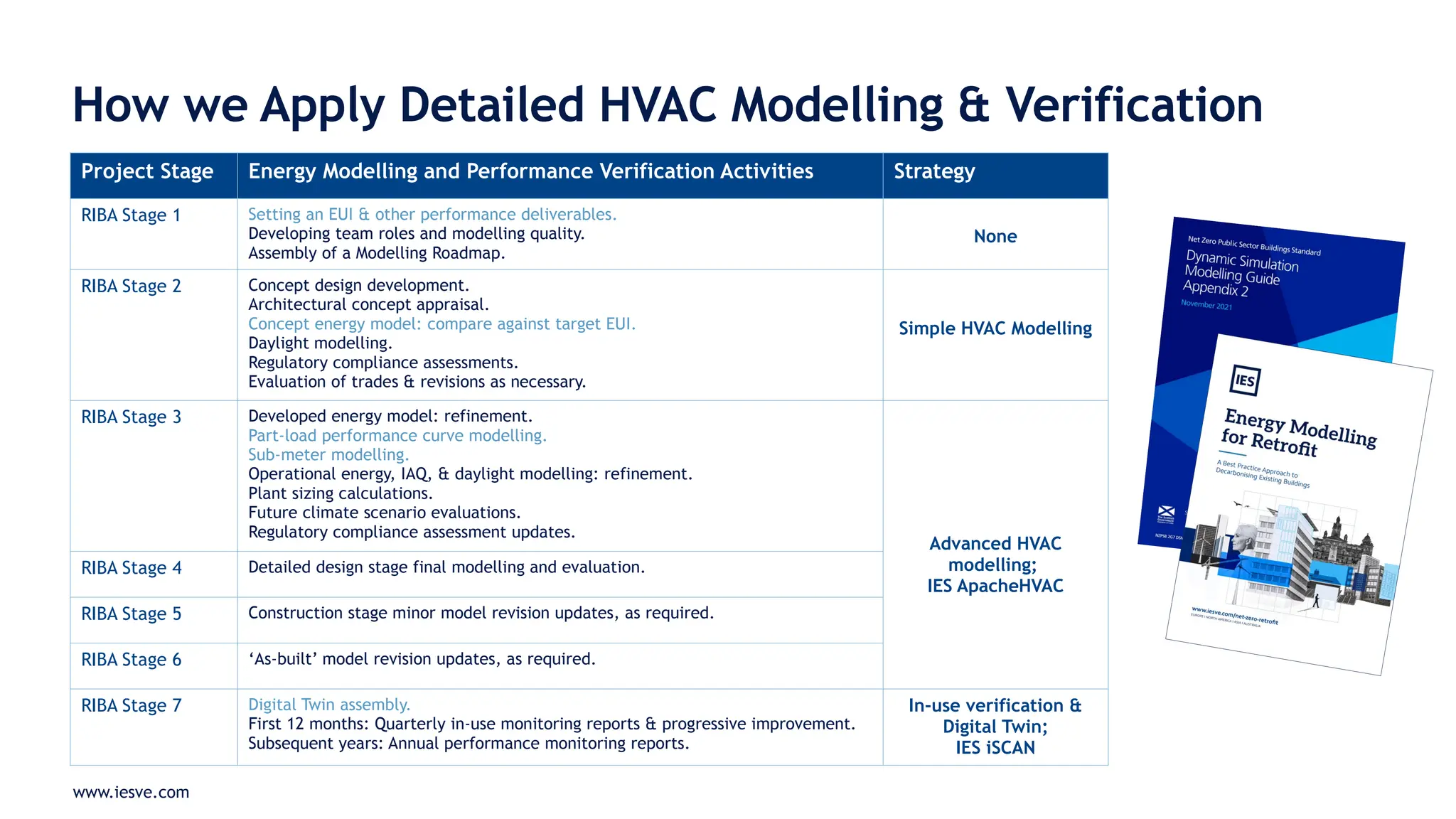
How we Apply Detailed HVAC Modelling & Verification
Project Stage Energy Modelling and Performance Verification Activities Strategy
RIBA Stage 1 Setting an EUI & other performance deliverables.
Developing team roles and modelling quality.
Assembly of a Modelling Roadmap.
None
RIBA Stage 2 Concept design development.
Architectural concept appraisal.
Concept energy model: compare against target EUI.
Daylight modelling.
Regulatory compliance assessments.
Evaluation of trades & revisions as necessary.
Simple HVAC Modelling
RIBA Stage 3 Developed energy model: refinement.
Part-load performance curve modelling.
Sub-meter modelling.
Operational energy, IAQ, & daylight modelling: refinement.
Plant sizing calculations.
Future climate scenario evaluations.
Regulatory compliance assessment updates.
Advanced HVAC
modelling;
IES ApacheHVAC
RIBA Stage 4 Detailed design stage final modelling and evaluation.
RIBA Stage 5 Construction stage minor model revision updates, as required.
RIBA Stage 6 ‘As-built’ model revision updates, as required.
RIBA Stage 7 Digital Twin assembly.
First 12 months: Quarterly in-use monitoring reports & progressive improvement.
Subsequent years: Annual performance monitoring reports.
In-use verification &
Digital Twin;
IES iSCAN
www.iesve.com
Simple vs. Advanced HVAC Modelling
www.iesve.com
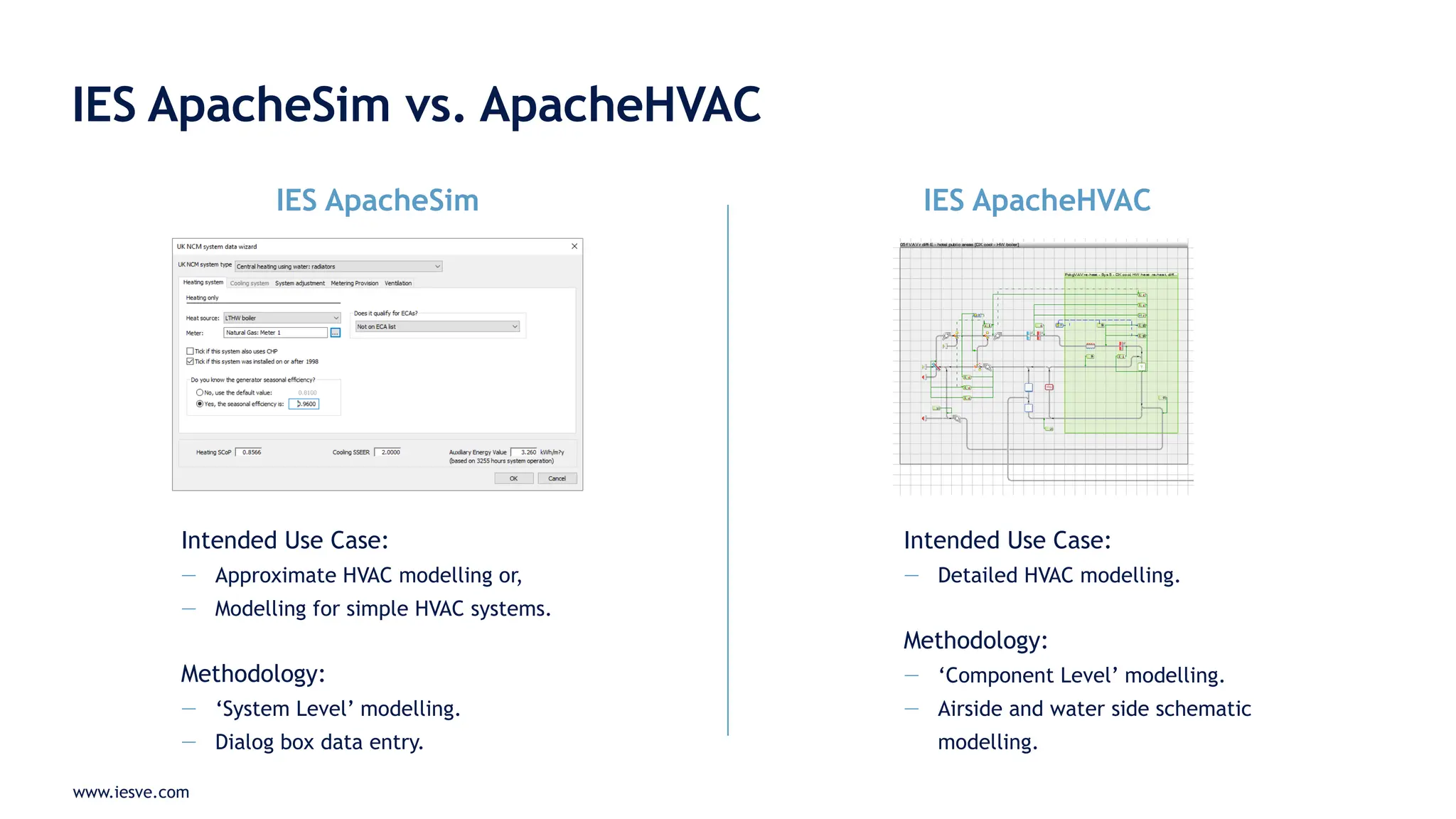
IES ApacheSim vs. ApacheHVAC
IES ApacheSim IES ApacheHVAC
Intended Use Case:
— Approximate HVAC modelling or,
— Modelling for simple HVAC systems.
Methodology:
— ‘System Level’ modelling.
— Dialog box data entry.
Intended Use Case:
— Detailed HVAC modelling.
Methodology:
— ‘Component Level’ modelling.
— Airside and water side schematic
modelling.
www.iesve.com
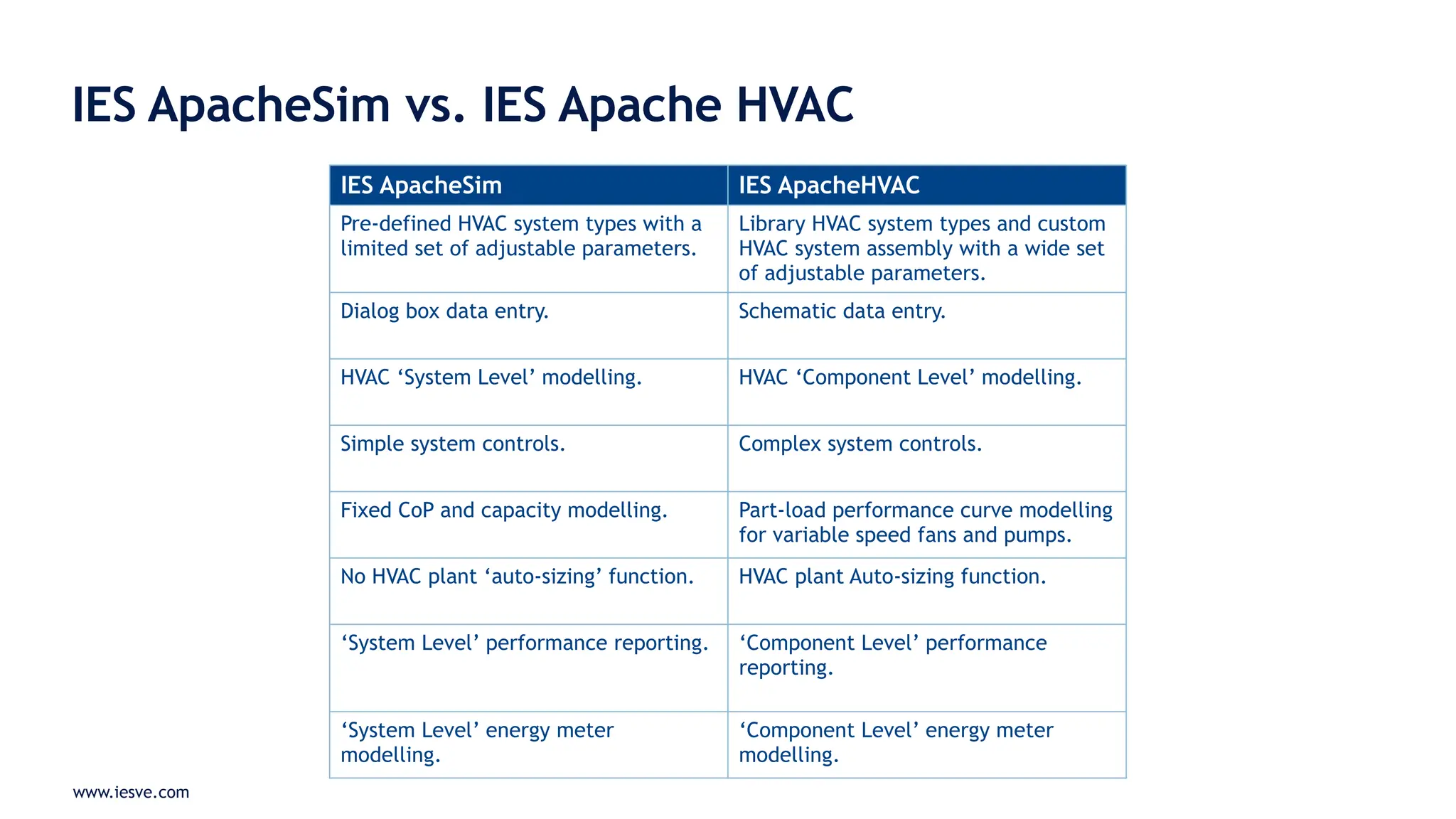
IES ApacheSim vs. IES Apache HVAC
IES ApacheSim IES ApacheHVAC
Pre-defined HVAC system types with a
limited set of adjustable parameters.
Library HVAC system types and custom
HVAC system assembly with a wide set
of adjustable parameters.
Dialog box data entry. Schematic data entry.
HVAC ‘System Level’ modelling. HVAC ‘Component Level’ modelling.
Simple system controls. Complex system controls.
Fixed CoP and capacity modelling. Part-load performance curve modelling
for variable speed fans and pumps.
No HVAC plant ‘auto-sizing’ function. HVAC plant Auto-sizing function.
‘System Level’ performance reporting. ‘Component Level’ performance
reporting.
‘System Level’ energy meter
modelling.
‘Component Level’ energy meter
modelling.
www.iesve.com
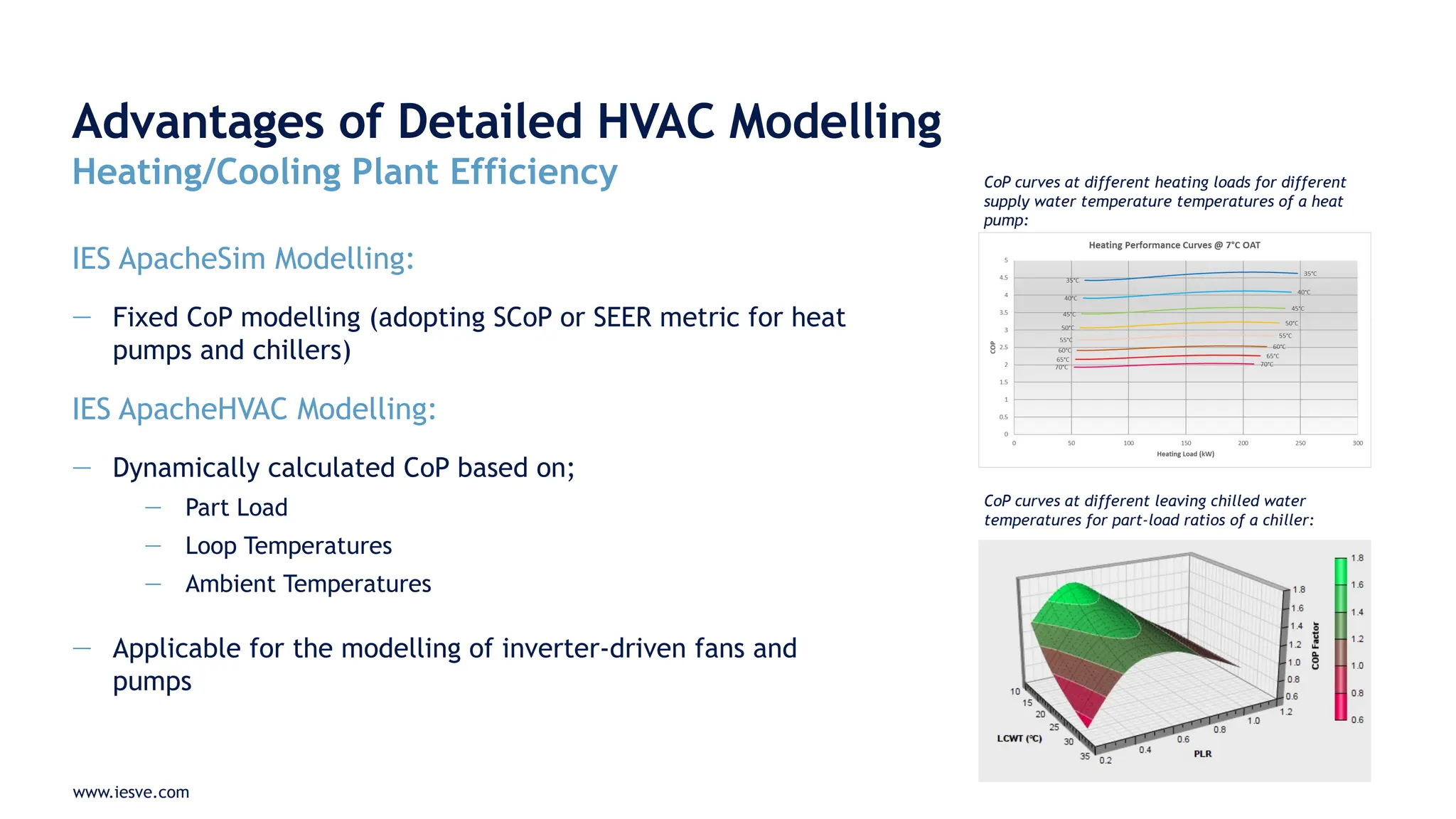
Advantages of Detailed HVAC Modelling
Heating/Cooling Plant Efficiency
IES ApacheSim Modelling:
— Fixed CoP modelling (adopting SCoP or SEER metric for heat
pumps and chillers)
IES ApacheHVAC Modelling:
— Dynamically calculated CoP based on;
— Part Load
— Loop Temperatures
— Ambient Temperatures
— Applicable for the modelling of inverter-driven fans and
pumps
CoP curves at different heating loads for different
supply water temperature temperatures of a heat
pump:
CoP curves at different leaving chilled water
temperatures for part-load ratios of a chiller:
www.iesve.com
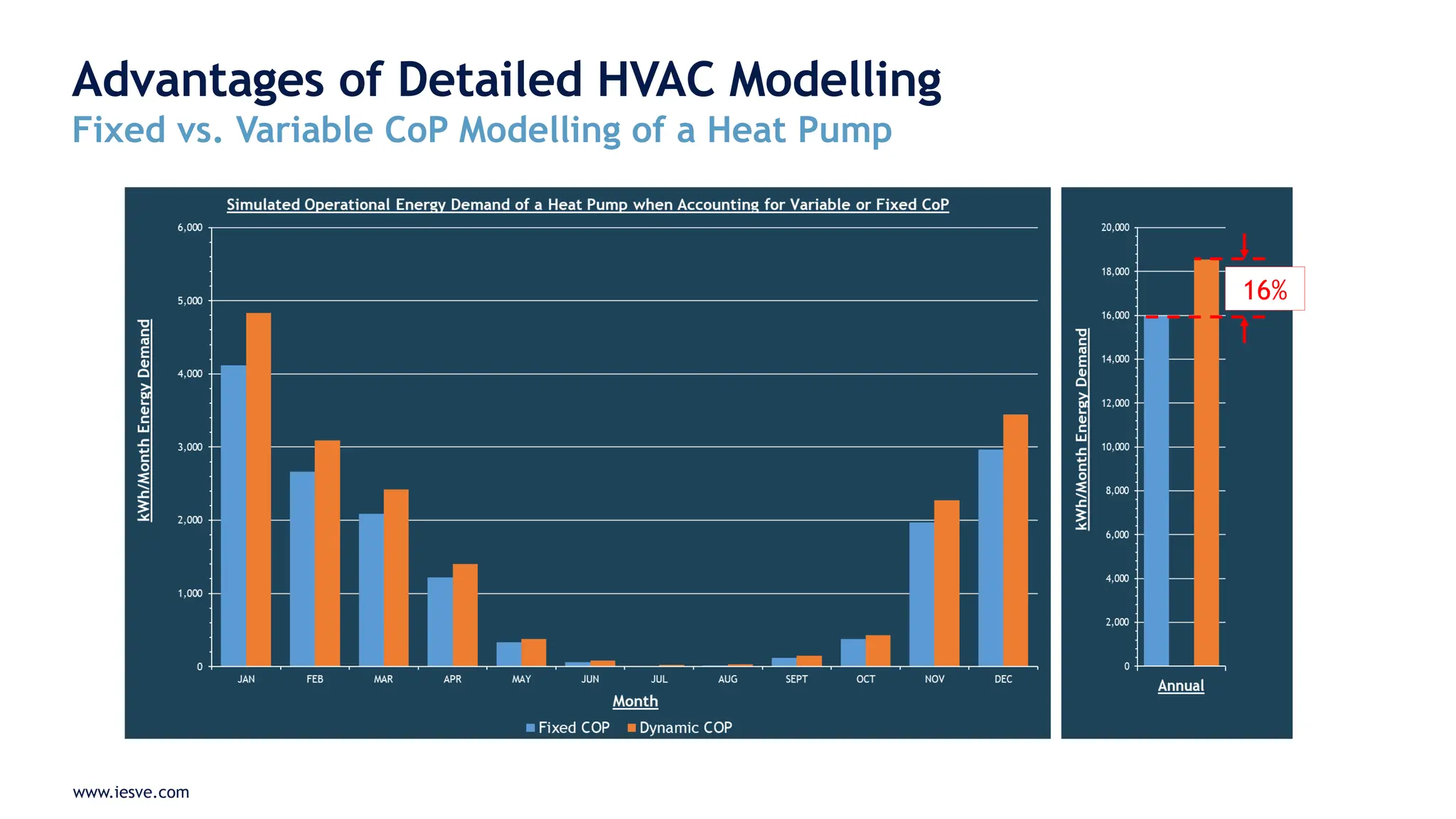
Advantages of Detailed HVAC Modelling
Fixed vs. Variable CoP Modelling of a Heat Pump
16%
www.iesve.com
Advantages of Detailed HVAC Modelling
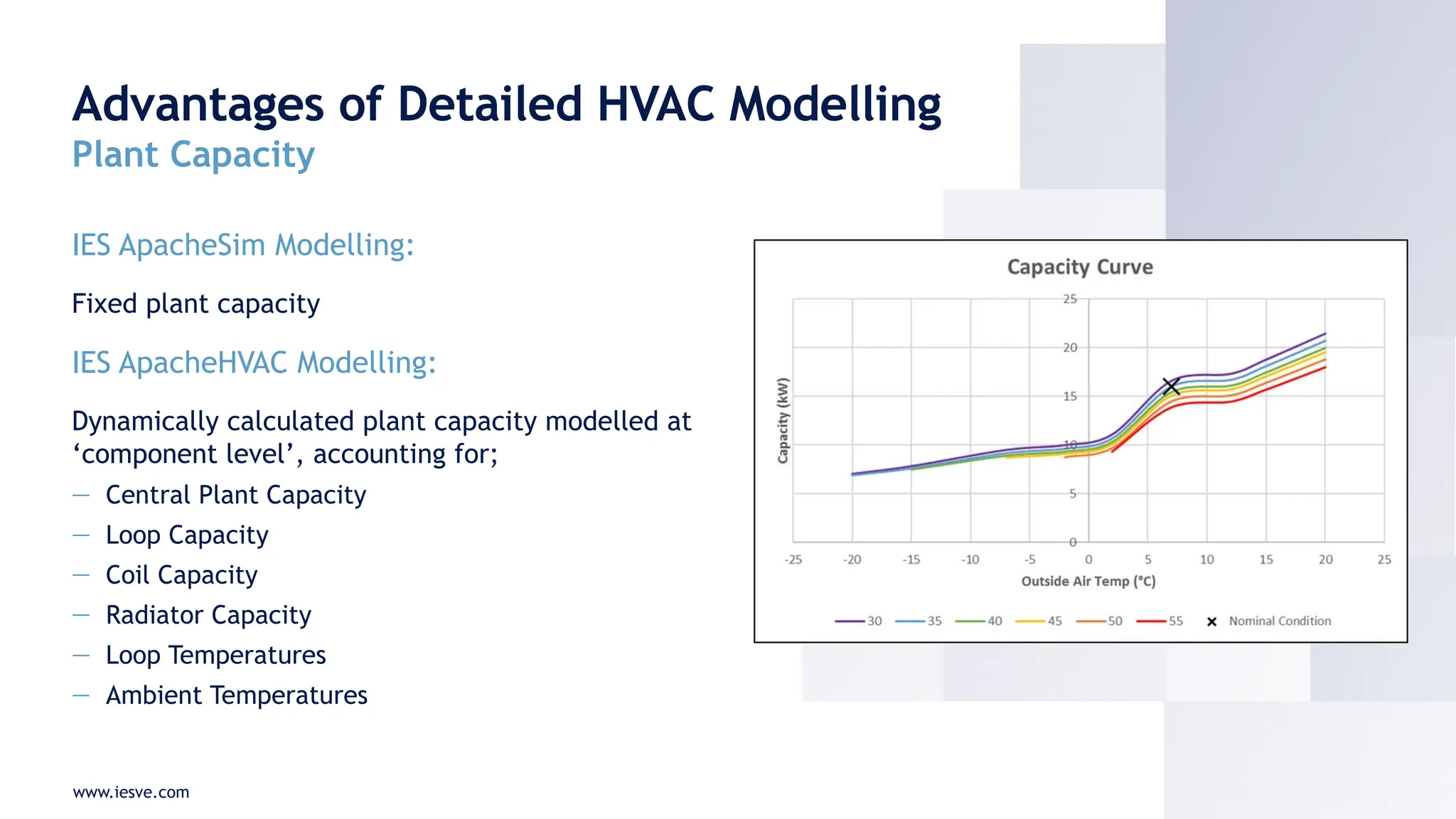
Plant Capacity
IES ApacheSim Modelling:
Fixed plant capacity
IES ApacheHVAC Modelling:
Dynamically calculated plant capacity modelled at
‘component level’, accounting for;
— Central Plant Capacity
— Loop Capacity
— Coil Capacity
— Radiator Capacity
— Loop Temperatures
— Ambient Temperatures
www.iesve.com
Advantages of Detailed HVAC Modelling
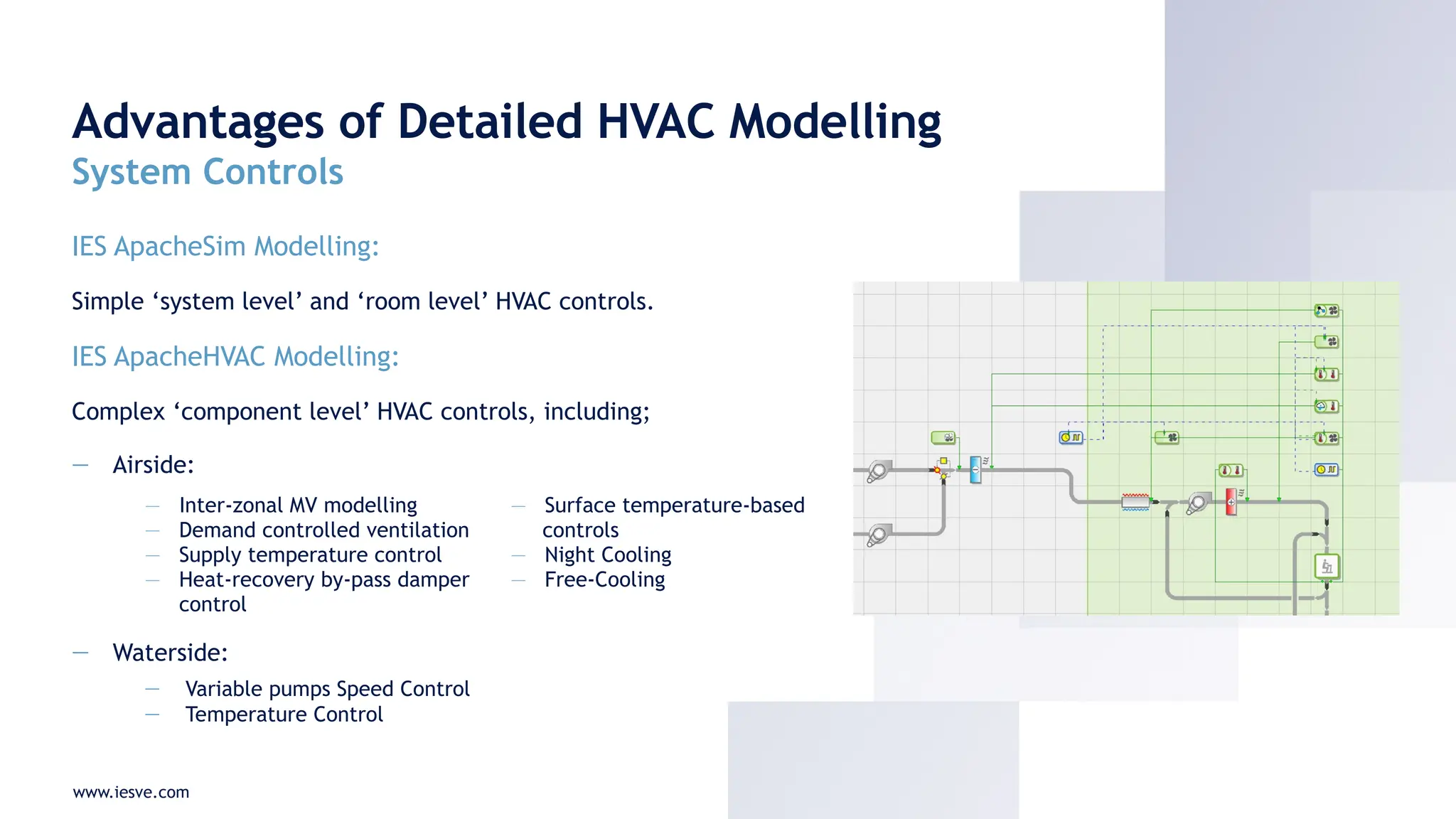
System Controls
IES ApacheSim Modelling:
Simple ‘system level’ and ‘room level’ HVAC controls.
IES ApacheHVAC Modelling:
Complex ‘component level’ HVAC controls, including;
— Airside:
— Waterside:
— Variable pumps Speed Control
— Temperature Control
— Inter-zonal MV modelling
— Demand controlled ventilation
— Supply temperature control
— Heat-recovery by-pass damper
control
— Surface temperature-based
controls
— Night Cooling
— Free-Cooling
www.iesve.com
Simple vs. Advanced HVAC Modelling
Energy Sub-Meters
www.iesve.com
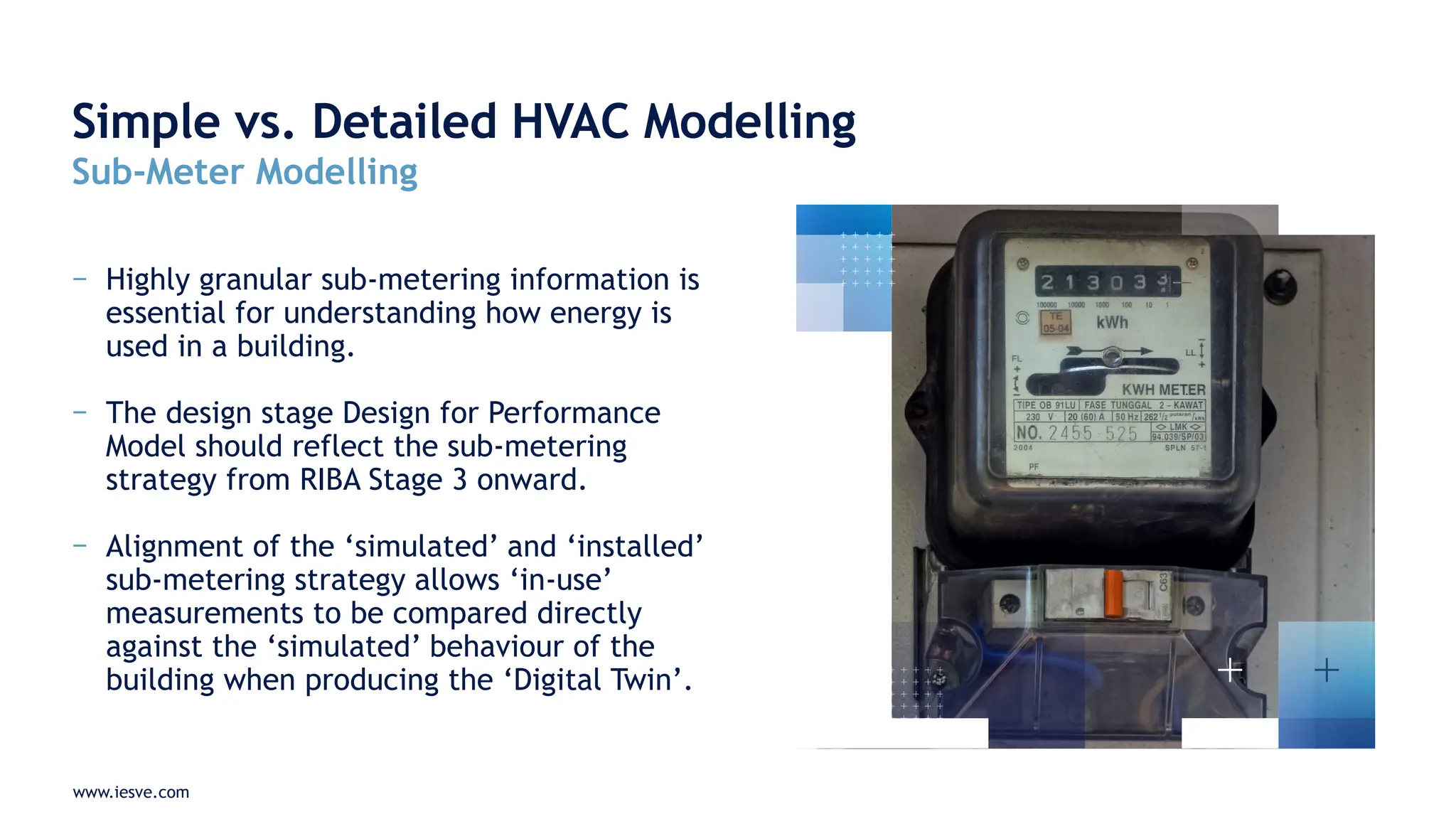
− Highly granular sub-metering information is
essential for understanding how energy is
used in a building.
− The design stage Design for Performance
Model should reflect the sub-metering
strategy from RIBA Stage 3 onward.
− Alignment of the ‘simulated’ and ‘installed’
sub-metering strategy allows ‘in-use’
measurements to be compared directly
against the ‘simulated’ behaviour of the
building when producing the ‘Digital Twin’.
Simple vs. Detailed HVAC Modelling
Sub-Meter Modelling
www.iesve.com
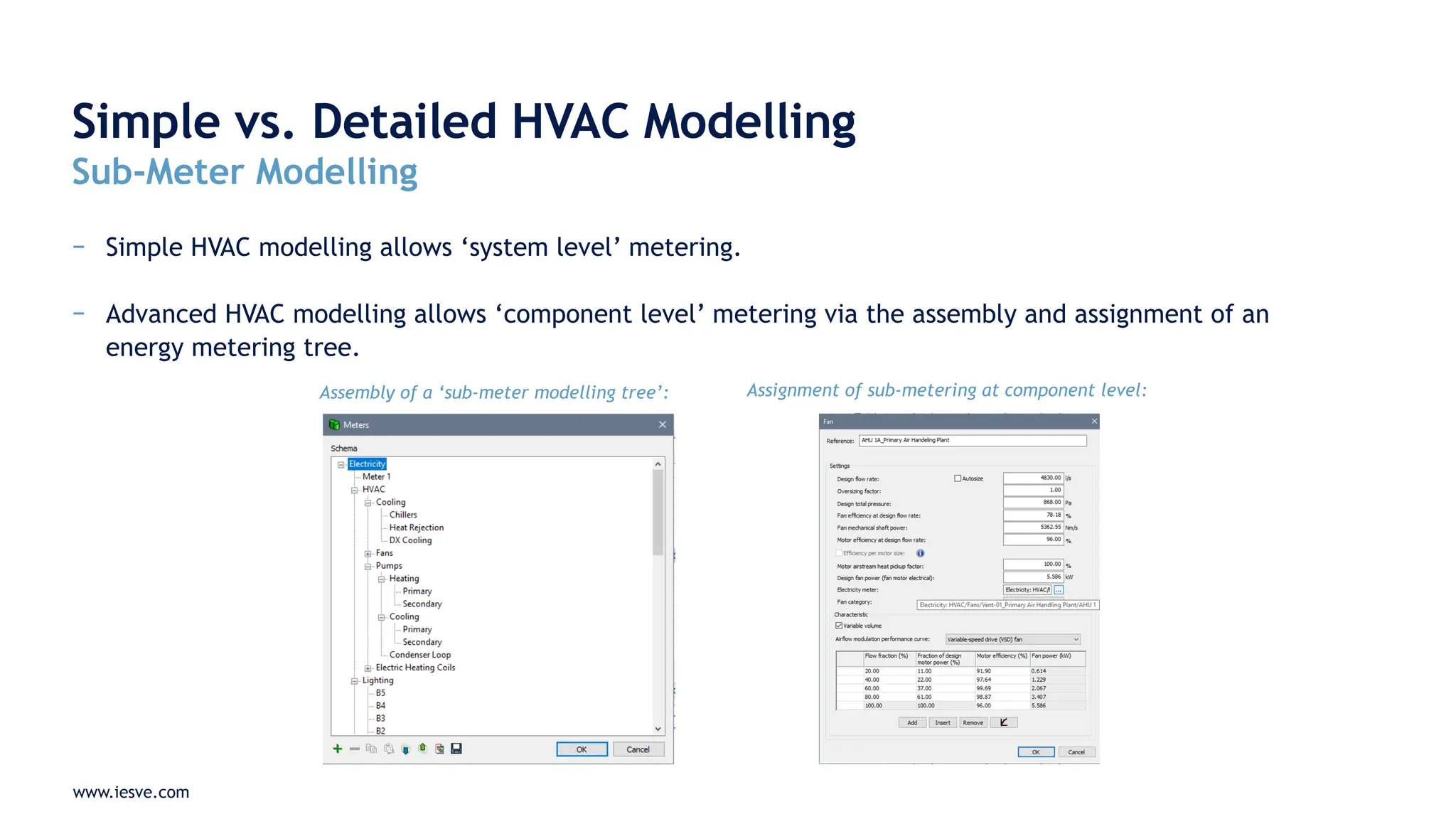
− Simple HVAC modelling allows ‘system level’ metering.
− Advanced HVAC modelling allows ‘component level’ metering via the assembly and assignment of an
energy metering tree.
Simple vs. Detailed HVAC Modelling
Sub-Meter Modelling
Assembly of a ‘sub-meter modelling tree’: Assignment of sub-metering at component level:
www.iesve.com
Simple vs. Detailed HVAC Modelling
Sub-Meter Modelling
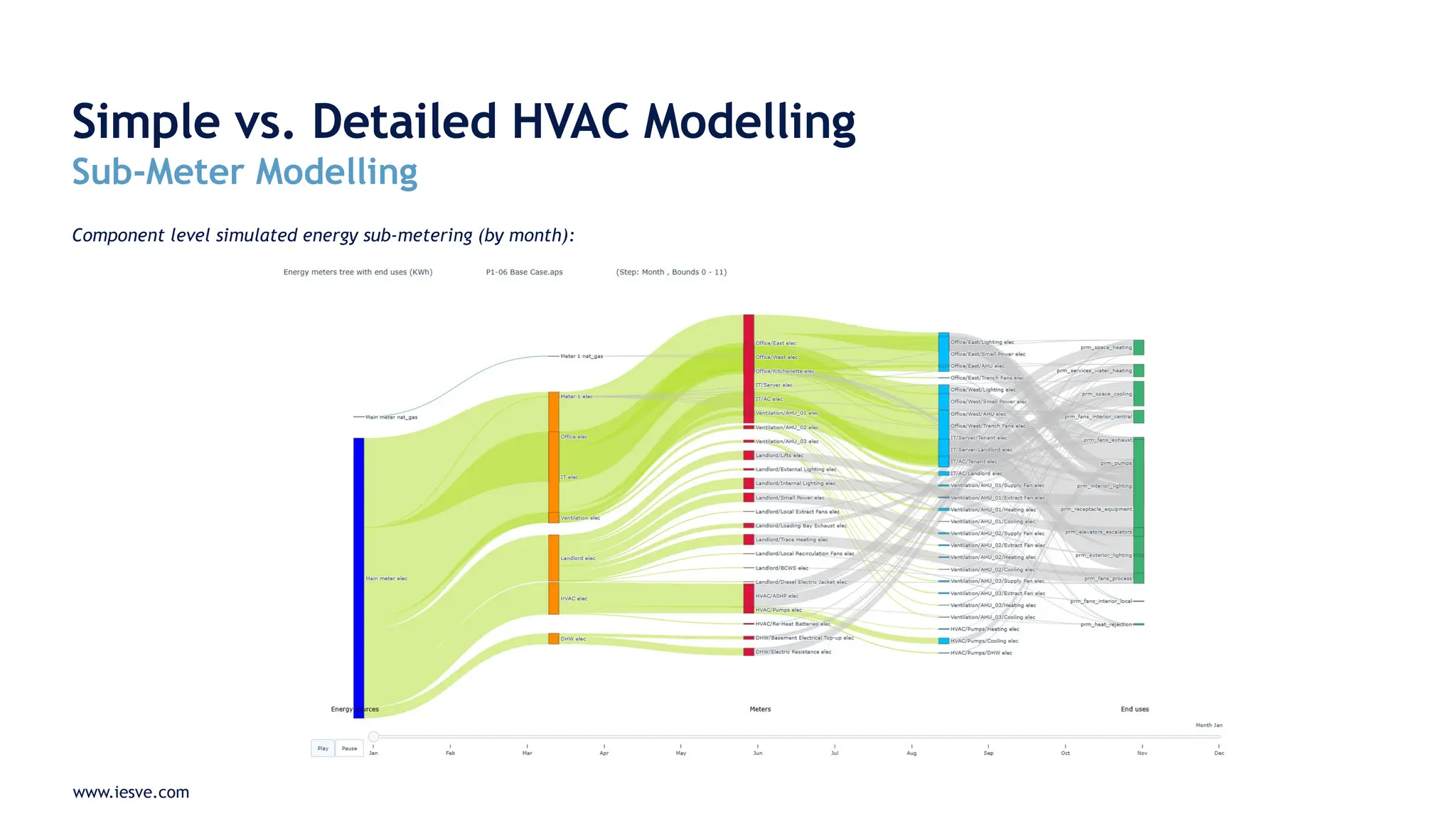
Component level simulated energy sub-metering (by month):
www.iesve.com
Simple vs. Advanced HVAC Modelling
Simulation Results Interrogation
www.iesve.com
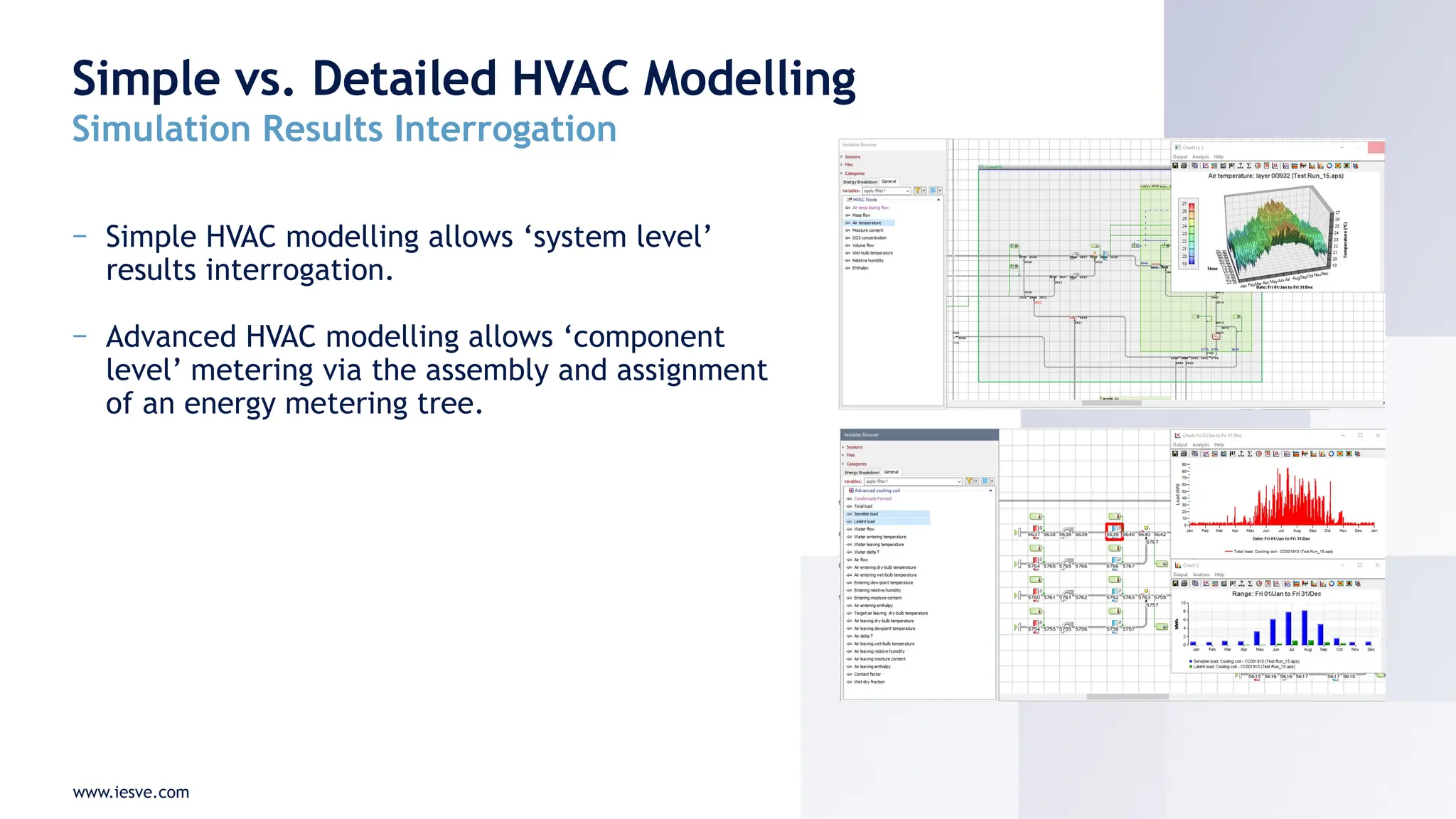
− Simple HVAC modelling allows ‘system level’
results interrogation.
− Advanced HVAC modelling allows ‘component
level’ metering via the assembly and assignment
of an energy metering tree.
Simple vs. Detailed HVAC Modelling
Simulation Results Interrogation
www.iesve.com
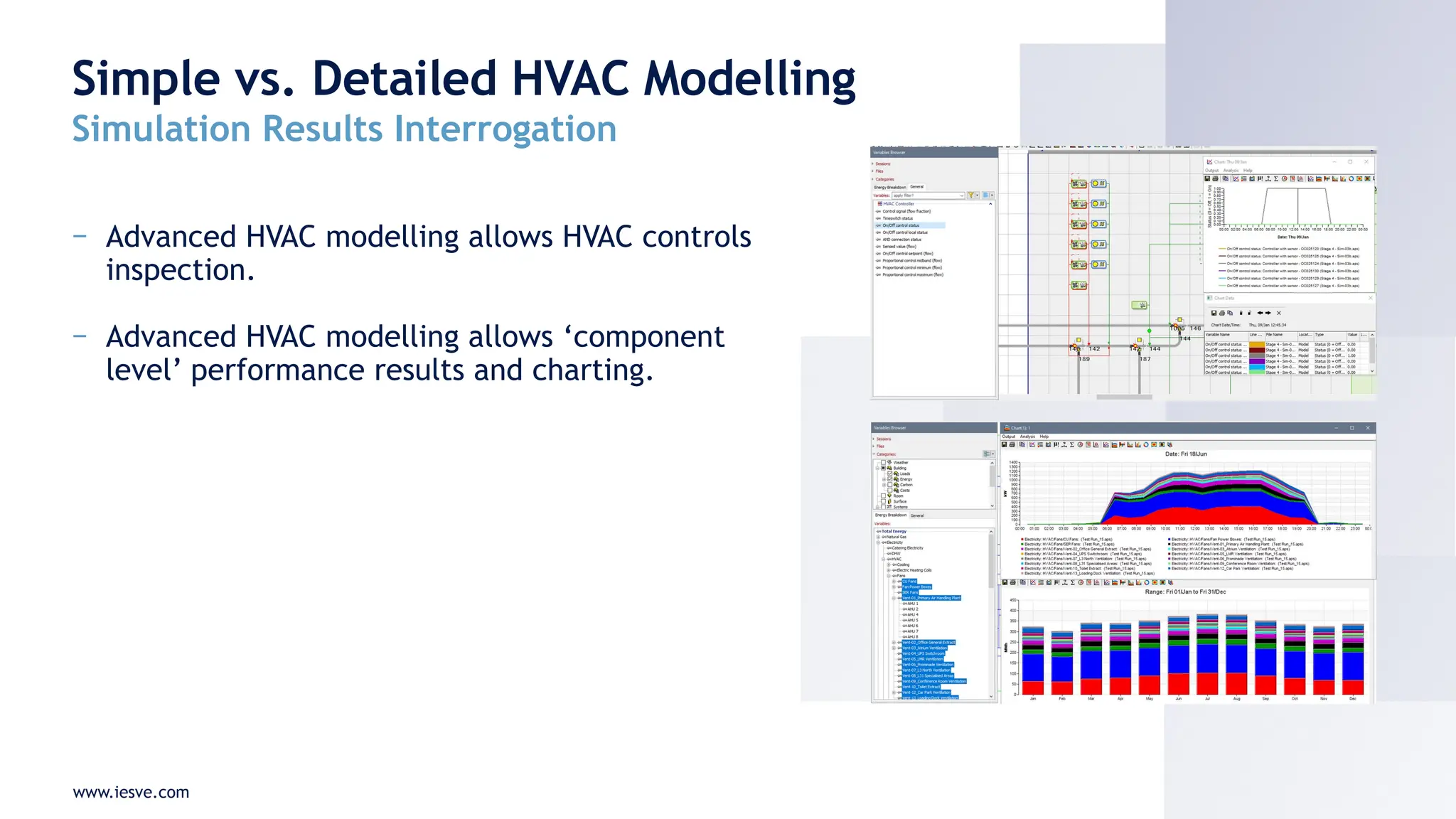
− Advanced HVAC modelling allows HVAC controls
inspection.
− Advanced HVAC modelling allows ‘component
level’ performance results and charting.
Simple vs. Detailed HVAC Modelling
Simulation Results Interrogation
www.iesve.com
Advantages of Detailed HVAC Modelling
Key Benefits for DfP Modelling
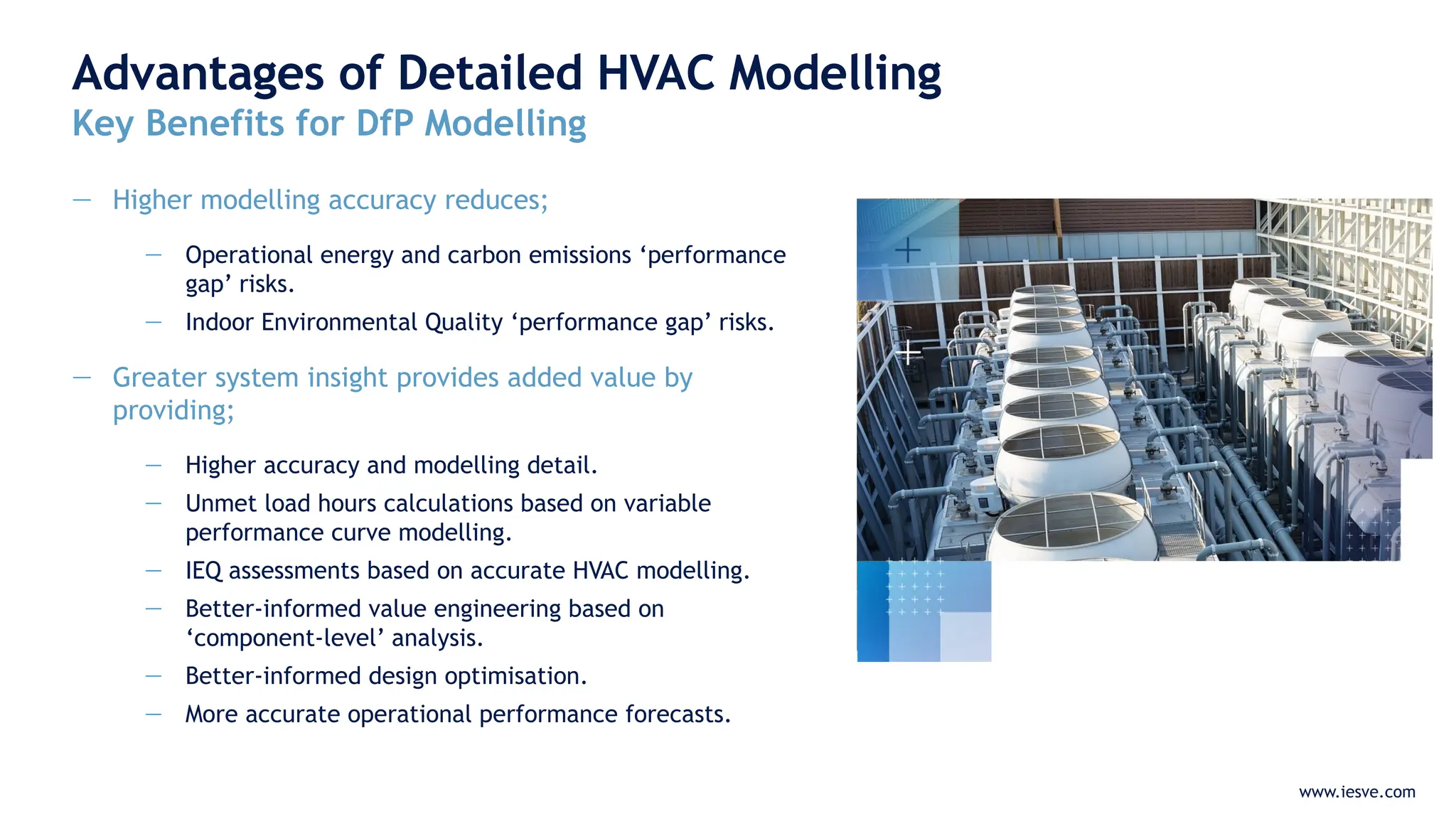
— Higher modelling accuracy reduces;
— Operational energy and carbon emissions ‘performance
gap’ risks.
— Indoor Environmental Quality ‘performance gap’ risks.
— Greater system insight provides added value by
providing;
— Higher accuracy and modelling detail.
— Unmet load hours calculations based on variable
performance curve modelling.
— IEQ assessments based on accurate HVAC modelling.
— Better-informed value engineering based on
‘component-level’ analysis.
— Better-informed design optimisation.
— More accurate operational performance forecasts.
www.iesve.com
Advantages of Detailed HVAC Modelling
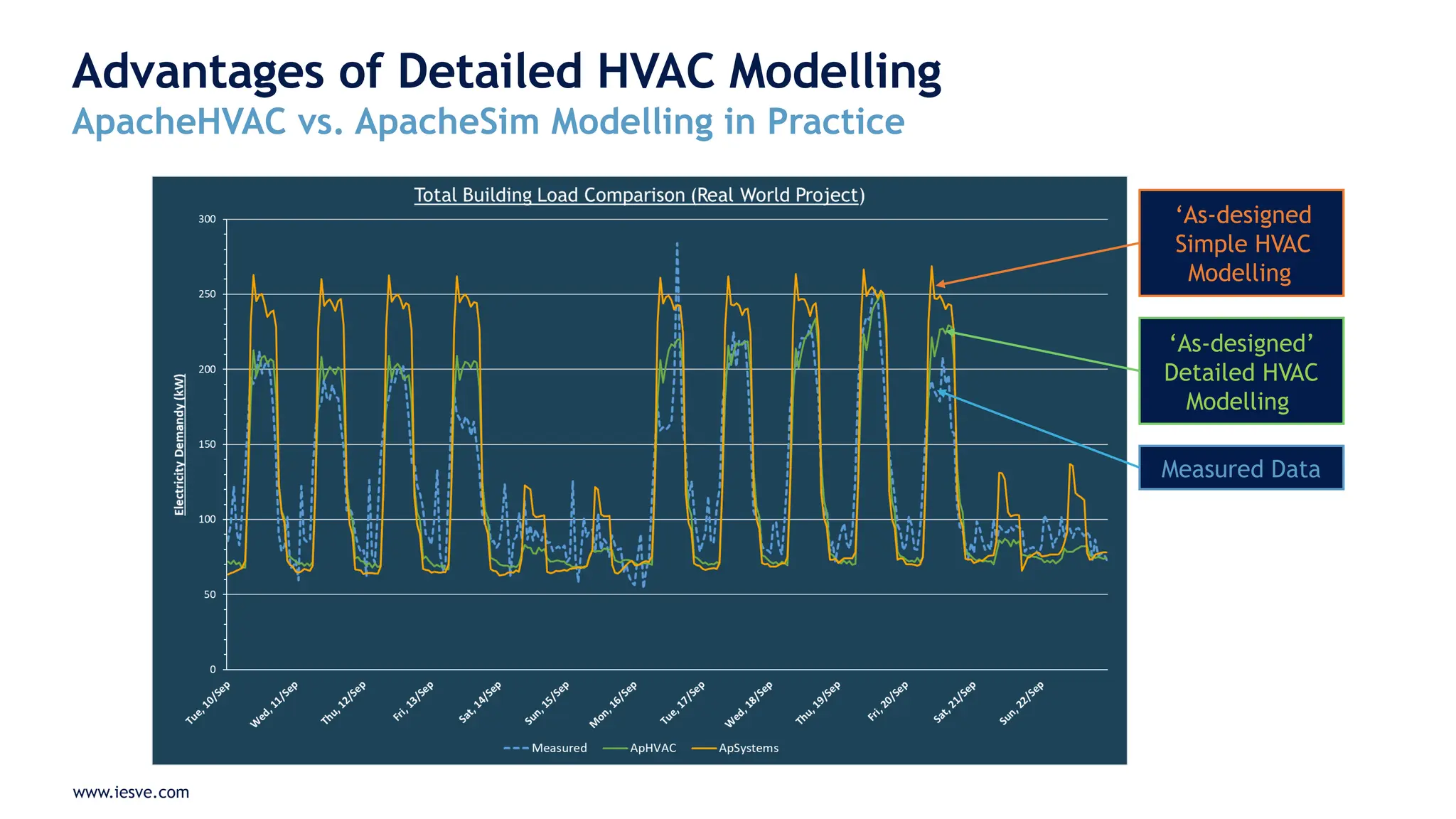
ApacheHVAC vs. ApacheSim Modelling in Practice
‘As-designed
Simple HVAC
Modelling
‘As-designed’
Detailed HVAC
Modelling
Measured Data
www.iesve.com
Advantages of Detailed HVAC Modelling
ApacheHVAC vs. ApacheSim Modelling in Practice
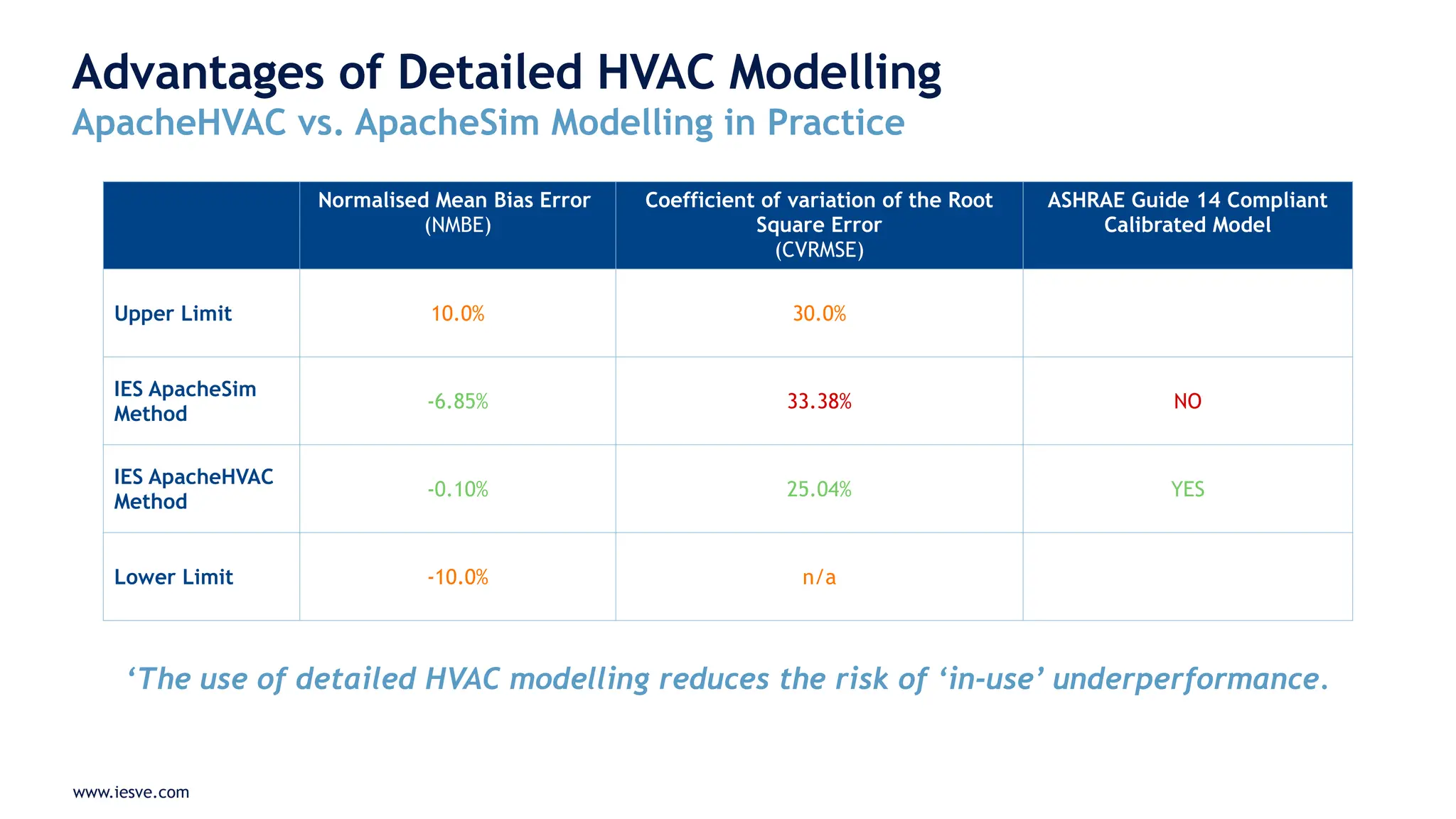
Normalised Mean Bias Error
(NMBE)
Coefficient of variation of the Root
Square Error
(CVRMSE)
ASHRAE Guide 14 Compliant
Calibrated Model
Upper Limit 10.0% 30.0%
IES ApacheSim
Method
-6.85% 33.38% NO
IES ApacheHVAC
Method
-0.10% 25.04% YES
Lower Limit -10.0% n/a
‘The use of detailed HVAC modelling reduces the risk of ‘in-use’ underperformance.
www.iesve.com
In-use Monitoring & Digital Twin
Assembly using iSCAN
www.iesve.com
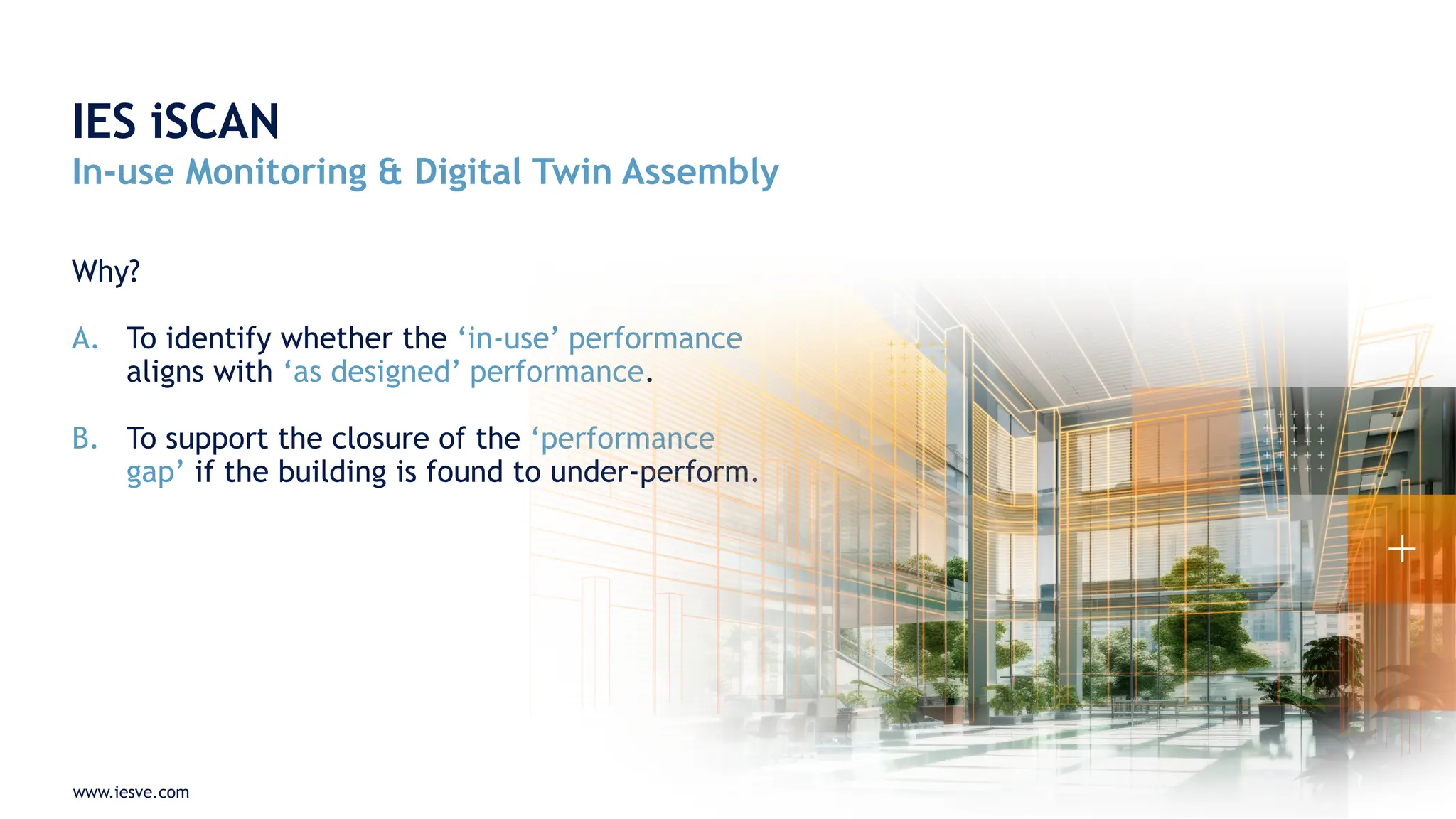
Why?
A. To identify whether the ‘in-use’ performance
aligns with ‘as designed’ performance.
B. To support the closure of the ‘performance
gap’ if the building is found to under-perform.
IES iSCAN
In-use Monitoring & Digital Twin Assembly
www.iesve.com
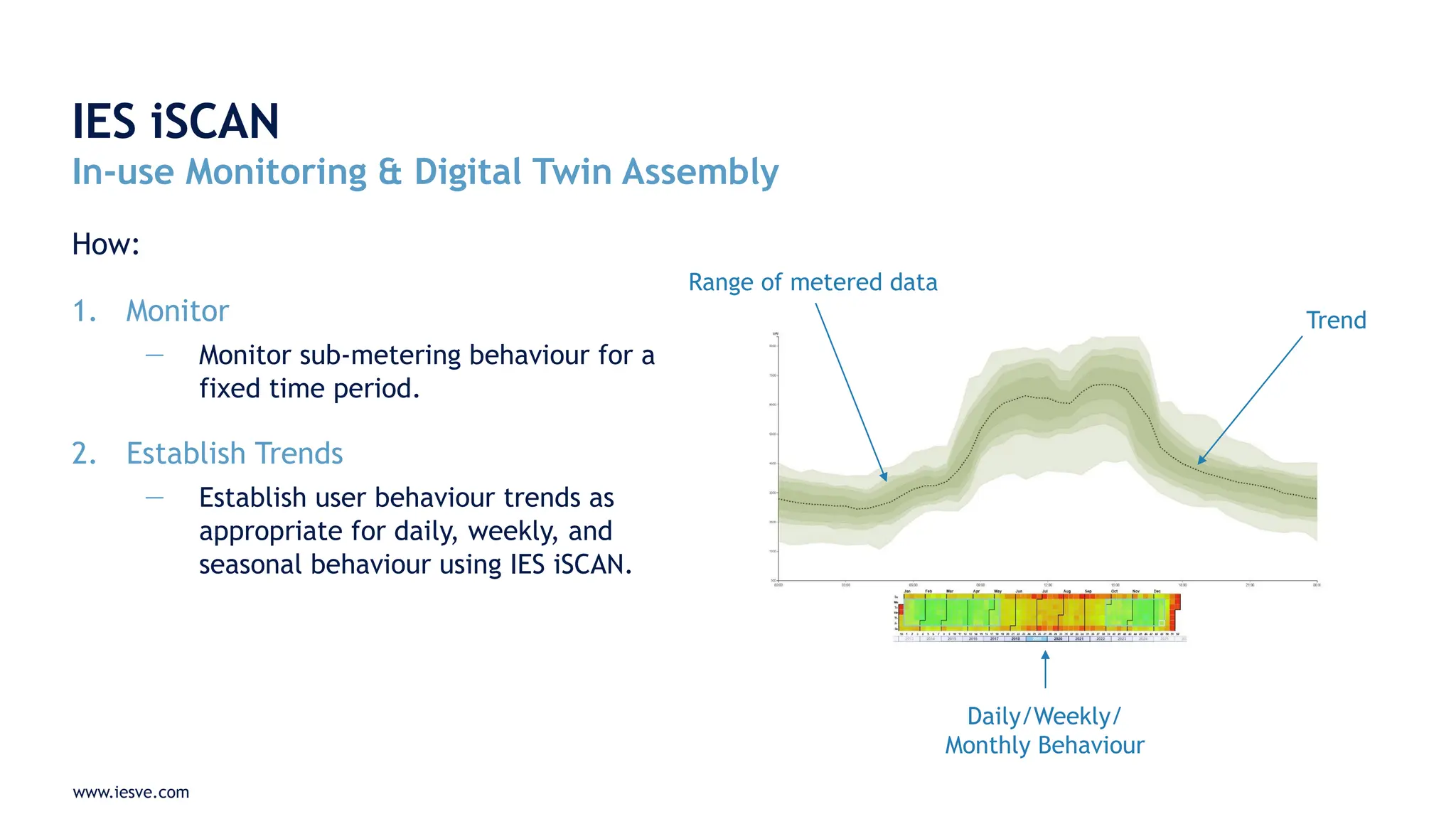
How:
1. Monitor
— Monitor sub-metering behaviour for a
fixed time period.
2. Establish Trends
— Establish user behaviour trends as
appropriate for daily, weekly, and
seasonal behaviour using IES iSCAN.
IES iSCAN
In-use Monitoring & Digital Twin Assembly
Range of metered data
Trend
Daily/Weekly/
Monthly Behaviour
www.iesve.com
3. Update the Design Stage Model
Re-populate the design stage Design for Performance Model with ‘in-use’ user behaviour
profiles, including;
— Room occupancy
— Electrical equipment usage
— Lighting use
— User-selected HVAC settings
— Any other metered information connected to IES iSCAN.
4. Re-simulate
Re-simulate the Design for Performance Model using revised profiles and ‘in-use’ weather
data (produced via iSCAN). This process produces a Digital Twin.
IES iSCAN
In-use Monitoring & Digital Twin Assembly
www.iesve.com
5. Evaluate
Compare the Digital Twin against the ‘as-designed’ performance, when accounting for identical
user behaviour and weather behaviour. Draw conclusions.
6. Modify
If the building does not achieve the ‘designed performance’, use the Digital Twin to diagnose the
reasons why and implement changes as necessary.
7. Verify
Re-evaluate ‘in-use’ performance against the ‘designed performance’ over an agreed time period
(typically 3 months). Repeat steps 6 & 7 as necessary.
IES iSCAN
In-use Monitoring & Digital Twin Assembly
RISK
www.iesve.com
− The requirement to demonstrate ‘designed
performance’ following project handover is becoming
increasingly important. Clients increasingly want to
see results delivered in practice.
− Detailed HVAC using tools like IES ApacheHVAC;
− Limit the risk of underperformance in practice
− Allow component-level design analysis and design
optimisation
− Component-level sub-meter modelling.
− Digital Twin software such as IES iSCAN allows ‘in-use’
performance to be calibrated against the ‘designed
performance’ and can operate as a diagnostic tool
where improvements are necessary.
How IES ApacheHVAC & iSCAN can help reduce
the risk of underperformance in operation
www.iesve.com
− Software licensing and/or consultancy
service support.
− Full or partial modelling of Operational
Energy Performance Models.
− IES ApacheHVAC project support and
mentoring.
− IES iSCAN software licensing and/or
consultancy services support.
− NZC Modelling Guide assembly.
How IES Can Support You
Thank you
Any Questions?
Richard.Tibenham@iesve.com

Closing the Performance Gap with Detailed HVAC Modelling & In-Use Performance Modelling

  • 1.
    Closing the Performance Gapwith Detailed HVAC Modelling & In-Use Performance Modelling How IES ApacheHVAC & iSCAN can help reduce the risk of underperformance in operation Richard Tibenham – UK Business Development Manager, IES
  • 2.
    www.iesve.com − What areIES ApacheHVAC & IES iSCAN? − What is their use case? − When should we apply IES ApacheHVAC to a project? − What are the differences between IES ApacheSim and IES ApacheHVAC? − When should in-use monitoring & Digital Twin assembly take place using IES iSCAN? − Q&A Agenda
  • 3.
    www.iesve.com What is IESApacheHVAC? The detailed HVAC modelling tool within IES ‘Virtual Environment’ — It enables VE models to include ‘Advanced HVAC modelling’ suitable for ‘Design for Performance’ dynamic simulation models. — The software provides a range of benefits over the simpler ‘IES ApacheSim’ HVAC modelling method, using component level and HVAC network modelling methods. www.iesve.com Example of an ApacheHVAC airside network:
  • 4.
    www.iesve.com What is IESiSCAN? IES’ Digital Twin platform — The cloud-based software allows real-time ‘in-use’ data to be captured and monitored. — When ‘in-use’ data is combined with a design stage ‘Design of Performance’ model, a ‘Digital Twin’ is produced. — The Digital Twin can be used to evaluate whether a building is operating to the designed performance standard, and if not, it can be used to identify the reasons why. — The Digital Twin can be used as a diagnostic tool to help close the ‘performance gap’. www.iesve.com Example of iSCAN in-use performance results:
  • 5.
    www.iesve.com When should ApacheHVAC& iSCAN be applied? IES ApacheHVAC and iSCAN are required when it is critical for the ‘designed performance’ to be achieved ‘in use’: www.iesve.com 1 Design Use a ‘Design for Performance Model’ to develop the building design and specification. RISK 2 Construction Construct the building in alignment with the ‘Design for Performance Model’ specification. 3 Verification Verify that the ‘in-use’ performance of the building achieves or exceeds the designed performance. 4 Improve until compliant Evaluate. Modify. Verify.
  • 6.
    www.iesve.com Building certification schemesrequiring ‘design for performance modelling’: − LEED Operational Energy Credits (ASHRAE 90.1 & 90.4) − BREEAM v7 Ene02 ‘Prediction of operational energy and carbon’ Building certification schemes requiring in-use performance verification: − UK Net Zero Carbon Buildings Standard − NABERS Certification − Depart for Education (DfE) School Output Specification requirements − NHS Net Zero Building Standard − Learning Estate Investment Programme (LEIP) – Scotland − BREEAM Ene03 (Energy Monitoring) − Performance Guarantee Contracts − Future Building Regulations???…. Increasing Demand for Certainty of Outcome:
  • 7.
    www.iesve.com How we ApplyDetailed HVAC Modelling & Verification Project Stage Energy Modelling and Performance Verification Activities Strategy RIBA Stage 1 Setting an EUI & other performance deliverables. Developing team roles and modelling quality. Assembly of a Modelling Roadmap. None RIBA Stage 2 Concept design development. Architectural concept appraisal. Concept energy model: compare against target EUI. Daylight modelling. Regulatory compliance assessments. Evaluation of trades & revisions as necessary. Simple HVAC Modelling RIBA Stage 3 Developed energy model: refinement. Part-load performance curve modelling. Sub-meter modelling. Operational energy, IAQ, & daylight modelling: refinement. Plant sizing calculations. Future climate scenario evaluations. Regulatory compliance assessment updates. Advanced HVAC modelling; IES ApacheHVAC RIBA Stage 4 Detailed design stage final modelling and evaluation. RIBA Stage 5 Construction stage minor model revision updates, as required. RIBA Stage 6 ‘As-built’ model revision updates, as required. RIBA Stage 7 Digital Twin assembly. First 12 months: Quarterly in-use monitoring reports & progressive improvement. Subsequent years: Annual performance monitoring reports. In-use verification & Digital Twin; IES iSCAN
  • 8.
  • 9.
    www.iesve.com IES ApacheSim vs.ApacheHVAC IES ApacheSim IES ApacheHVAC Intended Use Case: — Approximate HVAC modelling or, — Modelling for simple HVAC systems. Methodology: — ‘System Level’ modelling. — Dialog box data entry. Intended Use Case: — Detailed HVAC modelling. Methodology: — ‘Component Level’ modelling. — Airside and water side schematic modelling.
  • 10.
    www.iesve.com IES ApacheSim vs.IES Apache HVAC IES ApacheSim IES ApacheHVAC Pre-defined HVAC system types with a limited set of adjustable parameters. Library HVAC system types and custom HVAC system assembly with a wide set of adjustable parameters. Dialog box data entry. Schematic data entry. HVAC ‘System Level’ modelling. HVAC ‘Component Level’ modelling. Simple system controls. Complex system controls. Fixed CoP and capacity modelling. Part-load performance curve modelling for variable speed fans and pumps. No HVAC plant ‘auto-sizing’ function. HVAC plant Auto-sizing function. ‘System Level’ performance reporting. ‘Component Level’ performance reporting. ‘System Level’ energy meter modelling. ‘Component Level’ energy meter modelling.
  • 11.
    www.iesve.com Advantages of DetailedHVAC Modelling Heating/Cooling Plant Efficiency IES ApacheSim Modelling: — Fixed CoP modelling (adopting SCoP or SEER metric for heat pumps and chillers) IES ApacheHVAC Modelling: — Dynamically calculated CoP based on; — Part Load — Loop Temperatures — Ambient Temperatures — Applicable for the modelling of inverter-driven fans and pumps CoP curves at different heating loads for different supply water temperature temperatures of a heat pump: CoP curves at different leaving chilled water temperatures for part-load ratios of a chiller:
  • 12.
    www.iesve.com Advantages of DetailedHVAC Modelling Fixed vs. Variable CoP Modelling of a Heat Pump 16%
  • 13.
    www.iesve.com Advantages of DetailedHVAC Modelling Plant Capacity IES ApacheSim Modelling: Fixed plant capacity IES ApacheHVAC Modelling: Dynamically calculated plant capacity modelled at ‘component level’, accounting for; — Central Plant Capacity — Loop Capacity — Coil Capacity — Radiator Capacity — Loop Temperatures — Ambient Temperatures
  • 14.
    www.iesve.com Advantages of DetailedHVAC Modelling System Controls IES ApacheSim Modelling: Simple ‘system level’ and ‘room level’ HVAC controls. IES ApacheHVAC Modelling: Complex ‘component level’ HVAC controls, including; — Airside: — Waterside: — Variable pumps Speed Control — Temperature Control — Inter-zonal MV modelling — Demand controlled ventilation — Supply temperature control — Heat-recovery by-pass damper control — Surface temperature-based controls — Night Cooling — Free-Cooling
  • 15.
    www.iesve.com Simple vs. AdvancedHVAC Modelling Energy Sub-Meters
  • 16.
    www.iesve.com − Highly granularsub-metering information is essential for understanding how energy is used in a building. − The design stage Design for Performance Model should reflect the sub-metering strategy from RIBA Stage 3 onward. − Alignment of the ‘simulated’ and ‘installed’ sub-metering strategy allows ‘in-use’ measurements to be compared directly against the ‘simulated’ behaviour of the building when producing the ‘Digital Twin’. Simple vs. Detailed HVAC Modelling Sub-Meter Modelling
  • 17.
    www.iesve.com − Simple HVACmodelling allows ‘system level’ metering. − Advanced HVAC modelling allows ‘component level’ metering via the assembly and assignment of an energy metering tree. Simple vs. Detailed HVAC Modelling Sub-Meter Modelling Assembly of a ‘sub-meter modelling tree’: Assignment of sub-metering at component level:
  • 18.
    www.iesve.com Simple vs. DetailedHVAC Modelling Sub-Meter Modelling Component level simulated energy sub-metering (by month):
  • 19.
    www.iesve.com Simple vs. AdvancedHVAC Modelling Simulation Results Interrogation
  • 20.
    www.iesve.com − Simple HVACmodelling allows ‘system level’ results interrogation. − Advanced HVAC modelling allows ‘component level’ metering via the assembly and assignment of an energy metering tree. Simple vs. Detailed HVAC Modelling Simulation Results Interrogation
  • 21.
    www.iesve.com − Advanced HVACmodelling allows HVAC controls inspection. − Advanced HVAC modelling allows ‘component level’ performance results and charting. Simple vs. Detailed HVAC Modelling Simulation Results Interrogation
  • 22.
    www.iesve.com Advantages of DetailedHVAC Modelling Key Benefits for DfP Modelling — Higher modelling accuracy reduces; — Operational energy and carbon emissions ‘performance gap’ risks. — Indoor Environmental Quality ‘performance gap’ risks. — Greater system insight provides added value by providing; — Higher accuracy and modelling detail. — Unmet load hours calculations based on variable performance curve modelling. — IEQ assessments based on accurate HVAC modelling. — Better-informed value engineering based on ‘component-level’ analysis. — Better-informed design optimisation. — More accurate operational performance forecasts.
  • 23.
    www.iesve.com Advantages of DetailedHVAC Modelling ApacheHVAC vs. ApacheSim Modelling in Practice ‘As-designed Simple HVAC Modelling ‘As-designed’ Detailed HVAC Modelling Measured Data
  • 24.
    www.iesve.com Advantages of DetailedHVAC Modelling ApacheHVAC vs. ApacheSim Modelling in Practice Normalised Mean Bias Error (NMBE) Coefficient of variation of the Root Square Error (CVRMSE) ASHRAE Guide 14 Compliant Calibrated Model Upper Limit 10.0% 30.0% IES ApacheSim Method -6.85% 33.38% NO IES ApacheHVAC Method -0.10% 25.04% YES Lower Limit -10.0% n/a ‘The use of detailed HVAC modelling reduces the risk of ‘in-use’ underperformance.
  • 25.
    www.iesve.com In-use Monitoring &Digital Twin Assembly using iSCAN
  • 26.
    www.iesve.com Why? A. To identifywhether the ‘in-use’ performance aligns with ‘as designed’ performance. B. To support the closure of the ‘performance gap’ if the building is found to under-perform. IES iSCAN In-use Monitoring & Digital Twin Assembly
  • 27.
    www.iesve.com How: 1. Monitor — Monitorsub-metering behaviour for a fixed time period. 2. Establish Trends — Establish user behaviour trends as appropriate for daily, weekly, and seasonal behaviour using IES iSCAN. IES iSCAN In-use Monitoring & Digital Twin Assembly Range of metered data Trend Daily/Weekly/ Monthly Behaviour
  • 28.
    www.iesve.com 3. Update theDesign Stage Model Re-populate the design stage Design for Performance Model with ‘in-use’ user behaviour profiles, including; — Room occupancy — Electrical equipment usage — Lighting use — User-selected HVAC settings — Any other metered information connected to IES iSCAN. 4. Re-simulate Re-simulate the Design for Performance Model using revised profiles and ‘in-use’ weather data (produced via iSCAN). This process produces a Digital Twin. IES iSCAN In-use Monitoring & Digital Twin Assembly
  • 29.
    www.iesve.com 5. Evaluate Compare theDigital Twin against the ‘as-designed’ performance, when accounting for identical user behaviour and weather behaviour. Draw conclusions. 6. Modify If the building does not achieve the ‘designed performance’, use the Digital Twin to diagnose the reasons why and implement changes as necessary. 7. Verify Re-evaluate ‘in-use’ performance against the ‘designed performance’ over an agreed time period (typically 3 months). Repeat steps 6 & 7 as necessary. IES iSCAN In-use Monitoring & Digital Twin Assembly RISK
  • 30.
    www.iesve.com − The requirementto demonstrate ‘designed performance’ following project handover is becoming increasingly important. Clients increasingly want to see results delivered in practice. − Detailed HVAC using tools like IES ApacheHVAC; − Limit the risk of underperformance in practice − Allow component-level design analysis and design optimisation − Component-level sub-meter modelling. − Digital Twin software such as IES iSCAN allows ‘in-use’ performance to be calibrated against the ‘designed performance’ and can operate as a diagnostic tool where improvements are necessary. How IES ApacheHVAC & iSCAN can help reduce the risk of underperformance in operation
  • 31.
    www.iesve.com − Software licensingand/or consultancy service support. − Full or partial modelling of Operational Energy Performance Models. − IES ApacheHVAC project support and mentoring. − IES iSCAN software licensing and/or consultancy services support. − NZC Modelling Guide assembly. How IES Can Support You
  • 32.