Achieving Excellence with IESVE Essential Knowledge Series
IESVE for HVAC Simulation
www.iesve.com
Using ApacheHVAC for Detailed Simulation
and Plant Analysis
Michael Pollock
Consultancy Manager
Richard Tibenham
UK Business Development Manager
Michael Pollock
Consultancy Manager
(VE Consultancy)
Richard Tibenham
UK Business
Development Manager
(VE Consultancy)
Agenda
▪ When to Use ApacheHVAC
▪ Introduction to ApacheHVAC
▪ Advantages of Detailed HVAC Modelling
▪ ApacheHVAC Systems Wizard
▪ HVAC Systems Library
▪ Autosizing
▪ Loads Reports
▪ Central Plant Heat Pumps
▪ Energy Meters
▪ Q&A
www.iesve.com
De-risk Innovative Design Solutions
Minimise Performance Gap
When to use ApacheHVAC
Building Performance Ratings Methods
www.iesve.com
Building Performance ratings including NABERS, LEED,
BREEAM use detailed HVAC Modelling to accurately predict
energy demands.
Simulate innovative design solutions to help demonstrate
the suitability of a design solution as well as identify
potential issues and risks with a new design solution.
Simulating plant performance in detail to accurately predict
plant efficiency and system energy demands and explore
opportunities to optimise building efficiency.
Decarbonisation and Net-Zero Strategies
Support accurate predictions of carbon emissions from new
buildings and retrofit of existing buildings.
Introduction to ApacheHVAC
Features include:
www.iesve.com
• User Friendly
• Flexible
• Schematic
• Component based
network
• Multiplexing
• Pre-built Systems
• Auto-sizing
• Loads Reports
• Hot Water Loops
• Chilled Water Loops
• Central Plant Heat Pumps
• VRF
ApacheHVAC is the module within the Virtual Environment
used to Perform Detailed HVAC Modelling with ApacheSim
Advantages of
Detailed HVAC Modelling
Advantages of Detailed HVAC Modelling
www.iesve.com
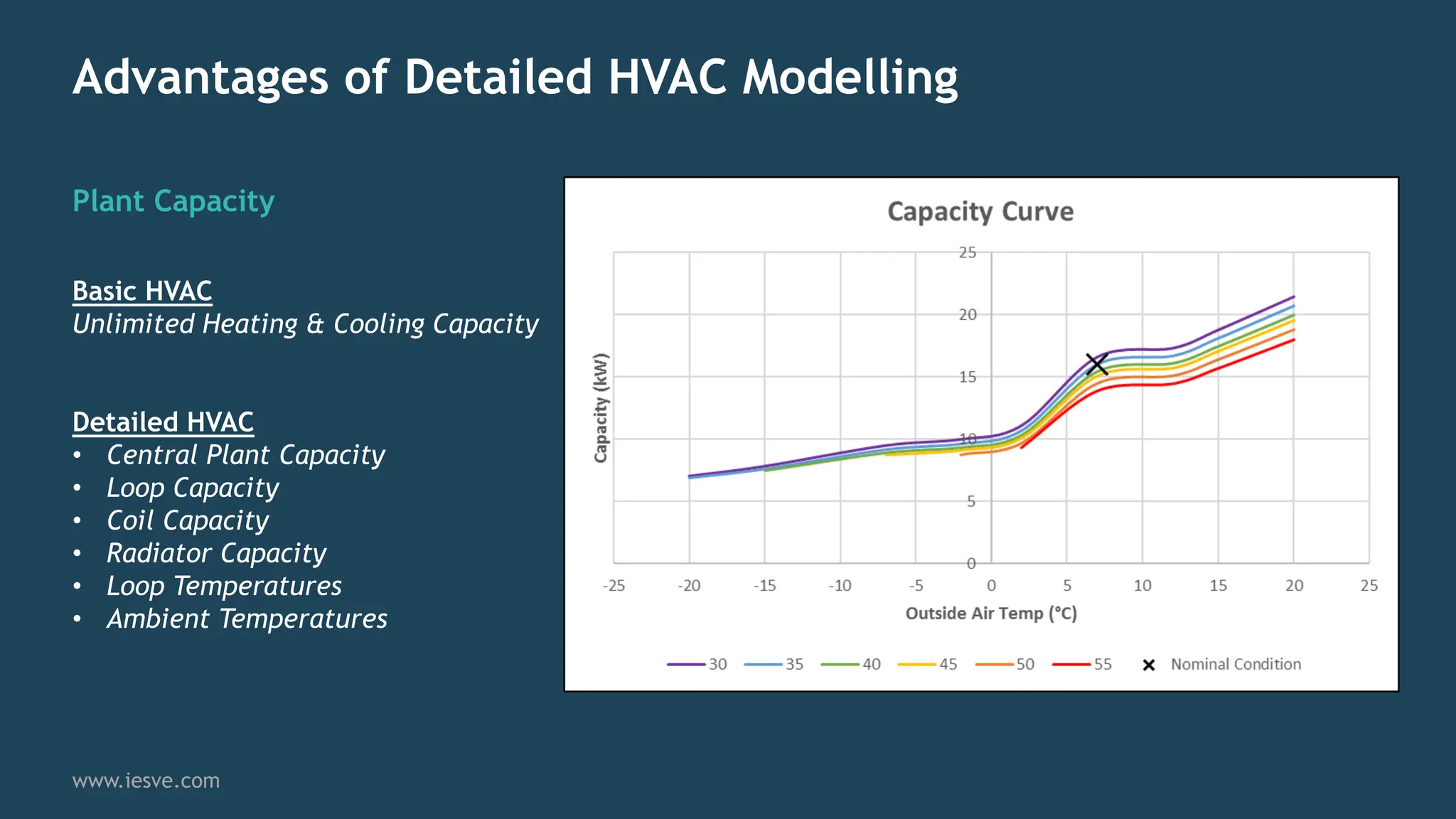
Plant Capacity
Basic HVAC
Unlimited Heating & Cooling Capacity
Detailed HVAC
• Central Plant Capacity
• Loop Capacity
• Coil Capacity
• Radiator Capacity
• Loop Temperatures
• Ambient Temperatures
Advantages of Detailed HVAC Modelling
www.iesve.com
Heating / Cooling Efficiency
Basic HVAC
Constant Seasonal Efficiency
Detailed HVAC
Efficiency dynamically calculated
at each timestep.
Efficiency influenced by:
• Part Load
• Loop Temperatures
• Ambient Temperatures
Advantages of Detailed HVAC Modelling
www.iesve.com
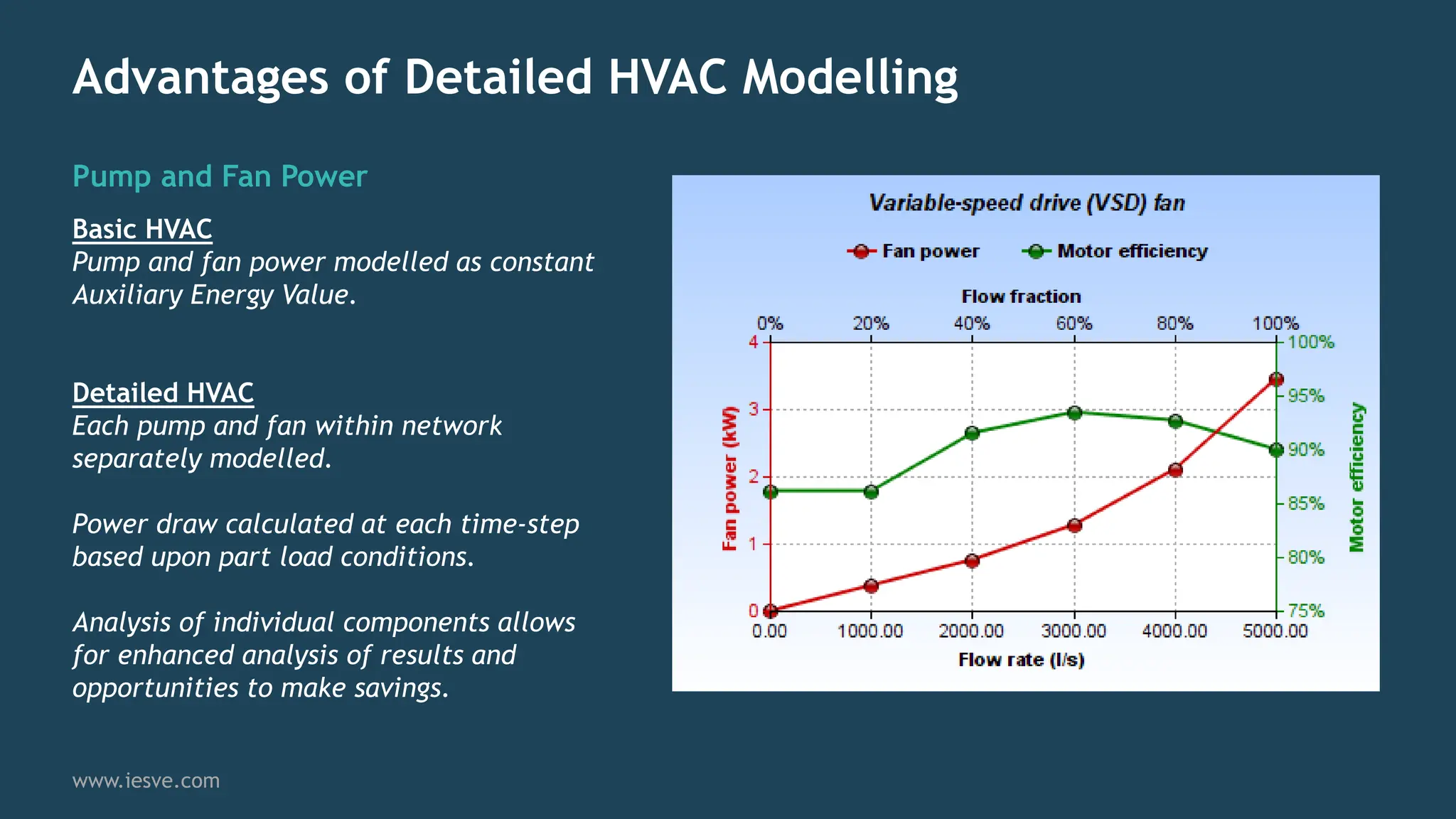
Pump and Fan Power
Basic HVAC
Pump and fan power modelled as constant
Auxiliary Energy Value.
Detailed HVAC
Each pump and fan within network
separately modelled.
Power draw calculated at each time-step
based upon part load conditions.
Analysis of individual components allows
for enhanced analysis of results and
opportunities to make savings.
Advantages of Detailed HVAC Modelling
www.iesve.com
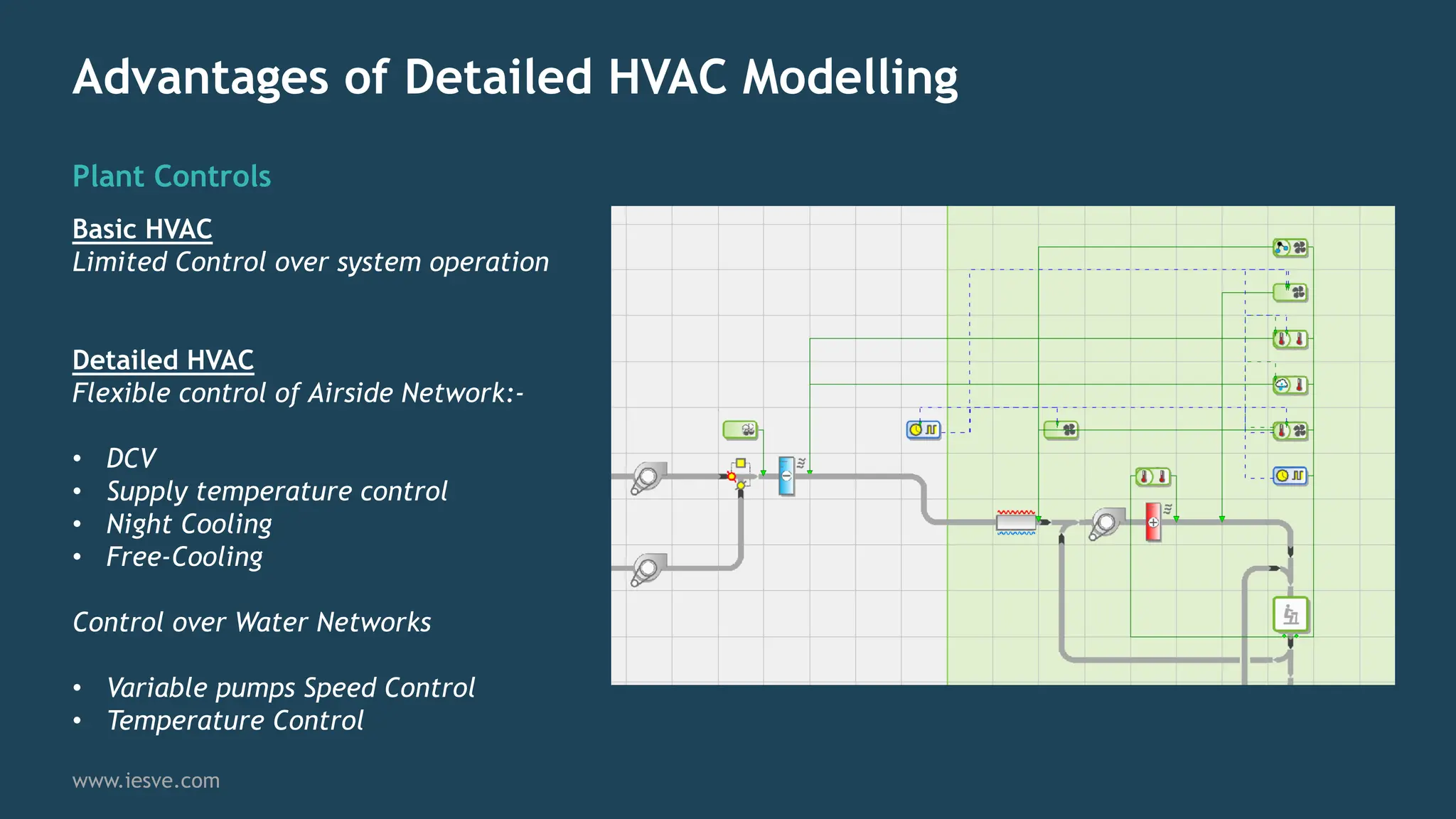
Plant Controls
Basic HVAC
Limited Control over system operation
Detailed HVAC
Flexible control of Airside Network:-
• DCV
• Supply temperature control
• Night Cooling
• Free-Cooling
Control over Water Networks
• Variable pumps Speed Control
• Temperature Control
HVAC System Wizard
HVAC System Wizard
General Setup and
Zoning
www.iesve.com
Wizard accessed from the
Apache Module
Create new or update
existing HVAC Network
Use existing Room Groups
or HVAC Zones
Choose between ASHRAE or
CIBSE methodology for
Room Loads analysis
HVAC System Wizard
Airside System
Selection
www.iesve.com
Select prototype from a
range of System Libraries
Assign system type to
selected Room Group
Include multiple network
types and groups within a
single project
Annotated graphics
illustrate each system
configuration
HVAC System Wizard
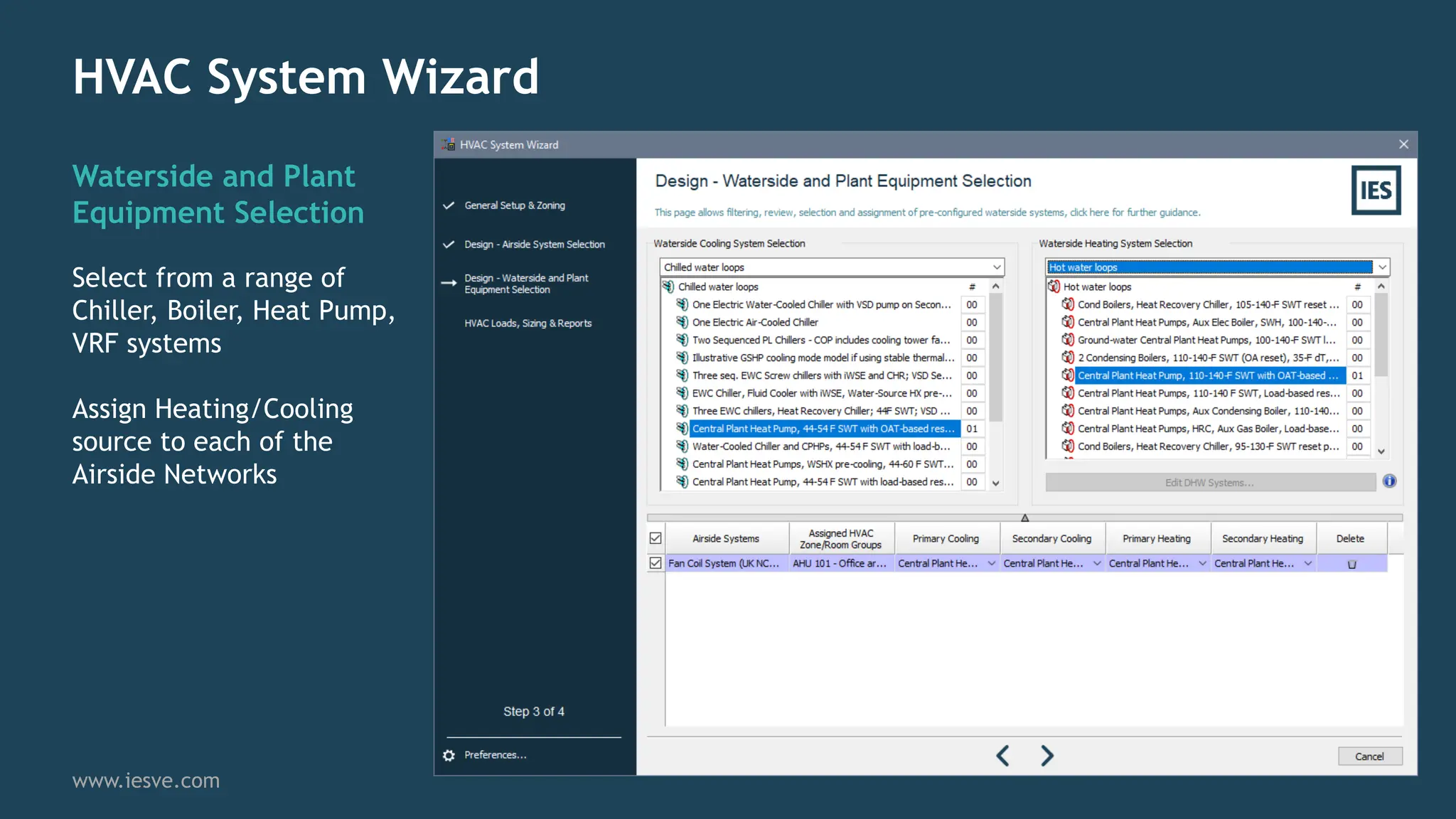
Waterside and Plant
Equipment Selection
www.iesve.com
Select from a range of
Chiller, Boiler, Heat Pump,
VRF systems
Assign Heating/Cooling
source to each of the
Airside Networks
HVAC System Wizard
HVAC Loads, Sizing &
Reports
www.iesve.com
Size Room Loads
Determine Peak Heating and
Cooling Loads for each Space and
calculates the required airflow
rates to meet Peak demand
Size System Loads
Sizes coils, fans Boilers, chillers
etc. based on previous loads
calculation
Run Apache Simulation
Perform a Dynamic Simulation
using the Autosized HVAC Network
HVAC System Wizard
ApacheHVAC Network
www.iesve.com
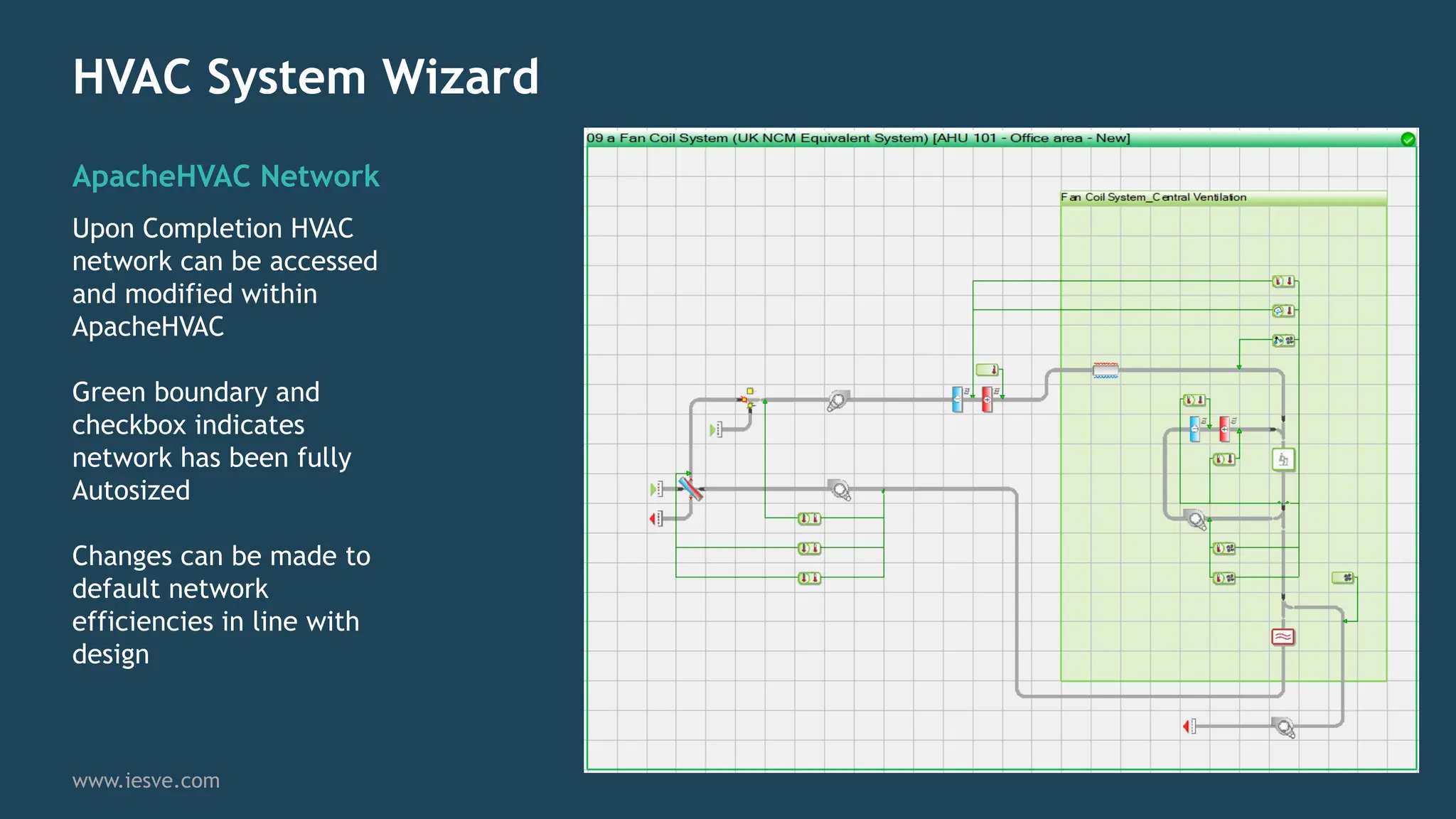
Upon Completion HVAC
network can be accessed
and modified within
ApacheHVAC
Green boundary and
checkbox indicates
network has been fully
Autosized
Changes can be made to
default network
efficiencies in line with
design
ApacheHVAC Prototype
Library and Autosizing
ApacheHVAC Prototype Library
Import Networks
www.iesve.com
Pre-built and fully autosizable
networks available to import into
any project.
Export Networks
Custom networks created by the
modeller can be saved to library to
re-use on future projects.
ApacheHVAC System Parameters
System Info Linked to
Apache Room Data
www.iesve.com
Heating / Cooling Setpoints
Automatically synced to Room
Data.
Updating set-points,
ventilation rates, occupancy
etc. automatically reflected in
HVAC network settings.
ApacheHVAC Autosizing
System Info Linked to Apache Room Data
www.iesve.com
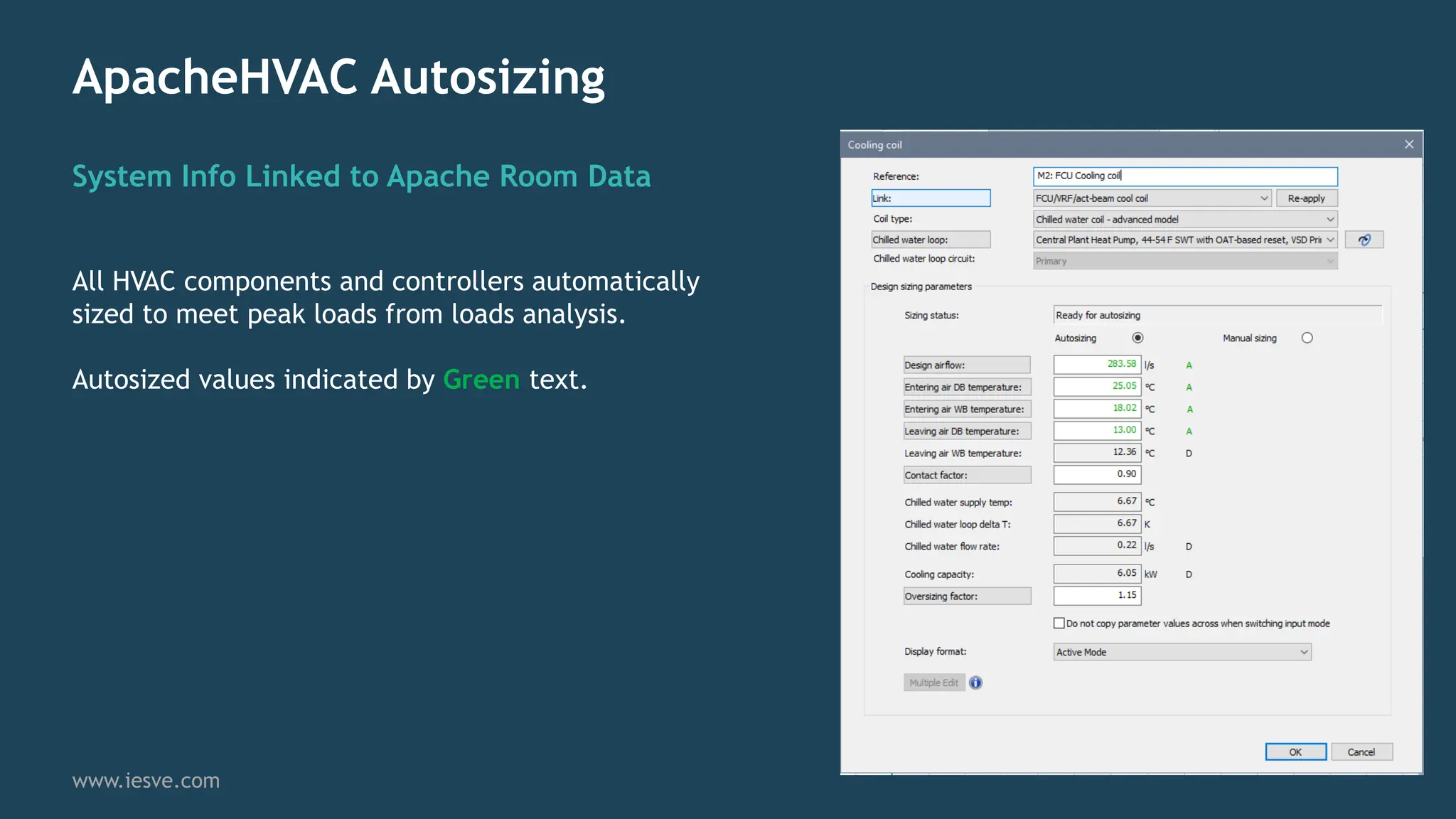
All HVAC components and controllers automatically
sized to meet peak loads from loads analysis.
Autosized values indicated by Green text.
ApacheHVAC Loads reports
Sizing Reports
www.iesve.com
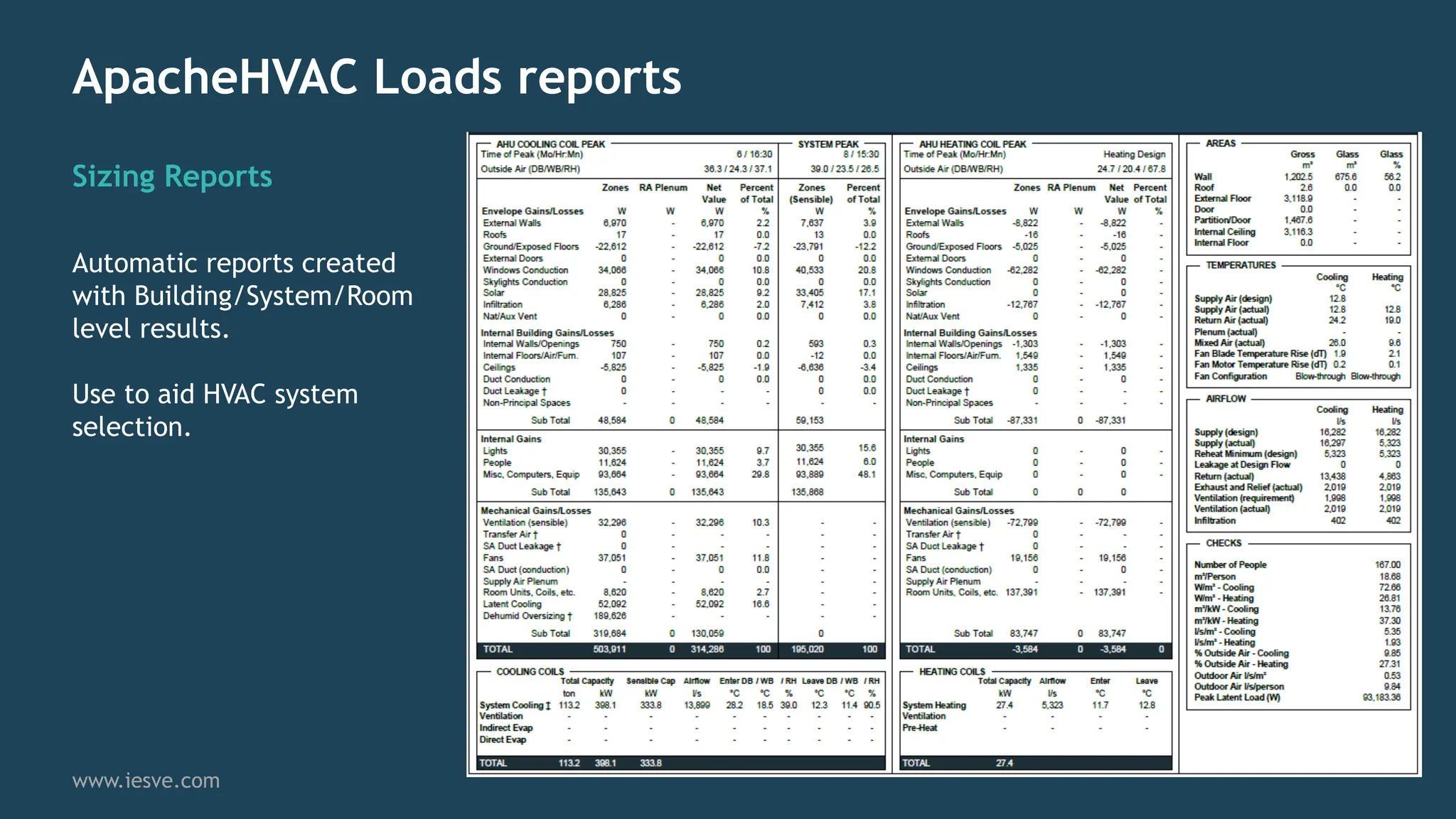
Automatic reports created
with Building/System/Room
level results.
Use to aid HVAC system
selection.
Modelling Heat Pumps
Heat Pumps
Reduced Grid CO2 Emissions Factor
www.iesve.com
CO2 Emissions associated with Grid
Electricity are steadily reducing
annually and future projections
continue this trend as more renewable
energy is added to the mix.
With the current carbon emission
factors, CO2 emissions from Electricity
are now lower than Natural Gas
making it a cleaner fuel option for use
in space heating.
This is further compounded when Heat
Pumps with High COP’s are utilised.
Source: BEIS Updated Energy and Emissions Projections 2017
Heat Pumps
High Efficiency
www.iesve.com
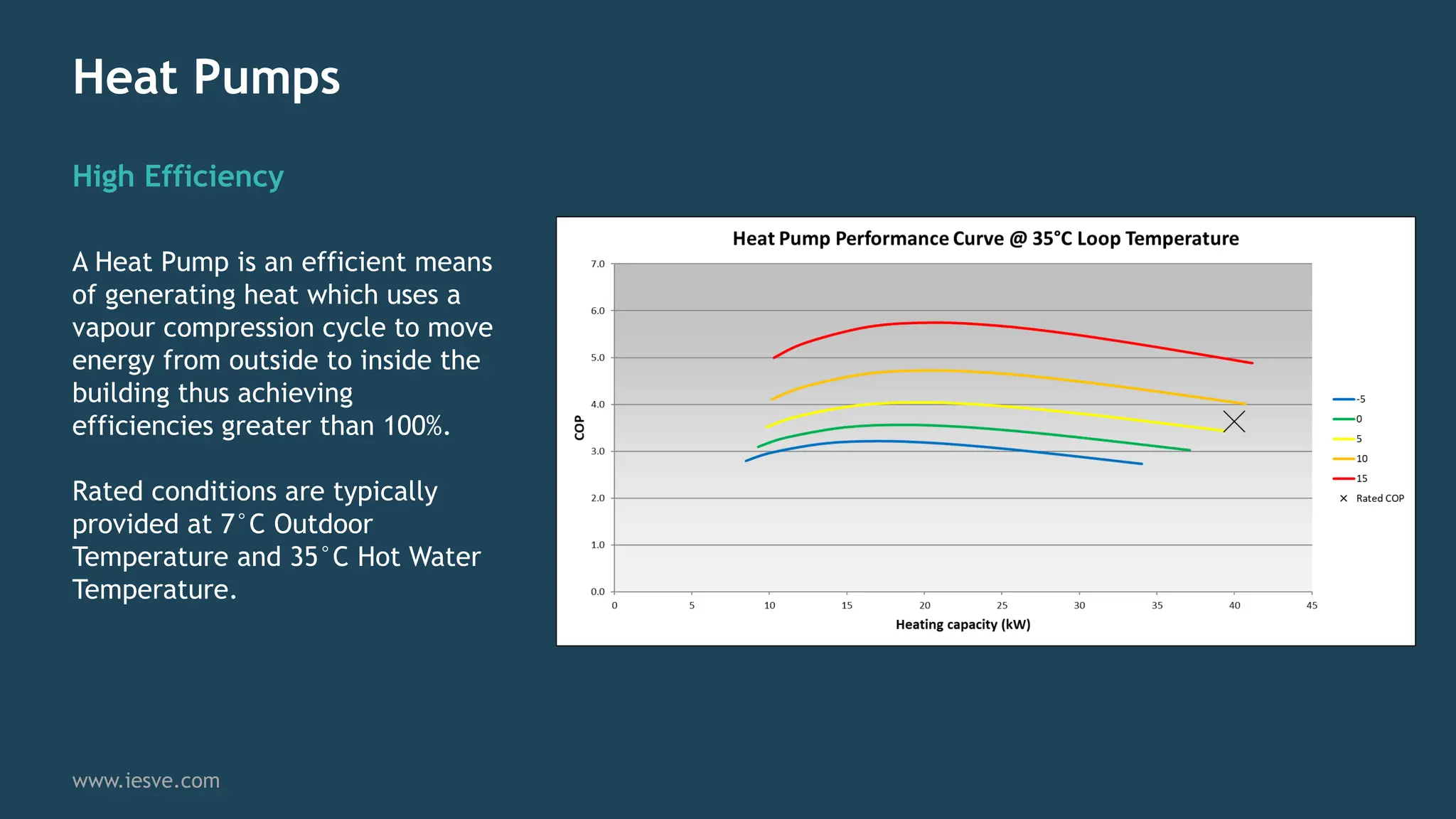
A Heat Pump is an efficient means
of generating heat which uses a
vapour compression cycle to move
energy from outside to inside the
building thus achieving
efficiencies greater than 100%.
Rated conditions are typically
provided at 7°C Outdoor
Temperature and 35°C Hot Water
Temperature.
Heat Pumps
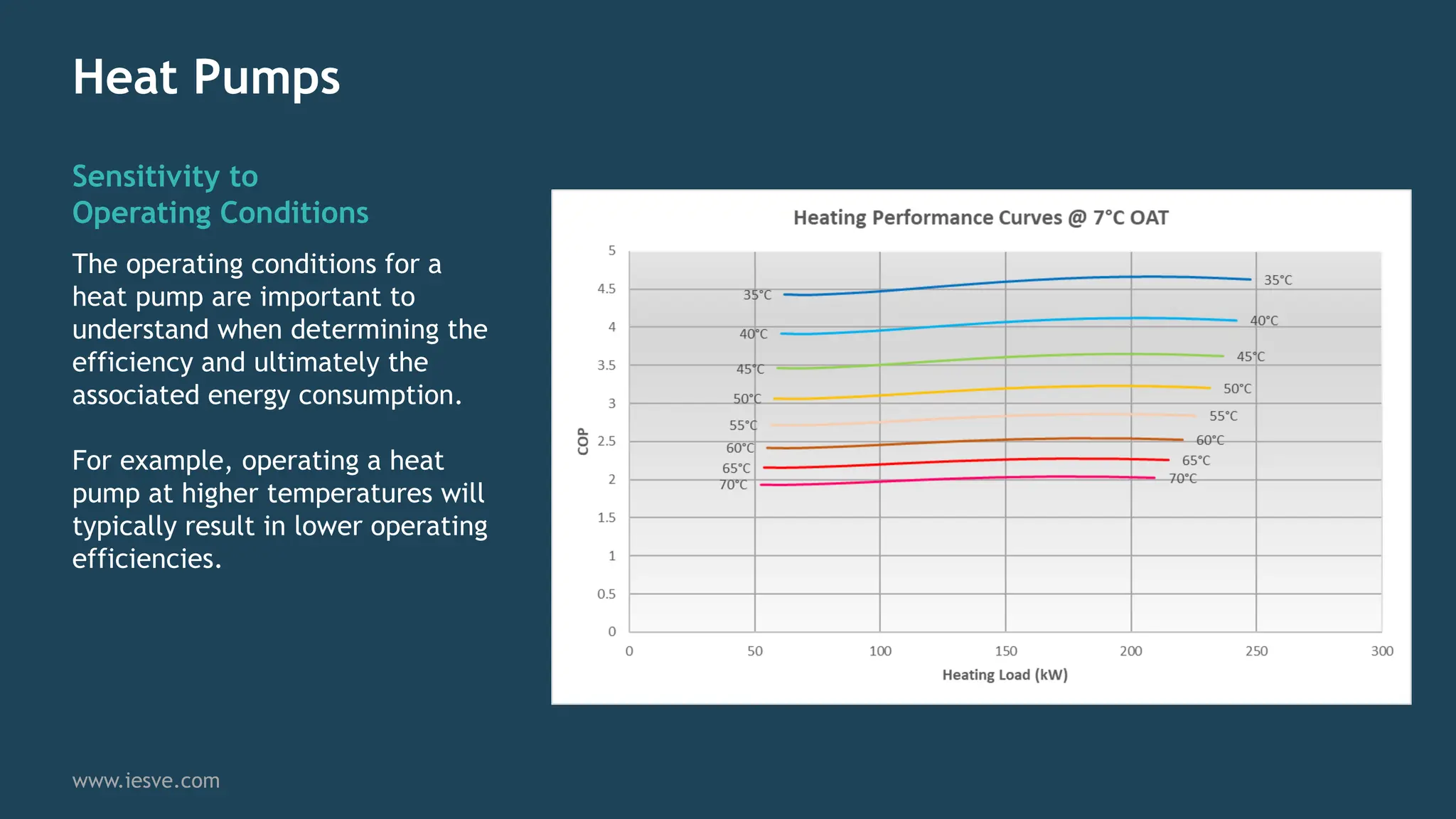
Sensitivity to
Operating Conditions
www.iesve.com
The operating conditions for a
heat pump are important to
understand when determining the
efficiency and ultimately the
associated energy consumption.
For example, operating a heat
pump at higher temperatures will
typically result in lower operating
efficiencies.
Heat Pumps
Central Plant Heat
Pump Modelling
www.iesve.com
Loop can include multiple
heat pumps that can be
sequenced.
Heat pumps can be
modelled as Heating Only
or Heating and Cooling.
Heat Pumps
Auxiliary Heat Source
www.iesve.com
Systems can be designed
to include Secondary Heat
sources to support Heat
Pumps under colder
conditions.
Auxiliary water heating
can be added to either
primary or individual
secondary loops.
Modelling with
Energy Sub-Meters
Energy Sub-Meters
Creating an Energy Metering Tree
www.iesve.com
Energy Meters are created to track energy usage
within a dynamic simulation model.
Flexible tree structure allows for multiple tiers to
be created.
Energy metering can be set to match installed
metering strategy to facilitate calibrated energy
modelling.
Energy Sub-Meters
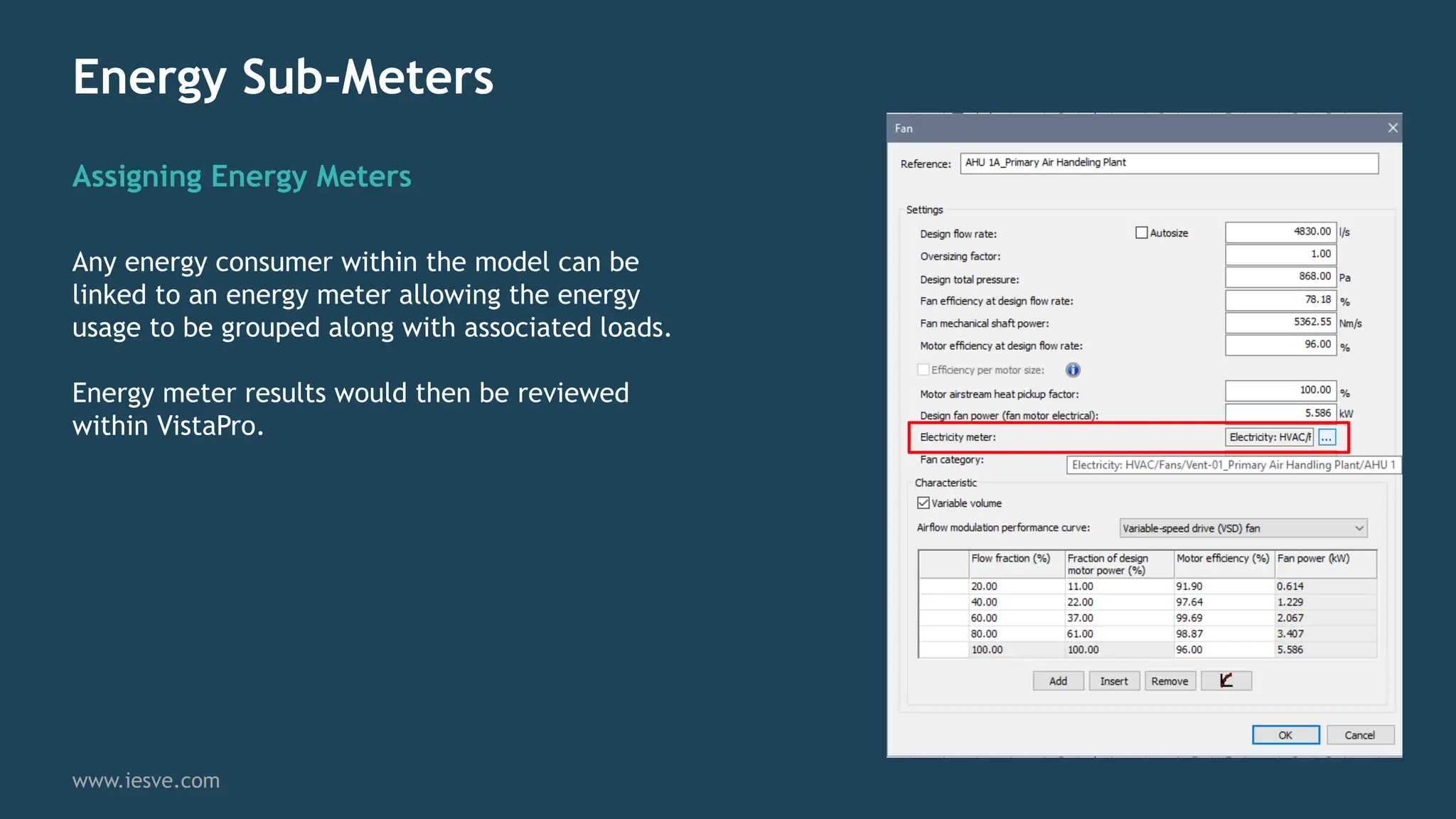
Assigning Energy Meters
www.iesve.com
Any energy consumer within the model can be
linked to an energy meter allowing the energy
usage to be grouped along with associated loads.
Energy meter results would then be reviewed
within VistaPro.
Interrogating HVAC
Results Within VistaPro
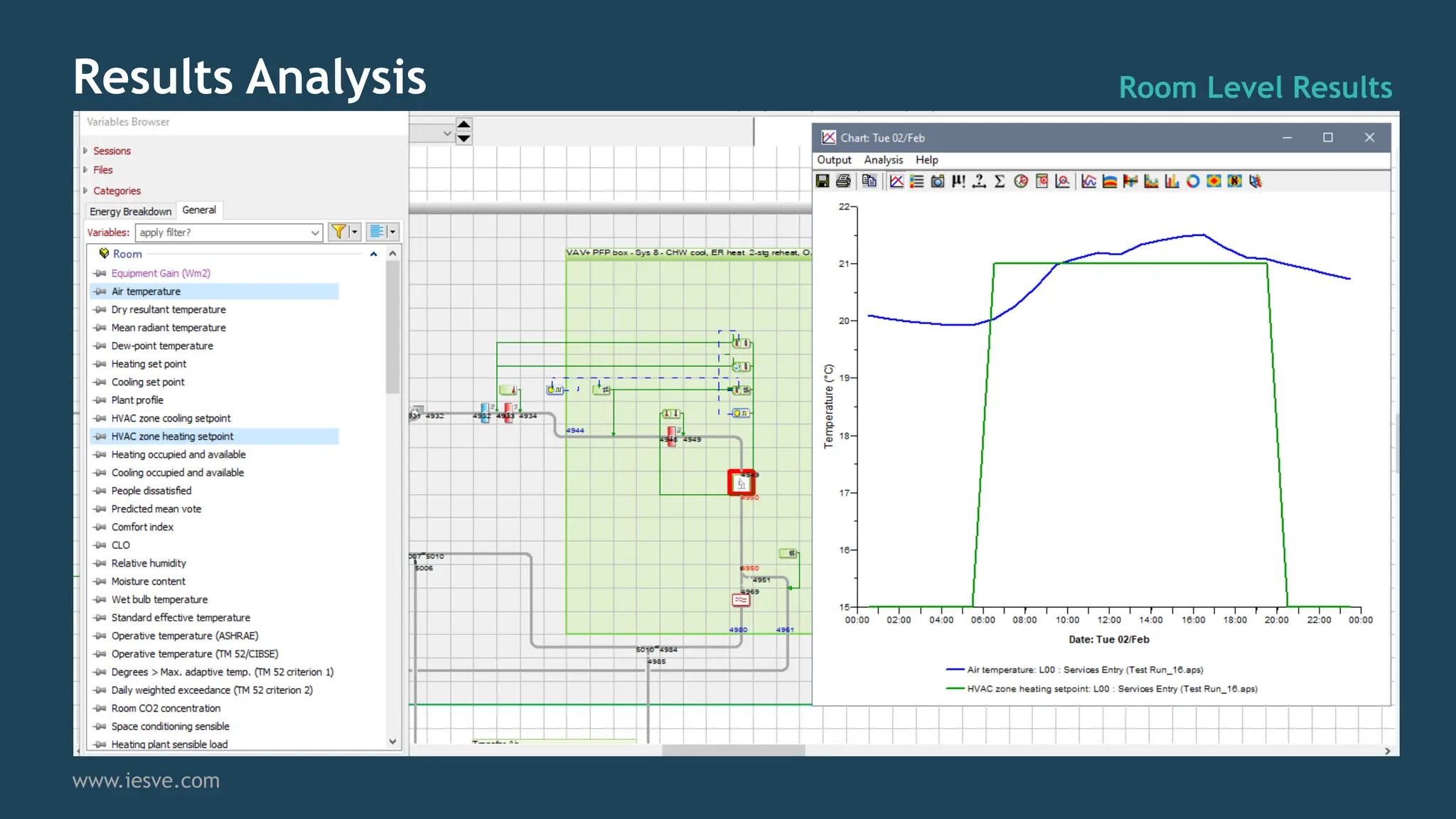
Results Analysis Room Level Results
www.iesve.com
Results Analysis HVAC Airside Components
www.iesve.com
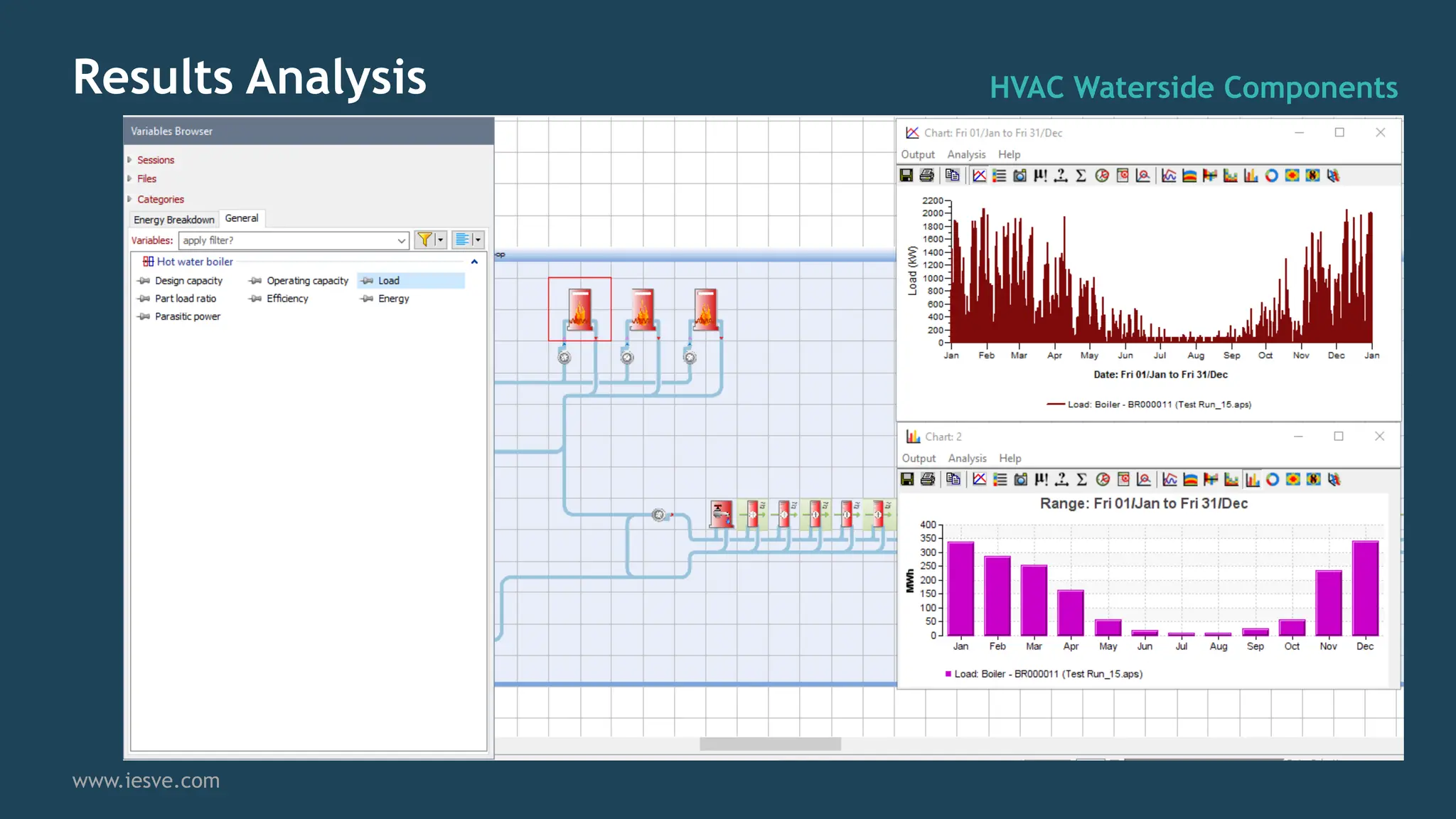
Results Analysis HVAC Waterside Components
www.iesve.com
Results Analysis HVAC Nodes
www.iesve.com
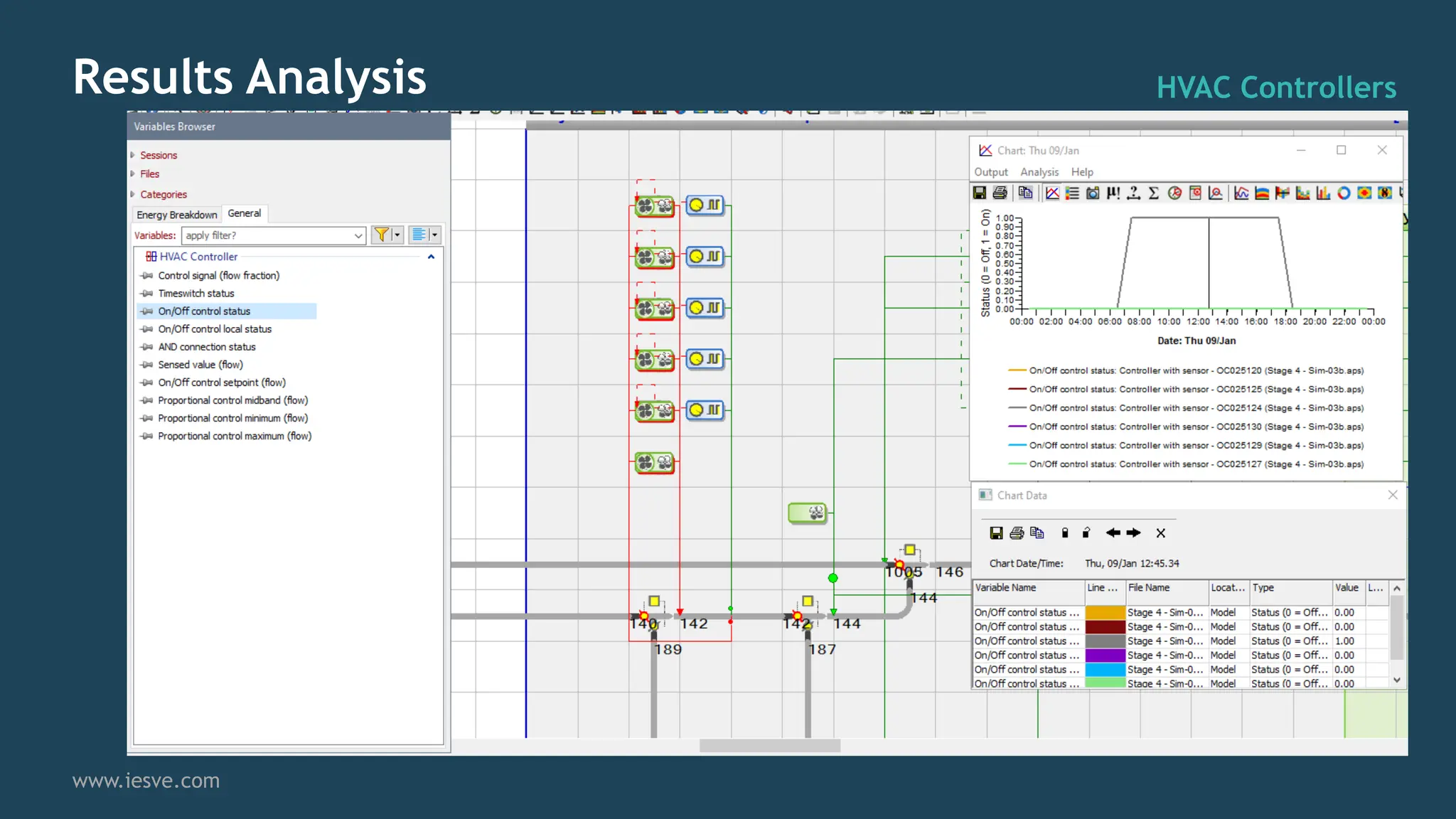
Results Analysis HVAC Controllers
www.iesve.com
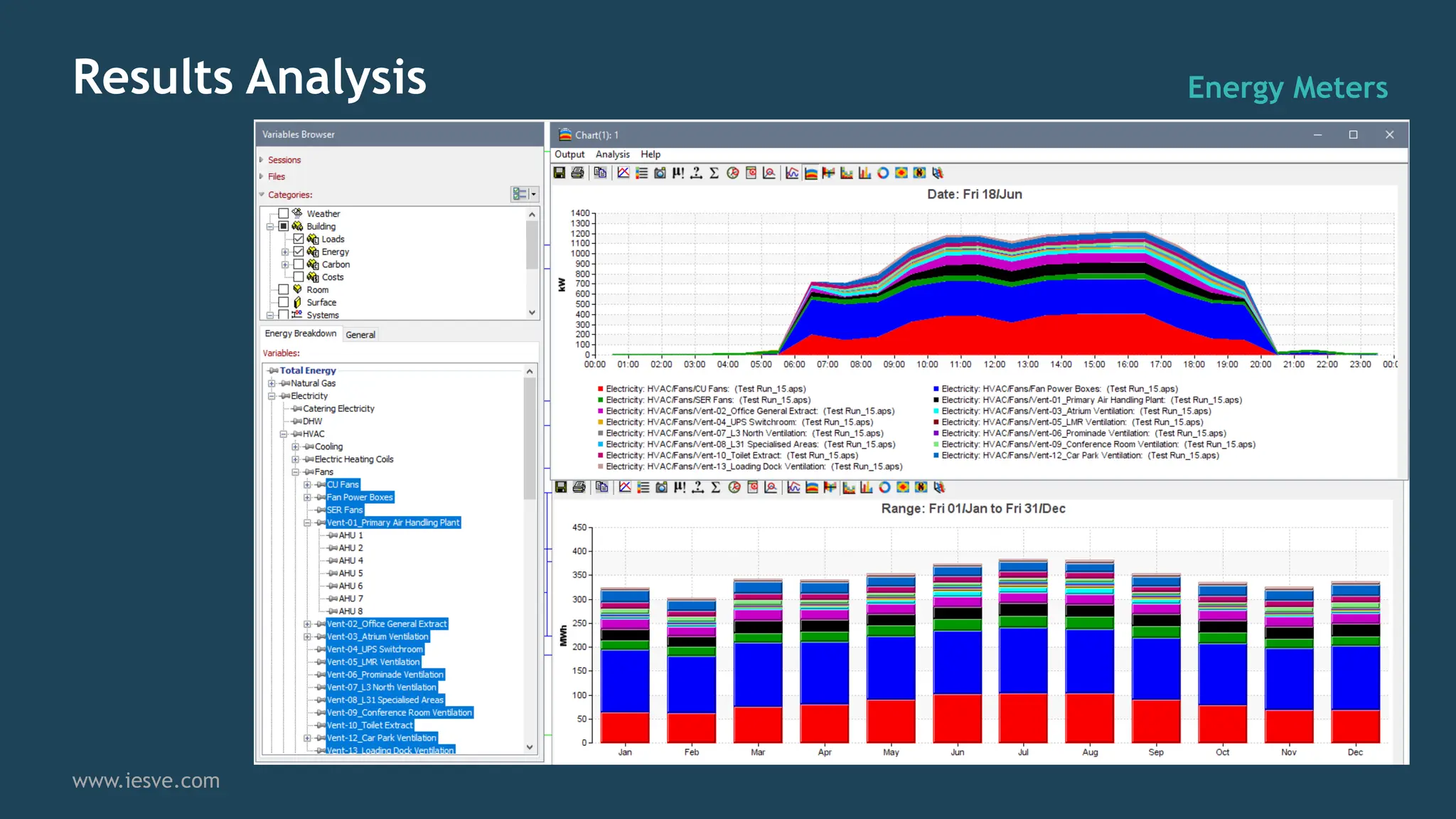
Results Analysis Energy Meters
www.iesve.com
Consultancy Support
www.iesve.com
• Geometric modelling
• UK Building Regulations modelling for Part L/Section
6/EPC/MEES compliance & strategic support
• Enhanced Building Energy Models (CIBSE TM54, NABERS,
BREEAM GN32 & ASHRAE 90.1)
• Detailed HVAC modelling adopting IES ApacheHVAC
• Net-Zero and Decarbonisation modelling for strategic
solutions and compliance (e.g. SFT NZPSB Standard)
• Part O strategy support & compliance modelling
• Daylight modelling for Planning Assessments
• CFD for Data Centres/External Comfort/Pollutant Dispersal
IESVE Software – Latest Release
www.iesve.com
https://www.iesve.com/ve2023
Contact Sales@iesve.com
NEW Indalo® Indoor Air Quality Navigator
Use CIBSE TM65 data to consider embodied carbon at design
stage, and meet the MEP 2040 challenge.
Contact Sales@iesve.com
NEW One Click LCA launch new MEP Carbon Tool
offering 90 days FREE access to IES customers
our next generation building energy and carbon management
platform
Sign up to our launch webinar on 13th March a 1pm GMT
Contact Sales@iesve.com
NEW IES Live
IESVE Training
www.iesve.com
IES Overheating Training (Online Live) - Elmhurst Energy
19th April –
Overheating in partnership with Elmhurst:
Live Online Training | IES (iesve.com)
Multiple Training courses from the IES Training
Team:
www.iesve.com
Richard.Tibenham@iesve.com
Michael.Pollock@iesve.com
Thank you
Q & A

Achieving Excellence IESVE for HVAC Simulation.pdf

  • 1.
    Achieving Excellence withIESVE Essential Knowledge Series IESVE for HVAC Simulation www.iesve.com Using ApacheHVAC for Detailed Simulation and Plant Analysis Michael Pollock Consultancy Manager Richard Tibenham UK Business Development Manager
  • 2.
    Michael Pollock Consultancy Manager (VEConsultancy) Richard Tibenham UK Business Development Manager (VE Consultancy)
  • 3.
    Agenda ▪ When toUse ApacheHVAC ▪ Introduction to ApacheHVAC ▪ Advantages of Detailed HVAC Modelling ▪ ApacheHVAC Systems Wizard ▪ HVAC Systems Library ▪ Autosizing ▪ Loads Reports ▪ Central Plant Heat Pumps ▪ Energy Meters ▪ Q&A www.iesve.com
  • 4.
    De-risk Innovative DesignSolutions Minimise Performance Gap When to use ApacheHVAC Building Performance Ratings Methods www.iesve.com Building Performance ratings including NABERS, LEED, BREEAM use detailed HVAC Modelling to accurately predict energy demands. Simulate innovative design solutions to help demonstrate the suitability of a design solution as well as identify potential issues and risks with a new design solution. Simulating plant performance in detail to accurately predict plant efficiency and system energy demands and explore opportunities to optimise building efficiency. Decarbonisation and Net-Zero Strategies Support accurate predictions of carbon emissions from new buildings and retrofit of existing buildings.
  • 5.
    Introduction to ApacheHVAC Featuresinclude: www.iesve.com • User Friendly • Flexible • Schematic • Component based network • Multiplexing • Pre-built Systems • Auto-sizing • Loads Reports • Hot Water Loops • Chilled Water Loops • Central Plant Heat Pumps • VRF ApacheHVAC is the module within the Virtual Environment used to Perform Detailed HVAC Modelling with ApacheSim
  • 6.
  • 7.
    Advantages of DetailedHVAC Modelling www.iesve.com Plant Capacity Basic HVAC Unlimited Heating & Cooling Capacity Detailed HVAC • Central Plant Capacity • Loop Capacity • Coil Capacity • Radiator Capacity • Loop Temperatures • Ambient Temperatures
  • 8.
    Advantages of DetailedHVAC Modelling www.iesve.com Heating / Cooling Efficiency Basic HVAC Constant Seasonal Efficiency Detailed HVAC Efficiency dynamically calculated at each timestep. Efficiency influenced by: • Part Load • Loop Temperatures • Ambient Temperatures
  • 9.
    Advantages of DetailedHVAC Modelling www.iesve.com Pump and Fan Power Basic HVAC Pump and fan power modelled as constant Auxiliary Energy Value. Detailed HVAC Each pump and fan within network separately modelled. Power draw calculated at each time-step based upon part load conditions. Analysis of individual components allows for enhanced analysis of results and opportunities to make savings.
  • 10.
    Advantages of DetailedHVAC Modelling www.iesve.com Plant Controls Basic HVAC Limited Control over system operation Detailed HVAC Flexible control of Airside Network:- • DCV • Supply temperature control • Night Cooling • Free-Cooling Control over Water Networks • Variable pumps Speed Control • Temperature Control
  • 11.
  • 12.
    HVAC System Wizard GeneralSetup and Zoning www.iesve.com Wizard accessed from the Apache Module Create new or update existing HVAC Network Use existing Room Groups or HVAC Zones Choose between ASHRAE or CIBSE methodology for Room Loads analysis
  • 13.
    HVAC System Wizard AirsideSystem Selection www.iesve.com Select prototype from a range of System Libraries Assign system type to selected Room Group Include multiple network types and groups within a single project Annotated graphics illustrate each system configuration
  • 14.
    HVAC System Wizard Watersideand Plant Equipment Selection www.iesve.com Select from a range of Chiller, Boiler, Heat Pump, VRF systems Assign Heating/Cooling source to each of the Airside Networks
  • 15.
    HVAC System Wizard HVACLoads, Sizing & Reports www.iesve.com Size Room Loads Determine Peak Heating and Cooling Loads for each Space and calculates the required airflow rates to meet Peak demand Size System Loads Sizes coils, fans Boilers, chillers etc. based on previous loads calculation Run Apache Simulation Perform a Dynamic Simulation using the Autosized HVAC Network
  • 16.
    HVAC System Wizard ApacheHVACNetwork www.iesve.com Upon Completion HVAC network can be accessed and modified within ApacheHVAC Green boundary and checkbox indicates network has been fully Autosized Changes can be made to default network efficiencies in line with design
  • 17.
  • 18.
    ApacheHVAC Prototype Library ImportNetworks www.iesve.com Pre-built and fully autosizable networks available to import into any project. Export Networks Custom networks created by the modeller can be saved to library to re-use on future projects.
  • 19.
    ApacheHVAC System Parameters SystemInfo Linked to Apache Room Data www.iesve.com Heating / Cooling Setpoints Automatically synced to Room Data. Updating set-points, ventilation rates, occupancy etc. automatically reflected in HVAC network settings.
  • 20.
    ApacheHVAC Autosizing System InfoLinked to Apache Room Data www.iesve.com All HVAC components and controllers automatically sized to meet peak loads from loads analysis. Autosized values indicated by Green text.
  • 21.
    ApacheHVAC Loads reports SizingReports www.iesve.com Automatic reports created with Building/System/Room level results. Use to aid HVAC system selection.
  • 22.
  • 23.
    Heat Pumps Reduced GridCO2 Emissions Factor www.iesve.com CO2 Emissions associated with Grid Electricity are steadily reducing annually and future projections continue this trend as more renewable energy is added to the mix. With the current carbon emission factors, CO2 emissions from Electricity are now lower than Natural Gas making it a cleaner fuel option for use in space heating. This is further compounded when Heat Pumps with High COP’s are utilised. Source: BEIS Updated Energy and Emissions Projections 2017
  • 24.
    Heat Pumps High Efficiency www.iesve.com AHeat Pump is an efficient means of generating heat which uses a vapour compression cycle to move energy from outside to inside the building thus achieving efficiencies greater than 100%. Rated conditions are typically provided at 7°C Outdoor Temperature and 35°C Hot Water Temperature.
  • 25.
    Heat Pumps Sensitivity to OperatingConditions www.iesve.com The operating conditions for a heat pump are important to understand when determining the efficiency and ultimately the associated energy consumption. For example, operating a heat pump at higher temperatures will typically result in lower operating efficiencies.
  • 26.
    Heat Pumps Central PlantHeat Pump Modelling www.iesve.com Loop can include multiple heat pumps that can be sequenced. Heat pumps can be modelled as Heating Only or Heating and Cooling.
  • 27.
    Heat Pumps Auxiliary HeatSource www.iesve.com Systems can be designed to include Secondary Heat sources to support Heat Pumps under colder conditions. Auxiliary water heating can be added to either primary or individual secondary loops.
  • 28.
  • 29.
    Energy Sub-Meters Creating anEnergy Metering Tree www.iesve.com Energy Meters are created to track energy usage within a dynamic simulation model. Flexible tree structure allows for multiple tiers to be created. Energy metering can be set to match installed metering strategy to facilitate calibrated energy modelling.
  • 30.
    Energy Sub-Meters Assigning EnergyMeters www.iesve.com Any energy consumer within the model can be linked to an energy meter allowing the energy usage to be grouped along with associated loads. Energy meter results would then be reviewed within VistaPro.
  • 31.
  • 32.
    Results Analysis RoomLevel Results www.iesve.com
  • 33.
    Results Analysis HVACAirside Components www.iesve.com
  • 34.
    Results Analysis HVACWaterside Components www.iesve.com
  • 35.
    Results Analysis HVACNodes www.iesve.com
  • 36.
    Results Analysis HVACControllers www.iesve.com
  • 37.
    Results Analysis EnergyMeters www.iesve.com
  • 38.
    Consultancy Support www.iesve.com • Geometricmodelling • UK Building Regulations modelling for Part L/Section 6/EPC/MEES compliance & strategic support • Enhanced Building Energy Models (CIBSE TM54, NABERS, BREEAM GN32 & ASHRAE 90.1) • Detailed HVAC modelling adopting IES ApacheHVAC • Net-Zero and Decarbonisation modelling for strategic solutions and compliance (e.g. SFT NZPSB Standard) • Part O strategy support & compliance modelling • Daylight modelling for Planning Assessments • CFD for Data Centres/External Comfort/Pollutant Dispersal
  • 39.
    IESVE Software –Latest Release www.iesve.com https://www.iesve.com/ve2023 Contact Sales@iesve.com NEW Indalo® Indoor Air Quality Navigator Use CIBSE TM65 data to consider embodied carbon at design stage, and meet the MEP 2040 challenge. Contact Sales@iesve.com NEW One Click LCA launch new MEP Carbon Tool offering 90 days FREE access to IES customers our next generation building energy and carbon management platform Sign up to our launch webinar on 13th March a 1pm GMT Contact Sales@iesve.com NEW IES Live
  • 40.
    IESVE Training www.iesve.com IES OverheatingTraining (Online Live) - Elmhurst Energy 19th April – Overheating in partnership with Elmhurst: Live Online Training | IES (iesve.com) Multiple Training courses from the IES Training Team:
  • 41.