CLONING-Analysis 
of visual effects on final cut pro X 
Analysis of visual effects on final cut pro X
• Cloning is something i have wanted to try in media for sometime, and is one 
of the features that final cut allows you to do in a way that other programs 
don't. 
• I assumed the process itself would be very difficult and would take a lot of 
technical skill, however when looking online at different tutorials i found that 
the task could be simple and would be something i could easily use. 
• it was also something that i could use in my own video, the skill i learnt looks 
professional when done correctly and could be something i can incorporate 
into the band scenes of my media.
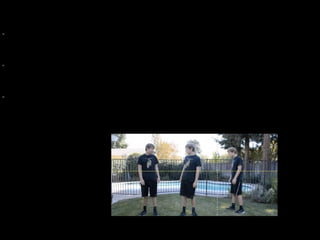
• As you can see the cloning can be done by filming the same person in two 
different areas of the shot, it was very important that the camera was kept still, as 
if it moves it can mean that in the editing process the shot won't be equal and it 
will be difficult to synchronise everything. 
• The two shots must be timed well as the one person in shot must be able to 
speak in a fluent style of conversation, if they dont then this shot can look messy 
and unprofessional. 
• Something else that needs to be remembered during the camera work part of the 
task is eye-line match, as in one attempt of the shot the eyes didn't match and the 
camera didnt run fluently, but that is something we will easily be able to resolve 
These are things i will need to consider if i am going to use cloning in my own 
music video. 
• Another thing that i need to consider when using cloning is that the lighting 
remains the same through the whole shot. the closer you can get to having the 
same lighting in a shot the better, as it means that less time has to be spent on 
colour enhancements in post production.
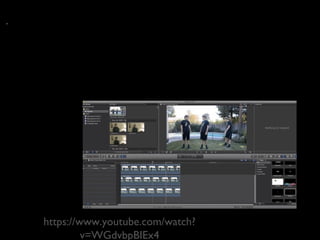
• There was an easy tutorial on youtube that helped me with the video itself, 
however once i had watched it once i knew quite easily what to do, it was about 
having more than one video on a timeline, and then cropping them so that it 
would flow easily together, the final touches were to put some colour matches 
and filters over the video as a whole to ensure that it looked realistic, this was 
important as to begin with their was a big line down the middle of the shot 
where it had been cropped, however this was easily resolved. 
https://www.youtube.com/watch? 
v=WGdvbpBIEx4

Cloning

  • 1.
    CLONING-Analysis of visualeffects on final cut pro X Analysis of visual effects on final cut pro X
  • 2.
    • Cloning issomething i have wanted to try in media for sometime, and is one of the features that final cut allows you to do in a way that other programs don't. • I assumed the process itself would be very difficult and would take a lot of technical skill, however when looking online at different tutorials i found that the task could be simple and would be something i could easily use. • it was also something that i could use in my own video, the skill i learnt looks professional when done correctly and could be something i can incorporate into the band scenes of my media.
  • 3.
    • As youcan see the cloning can be done by filming the same person in two different areas of the shot, it was very important that the camera was kept still, as if it moves it can mean that in the editing process the shot won't be equal and it will be difficult to synchronise everything. • The two shots must be timed well as the one person in shot must be able to speak in a fluent style of conversation, if they dont then this shot can look messy and unprofessional. • Something else that needs to be remembered during the camera work part of the task is eye-line match, as in one attempt of the shot the eyes didn't match and the camera didnt run fluently, but that is something we will easily be able to resolve These are things i will need to consider if i am going to use cloning in my own music video. • Another thing that i need to consider when using cloning is that the lighting remains the same through the whole shot. the closer you can get to having the same lighting in a shot the better, as it means that less time has to be spent on colour enhancements in post production.
  • 4.
    • There wasan easy tutorial on youtube that helped me with the video itself, however once i had watched it once i knew quite easily what to do, it was about having more than one video on a timeline, and then cropping them so that it would flow easily together, the final touches were to put some colour matches and filters over the video as a whole to ensure that it looked realistic, this was important as to begin with their was a big line down the middle of the shot where it had been cropped, however this was easily resolved. https://www.youtube.com/watch? v=WGdvbpBIEx4