Client Connections Integrated Desktop
A financial services firm seeks to bring together multiple lines of business to share a common view of their customers
A USER EXPERIENCE SERIES CASE STUDY By AXIS Information Architecture Group
In a full-service financial firm, distinct lines of business serve various
aspects of a client's needs. But when the banker, broker and support rep
don't share a common understanding of the client's multi-faceted financial
picture, the client can feel that their firm does not understand them.
Client Connections Integrated Desktop A USER EXPERIENCE SERIES CASE STUDY
Team Effort.
For the First time ever, Client
Connections provided the firm’s
associates an integrated view of their
clients. With bankers, brokers, and
support associates working together as
partners on a financial portfolio,
customers receive better service, better
attention, better answers, and a sense
that the firm is working collectively for
them.
A result of extensive user input and
feedback, the Client Connections user
interface was designed around a day-
planner paradigm, with overviews of
activities, opportunities, and client
account information. Client Connections
allowed Brokers and bankers to work
as a team for the benefit of their
clients, sharing information about each
customer, especially details of accounts
and interactions with the client.
Sharing readily empowers each partner
on the team to provide personal and
knowledgeable service to each Client.

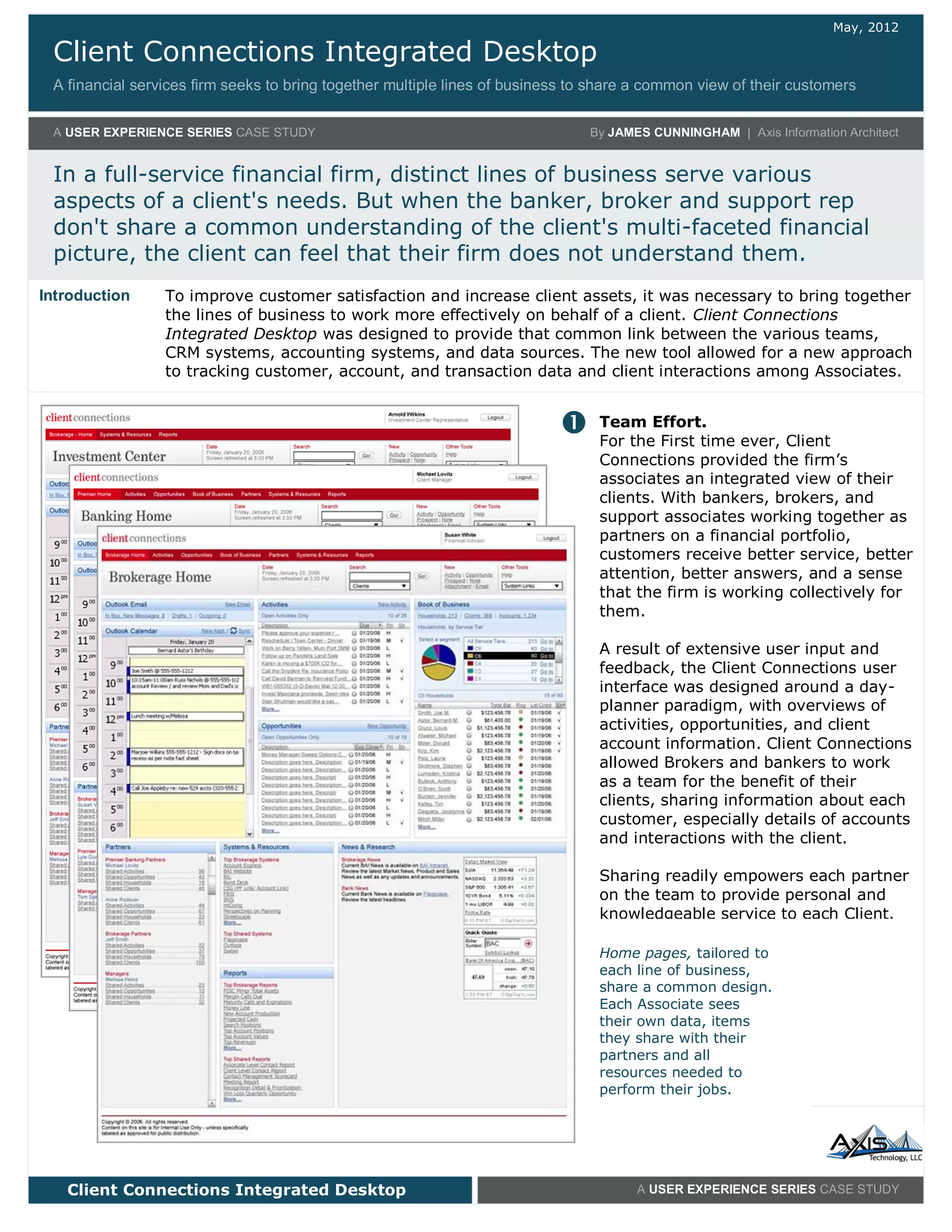
Home pages, tailored to
each line of business,
share a common design.
Each Associate sees
their own data, items
they share with their
partners and all
resources needed to
perform their jobs.
To improve customer satisfaction and increase client assets, it was necessary to bring together
the lines of business to work more effectively on behalf of a client. Client Connections
Integrated Desktop was designed to provide that common link between the various teams,
CRM systems, accounting systems, and data sources. The new tool allowed for a new approach
to tracking customer, account, and transaction data and client interactions among Associates.
Introduction
Client Connections Integrated Desktop
A USER EXPERIENCE SERIES CASE STUDY By AXIS Information Architecture Group
Client Connections Integrated Desktop A USER EXPERIENCE SERIES CASE STUDY
Unified Design
The Client Connections user interface is
organized to fit the firm’s new team-
oriented business model, providing
sections for Activities (tasks)
Opportunities (new business), Book of
Business (Client and Account data),
Partners (team members), Systems &
Resources, and Reports (external tools
and data).
Each section shares a common list view
design, and provides a variety of
options for analyzing, visualizing,
filtering, and sorting the data.
To provide further information, each
item - Client, Activity, Opportunity or
Account - has an Info Card (inset) for
quick access to key data and a Detail
screen (below) presenting a richer set
of data.




With its emphasis on shared information and its inviting interface, Client Connections bridges
gaps in communication, information, and toolsets that had long existed between associates
from the various lines of business. Associates now receive more complete data about the
firm’s clients, share their work more effectively, and have the opportunity to win more
business for the firm. Clients, meanwhile, receive the service they expect on their complete
financial portfolio.
In Closing
The Client Detail screen
provides a common
view of the customer to
all partners on the client
team.
A Profile area provides
extensive data about
the Client. Lists of
related Activities,
Opportunities, Accounts,
Attachments, and Notes
bring together all
information linked to
the client.
Info Cards are smaller
pop-up windows
providing key details
about an item within the
context of the current
page. These allow the
user to get more data
about an item or take
action on an item
without leaving the
screen they are viewing.

Client Connections

  • 1.
    Client Connections IntegratedDesktop A financial services firm seeks to bring together multiple lines of business to share a common view of their customers A USER EXPERIENCE SERIES CASE STUDY By AXIS Information Architecture Group In a full-service financial firm, distinct lines of business serve various aspects of a client's needs. But when the banker, broker and support rep don't share a common understanding of the client's multi-faceted financial picture, the client can feel that their firm does not understand them. Client Connections Integrated Desktop A USER EXPERIENCE SERIES CASE STUDY Team Effort. For the First time ever, Client Connections provided the firm’s associates an integrated view of their clients. With bankers, brokers, and support associates working together as partners on a financial portfolio, customers receive better service, better attention, better answers, and a sense that the firm is working collectively for them. A result of extensive user input and feedback, the Client Connections user interface was designed around a day- planner paradigm, with overviews of activities, opportunities, and client account information. Client Connections allowed Brokers and bankers to work as a team for the benefit of their clients, sharing information about each customer, especially details of accounts and interactions with the client. Sharing readily empowers each partner on the team to provide personal and knowledgeable service to each Client.  Home pages, tailored to each line of business, share a common design. Each Associate sees their own data, items they share with their partners and all resources needed to perform their jobs. To improve customer satisfaction and increase client assets, it was necessary to bring together the lines of business to work more effectively on behalf of a client. Client Connections Integrated Desktop was designed to provide that common link between the various teams, CRM systems, accounting systems, and data sources. The new tool allowed for a new approach to tracking customer, account, and transaction data and client interactions among Associates. Introduction
  • 2.
    Client Connections IntegratedDesktop A USER EXPERIENCE SERIES CASE STUDY By AXIS Information Architecture Group Client Connections Integrated Desktop A USER EXPERIENCE SERIES CASE STUDY Unified Design The Client Connections user interface is organized to fit the firm’s new team- oriented business model, providing sections for Activities (tasks) Opportunities (new business), Book of Business (Client and Account data), Partners (team members), Systems & Resources, and Reports (external tools and data). Each section shares a common list view design, and provides a variety of options for analyzing, visualizing, filtering, and sorting the data. To provide further information, each item - Client, Activity, Opportunity or Account - has an Info Card (inset) for quick access to key data and a Detail screen (below) presenting a richer set of data.     With its emphasis on shared information and its inviting interface, Client Connections bridges gaps in communication, information, and toolsets that had long existed between associates from the various lines of business. Associates now receive more complete data about the firm’s clients, share their work more effectively, and have the opportunity to win more business for the firm. Clients, meanwhile, receive the service they expect on their complete financial portfolio. In Closing The Client Detail screen provides a common view of the customer to all partners on the client team. A Profile area provides extensive data about the Client. Lists of related Activities, Opportunities, Accounts, Attachments, and Notes bring together all information linked to the client. Info Cards are smaller pop-up windows providing key details about an item within the context of the current page. These allow the user to get more data about an item or take action on an item without leaving the screen they are viewing.