Muhammad Aon
Muhammad Irfan
Abdul Hakeem
Muhammad Kashif
Clerical Temps
Purpose
 To demonstrate a practical application of database
design and implementation techniques.
General Description
 It is agency that provides temporary clerical help to its
clients
 It has 1000 workers and about 250 clients
 They perform activities using file processing system or
manual system
 Now they want to develop a database system to control
its operation
Basic Operations
 Ann King is owner of that agency
 She is assisted by Personnel Director, Accounting
Manager and client representative
 Personnel Director recruits and hire new workers,
promotes good workers and suspend unsatisfactory
workers
 Accounting Manager is responsible for account
receivable and payroll
 Client Representative finds new clients and
communicates with all clients
Information Needs
 The database will be used to track of payroll, account
receivable, personnel records of active workers, client
records, job requests and job assignments
Step 1
 Write out the format of every input document and
every report, and the input and output screens for
every routine transaction to be performed against the
database
 Following forms are use to provide
information
1.Worker Application Form
Date of Application _________________________
Name ________________________________________________________________
Address
______________________________________________________________________
______________________________________________________________________
Telephone ____________________________________________________________
Social Security Number _________________________________________________
*Date of Birth _____________________________ *Sex ______________________
Skills Applicant: Check each of the following skills you have. Do not enter the
level of skill. You will be tested on each of the skills you check and the interviewer
will fill in the level, based on your test performance.
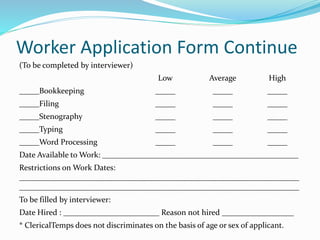
Worker Application Form Continue
(To be completed by interviewer)
Low Average High
_____Bookkeeping _____ _____ _____
_____Filing _____ _____ _____
_____Stenography _____ _____ _____
_____Typing _____ _____ _____
_____Word Processing _____ _____ _____
Date Available to Work: _________________________________________________
Restrictions on Work Dates:
______________________________________________________________________
______________________________________________________________________
To be filled by interviewer:
Date Hired : ________________________ Reason not hired __________________
* ClericalTemps does not discriminates on the basis of age or sex of applicant.
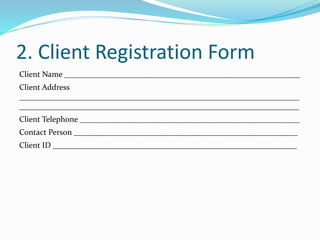
2. Client Registration Form
Client Name ___________________________________________________________
Client Address
______________________________________________________________________
______________________________________________________________________
Client Telephone _______________________________________________________
Contact Person ________________________________________________________
Client ID _____________________________________________________________
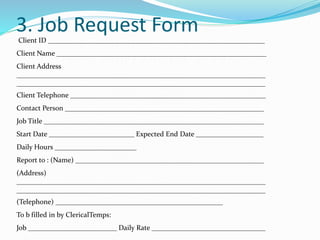
3. Job Request Form
Client ID _____________________________________________________________
Client Name ___________________________________________________________
Client Address
______________________________________________________________________
______________________________________________________________________
Client Telephone _______________________________________________________
Contact Person ________________________________________________________
Job Title ______________________________________________________________
Start Date ________________________ Expected End Date ___________________
Daily Hours _______________________
Report to : (Name) _____________________________________________________
(Address)
______________________________________________________________________
______________________________________________________________________
(Telephone) _______________________________________________
To b filled in by ClericalTemps:
Job _________________________ Daily Rate ________________________________
4. Worker Evaluation Form
Client ID _____________________________________________________________
Client Name ___________________________________________________________
Client Address
_______________________________________________________________________________________________
_____________________________________________
Client Telephone _______________________________________________________
Employee ID __________________________________________________________
Employee Name _______________________________________________________
Job # ____________________________ Job Title ______________________________
Starting Date __________________________________________________________
Employee Rating: Please evaluate the performance of the ClericalTemps worker name above on the job
indicated above:
_____ Excellent – 5
_____ Good – 4
_____ Average – 3
_____ Fair – 2
_____ Unsatisfactory -1
Signature of Rater ______________________________________________________
Name of Rater (Please print or type) _______________________________________
Title of Rater __________________________________________________________
Date of Rating _________________________________________________________
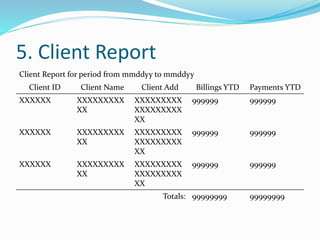
5. Client Report
Client Report for period from mmddyy to mmddyy
Client ID Client Name Client Add Billings YTD Payments YTD
XXXXXX XXXXXXXXX
XX
XXXXXXXXX
XXXXXXXXX
XX
999999 999999
XXXXXX XXXXXXXXX
XX
XXXXXXXXX
XXXXXXXXX
XX
999999 999999
XXXXXX XXXXXXXXX
XX
XXXXXXXXX
XXXXXXXXX
XX
999999 999999
Totals: 99999999 99999999
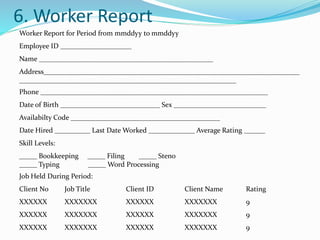
6. Worker Report
Worker Report for Period from mmddyy to mmddyy
Employee ID ____________________
Name _________________________________________________
Address________________________________________________________________________
_____________________________________________________________
Phone ________________________________________________________________
Date of Birth ____________________________ Sex __________________________
Availabilty Code __________________________________________
Date Hired __________ Last Date Worked _____________ Average Rating ______
Skill Levels:
_____ Bookkeeping _____ Filing _____ Steno
_____ Typing _____ Word Processing
Job Held During Period:
Client No Job Title Client ID Client Name Rating
XXXXXX XXXXXXX XXXXXX XXXXXXX 9
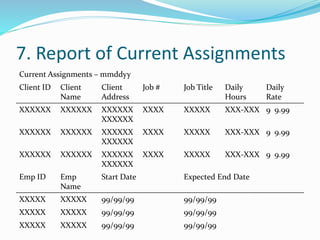
7. Report of Current Assignments
Current Assignments – mmddyy
Client ID Client
Name
Client
Address
Job # Job Title Daily
Hours
Daily
Rate
XXXXXX XXXXXX XXXXXX
XXXXXX
XXXX XXXXX XXX-XXX 9 9.99
XXXXXX XXXXXX XXXXXX
XXXXXX
XXXX XXXXX XXX-XXX 9 9.99
XXXXXX XXXXXX XXXXXX
XXXXXX
XXXX XXXXX XXX-XXX 9 9.99
Emp ID Emp
Name
Start Date Expected End Date
XXXXX XXXXX 99/99/99 99/99/99
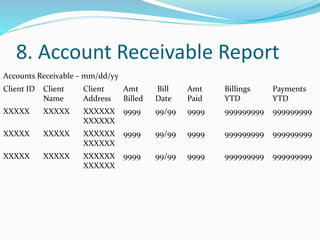
8. Account Receivable Report
Accounts Receivable – mm/dd/yy
Client ID Client
Name
Client
Address
Amt
Billed
Bill
Date
Amt
Paid
Billings
YTD
Payments
YTD
XXXXX XXXXX XXXXXX
XXXXXX
9999 99/99 9999 999999999 999999999
XXXXX XXXXX XXXXXX
XXXXXX
9999 99/99 9999 999999999 999999999
XXXXX XXXXX XXXXXX
XXXXXX
9999 99/99 9999 999999999 999999999
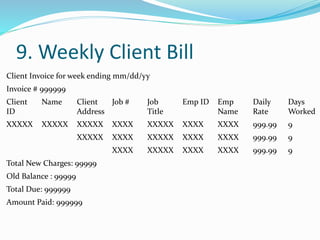
9. Weekly Client Bill
Client Invoice for week ending mm/dd/yy
Invoice # 999999
Client
ID
Name Client
Address
Job # Job
Title
Emp ID Emp
Name
Daily
Rate
Days
Worked
XXXXX XXXXX XXXXX XXXX XXXXX XXXX XXXX 999.99 9
XXXXX XXXX XXXXX XXXX XXXX 999.99 9
XXXX XXXXX XXXX XXXX 999.99 9
Total New Charges: 99999
Old Balance : 99999
Total Due: 999999
Amount Paid: 999999
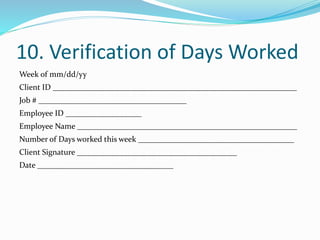
10. Verification of Days Worked
Week of mm/dd/yy
Client ID _____________________________________________________________
Job # _____________________________________
Employee ID ___________________
Employee Name _______________________________________________________
Number of Days worked this week _______________________________________
Client Signature ________________________________________
Date __________________________________
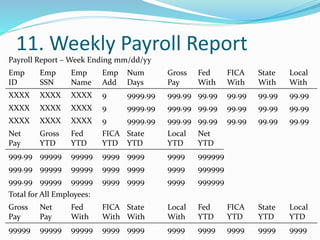
11. Weekly Payroll Report
Payroll Report – Week Ending mm/dd/yy
Emp
ID
Emp
SSN
Emp
Name
Emp
Add
Num
Days
Gross
Pay
Fed
With
FICA
With
State
With
Local
With
XXXX XXXX XXXX 9 9999.99 999.99 99.99 99.99 99.99 99.99
Net
Pay
Gross
YTD
Fed
YTD
FICA
YTD
State
YTD
Local
YTD
Net
YTD
999.99 99999 99999 9999 9999 9999 999999
999.99 99999 99999 9999 9999 9999 999999
999.99 99999 99999 9999 9999 9999 999999
Total for All Employees:
Gross
Pay
Net
Pay
Fed
With
FICA
With
State
With
Local
With
Fed
YTD
FICA
YTD
State
YTD
Local
YTD
99999 99999 99999 9999 9999 9999 9999 9999 9999 9999
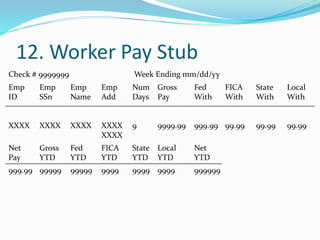
12. Worker Pay Stub
Check # 9999999 Week Ending mm/dd/yy
Emp
ID
Emp
SSn
Emp
Name
Emp
Add
Num
Days
Gross
Pay
Fed
With
FICA
With
State
With
Local
With
XXXX XXXX XXXX XXXX
XXXX
9 9999.99 999.99 99.99 99.99 99.99
Net
Pay
Gross
YTD
Fed
YTD
FICA
YTD
State
YTD
Local
YTD
Net
YTD
999.99 99999 99999 9999 9999 9999 999999
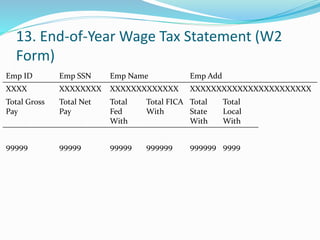
13. End-of-Year Wage Tax Statement (W2
Form)
Emp ID Emp SSN Emp Name Emp Add
XXXX XXXXXXXX XXXXXXXXXXXXX XXXXXXXXXXXXXXXXXXXXXXX
Total Gross
Pay
Total Net
Pay
Total
Fed
With
Total FICA
With
Total
State
With
Total
Local
With
99999 99999 99999 999999 999999 9999
14. Worker Entry and Edit
1. To add a new worker, enter the data in the blank spaces.
2. To correct data for a worker, enter the new data by typing over the old values.
Employee ID _________________ Social Security Number ____________________
Name ________________________________________________________________
Address_______________________________________________________________
______________________________________________________________________
Telephone_____________________________________
Date of Birth _________________ Sex___________ Date Hired ________________
Availability Code _______________________________________________________
Average Rating _______________________
Skill Levels: ____Bookkeeping ____Filing ____ Stenography
____ Typing ____ Word Processing
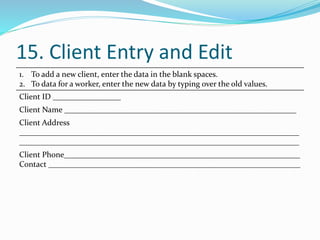
15. Client Entry and Edit
1. To add a new client, enter the data in the blank spaces.
2. To data for a worker, enter the new data by typing over the old values.
Client ID _________________
Client Name __________________________________________________________
Client Address
______________________________________________________________________
______________________________________________________________________
Client Phone___________________________________________________________
Contact _______________________________________________________________
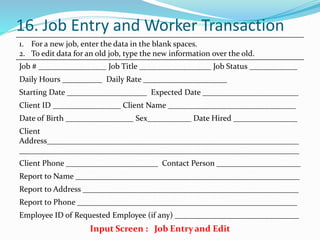
16. Job Entry and Worker Transaction
1. For a new job, enter the data in the blank spaces.
2. To edit data for an old job, type the new information over the old.
Job # _________________ Job Title __________________ Job Status ____________
Daily Hours __________ Daily Rate _____________________
Starting Date ____________________ Expected Date ________________________
Client ID _________________ Client Name ________________________________
Date of Birth _________________ Sex___________ Date Hired ________________
Client
Address_______________________________________________________________
______________________________________________________________________
Client Phone _______________________ Contact Person _____________________
Report to Name ________________________________________________________
Report to Address ______________________________________________________
Report to Phone _______________________________________________________
Employee ID of Requested Employee (if any) _______________________________
Input Screen : Job Entry and Edit
Continue
1. The following worker is eligible for the job.
2. To see other eligible workers, press enter until the message “No others are
eligible” is displayed.
Employee ID _________________ Social Security Number ____________________
Name ________________________________________________________________
Address_______________________________________________________________
______________________________________________________________________
Telephone_____________________________________
Average Rating ____________________________________________
Last Date Worked ______________________________________
Skill Levels: ____Bookkeeping ____Filing ____ Steno
____ Typing ____ Word Processing
Output Screen : Potential Workers for Job
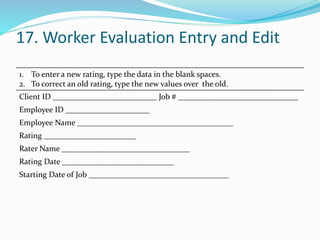
17. Worker Evaluation Entry and Edit
1. To enter a new rating, type the data in the blank spaces.
2. To correct an old rating, type the new values over the old.
Client ID __________________________ Job # ______________________________
Employee ID _____________________
Employee Name _______________________________________
Rating _______________________
Rater Name ________________________________
Rating Date ____________________________
Starting Date of Job ___________________________________
Study the environment and write out a list of
assumptions
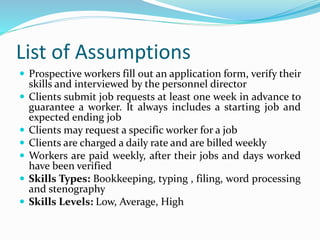
List of Assumptions
 Prospective workers fill out an application form, verify their
skills and interviewed by the personnel director
 Clients submit job requests at least one week in advance to
guarantee a worker. It always includes a starting job and
expected ending job
 Clients may request a specific worker for a job
 Clients are charged a daily rate and are billed weekly
 Workers are paid weekly, after their jobs and days worked
have been verified
 Skills Types: Bookkeeping, typing , filing, word processing
and stenography
 Skills Levels: Low, Average, High
Continue
 Rate charged to clients and salary to paid workers
depend on job title, which is determined by the
required skill types and levels
 At the end of each job, the client is asked to submit
and evaluation of workers. Rating range from
1(Unsatisfactory) to 5 (Excellent).

Clerical Temps.pptx

  • 1.
    Muhammad Aon Muhammad Irfan AbdulHakeem Muhammad Kashif
  • 2.
  • 3.
    Purpose  To demonstratea practical application of database design and implementation techniques.
  • 4.
    General Description  Itis agency that provides temporary clerical help to its clients  It has 1000 workers and about 250 clients  They perform activities using file processing system or manual system  Now they want to develop a database system to control its operation
  • 5.
    Basic Operations  AnnKing is owner of that agency  She is assisted by Personnel Director, Accounting Manager and client representative  Personnel Director recruits and hire new workers, promotes good workers and suspend unsatisfactory workers  Accounting Manager is responsible for account receivable and payroll  Client Representative finds new clients and communicates with all clients
  • 6.
    Information Needs  Thedatabase will be used to track of payroll, account receivable, personnel records of active workers, client records, job requests and job assignments
  • 8.
    Step 1  Writeout the format of every input document and every report, and the input and output screens for every routine transaction to be performed against the database  Following forms are use to provide information
  • 9.
    1.Worker Application Form Dateof Application _________________________ Name ________________________________________________________________ Address ______________________________________________________________________ ______________________________________________________________________ Telephone ____________________________________________________________ Social Security Number _________________________________________________ *Date of Birth _____________________________ *Sex ______________________ Skills Applicant: Check each of the following skills you have. Do not enter the level of skill. You will be tested on each of the skills you check and the interviewer will fill in the level, based on your test performance.
  • 10.
    Worker Application FormContinue (To be completed by interviewer) Low Average High _____Bookkeeping _____ _____ _____ _____Filing _____ _____ _____ _____Stenography _____ _____ _____ _____Typing _____ _____ _____ _____Word Processing _____ _____ _____ Date Available to Work: _________________________________________________ Restrictions on Work Dates: ______________________________________________________________________ ______________________________________________________________________ To be filled by interviewer: Date Hired : ________________________ Reason not hired __________________ * ClericalTemps does not discriminates on the basis of age or sex of applicant.
  • 11.
    2. Client RegistrationForm Client Name ___________________________________________________________ Client Address ______________________________________________________________________ ______________________________________________________________________ Client Telephone _______________________________________________________ Contact Person ________________________________________________________ Client ID _____________________________________________________________
  • 12.
    3. Job RequestForm Client ID _____________________________________________________________ Client Name ___________________________________________________________ Client Address ______________________________________________________________________ ______________________________________________________________________ Client Telephone _______________________________________________________ Contact Person ________________________________________________________ Job Title ______________________________________________________________ Start Date ________________________ Expected End Date ___________________ Daily Hours _______________________ Report to : (Name) _____________________________________________________ (Address) ______________________________________________________________________ ______________________________________________________________________ (Telephone) _______________________________________________ To b filled in by ClericalTemps: Job _________________________ Daily Rate ________________________________
  • 13.
    4. Worker EvaluationForm Client ID _____________________________________________________________ Client Name ___________________________________________________________ Client Address _______________________________________________________________________________________________ _____________________________________________ Client Telephone _______________________________________________________ Employee ID __________________________________________________________ Employee Name _______________________________________________________ Job # ____________________________ Job Title ______________________________ Starting Date __________________________________________________________ Employee Rating: Please evaluate the performance of the ClericalTemps worker name above on the job indicated above: _____ Excellent – 5 _____ Good – 4 _____ Average – 3 _____ Fair – 2 _____ Unsatisfactory -1 Signature of Rater ______________________________________________________ Name of Rater (Please print or type) _______________________________________ Title of Rater __________________________________________________________ Date of Rating _________________________________________________________
  • 14.
    5. Client Report ClientReport for period from mmddyy to mmddyy Client ID Client Name Client Add Billings YTD Payments YTD XXXXXX XXXXXXXXX XX XXXXXXXXX XXXXXXXXX XX 999999 999999 XXXXXX XXXXXXXXX XX XXXXXXXXX XXXXXXXXX XX 999999 999999 XXXXXX XXXXXXXXX XX XXXXXXXXX XXXXXXXXX XX 999999 999999 Totals: 99999999 99999999
  • 15.
    6. Worker Report WorkerReport for Period from mmddyy to mmddyy Employee ID ____________________ Name _________________________________________________ Address________________________________________________________________________ _____________________________________________________________ Phone ________________________________________________________________ Date of Birth ____________________________ Sex __________________________ Availabilty Code __________________________________________ Date Hired __________ Last Date Worked _____________ Average Rating ______ Skill Levels: _____ Bookkeeping _____ Filing _____ Steno _____ Typing _____ Word Processing Job Held During Period: Client No Job Title Client ID Client Name Rating XXXXXX XXXXXXX XXXXXX XXXXXXX 9 XXXXXX XXXXXXX XXXXXX XXXXXXX 9 XXXXXX XXXXXXX XXXXXX XXXXXXX 9
  • 16.
    7. Report ofCurrent Assignments Current Assignments – mmddyy Client ID Client Name Client Address Job # Job Title Daily Hours Daily Rate XXXXXX XXXXXX XXXXXX XXXXXX XXXX XXXXX XXX-XXX 9 9.99 XXXXXX XXXXXX XXXXXX XXXXXX XXXX XXXXX XXX-XXX 9 9.99 XXXXXX XXXXXX XXXXXX XXXXXX XXXX XXXXX XXX-XXX 9 9.99 Emp ID Emp Name Start Date Expected End Date XXXXX XXXXX 99/99/99 99/99/99 XXXXX XXXXX 99/99/99 99/99/99 XXXXX XXXXX 99/99/99 99/99/99
  • 17.
    8. Account ReceivableReport Accounts Receivable – mm/dd/yy Client ID Client Name Client Address Amt Billed Bill Date Amt Paid Billings YTD Payments YTD XXXXX XXXXX XXXXXX XXXXXX 9999 99/99 9999 999999999 999999999 XXXXX XXXXX XXXXXX XXXXXX 9999 99/99 9999 999999999 999999999 XXXXX XXXXX XXXXXX XXXXXX 9999 99/99 9999 999999999 999999999
  • 18.
    9. Weekly ClientBill Client Invoice for week ending mm/dd/yy Invoice # 999999 Client ID Name Client Address Job # Job Title Emp ID Emp Name Daily Rate Days Worked XXXXX XXXXX XXXXX XXXX XXXXX XXXX XXXX 999.99 9 XXXXX XXXX XXXXX XXXX XXXX 999.99 9 XXXX XXXXX XXXX XXXX 999.99 9 Total New Charges: 99999 Old Balance : 99999 Total Due: 999999 Amount Paid: 999999
  • 19.
    10. Verification ofDays Worked Week of mm/dd/yy Client ID _____________________________________________________________ Job # _____________________________________ Employee ID ___________________ Employee Name _______________________________________________________ Number of Days worked this week _______________________________________ Client Signature ________________________________________ Date __________________________________
  • 20.
    11. Weekly PayrollReport Payroll Report – Week Ending mm/dd/yy Emp ID Emp SSN Emp Name Emp Add Num Days Gross Pay Fed With FICA With State With Local With XXXX XXXX XXXX 9 9999.99 999.99 99.99 99.99 99.99 99.99 XXXX XXXX XXXX 9 9999.99 999.99 99.99 99.99 99.99 99.99 XXXX XXXX XXXX 9 9999.99 999.99 99.99 99.99 99.99 99.99 Net Pay Gross YTD Fed YTD FICA YTD State YTD Local YTD Net YTD 999.99 99999 99999 9999 9999 9999 999999 999.99 99999 99999 9999 9999 9999 999999 999.99 99999 99999 9999 9999 9999 999999 Total for All Employees: Gross Pay Net Pay Fed With FICA With State With Local With Fed YTD FICA YTD State YTD Local YTD 99999 99999 99999 9999 9999 9999 9999 9999 9999 9999
  • 21.
    12. Worker PayStub Check # 9999999 Week Ending mm/dd/yy Emp ID Emp SSn Emp Name Emp Add Num Days Gross Pay Fed With FICA With State With Local With XXXX XXXX XXXX XXXX XXXX 9 9999.99 999.99 99.99 99.99 99.99 Net Pay Gross YTD Fed YTD FICA YTD State YTD Local YTD Net YTD 999.99 99999 99999 9999 9999 9999 999999
  • 22.
    13. End-of-Year WageTax Statement (W2 Form) Emp ID Emp SSN Emp Name Emp Add XXXX XXXXXXXX XXXXXXXXXXXXX XXXXXXXXXXXXXXXXXXXXXXX Total Gross Pay Total Net Pay Total Fed With Total FICA With Total State With Total Local With 99999 99999 99999 999999 999999 9999
  • 23.
    14. Worker Entryand Edit 1. To add a new worker, enter the data in the blank spaces. 2. To correct data for a worker, enter the new data by typing over the old values. Employee ID _________________ Social Security Number ____________________ Name ________________________________________________________________ Address_______________________________________________________________ ______________________________________________________________________ Telephone_____________________________________ Date of Birth _________________ Sex___________ Date Hired ________________ Availability Code _______________________________________________________ Average Rating _______________________ Skill Levels: ____Bookkeeping ____Filing ____ Stenography ____ Typing ____ Word Processing
  • 24.
    15. Client Entryand Edit 1. To add a new client, enter the data in the blank spaces. 2. To data for a worker, enter the new data by typing over the old values. Client ID _________________ Client Name __________________________________________________________ Client Address ______________________________________________________________________ ______________________________________________________________________ Client Phone___________________________________________________________ Contact _______________________________________________________________
  • 25.
    16. Job Entryand Worker Transaction 1. For a new job, enter the data in the blank spaces. 2. To edit data for an old job, type the new information over the old. Job # _________________ Job Title __________________ Job Status ____________ Daily Hours __________ Daily Rate _____________________ Starting Date ____________________ Expected Date ________________________ Client ID _________________ Client Name ________________________________ Date of Birth _________________ Sex___________ Date Hired ________________ Client Address_______________________________________________________________ ______________________________________________________________________ Client Phone _______________________ Contact Person _____________________ Report to Name ________________________________________________________ Report to Address ______________________________________________________ Report to Phone _______________________________________________________ Employee ID of Requested Employee (if any) _______________________________ Input Screen : Job Entry and Edit
  • 26.
    Continue 1. The followingworker is eligible for the job. 2. To see other eligible workers, press enter until the message “No others are eligible” is displayed. Employee ID _________________ Social Security Number ____________________ Name ________________________________________________________________ Address_______________________________________________________________ ______________________________________________________________________ Telephone_____________________________________ Average Rating ____________________________________________ Last Date Worked ______________________________________ Skill Levels: ____Bookkeeping ____Filing ____ Steno ____ Typing ____ Word Processing Output Screen : Potential Workers for Job
  • 27.
    17. Worker EvaluationEntry and Edit 1. To enter a new rating, type the data in the blank spaces. 2. To correct an old rating, type the new values over the old. Client ID __________________________ Job # ______________________________ Employee ID _____________________ Employee Name _______________________________________ Rating _______________________ Rater Name ________________________________ Rating Date ____________________________ Starting Date of Job ___________________________________
  • 28.
    Study the environmentand write out a list of assumptions
  • 29.
    List of Assumptions Prospective workers fill out an application form, verify their skills and interviewed by the personnel director  Clients submit job requests at least one week in advance to guarantee a worker. It always includes a starting job and expected ending job  Clients may request a specific worker for a job  Clients are charged a daily rate and are billed weekly  Workers are paid weekly, after their jobs and days worked have been verified  Skills Types: Bookkeeping, typing , filing, word processing and stenography  Skills Levels: Low, Average, High
  • 30.
    Continue  Rate chargedto clients and salary to paid workers depend on job title, which is determined by the required skill types and levels  At the end of each job, the client is asked to submit and evaluation of workers. Rating range from 1(Unsatisfactory) to 5 (Excellent).