welcome
Office Management
System
Presented By: Supervisor:
S. M. Shamim Toyeer-E-Ferdoush
#ID: 17103195 Faculty
Dept. of
Computer Science
&
Engineering
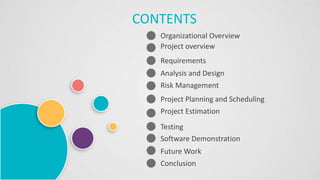
Organizational Overview
Project overview
CONTENTS
Requirements
Analysis and Design
Testing
Software Demonstration
Future Work
Conclusion
Risk Management
Project Planning and Scheduling
Project Estimation
Organizational
Overview
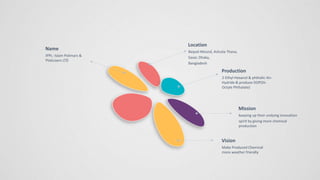
Name
IPPL- Islam Polimars &
Platicizers LTD
Location
Baipail Moszid, Ashulia Thana,
Savar, Dhaka,
Bangladesh
Production
2-Ethyl-Hexanol & phthalic-An-
Hydride & produce DOP(Di-
Octyle Phthalate)
Vision
Make Produced Chemical
more weather friendly
Mission
keeping up their undying innovation
spirit by giving more chemical
production
Project
Overview
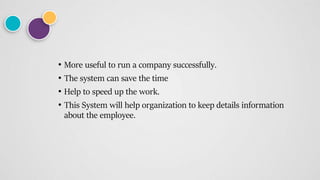
• More useful to run a company successfully.
• The system can save the time
• Help to speed up the work.
• This System will help organization to keep details information
about the employee.
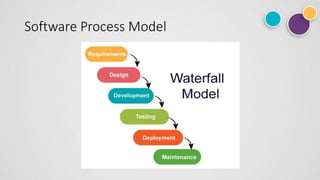
Software Process Model
Choosing Reason
• Sequential process model
• conception, initiation, analysis, design, construction.
Feasibility Study
• Technical feasibility: To build this project I used HTML, CSS, PHP with
MySQL database and this project is technically feasible as company
give me the requirement to do the work for their resources and which
are available now and worked on it.
• Operational feasibility: I used here some drop down box according to
the user that data will come automatically no need to fill up any form
by using text. And also there is no complexity that can confuse the
user.
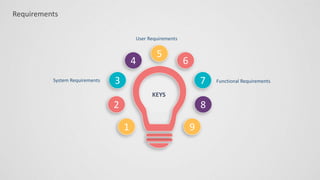
Requirements
Requirements
3
2
1
6
7
8
4
5
9
Functional Requirements
User Requirements
System Requirements
KEYS
User Requirements
• 1.Admin can add employee and give user id and password to access
the software.
• 2.Admin can update information and view their profile.
• 3.Employee can give their attendance to the system.
• 4.Admin can view the admin dashboard where he can see the total
employees.
• 5.Admin can manage project monitoring; admin posts task notice for
employees.
SYSTEM REQUIREMENTS:
1. Admin can add employee and give user id and password to
access the software:
1.1 Admin can log in using Id and password.
1.2 Admin can add new employee with employee id,
employee name, position, schedule, member’s
joining information and employee’s photo.
1.3 Admin will press the save button to complete the new
employee registration.
SYSTEM REQUIREMENTS:
2.Admin can update information and view their profile.
2.1 Admin can log in using Id and password.
2.2 Admin can update their profile and view also.
3.Employee can give their attendance to the system.
3.1 If Employee is present then give the attendance by clicking
time in button.
3.2 When employee leave the office then click time out button.
SYSTEM REQUIREMENTS:
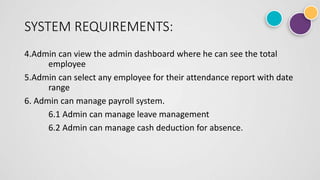
4.Admin can view the admin dashboard where he can see the total
employee
5.Admin can select any employee for their attendance report with date
range
6. Admin can manage payroll system.
6.1 Admin can manage leave management
6.2 Admin can manage cash deduction for absence.
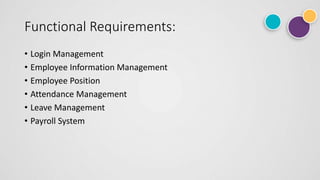
Functional Requirements:
• Login Management
• Employee Information Management
• Employee Position
• Attendance Management
• Leave Management
• Payroll System
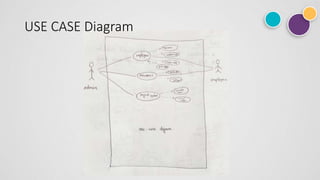
USE CASE Diagram
Functions of this System
Login Management [F01]
Employee Management [F02]
Attendance Management [F03]
Leave Management [F04]
Payroll System [F05]
Project Assign [F06]
Planning &
Scheduling
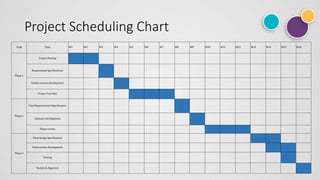
Project Scheduling Chart
Task Time W1 W2 W3 W4 W5 W6 W7 W8 W9 W10 W11 W12 W13 W14 W15 W16
Phase 1
Project Planing
Requirement Specifications
Initital version development
Project Test Plan
Phase 2
Final Requirements Specification
Software development
Phase review
Phase 3
Final design Specification
Final version development
Testing
Review & Approval
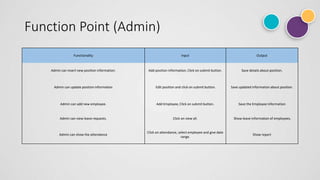
Function Point (Admin)
Functionality Input Output
Admin can insert new position information. Add position information, Click on submit button. Save details about position.
Admin can update position information Edit position and click on submit button. Save updated information about position.
Admin can add new employee. Add Employee, Click on submit button. Save the Employee Information
Admin can view leave requests. Click on view all. Show leave information of employees.
Admin can show the attendance
Click on attendance, select employee and give date
range.
Show report
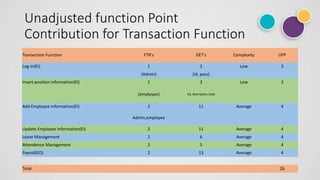
Unadjusted function Point
Contribution for Transaction Function
Transection Function FTR's DET's Complexity UFP
Log-in(EI) 1 2 Low 3
(Admin) (id, pass)
Insert position information(EI) 1 3 Low 3
(employee) (id, description,rate)
Add Employee information(EI) 2 11 Average 4
Admin,employee
Update Employee information(EI) 2 11 Average 4
Leave Management 2 6 Average 4
Attendence Management 2 5 Average 4
Payroll(EO) 2 13 Average 4
Total 26
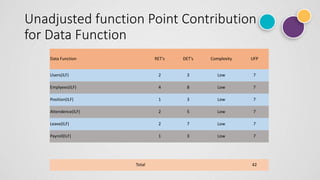
Unadjusted function Point Contribution
for Data Function
Data Function RET's DET's Complexity UFP
Users(ILF) 2 3 Low 7
Emplyees(ILF) 4 8 Low 7
Position(ILF) 1 3 Low 7
Attendence(ILF) 2 5 Low 7
Leave(ILF) 2 7 Low 7
Payroll(ILF) 1 3 Low 7
Total 42
Project
Estimation
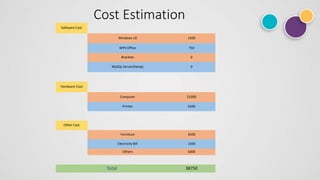
Cost Estimation
Software Cost
Windows 10 1500
WPS Office 750
Brackets 0
MySQL Server(Xamp) 0
Hardware Cost
Computer 21000
Printer 5500
Other Cost
Furniture 3500
Electricity Bill 1500
Others 5000
Total 38750
Analysis
&
Design
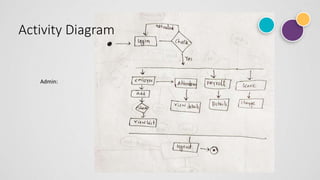
Activity Diagram
Admin:
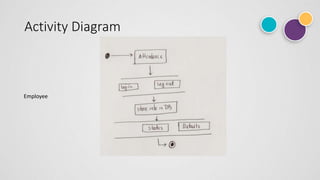
Activity Diagram
Employee
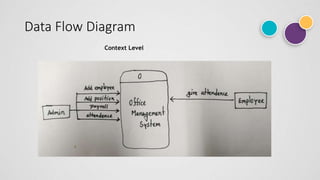
Data Flow Diagram
Context Level
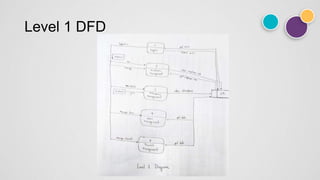
Level 1 DFD
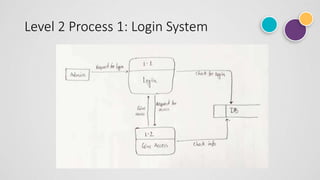
Level 2 Process 1: Login System
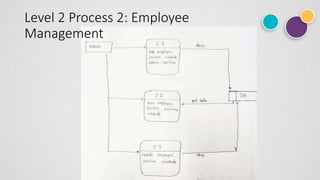
Level 2 Process 2: Employee
Management
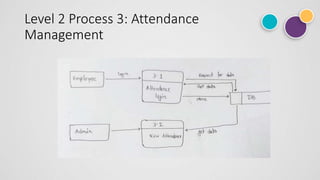
Level 2 Process 3: Attendance
Management
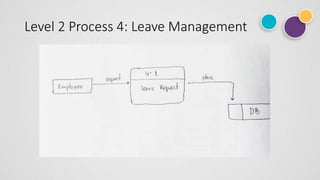
Level 2 Process 4: Leave Management
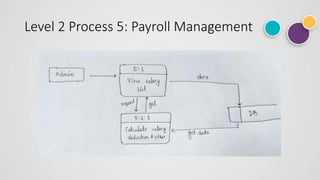
Level 2 Process 5: Payroll Management
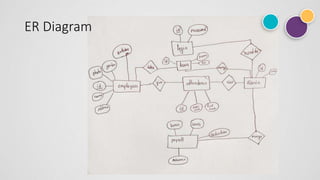
ER Diagram
Risk Analysis
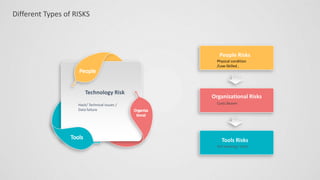
Different Types of RISKS
Technology Risk
Hack/ Technical Issues /
Data failure
People Risks
Physical condition
/Low-Skilled ,
Organizational Risks
Costs Bearer
Tools Risks
Not working/ crash
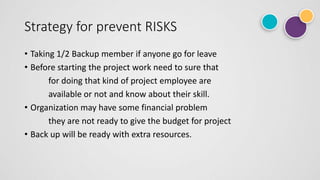
Strategy for prevent RISKS
• Taking 1/2 Backup member if anyone go for leave
• Before starting the project work need to sure that
for doing that kind of project employee are
available or not and know about their skill.
• Organization may have some financial problem
they are not ready to give the budget for project
• Back up will be ready with extra resources.
Risk Monitoring
• Access each identified risks regularly to decide whether or not it is
becoming less or more probable.
• Also assess whether the effects of the risk have changed.
• Each key risk should be discussed with team.
Testing
Future work
• Upgrading with Employee part.
• Upgrading some more feature & Accessable function by emplyee like
payroll, Total absent etc.
Questions
THANK YOU
S. M. Shamim

Office Management System

  • 1.
  • 2.
    Presented By: Supervisor: S.M. Shamim Toyeer-E-Ferdoush #ID: 17103195 Faculty Dept. of Computer Science & Engineering
  • 3.
    Organizational Overview Project overview CONTENTS Requirements Analysisand Design Testing Software Demonstration Future Work Conclusion Risk Management Project Planning and Scheduling Project Estimation
  • 4.
  • 5.
    Name IPPL- Islam Polimars& Platicizers LTD Location Baipail Moszid, Ashulia Thana, Savar, Dhaka, Bangladesh Production 2-Ethyl-Hexanol & phthalic-An- Hydride & produce DOP(Di- Octyle Phthalate) Vision Make Produced Chemical more weather friendly Mission keeping up their undying innovation spirit by giving more chemical production
  • 6.
  • 7.
    • More usefulto run a company successfully. • The system can save the time • Help to speed up the work. • This System will help organization to keep details information about the employee.
  • 8.
  • 9.
    Choosing Reason • Sequentialprocess model • conception, initiation, analysis, design, construction.
  • 10.
    Feasibility Study • Technicalfeasibility: To build this project I used HTML, CSS, PHP with MySQL database and this project is technically feasible as company give me the requirement to do the work for their resources and which are available now and worked on it. • Operational feasibility: I used here some drop down box according to the user that data will come automatically no need to fill up any form by using text. And also there is no complexity that can confuse the user.
  • 11.
  • 12.
  • 13.
    User Requirements • 1.Admincan add employee and give user id and password to access the software. • 2.Admin can update information and view their profile. • 3.Employee can give their attendance to the system. • 4.Admin can view the admin dashboard where he can see the total employees. • 5.Admin can manage project monitoring; admin posts task notice for employees.
  • 14.
    SYSTEM REQUIREMENTS: 1. Admincan add employee and give user id and password to access the software: 1.1 Admin can log in using Id and password. 1.2 Admin can add new employee with employee id, employee name, position, schedule, member’s joining information and employee’s photo. 1.3 Admin will press the save button to complete the new employee registration.
  • 15.
    SYSTEM REQUIREMENTS: 2.Admin canupdate information and view their profile. 2.1 Admin can log in using Id and password. 2.2 Admin can update their profile and view also. 3.Employee can give their attendance to the system. 3.1 If Employee is present then give the attendance by clicking time in button. 3.2 When employee leave the office then click time out button.
  • 16.
    SYSTEM REQUIREMENTS: 4.Admin canview the admin dashboard where he can see the total employee 5.Admin can select any employee for their attendance report with date range 6. Admin can manage payroll system. 6.1 Admin can manage leave management 6.2 Admin can manage cash deduction for absence.
  • 17.
    Functional Requirements: • LoginManagement • Employee Information Management • Employee Position • Attendance Management • Leave Management • Payroll System
  • 18.
  • 19.
    Functions of thisSystem Login Management [F01] Employee Management [F02] Attendance Management [F03] Leave Management [F04] Payroll System [F05] Project Assign [F06]
  • 20.
  • 21.
    Project Scheduling Chart TaskTime W1 W2 W3 W4 W5 W6 W7 W8 W9 W10 W11 W12 W13 W14 W15 W16 Phase 1 Project Planing Requirement Specifications Initital version development Project Test Plan Phase 2 Final Requirements Specification Software development Phase review Phase 3 Final design Specification Final version development Testing Review & Approval
  • 22.
    Function Point (Admin) FunctionalityInput Output Admin can insert new position information. Add position information, Click on submit button. Save details about position. Admin can update position information Edit position and click on submit button. Save updated information about position. Admin can add new employee. Add Employee, Click on submit button. Save the Employee Information Admin can view leave requests. Click on view all. Show leave information of employees. Admin can show the attendance Click on attendance, select employee and give date range. Show report
  • 23.
    Unadjusted function Point Contributionfor Transaction Function Transection Function FTR's DET's Complexity UFP Log-in(EI) 1 2 Low 3 (Admin) (id, pass) Insert position information(EI) 1 3 Low 3 (employee) (id, description,rate) Add Employee information(EI) 2 11 Average 4 Admin,employee Update Employee information(EI) 2 11 Average 4 Leave Management 2 6 Average 4 Attendence Management 2 5 Average 4 Payroll(EO) 2 13 Average 4 Total 26
  • 24.
    Unadjusted function PointContribution for Data Function Data Function RET's DET's Complexity UFP Users(ILF) 2 3 Low 7 Emplyees(ILF) 4 8 Low 7 Position(ILF) 1 3 Low 7 Attendence(ILF) 2 5 Low 7 Leave(ILF) 2 7 Low 7 Payroll(ILF) 1 3 Low 7 Total 42
  • 25.
  • 26.
    Cost Estimation Software Cost Windows10 1500 WPS Office 750 Brackets 0 MySQL Server(Xamp) 0 Hardware Cost Computer 21000 Printer 5500 Other Cost Furniture 3500 Electricity Bill 1500 Others 5000 Total 38750
  • 27.
  • 28.
  • 29.
  • 30.
  • 31.
  • 32.
    Level 2 Process1: Login System
  • 33.
    Level 2 Process2: Employee Management
  • 34.
    Level 2 Process3: Attendance Management
  • 35.
    Level 2 Process4: Leave Management
  • 36.
    Level 2 Process5: Payroll Management
  • 37.
  • 38.
  • 39.
    Different Types ofRISKS Technology Risk Hack/ Technical Issues / Data failure People Risks Physical condition /Low-Skilled , Organizational Risks Costs Bearer Tools Risks Not working/ crash
  • 40.
    Strategy for preventRISKS • Taking 1/2 Backup member if anyone go for leave • Before starting the project work need to sure that for doing that kind of project employee are available or not and know about their skill. • Organization may have some financial problem they are not ready to give the budget for project • Back up will be ready with extra resources.
  • 41.
    Risk Monitoring • Accesseach identified risks regularly to decide whether or not it is becoming less or more probable. • Also assess whether the effects of the risk have changed. • Each key risk should be discussed with team.
  • 42.
  • 44.
  • 45.
    • Upgrading withEmployee part. • Upgrading some more feature & Accessable function by emplyee like payroll, Total absent etc.
  • 46.
  • 47.