Automation Nation
RJ Linehan
&
Pete Cammisa
Today’s Agenda
• Company Profile
• Citizens of the Automation Nation
• Process Automation
• History Lesson
• EPMA Automation
• LCM Automation
• History Lesson Learned
• Essbase Automation - MaxL
• Questions
Company Profile – Innovus Partners
• Oracle Hyperion Enterprise Performance Management
• Oracle Gold Partner
• Oracle Certified Specialists
• Based in the NY Tri-State Area
• Follow us on Twitter, Facebook, and LinkedIn
Speaker Biography – RJ Linehan
• 12+ Years Consulting in the Oracle Hyperion EPM
Space
• 40+ Projects Completed
• Essbase and Planning Certified
• Favorite Automation Tool
 MaxL Scripting
Speaker Biography – Pete Cammisa
• 4+ Years Consulting in the Oracle EPM Space
• 15+ Projects Completed
• Essbase and Planning Certified
• Favorite Automation Tool
 EPMA Batch Client
Process Automation – What is it?
• Process
 Method for executing a set of related tasks to achieve a desired
outcome
• Automation
 Streamlining a method through a means other than manual
execution
• Process Automation
 Using a tool or utility, an approach that applies automation to a
process to ensure the process achieves the desired outcome
Process Automation – What is it?
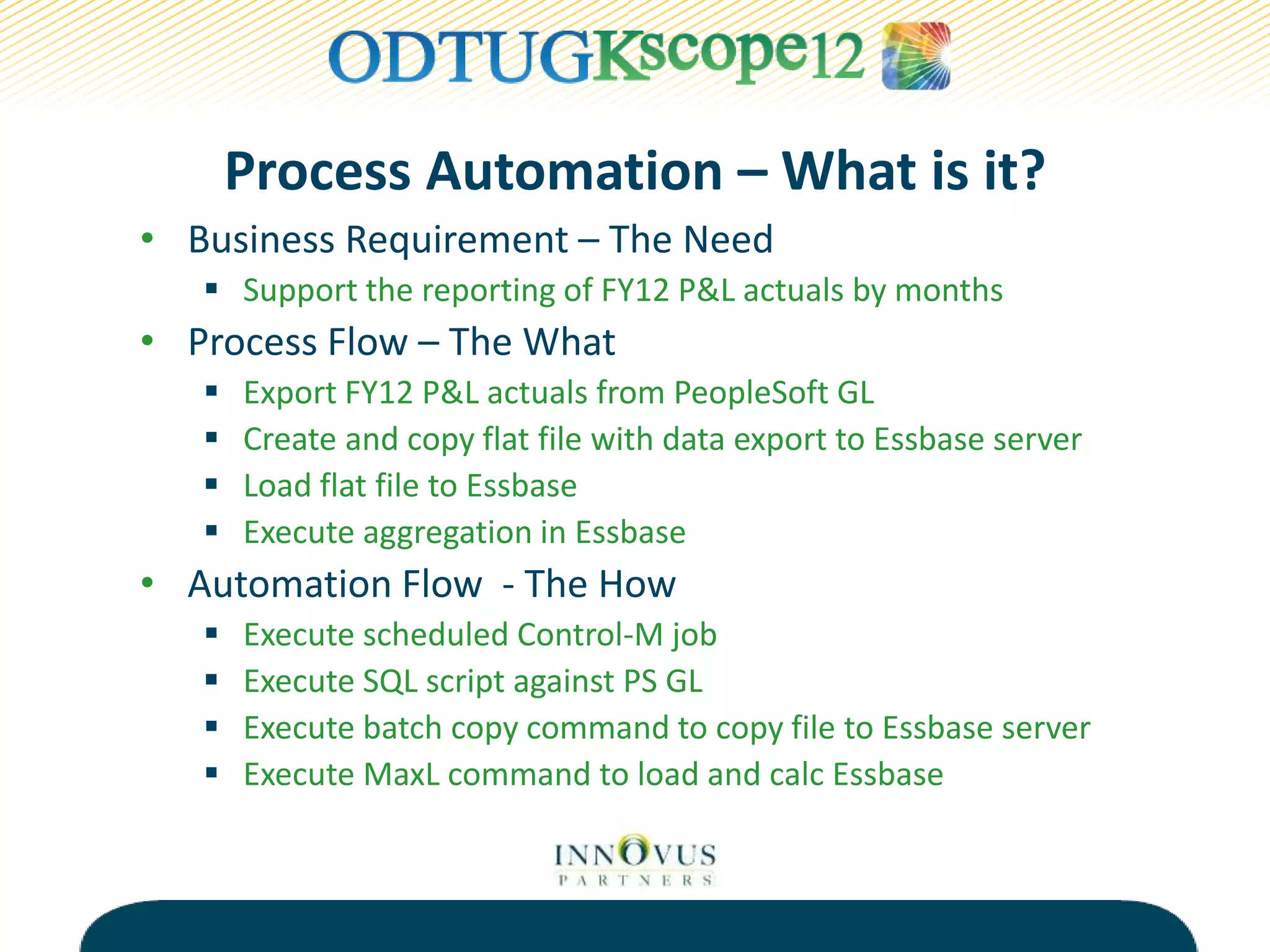
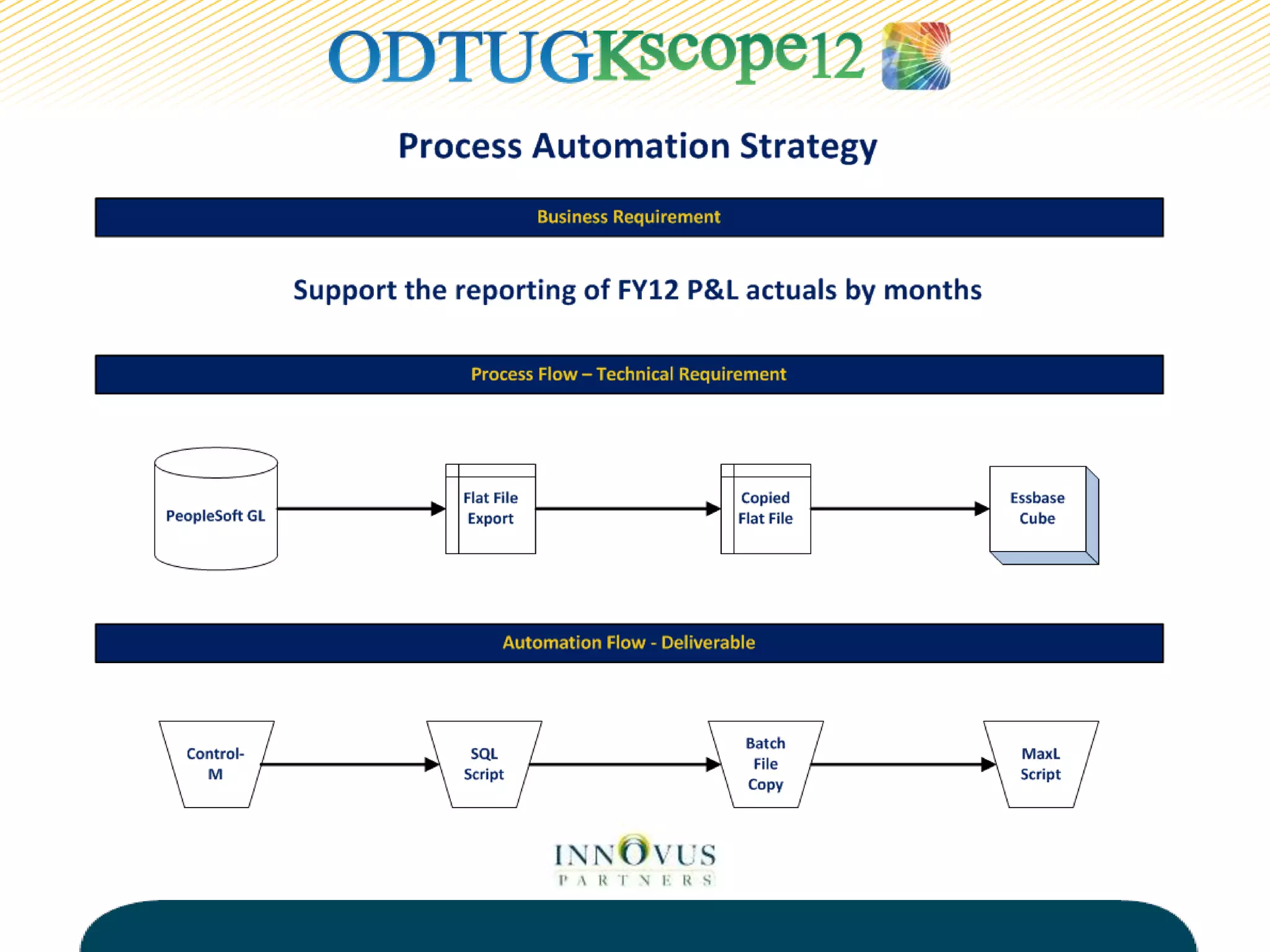
• Business Requirement – The Need
 Support the reporting of FY12 P&L actuals by months
• Process Flow – The What
 Export FY12 P&L actuals from PeopleSoft GL
 Create and copy flat file with data export to Essbase server
 Load flat file to Essbase
 Execute aggregation in Essbase
• Automation Flow - The How
 Execute scheduled Control-M job
 Execute SQL script against PS GL
 Execute batch copy command to copy file to Essbase server
 Execute MaxL command to load and calc Essbase
Process Flow Automation Flow Control-M Job Source System Source Server Source Job Name Source Flat File Source File Location Target System Target Server Target Job Name Target Load File Target File Location Target Load Rule
Load CY Actuals Load PS Actuals PS-ESS-Act PeopleSoft GL PS-PROD ExpCYAct.sql ExpCYAct.txt PS-PRODdata P&L Cube ESS-PROD LoadPSAct.bat ExpCYAct.txt PS-PRODdata L_ACT.rul
Load PY Actuals Load PS Actuals PS-ESS-Act PeopleSoft GL PS-PROD ExpPYAct.sql ExpPYAct.txt PS-PRODdata P&L Cube ESS-PROD LoadPSAct.bat ExpPYAct.txt PS-PRODdata L_ACT.rul
Load PY-1 ActualsLoad PS Actuals PS-ESS-Act PeopleSoft GL PS-PROD ExpPY-1Act.sql ExpPY-1Act.txt PS-PRODdata P&L Cube ESS-PROD LoadPSAct.bat ExpPY-1Act.txt PS-PRODdata L_ACT.rul
Load PY-2 ActualsLoad PS Actuals PS-ESS-Act PeopleSoft GL PS-PROD ExpPY-2Act.sql ExpPY-2Act.txt PS-PRODdata P&L Cube ESS-PROD LoadPSAct.bat ExpPY-2Act.txt PS-PRODdata L_ACT.rul
Load PY-3 ActualsLoad PS Actuals PS-ESS-Act PeopleSoft GL PS-PROD ExpPY-3Act.sql ExpPY-3Act.txt PS-PRODdata P&L Cube ESS-PROD LoadPSAct.bat ExpPY-3Act.txt PS-PRODdata L_ACT.rul
Load CY HR Load PS HR PS-ESS-HR PeopleSoft HR PS-PROD ExpCYHR.sql ExpCYHR.txt PS-PRODdata WF Cube ESS-PROD LoadPSHR.bat ExpCYHR.txt PS-PRODdata L_ACT.rul
Load PY HR Load PS HR PS-ESS-HR PeopleSoft HR PS-PROD ExpPYHR.sql ExpPYHR.txt PS-PRODdata WF Cube ESS-PROD LoadPSHR.bat ExpPYHR.txt PS-PRODdata L_ACT.rul
Source Target
Process Automation Documentation
Process Automation – Why use it?
• Frees up limited resources in the organization
• Eliminates or minimizes errors in the process
• Adds structure and stability to the process
• Introduces reliability to the process
• Creates opportunities to improve the process
 Provides audit trail
 Increases security
 Supports user notification
Process Automation – Goals
• Identify when process automation is warranted
• Leverage native tools to minimize complexity
• Build a solution that promotes standardization
• Avoid a solution with the following characteristics
 Lacks core functionality such as error handling and
notification
 Hinders migration across environments
 Provides instability to the process
History Lesson
• Company X
 Oracle Hyperion EPM Shop for 8 Years
 Manually-driven on-demand EPM environment
 Lack of task knowledge with regards to processes supporting
EPM environment
 Lack of communication and understanding between
functional and technical resources
 Current environment negatively impacts stability of
management reporting cycles
 Resources supporting EPM environment are reactive instead
of proactive
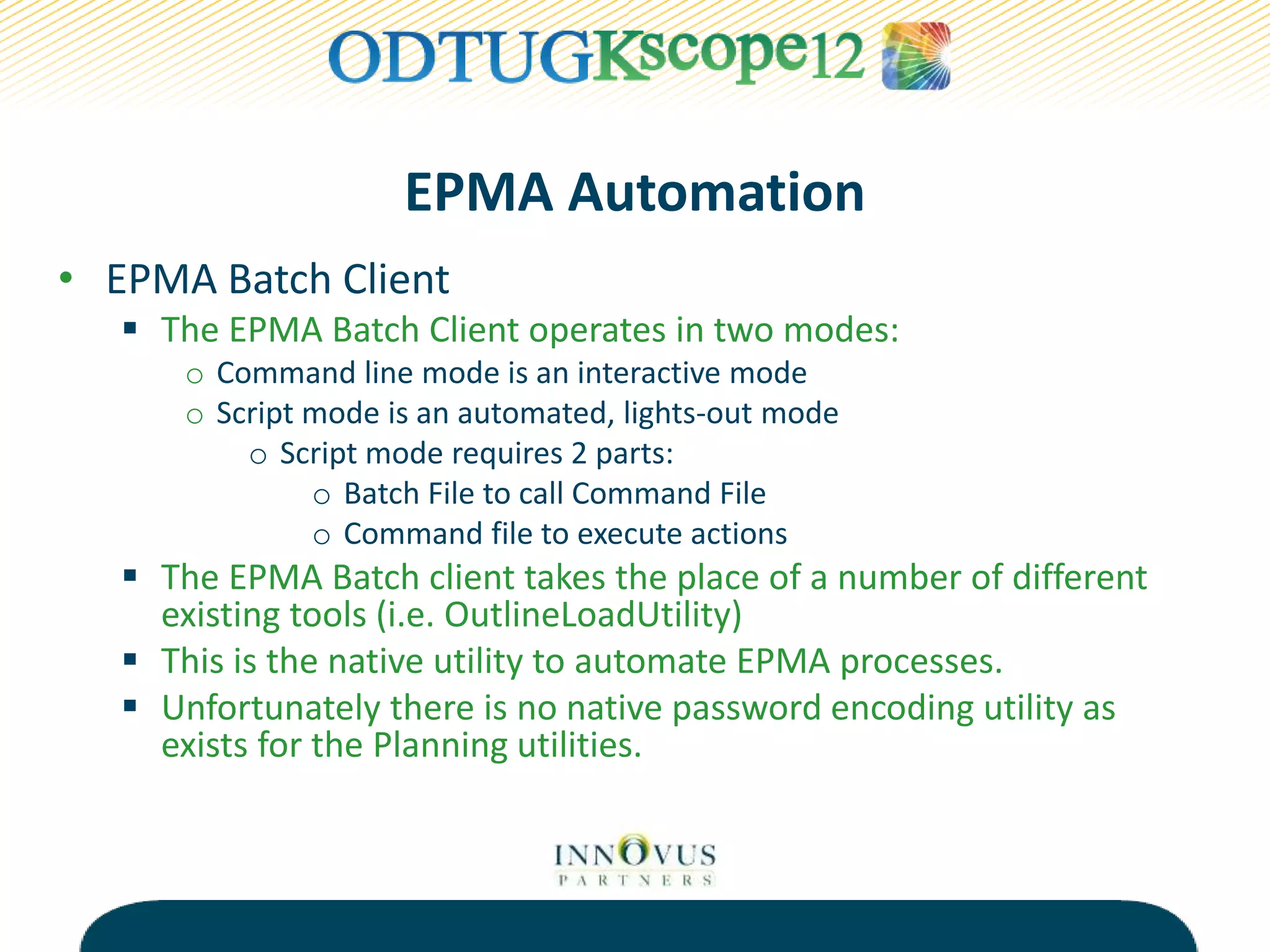
EPMA Automation
• EPMA Batch Client
 The EPMA Batch Client operates in two modes:
o Command line mode is an interactive mode
o Script mode is an automated, lights-out mode
o Script mode requires 2 parts:
o Batch File to call Command File
o Command file to execute actions
 The EPMA Batch client takes the place of a number of different
existing tools (i.e. OutlineLoadUtility)
 This is the native utility to automate EPMA processes.
 Unfortunately there is no native password encoding utility as
exists for the Planning utilities.
Process Overview
Source
• Flat File
• Interface Tables
• DRM
EPMA
• Shared Library
• Local Application
Dimensions
Application
• Essbase
(BSO/ASO)
• Planning
• HFM
• HPCM
BATCH
CLIENT
BATCH
CLIENT
EPMA Automation
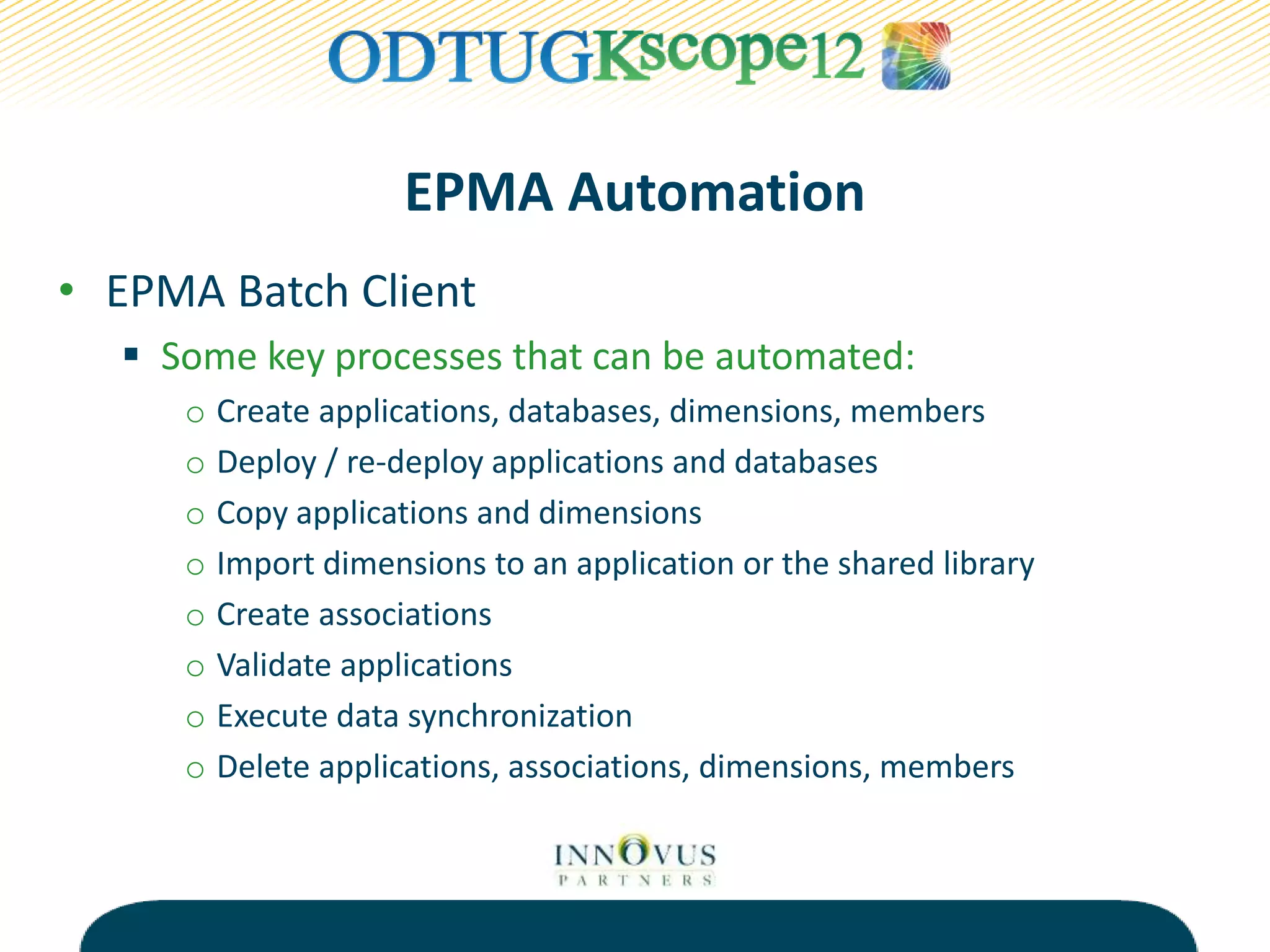
• EPMA Batch Client
 Some key processes that can be automated:
o Create applications, databases, dimensions, members
o Deploy / re-deploy applications and databases
o Copy applications and dimensions
o Import dimensions to an application or the shared library
o Create associations
o Validate applications
o Execute data synchronization
o Delete applications, associations, dimensions, members
EPMA Automation
• Batch file that calls a command file
 Call the epma-batch-client.bat
 -C = Pass the Command file
 -R = Specify the location of the results file
 -L (on/off) = Log the commands (default is off)
 -S (true/false) = Stops the script on failure (default is true)
 -U = Username
 -P = Password
EPMA Automation
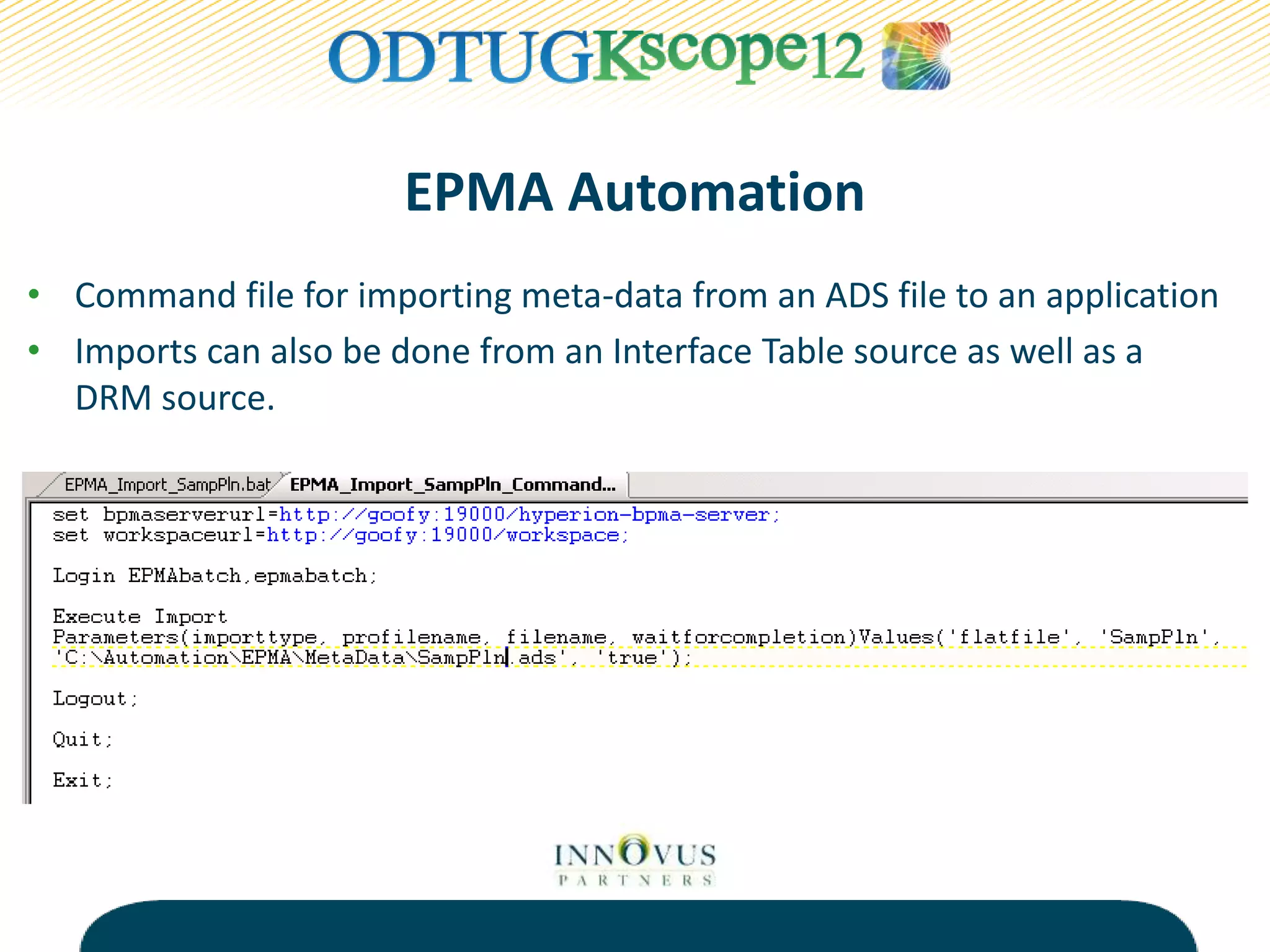
• Command file for importing meta-data from an ADS file to an application
• Imports can also be done from an Interface Table source as well as a
DRM source.
EPMA Automation
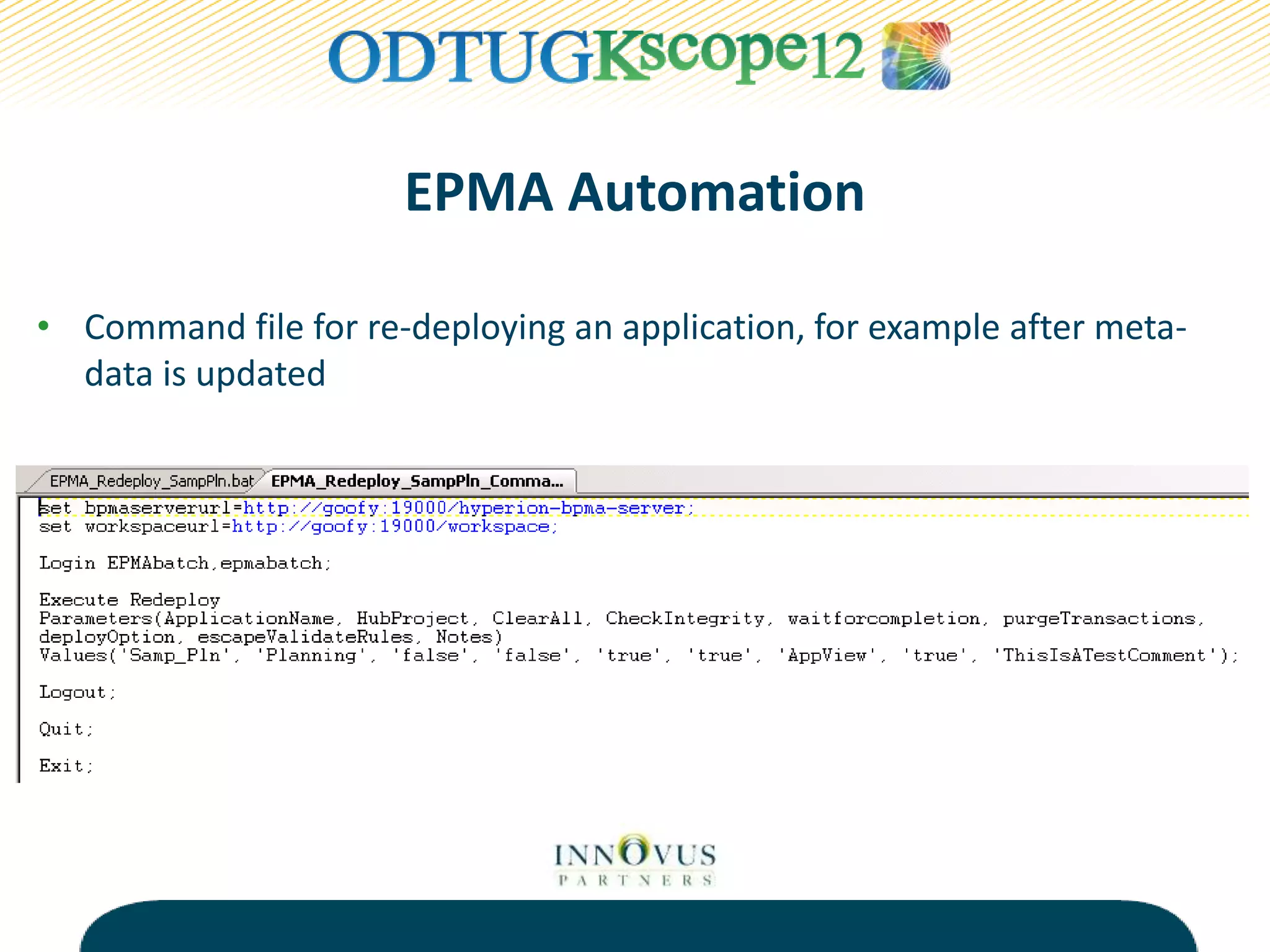
• Command file for re-deploying an application, for example after meta-
data is updated
EPMA Automation
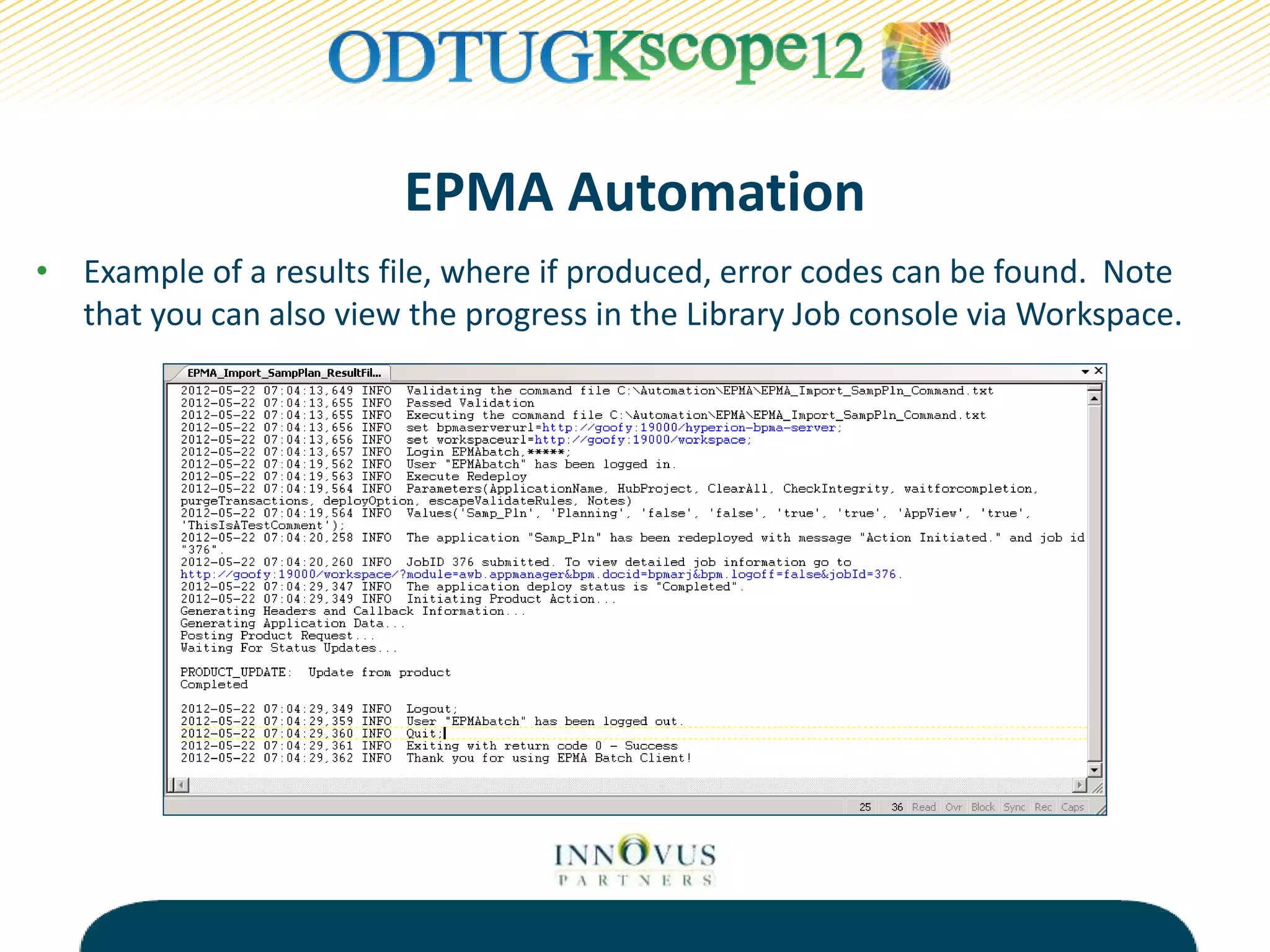
• Example of a results file, where if produced, error codes can be found. Note
that you can also view the progress in the Library Job console via Workspace.
LCM Automation
• The Life Cycle Management Utility
 Command-line utility that allows for hands-off or lights-out
processing of LCM migrations
 Ideally this utility can be used for automated backups as well
as automated migrations*
 There are 2 pieces required for the utility to run:
o A batch/command file to initiate the utility
o A migration definition file to define the migration itself
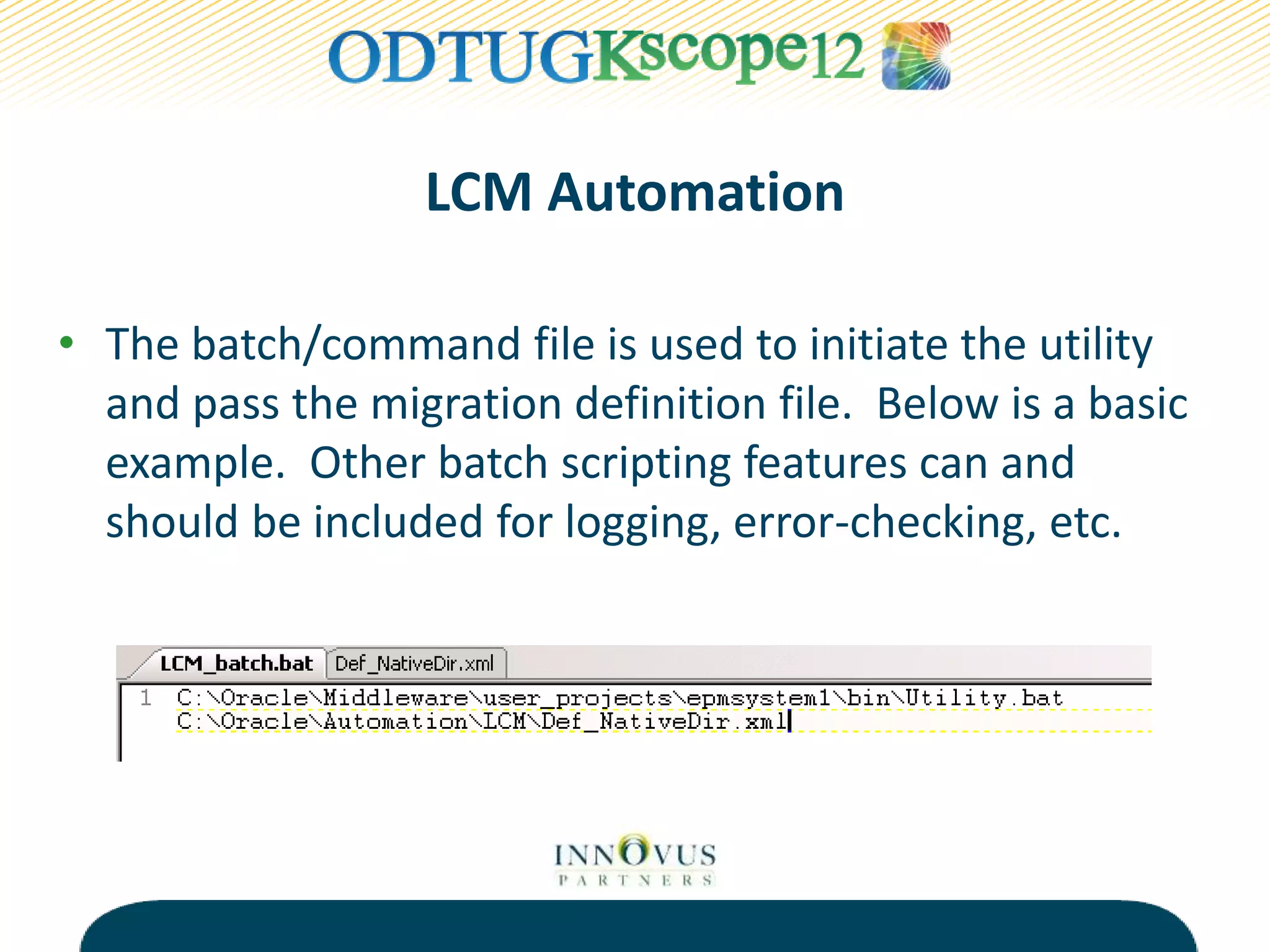
• The batch/command file is used to initiate the utility
and pass the migration definition file. Below is a basic
example. Other batch scripting features can and
should be included for logging, error-checking, etc.
LCM Automation
LCM Automation
• The Migration Definition file:
 Specifies the who, what, where and how.
 Can be generated via the GUI in Shared Services or manually
created as an XML.
 A good practice to follow would be to use the GUI to
generate an XML for a starting point and modify, re-use the
file going forward.
 The LCM utility will automatically encrypt the password on
the first run.
LCM Automation
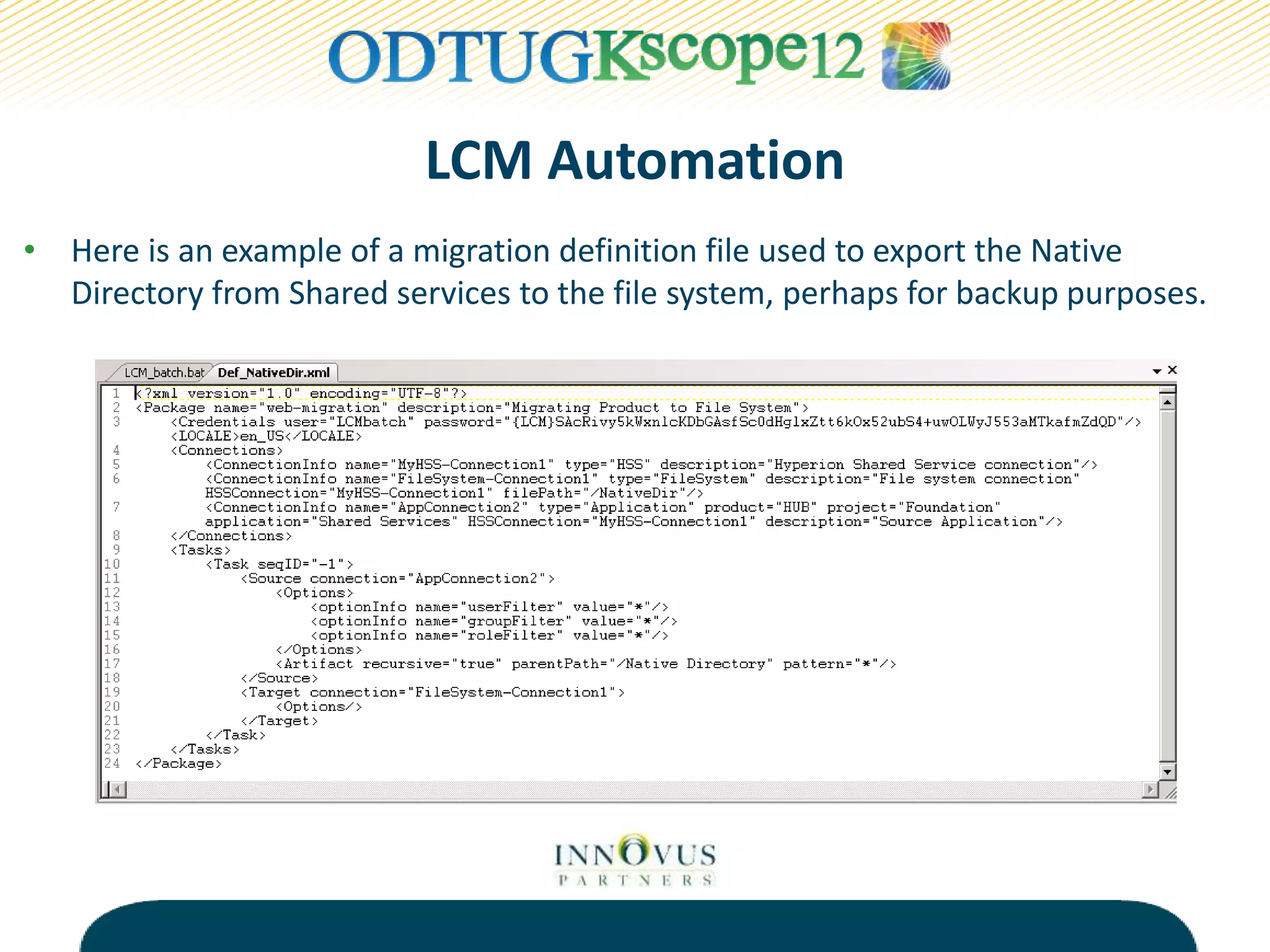
• Here is an example of a migration definition file used to export the Native
Directory from Shared services to the file system, perhaps for backup purposes.
LCM Automation
• Here is an example of a migration definition file used to export the planning
application “Samp_Pln” to the file system, perhaps for backup purposes or to be
moved into another environment.
Key Benefit of LCM Automation
• Incremental Backup and Restore of EPM
Artifacts
 Similar to file-based backup of Essbase Object files
 Applying similar approach allows for efficient
recovery of artifacts
 Less dependence on organization’s infrastructure
team to restore backup
 NOT a Replacement for RDBMS Backups for EPM
Repositories
History Lesson Learned
• Company X
 Better understanding of processes in EPM environment that drive
management reporting cycles
 Improved communication between functional and technical
resources
 Identified key processes that could be automated through
scheduled and on-demand jobs
 Improved stability through the elimination of manual processes
 Approach to maintaining the EPM environment has become more
of a proactive task
Essbase Automation - MaxL
• Export Outline Statement
 Exports meta data from an Essbase outline to an XML file
 Supports both BSO and ASO outlines
 Supports selective dimensional export
 Supports alternate alias tables
Essbase Automation - MaxL
• Execute Allocation
Statement
 Allocate source data to a
target range of cells in an
ASO database
 Leverages MDX to define
members sets for source
and target
 Limited drivers for
spreading data
Essbase Automation - MaxL
• Execute Calculation Statement
 Performs a calculation against an ASO database based on a
script defined in MDX
Automation Nation – Useful Links
• EPMA Batch Client
 http://bit.ly/epmabatch
• LCM Utility (Navigate to ‘Using Life Cycle Management Utility’
Section)
 http://bit.ly/lcmutil
• Essbase Technical Reference (Navigate to MaxL Section)
 http://bit.ly/esstechref
• Oracle Magazine, “Using Oracle Essbase Release 11.1.2
Aggregate Storage Option Databases”
 http://bit.ly/OracleMagASO
• Innovus Partners Blog
 http://bit.ly/invprtblog
RJ Linehan
rj@innovuspartners.com
Pete Cammisa
pete@innovuspartners.com

Automation Nation

  • 1.
  • 2.
    Today’s Agenda • CompanyProfile • Citizens of the Automation Nation • Process Automation • History Lesson • EPMA Automation • LCM Automation • History Lesson Learned • Essbase Automation - MaxL • Questions
  • 3.
    Company Profile –Innovus Partners • Oracle Hyperion Enterprise Performance Management • Oracle Gold Partner • Oracle Certified Specialists • Based in the NY Tri-State Area • Follow us on Twitter, Facebook, and LinkedIn
  • 4.
    Speaker Biography –RJ Linehan • 12+ Years Consulting in the Oracle Hyperion EPM Space • 40+ Projects Completed • Essbase and Planning Certified • Favorite Automation Tool  MaxL Scripting
  • 5.
    Speaker Biography –Pete Cammisa • 4+ Years Consulting in the Oracle EPM Space • 15+ Projects Completed • Essbase and Planning Certified • Favorite Automation Tool  EPMA Batch Client
  • 6.
    Process Automation –What is it? • Process  Method for executing a set of related tasks to achieve a desired outcome • Automation  Streamlining a method through a means other than manual execution • Process Automation  Using a tool or utility, an approach that applies automation to a process to ensure the process achieves the desired outcome
  • 7.
    Process Automation –What is it? • Business Requirement – The Need  Support the reporting of FY12 P&L actuals by months • Process Flow – The What  Export FY12 P&L actuals from PeopleSoft GL  Create and copy flat file with data export to Essbase server  Load flat file to Essbase  Execute aggregation in Essbase • Automation Flow - The How  Execute scheduled Control-M job  Execute SQL script against PS GL  Execute batch copy command to copy file to Essbase server  Execute MaxL command to load and calc Essbase
  • 9.
    Process Flow AutomationFlow Control-M Job Source System Source Server Source Job Name Source Flat File Source File Location Target System Target Server Target Job Name Target Load File Target File Location Target Load Rule Load CY Actuals Load PS Actuals PS-ESS-Act PeopleSoft GL PS-PROD ExpCYAct.sql ExpCYAct.txt PS-PRODdata P&L Cube ESS-PROD LoadPSAct.bat ExpCYAct.txt PS-PRODdata L_ACT.rul Load PY Actuals Load PS Actuals PS-ESS-Act PeopleSoft GL PS-PROD ExpPYAct.sql ExpPYAct.txt PS-PRODdata P&L Cube ESS-PROD LoadPSAct.bat ExpPYAct.txt PS-PRODdata L_ACT.rul Load PY-1 ActualsLoad PS Actuals PS-ESS-Act PeopleSoft GL PS-PROD ExpPY-1Act.sql ExpPY-1Act.txt PS-PRODdata P&L Cube ESS-PROD LoadPSAct.bat ExpPY-1Act.txt PS-PRODdata L_ACT.rul Load PY-2 ActualsLoad PS Actuals PS-ESS-Act PeopleSoft GL PS-PROD ExpPY-2Act.sql ExpPY-2Act.txt PS-PRODdata P&L Cube ESS-PROD LoadPSAct.bat ExpPY-2Act.txt PS-PRODdata L_ACT.rul Load PY-3 ActualsLoad PS Actuals PS-ESS-Act PeopleSoft GL PS-PROD ExpPY-3Act.sql ExpPY-3Act.txt PS-PRODdata P&L Cube ESS-PROD LoadPSAct.bat ExpPY-3Act.txt PS-PRODdata L_ACT.rul Load CY HR Load PS HR PS-ESS-HR PeopleSoft HR PS-PROD ExpCYHR.sql ExpCYHR.txt PS-PRODdata WF Cube ESS-PROD LoadPSHR.bat ExpCYHR.txt PS-PRODdata L_ACT.rul Load PY HR Load PS HR PS-ESS-HR PeopleSoft HR PS-PROD ExpPYHR.sql ExpPYHR.txt PS-PRODdata WF Cube ESS-PROD LoadPSHR.bat ExpPYHR.txt PS-PRODdata L_ACT.rul Source Target Process Automation Documentation
  • 10.
    Process Automation –Why use it? • Frees up limited resources in the organization • Eliminates or minimizes errors in the process • Adds structure and stability to the process • Introduces reliability to the process • Creates opportunities to improve the process  Provides audit trail  Increases security  Supports user notification
  • 11.
    Process Automation –Goals • Identify when process automation is warranted • Leverage native tools to minimize complexity • Build a solution that promotes standardization • Avoid a solution with the following characteristics  Lacks core functionality such as error handling and notification  Hinders migration across environments  Provides instability to the process
  • 12.
    History Lesson • CompanyX  Oracle Hyperion EPM Shop for 8 Years  Manually-driven on-demand EPM environment  Lack of task knowledge with regards to processes supporting EPM environment  Lack of communication and understanding between functional and technical resources  Current environment negatively impacts stability of management reporting cycles  Resources supporting EPM environment are reactive instead of proactive
  • 13.
    EPMA Automation • EPMABatch Client  The EPMA Batch Client operates in two modes: o Command line mode is an interactive mode o Script mode is an automated, lights-out mode o Script mode requires 2 parts: o Batch File to call Command File o Command file to execute actions  The EPMA Batch client takes the place of a number of different existing tools (i.e. OutlineLoadUtility)  This is the native utility to automate EPMA processes.  Unfortunately there is no native password encoding utility as exists for the Planning utilities.
  • 14.
    Process Overview Source • FlatFile • Interface Tables • DRM EPMA • Shared Library • Local Application Dimensions Application • Essbase (BSO/ASO) • Planning • HFM • HPCM BATCH CLIENT BATCH CLIENT
  • 15.
    EPMA Automation • EPMABatch Client  Some key processes that can be automated: o Create applications, databases, dimensions, members o Deploy / re-deploy applications and databases o Copy applications and dimensions o Import dimensions to an application or the shared library o Create associations o Validate applications o Execute data synchronization o Delete applications, associations, dimensions, members
  • 17.
    EPMA Automation • Batchfile that calls a command file  Call the epma-batch-client.bat  -C = Pass the Command file  -R = Specify the location of the results file  -L (on/off) = Log the commands (default is off)  -S (true/false) = Stops the script on failure (default is true)  -U = Username  -P = Password
  • 18.
    EPMA Automation • Commandfile for importing meta-data from an ADS file to an application • Imports can also be done from an Interface Table source as well as a DRM source.
  • 19.
    EPMA Automation • Commandfile for re-deploying an application, for example after meta- data is updated
  • 20.
    EPMA Automation • Exampleof a results file, where if produced, error codes can be found. Note that you can also view the progress in the Library Job console via Workspace.
  • 21.
    LCM Automation • TheLife Cycle Management Utility  Command-line utility that allows for hands-off or lights-out processing of LCM migrations  Ideally this utility can be used for automated backups as well as automated migrations*  There are 2 pieces required for the utility to run: o A batch/command file to initiate the utility o A migration definition file to define the migration itself
  • 22.
    • The batch/commandfile is used to initiate the utility and pass the migration definition file. Below is a basic example. Other batch scripting features can and should be included for logging, error-checking, etc. LCM Automation
  • 23.
    LCM Automation • TheMigration Definition file:  Specifies the who, what, where and how.  Can be generated via the GUI in Shared Services or manually created as an XML.  A good practice to follow would be to use the GUI to generate an XML for a starting point and modify, re-use the file going forward.  The LCM utility will automatically encrypt the password on the first run.
  • 24.
    LCM Automation • Hereis an example of a migration definition file used to export the Native Directory from Shared services to the file system, perhaps for backup purposes.
  • 25.
    LCM Automation • Hereis an example of a migration definition file used to export the planning application “Samp_Pln” to the file system, perhaps for backup purposes or to be moved into another environment.
  • 26.
    Key Benefit ofLCM Automation • Incremental Backup and Restore of EPM Artifacts  Similar to file-based backup of Essbase Object files  Applying similar approach allows for efficient recovery of artifacts  Less dependence on organization’s infrastructure team to restore backup  NOT a Replacement for RDBMS Backups for EPM Repositories
  • 27.
    History Lesson Learned •Company X  Better understanding of processes in EPM environment that drive management reporting cycles  Improved communication between functional and technical resources  Identified key processes that could be automated through scheduled and on-demand jobs  Improved stability through the elimination of manual processes  Approach to maintaining the EPM environment has become more of a proactive task
  • 28.
    Essbase Automation -MaxL • Export Outline Statement  Exports meta data from an Essbase outline to an XML file  Supports both BSO and ASO outlines  Supports selective dimensional export  Supports alternate alias tables
  • 29.
    Essbase Automation -MaxL • Execute Allocation Statement  Allocate source data to a target range of cells in an ASO database  Leverages MDX to define members sets for source and target  Limited drivers for spreading data
  • 30.
    Essbase Automation -MaxL • Execute Calculation Statement  Performs a calculation against an ASO database based on a script defined in MDX
  • 31.
    Automation Nation –Useful Links • EPMA Batch Client  http://bit.ly/epmabatch • LCM Utility (Navigate to ‘Using Life Cycle Management Utility’ Section)  http://bit.ly/lcmutil • Essbase Technical Reference (Navigate to MaxL Section)  http://bit.ly/esstechref • Oracle Magazine, “Using Oracle Essbase Release 11.1.2 Aggregate Storage Option Databases”  http://bit.ly/OracleMagASO • Innovus Partners Blog  http://bit.ly/invprtblog
  • 32.

Editor's Notes

  • #2 RJ GOOD MORNING! Welcome to the automation nation, Some of you may be asking yourself what is the ‘Automation Nation’? Well, we are a small nation and live by a few simple laws. We do not like to push buttons and do manual tasks, we try not to work past 5 on any task that could be simplified, and we are always look for an easier way to do something. We enjoy when tourists come to our little nation for some R&R because we know that if they are here, they have adopted our creed. Automation means less work and more play… That is why we are here today. To share some of our nation’s secrets and hope that you too will join our nation. Ask who is our audience? Consultant vs. Customer, IT vs. Business
  • #3 RJ In keeping with the spirit of our nation’s capitol, “Organization”, I’d like to start off with what we will be covering today. Background of who we are and what we do in this little nation of ours Introduce you to our vision of ‘Process Automation’, what is it? why use it? what should the goals? Share with you some history of the automation nation, this lesson is important to remind us not to repeat history We will then focus on key products in the Oracle Hyperion EPM Stack where you can leverage our nation’s ideology Conclude with our history lesson, another reminder not to repeat it At that point we will stick around for some Q&A and additional lessons if necessary What we will not be covering in the presentation are how to write a script
  • #4 RJ We are a consulting firm that specializes in implementing solutions that leverage the Oracle Hyperion EPM Suite. We are an Oracle Gold Partner and all of our consultants are Oracle Certified Specialists We are based in the NY Tri-State Area When you have time check out our web site – there is useful information there. You can check out our blog for useful tips and tricks and upcoming events that we will be attending.
  • #5 RJ I have been working as a consultant in the Oracle Hyperion EPM Space for over 12 years and in that time I have completed over 40 projects. I am currently Essbase and Planning certified My favorite automation tool is maxl because of all the tools available it is the one I have been using the longest and it’s nice to occasionally work in your comfort zone. It may also help that working with it as long as I have a script to do just about anything which makes my life and the client’s easier on the job.
  • #6 Pete Hi and good morning. My name is Pete Cammisa. I have been working in the Oracle EPM space on the consulting side for the past 4 years. I’ve completed over 15 projects across Essbase, Planning and HPCM. I am certified in Essbase and certified / specialized Planning. I really enjoy working with Oracle’s suite of EPM products and despite the growing pains of new technologies, I strive to embrace them as quickly as I can to help evaluate their functionality not only for myself, but also for our clients. Most recently, my favorite automation tool has become the EPMA Batch client. The reason behind that is because I’ve seen far too often, after adopting EPMA, clients are manually administering the product through the GUI. The EPMA batch client provides a simple utility that can be called from a batch script to execute almost any task done manually in the EPMA GUI. I’ll talk more to the EPMA batch client later in our presentation.
  • #7 We are going to start our presentation with some theory and recommended approaches What is Process Automation? People have different interpretations of what process automation is. Often these interpretations are accurate but usually on a case-by-case basis. Depending on who you talk to (Business/IT) you get different answers to the question. People tend to immediately think of implementing some type of scripting to automate a job that needs to be scheduled. The interpretation of process automation is a function of the current initiative. However, there is more to process automation than that and it should be recognized on any EPM implementation. To start, let’s break down the term Process – This concept equates to a term I like to use called process flow. This process flow aligns with the EPM solution’s business requirement, it describes what will be automated Automation - This concept defines the how in process automation. How can the process be programmed to achieve the desired outcome? Process Automation – What this means is combining these two terms introduces an approach to defining a strategy for supporting the many processes that encompass an EPM solution
  • #11 RJ / Pete ? - Human error,
  • #12 RJ / Pete – Keep it simple
  • #14 Pete Let’s talk about the EPMA Batch Client. We’ll get the most obvious question out of the way, where is it and how do I get to it…. it is a separate item listed under EPMA in the installtool and must be installed on the same server as the EPMA dimension server You can launch it via start->Programs->Oracle EPM or from the file system. Here’s the good news and why you should use it The EPMA batch client can operate in 2 modes: Command Line mode is an interactive batch client mode which can be used to perform on demand actions. This is particularly helpful to folks on the more technical side of the house who may have enjoyed administering Essbase via ESSCMD or MaxL without ever having to touch a graphical interface. Script mode is what we are here to discuss today. Script mode is an automated way to run the EPMA batch client which can be run on-demand or via a scheduler. Where does this become particularly useful: A company who constantly adds accounts or departments, products or services to their outline during the day can automate an outline re-deployment overnight A company who wishes to automate the flow of the Accounts from their GL system into their Planning application without a manual chain of commands The script mode can be used for numerous other data flows which occur in an organization’s EPM solution And maybe most importantly for some of you, the Script mode can take the place of some of the manual processes you do today which can be painful and always consume valuable time that can and should be spent on other, more important activities. The EPMA batch client takes the place for a number of different existing tools. The first example that comes to my mind is Classic Planning’s Outline Load Utility. This utility was used to systematically build a planning outline without tedious manual metadata entry in the planning GUI. For Planning applications built using EPMA, this batch client fills the shoes of the Outline Load Utility and I will show an example of that in the coming slides, as well as other data flows that can be automated using the batch client Why else do we use the EPMA batch client, well it is the native utility provided to us by Oracle to automate EPMA processes. It’s easy to use and it comes packaged with the software. Now for the not so good news: The EPMA Batch client is designed to work on a Windows system only. In fact, according to oracle’s certification matrix for 11.1.2.1, EPMA dimension server itself as well as the file generator is only supported on windows The other disappointing feature, or lack thereof, is password encryption. For our other planning utilities, we can encrypt the password. The LCM utility as you will see later, automatically encrypts the password. Even MaxL affords us with a native method for encryption. However, the EPMA batch client does not. Now that’s not to say that a scripting guru could not find a way to secure the password but that’s outside of the utility when it really should be integrated.
  • #15 Now let’s take a step back and look at a 10,000 foot view. This is a very simple flow that helps identify where the EPMA batch client fits a solution. For conversation sake, let’s consider 3 areas. An External source, EPMA itself, and a target or application. EPMA fits in between where you see the arrows, or data flows. For example, let’s talk about the first arrow between source and EPMA. The EPMA batch client can be used to load metadata from an external source, be it flat file, interface tables, or DRM, to the EPMA product repository itself. This is useful in a case as mentioned before where the business requires their Accounts in planning to be sourced from their GL. The next data flow is from EPMA to the applications it supports. Once our metadata has been updated in EPMA, perhaps as mentioned above, the applications built with EPMA must also be made aware of these updates. The batch client can be used to re-deploy those applications from EPMA to Essbase, planning, HFM, and HPCM. This is a high level flow of where the batch client fits a process flow.
  • #16 Pete Here is a list of some of the key processes that can be automated using the EPMA Batch client. Now each and every one of these has specific options by action and by product so we’re not going to get that detailed but you can work by this, just about anything you do in the GUI can be recreated using this batch client. A quick example may be a Planning application deployment, we would see options in the GUI for deploying security filters and the same option is available in the GUI. These are all documented very well in the EPMA batch client users guide which can be found in the Foundation Services section of the document library. I heard it said yesterday at the lunch and learn, the easiest way to find this documentation is via Google, search ORACLE EPM DOCUMENTATION.
  • #17 Now the next few slides are going to show examples of the batch and command files used to automation the EPMA batch client. I wanted to stress a serious note with a joke. We will not be telling you how you should code. Scripting is like handwriting, everybody’s is unique and it does not have to be our own to be legible and sensible. I know many of you have probably seen this flow diagram before, but I saw this at a client’s desk once and asked if I could borrow it because I’m sure for all of us, it hits home and we can have a good laugh about it. In fact we can apply this to all aspects of a project, not just the code. just to point out the utilities.
  • #18 -C = Pass the Command file (Required, all others optional) You can specify the script file name and any log file names as relative paths, however the paths must be relative to the EPMABatchClient folder, not the folder in which the batch file was launched. -S = StopOnError option returns a wealth of error codes and is set to true by default. There is a table of error codes in the documentation that you will find somewhat helpful, in typical oracle fashion. Whether or not to stop on error is a case by case basis, give examples of serial metadata and data loads.
  • #19 Simple format, Can be dynamically generated if you are a guru Bpma server Workspace server Login Execute import (maxl feel) Parameters: Import type Profile name Filename Wait for completion
  • #20 Here is a very common activity that an administrator will perform over and over again Application name – The name of an existing application or #SHARED ClearAll – Deletes all dimension members in the target application first HFM only and be careful, will delete data, journals, and intercompany Transactions. Waitforcompletion – waits for the job to complete before moving on DeployOption – Deployment type, default is appview which deploys the application only
  • #21 Put an example of an error file. Discuss stop on error, different methods depending on the type of error and business requirement
  • #22 Talk about registering multiple environments to one shared services (MSAD idea) – Get away from this topic Talk about migration environment to environment being sensitive, case by case basis – Contains environment specific configuraiton information, can CORRUPT target environment. – Separate discussion on migrations. Can use a shared disk as the file system There are product – specific limitations or quirks as we may like to call them. LCM file / folder structure based tool, client with “/” in a dimension name, dimension does not import. Things like this WINDOWS OR UNIX
  • #23 Talk about the other arguments Default: [-d]: defers validation and [-f]: fully execute tasks arguments This means that after a failed task, Lifecycle Management Utility will continue with the next task. Validation of a task's source and target connections are performed only when the task is executed and not before starting the task execution. Optional: [-estimate]: Estimates the Number of Artifacts in a Migration – self defining [-b]: Specifies the Base Path – if you have specified a path other than the default import_export folder [-ls]: Lists EPM System Contents – will list all of the artifacts of the source and target
  • #24 Read from the slide
  • #25 File ELEMENTS (start and end with tags) Package Name – defaults Credentials – user and password, password is encrypted on the first run as you see here LOCALE – Connections – source / target – This is where we can specify a different file system target other than the default folder. Tasks – What are we doing, references the connections
  • #26 Let’s take a closer look at the file contents… First line/first section, generic XML housekeeping – don’t edit Second section, Package name and description, default LCM – don’t edit Third section, User and password – can be edited, password can be entered in clear text, lcm utility will encrypt on first run 4th section, locale – don’t edit 5th section – connection information for source and target, here is where you would edit the file path if other than default desired 6th and final section – tasks define which artifacts to migrate