ObjectOriented
Programming
Class And Object
Submittedto:
PrafullahKumarSaha
Seniorlecturer,DeptofCSE
DaffodilInstituteIT.
Submitted By:
1.Sumaya khatun
ID: 180155
2.Avijit saha
ID: 180154
3. Nazmul hasan
ID:180124
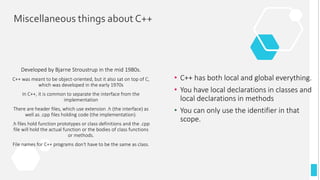
Miscellaneous things about C++
Developed by Bjarne Stroustrup in the mid 1980s.
C++ was meant to be object-oriented, but it also sat on top of C,
which was developed in the early 1970s
In C++, it is common to separate the interface from the
implementation
There are header files, which use extension .h (the interface) as
well as .cpp files holding code (the implementation).
.h files hold function prototypes or class definitions and the .cpp
file will hold the actual function or the bodies of class functions
or methods.
File names for C++ programs don't have to be the same as class.
• C++ has both local and global everything.
• You have local declarations in classes and
local declarations in methods
• You can only use the identifier in that
scope.
4
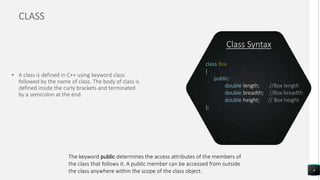
class Box
{
public:
double length; //Box length
double breadth; //Box breadth
double height; // Box height
};
Class Syntax
CLASS
• A class is defined in C++ using keyword class
followed by the name of class. The body of class is
defined inside the curly brackets and terminated
by a semicolon at the end.
The keyword public determines the access attributes of the members of
the class that follows it. A public member can be accessed from outside
the class anywhere within the scope of the class object.
5
class PublicAccess {
// public access modifier
public:
int x; // Data Member
Declaration
void display(); // Member
Function decaration }
Public
class PrivateAccess {
// private access modifier
private:
int x; // Data Member Declaration
void display(); // Member Function
decaration }
Private
class ProtectedAccess {
// protected access modifier
protected:
int x; // Data Member
Declaration
void display();//Member
Function decaration }
Protected
Access Modifiers
Access modifiers are used to implement an important
feature of Object-Oriented Programming known as Data
Hiding
There are 3 types of access modifiers available in C++:
1.Public
2.Private
3.Protected
6
Box Box1; // Declare Box1 of type
Box Box2; // Declare Box2 of type
Object Syntax
OBJECT
• A class provides the blueprints for objects, so
basically an object is created from a class. We
declare objects of a class with exactly the same
sort of declaration that we declare variables of
basic types.
Both of the objects Box1 and Box2 will have their own copy of data
members.
Accessing the Data Members
7
#include <iostream>
using namespace std;
class Box {
public:
double length; // Length of a box
double breadth; // Breadth of a box
double height; // Height of a box
};
int main( )
{
Box Box1; // Declare Box1 of type Box
Box Box2; // Declare Box2 of type Box
double volume = 0.0; // Store the volume of a
box here
// box 1 specification
Box1.height = 5.0;
Box1.length = 6.0;
Box1.breadth = 7.0;
// box 2 specification
Box2.height = 10.0;
Box2.length = 12.0;
Box2.breadth = 13.0;
// volume of box 1
volume = Box1.height * Box1.length *
Box1.breadth;
cout << "Volume of Box1 : " << volume <<endl;
// volume of box 2
volume = Box2.height * Box2.length *
Box2.breadth;
cout << "Volume of Box2 : " << volume <<endl;
return 0;
}
The public data members of objects of a class can be accessed
using the direct member access operator (.). Let us try the
following example to make the things clear in left side program.
When the left side code is compiled and executed, it produces the
following result:
Volume of Box1 : 210
Volume of Box2 : 1560
8
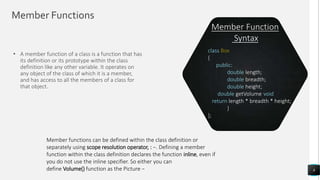
class Box
{
public:
double length; //Box length
double breadth; //Box breadth
double height; // Box height
double getVolume(void) {
return length * breadth * height;
}
};
Member Function
Syntax
Member Functions
• A member function of a class is a function that has
its definition or its prototype within the class
definition like any other variable. It operates on
any object of the class of which it is a member,
and has access to all the members of a class for
that object.
Member functions can be defined within the class definition or
separately using scope resolution operator, : −. Defining a member
function within the class definition declares the function inline, even if
you do not use the inline specifier. So either you can
define Volume() function as the Picture −
Member Functions
9
#include <iostream>
using namespace std;
class Box {
public:
double length; // Length of a box
double breadth; // Breadth of a box
double height; // Height of a box
// Member functions declaration
double getVolume(void);
void setLength( double len );
void setBreadth( double bre );
void setHeight( double hei );
};
// Member functions definitions
double Box::getVolume(void) {
return length * breadth * height;
}
void Box::setLength( double len ) {
length = len;
}
void Box::setBreadth( double bre ) {
breadth = bre;
}
void Box::setHeight( double hei ) {
height = hei;
}
// Main function for the program
int main() {
Box Box1; // Declare Box1 of type Box
Box Box2; // Declare Box2 of type Box
double volume = 0.0; // Store the volume of a box here
// box 1 specification
Box1.setLength(6.0);
Box1.setBreadth(7.0);
Box1.setHeight(5.0);
// box 2 specification
Box2.setLength(12.0);
Box2.setBreadth(13.0);
Box2.setHeight(10.0);
// volume of box 1
volume = Box1.getVolume();
cout << "Volume of Box1 : " << volume <<endl;
// volume of box 2
volume = Box2.getVolume();
cout << "Volume of Box2 : " << volume <<endl;
return 0;
}
Let us put above concepts to set and get the value of different
class members in a class :-
When the left side code is compiled and executed, it produces the
following result:
Volume of Box1 : 210
Volume of Box2 : 1560
Nesting of Member Functions
10
#include <iostream>
// Nesting of member functions
using namespace std;
class comparing {
int m,n;
public:
void input(void);
void display(void);
int larger(void);
};
void comparing :: input(void) {
cout << "Enter the two numbers to be compared
n";
cin >> m >> n;
}
void comparing :: display(void) {
cout << "The larger number among the entered
values is :" << larger() << endl;
}
int comparing :: larger(void)
{
if (m >= n)
{
return (m);
}
else {
return (n);
}
}
int main () {
comparing x;
x.input();
x.display();
return 0;
}
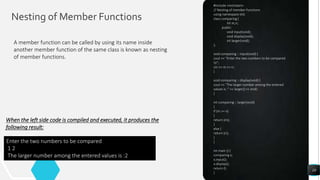
A member function can be called by using its name inside
another member function of the same class is known as nesting
of member functions.
When the left side code is compiled and executed, it produces the
following result:
Enter the two numbers to be compared
1 2
The larger number among the entered values is :2
11
class Box {
double width;
public:
double length;
friend void printWidth( Box box );
void setWidth( double wid );
};
Friend Function
Syntax
Friend Functions
• A friend function of a class is defined outside that
class' scope but it has the right to access all
private and protected members of the class. Even
though the prototypes for friend functions appear
in the class definition, friends are not member
functions
To declare a function as a friend of a class, precede the function
prototype in the class definition with keyword friend as follows the
picture
Friend Function
12
#include <iostream>
using namespace std;
class Box {
double width;
public:
friend void printWidth( Box box );
void setWidth( double wid );
};
// Member function definition
void Box::setWidth( double wid ) {
width = wid;
}
// Note: printWidth() is not a member function of
any class.
void printWidth( Box box ) {
/* Because printWidth() is a friend of Box, it can
directly access any member of this class */
cout << "Width of box : " << box.width <<endl;
}
// Main function for the program
int main() {
Box box;
// set box width without member function
box.setWidth(10.0);
// Use friend function to print the wdith.
printWidth( box );
return 0;
}
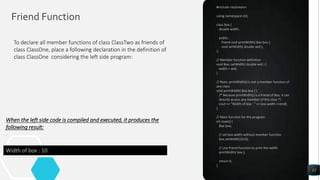
To declare all member functions of class ClassTwo as friends of
class ClassOne, place a following declaration in the definition of
class ClassOne considering the left side program:
When the left side code is compiled and executed, it produces the
following result:
Width of box : 10
13
inline int Max(int x, int y) {
return (x > y)? x : y;
}
Inline Function
Syntax
Inline Functions
• Inline function is powerful concept that is
commonly used with classes. If a function is inline,
the compiler places a copy of the code of that
function at each point where the function is called
at compile time.
A function definition in a class definition is an inline function definition,
even without the use of the inline specifier.
Inline Function
14
#include <iostream>
using namespace std;
inline int Max(int x, int y) {
return (x > y)? x : y;
}
// Main function for the program
int main() {
cout << "Max (20,10): " << Max(20,10) << endl;
cout << "Max (0,200): " << Max(0,200) << endl;
cout << "Max (100,1010): " << Max(100,1010) <<
endl;
return 0;
}
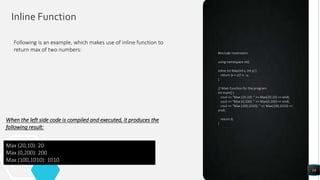
Following is an example, which makes use of inline function to
return max of two numbers:
When the left side code is compiled and executed, it produces the
following result:
Max (20,10): 20
Max (0,200): 200
Max (100,1010): 1010
Thank You

Class and object

  • 1.
  • 2.
    Submitted By: 1.Sumaya khatun ID:180155 2.Avijit saha ID: 180154 3. Nazmul hasan ID:180124
  • 3.
    Miscellaneous things aboutC++ Developed by Bjarne Stroustrup in the mid 1980s. C++ was meant to be object-oriented, but it also sat on top of C, which was developed in the early 1970s In C++, it is common to separate the interface from the implementation There are header files, which use extension .h (the interface) as well as .cpp files holding code (the implementation). .h files hold function prototypes or class definitions and the .cpp file will hold the actual function or the bodies of class functions or methods. File names for C++ programs don't have to be the same as class. • C++ has both local and global everything. • You have local declarations in classes and local declarations in methods • You can only use the identifier in that scope.
  • 4.
    4 class Box { public: double length;//Box length double breadth; //Box breadth double height; // Box height }; Class Syntax CLASS • A class is defined in C++ using keyword class followed by the name of class. The body of class is defined inside the curly brackets and terminated by a semicolon at the end. The keyword public determines the access attributes of the members of the class that follows it. A public member can be accessed from outside the class anywhere within the scope of the class object.
  • 5.
    5 class PublicAccess { //public access modifier public: int x; // Data Member Declaration void display(); // Member Function decaration } Public class PrivateAccess { // private access modifier private: int x; // Data Member Declaration void display(); // Member Function decaration } Private class ProtectedAccess { // protected access modifier protected: int x; // Data Member Declaration void display();//Member Function decaration } Protected Access Modifiers Access modifiers are used to implement an important feature of Object-Oriented Programming known as Data Hiding There are 3 types of access modifiers available in C++: 1.Public 2.Private 3.Protected
  • 6.
    6 Box Box1; //Declare Box1 of type Box Box2; // Declare Box2 of type Object Syntax OBJECT • A class provides the blueprints for objects, so basically an object is created from a class. We declare objects of a class with exactly the same sort of declaration that we declare variables of basic types. Both of the objects Box1 and Box2 will have their own copy of data members.
  • 7.
    Accessing the DataMembers 7 #include <iostream> using namespace std; class Box { public: double length; // Length of a box double breadth; // Breadth of a box double height; // Height of a box }; int main( ) { Box Box1; // Declare Box1 of type Box Box Box2; // Declare Box2 of type Box double volume = 0.0; // Store the volume of a box here // box 1 specification Box1.height = 5.0; Box1.length = 6.0; Box1.breadth = 7.0; // box 2 specification Box2.height = 10.0; Box2.length = 12.0; Box2.breadth = 13.0; // volume of box 1 volume = Box1.height * Box1.length * Box1.breadth; cout << "Volume of Box1 : " << volume <<endl; // volume of box 2 volume = Box2.height * Box2.length * Box2.breadth; cout << "Volume of Box2 : " << volume <<endl; return 0; } The public data members of objects of a class can be accessed using the direct member access operator (.). Let us try the following example to make the things clear in left side program. When the left side code is compiled and executed, it produces the following result: Volume of Box1 : 210 Volume of Box2 : 1560
  • 8.
    8 class Box { public: double length;//Box length double breadth; //Box breadth double height; // Box height double getVolume(void) { return length * breadth * height; } }; Member Function Syntax Member Functions • A member function of a class is a function that has its definition or its prototype within the class definition like any other variable. It operates on any object of the class of which it is a member, and has access to all the members of a class for that object. Member functions can be defined within the class definition or separately using scope resolution operator, : −. Defining a member function within the class definition declares the function inline, even if you do not use the inline specifier. So either you can define Volume() function as the Picture −
  • 9.
    Member Functions 9 #include <iostream> usingnamespace std; class Box { public: double length; // Length of a box double breadth; // Breadth of a box double height; // Height of a box // Member functions declaration double getVolume(void); void setLength( double len ); void setBreadth( double bre ); void setHeight( double hei ); }; // Member functions definitions double Box::getVolume(void) { return length * breadth * height; } void Box::setLength( double len ) { length = len; } void Box::setBreadth( double bre ) { breadth = bre; } void Box::setHeight( double hei ) { height = hei; } // Main function for the program int main() { Box Box1; // Declare Box1 of type Box Box Box2; // Declare Box2 of type Box double volume = 0.0; // Store the volume of a box here // box 1 specification Box1.setLength(6.0); Box1.setBreadth(7.0); Box1.setHeight(5.0); // box 2 specification Box2.setLength(12.0); Box2.setBreadth(13.0); Box2.setHeight(10.0); // volume of box 1 volume = Box1.getVolume(); cout << "Volume of Box1 : " << volume <<endl; // volume of box 2 volume = Box2.getVolume(); cout << "Volume of Box2 : " << volume <<endl; return 0; } Let us put above concepts to set and get the value of different class members in a class :- When the left side code is compiled and executed, it produces the following result: Volume of Box1 : 210 Volume of Box2 : 1560
  • 10.
    Nesting of MemberFunctions 10 #include <iostream> // Nesting of member functions using namespace std; class comparing { int m,n; public: void input(void); void display(void); int larger(void); }; void comparing :: input(void) { cout << "Enter the two numbers to be compared n"; cin >> m >> n; } void comparing :: display(void) { cout << "The larger number among the entered values is :" << larger() << endl; } int comparing :: larger(void) { if (m >= n) { return (m); } else { return (n); } } int main () { comparing x; x.input(); x.display(); return 0; } A member function can be called by using its name inside another member function of the same class is known as nesting of member functions. When the left side code is compiled and executed, it produces the following result: Enter the two numbers to be compared 1 2 The larger number among the entered values is :2
  • 11.
    11 class Box { doublewidth; public: double length; friend void printWidth( Box box ); void setWidth( double wid ); }; Friend Function Syntax Friend Functions • A friend function of a class is defined outside that class' scope but it has the right to access all private and protected members of the class. Even though the prototypes for friend functions appear in the class definition, friends are not member functions To declare a function as a friend of a class, precede the function prototype in the class definition with keyword friend as follows the picture
  • 12.
    Friend Function 12 #include <iostream> usingnamespace std; class Box { double width; public: friend void printWidth( Box box ); void setWidth( double wid ); }; // Member function definition void Box::setWidth( double wid ) { width = wid; } // Note: printWidth() is not a member function of any class. void printWidth( Box box ) { /* Because printWidth() is a friend of Box, it can directly access any member of this class */ cout << "Width of box : " << box.width <<endl; } // Main function for the program int main() { Box box; // set box width without member function box.setWidth(10.0); // Use friend function to print the wdith. printWidth( box ); return 0; } To declare all member functions of class ClassTwo as friends of class ClassOne, place a following declaration in the definition of class ClassOne considering the left side program: When the left side code is compiled and executed, it produces the following result: Width of box : 10
  • 13.
    13 inline int Max(intx, int y) { return (x > y)? x : y; } Inline Function Syntax Inline Functions • Inline function is powerful concept that is commonly used with classes. If a function is inline, the compiler places a copy of the code of that function at each point where the function is called at compile time. A function definition in a class definition is an inline function definition, even without the use of the inline specifier.
  • 14.
    Inline Function 14 #include <iostream> usingnamespace std; inline int Max(int x, int y) { return (x > y)? x : y; } // Main function for the program int main() { cout << "Max (20,10): " << Max(20,10) << endl; cout << "Max (0,200): " << Max(0,200) << endl; cout << "Max (100,1010): " << Max(100,1010) << endl; return 0; } Following is an example, which makes use of inline function to return max of two numbers: When the left side code is compiled and executed, it produces the following result: Max (20,10): 20 Max (0,200): 200 Max (100,1010): 1010
  • 15.