
Drupal @ SF State 2011
                Continuous Integration
Emanuele Quinto and Supakit Kiatrungrit (Nat)
                  Identity Management/Portal
Continuous Integration

       Definition


       Tools & Technologies

      •   Phing
      •   Drush
      •   Apache Ant
      •   QuickBuild

       Quickbuild + Drupal @ SF State

      • Portal (internal site) / Web Content (public sites)
      • Testing
      • Deploying


2
What is Continous Integration?

    Wikipedia

    • Implements continuous processes of applying quality
      control — small pieces of effort, applied frequently.
      Continuous integration aims to improve the quality
      of software, and to reduce the time taken to deliver
      it, by replacing the traditional practice of applying
      quality control after completing all development.

    Practically

    • Members of a team integrate their work frequently.
    • Integration is verified by an automated build
      (including test) to detect integration errors as quickly
      as possible.
3
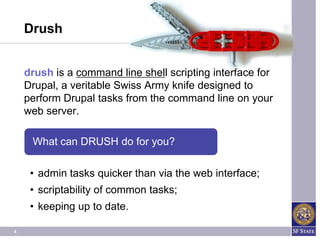
Drush


    drush is a command line shell scripting interface for
    Drupal, a veritable Swiss Army knife designed to
    perform Drupal tasks from the command line on your
    web server.

     What can DRUSH do for you?

     • admin tasks quicker than via the web interface;
     • scriptability of common tasks;
     • keeping up to date.

4
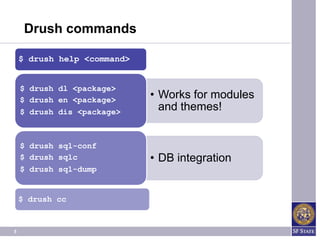
Drush commands

    $ drush help <command>


    $ drush dl <package>
    $ drush en <package>
                             • Works for modules
    $ drush dis <package>
                               and themes!


    $ drush sql-conf
    $ drush sqlc             • DB integration
    $ drush sql-dump


    $ drush cc


5
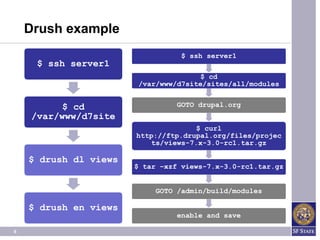
Drush example
                                  $ ssh server1
     $ ssh server1
                                       $ cd
                        /var/www/d7site/sites/all/modules


          $ cd                   GOTO drupal.org
    /var/www/d7site
                                     $ curl
                       http://ftp.drupal.org/files/projec
                           ts/views-7.x-3.0-rc1.tar.gz

    $ drush dl views
                       $ tar –xzf views-7.x-3.0-rc1.tar.gz


                            GOTO /admin/build/modules

    $ drush en views
                                 enable and save

6
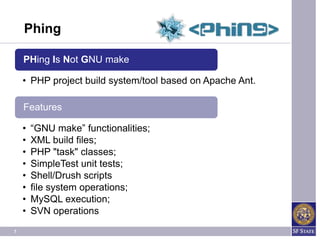
Phing

    PHing Is Not GNU make

    • PHP project build system/tool based on Apache Ant.

    Features

    •   “GNU make” functionalities;
    •   XML build files;
    •   PHP "task" classes;
    •   SimpleTest unit tests;
    •   Shell/Drush scripts
    •   file system operations;
    •   MySQL execution;
    •   SVN operations
7
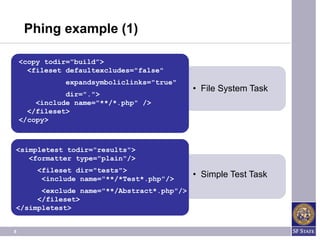
Phing example (1)

    <copy todir=“build”>
      <fileset defaultexcludes="false"
               expandsymboliclinks="true"
                                            • File System Task
               dir=".">
        <include name="**/*.php" />
      </fileset>
    </copy>


<simpletest todir="results">
   <formatter type="plain"/>
        <fileset dir="tests">
         <include name="**/*Test*.php"/>
                                            • Simple Test Task
      <exclude name="**/Abstract*.php"/>
     </fileset>
</simpletest>


8
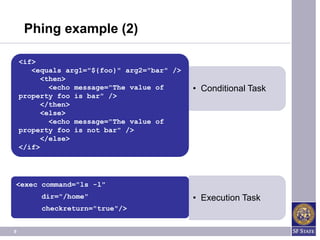
Phing example (2)

    <if>
       <equals arg1="${foo}" arg2="bar" />
          <then>
            <echo message="The value of      • Conditional Task
    property foo is bar" />
          </then>
          <else>
            <echo message="The value of
    property foo is not bar" />
          </else>
    </if>


<exec command="ls -l"
         dir="/home"                         • Execution Task
         checkreturn="true"/>


9
Apache Ant

     Apache Ant "Another Neat Tool”

     • Java-based build tool: Java library and
       command-line;

     Features

     •   main usage is the build of Java applications;
     •   used effectively to build non Java applications;
     •   Java Class like extensions;
     •   build files in XML;
     •   Standardized and Platform Independent;
10
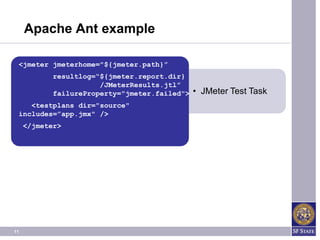
Apache Ant example

 <jmeter jmeterhome="${jmeter.path}”
            resultlog=“${jmeter.report.dir}
                       /JMeterResults.jtl”
            failureProperty="jmeter.failed">   • JMeter Test Task
    <testplans dir="source"
 includes=”app.jmx" />
     </jmeter>


11
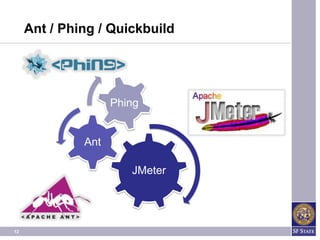
Ant / Phing / Quickbuild


                    Phing


              Ant

                       JMeter


12
QUICKBUILD


13
QuickBuild

     QuickBuild

     • Object Oriented Based Continuous Integration

     Features

     • Supported SCM systems: Subversion, CVS,
       Perforce, ClearCase, StarTeam, Visual
       SourceSafe, Accurev, Git, Mercurial, Bazaar,
       Team
     • Supports Issue Traker systems: JIRA, Trac,
       Bugzilla, CollabNet TeamForge, and Redmine.
     • Advanced Build Grid
14
QuickBuild

     Features

     • Native support for mainstream code
       inspection and coverage tools, including
       checkstyle, findbugs, emma, pmd, and
       cobertura.
     • Extensible via Plugins and RESTful API
     • Proof Build
     • Support to notify through: RSS, Email,
       MSN Messenger, Google Talk, Jabber,
       and the cross-platform tray monitor.
     • Customizable User Dashboards
15
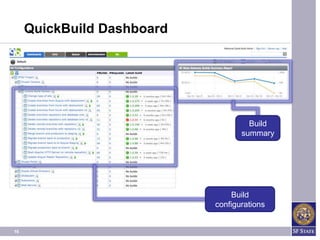
QuickBuild Dashboard


                                     Build
                                   summary


                                Build
                            configurations


16
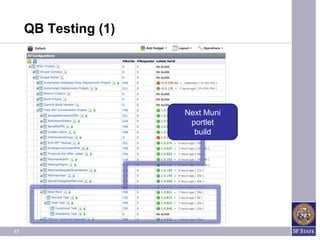
QB Testing (1)


                      Next Muni
                       portlet
                        build


17
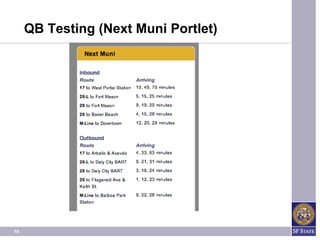
QB Testing (Next Muni Portlet)


18
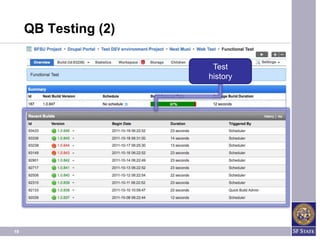
QB Testing (2)

                       Test
                      history


19
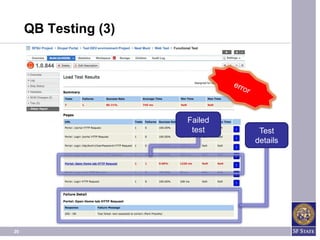
QB Testing (3)


                      Failed
                       test     Test
                               details


20
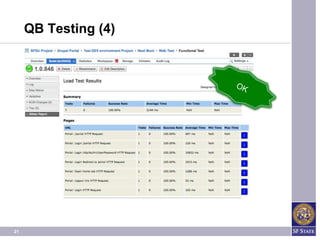
QB Testing (4)


21
PORTAL DEPLOYMENT


22
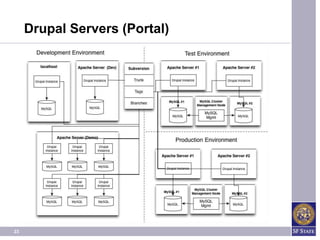
Drupal Servers (Portal)


23
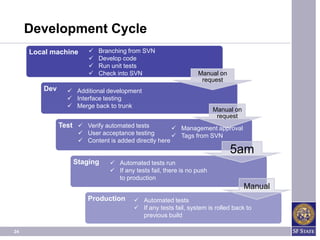
Development Cycle
     Local machine        Branching from SVN
                          Develop code
                          Run unit tests
                          Check into SVN                      Manual on
                                                                request
        Dev      Additional development
                 Interface testing
                 Merge back to trunk
                                                                      Manual on
                                                                       request
              Test  Verify automated tests           Management approval
                     User acceptance testing         Tags from SVN
                     Content is added directly here
                                                                           5am
                  Staging      Automated tests run
                               If any tests fail, there is no push
                                to production
                                                                                  Manual
                       Production       Automated tests
                                        If any tests fail, system is rolled back to
                                         previous build

24
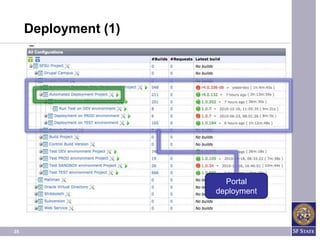
Deployment (1)


                        Portal
                      deployment


25
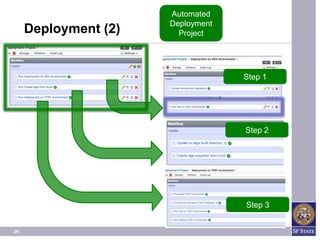
Automated
                      Deployment
     Deployment (2)     Project


                                   Step 1


                                   Step 2


                                   Step 3


26
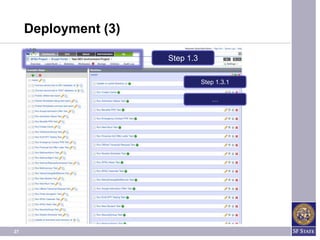
Deployment (3)

                      Step 1.3

                                 Step 1.3.1

                                    …


27
WEB CONTENT DEPLOYMENT


28
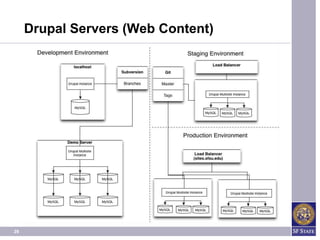
Drupal Servers (Web Content)


29
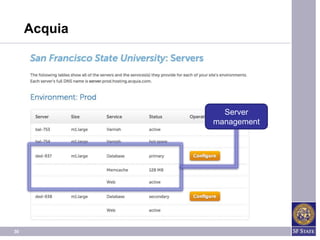
Acquia


                Server
              management


30
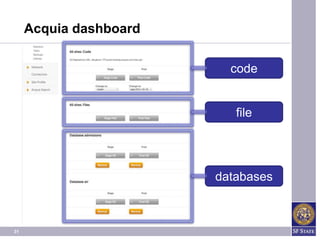
Acquia dashboard

                          code


                           file


                        databases


31
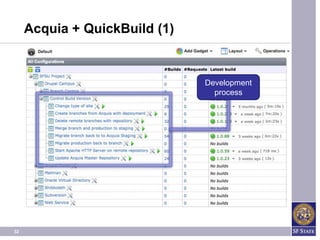
Acquia + QuickBuild (1)


                               Development
                                 process


32
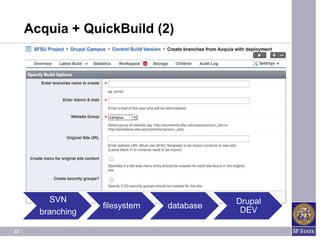
Acquia + QuickBuild (2)


          SVN                              Drupal
                   filesystem   database
       branching                            DEV

33
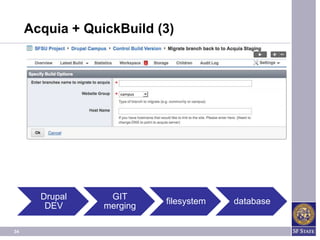
Acquia + QuickBuild (3)


       Drupal     GIT
                           filesystem   database
        DEV      merging

34
Q&A

     THANK YOU
35
About us


                                 Supakit Kiatrungrit (Nat)
                                                supakitk@sfsu.edu
           http://www.linkedin.com/pub/supakit-kiatrungrit/6/174/888


                                           Emanuele Quinto
                                                 equinto@sfsu.edu
                         http://www.linkedin.com/in/emanuelequinto
                                                           @emaV

36

Drupal & Continous Integration - SF State Study Case

  • 1.
    Drupal @ SFState 2011 Continuous Integration Emanuele Quinto and Supakit Kiatrungrit (Nat) Identity Management/Portal
  • 2.
    Continuous Integration Definition Tools & Technologies • Phing • Drush • Apache Ant • QuickBuild Quickbuild + Drupal @ SF State • Portal (internal site) / Web Content (public sites) • Testing • Deploying 2
  • 3.
    What is ContinousIntegration? Wikipedia • Implements continuous processes of applying quality control — small pieces of effort, applied frequently. Continuous integration aims to improve the quality of software, and to reduce the time taken to deliver it, by replacing the traditional practice of applying quality control after completing all development. Practically • Members of a team integrate their work frequently. • Integration is verified by an automated build (including test) to detect integration errors as quickly as possible. 3
  • 4.
    Drush drush is a command line shell scripting interface for Drupal, a veritable Swiss Army knife designed to perform Drupal tasks from the command line on your web server. What can DRUSH do for you? • admin tasks quicker than via the web interface; • scriptability of common tasks; • keeping up to date. 4
  • 5.
    Drush commands $ drush help <command> $ drush dl <package> $ drush en <package> • Works for modules $ drush dis <package> and themes! $ drush sql-conf $ drush sqlc • DB integration $ drush sql-dump $ drush cc 5
  • 6.
    Drush example $ ssh server1 $ ssh server1 $ cd /var/www/d7site/sites/all/modules $ cd GOTO drupal.org /var/www/d7site $ curl http://ftp.drupal.org/files/projec ts/views-7.x-3.0-rc1.tar.gz $ drush dl views $ tar –xzf views-7.x-3.0-rc1.tar.gz GOTO /admin/build/modules $ drush en views enable and save 6
  • 7.
    Phing PHing Is Not GNU make • PHP project build system/tool based on Apache Ant. Features • “GNU make” functionalities; • XML build files; • PHP "task" classes; • SimpleTest unit tests; • Shell/Drush scripts • file system operations; • MySQL execution; • SVN operations 7
  • 8.
    Phing example (1) <copy todir=“build”> <fileset defaultexcludes="false" expandsymboliclinks="true" • File System Task dir="."> <include name="**/*.php" /> </fileset> </copy> <simpletest todir="results"> <formatter type="plain"/> <fileset dir="tests"> <include name="**/*Test*.php"/> • Simple Test Task <exclude name="**/Abstract*.php"/> </fileset> </simpletest> 8
  • 9.
    Phing example (2) <if> <equals arg1="${foo}" arg2="bar" /> <then> <echo message="The value of • Conditional Task property foo is bar" /> </then> <else> <echo message="The value of property foo is not bar" /> </else> </if> <exec command="ls -l" dir="/home" • Execution Task checkreturn="true"/> 9
  • 10.
    Apache Ant Apache Ant "Another Neat Tool” • Java-based build tool: Java library and command-line; Features • main usage is the build of Java applications; • used effectively to build non Java applications; • Java Class like extensions; • build files in XML; • Standardized and Platform Independent; 10
  • 11.
    Apache Ant example <jmeter jmeterhome="${jmeter.path}” resultlog=“${jmeter.report.dir} /JMeterResults.jtl” failureProperty="jmeter.failed"> • JMeter Test Task <testplans dir="source" includes=”app.jmx" /> </jmeter> 11
  • 12.
    Ant / Phing/ Quickbuild Phing Ant JMeter 12
  • 13.
  • 14.
    QuickBuild QuickBuild • Object Oriented Based Continuous Integration Features • Supported SCM systems: Subversion, CVS, Perforce, ClearCase, StarTeam, Visual SourceSafe, Accurev, Git, Mercurial, Bazaar, Team • Supports Issue Traker systems: JIRA, Trac, Bugzilla, CollabNet TeamForge, and Redmine. • Advanced Build Grid 14
  • 15.
    QuickBuild Features • Native support for mainstream code inspection and coverage tools, including checkstyle, findbugs, emma, pmd, and cobertura. • Extensible via Plugins and RESTful API • Proof Build • Support to notify through: RSS, Email, MSN Messenger, Google Talk, Jabber, and the cross-platform tray monitor. • Customizable User Dashboards 15
  • 16.
    QuickBuild Dashboard Build summary Build configurations 16
  • 17.
    QB Testing (1) Next Muni portlet build 17
  • 18.
    QB Testing (NextMuni Portlet) 18
  • 19.
    QB Testing (2) Test history 19
  • 20.
    QB Testing (3) Failed test Test details 20
  • 21.
  • 22.
  • 23.
  • 24.
    Development Cycle Local machine  Branching from SVN  Develop code  Run unit tests  Check into SVN Manual on request Dev  Additional development  Interface testing  Merge back to trunk Manual on request Test  Verify automated tests  Management approval  User acceptance testing  Tags from SVN  Content is added directly here 5am Staging  Automated tests run  If any tests fail, there is no push to production Manual Production  Automated tests  If any tests fail, system is rolled back to previous build 24
  • 25.
    Deployment (1) Portal deployment 25
  • 26.
    Automated Deployment Deployment (2) Project Step 1 Step 2 Step 3 26
  • 27.
    Deployment (3) Step 1.3 Step 1.3.1 … 27
  • 28.
  • 29.
  • 30.
    Acquia Server management 30
  • 31.
    Acquia dashboard code file databases 31
  • 32.
    Acquia + QuickBuild(1) Development process 32
  • 33.
    Acquia + QuickBuild(2) SVN Drupal filesystem database branching DEV 33
  • 34.
    Acquia + QuickBuild(3) Drupal GIT filesystem database DEV merging 34
  • 35.
    Q&A THANK YOU 35
  • 36.
    About us Supakit Kiatrungrit (Nat) supakitk@sfsu.edu http://www.linkedin.com/pub/supakit-kiatrungrit/6/174/888 Emanuele Quinto equinto@sfsu.edu http://www.linkedin.com/in/emanuelequinto @emaV 36

Editor's Notes

  • #17 Blue line: time to build the configurationOrange line: percentage of successful building