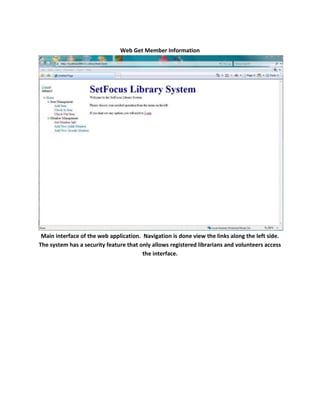
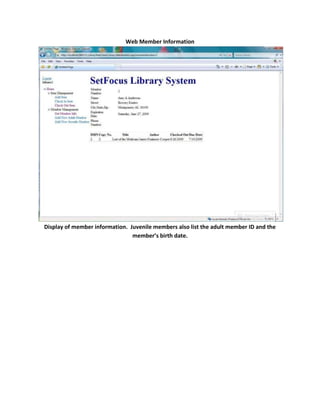
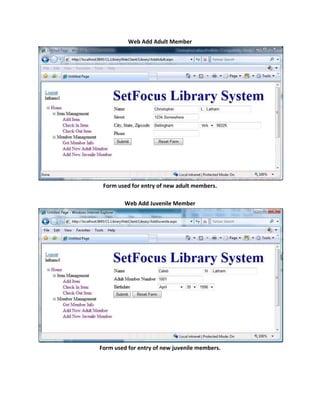
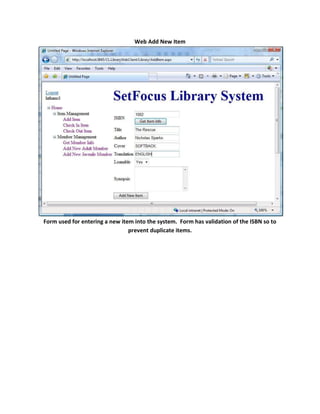
SetFocus Library SystemIntroduction:  This project is a simple library administration application.Audience: The typical users would be librarians and library volunteers.Project Goals:Both Windows and web based interfaces
Handle all common library functions (e.g. Check a book out, Add a new library member, etc.) with minimal required training.
Easily maintained code.
Appropriate error handling.
Validation for all entered fields.Code SamplesWindows Validation        private bool IsValidMember()        {            bool isValid = true;            if (!IsValidName(firstNameTextBox.Text))            {                if (FirstName.Length == 0)                    ValidatorErrorProvider.SetError(firstNameTextBox, \"
You must provide a valid first name\"
);                else                    ValidatorErrorProvider.SetError(firstNameTextBox, \"
The first name must be capitalized and contain only letters\"
);                isValid = false;            }            else                ValidatorErrorProvider.SetError(firstNameTextBox, string.Empty);            if (!IsValidName(lastNameTextBox.Text))            {                if (LastName.Length == 0)                    ValidatorErrorProvider.SetError(lastNameTextBox, \"
You must provide a valid last name\"
);                else                    ValidatorErrorProvider.SetError(lastNameTextBox, \"
The last name must be capitalized and contain only letters\"
);                isValid = false;            }            else                ValidatorErrorProvider.SetError(lastNameTextBox, string.Empty);            if (!IsValidMiddleInitial(MiddleInitial))            {                ValidatorErrorProvider.SetError(middleInitialTextBox, \"
The middle initial must be one capital letter or left blank\"
);                isValid = false;            }            else                ValidatorErrorProvider.SetError(middleInitialTextBox, string.Empty);            if (!IsValidStreet(Street))            {                ValidatorErrorProvider.SetError(streetTextBox, \"
You must provide a valid street address\"
);                isValid = false;            }            else                ValidatorErrorProvider.SetError(streetTextBox, string.Empty);            if (!IsValidCity(City))            {                                    ValidatorErrorProvider.SetError(cityTextBox, \"
You must provide a valid city name\"
);                isValid = false;            }            else                ValidatorErrorProvider.SetError(cityTextBox, string.Empty);            if (!IsValidZipcode(Zipcode))            {                if (Zipcode.Length == 0)                    ValidatorErrorProvider.SetError(zipTextBox, \"
You must provide a valid zipcode\"
);                else                    ValidatorErrorProvider.SetError(zipTextBox, \"
The zipcode must be of the format ##### or #####-####\"
);                isValid = false;            }            else                ValidatorErrorProvider.SetError(zipTextBox, string.Empty);            if (!IsValidPhone(Phone))            {                ValidatorErrorProvider.SetError(phoneTextBox, \"
You must provide a valid phone number in the form (###)###-### or leave it blank\"
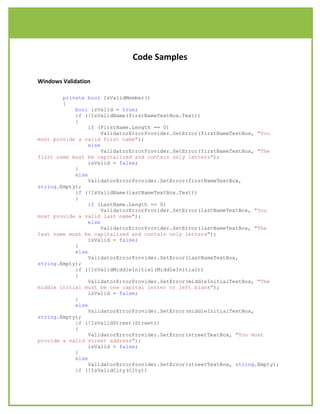
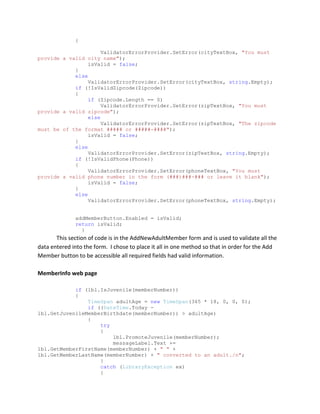
);                isValid = false;            }            else                ValidatorErrorProvider.SetError(phoneTextBox, string.Empty);            addMemberButton.Enabled = isValid;            return isValid;        } This section of code is in the AddNewAdultMember form and is used to validate all the data entered into the form.  I chose to place it all in one method so that in order for the Add Member button to be accessible all required fields had valid information.MemberInfo web page if (lbl.IsJuvenile(memberNumber))            {                TimeSpan adultAge = new TimeSpan(365 * 18, 0, 0, 0);                if ((DateTime.Today - lbl.GetJuvenileMemberBirthdate(memberNumber)) > adultAge)                {                    try                    {                        lbl.PromoteJuvenile(memberNumber);                        messageLabel.Text += lbl.GetMemberFirstName(memberNumber) + \"
 \"
 + lbl.GetMemberLastName(memberNumber) + \"
 converted to an adult./n\"
;                    }                    catch (LibraryException ex)                    {                        if (ex.LibraryErrorCode == ErrorCode.JuvenileNotOldEnough)                            messageLabel.Text += \"
Juvenile conversion failed, juvenile not old enough.\"
;                        else                            throw;                    }                }                birthdateLabelLabel.Visible = true;                birthdateLabelLabel.Text = \"
Birthdate: \"
;                birthdateLabel.Text = lbl.GetJuvenileMemberBirthdate(memberNumber).ToLongDateString();                adultMemberLabelLabel.Visible = true;                adultMemberLabelLabel.Text = \"
Adult Member No: \"
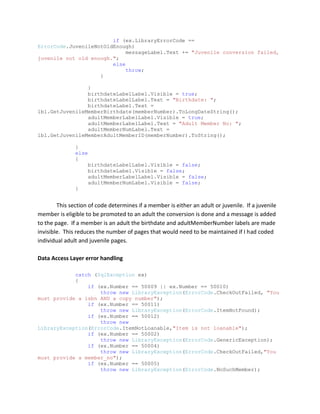
;                adultMemberNumLabel.Text = lbl.GetJuvenileMemberAdultMemberID(memberNumber).ToString();            }            else            {                birthdateLabelLabel.Visible = false;                birthdateLabel.Visible = false;                adultMemberLabelLabel.Visible = false;                adultMemberNumLabel.Visible = false;                }This section of code determines if a member is either an adult or juvenile.  If a juvenile member is eligible to be promoted to an adult the conversion is done and a message is added to the page.  If a member is an adult the birthdate and adultMemberNumber labels are made invisible.  This reduces the number of pages that would need to be maintained if I had coded individual adult and juvenile pages.Data Access Layer error handlingcatch (SqlException ex)            {                if (ex.Number == 50009 || ex.Number == 50010)                    throw new LibraryException(ErrorCode.CheckOutFailed, \"
You must provide a isbn AND a copy number\"
);                if (ex.Number == 50011)                    throw new LibraryException(ErrorCode.ItemNotFound);                if (ex.Number == 50012)                    throw new LibraryException(ErrorCode.ItemNotLoanable,\"
Item is not loanable\"
);                if (ex.Number == 50002)                    throw new LibraryException(ErrorCode.GenericException);                if (ex.Number == 50004)                    throw new LibraryException(ErrorCode.CheckOutFailed,\"
You must provide a member_no\"
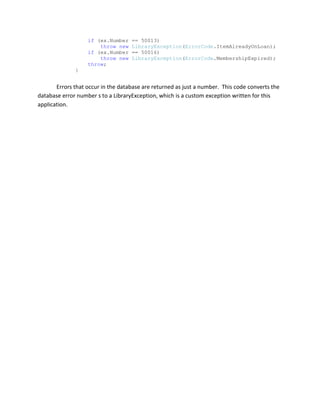
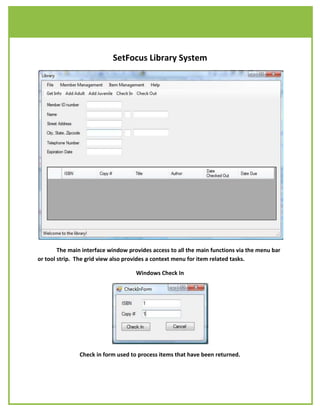
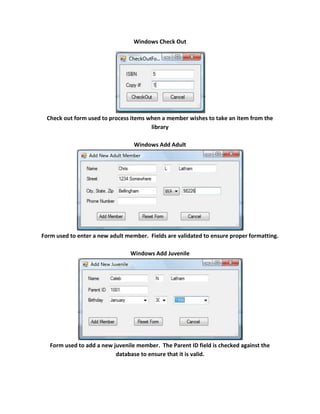
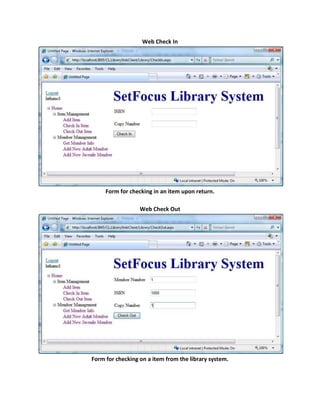
);                if (ex.Number == 50005)                    throw new LibraryException(ErrorCode.NoSuchMember);                if (ex.Number == 50013)                    throw new LibraryException(ErrorCode.ItemAlreadyOnLoan);                if (ex.Number == 50016)                    throw new LibraryException(ErrorCode.MembershipExpired);                throw;            }Errors that occur in the database are returned as just a number.  This code converts the database error number s to a LibraryException, which is a custom exception written for this application.SetFocus Library SystemThe main interface window provides access to all the main functions via the menu bar or tool strip.  The grid view also provides a context menu for item related tasks.Windows Check InCheck in form used to process items that have been returned.Windows Check OutCheck out form used to process items when a member wishes to take an item from the libraryWindows Add AdultForm used to enter a new adult member.  Fields are validated to ensure proper formatting.Windows Add JuvenileForm used to add a new juvenile member.  The Parent ID field is checked against the database to ensure that it is valid.Web Get Member InformationMain interface of the web application.  Navigation is done view the links along the left side.  The system has a security feature that only allows registered librarians and volunteers access the interface.Web Member InformationDisplay of member information.  Juvenile members also list the adult member ID and the member’s birth date.Web Add Adult MemberForm used for entry of new adult members.Web Add Juvenile MemberForm used for entry of new juvenile members.Web Add New ItemForm used for entering a new item into the system.  Form has validation of the ISBN so to prevent duplicate items.Web Check InForm for checking in an item upon return.Web Check OutForm for checking on a item from the library system.
Christopher Latham Portfolio

Christopher Latham Portfolio

  • 1.
    SetFocus Library SystemIntroduction: This project is a simple library administration application.Audience: The typical users would be librarians and library volunteers.Project Goals:Both Windows and web based interfaces
  • 2.
    Handle all commonlibrary functions (e.g. Check a book out, Add a new library member, etc.) with minimal required training.
  • 3.
  • 4.
  • 5.
    Validation for allentered fields.Code SamplesWindows Validation private bool IsValidMember() { bool isValid = true; if (!IsValidName(firstNameTextBox.Text)) { if (FirstName.Length == 0) ValidatorErrorProvider.SetError(firstNameTextBox, \" You must provide a valid first name\" ); else ValidatorErrorProvider.SetError(firstNameTextBox, \" The first name must be capitalized and contain only letters\" ); isValid = false; } else ValidatorErrorProvider.SetError(firstNameTextBox, string.Empty); if (!IsValidName(lastNameTextBox.Text)) { if (LastName.Length == 0) ValidatorErrorProvider.SetError(lastNameTextBox, \" You must provide a valid last name\" ); else ValidatorErrorProvider.SetError(lastNameTextBox, \" The last name must be capitalized and contain only letters\" ); isValid = false; } else ValidatorErrorProvider.SetError(lastNameTextBox, string.Empty); if (!IsValidMiddleInitial(MiddleInitial)) { ValidatorErrorProvider.SetError(middleInitialTextBox, \" The middle initial must be one capital letter or left blank\" ); isValid = false; } else ValidatorErrorProvider.SetError(middleInitialTextBox, string.Empty); if (!IsValidStreet(Street)) { ValidatorErrorProvider.SetError(streetTextBox, \" You must provide a valid street address\" ); isValid = false; } else ValidatorErrorProvider.SetError(streetTextBox, string.Empty); if (!IsValidCity(City)) { ValidatorErrorProvider.SetError(cityTextBox, \" You must provide a valid city name\" ); isValid = false; } else ValidatorErrorProvider.SetError(cityTextBox, string.Empty); if (!IsValidZipcode(Zipcode)) { if (Zipcode.Length == 0) ValidatorErrorProvider.SetError(zipTextBox, \" You must provide a valid zipcode\" ); else ValidatorErrorProvider.SetError(zipTextBox, \" The zipcode must be of the format ##### or #####-####\" ); isValid = false; } else ValidatorErrorProvider.SetError(zipTextBox, string.Empty); if (!IsValidPhone(Phone)) { ValidatorErrorProvider.SetError(phoneTextBox, \" You must provide a valid phone number in the form (###)###-### or leave it blank\" ); isValid = false; } else ValidatorErrorProvider.SetError(phoneTextBox, string.Empty); addMemberButton.Enabled = isValid; return isValid; } This section of code is in the AddNewAdultMember form and is used to validate all the data entered into the form. I chose to place it all in one method so that in order for the Add Member button to be accessible all required fields had valid information.MemberInfo web page if (lbl.IsJuvenile(memberNumber)) { TimeSpan adultAge = new TimeSpan(365 * 18, 0, 0, 0); if ((DateTime.Today - lbl.GetJuvenileMemberBirthdate(memberNumber)) > adultAge) { try { lbl.PromoteJuvenile(memberNumber); messageLabel.Text += lbl.GetMemberFirstName(memberNumber) + \" \" + lbl.GetMemberLastName(memberNumber) + \" converted to an adult./n\" ; } catch (LibraryException ex) { if (ex.LibraryErrorCode == ErrorCode.JuvenileNotOldEnough) messageLabel.Text += \" Juvenile conversion failed, juvenile not old enough.\" ; else throw; } } birthdateLabelLabel.Visible = true; birthdateLabelLabel.Text = \" Birthdate: \" ; birthdateLabel.Text = lbl.GetJuvenileMemberBirthdate(memberNumber).ToLongDateString(); adultMemberLabelLabel.Visible = true; adultMemberLabelLabel.Text = \" Adult Member No: \" ; adultMemberNumLabel.Text = lbl.GetJuvenileMemberAdultMemberID(memberNumber).ToString(); } else { birthdateLabelLabel.Visible = false; birthdateLabel.Visible = false; adultMemberLabelLabel.Visible = false; adultMemberNumLabel.Visible = false; }This section of code determines if a member is either an adult or juvenile. If a juvenile member is eligible to be promoted to an adult the conversion is done and a message is added to the page. If a member is an adult the birthdate and adultMemberNumber labels are made invisible. This reduces the number of pages that would need to be maintained if I had coded individual adult and juvenile pages.Data Access Layer error handlingcatch (SqlException ex) { if (ex.Number == 50009 || ex.Number == 50010) throw new LibraryException(ErrorCode.CheckOutFailed, \" You must provide a isbn AND a copy number\" ); if (ex.Number == 50011) throw new LibraryException(ErrorCode.ItemNotFound); if (ex.Number == 50012) throw new LibraryException(ErrorCode.ItemNotLoanable,\" Item is not loanable\" ); if (ex.Number == 50002) throw new LibraryException(ErrorCode.GenericException); if (ex.Number == 50004) throw new LibraryException(ErrorCode.CheckOutFailed,\" You must provide a member_no\" ); if (ex.Number == 50005) throw new LibraryException(ErrorCode.NoSuchMember); if (ex.Number == 50013) throw new LibraryException(ErrorCode.ItemAlreadyOnLoan); if (ex.Number == 50016) throw new LibraryException(ErrorCode.MembershipExpired); throw; }Errors that occur in the database are returned as just a number. This code converts the database error number s to a LibraryException, which is a custom exception written for this application.SetFocus Library SystemThe main interface window provides access to all the main functions via the menu bar or tool strip. The grid view also provides a context menu for item related tasks.Windows Check InCheck in form used to process items that have been returned.Windows Check OutCheck out form used to process items when a member wishes to take an item from the libraryWindows Add AdultForm used to enter a new adult member. Fields are validated to ensure proper formatting.Windows Add JuvenileForm used to add a new juvenile member. The Parent ID field is checked against the database to ensure that it is valid.Web Get Member InformationMain interface of the web application. Navigation is done view the links along the left side. The system has a security feature that only allows registered librarians and volunteers access the interface.Web Member InformationDisplay of member information. Juvenile members also list the adult member ID and the member’s birth date.Web Add Adult MemberForm used for entry of new adult members.Web Add Juvenile MemberForm used for entry of new juvenile members.Web Add New ItemForm used for entering a new item into the system. Form has validation of the ISBN so to prevent duplicate items.Web Check InForm for checking in an item upon return.Web Check OutForm for checking on a item from the library system.