William SpreitzerC# .NET Developer – Design Portfoliowspreitzer@comcast.nethttp://www.linkedin.com/in/wspreitzerilnet(224)234-3453
Business Tier Object Framework – Retail ServicesOverview:Developed two Business layer assemblies for a Retail Services CompanyFoundation.dll – Interface and base classes
AppTypes.dll – Various Entity, Collection, and Exception ClassesProject requirements included integrating new assemblies into existing framework and verifying functionality using detailed unit-testing.  Business objects implemented .NET Framework interfaces and extended .NET base classes whenever possible.  To support documentation and maintainability XML Build Documentation and Custom Attributes were utilized.
Key Knowledge ComponentsObject Modeling of Business EntitiesCustomizing Exception and Event HandlingImproving Meta-Data using Custom AttributesUnit Testing using System.Reflection namespaceUtilizing Strongly-Typed Generic CollectionsImplementing .NET Framework and Custom InterfacesExtending .NET Framework Base ClassesGenerating XML Release Build Documentation
Design ApproachCreate functional business objects easily used by the presentation and data access layers at runtime.  Support binary and XML serialization for preserving application state.Custom objects were developed by implementing .NET Base Classes and extending standard .NET Interfaces.Examples are IComparable<T>, IComparer<T> and ISerializable.
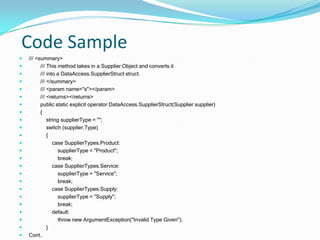
Design Approach cont.Enhance object flexibility by providing intuitive operator overloading and overriding base class methods such as Object.GetHashCode().Customized exception classes were built to provide application specific error information and an EventLogger class was developed to register delegates to customized collection modification events.  For proper integration and regression analysis, the code was unit-tested during development using test scenarios and runtime reflection.To support future maintainability, code was commented using .NET XML documentation generated on build as well as customized attributes viewable at runtime using reflection or via the MSIL Manifest using ILDASM.exe
Code Sample/// <summary>        /// This method takes in a Supplier Object and converts it        /// into a DataAccess.SupplierStruct struct.          /// </summary>/// <param name="s"></param>        /// <returns></returns>        public static explicit operator DataAccess.SupplierStruct(Supplier supplier)        {            string supplierType = "";            switch (supplier.Type)            {                case SupplierTypes.Product:supplierType = "Product";                    break;                case SupplierTypes.Service:supplierType = "Service";                    break;                case SupplierTypes.Supply:supplierType = "Supply";                    break;                default:                    throw new ArgumentException("Invalid Type Given");}Cont..
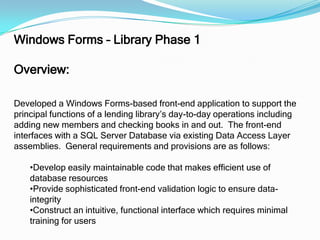
Windows Forms – Library Phase 1Overview:Developed a Windows Forms-based front-end application to support the principal functions of a lending library’s day-to-day operations including adding new members and checking books in and out.  The front-end interfaces with a SQL Server Database via existing Data Access Layer assemblies.  General requirements and provisions are as follows:Develop easily maintainable code that makes efficient use of database resources
Provide sophisticated front-end validation logic to ensure data-integrity
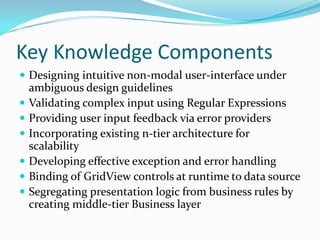
Construct an intuitive, functional interface which requires minimal training for usersKey Knowledge ComponentsDesigning intuitive non-modal user-interface under ambiguous design guidelinesValidating complex input using Regular ExpressionsProviding user input feedback via error providersIncorporating existing n-tier architecture for scalabilityDeveloping effective exception and error handlingBinding of GridView controls at runtime to data sourceSegregating presentation logic from business rules by creating middle-tier Business layer
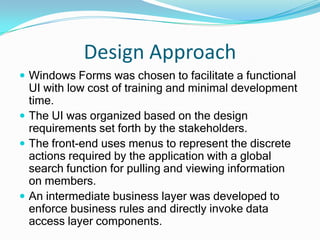
Design ApproachWindows Forms was chosen to facilitate a functional UI with low cost of training and minimal development time.The UI was organized based on the design requirements set forth by the stakeholders.The front-end uses menus to represent the discrete actions required by the application with a global search function for pulling and viewing information on members.  An intermediate business layer was developed to enforce business rules and directly invoke data access layer components.
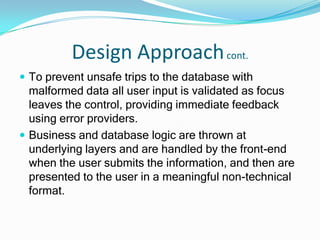
Design Approach cont.To prevent unsafe trips to the database with malformed data all user input is validated as focus leaves the control, providing immediate feedback using error providers.  Business and database logic are thrown at underlying layers and are handled by the front-end when the user submits the information, and then are presented to the user in a meaningful non-technical format.
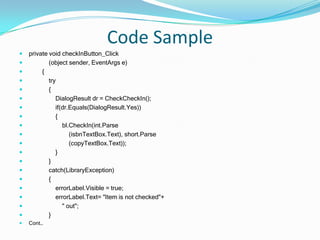
Code Sampleprivate void checkInButton_Click            (object sender, EventArgs e)        {            try            {                DialogResult dr = CheckCheckIn();                if(dr.Equals(DialogResult.Yes))                {                    bl.CheckIn(int.Parse                        (isbnTextBox.Text), short.Parse                        (copyTextBox.Text));                }            }            catch(LibraryException)            {                errorLabel.Visible = true;                errorLabel.Text= "Item is not checked"+                    " out";            }Cont…
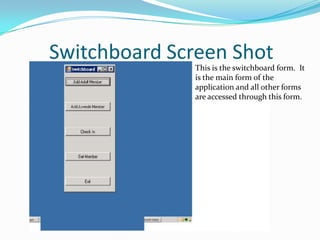
Switchboard Screen ShotThis is the switchboard form.  It is the main form of the application and all other forms are accessed through this form.
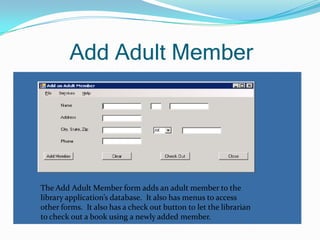
Add Adult Member The Add Adult Member form adds an adult member to the library application’s database.  It also has menus to access other forms.  It also has a check out button to let the librarian to check out a book using a newly added member.
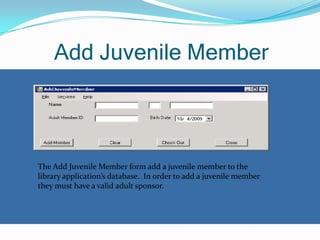
Add Juvenile MemberThe Add Juvenile Member form add a juvenile member to the library application’s database.  In order to add a juvenile member they must have a valid adult sponsor.
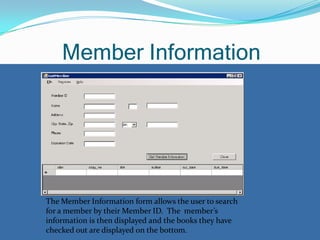
Member InformationThe Member Information form allows the user to search for a member by their Member ID.  The  member’s information is then displayed and the books they have checked out are displayed on the bottom.

Il 09 T3 William Spreitzer

  • 1.
    William SpreitzerC# .NETDeveloper – Design Portfoliowspreitzer@comcast.nethttp://www.linkedin.com/in/wspreitzerilnet(224)234-3453
  • 2.
    Business Tier ObjectFramework – Retail ServicesOverview:Developed two Business layer assemblies for a Retail Services CompanyFoundation.dll – Interface and base classes
  • 3.
    AppTypes.dll – VariousEntity, Collection, and Exception ClassesProject requirements included integrating new assemblies into existing framework and verifying functionality using detailed unit-testing. Business objects implemented .NET Framework interfaces and extended .NET base classes whenever possible. To support documentation and maintainability XML Build Documentation and Custom Attributes were utilized.
  • 4.
    Key Knowledge ComponentsObjectModeling of Business EntitiesCustomizing Exception and Event HandlingImproving Meta-Data using Custom AttributesUnit Testing using System.Reflection namespaceUtilizing Strongly-Typed Generic CollectionsImplementing .NET Framework and Custom InterfacesExtending .NET Framework Base ClassesGenerating XML Release Build Documentation
  • 5.
    Design ApproachCreate functionalbusiness objects easily used by the presentation and data access layers at runtime. Support binary and XML serialization for preserving application state.Custom objects were developed by implementing .NET Base Classes and extending standard .NET Interfaces.Examples are IComparable<T>, IComparer<T> and ISerializable.
  • 6.
    Design Approach cont.Enhanceobject flexibility by providing intuitive operator overloading and overriding base class methods such as Object.GetHashCode().Customized exception classes were built to provide application specific error information and an EventLogger class was developed to register delegates to customized collection modification events. For proper integration and regression analysis, the code was unit-tested during development using test scenarios and runtime reflection.To support future maintainability, code was commented using .NET XML documentation generated on build as well as customized attributes viewable at runtime using reflection or via the MSIL Manifest using ILDASM.exe
  • 7.
    Code Sample/// <summary> /// This method takes in a Supplier Object and converts it /// into a DataAccess.SupplierStruct struct. /// </summary>/// <param name="s"></param> /// <returns></returns> public static explicit operator DataAccess.SupplierStruct(Supplier supplier) { string supplierType = ""; switch (supplier.Type) { case SupplierTypes.Product:supplierType = "Product"; break; case SupplierTypes.Service:supplierType = "Service"; break; case SupplierTypes.Supply:supplierType = "Supply"; break; default: throw new ArgumentException("Invalid Type Given");}Cont..
  • 8.
    Windows Forms –Library Phase 1Overview:Developed a Windows Forms-based front-end application to support the principal functions of a lending library’s day-to-day operations including adding new members and checking books in and out. The front-end interfaces with a SQL Server Database via existing Data Access Layer assemblies. General requirements and provisions are as follows:Develop easily maintainable code that makes efficient use of database resources
  • 9.
    Provide sophisticated front-endvalidation logic to ensure data-integrity
  • 10.
    Construct an intuitive,functional interface which requires minimal training for usersKey Knowledge ComponentsDesigning intuitive non-modal user-interface under ambiguous design guidelinesValidating complex input using Regular ExpressionsProviding user input feedback via error providersIncorporating existing n-tier architecture for scalabilityDeveloping effective exception and error handlingBinding of GridView controls at runtime to data sourceSegregating presentation logic from business rules by creating middle-tier Business layer
  • 11.
    Design ApproachWindows Formswas chosen to facilitate a functional UI with low cost of training and minimal development time.The UI was organized based on the design requirements set forth by the stakeholders.The front-end uses menus to represent the discrete actions required by the application with a global search function for pulling and viewing information on members. An intermediate business layer was developed to enforce business rules and directly invoke data access layer components.
  • 12.
    Design Approach cont.Toprevent unsafe trips to the database with malformed data all user input is validated as focus leaves the control, providing immediate feedback using error providers. Business and database logic are thrown at underlying layers and are handled by the front-end when the user submits the information, and then are presented to the user in a meaningful non-technical format.
  • 13.
    Code Sampleprivate voidcheckInButton_Click (object sender, EventArgs e) { try { DialogResult dr = CheckCheckIn(); if(dr.Equals(DialogResult.Yes)) { bl.CheckIn(int.Parse (isbnTextBox.Text), short.Parse (copyTextBox.Text)); } } catch(LibraryException) { errorLabel.Visible = true; errorLabel.Text= "Item is not checked"+ " out"; }Cont…
  • 14.
    Switchboard Screen ShotThisis the switchboard form. It is the main form of the application and all other forms are accessed through this form.
  • 15.
    Add Adult MemberThe Add Adult Member form adds an adult member to the library application’s database. It also has menus to access other forms. It also has a check out button to let the librarian to check out a book using a newly added member.
  • 16.
    Add Juvenile MemberTheAdd Juvenile Member form add a juvenile member to the library application’s database. In order to add a juvenile member they must have a valid adult sponsor.
  • 17.
    Member InformationThe MemberInformation form allows the user to search for a member by their Member ID. The member’s information is then displayed and the books they have checked out are displayed on the bottom.