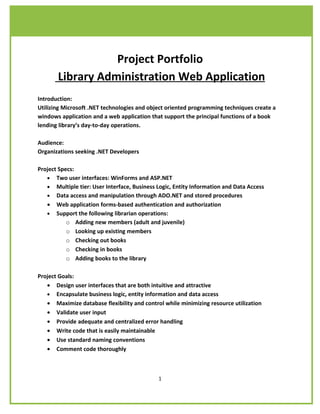
Project Portfolio
       Library Administration Web Application
Introduction:
Utilizing Microsoft .NET technologies and object oriented programming techniques create a
windows application and a web application that support the principal functions of a book
lending library’s day-to-day operations.

Audience:
Organizations seeking .NET Developers

Project Specs:
   • Two user interfaces: WinForms and ASP.NET
   • Multiple tier: User Interface, Business Logic, Entity Information and Data Access
   • Data access and manipulation through ADO.NET and stored procedures
   • Web application forms-based authentication and authorization
   • Support the following librarian operations:
           o Adding new members (adult and juvenile)
           o Looking up existing members
           o Checking out books
           o Checking in books
           o Adding books to the library

Project Goals:
   • Design user interfaces that are both intuitive and attractive
   • Encapsulate business logic, entity information and data access
   • Maximize database flexibility and control while minimizing resource utilization
   • Validate user input
   • Provide adequate and centralized error handling
   • Write code that is easily maintainable
   • Use standard naming conventions
   • Comment code thoroughly


                                             1
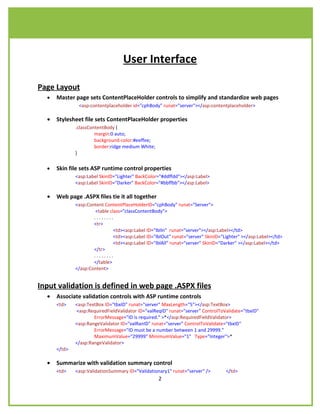
User Interface

Page Layout
  •   Master page sets ContentPlaceHolder controls to simplify and standardize web pages
               <asp:contentplaceholder id="cphBody" runat="server"></asp:contentplaceholder>

  •   Stylesheet file sets ContentPlaceHolder properties
              .classContentBody {
                       margin:0 auto;
                       background-color:#eeffee;
                       border:ridge medium White;
              }

  •   Skin file sets ASP runtime control properties
              <asp:Label SkinID="Lighter" BackColor="#ddffdd"></asp:Label>
              <asp:Label SkinID="Darker" BackColor="#bbffbb"></asp:Label>

  •   Web page .ASPX files tie it all together
              <asp:Content ContentPlaceHolderID="cphBody" runat="Server">
                      <table class="classContentBody">
                      ........
                      <tr>
                               <td><asp:Label ID="lblIn" runat="server"></asp:Label></td>
                               <td><asp:Label ID="lblOut" runat="server" SkinID="Lighter" ></asp:Label></td>
                               <td><asp:Label ID="lblAll" runat="server" SkinID="Darker" ></asp:Label></td>
                      </tr>
                      ........
                      </table>
              </asp:Content>


Input validation is defined in web page .ASPX files
  •   Associate validation controls with ASP runtime controls
      <td>    <asp:TextBox ID="tbxID" runat="server" MaxLength="5"></asp:TextBox>
              <asp:RequiredFieldValidator ID="valReqID" runat="server" ControlToValidate="tbxID"
                      ErrorMessage="ID is required." >*</asp:RequiredFieldValidator>
              <asp:RangeValidator ID="valRanID" runat="server" ControlToValidate="tbxID"
                      ErrorMessage="ID must be a number between 1 and 29999."
                      MaximumValue="29999" MinimumValue="1" Type="Integer">*
              </asp:RangeValidator>
      </td>

  •   Summarize with validation summary control
      <td>    <asp:ValidationSummary ID="Validationary1" runat="server" />        </td>
                                                    2
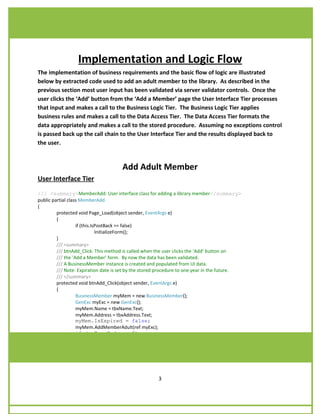
Implementation and Logic Flow
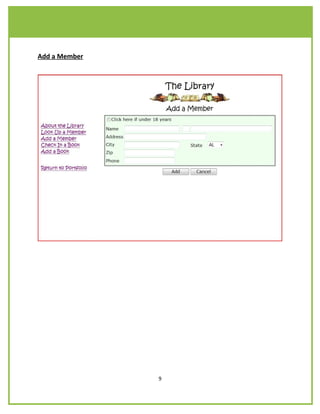
The implementation of business requirements and the basic flow of logic are illustrated
below by extracted code used to add an adult member to the library. As described in the
previous section most user input has been validated via server validator controls. Once the
user clicks the ‘Add’ button from the ‘Add a Member’ page the User Interface Tier processes
that input and makes a call to the Business Logic Tier. The Business Logic Tier applies
business rules and makes a call to the Data Access Tier. The Data Access Tier formats the
data appropriately and makes a call to the stored procedure. Assuming no exceptions control
is passed back up the call chain to the User Interface Tier and the results displayed back to
the user.


                                      Add Adult Member
User Interface Tier
/// <summary>MemberAdd: User interface class for adding a library member</summary>
public partial class MemberAdd
{
         protected void Page_Load(object sender, EventArgs e)
         {
                   if (this.IsPostBack == false)
                              InitializeForm();
         }
         /// <summary>
         /// btnAdd_Click: This method is called when the user clicks the ‘Add’ button on
         /// the ‘Add a Member’ form. By now the data has been validated.
         /// A BusinessMember instance is created and populated from UI data.
         /// Note: Expiration date is set by the stored procedure to one year in the future.
         /// </summary>
         protected void btnAdd_Click(object sender, EventArgs e)
         {
                   BusinessMember myMem = new BusinessMember();
                   GenExc myExc = new GenExc();
                   myMem.Name = tbxName.Text;
                   myMem.Address = tbxAddress.Text;
                   myMem.IsExpired = false;
                   myMem.AddMemberAdult(ref myExc);
                   if (myExc.Code == 0)
                              ReportMemberAdd(myMem);
                   lblStatusMsg.Text = myExc.FormatMessage();
         }


                                                      3
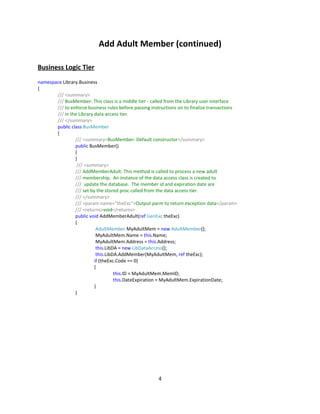
Add Adult Member (continued)

Business Logic Tier
namespace Library.Business
{
       /// <summary>
       /// BusMember: This class is a middle tier - called from the Library user interface
       /// to enforce business rules before passing instructions on to finalize transactions
       /// in the Library data access tier.
       /// </summary>
       public class BusMember
       {
                /// <summary>BusMember: Default constructor</summary>
                public BusMember()
                {
                }
                 /// <summary>
                /// AddMemberAdult: This method is called to process a new adult
                /// membership. An instance of the data access class is created to
                /// update the database. The member id and expiration date are
                /// set by the stored proc called from the data access tier.
                /// </summary>
                /// <param name="theExc">Output parm to return exception data</param>
                /// <returns>void</returns>
                public void AddMemberAdult(ref GenExc theExc)
                {
                           AdultMember MyAdultMem = new AdultMember();
                           MyAdultMem.Name = this.Name;
                           MyAdultMem.Address = this.Address;
                           this.LibDA = new LibDataAccess();
                           this.LibDA.AddMember(MyAdultMem, ref theExc);
                          if (theExc.Code == 0)
                          {
                                    this.ID = MyAdultMem.MemID;
                                    this.DateExpiration = MyAdultMem.ExpirationDate;
                          }
                }


                                                       4
Add Adult Member (continued)

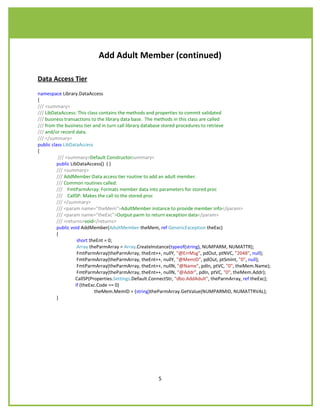
Data Access Tier
namespace Library.DataAccess
{
/// <summary>
/// LibDataAccess: This class contains the methods and properties to commit validated
/// business transactions to the library data base. The methods in this class are called
/// from the business tier and in turn call library database stored procedures to retrieve
/// and/or record data.
/// </summary>
public class LibDataAccess
{
           /// <summary>Default Constructorsummary>
          public LibDataAccess() { }
          /// <summary>
          /// AddMember:Data access tier routine to add an adult member.
          /// Common routines called:
          /// FmtParmArray: Formats member data into parameters for stored proc
          /// CallSP: Makes the call to the stored proc
          /// </summary>
          /// <param name="theMem">AdultMember instance to provide member info</param>
          /// <param name="theExc">Output parm to return exception data</param>
          /// <returns>void</returns>
          public void AddMember(AdultMember theMem, ref GenericException theExc)
          {
                     short theEnt = 0;
                     Array theParmArray = Array.CreateInstance(typeof(string), NUMPARM, NUMATTR);
                     FmtParmArray(theParmArray, theEnt++, nullY, "@ErrMsg", pdOut, ptNVC, "2048", null);
                     FmtParmArray(theParmArray, theEnt++, nullY, "@MemID", pdOut, ptSmInt, "0", null);
                     FmtParmArray(theParmArray, theEnt++, nullN, "@Name", pdIn, ptVC, "0", theMem.Name);
                     FmtParmArray(theParmArray, theEnt++, nullN, "@Addr", pdIn, ptVC, "0", theMem.Addr);
                    CallSP(Properties.Settings.Default.ConnectStr, "dbo.AddAdult", theParmArray, ref theExc);
                    if (theExc.Code == 0)
                              theMem.MemID = (string)theParmArray.GetValue(NUMPARMID, NUMATTRVAL);
          }


                                                        5
Add Adult Member (continued)

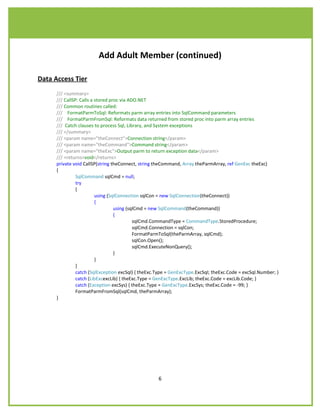
Data Access Tier
      /// <summary>
      /// CallSP: Calls a stored proc via ADO.NET
      /// Common routines called:
      /// FormatParmToSql: Reformats parm array entries into SqlCommand parameters
      /// FormatParmFromSql: Reformats data returned from stored proc into parm array entries
      /// Catch clauses to process Sql, Library, and System exceptions
      /// </summary>
      /// <param name="theConnect">Connection string</param>
      /// <param name="theCommand">Command string</param>
      /// <param name="theExc">Output parm to return exception data</param>
      /// <returns>void</returns>
      private void CallSP(string theConnect, string theCommand, Array theParmArray, ref GenExc theExc)
      {
                SqlCommand sqlCmd = null;
                try
                {
                          using (SqlConnection sqlCon = new SqlConnection(theConnect))
                          {
                                   using (sqlCmd = new SqlCommand(theCommand))
                                   {
                                            sqlCmd.CommandType = CommandType.StoredProcedure;
                                            sqlCmd.Connection = sqlCon;
                                            FormatParmToSql(theParmArray, sqlCmd);
                                            sqlCon.Open();
                                            sqlCmd.ExecuteNonQuery();
                                   }
                          }
                }
                catch (SqlException excSql) { theExc.Type = GenExcType.ExcSql; theExc.Code = excSql.Number; }
                catch (LibExcexcLib) { theExc.Type = GenExcType.ExcLib; theExc.Code = excLib.Code; }
                catch (Exception excSys) { theExc.Type = GenExcType.ExcSys; theExc.Code = -99; }
                FormatParmFromSql(sqlCmd, theParmArray);
      }


                                                     6
Add Adult Member (continued)

Stored Procedure
       CREATE PROC [dbo].[AddAdult]
              @ErrMsg NVARCHAR(500) OUTPUT,
              @MemID SMALLINT OUTPUT,
              @Name VARCHAR (50) = NULL,
              @Addr VARCHAR (50) = NULL,
                      AS SET ANSI_NULLS ON

               DECLARE @Identity SMALLINT
               DECLARE @ExpirationDate DATETIME

      BEGIN TRY
              IF @Name IS NULL
                       RAISERROR (' Error %d: Name is null.',14, 1, 50001);
              IF @Addr IS NULL
                       RAISERROR (' Error %d: Street is null.',14, 1, 50003);
              SELECT @ExpirationDate = CONVERT (DATE, DATEADD(YEAR, 1, GETDATE()))
      END TRY
      BEGIN CATCH
              SELECT @ ErrMsg = ERROR_MESSAGE(),
              RAISERROR (@ErrMsg, ERROR_SEVERITY(), ERROR_STATE(););
      END CATCH
      BEGIN TRANSACTION
              BEGIN TRY
                       INSERT dbo.member
                               (name)
                       VALUES (@Name)
                       SELECT @Identity = SCOPE_IDENTITY()
              END TRY
              BEGIN CATCH
                       ROLLBACK TRAN
                       RAISERROR (' Error %d: Insert member failed.',16, 1, 60001);
              END CATCH
              BEGIN TRY
                       INSERT dbo.adult
                               (member_no, address, expr_date )
                       VALUES (@Identity, @Addr, @ExpirationDate)
              END TRY
      BEGIN CATCH
              ROLLBACK TRAN
              RAISERROR (' Error %d: Insert adult failed.',16, 1, 60002);
      END CATCH
SET @MemID = @Identity
COMMIT TRANSACTION


                                                  7
Screen Shots

About the Library


                         8
Add a Member


               9
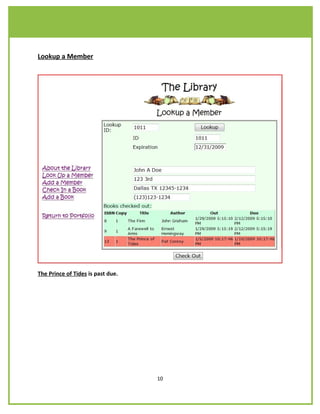
Lookup a Member


The Prince of Tides is past due.


                                   10
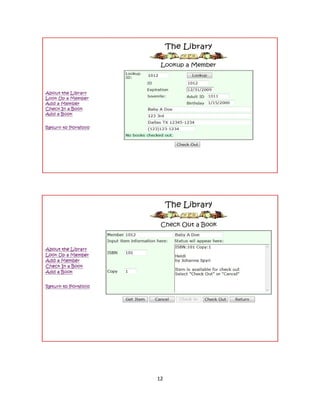
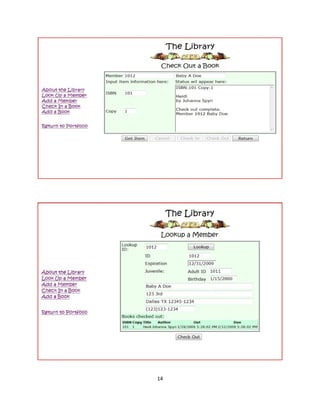
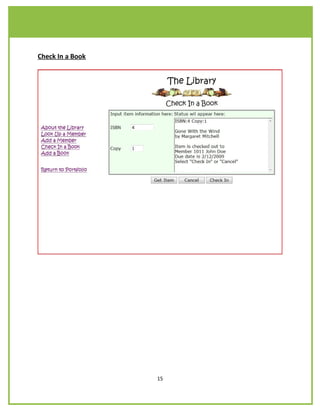
Lookup a Member and Check out a Book


                                   11
12
Lookup a Member and Check out a Book (continued)


                                   13
14
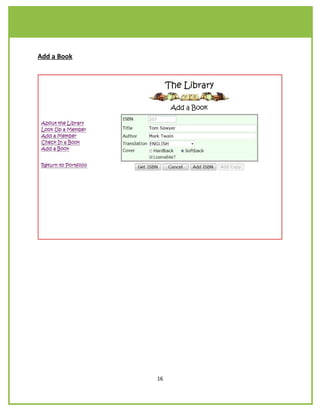
Check In a Book


                  15
Add a Book


             16

Library Project

  • 1.
    Project Portfolio Library Administration Web Application Introduction: Utilizing Microsoft .NET technologies and object oriented programming techniques create a windows application and a web application that support the principal functions of a book lending library’s day-to-day operations. Audience: Organizations seeking .NET Developers Project Specs: • Two user interfaces: WinForms and ASP.NET • Multiple tier: User Interface, Business Logic, Entity Information and Data Access • Data access and manipulation through ADO.NET and stored procedures • Web application forms-based authentication and authorization • Support the following librarian operations: o Adding new members (adult and juvenile) o Looking up existing members o Checking out books o Checking in books o Adding books to the library Project Goals: • Design user interfaces that are both intuitive and attractive • Encapsulate business logic, entity information and data access • Maximize database flexibility and control while minimizing resource utilization • Validate user input • Provide adequate and centralized error handling • Write code that is easily maintainable • Use standard naming conventions • Comment code thoroughly 1
  • 2.
    User Interface Page Layout • Master page sets ContentPlaceHolder controls to simplify and standardize web pages <asp:contentplaceholder id="cphBody" runat="server"></asp:contentplaceholder> • Stylesheet file sets ContentPlaceHolder properties .classContentBody { margin:0 auto; background-color:#eeffee; border:ridge medium White; } • Skin file sets ASP runtime control properties <asp:Label SkinID="Lighter" BackColor="#ddffdd"></asp:Label> <asp:Label SkinID="Darker" BackColor="#bbffbb"></asp:Label> • Web page .ASPX files tie it all together <asp:Content ContentPlaceHolderID="cphBody" runat="Server"> <table class="classContentBody"> ........ <tr> <td><asp:Label ID="lblIn" runat="server"></asp:Label></td> <td><asp:Label ID="lblOut" runat="server" SkinID="Lighter" ></asp:Label></td> <td><asp:Label ID="lblAll" runat="server" SkinID="Darker" ></asp:Label></td> </tr> ........ </table> </asp:Content> Input validation is defined in web page .ASPX files • Associate validation controls with ASP runtime controls <td> <asp:TextBox ID="tbxID" runat="server" MaxLength="5"></asp:TextBox> <asp:RequiredFieldValidator ID="valReqID" runat="server" ControlToValidate="tbxID" ErrorMessage="ID is required." >*</asp:RequiredFieldValidator> <asp:RangeValidator ID="valRanID" runat="server" ControlToValidate="tbxID" ErrorMessage="ID must be a number between 1 and 29999." MaximumValue="29999" MinimumValue="1" Type="Integer">* </asp:RangeValidator> </td> • Summarize with validation summary control <td> <asp:ValidationSummary ID="Validationary1" runat="server" /> </td> 2
  • 3.
    Implementation and LogicFlow The implementation of business requirements and the basic flow of logic are illustrated below by extracted code used to add an adult member to the library. As described in the previous section most user input has been validated via server validator controls. Once the user clicks the ‘Add’ button from the ‘Add a Member’ page the User Interface Tier processes that input and makes a call to the Business Logic Tier. The Business Logic Tier applies business rules and makes a call to the Data Access Tier. The Data Access Tier formats the data appropriately and makes a call to the stored procedure. Assuming no exceptions control is passed back up the call chain to the User Interface Tier and the results displayed back to the user. Add Adult Member User Interface Tier /// <summary>MemberAdd: User interface class for adding a library member</summary> public partial class MemberAdd { protected void Page_Load(object sender, EventArgs e) { if (this.IsPostBack == false) InitializeForm(); } /// <summary> /// btnAdd_Click: This method is called when the user clicks the ‘Add’ button on /// the ‘Add a Member’ form. By now the data has been validated. /// A BusinessMember instance is created and populated from UI data. /// Note: Expiration date is set by the stored procedure to one year in the future. /// </summary> protected void btnAdd_Click(object sender, EventArgs e) { BusinessMember myMem = new BusinessMember(); GenExc myExc = new GenExc(); myMem.Name = tbxName.Text; myMem.Address = tbxAddress.Text; myMem.IsExpired = false; myMem.AddMemberAdult(ref myExc); if (myExc.Code == 0) ReportMemberAdd(myMem); lblStatusMsg.Text = myExc.FormatMessage(); } 3
  • 4.
    Add Adult Member(continued) Business Logic Tier namespace Library.Business { /// <summary> /// BusMember: This class is a middle tier - called from the Library user interface /// to enforce business rules before passing instructions on to finalize transactions /// in the Library data access tier. /// </summary> public class BusMember { /// <summary>BusMember: Default constructor</summary> public BusMember() { } /// <summary> /// AddMemberAdult: This method is called to process a new adult /// membership. An instance of the data access class is created to /// update the database. The member id and expiration date are /// set by the stored proc called from the data access tier. /// </summary> /// <param name="theExc">Output parm to return exception data</param> /// <returns>void</returns> public void AddMemberAdult(ref GenExc theExc) { AdultMember MyAdultMem = new AdultMember(); MyAdultMem.Name = this.Name; MyAdultMem.Address = this.Address; this.LibDA = new LibDataAccess(); this.LibDA.AddMember(MyAdultMem, ref theExc); if (theExc.Code == 0) { this.ID = MyAdultMem.MemID; this.DateExpiration = MyAdultMem.ExpirationDate; } } 4
  • 5.
    Add Adult Member(continued) Data Access Tier namespace Library.DataAccess { /// <summary> /// LibDataAccess: This class contains the methods and properties to commit validated /// business transactions to the library data base. The methods in this class are called /// from the business tier and in turn call library database stored procedures to retrieve /// and/or record data. /// </summary> public class LibDataAccess { /// <summary>Default Constructorsummary> public LibDataAccess() { } /// <summary> /// AddMember:Data access tier routine to add an adult member. /// Common routines called: /// FmtParmArray: Formats member data into parameters for stored proc /// CallSP: Makes the call to the stored proc /// </summary> /// <param name="theMem">AdultMember instance to provide member info</param> /// <param name="theExc">Output parm to return exception data</param> /// <returns>void</returns> public void AddMember(AdultMember theMem, ref GenericException theExc) { short theEnt = 0; Array theParmArray = Array.CreateInstance(typeof(string), NUMPARM, NUMATTR); FmtParmArray(theParmArray, theEnt++, nullY, "@ErrMsg", pdOut, ptNVC, "2048", null); FmtParmArray(theParmArray, theEnt++, nullY, "@MemID", pdOut, ptSmInt, "0", null); FmtParmArray(theParmArray, theEnt++, nullN, "@Name", pdIn, ptVC, "0", theMem.Name); FmtParmArray(theParmArray, theEnt++, nullN, "@Addr", pdIn, ptVC, "0", theMem.Addr); CallSP(Properties.Settings.Default.ConnectStr, "dbo.AddAdult", theParmArray, ref theExc); if (theExc.Code == 0) theMem.MemID = (string)theParmArray.GetValue(NUMPARMID, NUMATTRVAL); } 5
  • 6.
    Add Adult Member(continued) Data Access Tier /// <summary> /// CallSP: Calls a stored proc via ADO.NET /// Common routines called: /// FormatParmToSql: Reformats parm array entries into SqlCommand parameters /// FormatParmFromSql: Reformats data returned from stored proc into parm array entries /// Catch clauses to process Sql, Library, and System exceptions /// </summary> /// <param name="theConnect">Connection string</param> /// <param name="theCommand">Command string</param> /// <param name="theExc">Output parm to return exception data</param> /// <returns>void</returns> private void CallSP(string theConnect, string theCommand, Array theParmArray, ref GenExc theExc) { SqlCommand sqlCmd = null; try { using (SqlConnection sqlCon = new SqlConnection(theConnect)) { using (sqlCmd = new SqlCommand(theCommand)) { sqlCmd.CommandType = CommandType.StoredProcedure; sqlCmd.Connection = sqlCon; FormatParmToSql(theParmArray, sqlCmd); sqlCon.Open(); sqlCmd.ExecuteNonQuery(); } } } catch (SqlException excSql) { theExc.Type = GenExcType.ExcSql; theExc.Code = excSql.Number; } catch (LibExcexcLib) { theExc.Type = GenExcType.ExcLib; theExc.Code = excLib.Code; } catch (Exception excSys) { theExc.Type = GenExcType.ExcSys; theExc.Code = -99; } FormatParmFromSql(sqlCmd, theParmArray); } 6
  • 7.
    Add Adult Member(continued) Stored Procedure CREATE PROC [dbo].[AddAdult] @ErrMsg NVARCHAR(500) OUTPUT, @MemID SMALLINT OUTPUT, @Name VARCHAR (50) = NULL, @Addr VARCHAR (50) = NULL, AS SET ANSI_NULLS ON DECLARE @Identity SMALLINT DECLARE @ExpirationDate DATETIME BEGIN TRY IF @Name IS NULL RAISERROR (' Error %d: Name is null.',14, 1, 50001); IF @Addr IS NULL RAISERROR (' Error %d: Street is null.',14, 1, 50003); SELECT @ExpirationDate = CONVERT (DATE, DATEADD(YEAR, 1, GETDATE())) END TRY BEGIN CATCH SELECT @ ErrMsg = ERROR_MESSAGE(), RAISERROR (@ErrMsg, ERROR_SEVERITY(), ERROR_STATE();); END CATCH BEGIN TRANSACTION BEGIN TRY INSERT dbo.member (name) VALUES (@Name) SELECT @Identity = SCOPE_IDENTITY() END TRY BEGIN CATCH ROLLBACK TRAN RAISERROR (' Error %d: Insert member failed.',16, 1, 60001); END CATCH BEGIN TRY INSERT dbo.adult (member_no, address, expr_date ) VALUES (@Identity, @Addr, @ExpirationDate) END TRY BEGIN CATCH ROLLBACK TRAN RAISERROR (' Error %d: Insert adult failed.',16, 1, 60002); END CATCH SET @MemID = @Identity COMMIT TRANSACTION 7
  • 8.
  • 9.
  • 10.
    Lookup a Member ThePrince of Tides is past due. 10
  • 11.
    Lookup a Memberand Check out a Book 11
  • 12.
  • 13.
    Lookup a Memberand Check out a Book (continued) 13
  • 14.
  • 15.
    Check In aBook 15
  • 16.