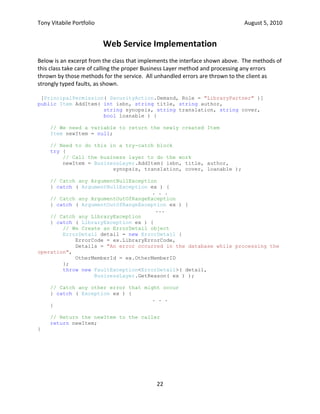
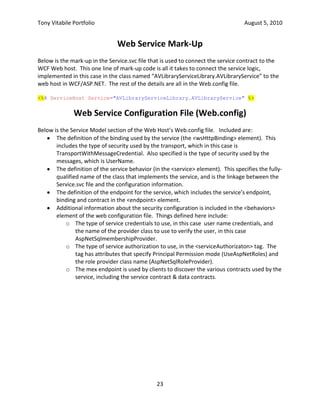
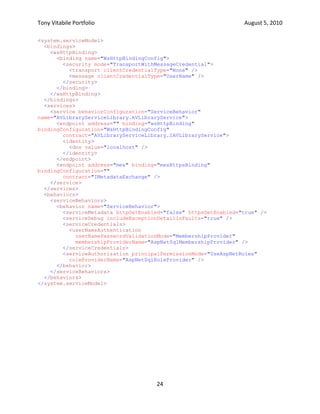
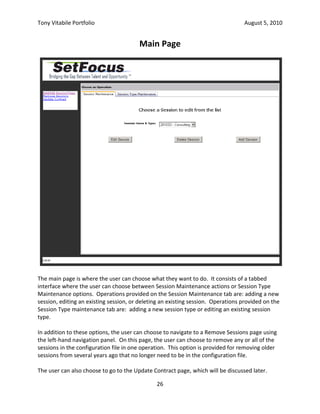
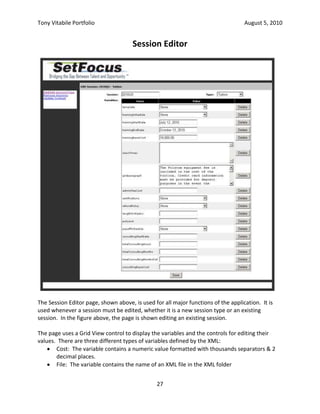
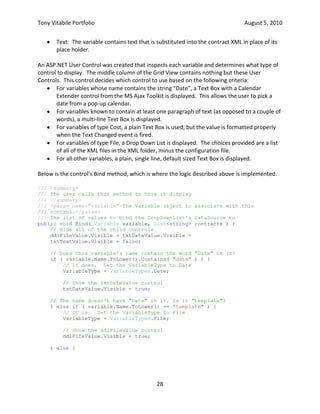
Library Project, Phase 1<br />Introduction:<br />This project required us to build a Windows Forms application to automate the principal day-to-day operations of a lending library.  The application had to support the four (4) principal library functions: adding adult & juvenile members and checking items in & out.<br />For this project, we were given DLLs containing the Entity and Data Access layers.  These interfaced with the back-end database, running on SQL Server.  Our task was to build a front-end for the application using Windows Forms and a business layer to isolate the front-end from the Data Access layer.<br />Audience:<br />.NET Project managers, .NET Developers<br />Project Goals:<br />The project goals were:<br />Create a Windows Forms application that allows a librarian to create new adult & juvenile members and check books in & out.
The application must validate user input to make sure data is entered for valid fields and all input meets business rules.
Items already checked-out cannot be checked-out by someone else until they have been checked back in.
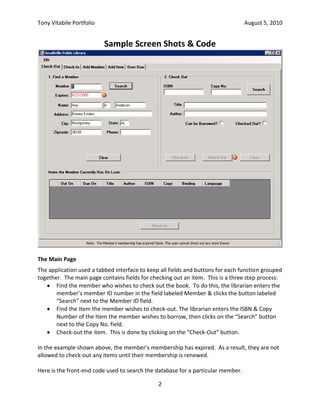
Regular expressions were to be used to verify that all input met formatting requirements.Sample Screen Shots & Code<br />The Main Page<br />The application used a tabbed interface to keep all fields and buttons for each function grouped together.  The main page contains fields for checking out an item.  This is a three step process:<br />Find the member who wishes to check out the book.  To do this, the librarian enters the member’s member ID number in the field labeled Member & clicks the button labeled “Search” next to the Member ID field.
Find the Item the member wishes to check-out. The librarian enters the ISBN & Copy Number of the Item the member wishes to borrow, then clicks on the “Search” button next to the Copy No. field.
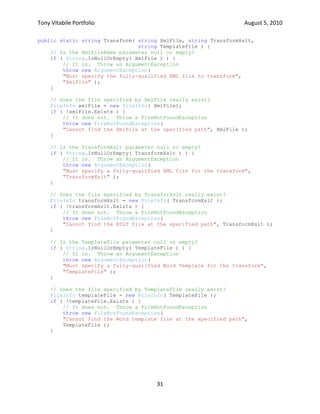
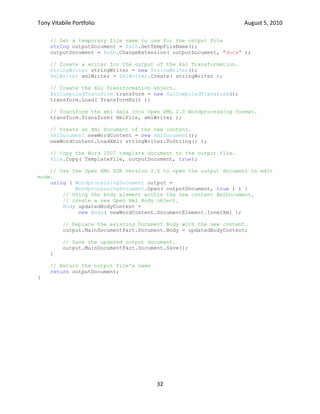
Check-out the item.  This is done by clicking on the “Check-Out” button.In the example shown above, the member’s membership has expired.  As a result, they are not allowed to check-out any items until their membership is renewed.<br />Here is the front-end code used to search the database for a particular member.<br />/// <summary><br />/// Handles the Search button on the Check-Out tab in the 1. Find a Member <br />/// Groupbox.<br />/// </summary><br />/// <param name=\"
sender\"
>The object that sent the message.  Ignored.</param><br />/// <param name=\"
e\"
>The arguments for the event.  Ignored</param><br />private void searchMemberButton_Click( object sender, EventArgs e ) {<br />    // Set our private field so the Validating methods know how to validate<br />    validateControls = ValidateCtrls.Member;<br />    // Validate the fields on the form<br />    if ( !this.ValidateChildren( ValidationConstraints.Enabled |<br />                                 ValidationConstraints.Visible ) ) {<br />        // If we get here, at least one field does not validate.  <br />        // Tell the user there's a problem<br />        DisplayStatus( statusLabel.Text + <br />            \"
 Please fix the errors before trying to search again.\"
 );<br />        // Exit now<br />        return;<br />    }<br />    // The form validates OK.  Get the member ID from the memberIdTextBox<br />    short memberID = short.Parse( memberIdTextBox.Text );<br />    // We need a try-catch block<br />    try {<br />        // Try to find the member with the given member ID from the database<br />        CurMember = BusinessLayer.GetMember( memberID );<br />    } catch ( ArgumentOutOfRangeException ) {<br />        // . . . <br />    } catch ( LibraryException ex ) {<br />        // If we get here, the GetMember operation failed.  <br />        // Construct an error message<br />        string errMsg = string.Format( <br />            \"
Unable to find a Member with ID {0} because {1}.\"
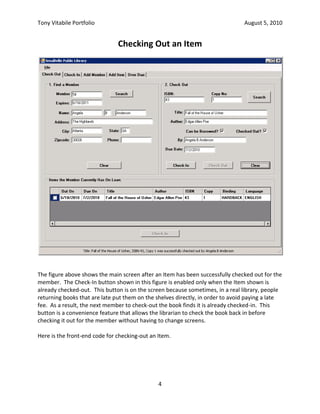
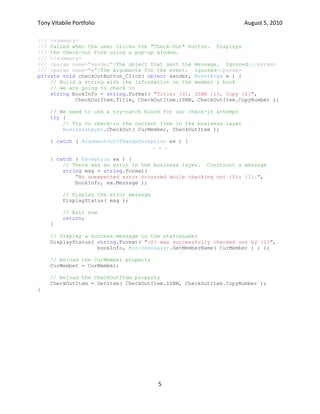
, memberID, <br />            BusinessLayer.GetReason( ex ) );<br />        // Display the error message in the statusLabel control<br />        DisplayStatus( errMsg );<br />        // Put the same error message in the errorProvider<br />        errorProvider.SetError( memberIdTextBox, errMsg );<br />        // Make sure CurMember is null<br />        CurMember = null;<br />    } catch ( Exception ex ) {<br />        // . . .<br />    }<br />}<br />Checking Out an Item<br />The figure above shows the main screen after an Item has been successfully checked out for the member.  The Check-In button shown in this figure is enabled only when the Item shown is already checked-out.  This button is on the screen because sometimes, in a real library, people returning books that are late put them on the shelves directly, in order to avoid paying a late fee.  As a result, the next member to check-out the book finds it is already checked-in.  This button is a convenience feature that allows the librarian to check the book back in before checking it out for the member without having to change screens.<br />Here is the front-end code for checking-out an Item.<br />/// <summary><br />/// Called when the user clicks the \"
Check-Out\"
 button.  Displays<br />/// the Check-Out Form using a pop-up window.<br />/// </summary><br />/// <param name=\"
sender\"
>The object that sent the message.  Ignored.</param><br />/// <param name=\"
e\"
>The arguments for the event.  Ignored</param><br />private void checkOutButton_Click( object sender, EventArgs e ) {<br />    // Build a string with the information on the member & book <br />    // we are going to check in<br />    string bookInfo = string.Format( \"
Title: {0}, ISBN {1}, Copy {2}\"
,<br />            CheckOutItem.Title, CheckOutItem.ISBN, CheckOutItem.CopyNumber );<br />    // We need to use a try-catch block for our check-in attempt<br />    try {<br />        // Try to check-in the current Item in the business layer<br />        BusinessLayer.CheckOut( CurMember, CheckOutItem );<br />    } catch ( ArgumentOutOfRangeException ex ) {<br />. . .<br />        <br />    } catch ( Exception ex ) {<br />        // There was an error in the business layer.  Construct a message<br />        string msg = string.Format( <br />\"
An unexpected error occurred while checking out {0}: {1}.\"
,<br />bookInfo, ex.Message );<br />        // Display the error message<br />        DisplayStatus( msg );<br />        // Exit now<br />        return;<br />    }<br />    // Display a success message in the statusLabel<br />    DisplayStatus( string.Format( \"
{0} was successfully checked out by {1}\"
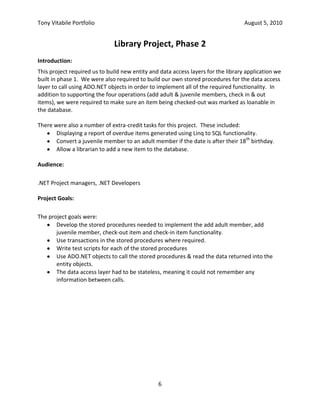
,<br />                   bookInfo, BusinessLayer.GetMemberName( CurMember ) ) );<br />    // Reload the CurMember property<br />    CurMember = CurMember;<br />    // Reload the CheckOutItem property<br />    CheckOutItem = GetItem( CheckOutItem.ISBN, CheckOutItem.CopyNumber );<br />}<br />Library Project, Phase 2<br />Introduction:<br />This project required us to build new entity and data access layers for the library application we built in phase 1.  We were also required to build our own stored procedures for the data access layer to call using ADO.NET objects in order to implement all of the required functionality.  In addition to supporting the four operations (add adult & juvenile members, check in & out items), we were required to make sure an item being checked-out was marked as loanable in the database.<br />There were also a number of extra-credit tasks for this project.  These included:<br />Displaying a report of overdue items generated using Linq to SQL functionality.
Convert a juvenile member to an adult member if the date is after their 18th birthday.
Allow a librarian to add a new item to the database.Audience:<br />.NET Project managers, .NET Developers<br />Project Goals:<br />The project goals were:<br />Develop the stored procedures needed to implement the add adult member, add juvenile member, check-out item and check-in item functionality.
Use transactions in the stored procedures where required.
Write test scripts for each of the stored procedures
Use ADO.NET objects to call the stored procedures & read the data returned into the entity objects.
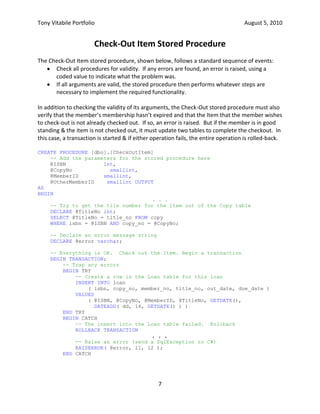
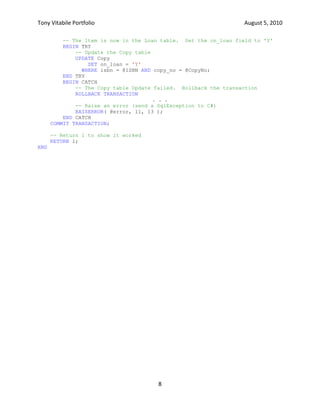
The data access layer had to be stateless, meaning it could not remember any information between calls.Check-Out Item Stored Procedure<br />The Check-Out Item stored procedure, shown below, follows a standard sequence of events:<br />Check all procedures for validity.  If any errors are found, an error is raised, using a coded value to indicate what the problem was.
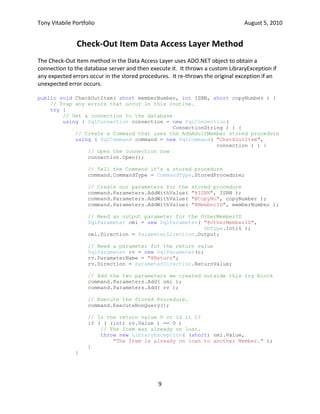
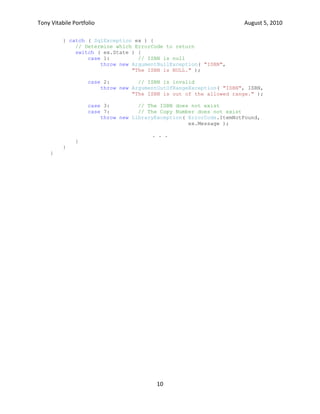
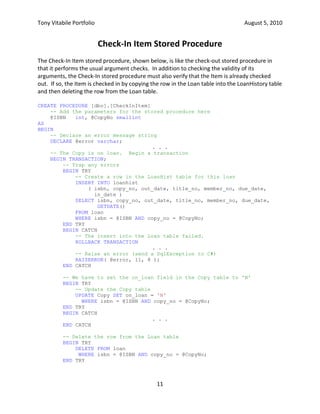
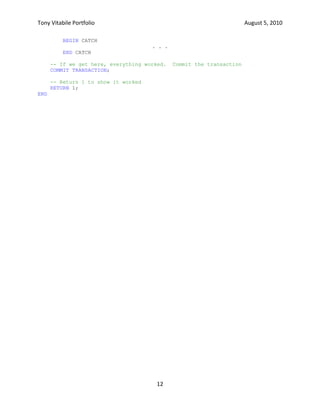
If all arguments are valid, the stored procedure then performs whatever steps are necessary to implement the required functionality.In addition to checking the validity of its arguments, the Check-Out stored procedure must also verify that the member’s membership hasn’t expired and that the Item that the member wishes to check-out is not already checked out.  If so, an error is raised.  But if the member is in good standing & the item is not checked out, it must update two tables to complete the checkout.  In this case, a transaction is started & if either operation fails, the entire operation is rolled-back.<br />CREATE PROCEDURE [dbo].[CheckOutItem]<br />    -- Add the parameters for the stored procedure here<br />    @ISBN            int,<br />    @CopyNo            smallint,<br />    @MemberID        smallint,<br />    @OtherMemberID    smallint OUTPUT<br />AS<br />BEGIN<br />. . .<br />    -- Try to get the tile number for the Item out of the Copy table<br />    DECLARE @TitleNo int;<br />    SELECT @TitleNo = title_no FROM copy <br />    WHERE isbn = @ISBN AND copy_no = @CopyNo;<br />    <br />    -- Declare an error message string<br />    DECLARE @error varchar;<br />    <br />    -- Everything is OK.  Check out the Item. Begin a transaction<br />    BEGIN TRANSACTION;<br />        -- Trap any errors<br />        BEGIN TRY<br />            -- Create a row in the Loan table for this loan<br />            INSERT INTO loan<br />                ( isbn, copy_no, member_no, title_no, out_date, due_date )<br />            VALUES<br />                ( @ISBN, @CopyNo, @MemberID, @TitleNo, GETDATE(), <br />DATEADD( dd, 14, GETDATE() ) )<br />        END TRY<br />        BEGIN CATCH<br />            -- The insert into the Loan table failed.  Rollback<br />            ROLLBACK TRANSACTION<br />, , ,<br />            -- Raise an error (send a SqlException to C#)<br />            RAISERROR( @error, 11, 12 );<br />        END CATCH<br />        <br />        -- The Item is now in the Loan table.  Set the on_loan field to 'Y'<br />        BEGIN TRY<br />            -- Update the Copy table<br />            UPDATE Copy<br />                SET on_loan = 'Y'<br />              WHERE isbn = @ISBN AND copy_no = @CopyNo;<br />        END TRY<br />        BEGIN CATCH<br />            -- The Copy table Update failed.  Rollback the transaction<br />            ROLLBACK TRANSACTION<br />. . .<br />            -- Raise an error (send a SqlException to C#)<br />            RAISERROR( @error, 11, 13 );<br />        END CATCH<br />    COMMIT TRANSACTION;<br />    <br />    -- Return 1 to show it worked<br />    RETURN 1;<br />END<br />Check-Out Item Data Access Layer Method<br />The Check-Out Item method in the Data Access Layer uses ADO.NET object to obtain a connection to the database server and then execute it.  It throws a custom LibraryException if any expected errors occur in the stored procedures.  It re-throws the original exception if an unexpected error occurs.<br />public void CheckOutItem( short memberNumber, int ISBN, short copyNumber ) {<br />    // Trap any errors that occur in this routine.<br />    try {<br />        // Get a connection to the database<br />        using ( SqlConnection connection = new SqlConnection( <br /> ConnectionString ) ) {<br />            // Create a Command that uses the AddAdultMember stored procedure<br />            using ( SqlCommand command = new SqlCommand( \"
CheckOutItem\"
,<br />   connection ) ) {<br />                // Open the connection now<br />                connection.Open();<br />                // Tell the Command it's a stored procedure<br />                command.CommandType = CommandType.StoredProcedure;<br />                // Create our parameters for the stored procedure<br />                command.Parameters.AddWithValue( \"
@ISBN\"
, ISBN );<br />                command.Parameters.AddWithValue( \"
@CopyNo\"
, copyNumber );<br />                command.Parameters.AddWithValue( \"
@MemberID\"
, memberNumber );<br />                // Need an output parameter for the OtherMemberID<br />                SqlParameter omi = new SqlParameter( \"
@OtherMemberID\"
,<br />     DbType.Int16 );<br />                omi.Direction = ParameterDirection.Output;<br />                // Need a parameter for the return value<br />                SqlParameter rv = new SqlParameter();<br />                rv.ParameterName = \"
@Return\"
;<br />                rv.Direction = ParameterDirection.ReturnValue;<br />                // Add the two parameters we created outside this try block<br />                command.Parameters.Add( omi );<br />                command.Parameters.Add( rv );<br />                // Execute the Stored Procedure.<br />                command.ExecuteNonQuery();<br />                // Is the return value 0 or is it 1?<br />                if ( ( (int) rv.Value ) == 0 )<br />                    // The Item was already on loan.<br />                    throw new LibraryException( (short) omi.Value, <br />\"
The Item is already on loan to another Member.\"
 );<br />                }<br />            }<br />        } catch ( SqlException ex ) {<br />            // Determine which ErrorCode to return<br />            switch ( ex.State ) {<br />                case 1:         // ISBN is null<br />                    throw new ArgumentNullException( \"
ISBN\"
,<br />                              \"
The ISBN is NULL.\"
 );<br />                case 2:         // ISBN is invalid<br />                    throw new ArgumentOutOfRangeException( \"
ISBN\"
, ISBN, <br />                              \"
The ISBN is out of the allowed range.\"
 );<br />                case 3:         // The ISBN does not exist<br />                case 7:         // The Copy Number does not exist<br />                    throw new LibraryException( ErrorCode.ItemNotFound,<br />ex.Message );<br />. . .<br />            }<br />        }<br />    }<br />Check-In Item Stored Procedure<br />The Check-In Item stored procedure, shown below, is like the check-out stored procedure in that it performs the usual argument checks.  In addition to checking the validity of its arguments, the Check-In stored procedure must also verify that the Item is already checked out.  If so, the Item is checked in by copying the row in the Loan table into the LoanHistory table and then deleting the row from the Loan table.<br />CREATE PROCEDURE [dbo].[CheckInItem]<br />    -- Add the parameters for the stored procedure here<br />    @ISBN   int, @CopyNo smallint<br />AS<br />BEGIN<br />    -- Declare an error message string<br />    DECLARE @error varchar;<br />. . .<br />    -- The Copy is on loan.  Begin a transaction<br />    BEGIN TRANSACTION;<br />        -- Trap any errors<br />        BEGIN TRY<br />            -- Create a row in the LoanHist table for this loan<br />            INSERT INTO loanhist<br />                ( isbn, copy_no, out_date, title_no, member_no, due_date,<br />in_date )<br />            SELECT isbn, copy_no, out_date, title_no, member_no, due_date, <br /> GETDATE()<br />            FROM loan<br />            WHERE isbn = @ISBN AND copy_no = @CopyNo;<br />        END TRY<br />        BEGIN CATCH<br />            -- The insert into the Loan table failed.<br />            ROLLBACK TRANSACTION<br />. . .<br />            -- Raise an error (send a SqlException to C#)<br />            RAISERROR( @error, 11, 8 );<br />        END CATCH<br />        <br />        -- We have to set the on_loan field in the Copy table to 'N'<br />        BEGIN TRY<br />            -- Update the Copy table<br />            UPDATE Copy SET on_loan = 'N'<br />              WHERE isbn = @ISBN AND copy_no = @CopyNo;<br />        END TRY<br />        BEGIN CATCH<br />. . .<br />        END CATCH<br />        <br />        -- Delete the row from the Loan table<br />        BEGIN TRY<br />            DELETE FROM loan<br />             WHERE isbn = @ISBN AND copy_no = @CopyNo;<br />        END TRY<br />        BEGIN CATCH<br />. . .<br />        END CATCH<br />    -- If we get here, everything worked.  Commit the transaction<br />    COMMIT TRANSACTION;<br />    <br />    -- Return 1 to show it worked<br />    RETURN 1;<br />END<br />Get Items Data Access Layer Method<br />The requirements called for the display of all Items a member has on loan when they are looked-up and displayed.  To find all of the Items a member has on loan, a stored procedure was written.  Then, a strongly typed DataSet called ItemsDataSet was created that connected to the stored procedure.  The code shown below is the Data Access Layer method that queries the database using the stored procedure and returns an ItemsDataSet to the caller with all of the Items that member has on loan.<br />public ItemsDataSet GetItems( short memberNumber ) {<br />    // Declare an ItemsDataSet object to return to the caller<br />    ItemsDataSet dataSet = new ItemsDataSet();<br />    // Create a try-catch block<br />    try {<br />        // Get a TableAdapter<br />        using ( ItemsTableAdapter adapter = new ItemsTableAdapter() ) {<br />            // Load the table with the data<br />            adapter.Fill( dataSet.Items, memberNumber );<br />        }<br />    } catch ( SqlException ex ) {<br />        // The cause of the exception is in the exception's State property<br />        switch ( ex.State ) {<br />            case 1:         // The MemberID is null<br />                throw new ArgumentNullException( \"
memberNumber\"
, <br />\"
The Member Number is NULL.\"
 );<br />            case 2:         // The MemberID is invalid<br />                throw new ArgumentOutOfRangeException( \"
memberNumber\"
, <br />memberNumber, <br />\"
The Member Number is out of the allowed range.\"
 );<br />            default:<br />                // An unexpected error occurred.  Throw a LibraryException<br />                throw new LibraryException( ErrorCode.GenericException, <br />\"
A database error occurred\"
, ex );<br />        }<br />    }<br />    return dataSet;<br />}<br />Overdue Items Report<br />One of the extra-credit requirements we had was to implement a report that retrieved a list of all overdue Items using Linq to SQL.  My implementation consisted of the following parts:<br />A .dbml file that queried a view of all Items on loan from the database
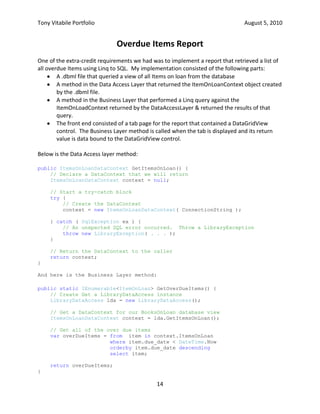
A method in the Data Access Layer that returned the ItemOnLoanContext object created by the .dbml file.
A method in the Business Layer that performed a Linq query against the ItemOnLoadContext returned by the DataAccessLayer & returned the results of that query.
The front end consisted of a tab page for the report that contained a DataGridView control.  The Business Layer method is called when the tab is displayed and its return value is data bound to the DataGridView control.Below is the Data Access layer method:<br />public ItemsOnLoanDataContext GetItemsOnLoan() {<br />    // Declare a DataContext that we will return<br />    ItemsOnLoanDataContext context = null;<br />    // Start a try-catch block<br />    try {<br />        // Create the DataContext<br />        context = new ItemsOnLoanDataContext( ConnectionString );<br />    } catch ( SqlException ex ) {<br />        // An unxpected SQL error occurred.  Throw a LibraryException<br />        throw new LibraryException( . . . );<br />    }<br />    // Return the DataContext to the caller<br />    return context;<br />}<br />And here is the Business Layer method:<br />public static IEnumerable<ItemOnLoan> GetOverDueItems() {<br />    // Create Get a LibraryDataAccess instance<br />    LibraryDataAccess lda = new LibraryDataAccess();<br />    // Get a DataContext for our BooksOnLoan database view<br />    ItemsOnLoanDataContext context = lda.GetItemsOnLoan();<br />    // Get all of the over due items<br />    var overDueItems = from  item in context.ItemsOnLoan<br />                       where item.due_date < DateTime.Now<br />                       orderby item.due_date descending<br />                       select item;<br />    return overDueItems;<br />}<br />Library Project, Phase 3<br />Introduction:<br />This project required us to replace the Windows front end which we had built & refined in Phases 1 & 2 with an ASP.NET front end.  In addition, new functionality had to be implemented.<br />Audience:<br />.NET Project managers, .NET Developers<br />Project Goals:<br />The project goals were:<br />Build a new front-end using ASP.NET
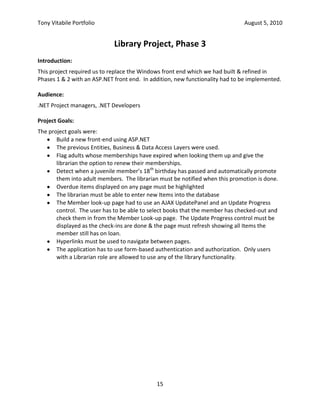
The previous Entities, Business & Data Access Layers were used.
Flag adults whose memberships have expired when looking them up and give the librarian the option to renew their memberships.
Detect when a juvenile member’s 18th birthday has passed and automatically promote them into adult members.  The librarian must be notified when this promotion is done.
Overdue items displayed on any page must be highlighted
The librarian must be able to enter new Items into the database
The Member look-up page had to use an AJAX UpdatePanel and an Update Progress control.  The user has to be able to select books that the member has checked-out and check them in from the Member Look-up page.  The Update Progress control must be displayed as the check-ins are done & the page must refresh showing all Items the member still has on loan.
Hyperlinks must be used to navigate between pages.
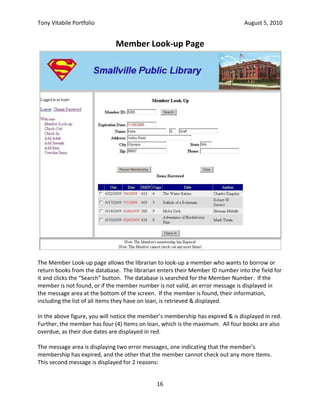
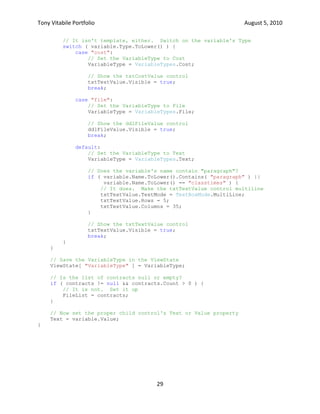
The application has to use form-based authentication and authorization.  Only users with a Librarian role are allowed to use any of the library functionality.Member Look-up Page<br />The Member Look-up page allows the librarian to look-up a member who wants to borrow or return books from the database.  The librarian enters their Member ID number into the field for it and clicks the “Search” button.  The database is searched for the Member Number.  If the member is not found, or if the member number is not valid, an error message is displayed in the message area at the bottom of the screen.  If the member is found, their information, including the list of all items they have on loan, is retrieved & displayed.<br />In the above figure, you will notice the member’s membership has expired & is displayed in red.  Further, the member has four (4) Items on loan, which is the maximum.  All four books are also overdue, as their due dates are displayed in red.<br />The message area is displaying two error messages, one indicating that the member’s membership has expired, and the other that the member cannot check out any more Items.  This second message is displayed for 2 reasons:<br />The member cannot have more than four (4) items out on loan at one time
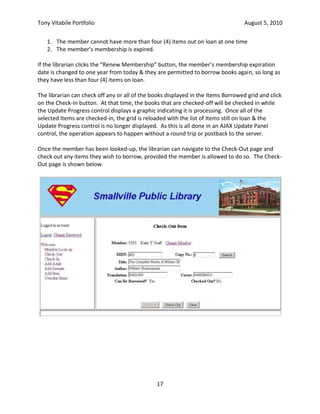
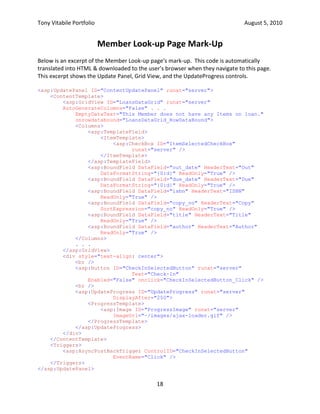
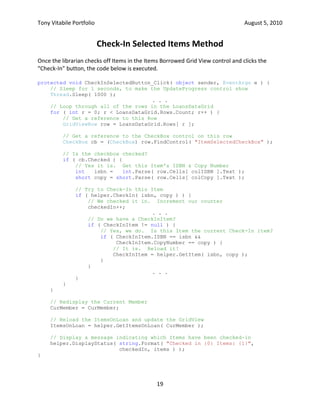
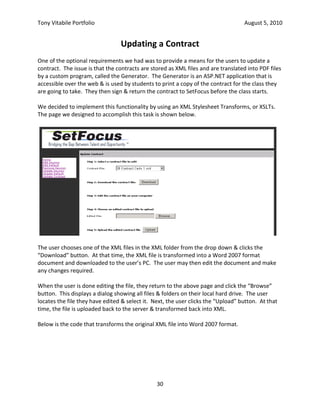
The member’s membership is expired.If the librarian clicks the “Renew Membership” button, the member’s membership expiration date is changed to one year from today & they are permitted to borrow books again, so long as they have less than four (4) items on loan.<br />The librarian can check off any or all of the books displayed in the Items Borrowed grid and click on the Check-In button.  At that time, the books that are checked-off will be checked in while the Update Progress control displays a graphic indicating it is processing.  Once all of the selected Items are checked-in, the grid is reloaded with the list of Items still on loan & the Update Progress control is no longer displayed.  As this is all done in an AJAX Update Panel control, the operation appears to happen without a round trip or postback to the server.<br />Once the member has been looked-up, the librarian can navigate to the Check-Out page and check out any items they wish to borrow, provided the member is allowed to do so.  The Check-Out page is shown below.<br />Member Look-up Page Mark-Up<br />Below is an excerpt of the Member Look-up page’s mark-up.  This code is automatically translated into HTML & downloaded to the user’s browser when they navigate to this page. This excerpt shows the Update Panel, Grid View, and the UpdateProgress controls.<br /><asp:UpdatePanel ID=\"
ContentUpdatePanel\"
 runat=\"
server\"
><br />    <ContentTemplate><br />        <asp:GridView ID=\"
LoansDataGrid\"
 runat=\"
server\"
 <br />        AutoGenerateColumns=\"
False\"
 . . .<br />            EmptyDataText=\"
This Member does not have any Items on loan.\"
 <br />            onrowdatabound=\"
LoansDataGrid_RowDataBound\"
><br />            <Columns><br />                <asp:TemplateField><br />                    <ItemTemplate><br />                        <asp:CheckBox ID=\"
ItemSelectedCheckBox\"
<br />runat=\"
server\"
 /><br />                    </ItemTemplate><br />                </asp:TemplateField><br />                <asp:BoundField DataField=\"
out_date\"
 HeaderText=\"
Out\"
 <br />                    DataFormatString=\"
{0:d}\"
 ReadOnly=\"
True\"
 /><br />                <asp:BoundField DataField=\"
due_date\"
 HeaderText=\"
Due\"
 <br />                    DataFormatString=\"
{0:d}\"
 ReadOnly=\"
True\"
 /><br />                <asp:BoundField DataField=\"
isbn\"
 HeaderText=\"
ISBN\"
 <br />                    ReadOnly=\"
True\"
 /><br />                <asp:BoundField DataField=\"
copy_no\"
 HeaderText=\"
Copy\"
 <br />                    SortExpression=\"
copy_no\"
 ReadOnly=\"
True\"
 /><br />                <asp:BoundField DataField=\"
title\"
 HeaderText=\"
Title\"
 <br />                    ReadOnly=\"
True\"
 /><br />                <asp:BoundField DataField=\"
author\"
 HeaderText=\"
Author\"
 <br />                    ReadOnly=\"
True\"
 /><br />            </Columns><br />            . . .<br />        </asp:GridView><br />        <div style=\"
text-align: center\"
><br />            <br /><br />            <asp:Button ID=\"
CheckInSelectedButton\"
 runat=\"
server\"
 <br />Text=\"
Check-In\"
 <br />                Enabled=\"
False\"
 onclick=\"
CheckInSelectedButton_Click\"
 /><br />            <br /><br />            <asp:UpdateProgress ID=\"
UpdateProgress\"
 runat=\"
server\"
 <br />DisplayAfter=\"
250\"
><br />                <ProgressTemplate><br />                    <asp:Image ID=\"
ProgressImage\"
 runat=\"
server\"
<br />ImageUrl=\"
~/images/ajax-loader.gif\"
 /><br />                </ProgressTemplate><br />            </asp:UpdateProgress><br />        </div><br />    </ContentTemplate><br />    <Triggers><br />        <asp:AsyncPostBackTrigger ControlID=\"
CheckInSelectedButton\"
 <br />EventName=\"
Click\"
 /><br />    </Triggers><br /></asp:UpdatePanel><br />Check-In Selected Items Method<br />Once the librarian checks off Items in the Items Borrowed Grid View control and clicks the “Check-In” button, the code below is executed.<br />protected void CheckInSelectedButton_Click( object sender, EventArgs e ) {<br />    // Sleep for 1 seconds, to make the UpdateProgress control show<br />    Thread.Sleep( 1000 );<br />. . .<br />    // Loop through all of the rows in the LoansDataGrid<br />    for ( int r = 0; r < LoansDataGrid.Rows.Count; r++ ) {<br />        // Get a reference to this Row<br />        GridViewRow row = LoansDataGrid.Rows[ r ];<br />        // Get a reference to the CheckBox control on this row<br />        CheckBox cb = (CheckBox) row.FindControl( \"
ItemSelectedCheckBox\"
 );<br />        // Is the checkbox checked?<br />        if ( cb.Checked ) {<br />            // Yes it is.  Get this Item's ISBN & Copy Number<br />            int   isbn =   int.Parse( row.Cells[ colISBN ].Text );<br />            short copy = short.Parse( row.Cells[ colCopy ].Text );<br />            // Try to Check-In this Item<br />            if ( helper.CheckIn( isbn, copy ) ) {<br />                // We checked it in.  Increment our counter<br />                checkedIn++;<br />. . .<br />                // Do we have a CheckInItem?<br />                if ( CheckInItem != null ) {<br />                    // Yes, we do.  Is this Item the current Check-In item?<br />                    if ( CheckInItem.ISBN == isbn && <br />                         CheckInItem.CopyNumber == copy ) {<br />                        // It is.  Reload it!<br />                        CheckInItem = helper.GetItem( isbn, copy );<br />                    }<br />                }<br />. . .<br />            }<br />        }<br />    }<br />    // Redisplay the Current Member<br />    CurMember = CurMember;<br />    // Reload the ItemsOnLoan and update the GridView<br />    ItemsOnLoan = helper.GetItemsOnLoan( CurMember );<br />    // Display a message indicating which Items have been checked-in<br />    helper.DisplayStatus( string.Format( \"
Checked in {0} Items: {1}\"
,<br />  checkedIn, items ) );<br />}<br />Library Project, Phase 4<br />Introduction:<br />This project required us to transform our ASP.NET applications into a WCF service back-end and a WCF client front-end application.<br />Audience:<br />.NET Project managers, .NET Developers<br />Project Goals:<br />The project goals were:<br />Create a WCF service that calls into the Business Layer.
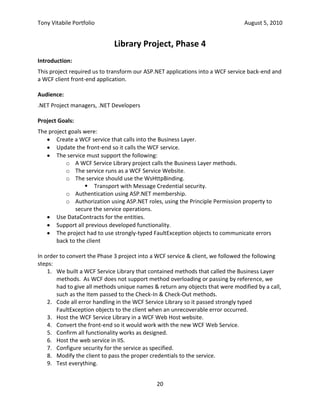
Update the front-end so it calls the WCF service.
The service must support the following:
A WCF Service Library project calls the Business Layer methods.
The service runs as a WCF Service Website.
The service should use the WsHttpBinding.
Transport with Message Credential security.
Authentication using ASP.NET membership.

Tony Vitabile .Net Portfolio

  • 1.
    Library Project, Phase1<br />Introduction:<br />This project required us to build a Windows Forms application to automate the principal day-to-day operations of a lending library. The application had to support the four (4) principal library functions: adding adult & juvenile members and checking items in & out.<br />For this project, we were given DLLs containing the Entity and Data Access layers. These interfaced with the back-end database, running on SQL Server. Our task was to build a front-end for the application using Windows Forms and a business layer to isolate the front-end from the Data Access layer.<br />Audience:<br />.NET Project managers, .NET Developers<br />Project Goals:<br />The project goals were:<br />Create a Windows Forms application that allows a librarian to create new adult & juvenile members and check books in & out.
  • 2.
    The application mustvalidate user input to make sure data is entered for valid fields and all input meets business rules.
  • 3.
    Items already checked-outcannot be checked-out by someone else until they have been checked back in.
  • 4.
    Regular expressions wereto be used to verify that all input met formatting requirements.Sample Screen Shots & Code<br />The Main Page<br />The application used a tabbed interface to keep all fields and buttons for each function grouped together. The main page contains fields for checking out an item. This is a three step process:<br />Find the member who wishes to check out the book. To do this, the librarian enters the member’s member ID number in the field labeled Member & clicks the button labeled “Search” next to the Member ID field.
  • 5.
    Find the Itemthe member wishes to check-out. The librarian enters the ISBN & Copy Number of the Item the member wishes to borrow, then clicks on the “Search” button next to the Copy No. field.
  • 6.
    Check-out the item. This is done by clicking on the “Check-Out” button.In the example shown above, the member’s membership has expired. As a result, they are not allowed to check-out any items until their membership is renewed.<br />Here is the front-end code used to search the database for a particular member.<br />/// <summary><br />/// Handles the Search button on the Check-Out tab in the 1. Find a Member <br />/// Groupbox.<br />/// </summary><br />/// <param name=\" sender\" >The object that sent the message. Ignored.</param><br />/// <param name=\" e\" >The arguments for the event. Ignored</param><br />private void searchMemberButton_Click( object sender, EventArgs e ) {<br /> // Set our private field so the Validating methods know how to validate<br /> validateControls = ValidateCtrls.Member;<br /> // Validate the fields on the form<br /> if ( !this.ValidateChildren( ValidationConstraints.Enabled |<br /> ValidationConstraints.Visible ) ) {<br /> // If we get here, at least one field does not validate. <br /> // Tell the user there's a problem<br /> DisplayStatus( statusLabel.Text + <br /> \" Please fix the errors before trying to search again.\" );<br /> // Exit now<br /> return;<br /> }<br /> // The form validates OK. Get the member ID from the memberIdTextBox<br /> short memberID = short.Parse( memberIdTextBox.Text );<br /> // We need a try-catch block<br /> try {<br /> // Try to find the member with the given member ID from the database<br /> CurMember = BusinessLayer.GetMember( memberID );<br /> } catch ( ArgumentOutOfRangeException ) {<br /> // . . . <br /> } catch ( LibraryException ex ) {<br /> // If we get here, the GetMember operation failed. <br /> // Construct an error message<br /> string errMsg = string.Format( <br /> \" Unable to find a Member with ID {0} because {1}.\" , memberID, <br /> BusinessLayer.GetReason( ex ) );<br /> // Display the error message in the statusLabel control<br /> DisplayStatus( errMsg );<br /> // Put the same error message in the errorProvider<br /> errorProvider.SetError( memberIdTextBox, errMsg );<br /> // Make sure CurMember is null<br /> CurMember = null;<br /> } catch ( Exception ex ) {<br /> // . . .<br /> }<br />}<br />Checking Out an Item<br />The figure above shows the main screen after an Item has been successfully checked out for the member. The Check-In button shown in this figure is enabled only when the Item shown is already checked-out. This button is on the screen because sometimes, in a real library, people returning books that are late put them on the shelves directly, in order to avoid paying a late fee. As a result, the next member to check-out the book finds it is already checked-in. This button is a convenience feature that allows the librarian to check the book back in before checking it out for the member without having to change screens.<br />Here is the front-end code for checking-out an Item.<br />/// <summary><br />/// Called when the user clicks the \" Check-Out\" button. Displays<br />/// the Check-Out Form using a pop-up window.<br />/// </summary><br />/// <param name=\" sender\" >The object that sent the message. Ignored.</param><br />/// <param name=\" e\" >The arguments for the event. Ignored</param><br />private void checkOutButton_Click( object sender, EventArgs e ) {<br /> // Build a string with the information on the member & book <br /> // we are going to check in<br /> string bookInfo = string.Format( \" Title: {0}, ISBN {1}, Copy {2}\" ,<br /> CheckOutItem.Title, CheckOutItem.ISBN, CheckOutItem.CopyNumber );<br /> // We need to use a try-catch block for our check-in attempt<br /> try {<br /> // Try to check-in the current Item in the business layer<br /> BusinessLayer.CheckOut( CurMember, CheckOutItem );<br /> } catch ( ArgumentOutOfRangeException ex ) {<br />. . .<br /> <br /> } catch ( Exception ex ) {<br /> // There was an error in the business layer. Construct a message<br /> string msg = string.Format( <br />\" An unexpected error occurred while checking out {0}: {1}.\" ,<br />bookInfo, ex.Message );<br /> // Display the error message<br /> DisplayStatus( msg );<br /> // Exit now<br /> return;<br /> }<br /> // Display a success message in the statusLabel<br /> DisplayStatus( string.Format( \" {0} was successfully checked out by {1}\" ,<br /> bookInfo, BusinessLayer.GetMemberName( CurMember ) ) );<br /> // Reload the CurMember property<br /> CurMember = CurMember;<br /> // Reload the CheckOutItem property<br /> CheckOutItem = GetItem( CheckOutItem.ISBN, CheckOutItem.CopyNumber );<br />}<br />Library Project, Phase 2<br />Introduction:<br />This project required us to build new entity and data access layers for the library application we built in phase 1. We were also required to build our own stored procedures for the data access layer to call using ADO.NET objects in order to implement all of the required functionality. In addition to supporting the four operations (add adult & juvenile members, check in & out items), we were required to make sure an item being checked-out was marked as loanable in the database.<br />There were also a number of extra-credit tasks for this project. These included:<br />Displaying a report of overdue items generated using Linq to SQL functionality.
  • 7.
    Convert a juvenilemember to an adult member if the date is after their 18th birthday.
  • 8.
    Allow a librarianto add a new item to the database.Audience:<br />.NET Project managers, .NET Developers<br />Project Goals:<br />The project goals were:<br />Develop the stored procedures needed to implement the add adult member, add juvenile member, check-out item and check-in item functionality.
  • 9.
    Use transactions inthe stored procedures where required.
  • 10.
    Write test scriptsfor each of the stored procedures
  • 11.
    Use ADO.NET objectsto call the stored procedures & read the data returned into the entity objects.
  • 12.
    The data accesslayer had to be stateless, meaning it could not remember any information between calls.Check-Out Item Stored Procedure<br />The Check-Out Item stored procedure, shown below, follows a standard sequence of events:<br />Check all procedures for validity. If any errors are found, an error is raised, using a coded value to indicate what the problem was.
  • 13.
    If all argumentsare valid, the stored procedure then performs whatever steps are necessary to implement the required functionality.In addition to checking the validity of its arguments, the Check-Out stored procedure must also verify that the member’s membership hasn’t expired and that the Item that the member wishes to check-out is not already checked out. If so, an error is raised. But if the member is in good standing & the item is not checked out, it must update two tables to complete the checkout. In this case, a transaction is started & if either operation fails, the entire operation is rolled-back.<br />CREATE PROCEDURE [dbo].[CheckOutItem]<br /> -- Add the parameters for the stored procedure here<br /> @ISBN int,<br /> @CopyNo smallint,<br /> @MemberID smallint,<br /> @OtherMemberID smallint OUTPUT<br />AS<br />BEGIN<br />. . .<br /> -- Try to get the tile number for the Item out of the Copy table<br /> DECLARE @TitleNo int;<br /> SELECT @TitleNo = title_no FROM copy <br /> WHERE isbn = @ISBN AND copy_no = @CopyNo;<br /> <br /> -- Declare an error message string<br /> DECLARE @error varchar;<br /> <br /> -- Everything is OK. Check out the Item. Begin a transaction<br /> BEGIN TRANSACTION;<br /> -- Trap any errors<br /> BEGIN TRY<br /> -- Create a row in the Loan table for this loan<br /> INSERT INTO loan<br /> ( isbn, copy_no, member_no, title_no, out_date, due_date )<br /> VALUES<br /> ( @ISBN, @CopyNo, @MemberID, @TitleNo, GETDATE(), <br />DATEADD( dd, 14, GETDATE() ) )<br /> END TRY<br /> BEGIN CATCH<br /> -- The insert into the Loan table failed. Rollback<br /> ROLLBACK TRANSACTION<br />, , ,<br /> -- Raise an error (send a SqlException to C#)<br /> RAISERROR( @error, 11, 12 );<br /> END CATCH<br /> <br /> -- The Item is now in the Loan table. Set the on_loan field to 'Y'<br /> BEGIN TRY<br /> -- Update the Copy table<br /> UPDATE Copy<br /> SET on_loan = 'Y'<br /> WHERE isbn = @ISBN AND copy_no = @CopyNo;<br /> END TRY<br /> BEGIN CATCH<br /> -- The Copy table Update failed. Rollback the transaction<br /> ROLLBACK TRANSACTION<br />. . .<br /> -- Raise an error (send a SqlException to C#)<br /> RAISERROR( @error, 11, 13 );<br /> END CATCH<br /> COMMIT TRANSACTION;<br /> <br /> -- Return 1 to show it worked<br /> RETURN 1;<br />END<br />Check-Out Item Data Access Layer Method<br />The Check-Out Item method in the Data Access Layer uses ADO.NET object to obtain a connection to the database server and then execute it. It throws a custom LibraryException if any expected errors occur in the stored procedures. It re-throws the original exception if an unexpected error occurs.<br />public void CheckOutItem( short memberNumber, int ISBN, short copyNumber ) {<br /> // Trap any errors that occur in this routine.<br /> try {<br /> // Get a connection to the database<br /> using ( SqlConnection connection = new SqlConnection( <br /> ConnectionString ) ) {<br /> // Create a Command that uses the AddAdultMember stored procedure<br /> using ( SqlCommand command = new SqlCommand( \" CheckOutItem\" ,<br /> connection ) ) {<br /> // Open the connection now<br /> connection.Open();<br /> // Tell the Command it's a stored procedure<br /> command.CommandType = CommandType.StoredProcedure;<br /> // Create our parameters for the stored procedure<br /> command.Parameters.AddWithValue( \" @ISBN\" , ISBN );<br /> command.Parameters.AddWithValue( \" @CopyNo\" , copyNumber );<br /> command.Parameters.AddWithValue( \" @MemberID\" , memberNumber );<br /> // Need an output parameter for the OtherMemberID<br /> SqlParameter omi = new SqlParameter( \" @OtherMemberID\" ,<br /> DbType.Int16 );<br /> omi.Direction = ParameterDirection.Output;<br /> // Need a parameter for the return value<br /> SqlParameter rv = new SqlParameter();<br /> rv.ParameterName = \" @Return\" ;<br /> rv.Direction = ParameterDirection.ReturnValue;<br /> // Add the two parameters we created outside this try block<br /> command.Parameters.Add( omi );<br /> command.Parameters.Add( rv );<br /> // Execute the Stored Procedure.<br /> command.ExecuteNonQuery();<br /> // Is the return value 0 or is it 1?<br /> if ( ( (int) rv.Value ) == 0 )<br /> // The Item was already on loan.<br /> throw new LibraryException( (short) omi.Value, <br />\" The Item is already on loan to another Member.\" );<br /> }<br /> }<br /> } catch ( SqlException ex ) {<br /> // Determine which ErrorCode to return<br /> switch ( ex.State ) {<br /> case 1: // ISBN is null<br /> throw new ArgumentNullException( \" ISBN\" ,<br /> \" The ISBN is NULL.\" );<br /> case 2: // ISBN is invalid<br /> throw new ArgumentOutOfRangeException( \" ISBN\" , ISBN, <br /> \" The ISBN is out of the allowed range.\" );<br /> case 3: // The ISBN does not exist<br /> case 7: // The Copy Number does not exist<br /> throw new LibraryException( ErrorCode.ItemNotFound,<br />ex.Message );<br />. . .<br /> }<br /> }<br /> }<br />Check-In Item Stored Procedure<br />The Check-In Item stored procedure, shown below, is like the check-out stored procedure in that it performs the usual argument checks. In addition to checking the validity of its arguments, the Check-In stored procedure must also verify that the Item is already checked out. If so, the Item is checked in by copying the row in the Loan table into the LoanHistory table and then deleting the row from the Loan table.<br />CREATE PROCEDURE [dbo].[CheckInItem]<br /> -- Add the parameters for the stored procedure here<br /> @ISBN int, @CopyNo smallint<br />AS<br />BEGIN<br /> -- Declare an error message string<br /> DECLARE @error varchar;<br />. . .<br /> -- The Copy is on loan. Begin a transaction<br /> BEGIN TRANSACTION;<br /> -- Trap any errors<br /> BEGIN TRY<br /> -- Create a row in the LoanHist table for this loan<br /> INSERT INTO loanhist<br /> ( isbn, copy_no, out_date, title_no, member_no, due_date,<br />in_date )<br /> SELECT isbn, copy_no, out_date, title_no, member_no, due_date, <br /> GETDATE()<br /> FROM loan<br /> WHERE isbn = @ISBN AND copy_no = @CopyNo;<br /> END TRY<br /> BEGIN CATCH<br /> -- The insert into the Loan table failed.<br /> ROLLBACK TRANSACTION<br />. . .<br /> -- Raise an error (send a SqlException to C#)<br /> RAISERROR( @error, 11, 8 );<br /> END CATCH<br /> <br /> -- We have to set the on_loan field in the Copy table to 'N'<br /> BEGIN TRY<br /> -- Update the Copy table<br /> UPDATE Copy SET on_loan = 'N'<br /> WHERE isbn = @ISBN AND copy_no = @CopyNo;<br /> END TRY<br /> BEGIN CATCH<br />. . .<br /> END CATCH<br /> <br /> -- Delete the row from the Loan table<br /> BEGIN TRY<br /> DELETE FROM loan<br /> WHERE isbn = @ISBN AND copy_no = @CopyNo;<br /> END TRY<br /> BEGIN CATCH<br />. . .<br /> END CATCH<br /> -- If we get here, everything worked. Commit the transaction<br /> COMMIT TRANSACTION;<br /> <br /> -- Return 1 to show it worked<br /> RETURN 1;<br />END<br />Get Items Data Access Layer Method<br />The requirements called for the display of all Items a member has on loan when they are looked-up and displayed. To find all of the Items a member has on loan, a stored procedure was written. Then, a strongly typed DataSet called ItemsDataSet was created that connected to the stored procedure. The code shown below is the Data Access Layer method that queries the database using the stored procedure and returns an ItemsDataSet to the caller with all of the Items that member has on loan.<br />public ItemsDataSet GetItems( short memberNumber ) {<br /> // Declare an ItemsDataSet object to return to the caller<br /> ItemsDataSet dataSet = new ItemsDataSet();<br /> // Create a try-catch block<br /> try {<br /> // Get a TableAdapter<br /> using ( ItemsTableAdapter adapter = new ItemsTableAdapter() ) {<br /> // Load the table with the data<br /> adapter.Fill( dataSet.Items, memberNumber );<br /> }<br /> } catch ( SqlException ex ) {<br /> // The cause of the exception is in the exception's State property<br /> switch ( ex.State ) {<br /> case 1: // The MemberID is null<br /> throw new ArgumentNullException( \" memberNumber\" , <br />\" The Member Number is NULL.\" );<br /> case 2: // The MemberID is invalid<br /> throw new ArgumentOutOfRangeException( \" memberNumber\" , <br />memberNumber, <br />\" The Member Number is out of the allowed range.\" );<br /> default:<br /> // An unexpected error occurred. Throw a LibraryException<br /> throw new LibraryException( ErrorCode.GenericException, <br />\" A database error occurred\" , ex );<br /> }<br /> }<br /> return dataSet;<br />}<br />Overdue Items Report<br />One of the extra-credit requirements we had was to implement a report that retrieved a list of all overdue Items using Linq to SQL. My implementation consisted of the following parts:<br />A .dbml file that queried a view of all Items on loan from the database
  • 14.
    A method inthe Data Access Layer that returned the ItemOnLoanContext object created by the .dbml file.
  • 15.
    A method inthe Business Layer that performed a Linq query against the ItemOnLoadContext returned by the DataAccessLayer & returned the results of that query.
  • 16.
    The front endconsisted of a tab page for the report that contained a DataGridView control. The Business Layer method is called when the tab is displayed and its return value is data bound to the DataGridView control.Below is the Data Access layer method:<br />public ItemsOnLoanDataContext GetItemsOnLoan() {<br /> // Declare a DataContext that we will return<br /> ItemsOnLoanDataContext context = null;<br /> // Start a try-catch block<br /> try {<br /> // Create the DataContext<br /> context = new ItemsOnLoanDataContext( ConnectionString );<br /> } catch ( SqlException ex ) {<br /> // An unxpected SQL error occurred. Throw a LibraryException<br /> throw new LibraryException( . . . );<br /> }<br /> // Return the DataContext to the caller<br /> return context;<br />}<br />And here is the Business Layer method:<br />public static IEnumerable<ItemOnLoan> GetOverDueItems() {<br /> // Create Get a LibraryDataAccess instance<br /> LibraryDataAccess lda = new LibraryDataAccess();<br /> // Get a DataContext for our BooksOnLoan database view<br /> ItemsOnLoanDataContext context = lda.GetItemsOnLoan();<br /> // Get all of the over due items<br /> var overDueItems = from item in context.ItemsOnLoan<br /> where item.due_date < DateTime.Now<br /> orderby item.due_date descending<br /> select item;<br /> return overDueItems;<br />}<br />Library Project, Phase 3<br />Introduction:<br />This project required us to replace the Windows front end which we had built & refined in Phases 1 & 2 with an ASP.NET front end. In addition, new functionality had to be implemented.<br />Audience:<br />.NET Project managers, .NET Developers<br />Project Goals:<br />The project goals were:<br />Build a new front-end using ASP.NET
  • 17.
    The previous Entities,Business & Data Access Layers were used.
  • 18.
    Flag adults whosememberships have expired when looking them up and give the librarian the option to renew their memberships.
  • 19.
    Detect when ajuvenile member’s 18th birthday has passed and automatically promote them into adult members. The librarian must be notified when this promotion is done.
  • 20.
    Overdue items displayedon any page must be highlighted
  • 21.
    The librarian mustbe able to enter new Items into the database
  • 22.
    The Member look-uppage had to use an AJAX UpdatePanel and an Update Progress control. The user has to be able to select books that the member has checked-out and check them in from the Member Look-up page. The Update Progress control must be displayed as the check-ins are done & the page must refresh showing all Items the member still has on loan.
  • 23.
    Hyperlinks must beused to navigate between pages.
  • 24.
    The application hasto use form-based authentication and authorization. Only users with a Librarian role are allowed to use any of the library functionality.Member Look-up Page<br />The Member Look-up page allows the librarian to look-up a member who wants to borrow or return books from the database. The librarian enters their Member ID number into the field for it and clicks the “Search” button. The database is searched for the Member Number. If the member is not found, or if the member number is not valid, an error message is displayed in the message area at the bottom of the screen. If the member is found, their information, including the list of all items they have on loan, is retrieved & displayed.<br />In the above figure, you will notice the member’s membership has expired & is displayed in red. Further, the member has four (4) Items on loan, which is the maximum. All four books are also overdue, as their due dates are displayed in red.<br />The message area is displaying two error messages, one indicating that the member’s membership has expired, and the other that the member cannot check out any more Items. This second message is displayed for 2 reasons:<br />The member cannot have more than four (4) items out on loan at one time
  • 25.
    The member’s membershipis expired.If the librarian clicks the “Renew Membership” button, the member’s membership expiration date is changed to one year from today & they are permitted to borrow books again, so long as they have less than four (4) items on loan.<br />The librarian can check off any or all of the books displayed in the Items Borrowed grid and click on the Check-In button. At that time, the books that are checked-off will be checked in while the Update Progress control displays a graphic indicating it is processing. Once all of the selected Items are checked-in, the grid is reloaded with the list of Items still on loan & the Update Progress control is no longer displayed. As this is all done in an AJAX Update Panel control, the operation appears to happen without a round trip or postback to the server.<br />Once the member has been looked-up, the librarian can navigate to the Check-Out page and check out any items they wish to borrow, provided the member is allowed to do so. The Check-Out page is shown below.<br />Member Look-up Page Mark-Up<br />Below is an excerpt of the Member Look-up page’s mark-up. This code is automatically translated into HTML & downloaded to the user’s browser when they navigate to this page. This excerpt shows the Update Panel, Grid View, and the UpdateProgress controls.<br /><asp:UpdatePanel ID=\" ContentUpdatePanel\" runat=\" server\" ><br /> <ContentTemplate><br /> <asp:GridView ID=\" LoansDataGrid\" runat=\" server\" <br /> AutoGenerateColumns=\" False\" . . .<br /> EmptyDataText=\" This Member does not have any Items on loan.\" <br /> onrowdatabound=\" LoansDataGrid_RowDataBound\" ><br /> <Columns><br /> <asp:TemplateField><br /> <ItemTemplate><br /> <asp:CheckBox ID=\" ItemSelectedCheckBox\" <br />runat=\" server\" /><br /> </ItemTemplate><br /> </asp:TemplateField><br /> <asp:BoundField DataField=\" out_date\" HeaderText=\" Out\" <br /> DataFormatString=\" {0:d}\" ReadOnly=\" True\" /><br /> <asp:BoundField DataField=\" due_date\" HeaderText=\" Due\" <br /> DataFormatString=\" {0:d}\" ReadOnly=\" True\" /><br /> <asp:BoundField DataField=\" isbn\" HeaderText=\" ISBN\" <br /> ReadOnly=\" True\" /><br /> <asp:BoundField DataField=\" copy_no\" HeaderText=\" Copy\" <br /> SortExpression=\" copy_no\" ReadOnly=\" True\" /><br /> <asp:BoundField DataField=\" title\" HeaderText=\" Title\" <br /> ReadOnly=\" True\" /><br /> <asp:BoundField DataField=\" author\" HeaderText=\" Author\" <br /> ReadOnly=\" True\" /><br /> </Columns><br /> . . .<br /> </asp:GridView><br /> <div style=\" text-align: center\" ><br /> <br /><br /> <asp:Button ID=\" CheckInSelectedButton\" runat=\" server\" <br />Text=\" Check-In\" <br /> Enabled=\" False\" onclick=\" CheckInSelectedButton_Click\" /><br /> <br /><br /> <asp:UpdateProgress ID=\" UpdateProgress\" runat=\" server\" <br />DisplayAfter=\" 250\" ><br /> <ProgressTemplate><br /> <asp:Image ID=\" ProgressImage\" runat=\" server\" <br />ImageUrl=\" ~/images/ajax-loader.gif\" /><br /> </ProgressTemplate><br /> </asp:UpdateProgress><br /> </div><br /> </ContentTemplate><br /> <Triggers><br /> <asp:AsyncPostBackTrigger ControlID=\" CheckInSelectedButton\" <br />EventName=\" Click\" /><br /> </Triggers><br /></asp:UpdatePanel><br />Check-In Selected Items Method<br />Once the librarian checks off Items in the Items Borrowed Grid View control and clicks the “Check-In” button, the code below is executed.<br />protected void CheckInSelectedButton_Click( object sender, EventArgs e ) {<br /> // Sleep for 1 seconds, to make the UpdateProgress control show<br /> Thread.Sleep( 1000 );<br />. . .<br /> // Loop through all of the rows in the LoansDataGrid<br /> for ( int r = 0; r < LoansDataGrid.Rows.Count; r++ ) {<br /> // Get a reference to this Row<br /> GridViewRow row = LoansDataGrid.Rows[ r ];<br /> // Get a reference to the CheckBox control on this row<br /> CheckBox cb = (CheckBox) row.FindControl( \" ItemSelectedCheckBox\" );<br /> // Is the checkbox checked?<br /> if ( cb.Checked ) {<br /> // Yes it is. Get this Item's ISBN & Copy Number<br /> int isbn = int.Parse( row.Cells[ colISBN ].Text );<br /> short copy = short.Parse( row.Cells[ colCopy ].Text );<br /> // Try to Check-In this Item<br /> if ( helper.CheckIn( isbn, copy ) ) {<br /> // We checked it in. Increment our counter<br /> checkedIn++;<br />. . .<br /> // Do we have a CheckInItem?<br /> if ( CheckInItem != null ) {<br /> // Yes, we do. Is this Item the current Check-In item?<br /> if ( CheckInItem.ISBN == isbn && <br /> CheckInItem.CopyNumber == copy ) {<br /> // It is. Reload it!<br /> CheckInItem = helper.GetItem( isbn, copy );<br /> }<br /> }<br />. . .<br /> }<br /> }<br /> }<br /> // Redisplay the Current Member<br /> CurMember = CurMember;<br /> // Reload the ItemsOnLoan and update the GridView<br /> ItemsOnLoan = helper.GetItemsOnLoan( CurMember );<br /> // Display a message indicating which Items have been checked-in<br /> helper.DisplayStatus( string.Format( \" Checked in {0} Items: {1}\" ,<br /> checkedIn, items ) );<br />}<br />Library Project, Phase 4<br />Introduction:<br />This project required us to transform our ASP.NET applications into a WCF service back-end and a WCF client front-end application.<br />Audience:<br />.NET Project managers, .NET Developers<br />Project Goals:<br />The project goals were:<br />Create a WCF service that calls into the Business Layer.
  • 26.
    Update the front-endso it calls the WCF service.
  • 27.
    The service mustsupport the following:
  • 28.
    A WCF ServiceLibrary project calls the Business Layer methods.
  • 29.
    The service runsas a WCF Service Website.
  • 30.
    The service shoulduse the WsHttpBinding.
  • 31.
    Transport with MessageCredential security.
  • 32.