Template Review Meeting Presentation & Discussion presented to  Chase Manhattan Bank  Site Strategy & Direction Team &  The Content Migration Team March 29, 1999
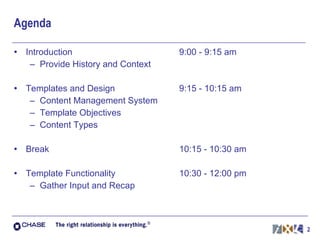
Agenda Introduction Provide History and Context Templates and Design Content Management System Template Objectives Content Types Break Template Functionality Gather Input and Recap 9:00 - 9:15 am 9:15 - 10:15 am 10:15 - 10:30 am 10:30 - 12:00 pm
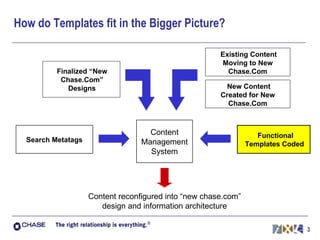
How do Templates fit in the Bigger Picture? Content reconfigured into “new chase.com” design and information architecture Existing Content Moving to New Chase.Com New Content Created for New Chase.Com Finalized “New Chase.Com” Designs Content Management System Search Metatags Functional Templates Coded
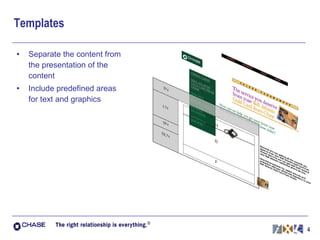
Templates Separate the content from the presentation of the content Include predefined areas for text and graphics
Why Move to a Template-based Site? Increase speed of publishing new content Eliminate the need to create custom code for each new piece of content Enable non-technical resources to update content Encourages consistency in: Look and feel: users experience consistent Chase identity Navigation: users have a stable structure and are less likely to get lost or be confused Enable Chase to quickly make global changes Save money and time for updates Common Process throughout the Enterprise Save money and time on training and support
About Content Management Systems Supports workflow to publish new content in a timely manner Allows for version control and archiving of web-related files Minimizes the possibility of overwriting files when multiple people are working on the same file Dynamically publish web pages Assures users see the freshest content Provides a platform for future Personalization
About FutureTense: Developed the FutureTense Internet Publishing System (IPS) Provides services for high-quality, high-volume environment: for Web production staff for delivery of content to end-users Enables Chase to: streamline production index information to make it searchable feed information into standard templates support workflow processes track revisions to web-related files
iXL & FutureTense iXL: Has translated designs for pages into templates. Has worked closely with FutureTense to insure templates work within the IPS. Will deliver templates and specifications to Chase and FutureTense. (Planned 4/1) FutureTense and Chase: Will integrate the templates into IPS. Prepare the templates and system for the migration of content. (Planned 4/15)
Template Specifications based on Design Guidelines Design   Guidelines : (flexible) are recommendations to follow when designing a page to insure maximum usability and consistency   include “soft” guidelines such as: whenever possible, use lists instead of dropdowns place emphasis of usable information, rather than sales minimize usage of paragraphs on “directory pages” Specifications:  (less flexible) are the detailed, technical instructions needed to create a page of the design include “hard” data such as: image size has a maximum width of 350 pixels header typeface is Verdana, 18 point bold
Template Design Process 1.  Consider previous input and learning 2.  Break Pages into Components 3.  Identify Variability Flexibility Standards
Template Design: Page Analysis, Step 2 Breaking down each page into it’s component parts, including  the following: Navigation Header Body Text Bulleted Lists Images Links Linksets Sub-Headers Footer
Template Design: Page Analysis, Step 3 Identifying the trade-off between Standards & Flexibility Areas for Standards Presence of Chase logo and other branding elements Location and functionality of Navigation (breadcrumbs) Recommended Areas for Standards Font size for header, body, and footer sections Aspect ratio of photographs Areas for Flexibility Number of images Length of pages/Layout in content area
Break 15 Minutes
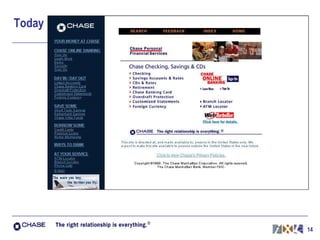
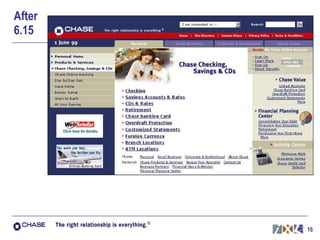
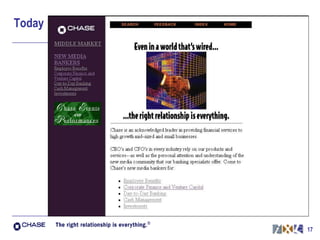
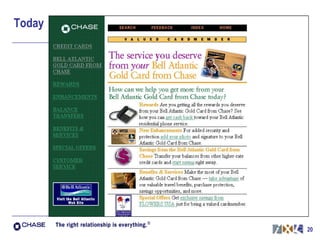
Today
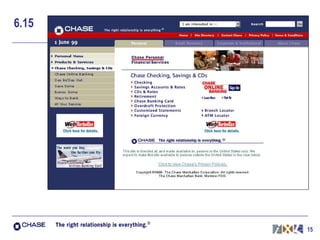
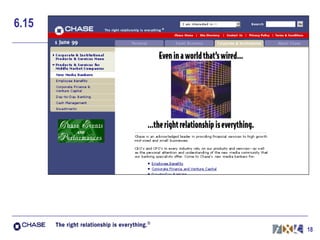
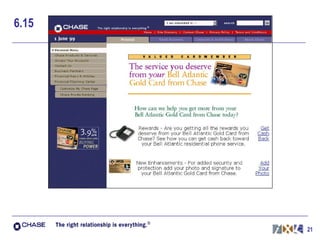
6.15
After  6.15
Today
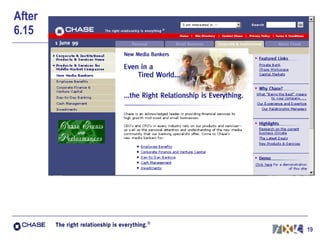
6.15
After 6.15
Today
6.15
Templates & Sub-Templates Templates can be made up of Sub-Templates Templates and Sub-Templates: Define Visual Geometry Provide code to talk to the “Back-end” Usage of Sub-Template provides flexibility
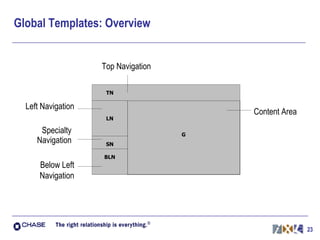
Global Templates: Overview Left Navigation Top Navigation Content Area Specialty Navigation Below Left Navigation
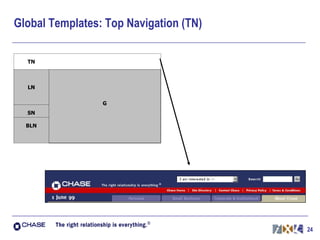
Global Templates: Top Navigation (TN)
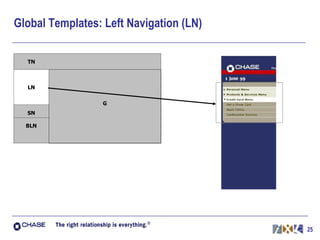
Global Templates: Left Navigation (LN)
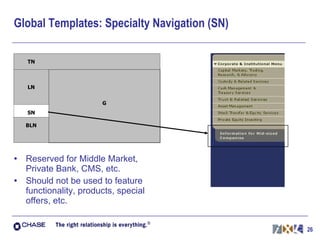
Global Templates: Specialty Navigation (SN) Reserved for Middle Market, Private Bank, CMS, etc. Should not be used to feature functionality, products, special offers, etc.
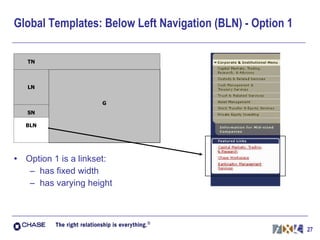
Global Templates: Below Left Navigation (BLN) - Option 1 Option 1 is a linkset: has fixed width has varying height
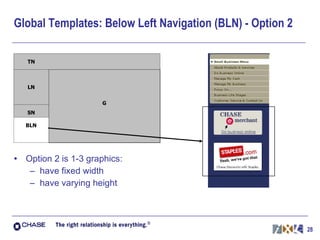
Global Templates: Below Left Navigation (BLN) - Option 2 Option 2 is 1-3 graphics: have fixed width have varying height
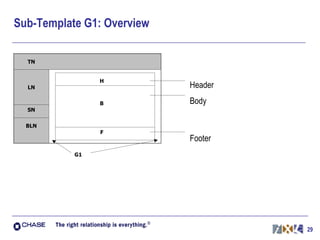
Sub-Template G1: Overview Header Body Footer
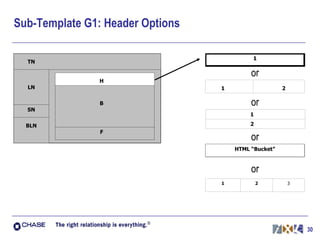
Sub-Template G1: Header Options or or or or
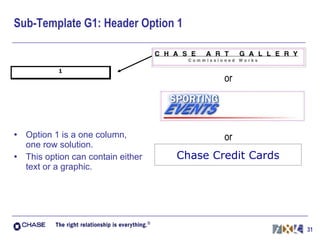
Sub-Template G1: Header Option 1 Option 1 is a one column, one row solution. This option can contain either text or a graphic. Chase Credit Cards or or
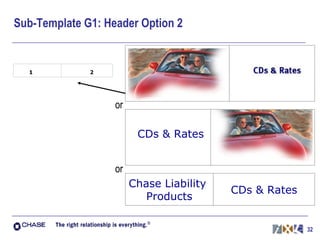
Sub-Template G1: Header Option 2 CDs & Rates Chase Liability  Products CDs & Rates or or
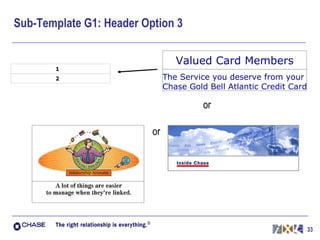
Sub-Template G1: Header Option 3 Valued Card Members The Service you deserve from your  Chase Gold Bell Atlantic Credit Card or or
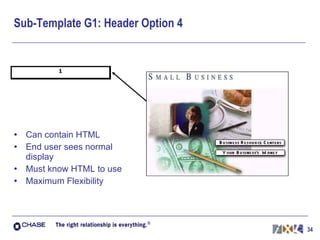
Sub-Template G1: Header Option 4 Can contain HTML End user sees normal display Must know HTML to use Maximum Flexibility
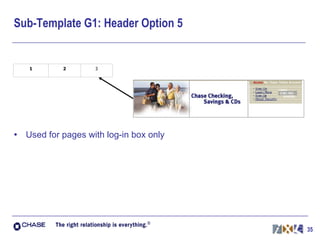
Sub-Template G1: Header Option 5 Used for pages with log-in box only
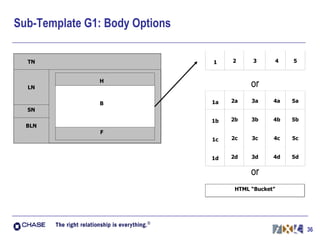
Sub-Template G1: Body Options or or
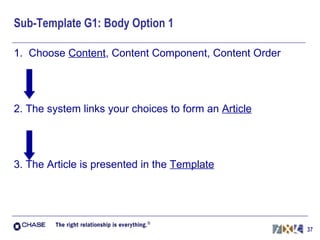
Sub-Template G1: Body Option 1 1.  Choose  Content , Content Component, Content Order 2. The system links your choices to form an  Article 3. The Article is presented in the  Template
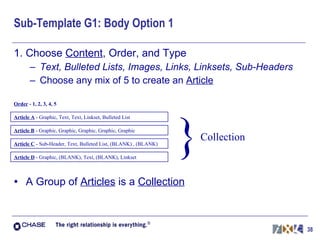
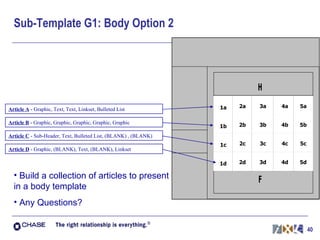
Sub-Template G1: Body Option 1 1. Choose  Content , Order, and Type Text, Bulleted Lists, Images, Links, Linksets, Sub-Headers Choose any mix of 5 to create an  Article A Group of  Articles  is a  Collection Article A   - Graphic, Text, Text, Linkset, Bulleted List % Order  - 1, 2, 3, 4, 5 Article B   - Graphic, Graphic, Graphic, Graphic, Graphic Article C   - Sub-Header, Text, Bulleted List, (BLANK) , (BLANK) Article D  - Graphic, (BLANK), Text, (BLANK), Linkset } Collection
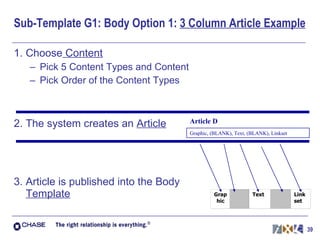
Sub-Template G1: Body Option 1:  3 Column Article Example 1. Choose  Content Pick 5 Content Types and Content Pick Order of the Content Types 2. The system creates an  Article 3. Article is published into the Body  Template Graphic, (BLANK), Text, (BLANK), Linkset Article D
Sub-Template G1: Body Option 2 Build a collection of articles to present in a body template Any Questions?  Article A   - Graphic, Text, Text, Linkset, Bulleted List Article B   - Graphic, Graphic, Graphic, Graphic, Graphic Article C   - Sub-Header, Text, Bulleted List, (BLANK) , (BLANK) Article D  - Graphic, (BLANK), Text, (BLANK), Linkset
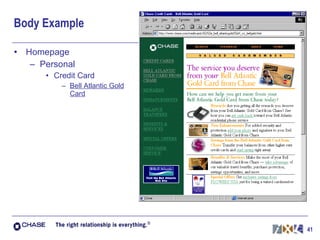
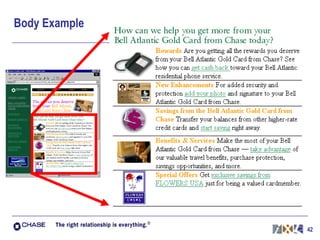
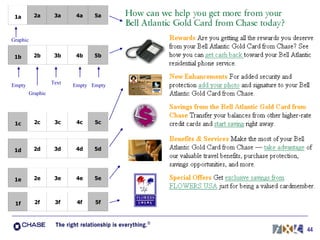
Body Example Homepage Personal Credit Card Bell Atlantic Gold Card
Body Example
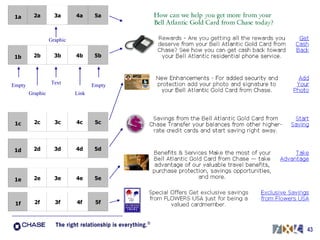
Graphic Text Graphic Link Empty Empty
Graphic Text Graphic Empty Empty Empty
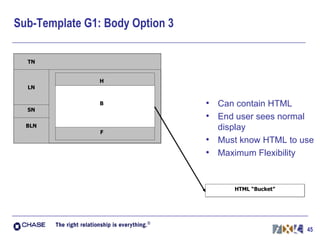
Sub-Template G1: Body Option 3 Can contain HTML End user sees normal display Must know HTML to use Maximum Flexibility
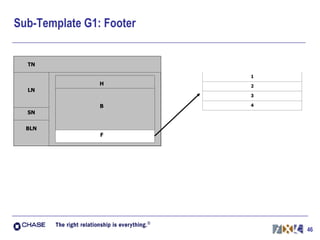
Sub-Template G1: Footer
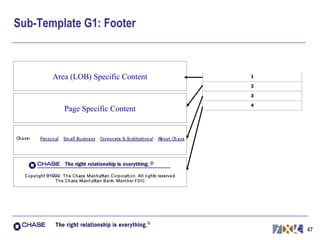
Sub-Template G1: Footer Page Specific Content Area (LOB) Specific Content
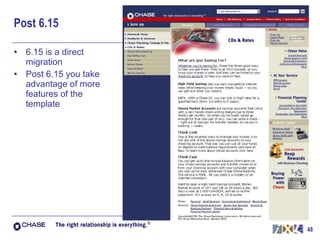
Post 6.15 6.15 is a direct migration Post 6.15 you take advantage of more features of the template
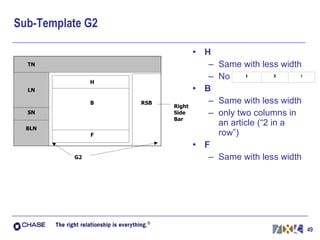
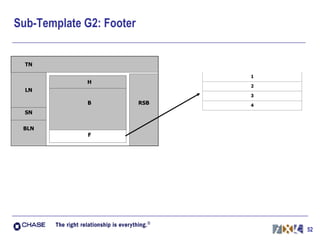
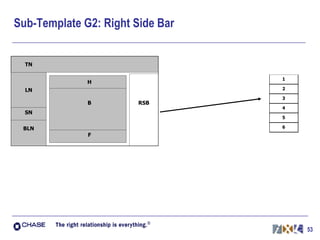
Sub-Template G2 H Same with less width No  B Same with less width only two columns in an article (“2 in a row”) F Same with less width
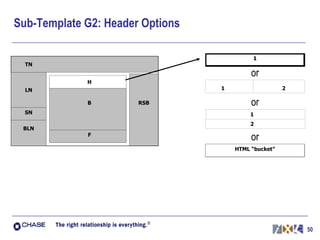
Sub-Template G2: Header Options or or or
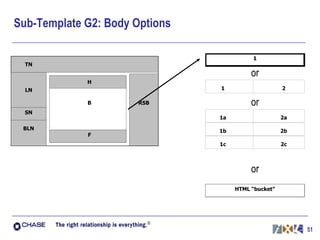
Sub-Template G2: Body Options or or or
Sub-Template G2: Footer
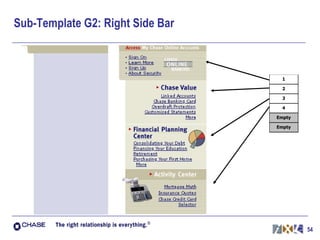
Sub-Template G2: Right Side Bar
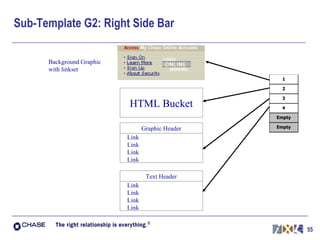
Sub-Template G2: Right Side Bar Background Graphic with linkset HTML Bucket Graphic Header Link Link Link Link Text Header Link Link Link Link
Questions
Next Steps Receive Feedback Finalize Specifications Deliver Template Specification and Code to Chase and FutureTense

Chase.com Content Management Presentation

  • 1.
    Template Review MeetingPresentation & Discussion presented to Chase Manhattan Bank Site Strategy & Direction Team & The Content Migration Team March 29, 1999
  • 2.
    Agenda Introduction ProvideHistory and Context Templates and Design Content Management System Template Objectives Content Types Break Template Functionality Gather Input and Recap 9:00 - 9:15 am 9:15 - 10:15 am 10:15 - 10:30 am 10:30 - 12:00 pm
  • 3.
    How do Templatesfit in the Bigger Picture? Content reconfigured into “new chase.com” design and information architecture Existing Content Moving to New Chase.Com New Content Created for New Chase.Com Finalized “New Chase.Com” Designs Content Management System Search Metatags Functional Templates Coded
  • 4.
    Templates Separate thecontent from the presentation of the content Include predefined areas for text and graphics
  • 5.
    Why Move toa Template-based Site? Increase speed of publishing new content Eliminate the need to create custom code for each new piece of content Enable non-technical resources to update content Encourages consistency in: Look and feel: users experience consistent Chase identity Navigation: users have a stable structure and are less likely to get lost or be confused Enable Chase to quickly make global changes Save money and time for updates Common Process throughout the Enterprise Save money and time on training and support
  • 6.
    About Content ManagementSystems Supports workflow to publish new content in a timely manner Allows for version control and archiving of web-related files Minimizes the possibility of overwriting files when multiple people are working on the same file Dynamically publish web pages Assures users see the freshest content Provides a platform for future Personalization
  • 7.
    About FutureTense: Developedthe FutureTense Internet Publishing System (IPS) Provides services for high-quality, high-volume environment: for Web production staff for delivery of content to end-users Enables Chase to: streamline production index information to make it searchable feed information into standard templates support workflow processes track revisions to web-related files
  • 8.
    iXL & FutureTenseiXL: Has translated designs for pages into templates. Has worked closely with FutureTense to insure templates work within the IPS. Will deliver templates and specifications to Chase and FutureTense. (Planned 4/1) FutureTense and Chase: Will integrate the templates into IPS. Prepare the templates and system for the migration of content. (Planned 4/15)
  • 9.
    Template Specifications basedon Design Guidelines Design Guidelines : (flexible) are recommendations to follow when designing a page to insure maximum usability and consistency include “soft” guidelines such as: whenever possible, use lists instead of dropdowns place emphasis of usable information, rather than sales minimize usage of paragraphs on “directory pages” Specifications: (less flexible) are the detailed, technical instructions needed to create a page of the design include “hard” data such as: image size has a maximum width of 350 pixels header typeface is Verdana, 18 point bold
  • 10.
    Template Design Process1. Consider previous input and learning 2. Break Pages into Components 3. Identify Variability Flexibility Standards
  • 11.
    Template Design: PageAnalysis, Step 2 Breaking down each page into it’s component parts, including the following: Navigation Header Body Text Bulleted Lists Images Links Linksets Sub-Headers Footer
  • 12.
    Template Design: PageAnalysis, Step 3 Identifying the trade-off between Standards & Flexibility Areas for Standards Presence of Chase logo and other branding elements Location and functionality of Navigation (breadcrumbs) Recommended Areas for Standards Font size for header, body, and footer sections Aspect ratio of photographs Areas for Flexibility Number of images Length of pages/Layout in content area
  • 13.
  • 14.
  • 15.
  • 16.
  • 17.
  • 18.
  • 19.
  • 20.
  • 21.
  • 22.
    Templates & Sub-TemplatesTemplates can be made up of Sub-Templates Templates and Sub-Templates: Define Visual Geometry Provide code to talk to the “Back-end” Usage of Sub-Template provides flexibility
  • 23.
    Global Templates: OverviewLeft Navigation Top Navigation Content Area Specialty Navigation Below Left Navigation
  • 24.
    Global Templates: TopNavigation (TN)
  • 25.
    Global Templates: LeftNavigation (LN)
  • 26.
    Global Templates: SpecialtyNavigation (SN) Reserved for Middle Market, Private Bank, CMS, etc. Should not be used to feature functionality, products, special offers, etc.
  • 27.
    Global Templates: BelowLeft Navigation (BLN) - Option 1 Option 1 is a linkset: has fixed width has varying height
  • 28.
    Global Templates: BelowLeft Navigation (BLN) - Option 2 Option 2 is 1-3 graphics: have fixed width have varying height
  • 29.
    Sub-Template G1: OverviewHeader Body Footer
  • 30.
    Sub-Template G1: HeaderOptions or or or or
  • 31.
    Sub-Template G1: HeaderOption 1 Option 1 is a one column, one row solution. This option can contain either text or a graphic. Chase Credit Cards or or
  • 32.
    Sub-Template G1: HeaderOption 2 CDs & Rates Chase Liability Products CDs & Rates or or
  • 33.
    Sub-Template G1: HeaderOption 3 Valued Card Members The Service you deserve from your Chase Gold Bell Atlantic Credit Card or or
  • 34.
    Sub-Template G1: HeaderOption 4 Can contain HTML End user sees normal display Must know HTML to use Maximum Flexibility
  • 35.
    Sub-Template G1: HeaderOption 5 Used for pages with log-in box only
  • 36.
    Sub-Template G1: BodyOptions or or
  • 37.
    Sub-Template G1: BodyOption 1 1. Choose Content , Content Component, Content Order 2. The system links your choices to form an Article 3. The Article is presented in the Template
  • 38.
    Sub-Template G1: BodyOption 1 1. Choose Content , Order, and Type Text, Bulleted Lists, Images, Links, Linksets, Sub-Headers Choose any mix of 5 to create an Article A Group of Articles is a Collection Article A - Graphic, Text, Text, Linkset, Bulleted List % Order - 1, 2, 3, 4, 5 Article B - Graphic, Graphic, Graphic, Graphic, Graphic Article C - Sub-Header, Text, Bulleted List, (BLANK) , (BLANK) Article D - Graphic, (BLANK), Text, (BLANK), Linkset } Collection
  • 39.
    Sub-Template G1: BodyOption 1: 3 Column Article Example 1. Choose Content Pick 5 Content Types and Content Pick Order of the Content Types 2. The system creates an Article 3. Article is published into the Body Template Graphic, (BLANK), Text, (BLANK), Linkset Article D
  • 40.
    Sub-Template G1: BodyOption 2 Build a collection of articles to present in a body template Any Questions? Article A - Graphic, Text, Text, Linkset, Bulleted List Article B - Graphic, Graphic, Graphic, Graphic, Graphic Article C - Sub-Header, Text, Bulleted List, (BLANK) , (BLANK) Article D - Graphic, (BLANK), Text, (BLANK), Linkset
  • 41.
    Body Example HomepagePersonal Credit Card Bell Atlantic Gold Card
  • 42.
  • 43.
    Graphic Text GraphicLink Empty Empty
  • 44.
    Graphic Text GraphicEmpty Empty Empty
  • 45.
    Sub-Template G1: BodyOption 3 Can contain HTML End user sees normal display Must know HTML to use Maximum Flexibility
  • 46.
  • 47.
    Sub-Template G1: FooterPage Specific Content Area (LOB) Specific Content
  • 48.
    Post 6.15 6.15is a direct migration Post 6.15 you take advantage of more features of the template
  • 49.
    Sub-Template G2 HSame with less width No B Same with less width only two columns in an article (“2 in a row”) F Same with less width
  • 50.
    Sub-Template G2: HeaderOptions or or or
  • 51.
    Sub-Template G2: BodyOptions or or or
  • 52.
  • 53.
  • 54.
  • 55.
    Sub-Template G2: RightSide Bar Background Graphic with linkset HTML Bucket Graphic Header Link Link Link Link Text Header Link Link Link Link
  • 56.
  • 57.
    Next Steps ReceiveFeedback Finalize Specifications Deliver Template Specification and Code to Chase and FutureTense