HTML Element Categories
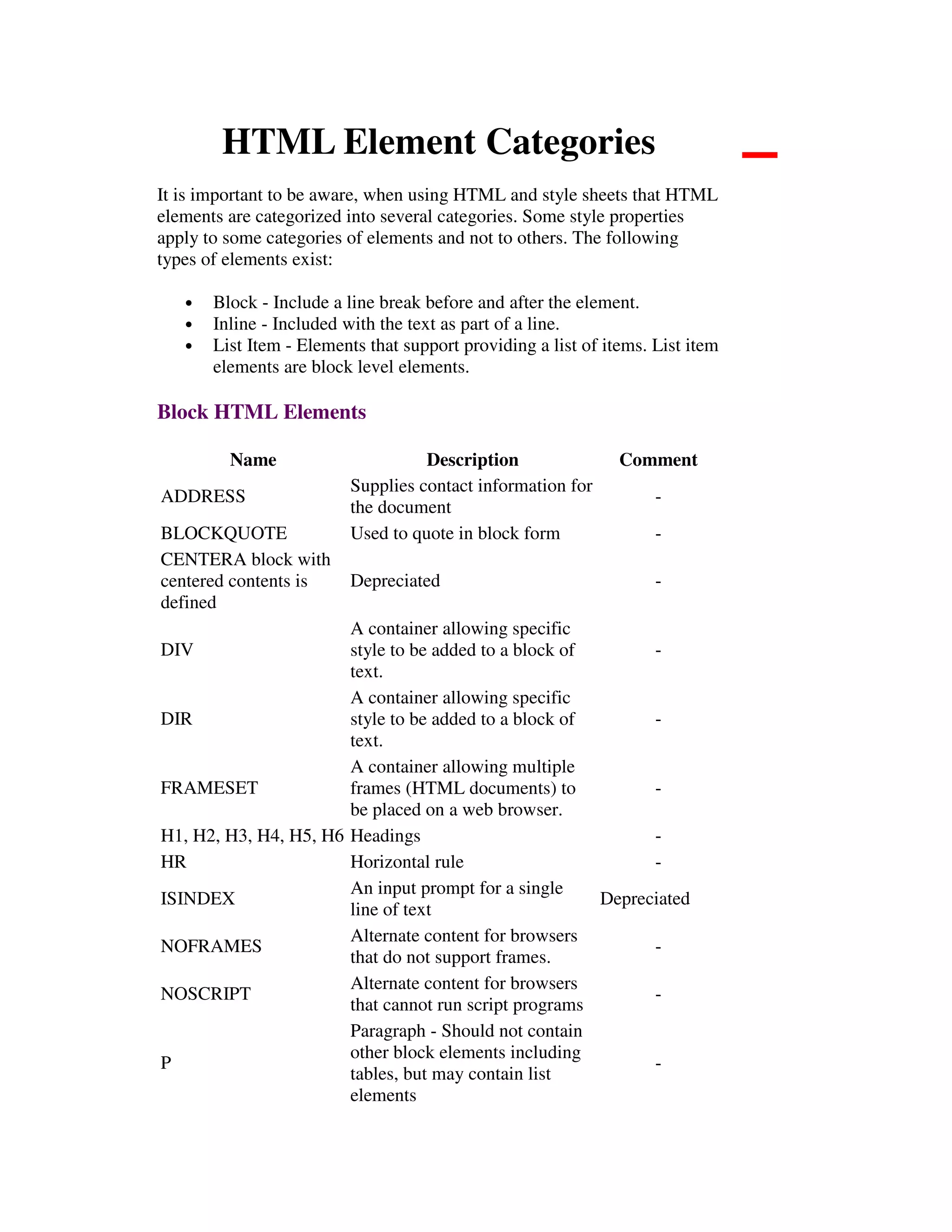
It is important to be aware, when using HTML and style sheets that HTML
elements are categorized into several categories. Some style properties
apply to some categories of elements and not to others. The following
types of elements exist:
• Block - Include a line break before and after the element.
• Inline - Included with the text as part of a line.
• List Item - Elements that support providing a list of items. List item
elements are block level elements.
Block HTML Elements
Name Description Comment
ADDRESS
Supplies contact information for
the document
-
BLOCKQUOTE Used to quote in block form -
CENTERA block with
centered contents is
defined
Depreciated -
DIV
A container allowing specific
style to be added to a block of
text.
-
DIR
A container allowing specific
style to be added to a block of
text.
-
FRAMESET
A container allowing multiple
frames (HTML documents) to
be placed on a web browser.
-
H1, H2, H3, H4, H5, H6 Headings -
HR Horizontal rule -
ISINDEX
An input prompt for a single
line of text
Depreciated
NOFRAMES
Alternate content for browsers
that do not support frames.
-
NOSCRIPT
Alternate content for browsers
that cannot run script programs
-
P
Paragraph - Should not contain
other block elements including
tables, but may contain list
elements
-
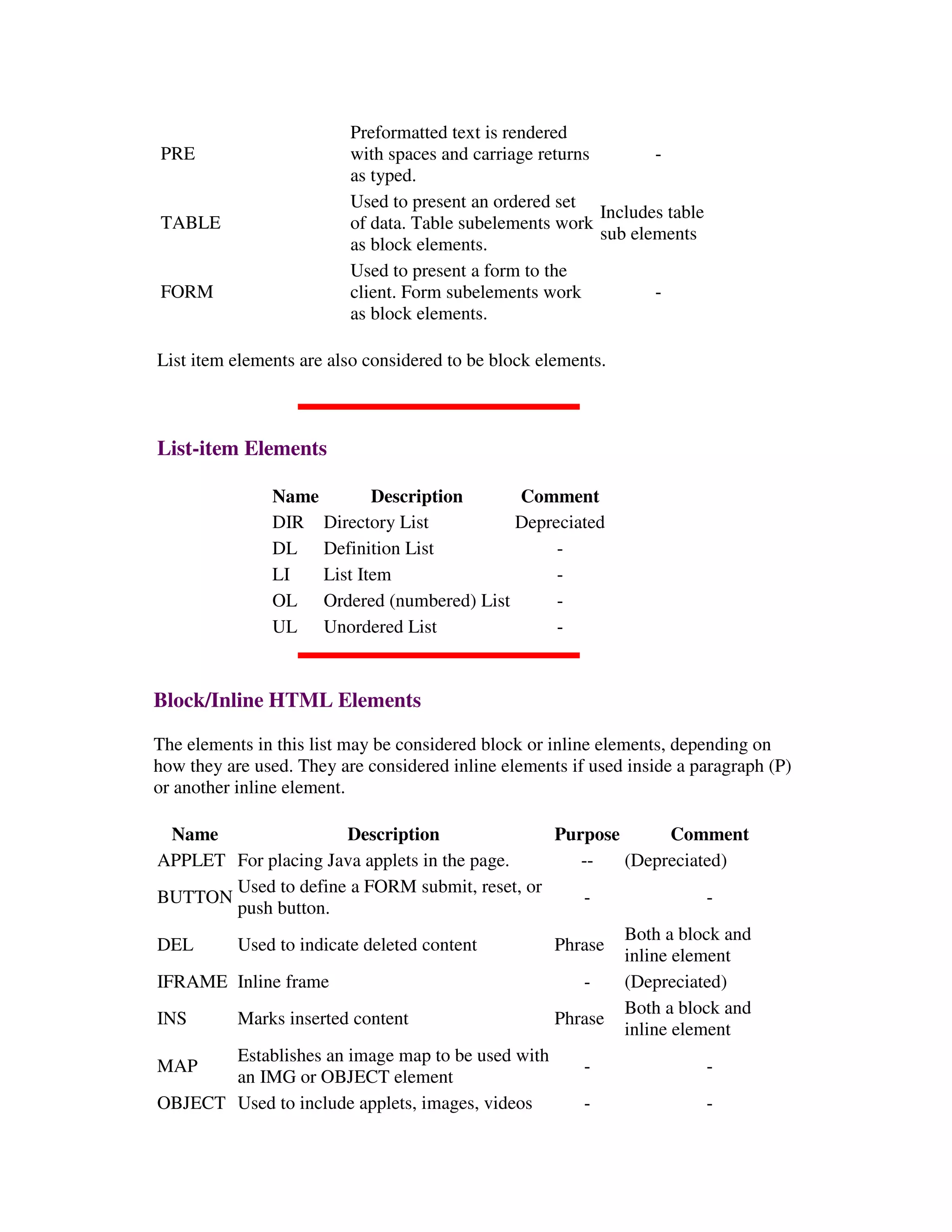
PRE
Preformatted text is rendered
with spaces and carriage returns
as typed.
-
TABLE
Used to present an ordered set
of data. Table subelements work
as block elements.
Includes table
sub elements
FORM
Used to present a form to the
client. Form subelements work
as block elements.
-
List item elements are also considered to be block elements.
List-item Elements
Name Description Comment
DIR Directory List Depreciated
DL Definition List -
LI List Item -
OL Ordered (numbered) List -
UL Unordered List -
Block/Inline HTML Elements
The elements in this list may be considered block or inline elements, depending on
how they are used. They are considered inline elements if used inside a paragraph (P)
or another inline element.
Name Description Purpose Comment
APPLET For placing Java applets in the page. -- (Depreciated)
BUTTON
Used to define a FORM submit, reset, or
push button.
- -
DEL Used to indicate deleted content Phrase
Both a block and
inline element
IFRAME Inline frame - (Depreciated)
INS Marks inserted content Phrase
Both a block and
inline element
MAP
Establishes an image map to be used with
an IMG or OBJECT element
- -
OBJECT Used to include applets, images, videos - -
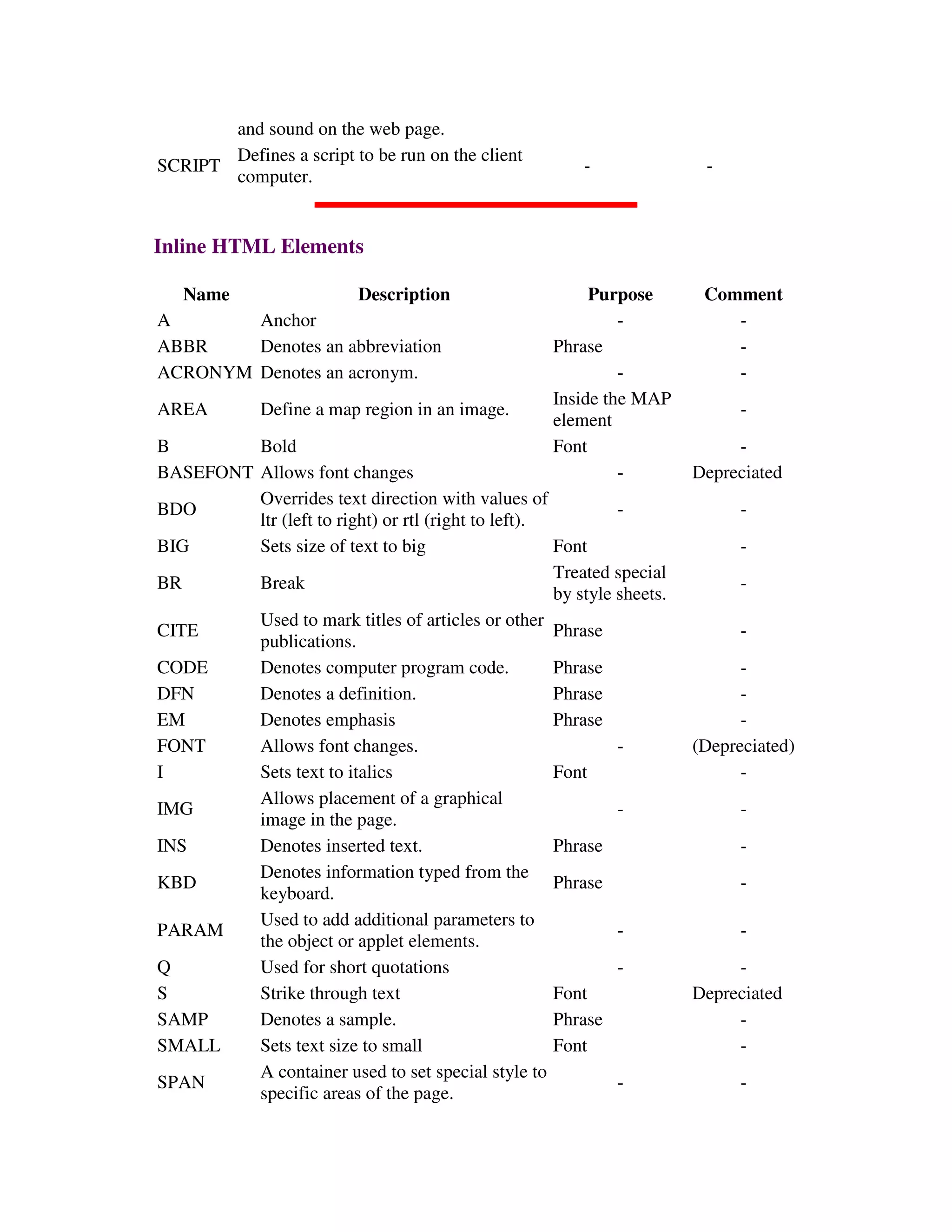
and sound on the web page.
SCRIPT
Defines a script to be run on the client
computer.
- -
Inline HTML Elements
Name Description Purpose Comment
A Anchor - -
ABBR Denotes an abbreviation Phrase -
ACRONYM Denotes an acronym. - -
AREA Define a map region in an image.
Inside the MAP
element
-
B Bold Font -
BASEFONT Allows font changes - Depreciated
BDO
Overrides text direction with values of
ltr (left to right) or rtl (right to left).
- -
BIG Sets size of text to big Font -
BR Break
Treated special
by style sheets.
-
CITE
Used to mark titles of articles or other
publications.
Phrase -
CODE Denotes computer program code. Phrase -
DFN Denotes a definition. Phrase -
EM Denotes emphasis Phrase -
FONT Allows font changes. - (Depreciated)
I Sets text to italics Font -
IMG
Allows placement of a graphical
image in the page.
- -
INS Denotes inserted text. Phrase -
KBD
Denotes information typed from the
keyboard.
Phrase -
PARAM
Used to add additional parameters to
the object or applet elements.
- -
Q Used for short quotations - -
S Strike through text Font Depreciated
SAMP Denotes a sample. Phrase -
SMALL Sets text size to small Font -
SPAN
A container used to set special style to
specific areas of the page.
- -
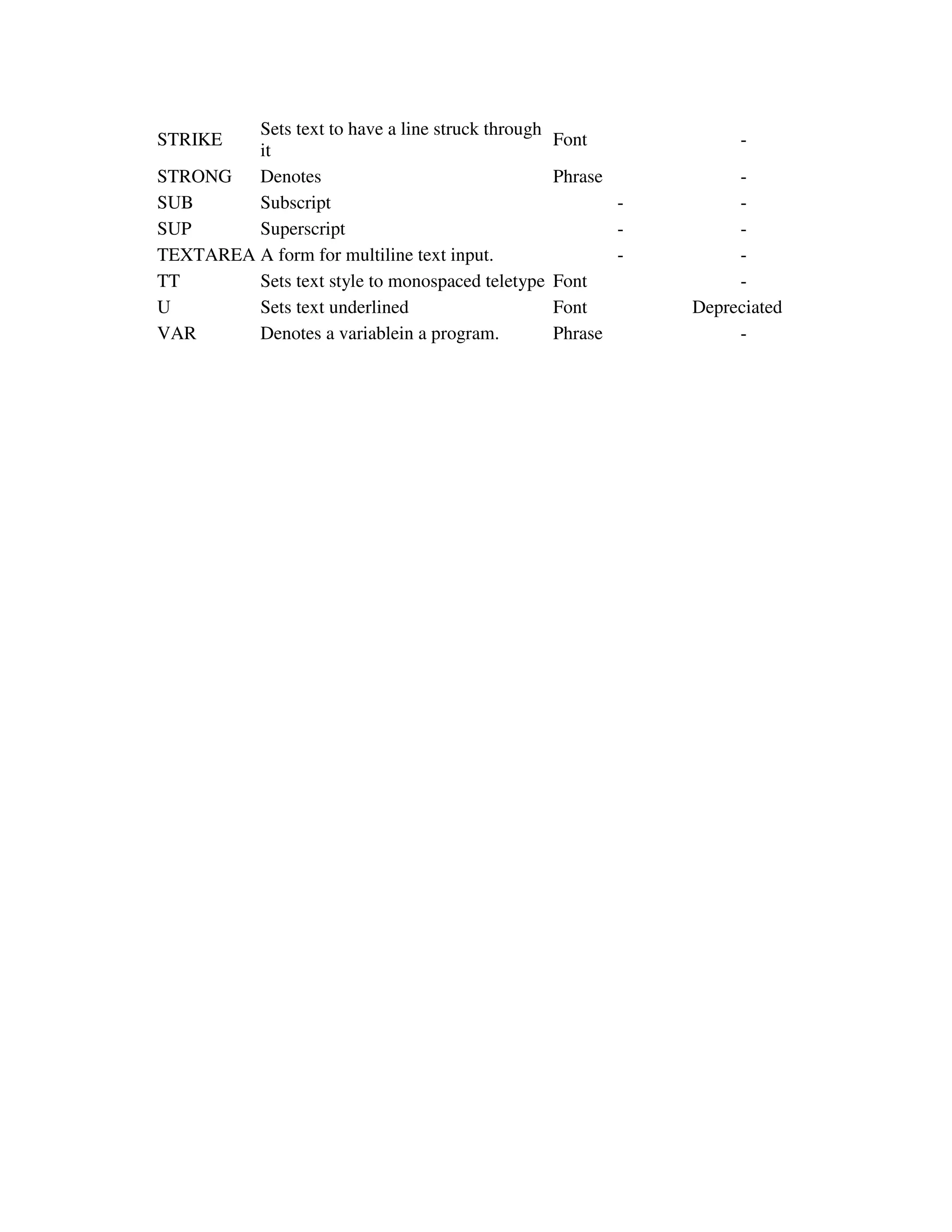
STRIKE
Sets text to have a line struck through
it
Font -
STRONG Denotes Phrase -
SUB Subscript - -
SUP Superscript - -
TEXTAREA A form for multiline text input. - -
TT Sets text style to monospaced teletype Font -
U Sets text underlined Font Depreciated
VAR Denotes a variablein a program. Phrase -

Html elements categories

  • 1.
    HTML Element Categories Itis important to be aware, when using HTML and style sheets that HTML elements are categorized into several categories. Some style properties apply to some categories of elements and not to others. The following types of elements exist: • Block - Include a line break before and after the element. • Inline - Included with the text as part of a line. • List Item - Elements that support providing a list of items. List item elements are block level elements. Block HTML Elements Name Description Comment ADDRESS Supplies contact information for the document - BLOCKQUOTE Used to quote in block form - CENTERA block with centered contents is defined Depreciated - DIV A container allowing specific style to be added to a block of text. - DIR A container allowing specific style to be added to a block of text. - FRAMESET A container allowing multiple frames (HTML documents) to be placed on a web browser. - H1, H2, H3, H4, H5, H6 Headings - HR Horizontal rule - ISINDEX An input prompt for a single line of text Depreciated NOFRAMES Alternate content for browsers that do not support frames. - NOSCRIPT Alternate content for browsers that cannot run script programs - P Paragraph - Should not contain other block elements including tables, but may contain list elements -
  • 2.
    PRE Preformatted text isrendered with spaces and carriage returns as typed. - TABLE Used to present an ordered set of data. Table subelements work as block elements. Includes table sub elements FORM Used to present a form to the client. Form subelements work as block elements. - List item elements are also considered to be block elements. List-item Elements Name Description Comment DIR Directory List Depreciated DL Definition List - LI List Item - OL Ordered (numbered) List - UL Unordered List - Block/Inline HTML Elements The elements in this list may be considered block or inline elements, depending on how they are used. They are considered inline elements if used inside a paragraph (P) or another inline element. Name Description Purpose Comment APPLET For placing Java applets in the page. -- (Depreciated) BUTTON Used to define a FORM submit, reset, or push button. - - DEL Used to indicate deleted content Phrase Both a block and inline element IFRAME Inline frame - (Depreciated) INS Marks inserted content Phrase Both a block and inline element MAP Establishes an image map to be used with an IMG or OBJECT element - - OBJECT Used to include applets, images, videos - -
  • 3.
    and sound onthe web page. SCRIPT Defines a script to be run on the client computer. - - Inline HTML Elements Name Description Purpose Comment A Anchor - - ABBR Denotes an abbreviation Phrase - ACRONYM Denotes an acronym. - - AREA Define a map region in an image. Inside the MAP element - B Bold Font - BASEFONT Allows font changes - Depreciated BDO Overrides text direction with values of ltr (left to right) or rtl (right to left). - - BIG Sets size of text to big Font - BR Break Treated special by style sheets. - CITE Used to mark titles of articles or other publications. Phrase - CODE Denotes computer program code. Phrase - DFN Denotes a definition. Phrase - EM Denotes emphasis Phrase - FONT Allows font changes. - (Depreciated) I Sets text to italics Font - IMG Allows placement of a graphical image in the page. - - INS Denotes inserted text. Phrase - KBD Denotes information typed from the keyboard. Phrase - PARAM Used to add additional parameters to the object or applet elements. - - Q Used for short quotations - - S Strike through text Font Depreciated SAMP Denotes a sample. Phrase - SMALL Sets text size to small Font - SPAN A container used to set special style to specific areas of the page. - -
  • 4.
    STRIKE Sets text tohave a line struck through it Font - STRONG Denotes Phrase - SUB Subscript - - SUP Superscript - - TEXTAREA A form for multiline text input. - - TT Sets text style to monospaced teletype Font - U Sets text underlined Font Depreciated VAR Denotes a variablein a program. Phrase -