Telecommunications, the
Internet, and Wireless
Technology
Saleh Hasan
Information Systems Course
UIBS
Telecommunications System Components and
Functions
 Computers to process
information
 Terminals or any
input/output devices
that send or receive
data
 Communications
processors
 Communications
software
• Transmit information
• Establish interface between
sender and the receiver
• Route messages along most
efficient paths
• Perform elementary processing
of information
• Perform editorial tasks on data
• Convert message speed or
format
• Control flow of information
Types of Signals
Digital signal
 Discrete waveform
 Transmits data coded
into two discrete states
as 1-bits and 0-bits
 Used for data
communications
Analog signal
 Continuous waveform
 Passes through
communications
medium
 Used for video, audio
and voice
communications
Communication Networks
 Star Network: All computers and other devices are
connected to a central host computer
 Bus Network: Links a number of computers by a single
circuit
 Ring Network: All computers are linked by a closed
loop
Local Area Networks; Require their own dedicated
channels, Encompass a limited distance, Gateway,
router, Network Operating System (NOS), peer-to-peer
Wide Area Networks (WANs); Span large geographical
distance, Consist of variety of cable, satellite, and
microwave technologies, Switched lines, dedicated lines
Electronic Commerce and Electronic
Business Technologies
 Email
 Group ware
 Voice mail
 Fax
 Teleconferencing
 Data conferencing
 Videoconferencing
 Distance learning
 E-learning
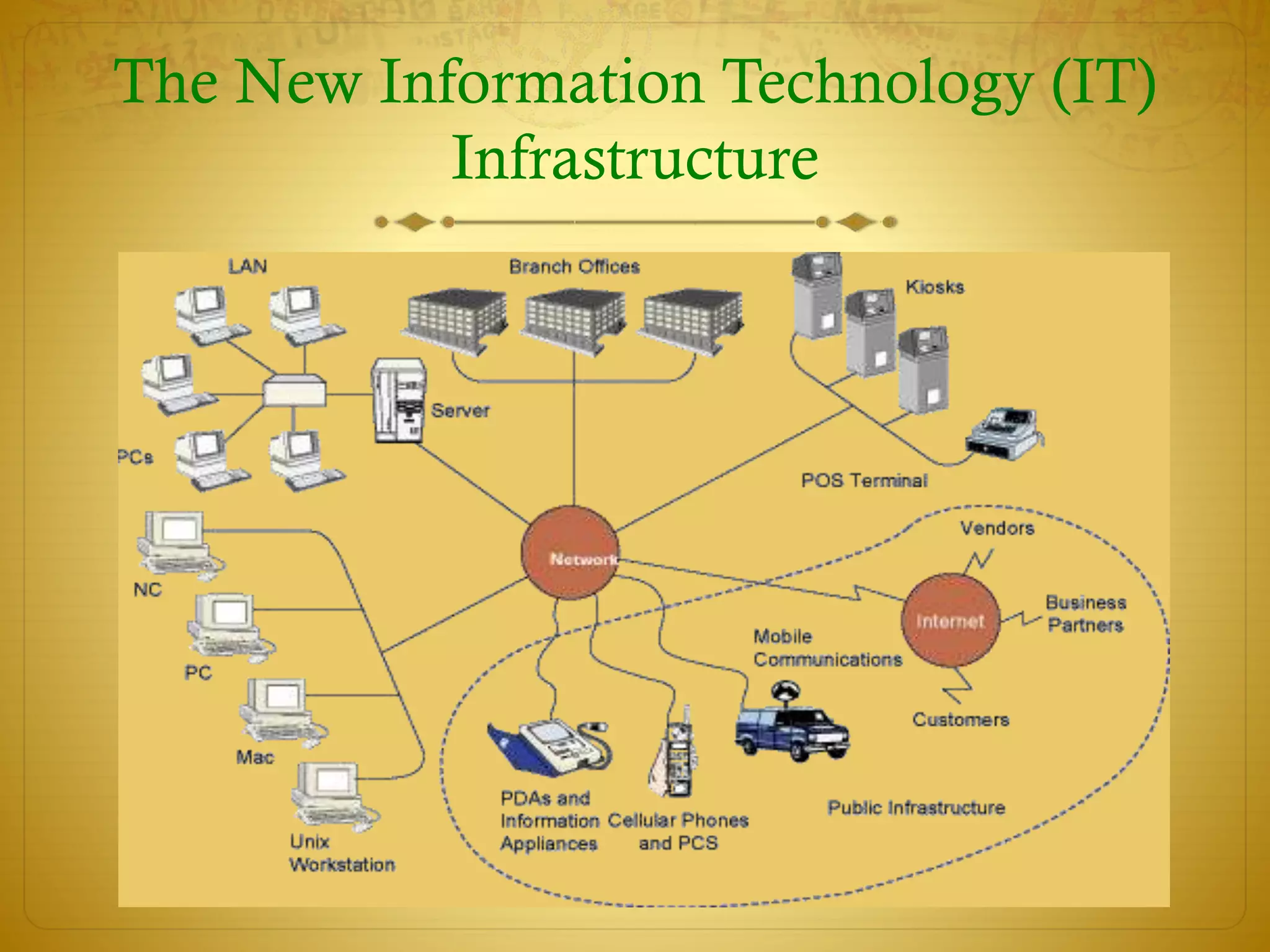
The New Information Technology (IT)
Infrastructure
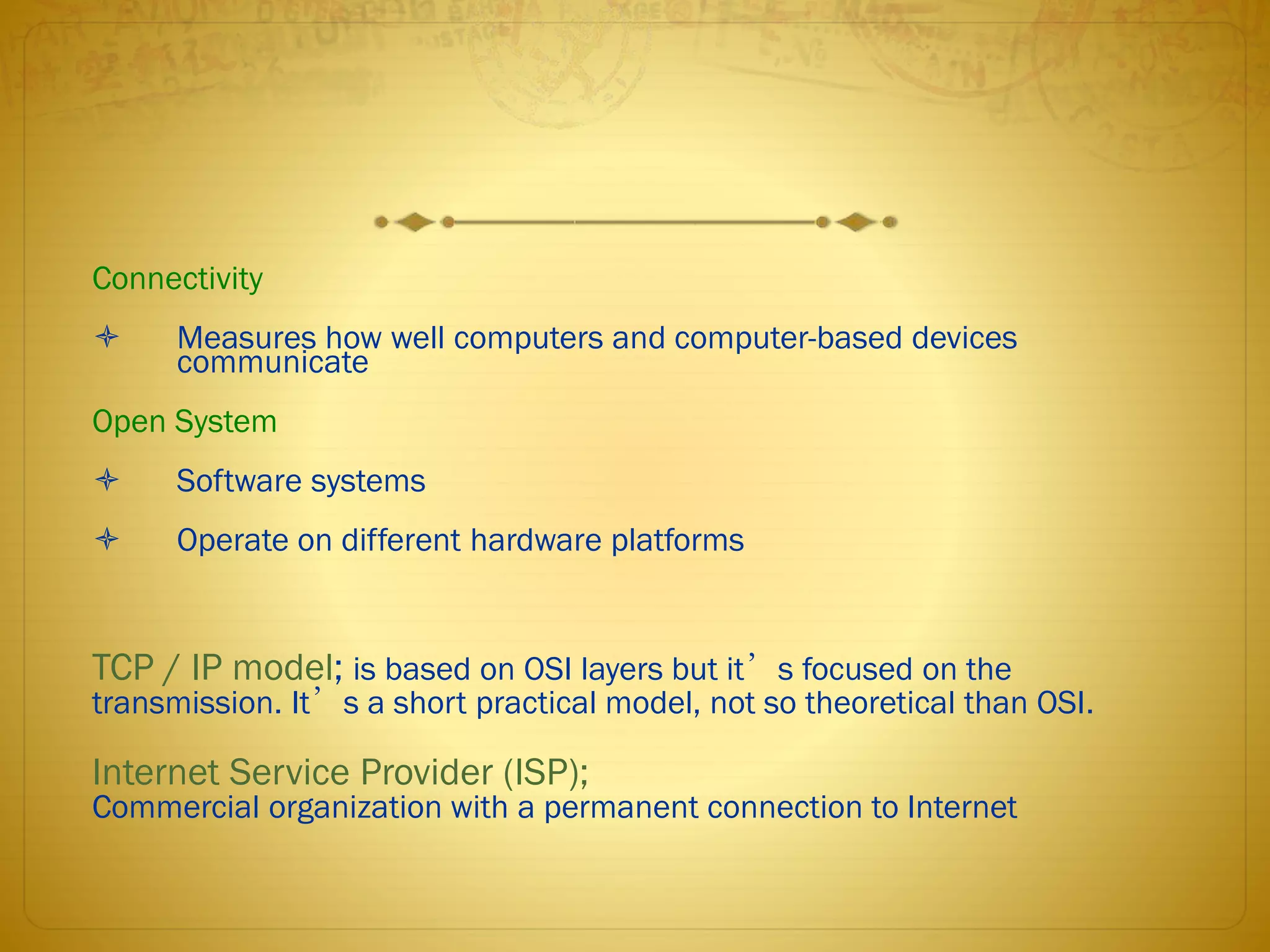
Connectivity
 Measures how well computers and computer-based devices
communicate
Open System
 Software systems
 Operate on different hardware platforms
TCP / IP model; is based on OSI layers but it’s focused on the
transmission. It’s a short practical model, not so theoretical than OSI.
Internet Service Provider (ISP);
Commercial organization with a permanent connection to Internet
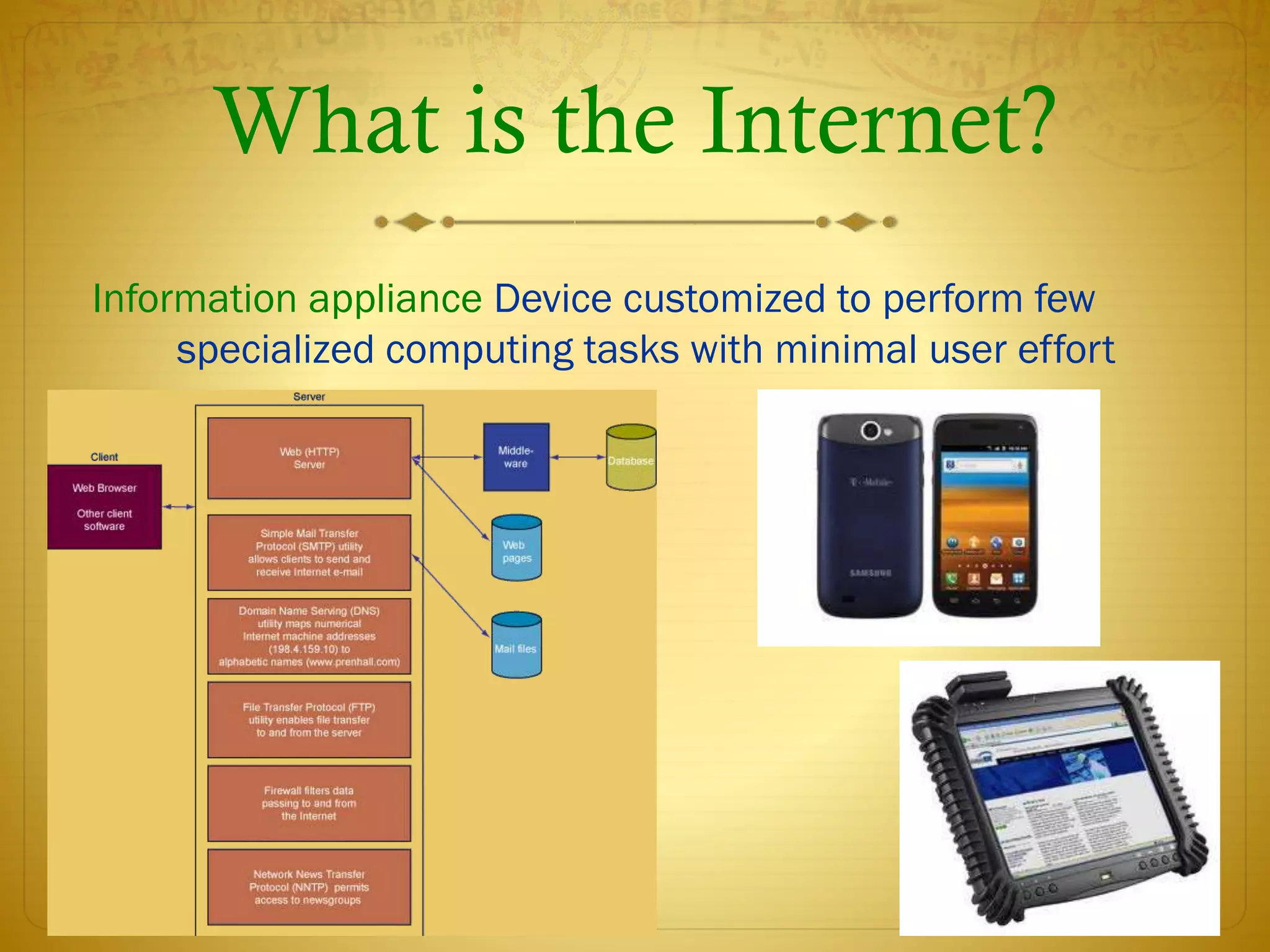
What is the Internet?
Information appliance Device customized to perform few
specialized computing tasks with minimal user effort
Internet Tools for Communication
 Electronic Mail (E-Mail) –Connects people worldwide
 Usenet Newsgroups –Online discussion group
 LISTSERV –First email broadcast from mailing list
 Chatting –Live, conversations among people
 Instant messaging -Creating private chat channels
 Internet telephony (VoIP) –Two-way voice transmission
among the internet
The Wireless Web
 Web-based applications
 Enables users to access digital information from
the Internet
 Wireless Web Standards:
 Wireless Application Protocol (WAP) = Accessing information over a
mobile.
 WML (Wireless Markup Language) = Provides navigation support, data
input, hyperlinks, text and image presentations, and forms.
 Microbrowser = Web browser designed for use on mobiles
 I-mode = Mobile internet similir service to WAP
 Voice portals – access to information through spoken commands and voice
responses
Web Content Management Tool
A content management system (CMS) is a system providing a
collection of procedures used to manage work flow in a
collaborative environment. These procedures can be manual or
computer-based. The procedures are designed to do the following:
 Allow for a large number of people to contribute to and share
stored data
 Control access to data, based on user roles (defining which
information users or user groups can view, edit, publish, etc.)
 Aid in easy storage and retrieval of data
 Reduce repetitive duplicate input
 Improve the ease of report writing
 Improve communication between users
The Challenge of Managing the New
Information Technology Infrastructure
 Loss of management control
 Connectivity and application integration challenges
 Organizational change requirements
 Hidden costs of enterprise computing
 Scalability, reliability, and security downtime

Chapter2 3 telecom_networks_internet summery

  • 1.
    Telecommunications, the Internet, andWireless Technology Saleh Hasan Information Systems Course UIBS
  • 2.
    Telecommunications System Componentsand Functions  Computers to process information  Terminals or any input/output devices that send or receive data  Communications processors  Communications software • Transmit information • Establish interface between sender and the receiver • Route messages along most efficient paths • Perform elementary processing of information • Perform editorial tasks on data • Convert message speed or format • Control flow of information
  • 3.
    Types of Signals Digitalsignal  Discrete waveform  Transmits data coded into two discrete states as 1-bits and 0-bits  Used for data communications Analog signal  Continuous waveform  Passes through communications medium  Used for video, audio and voice communications
  • 4.
    Communication Networks  StarNetwork: All computers and other devices are connected to a central host computer  Bus Network: Links a number of computers by a single circuit  Ring Network: All computers are linked by a closed loop Local Area Networks; Require their own dedicated channels, Encompass a limited distance, Gateway, router, Network Operating System (NOS), peer-to-peer Wide Area Networks (WANs); Span large geographical distance, Consist of variety of cable, satellite, and microwave technologies, Switched lines, dedicated lines
  • 5.
    Electronic Commerce andElectronic Business Technologies  Email  Group ware  Voice mail  Fax  Teleconferencing  Data conferencing  Videoconferencing  Distance learning  E-learning
  • 6.
    The New InformationTechnology (IT) Infrastructure
  • 7.
    Connectivity  Measures howwell computers and computer-based devices communicate Open System  Software systems  Operate on different hardware platforms TCP / IP model; is based on OSI layers but it’s focused on the transmission. It’s a short practical model, not so theoretical than OSI. Internet Service Provider (ISP); Commercial organization with a permanent connection to Internet
  • 8.
    What is theInternet? Information appliance Device customized to perform few specialized computing tasks with minimal user effort
  • 9.
    Internet Tools forCommunication  Electronic Mail (E-Mail) –Connects people worldwide  Usenet Newsgroups –Online discussion group  LISTSERV –First email broadcast from mailing list  Chatting –Live, conversations among people  Instant messaging -Creating private chat channels  Internet telephony (VoIP) –Two-way voice transmission among the internet
  • 10.
    The Wireless Web Web-based applications  Enables users to access digital information from the Internet  Wireless Web Standards:  Wireless Application Protocol (WAP) = Accessing information over a mobile.  WML (Wireless Markup Language) = Provides navigation support, data input, hyperlinks, text and image presentations, and forms.  Microbrowser = Web browser designed for use on mobiles  I-mode = Mobile internet similir service to WAP  Voice portals – access to information through spoken commands and voice responses
  • 11.
    Web Content ManagementTool A content management system (CMS) is a system providing a collection of procedures used to manage work flow in a collaborative environment. These procedures can be manual or computer-based. The procedures are designed to do the following:  Allow for a large number of people to contribute to and share stored data  Control access to data, based on user roles (defining which information users or user groups can view, edit, publish, etc.)  Aid in easy storage and retrieval of data  Reduce repetitive duplicate input  Improve the ease of report writing  Improve communication between users
  • 12.
    The Challenge ofManaging the New Information Technology Infrastructure  Loss of management control  Connectivity and application integration challenges  Organizational change requirements  Hidden costs of enterprise computing  Scalability, reliability, and security downtime