Programming Logic and Design
Eighth Edition
Chapter 1
An Overview of Computers and
Programming
Objectives
In this chapter, you will learn about:
• Computer systems
• Simple program logic
• The steps involved in the program development cycle
• Pseudocode statements and flowchart symbols
• Using a sentinel value to end a program
• Programming and user environments
• The evolution of programming models
2
Programming Logic and Design, Eighth Edition
Understanding Computer Systems
• Computer system
– Combination of all the components required to process
and store data using a computer
• Hardware
– Equipment associated with a computer
• Software
– Computer instructions
– Tells the hardware what to do
– Programs
• Instructions written by programmers
3
Programming Logic and Design, Eighth Edition
Understanding Computer Systems (continued)
– Application software such as word processing,
spreadsheets, payroll and inventory, even games
– System software such as operating systems like Windows,
Linux, or UNIX
• Computer hardware and software accomplish three
major operations
– Input
• Data items such as text, numbers, images, and sound
– Processing
• Calculations and comparisons performed by the central processing
unit (CPU)
4
Programming Logic and Design, Eighth Edition
Understanding Computer Systems (continued)
– Output
• Resulting information that is sent to a printer,
a monitor, or storage devices after processing
• A Cloud based device is accessed through the Internet
• Programming language
– Used to write computer instructions called program code
– Writing instructions is called coding the program
– Examples
• Visual Basic, C#, C++, or Java
• Syntax
– Rules governing word usage and punctuation
– Mistakes in a language’s usage are syntax errors
5
Programming Logic and Design, Eighth Edition
Understanding Computer Systems (continued)
• Computer memory
– Computer’s temporary, internal storage – random access memory (RAM)
– Volatile memory – lost when the power is off
• Permanent storage devices
– Nonvolatile memory
• Compiler or interpreter
– Translates source code into machine language (binary language)
statements called object code
– Checks for syntax errors
• Program executes or runs
– Input will be accepted, some processing will occur, and results will be
output
6
Programming Logic and Design, Eighth Edition
Understanding Simple Program Logic
• Programs with syntax errors cannot execute
• Logical errors
– Errors in program logic produce incorrect output
• Logic of the computer program
– Sequence of specific instructions in specific order
• Variable
– Named memory location whose value can vary
7
Programming Logic and Design, Eighth Edition
Understanding the Program
Development Cycle
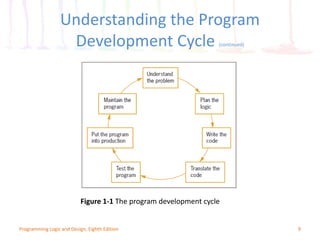
• Program development cycle
– Understand the problem
– Plan the logic
– Code the program
– Use software (a compiler or interpreter) to translate the
program into machine language
– Test the program
– Put the program into production
– Maintain the program
8
Programming Logic and Design, Eighth Edition
Understanding the Program
Development Cycle (continued)
9
Figure 1-1 The program development cycle
Programming Logic and Design, Eighth Edition
Understanding the Problem
• One of the most difficult aspects of programming
• Users or end users
– People for whom a program is written
• Documentation
– Supporting paperwork for a program
10
Programming Logic and Design, Eighth Edition
Planning the Logic
• An algorithm is the sequence of steps or rules you
follow to solve a problem
• Most common planning tools
– Flowcharts
– Pseudocode
– IPO charts (input, processing, and output)
– TOE charts (tasks, objects, and events)
• Desk-checking
– Walking through a program’s logic on paper before you
actually write the program
11
Programming Logic and Design, Eighth Edition
Coding the Program
• Hundreds of programming languages available
– Choose based on features
– Similar in their basic capabilities
• Coding is easier than the planning step
• Experienced programmers can successfully combine
logic planning and program coding in one step
12
Programming Logic and Design, Eighth Edition
Using Software to Translate the
Program into Machine Language
• Translator program
– Compiler or interpreter
– Changes the programmer’s English-like high-level
programming language into the low-level machine
language
• Syntax error
– Misuse of a language’s grammar rules
– Programmer corrects listed syntax errors
– Might need to recompile the code several times
13
Programming Logic and Design, Eighth Edition
Using Software to Translate the Program
into Machine Language (continued)
Figure 1-2 Creating an executable program
14
Programming Logic and Design, Eighth Edition
Testing the Program
• Logical error
– Results when a syntactically correct statement, but the
wrong one for the current context, is used
• Test
– Execute the program with some sample data to see
whether the results are logically correct
• Debugging is the process of finding and correcting
program errors
• Programs should be tested with many sets of data
15
Programming Logic and Design, Eighth Edition
Putting the Program into Production
• Process depends on program’s purpose
– May take several months
• Conversion
– The entire set of actions an organization must take to
switch over to using a new program or set of programs
16
Programming Logic and Design, Eighth Edition
Maintaining the Program
• Maintenance
– Making changes after the program is put into production
• Common first programming job
– Maintaining previously written programs
• Make changes to existing programs
– Repeat the development cycle
17
Programming Logic and Design, Eighth Edition
Using Pseudocode Statements
and Flowchart Symbols
• Pseudocode
– English-like representation of the logical steps it takes to
solve a problem
• Flowchart
– Pictorial representation of the logical steps it takes to solve
a problem
18
Programming Logic and Design, Eighth Edition
Writing Pseudocode
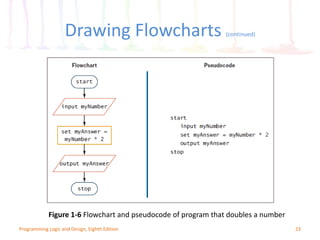
• Pseudocode representation of a number-doubling
problem
start
input myNumber
set myAnswer = myNumber * 2
output myAnswer
stop
19
Programming Logic and Design, Eighth Edition
Writing Pseudocode (continued)
20
Programming Logic and Design, Eighth Edition
Drawing Flowcharts
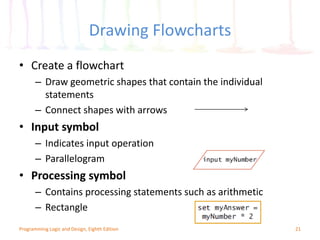
• Create a flowchart
– Draw geometric shapes that contain the individual
statements
– Connect shapes with arrows
• Input symbol
– Indicates input operation
– Parallelogram
• Processing symbol
– Contains processing statements such as arithmetic
– Rectangle
21
Programming Logic and Design, Eighth Edition
Drawing Flowcharts (continued)
• Output symbol
– Represents output statements
– Parallelogram
• Flowlines
– Arrows that connect steps
• Terminal symbols
– Start/stop symbols
– Shaped like a racetrack
– Also called lozenges
22
Programming Logic and Design, Eighth Edition
Drawing Flowcharts (continued)
Figure 1-6 Flowchart and pseudocode of program that doubles a number
23
Programming Logic and Design, Eighth Edition
Repeating Instructions
• Program in Figure 1-6 only works for one number
• Not feasible to run the program over and over
10,000 times
• Not feasible to add 10,000 lines of code to a
program
• Create a loop (repetition of a series of steps) instead
• Avoid an infinite loop (repeating flow of logic that
never ends)
24
Programming Logic and Design, Eighth Edition
Repeating Instructions (continued)
Figure 1-7 Inefficient pseudocode for program that doubles 10,000 numbers
25
Programming Logic and Design, Eighth Edition
Repeating Instructions (continued)
Figure 1-8 Flowchart of infinite number-doubling program
26
Programming Logic and Design, Eighth Edition
Using a Sentinel Value to End
a Program
• Making a decision
– Testing a value
– Decision symbol
• Diamond shape
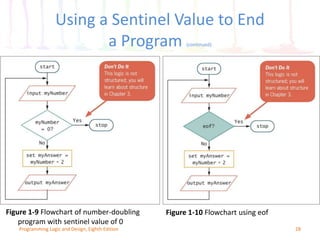
• Dummy value
– Data-entry value that the user will never need
– Sentinel value
• eof (“end of file”)
– Marker at the end of a file that automatically acts as a
sentinel
27
Programming Logic and Design, Eighth Edition
Using a Sentinel Value to End
a Program (continued)
Figure 1-9 Flowchart of number-doubling
program with sentinel value of 0
28
Programming Logic and Design, Eighth Edition
Figure 1-10 Flowchart using eof
Understanding Programming
and User Environments
• Understanding Programming Environments
– Text Editor is used to create simple text files
– Integrated Development Environment (IDE) provides an
editor, compiler, and other programming tools
• Microsoft Visual Studio IDE
• Understanding User Environments
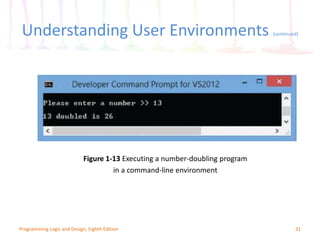
– Command Line is a location on your computer screen at
which you type text entries to communicate with the
computer’s operating system
– A graphical user interface, or GUI (pronounced gooey),
allows users to interact with a program in a graphical
environment
29
Programming Logic and Design, Eighth Edition
Understanding Programming
Environments (continued)
Figure 1-12 A C# number-doubling program in Visual Studio
30
Programming Logic and Design, Eighth Edition
Understanding User Environments (continued)
Figure 1-13 Executing a number-doubling program
in a command-line environment
31
Programming Logic and Design, Eighth Edition
Understanding User Environments (continued)
Figure 1-14 Executing a number-doubling program
in a GUI environment
32
Programming Logic and Design, Eighth Edition
Understanding the Evolution
of Programming Models
• People have been writing modern computer
programs since the 1940s
• Newer programming languages
– Look much more like natural language
– Are easier to use
– Create self-contained modules or program segments that
can be pieced together in a variety of ways
33
Programming Logic and Design, Eighth Edition
Understanding the Evolution
of Programming Models (continued)
• Major models or paradigms used by programmers
– Procedural programming
• Focuses on the procedures that programmers
create
– Object-oriented programming
• Focuses on objects, or “things,” and describes
their features (or attributes) and their
behaviors
34
Programming Logic and Design, Eighth Edition
Summary
• Hardware and software accomplish input,
processing, and output
• Logic must be developed correctly
• Logical errors are much more difficult to locate than
syntax errors
• Use flowcharts, pseudocode, IPO charts, and TOE
charts to plan the logic
• Avoid infinite loops by testing for a sentinel value
• Use a text editor or an IDE to enter your program
statements
35
Programming Logic and Design, Eighth Edition

chapter1-161229182113 (1).pdf

  • 1.
    Programming Logic andDesign Eighth Edition Chapter 1 An Overview of Computers and Programming
  • 2.
    Objectives In this chapter,you will learn about: • Computer systems • Simple program logic • The steps involved in the program development cycle • Pseudocode statements and flowchart symbols • Using a sentinel value to end a program • Programming and user environments • The evolution of programming models 2 Programming Logic and Design, Eighth Edition
  • 3.
    Understanding Computer Systems •Computer system – Combination of all the components required to process and store data using a computer • Hardware – Equipment associated with a computer • Software – Computer instructions – Tells the hardware what to do – Programs • Instructions written by programmers 3 Programming Logic and Design, Eighth Edition
  • 4.
    Understanding Computer Systems(continued) – Application software such as word processing, spreadsheets, payroll and inventory, even games – System software such as operating systems like Windows, Linux, or UNIX • Computer hardware and software accomplish three major operations – Input • Data items such as text, numbers, images, and sound – Processing • Calculations and comparisons performed by the central processing unit (CPU) 4 Programming Logic and Design, Eighth Edition
  • 5.
    Understanding Computer Systems(continued) – Output • Resulting information that is sent to a printer, a monitor, or storage devices after processing • A Cloud based device is accessed through the Internet • Programming language – Used to write computer instructions called program code – Writing instructions is called coding the program – Examples • Visual Basic, C#, C++, or Java • Syntax – Rules governing word usage and punctuation – Mistakes in a language’s usage are syntax errors 5 Programming Logic and Design, Eighth Edition
  • 6.
    Understanding Computer Systems(continued) • Computer memory – Computer’s temporary, internal storage – random access memory (RAM) – Volatile memory – lost when the power is off • Permanent storage devices – Nonvolatile memory • Compiler or interpreter – Translates source code into machine language (binary language) statements called object code – Checks for syntax errors • Program executes or runs – Input will be accepted, some processing will occur, and results will be output 6 Programming Logic and Design, Eighth Edition
  • 7.
    Understanding Simple ProgramLogic • Programs with syntax errors cannot execute • Logical errors – Errors in program logic produce incorrect output • Logic of the computer program – Sequence of specific instructions in specific order • Variable – Named memory location whose value can vary 7 Programming Logic and Design, Eighth Edition
  • 8.
    Understanding the Program DevelopmentCycle • Program development cycle – Understand the problem – Plan the logic – Code the program – Use software (a compiler or interpreter) to translate the program into machine language – Test the program – Put the program into production – Maintain the program 8 Programming Logic and Design, Eighth Edition
  • 9.
    Understanding the Program DevelopmentCycle (continued) 9 Figure 1-1 The program development cycle Programming Logic and Design, Eighth Edition
  • 10.
    Understanding the Problem •One of the most difficult aspects of programming • Users or end users – People for whom a program is written • Documentation – Supporting paperwork for a program 10 Programming Logic and Design, Eighth Edition
  • 11.
    Planning the Logic •An algorithm is the sequence of steps or rules you follow to solve a problem • Most common planning tools – Flowcharts – Pseudocode – IPO charts (input, processing, and output) – TOE charts (tasks, objects, and events) • Desk-checking – Walking through a program’s logic on paper before you actually write the program 11 Programming Logic and Design, Eighth Edition
  • 12.
    Coding the Program •Hundreds of programming languages available – Choose based on features – Similar in their basic capabilities • Coding is easier than the planning step • Experienced programmers can successfully combine logic planning and program coding in one step 12 Programming Logic and Design, Eighth Edition
  • 13.
    Using Software toTranslate the Program into Machine Language • Translator program – Compiler or interpreter – Changes the programmer’s English-like high-level programming language into the low-level machine language • Syntax error – Misuse of a language’s grammar rules – Programmer corrects listed syntax errors – Might need to recompile the code several times 13 Programming Logic and Design, Eighth Edition
  • 14.
    Using Software toTranslate the Program into Machine Language (continued) Figure 1-2 Creating an executable program 14 Programming Logic and Design, Eighth Edition
  • 15.
    Testing the Program •Logical error – Results when a syntactically correct statement, but the wrong one for the current context, is used • Test – Execute the program with some sample data to see whether the results are logically correct • Debugging is the process of finding and correcting program errors • Programs should be tested with many sets of data 15 Programming Logic and Design, Eighth Edition
  • 16.
    Putting the Programinto Production • Process depends on program’s purpose – May take several months • Conversion – The entire set of actions an organization must take to switch over to using a new program or set of programs 16 Programming Logic and Design, Eighth Edition
  • 17.
    Maintaining the Program •Maintenance – Making changes after the program is put into production • Common first programming job – Maintaining previously written programs • Make changes to existing programs – Repeat the development cycle 17 Programming Logic and Design, Eighth Edition
  • 18.
    Using Pseudocode Statements andFlowchart Symbols • Pseudocode – English-like representation of the logical steps it takes to solve a problem • Flowchart – Pictorial representation of the logical steps it takes to solve a problem 18 Programming Logic and Design, Eighth Edition
  • 19.
    Writing Pseudocode • Pseudocoderepresentation of a number-doubling problem start input myNumber set myAnswer = myNumber * 2 output myAnswer stop 19 Programming Logic and Design, Eighth Edition
  • 20.
    Writing Pseudocode (continued) 20 ProgrammingLogic and Design, Eighth Edition
  • 21.
    Drawing Flowcharts • Createa flowchart – Draw geometric shapes that contain the individual statements – Connect shapes with arrows • Input symbol – Indicates input operation – Parallelogram • Processing symbol – Contains processing statements such as arithmetic – Rectangle 21 Programming Logic and Design, Eighth Edition
  • 22.
    Drawing Flowcharts (continued) •Output symbol – Represents output statements – Parallelogram • Flowlines – Arrows that connect steps • Terminal symbols – Start/stop symbols – Shaped like a racetrack – Also called lozenges 22 Programming Logic and Design, Eighth Edition
  • 23.
    Drawing Flowcharts (continued) Figure1-6 Flowchart and pseudocode of program that doubles a number 23 Programming Logic and Design, Eighth Edition
  • 24.
    Repeating Instructions • Programin Figure 1-6 only works for one number • Not feasible to run the program over and over 10,000 times • Not feasible to add 10,000 lines of code to a program • Create a loop (repetition of a series of steps) instead • Avoid an infinite loop (repeating flow of logic that never ends) 24 Programming Logic and Design, Eighth Edition
  • 25.
    Repeating Instructions (continued) Figure1-7 Inefficient pseudocode for program that doubles 10,000 numbers 25 Programming Logic and Design, Eighth Edition
  • 26.
    Repeating Instructions (continued) Figure1-8 Flowchart of infinite number-doubling program 26 Programming Logic and Design, Eighth Edition
  • 27.
    Using a SentinelValue to End a Program • Making a decision – Testing a value – Decision symbol • Diamond shape • Dummy value – Data-entry value that the user will never need – Sentinel value • eof (“end of file”) – Marker at the end of a file that automatically acts as a sentinel 27 Programming Logic and Design, Eighth Edition
  • 28.
    Using a SentinelValue to End a Program (continued) Figure 1-9 Flowchart of number-doubling program with sentinel value of 0 28 Programming Logic and Design, Eighth Edition Figure 1-10 Flowchart using eof
  • 29.
    Understanding Programming and UserEnvironments • Understanding Programming Environments – Text Editor is used to create simple text files – Integrated Development Environment (IDE) provides an editor, compiler, and other programming tools • Microsoft Visual Studio IDE • Understanding User Environments – Command Line is a location on your computer screen at which you type text entries to communicate with the computer’s operating system – A graphical user interface, or GUI (pronounced gooey), allows users to interact with a program in a graphical environment 29 Programming Logic and Design, Eighth Edition
  • 30.
    Understanding Programming Environments (continued) Figure1-12 A C# number-doubling program in Visual Studio 30 Programming Logic and Design, Eighth Edition
  • 31.
    Understanding User Environments(continued) Figure 1-13 Executing a number-doubling program in a command-line environment 31 Programming Logic and Design, Eighth Edition
  • 32.
    Understanding User Environments(continued) Figure 1-14 Executing a number-doubling program in a GUI environment 32 Programming Logic and Design, Eighth Edition
  • 33.
    Understanding the Evolution ofProgramming Models • People have been writing modern computer programs since the 1940s • Newer programming languages – Look much more like natural language – Are easier to use – Create self-contained modules or program segments that can be pieced together in a variety of ways 33 Programming Logic and Design, Eighth Edition
  • 34.
    Understanding the Evolution ofProgramming Models (continued) • Major models or paradigms used by programmers – Procedural programming • Focuses on the procedures that programmers create – Object-oriented programming • Focuses on objects, or “things,” and describes their features (or attributes) and their behaviors 34 Programming Logic and Design, Eighth Edition
  • 35.
    Summary • Hardware andsoftware accomplish input, processing, and output • Logic must be developed correctly • Logical errors are much more difficult to locate than syntax errors • Use flowcharts, pseudocode, IPO charts, and TOE charts to plan the logic • Avoid infinite loops by testing for a sentinel value • Use a text editor or an IDE to enter your program statements 35 Programming Logic and Design, Eighth Edition