Computer and programing basics
 Course outline ….
 an over view of computers and programing languages
 Algorithms and flowcharts
 Elements of a computer system
 The language of the computer
 The evolution of programming languages
 Programs / software types
 Road map from zero to hero
Elements of a computer system..
#Hardware
 Central processing unit (cpu)
 Main memory
 Secondary storage
 input/output devices
#Software
 Operating system
 Application software
Central processing unit(CPU)
 The main components of CPU are
 Control unit (cu)
 Arithmetic and logic unit (ALU)
 Registers
Central processing unit (CPU)..
#CU (control unit )
 Fetches and decodes instructions
 Controls flow of information in and out of main memory
 Controls operations of internal CPU components
#ALU (arithmetic logic unit )
 Carries out all arithmetic and logical operations
 #Registers.
 PC (programing counter )points to next instruction to be executed )
 IR(instruction register) holds instruction currently being executed
Main memory ..
 Directly connected to the cpu
 All programs must be loaded into main memory before they can executed
 All data must be brought into main memory before it can be manipulated
 When computer power is turned off , every thing in main memory is lost
Secondary storage ..
 Secondary storage are devices that stores information Permanentlly
 Examples of secondary storage
 Hard disks
 Floppy disks
 CD_Roms
 Tapes
 Flash drivers
Input/output devices
 Input devices feed data and programs into computers they include;
 Keyboard
 Mouse
 Secondary storage
 Output devices display results they include
 Monitor
 Printer
 Secondary storage
Program software ..
 Program that perform a specific task
 Software program /operating system
 Take control of computer and interface between user and machine such as open
windows ,shut down …etc
 Operating system monitors the over all activity of the computer and provides services.
 Application programs perform a specific task
 Social media ( facebook , whats app, tweeter)
 Microsoft office (word , powerpoint, excel)
 Word processors , spreadsheets , games
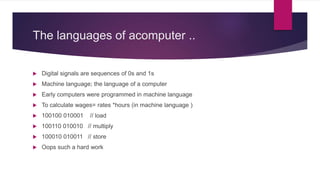
The languages of acomputer ..
 Digital signals are sequences of 0s and 1s
 Machine language; the language of a computer
 Early computers were programmed in machine language
 To calculate wages= rates *hours (in machine language )
 100100 010001 // load
 100110 010010 // multiply
 100010 010011 // store
 Oops such a hard work
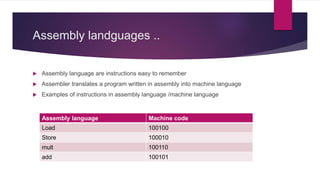
Assembly landguages ..
 Assembly language are instructions easy to remember
 Assembler translates a program written in assembly into machine language
 Examples of instructions in assembly language /machine language
Assembly language Machine code
Load 100100
Store 100010
mult 100110
add 100101
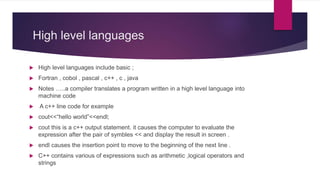
High level languages
 High level languages include basic ;
 Fortran , cobol , pascal , c++ , c , java
 Notes …..a compiler translates a program written in a high level language into
machine code
 A c++ line code for example
 cout<<“hello world”<<endl;
 cout this is a c++ output statement. it causes the computer to evaluate the
expression after the pair of symbles << and display the result in screen .
 endl causes the insertion point to move to the beginning of the next line .
 C++ contains various of expressions such as arithmetic ,logical operators and
strings
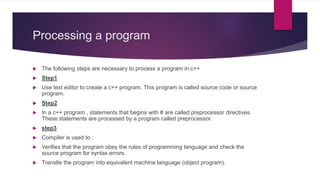
Processing a program
 The following steps are necessary to process a program in c++
 Step1
 Use text editor to create a c++ program. This program is called source code or source
program.
 Step2
 In a c++ program , statements that begins with # are called preprocessor directives.
These statements are processed by a program called preprocessor.
 step3
 Compiler is used to ;
 Verifies that the program obey the rules of programming language and check the
source program for syntax errors.
 Translte the program into equivalent machine language (object program).
Processing a program…
 Step4
 Programs in high level languages are developed using a software development kit
(SDK)
 SDK contains programs that are useful in creating your program such as
mathematical functions , The prewritten code resides in a library .
 Linker combines the object code with program from libraries .
 step5
 You must load the executable program into main memory for execution.
 Loader ; a program that loads an executable program into main memory .
 Step6
 The final step is to execute the program.
Problem solving ..
 Programing is a process of problem solving..
 Problem solving techniques
 Analyze the problem
 Outline the problem requirements
 Design steps 9(algorithm) to solve the problem
 Algoithm
 Step by step problem solving process
 Solution achieved in finite amount of time
Problem solving process…
 the problem
 outline the problem and its requirements
 Design steps (algorithm) to solve the problem
 Step2 Implement the algorithm
 Implement the algorithm in code
 Verify that the algorithm works
 Step3 Maintenance
 Use and modify the program if the problem domain changes
Compiling and linking ..
 Run the code through compiler
 If compiler generates errors
 Look at code and remove errors
 Run code again through compiler
 If there are no syntax errors
 Compiler generates equivalent machine code
 Linker links machine code with system resourcs
ANSI/ISO standard c++
 C++ is evolved from c
 C++ designed by Bjarne stroustrup at bell laboratories in early 1980s
 C++ programs were not always portable from one compiler to an other
 In mid 1998 ,ANSI/ISO c++ language Standards were approved
extra notes …What is software!!
 Software consists of a set of machine readable instructions called programs , that
cause the computer to perform a task.
 There are two basic types of software
 Application software
 Designed to satisfy users needs .
 May be custom or packaged (off the shelf)
 System software
 Without hardware and applications are useless
 Operating system coordinate all hardware components
 compilers translate source program into object program
extra notes..Programing languages
 Enables a programmer to write programs that are more or less independent of a
particular type of computer .
 Considered high level languages because they are closer to human language and
far further from machine code .
 Generations of computer languages are ;
 1st generation is ; binary language / machine code
 2nd generation is ; assembly / low level language
 3rd generation Is ; high level languages as c , c++
 4th generation is ; query language ; used to access database as SQL
 5th generation is ; artificial intelligence languages , as prolog and lisp
extra notes.. History of algorithm
 Named after the persian mathematician muhammad ibn musa al-Khwarizmi (780-
850) in (Khwarizmi, Uzbekistan )developed a strategy for calculating heritage
proportions using algebraic methods
 His name was turned into algorithm and that evolved algorism
summary
 Computer is an electronic device that can perform arithmetic and logical
operations
 Computer system has hardware and software
 Central processing unit (CPU) is brain of machine
 Primary storage (main memory) is volatile ,secondary storage is permanent
 Operating system monitors the overall activity of the computer and provides
services
 Various kind of languages classifyded as ; assembly , medium , high level and
machine code

Computer and programing basics.pptx

  • 1.
    Computer and programingbasics  Course outline ….  an over view of computers and programing languages  Algorithms and flowcharts  Elements of a computer system  The language of the computer  The evolution of programming languages  Programs / software types  Road map from zero to hero
  • 2.
    Elements of acomputer system.. #Hardware  Central processing unit (cpu)  Main memory  Secondary storage  input/output devices #Software  Operating system  Application software
  • 3.
    Central processing unit(CPU) The main components of CPU are  Control unit (cu)  Arithmetic and logic unit (ALU)  Registers
  • 4.
    Central processing unit(CPU).. #CU (control unit )  Fetches and decodes instructions  Controls flow of information in and out of main memory  Controls operations of internal CPU components #ALU (arithmetic logic unit )  Carries out all arithmetic and logical operations  #Registers.  PC (programing counter )points to next instruction to be executed )  IR(instruction register) holds instruction currently being executed
  • 5.
    Main memory .. Directly connected to the cpu  All programs must be loaded into main memory before they can executed  All data must be brought into main memory before it can be manipulated  When computer power is turned off , every thing in main memory is lost
  • 6.
    Secondary storage .. Secondary storage are devices that stores information Permanentlly  Examples of secondary storage  Hard disks  Floppy disks  CD_Roms  Tapes  Flash drivers
  • 7.
    Input/output devices  Inputdevices feed data and programs into computers they include;  Keyboard  Mouse  Secondary storage  Output devices display results they include  Monitor  Printer  Secondary storage
  • 8.
    Program software .. Program that perform a specific task  Software program /operating system  Take control of computer and interface between user and machine such as open windows ,shut down …etc  Operating system monitors the over all activity of the computer and provides services.  Application programs perform a specific task  Social media ( facebook , whats app, tweeter)  Microsoft office (word , powerpoint, excel)  Word processors , spreadsheets , games
  • 9.
    The languages ofacomputer ..  Digital signals are sequences of 0s and 1s  Machine language; the language of a computer  Early computers were programmed in machine language  To calculate wages= rates *hours (in machine language )  100100 010001 // load  100110 010010 // multiply  100010 010011 // store  Oops such a hard work
  • 10.
    Assembly landguages .. Assembly language are instructions easy to remember  Assembler translates a program written in assembly into machine language  Examples of instructions in assembly language /machine language Assembly language Machine code Load 100100 Store 100010 mult 100110 add 100101
  • 11.
    High level languages High level languages include basic ;  Fortran , cobol , pascal , c++ , c , java  Notes …..a compiler translates a program written in a high level language into machine code  A c++ line code for example  cout<<“hello world”<<endl;  cout this is a c++ output statement. it causes the computer to evaluate the expression after the pair of symbles << and display the result in screen .  endl causes the insertion point to move to the beginning of the next line .  C++ contains various of expressions such as arithmetic ,logical operators and strings
  • 12.
    Processing a program The following steps are necessary to process a program in c++  Step1  Use text editor to create a c++ program. This program is called source code or source program.  Step2  In a c++ program , statements that begins with # are called preprocessor directives. These statements are processed by a program called preprocessor.  step3  Compiler is used to ;  Verifies that the program obey the rules of programming language and check the source program for syntax errors.  Translte the program into equivalent machine language (object program).
  • 13.
    Processing a program… Step4  Programs in high level languages are developed using a software development kit (SDK)  SDK contains programs that are useful in creating your program such as mathematical functions , The prewritten code resides in a library .  Linker combines the object code with program from libraries .  step5  You must load the executable program into main memory for execution.  Loader ; a program that loads an executable program into main memory .  Step6  The final step is to execute the program.
  • 14.
    Problem solving .. Programing is a process of problem solving..  Problem solving techniques  Analyze the problem  Outline the problem requirements  Design steps 9(algorithm) to solve the problem  Algoithm  Step by step problem solving process  Solution achieved in finite amount of time
  • 15.
    Problem solving process… the problem  outline the problem and its requirements  Design steps (algorithm) to solve the problem  Step2 Implement the algorithm  Implement the algorithm in code  Verify that the algorithm works  Step3 Maintenance  Use and modify the program if the problem domain changes
  • 16.
    Compiling and linking..  Run the code through compiler  If compiler generates errors  Look at code and remove errors  Run code again through compiler  If there are no syntax errors  Compiler generates equivalent machine code  Linker links machine code with system resourcs
  • 17.
    ANSI/ISO standard c++ C++ is evolved from c  C++ designed by Bjarne stroustrup at bell laboratories in early 1980s  C++ programs were not always portable from one compiler to an other  In mid 1998 ,ANSI/ISO c++ language Standards were approved
  • 18.
    extra notes …Whatis software!!  Software consists of a set of machine readable instructions called programs , that cause the computer to perform a task.  There are two basic types of software  Application software  Designed to satisfy users needs .  May be custom or packaged (off the shelf)  System software  Without hardware and applications are useless  Operating system coordinate all hardware components  compilers translate source program into object program
  • 19.
    extra notes..Programing languages Enables a programmer to write programs that are more or less independent of a particular type of computer .  Considered high level languages because they are closer to human language and far further from machine code .  Generations of computer languages are ;  1st generation is ; binary language / machine code  2nd generation is ; assembly / low level language  3rd generation Is ; high level languages as c , c++  4th generation is ; query language ; used to access database as SQL  5th generation is ; artificial intelligence languages , as prolog and lisp
  • 20.
    extra notes.. Historyof algorithm  Named after the persian mathematician muhammad ibn musa al-Khwarizmi (780- 850) in (Khwarizmi, Uzbekistan )developed a strategy for calculating heritage proportions using algebraic methods  His name was turned into algorithm and that evolved algorism
  • 21.
    summary  Computer isan electronic device that can perform arithmetic and logical operations  Computer system has hardware and software  Central processing unit (CPU) is brain of machine  Primary storage (main memory) is volatile ,secondary storage is permanent  Operating system monitors the overall activity of the computer and provides services  Various kind of languages classifyded as ; assembly , medium , high level and machine code