1
Computer System Overview
Chapter 1
Prepared By:
Er. Shikha Manrai
2
Operating System
• Exploits the hardware resources of one
or more processors
• Provides a set of services to system
users
• Manages secondary memory and I/O
devices
3
Basic Elements
• Processor
• Main Memory
– volatile
– referred to as real memory or primary memory
• I/O modules
– secondary memory devices
– communications equipment
– terminals
• System bus
– communication among processors, memory, and
I/O modules
4
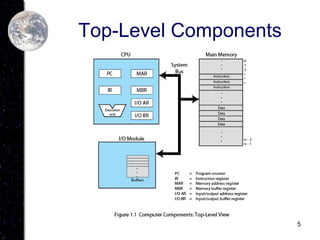
Processor
• Two internal registers
– Memory address register (MAR)
• Specifies the address for the next read or
write
– Memory buffer register (MBR)
• Contains data written into memory or receives
data read from memory
– I/O address register
– I/O buffer register
5
Top-Level Components
6
Processor Registers
• User-visible registers
– Enable programmer to minimize main-
memory references by optimizing register
use
• Control and status registers
– Used by processor to control operating of
the processor
– Used by privileged operating-system
routines to control the execution of
programs
7
User-Visible Registers
• May be referenced by machine
language
• Available to all programs - application
programs and system programs
• Types of registers
– Data
– Address
• Index
• Segment pointer
• Stack pointer
8
User-Visible Registers
• Address Registers
– Index
• Involves adding an index to a base value to
get an address
– Segment pointer
• When memory is divided into segments,
memory is referenced by a segment and an
offset
– Stack pointer
• Points to top of stack
9
Control and Status Registers
• Program Counter (PC)
– Contains the address of an instruction to be
fetched
• Instruction Register (IR)
– Contains the instruction most recently fetched
• Program Status Word (PSW)
– Condition codes
– Interrupt enable/disable
– Supervisor/user mode
10
Control and Status Registers
• Condition Codes or Flags
– Bits set by the processor hardware as a
result of operations
– Examples
• Positive result
• Negative result
• Zero
• Overflow
11
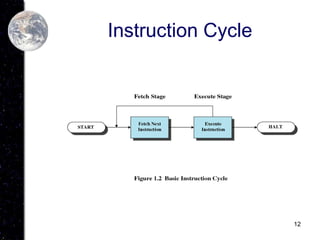
Instruction Execution
• Two steps
– Processor reads instructions from memory
• Fetches
– Processor executes each instruction
12
Instruction Cycle
13
Instruction Fetch and
Execute
• The processor fetches the instruction
from memory
• Program counter (PC) holds address of
the instruction to be fetched next
• Program counter is incremented after
each fetch
14
Instruction Register
• Fetched instruction is placed in the
instruction register
• Categories
– Processor-memory
• Transfer data between processor and memory
– Processor-I/O
• Data transferred to or from a peripheral device
– Data processing
• Arithmetic or logic operation on data
– Control
• Alter sequence of execution
15
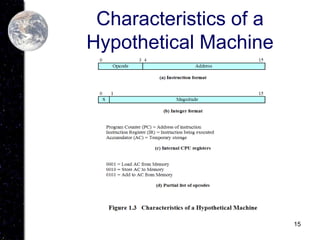
Characteristics of a
Hypothetical Machine
16
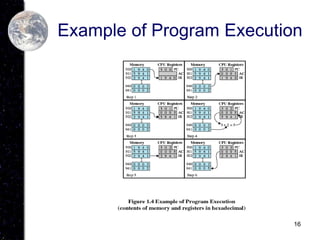
Example of Program Execution
17
Direct Memory Access (DMA)
• I/O exchanges occur directly with
memory
• Processor grants I/O module authority
to read from or write to memory
• Relieves the processor responsibility
for the exchange
18
Interrupts
• Interrupt the normal sequencing of the
processor
• Most I/O devices are slower than the
processor
– Processor must pause to wait for device
19
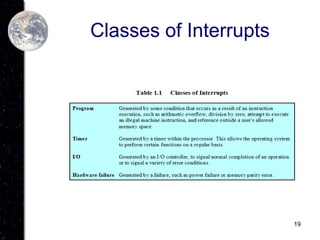
Classes of Interrupts
20
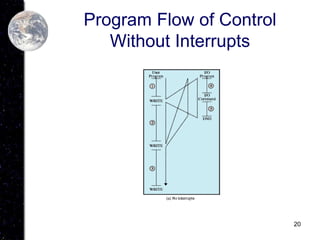
Program Flow of Control
Without Interrupts
21
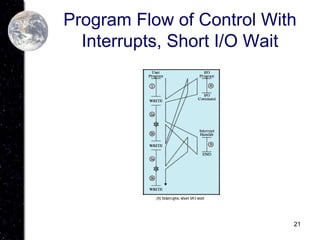
Program Flow of Control With
Interrupts, Short I/O Wait
22
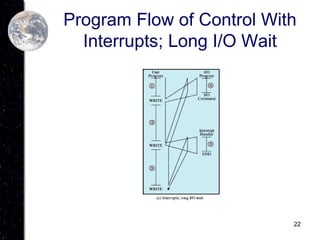
Program Flow of Control With
Interrupts; Long I/O Wait
23
Interrupt Handler
• Program to service a particular I/O
device
• Generally part of the operating system
24
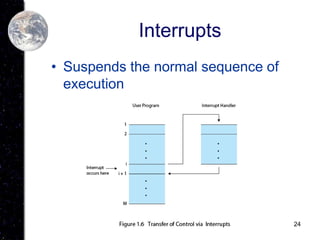
Interrupts
• Suspends the normal sequence of
execution
25
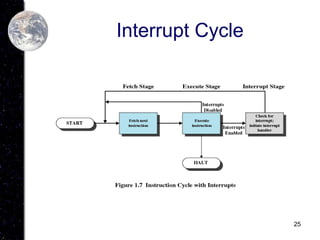
Interrupt Cycle
26
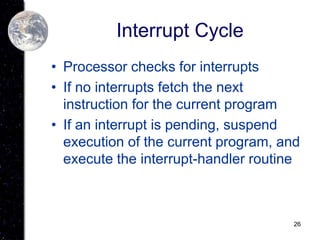
Interrupt Cycle
• Processor checks for interrupts
• If no interrupts fetch the next
instruction for the current program
• If an interrupt is pending, suspend
execution of the current program, and
execute the interrupt-handler routine
27
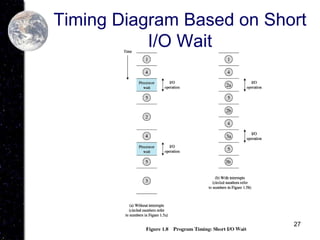
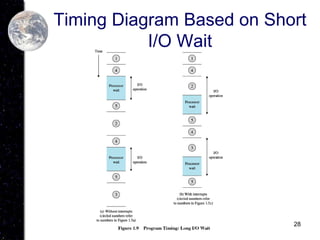
Timing Diagram Based on Short
I/O Wait
28
Timing Diagram Based on Short
I/O Wait
29
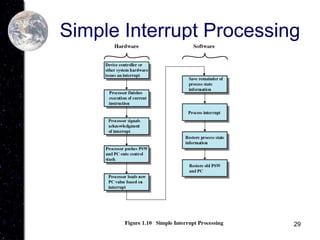
Simple Interrupt Processing
30
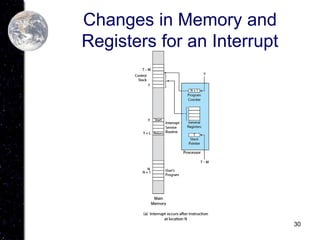
Changes in Memory and
Registers for an Interrupt
31
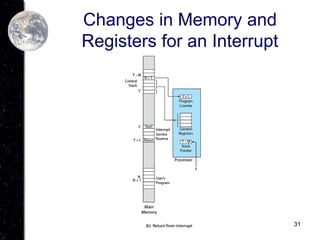
Changes in Memory and
Registers for an Interrupt
32
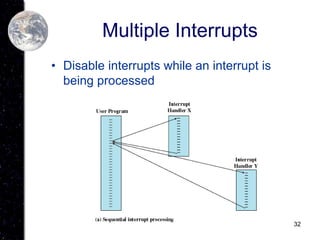
Multiple Interrupts
• Disable interrupts while an interrupt is
being processed
33
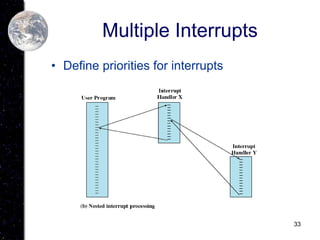
Multiple Interrupts
• Define priorities for interrupts
34
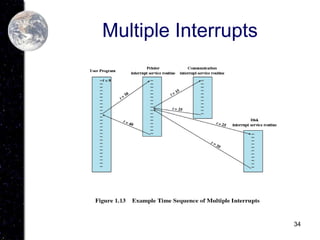
Multiple Interrupts
35
Multiprogramming
• Processor has more than one program
to execute
• The sequence the programs are
executed depend on their relative
priority and whether they are waiting
for I/O
• After an interrupt handler completes,
control may not return to the program
that was executing at the time of the
interrupt
36
Memory Hierarchy
• Faster access time, greater cost per bit
• Greater capacity, smaller cost per bit
• Greater capacity, slower access speed
37
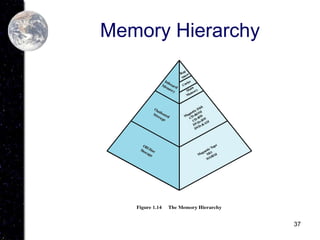
Memory Hierarchy
38
Going Down the Hierarchy
• Decreasing cost per bit
• Increasing capacity
• Increasing access time
• Decreasing frequency of access of the
memory by the processor
– Locality of reference
39
Secondary Memory
• Nonvolatile
• Auxiliary memory
• Used to store program and data files
40
Disk Cache
• A portion of main memory used as a
buffer to temporarily to hold data for
the disk
• Disk writes are clustered
• Some data written out may be
referenced again. The data are
retrieved rapidly from the software
cache instead of slowly from disk
41
Cache Memory
• Invisible to operating system
• Increase the speed of memory
• Processor speed is faster than memory
speed
• Exploit the principle of locality
42
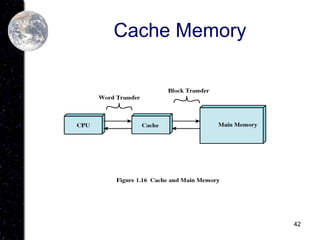
Cache Memory
43
Cache Memory
• Contains a copy of a portion of main
memory
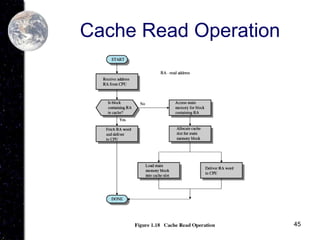
• Processor first checks cache
• If not found in cache, the block of
memory containing the needed
information is moved to the cache and
delivered to the processor
44
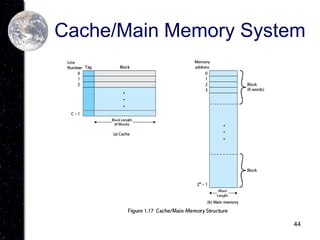
Cache/Main Memory System
45
Cache Read Operation
46
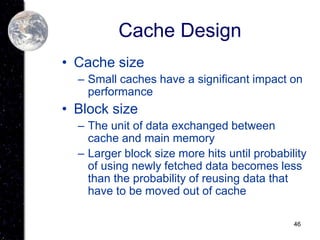
Cache Design
• Cache size
– Small caches have a significant impact on
performance
• Block size
– The unit of data exchanged between
cache and main memory
– Larger block size more hits until probability
of using newly fetched data becomes less
than the probability of reusing data that
have to be moved out of cache
47
Cache Design
• Mapping function
– Determines which cache location the
block will occupy
• Replacement algorithm
– Determines which block to replace
– Least-Recently-Used (LRU) algorithm
48
Cache Design
• Write policy
– When the memory write operation takes
place
– Can occur every time block is updated
– Can occur only when block is replaced
• Minimizes memory write operations
• Leaves main memory in an obsolete state
49
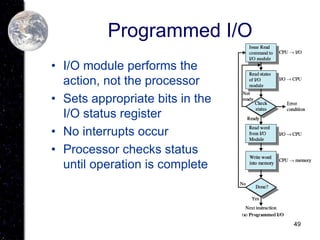
Programmed I/O
• I/O module performs the
action, not the processor
• Sets appropriate bits in the
I/O status register
• No interrupts occur
• Processor checks status
until operation is complete
50
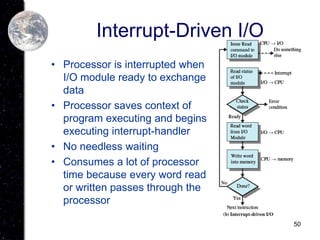
Interrupt-Driven I/O
• Processor is interrupted when
I/O module ready to exchange
data
• Processor saves context of
program executing and begins
executing interrupt-handler
• No needless waiting
• Consumes a lot of processor
time because every word read
or written passes through the
processor
51
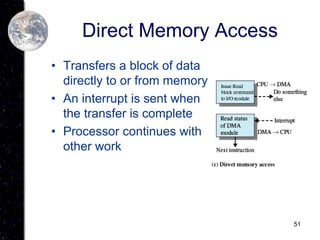
Direct Memory Access
• Transfers a block of data
directly to or from memory
• An interrupt is sent when
the transfer is complete
• Processor continues with
other work

Chapter1 Computer System Overview.ppt

  • 1.
    1 Computer System Overview Chapter1 Prepared By: Er. Shikha Manrai
  • 2.
    2 Operating System • Exploitsthe hardware resources of one or more processors • Provides a set of services to system users • Manages secondary memory and I/O devices
  • 3.
    3 Basic Elements • Processor •Main Memory – volatile – referred to as real memory or primary memory • I/O modules – secondary memory devices – communications equipment – terminals • System bus – communication among processors, memory, and I/O modules
  • 4.
    4 Processor • Two internalregisters – Memory address register (MAR) • Specifies the address for the next read or write – Memory buffer register (MBR) • Contains data written into memory or receives data read from memory – I/O address register – I/O buffer register
  • 5.
  • 6.
    6 Processor Registers • User-visibleregisters – Enable programmer to minimize main- memory references by optimizing register use • Control and status registers – Used by processor to control operating of the processor – Used by privileged operating-system routines to control the execution of programs
  • 7.
    7 User-Visible Registers • Maybe referenced by machine language • Available to all programs - application programs and system programs • Types of registers – Data – Address • Index • Segment pointer • Stack pointer
  • 8.
    8 User-Visible Registers • AddressRegisters – Index • Involves adding an index to a base value to get an address – Segment pointer • When memory is divided into segments, memory is referenced by a segment and an offset – Stack pointer • Points to top of stack
  • 9.
    9 Control and StatusRegisters • Program Counter (PC) – Contains the address of an instruction to be fetched • Instruction Register (IR) – Contains the instruction most recently fetched • Program Status Word (PSW) – Condition codes – Interrupt enable/disable – Supervisor/user mode
  • 10.
    10 Control and StatusRegisters • Condition Codes or Flags – Bits set by the processor hardware as a result of operations – Examples • Positive result • Negative result • Zero • Overflow
  • 11.
    11 Instruction Execution • Twosteps – Processor reads instructions from memory • Fetches – Processor executes each instruction
  • 12.
  • 13.
    13 Instruction Fetch and Execute •The processor fetches the instruction from memory • Program counter (PC) holds address of the instruction to be fetched next • Program counter is incremented after each fetch
  • 14.
    14 Instruction Register • Fetchedinstruction is placed in the instruction register • Categories – Processor-memory • Transfer data between processor and memory – Processor-I/O • Data transferred to or from a peripheral device – Data processing • Arithmetic or logic operation on data – Control • Alter sequence of execution
  • 15.
  • 16.
  • 17.
    17 Direct Memory Access(DMA) • I/O exchanges occur directly with memory • Processor grants I/O module authority to read from or write to memory • Relieves the processor responsibility for the exchange
  • 18.
    18 Interrupts • Interrupt thenormal sequencing of the processor • Most I/O devices are slower than the processor – Processor must pause to wait for device
  • 19.
  • 20.
    20 Program Flow ofControl Without Interrupts
  • 21.
    21 Program Flow ofControl With Interrupts, Short I/O Wait
  • 22.
    22 Program Flow ofControl With Interrupts; Long I/O Wait
  • 23.
    23 Interrupt Handler • Programto service a particular I/O device • Generally part of the operating system
  • 24.
    24 Interrupts • Suspends thenormal sequence of execution
  • 25.
  • 26.
    26 Interrupt Cycle • Processorchecks for interrupts • If no interrupts fetch the next instruction for the current program • If an interrupt is pending, suspend execution of the current program, and execute the interrupt-handler routine
  • 27.
    27 Timing Diagram Basedon Short I/O Wait
  • 28.
    28 Timing Diagram Basedon Short I/O Wait
  • 29.
  • 30.
    30 Changes in Memoryand Registers for an Interrupt
  • 31.
    31 Changes in Memoryand Registers for an Interrupt
  • 32.
    32 Multiple Interrupts • Disableinterrupts while an interrupt is being processed
  • 33.
    33 Multiple Interrupts • Definepriorities for interrupts
  • 34.
  • 35.
    35 Multiprogramming • Processor hasmore than one program to execute • The sequence the programs are executed depend on their relative priority and whether they are waiting for I/O • After an interrupt handler completes, control may not return to the program that was executing at the time of the interrupt
  • 36.
    36 Memory Hierarchy • Fasteraccess time, greater cost per bit • Greater capacity, smaller cost per bit • Greater capacity, slower access speed
  • 37.
  • 38.
    38 Going Down theHierarchy • Decreasing cost per bit • Increasing capacity • Increasing access time • Decreasing frequency of access of the memory by the processor – Locality of reference
  • 39.
    39 Secondary Memory • Nonvolatile •Auxiliary memory • Used to store program and data files
  • 40.
    40 Disk Cache • Aportion of main memory used as a buffer to temporarily to hold data for the disk • Disk writes are clustered • Some data written out may be referenced again. The data are retrieved rapidly from the software cache instead of slowly from disk
  • 41.
    41 Cache Memory • Invisibleto operating system • Increase the speed of memory • Processor speed is faster than memory speed • Exploit the principle of locality
  • 42.
  • 43.
    43 Cache Memory • Containsa copy of a portion of main memory • Processor first checks cache • If not found in cache, the block of memory containing the needed information is moved to the cache and delivered to the processor
  • 44.
  • 45.
  • 46.
    46 Cache Design • Cachesize – Small caches have a significant impact on performance • Block size – The unit of data exchanged between cache and main memory – Larger block size more hits until probability of using newly fetched data becomes less than the probability of reusing data that have to be moved out of cache
  • 47.
    47 Cache Design • Mappingfunction – Determines which cache location the block will occupy • Replacement algorithm – Determines which block to replace – Least-Recently-Used (LRU) algorithm
  • 48.
    48 Cache Design • Writepolicy – When the memory write operation takes place – Can occur every time block is updated – Can occur only when block is replaced • Minimizes memory write operations • Leaves main memory in an obsolete state
  • 49.
    49 Programmed I/O • I/Omodule performs the action, not the processor • Sets appropriate bits in the I/O status register • No interrupts occur • Processor checks status until operation is complete
  • 50.
    50 Interrupt-Driven I/O • Processoris interrupted when I/O module ready to exchange data • Processor saves context of program executing and begins executing interrupt-handler • No needless waiting • Consumes a lot of processor time because every word read or written passes through the processor
  • 51.
    51 Direct Memory Access •Transfers a block of data directly to or from memory • An interrupt is sent when the transfer is complete • Processor continues with other work