Dimension Units
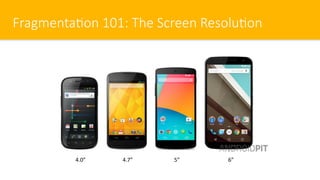
Fragmenta/on 101: The Screen Resolu/on
4.7” 5” 6”4.0”
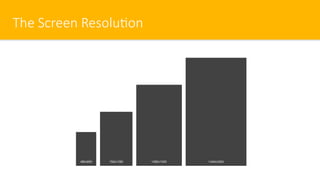
The Screen Resolu/on
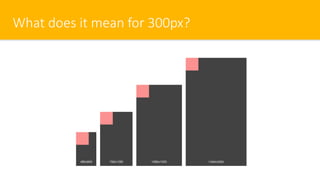
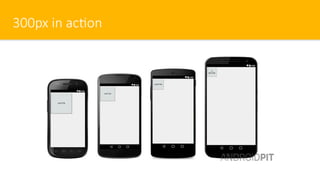
What does it mean for 300px?
300px in ac/on
Rule 8:
Don’t use px
NO MATTER WHAT
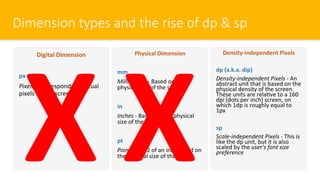
Dimension types and the rise of dp & sp
Digital Dimension
px
Pixels - Corresponds to actual
pixels on the screen
Physical Dimension
mm
Millimeters - Based on the
physical size of the screen
in
Inches - Based on the physical
size of the screen
pt
Points - 1/72 of an inch based on
the physical size of the screen
Density-independent Pixels
dp (a.k.a. dip)
Density-independent Pixels - An
abstract unit that is based on the
physical density of the screen.
These units are relaOve to a 160
dpi (dots per inch) screen, on
which 1dp is roughly equal to
1px
sp
Scale-independent Pixels - This is
like the dp unit, but it is also
scaled by the user's font size
preference
X X
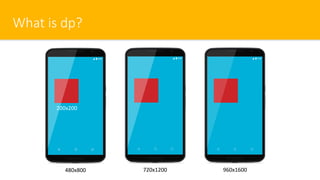
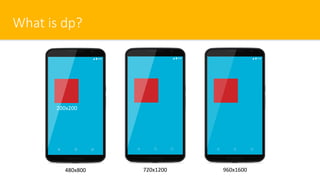
What is dp?
480x800 720x1200 960x1600
200x200
What is dp?
More dpi means more pixels
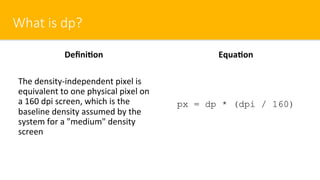
What is dp?
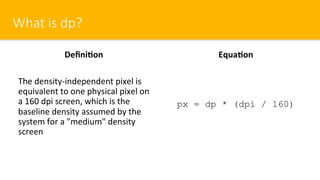
Defini=on
The density-independent pixel is
equivalent to one physical pixel on
a 160 dpi screen, which is the
baseline density assumed by the
system for a "medium" density
screen
Equa=on
px = dp * (dpi / 160)
The dpi
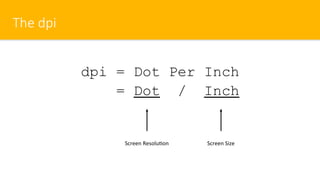
dpi = Dot Per Inch
= Dot / Inch
Screen ResoluOon Screen Size
What is dp?
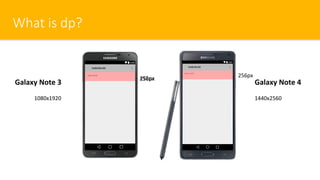
Galaxy Note 4Galaxy Note 3
1080x1920 1440x2560
256px
256px192px
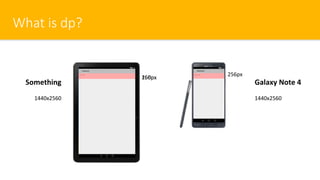
What is dp?
Galaxy Note 4Something
1440x2560 1440x2560
256px
256px160px
What is dp?
Defini=on
The density-independent pixel is
equivalent to one physical pixel on
a 160 dpi screen, which is the
baseline density assumed by the
system for a "medium" density
screen
Equa=on
px = dp * (dpi / 160)
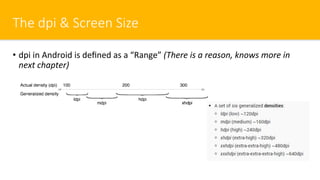
The dpi & Screen Size
•  dpi in Android is defined as a “Range” (There is a reason, knows more in
next chapter)
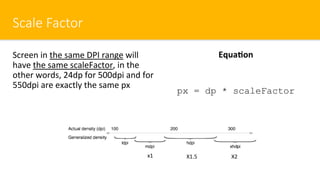
Scale Factor
Equa=on
px = dp * scaleFactor
Screen in the same DPI range will
have the same scaleFactor, in the
other words, 24dp for 500dpi and for
550dpi are exactly the same px
x1 X1.5 X2
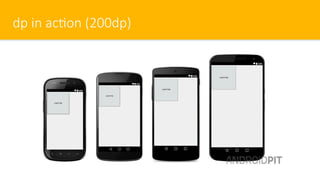
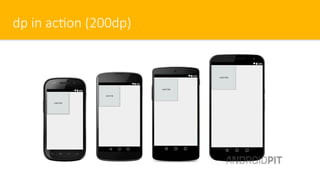
dp in ac/on (200dp)
What is dp?
480x800 720x1200 960x1600
200x200
Fact about dp
•  Don’t expect the same physical size for the same dp value
•  Just almost the same
•  Does macer for both Designer and Developer
•  You might feel a licle bit strange at the beginning about this unit but keep
in mind that user has never felt that
•  You have no need to remember anything about dpi and scaleFactor value,
once you care, fragmentaOon problem will come.
•  It is the best thing in Android. If you want to be an Android Developer, you
HAVE TO love it.
Rule 9:
ALWAYS use dp for View’s dimension
and use sp for TextView
Rule 10:
Avoid using any fixed width/height
unless you know what are you doing
dp in ac/on (200dp)
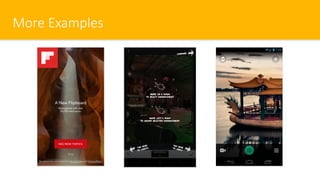
More Examples
Rule 11:
If you fully understand the purpose of
dp and dpi, you will 50% win over
fragmentaOon
Magic of dp
•  Once you use dp, the single value will always automaOcally fit every single
screen with the same condiOon perfectly:
•  Mobile – Portrait
•  Mobile – Landscape
•  Tablet – Portrait
•  Tablet – Landscape
•  Because Android is designed that way
•  Android UI Guideline are all in dp unit
•  Try it
Rule 12:
dp is mostly used for padding, margin
and element’s height
Secret
Android App UI Design starts with
”Title Bar’s height”. Use it as a
Reference.
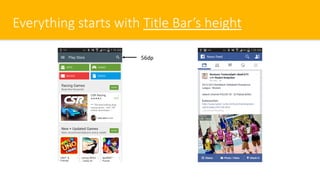
Everything starts with Title Bar’s height
56dp

Chapter 8 - Dimension Units

  • 1.
  • 2.
    Fragmenta/on 101: TheScreen Resolu/on 4.7” 5” 6”4.0”
  • 3.
  • 4.
    What does itmean for 300px?
  • 5.
  • 6.
    Rule 8: Don’t usepx NO MATTER WHAT
  • 7.
    Dimension types andthe rise of dp & sp Digital Dimension px Pixels - Corresponds to actual pixels on the screen Physical Dimension mm Millimeters - Based on the physical size of the screen in Inches - Based on the physical size of the screen pt Points - 1/72 of an inch based on the physical size of the screen Density-independent Pixels dp (a.k.a. dip) Density-independent Pixels - An abstract unit that is based on the physical density of the screen. These units are relaOve to a 160 dpi (dots per inch) screen, on which 1dp is roughly equal to 1px sp Scale-independent Pixels - This is like the dp unit, but it is also scaled by the user's font size preference X X
  • 8.
    What is dp? 480x800720x1200 960x1600 200x200
  • 9.
    What is dp? Moredpi means more pixels
  • 10.
    What is dp? Defini=on Thedensity-independent pixel is equivalent to one physical pixel on a 160 dpi screen, which is the baseline density assumed by the system for a "medium" density screen Equa=on px = dp * (dpi / 160)
  • 11.
    The dpi dpi =Dot Per Inch = Dot / Inch Screen ResoluOon Screen Size
  • 12.
    What is dp? GalaxyNote 4Galaxy Note 3 1080x1920 1440x2560 256px 256px192px
  • 13.
    What is dp? GalaxyNote 4Something 1440x2560 1440x2560 256px 256px160px
  • 14.
    What is dp? Defini=on Thedensity-independent pixel is equivalent to one physical pixel on a 160 dpi screen, which is the baseline density assumed by the system for a "medium" density screen Equa=on px = dp * (dpi / 160)
  • 15.
    The dpi &Screen Size •  dpi in Android is defined as a “Range” (There is a reason, knows more in next chapter)
  • 16.
    Scale Factor Equa=on px =dp * scaleFactor Screen in the same DPI range will have the same scaleFactor, in the other words, 24dp for 500dpi and for 550dpi are exactly the same px x1 X1.5 X2
  • 17.
    dp in ac/on(200dp)
  • 18.
    What is dp? 480x800720x1200 960x1600 200x200
  • 19.
    Fact about dp • Don’t expect the same physical size for the same dp value •  Just almost the same •  Does macer for both Designer and Developer •  You might feel a licle bit strange at the beginning about this unit but keep in mind that user has never felt that •  You have no need to remember anything about dpi and scaleFactor value, once you care, fragmentaOon problem will come. •  It is the best thing in Android. If you want to be an Android Developer, you HAVE TO love it.
  • 20.
    Rule 9: ALWAYS usedp for View’s dimension and use sp for TextView
  • 21.
    Rule 10: Avoid usingany fixed width/height unless you know what are you doing
  • 22.
    dp in ac/on(200dp)
  • 23.
  • 24.
    Rule 11: If youfully understand the purpose of dp and dpi, you will 50% win over fragmentaOon
  • 25.
    Magic of dp • Once you use dp, the single value will always automaOcally fit every single screen with the same condiOon perfectly: •  Mobile – Portrait •  Mobile – Landscape •  Tablet – Portrait •  Tablet – Landscape •  Because Android is designed that way •  Android UI Guideline are all in dp unit •  Try it
  • 26.
    Rule 12: dp ismostly used for padding, margin and element’s height
  • 27.
    Secret Android App UIDesign starts with ”Title Bar’s height”. Use it as a Reference.
  • 28.
    Everything starts withTitle Bar’s height 56dp