1
2
Pixel Perfect
Steven Meyer | August 2017
3
Steven Meyer
Experience
o Current: Manager of User Experience, CDK Global
o Previous: Lead User Experience Designer, Pearson
o Experience has spanned through leading Marines,
creating a startup, working for a venture-backed
startup, designing and developing at a Fortune 500
company, and more.
Education
o Master of Science, Technology (MSTech),
concentration in Graphic Information Technology,
Arizona State University
o Certificate, User Experience and Customer-
Centered Design, California State University,
Fullerton
https://www.linkedin.com/in/stevenmeyer1
4https://jobs.cdkglobal.com/
Accelerate Your Career.
Drive Global Technology
CDK Global is the largest global provider of integrated information technology and
digital marketing solutions to the automotive retail industry.
Checkout our openings in UX, SEO, product, development, and more!
@lifeatcdk
5
The Pixel
(Picture Element)
6
A Physical Pixel
7
A Physical Pixel
8
Sub-Pixel
• Sub pixels primarily display a combination of red,
green, and blue
• On 24-bit screen the value on each color ranges
from 0 to 255. That’s 256 possible values
• 2563 means that 16,777,216 colors can be
displayed
• Humans can see approximately 10 million different
colors.
https://en.wikipedia.org/wiki/Color_vision#cite_note-deane-44
9
Sub-Pixel
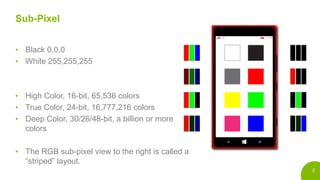
• Black 0,0,0
• White 255,255,255
• High Color, 16-bit, 65,536 colors
• True Color, 24-bit, 16,777,216 colors
• Deep Color, 30/26/48-bit, a billion or more
colors
• The RGB sub-pixel view to the right is called a
“striped” layout.
10
PenTile Sub-Pixel
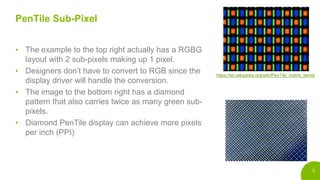
• The example to the top right actually has a RGBG
layout with 2 sub-pixels making up 1 pixel.
• Designers don’t have to convert to RGB since the
display driver will handle the conversion.
• The image to the bottom right has a diamond
pattern that also carries twice as many green sub-
pixels.
• Diamond PenTile display can achieve more pixels
per inch (PPI)
https://en.wikipedia.org/wiki/PenTile_matrix_family
11
Colors
12
Resolution & Pixel Pitch
• Pixel Pitch: The distance between the
center of one pixel to another
• Resolution: width and height in pixels
http://www.lg.com/us/monitors/lg-27UD88-W-4k-uhd-led-monitor
13
Size Calculations
c2 = 38402px + 21602px
c = 19411200px
c = 4405px (rounded)
Pixels per inch = 4405px / 27in
PPI = 163 (rounded)
Pixel pitch = 27in / 4405px
Pixel pitch = 0.00612939841in x 25.4(mm conversion)
Pixel pitch = 0.155mm
c
a
b
14
Size Calculations
Pixels per inch =
𝑑𝑖𝑎𝑔𝑎𝑛𝑜𝑙 𝑟𝑒𝑠𝑜𝑙𝑢𝑡𝑖𝑜𝑛 (𝑐)
𝑑𝑖𝑎𝑔𝑎𝑛𝑜𝑙 𝑖𝑛𝑐ℎ𝑒𝑠 (4”)
c = 480𝑝𝑥2 + 800𝑝𝑥2
c = 932.9523032
Pixels per inch =
932.9523032𝑝𝑥
4”
Pixels per inch = 233 (rounded)
c
a
b
15
Why does pixel pitch matter?
16
Product Example
c
a
b
https://www.amazon.com/gp/product/B01GEW27DA/ref=ods_tab_ps_frdnewgen
17
Sending the Image
c
a
b
Skewed Pixel Pitch
1:1 Pixel Pitch
18
Why does pixels per inch
matter?
19
How Good is the Display?
d = perpendicular distance to the screen halfway between adjacent pixels
a = arc minute (1 arc minute = 1/60th of a degree)
p = spacing between two objects (pixel pitch)
20
One or Two Objects?
Car or motorcycle?
At a certain distance
it becomes difficult to
distinguish if there
are two headlights,
or one.
21
Visual Acuity
http://wolfcrow.com/blog/notes-by-dr-optoglass-the-resolution-of-the-human-eye/
• The adult human eye can focus on objects as close
as 4”.
• The average visual acuity (clarity of vision) is 1 arc
minute. It would be extremely rare to find someone
better than .4.
.4 – 1 arc minute
22
Retina Display Calculation
d =
𝑝
2tan(
𝑎
2
)
d =
0.1554
2tan(
1
60
2
)
d =
0.1554
0.000290888
d = 535.2262314 / 25.4 (inch conversion)
d = 21.0325288”
If you sit closer than 21 inches this is
not a retina display. If you sit further
than 21 inches, then it is.
23
Phone Calculations
a = 1/60 (assuming average vision)
d = 152.4mm (6”)
p = 2 x 152.4 x tan(
1
60
2
)
p = .044331363
ppi =
25.4
.044331363
ppi = 573 (rounded)
If you held your phone 6” away, how many pixels per inch would you need in order for it to
be a retina display?
How about perfect vision at the closest
focus distance?
a = .4/60
d = 101.6mm (6”)
p = 2 x 101.6 x tan(
.4
60
2
)
p = .011821697
ppi =
25.4
.011821697
ppi = 2148 (rounded)
24
Challenge Problem
Are the following displays considered retina displays for their
intended use?
25
Microsoft Surface Hub
https://www.microsoft.com/microsoft-surface-hub/en-us/product-specs#tech-specs
26
Microsoft Surface Hub
https://www.microsoft.com/microsoft-surface-hub/en-us/product-specs#tech-specs
27
Solve for Distance
c2 = 38402 + 21602
c = 4406 (rounded)
ppi = 4406 / 84”
ppi = 52.45 (rounded)
p = .484mm (rounded)
d =
.484
2tan(
1
60
2
)
d = 1663.87 (rounded)
d = 1663.87 / 25.4 (inch conversion)
d = 65.51” (rounded)
d = 5’ 5.5”
With average vision you must
stand at least 5’ 5.5” away to
not be able to differentiate
between pixels.
28
Use Cases Can Be Important
https://www.microsoft.com/microsoft-surface-hub/en-us/product-specs#tech-specs
29
Scaling Across Devices
30
Single Density Display
27” monitor
1920px by 1080px
Image is 100px by 100px
31
Challenge Problem
What happens when I take the 100x100 image from the
previous slide, and open it on an iPhone 7 Plus in Safari?
32
Challenge Problem
27” monitor
1920px by 1080px
5.5” phone
1920px by 1080px
Image
100px by 100px
33
Dense Display
5.5” screen
1920px by 1080px
Image is 100px by 100px
• When there is no scaling applied,
the iPhone maps to physical pixels.
• The previous screen was a 27”
monitor with the same resolution.
However, the image appears large
because of the pixel pitch.
• The iPhone has a very dense
screen, so scaling is needed to
make images larger.
34
3X Density
• To tell web pages to use the devices
scale factor we add: <meta
name="viewport"
content="width=device-width, initial-
scale=1">
• Now we can see that the image on the
right was scaled 3X*, as well as the text
• However, raster images such as png’s
and jpg’s will start to lose their quality.
The image was made at 100px by
100px, and we have now stretched it 3x
to 300px by 300px
*iPhone 7 Plus actually scales up to 3X and then slightly
down samples to fit to 1920x1080.
35
Resizing Images
100px by 100px
Each original pixel is
mapped to a physical pixel
on a single density screen.
200px by 200px
Values need to be filled in
since now there are gaps of
color information.
300px by 300px
Filling in the values get more
difficult.
1X 2X 3X
36
Resizing Images
Original image created at
100px by 100px
Original image created at
200px by 200px
Original image created at
300px by 300px
1X 2X 3X
37
Design Explanation
If an iPhone 7 has a resolution of
750x1334px, then why do I design for
375x667px?
• We know the design is going to scale. So
instead we move to points on iOS for
scaling.
• Raster images still need to be exported at
the scale size. The iPhone to the right
would need an image exported as 200px
by 200px if you wanted it to appear clear
and not blurry.
38
Factoring in Size
• Our 27” monitor had 82ppi. That means
our 100px by 100px image was
approximately 1.21”.
• Our iPhone 7 Plus example had 401ppi.
That means our scaled 300px by 300px
image was approximately .75”.
So should we export the iPhone 7 Plus
image at a larger size, so that the physical
size matches our monitor version?
39
The Usability of Scaling
• All objects should appear the same when factoring in distance and size
• Phones are held close, so the physical size can be smaller, but it
appears the same size as a 27” monitor that is over 20” away
https://www.w3.org/TR/css3-values/
40
The Usability of Scaling
https://www.w3.org/TR/css3-values/
41
Android Scaling
Due to the mass amounts of Android devices there are “density
buckets” for scaling. You will scale to whichever bucket you are closest
to.
Name DPI Scale
ldpi ~120dpi .75X
mdpi ~160dpi (baseline) 1.0X
hdpi ~240dpi 1.5X
xhdpi ~320dpi 2.0X
xxhdpi ~480dpi 3.0X
xxxhdpi ~650dpi 4.0X
42
Android Scaling
• On this platform instead of points as the
relative measurement we use density-
independent pixels (dp).
• px = dp * (dpi / 160)
• px(pixels), dp(density independent
pixels), dpi(dots per inch)
• Why 160? 160dpi is the baseline for
when these values are mapped 1:1 on
physical pixels. It is the 1X scaling
factor.
43
Calculate Android Device Scale
HTC M9, 1920x1080px @ 5”
c = 1920𝑝𝑥2 + 1080𝑝𝑥2
c = 2202.90717
Dots per inch =
2202.90717𝑝𝑥
5”
Dots per inch = ~440.58
Name DPI Scale
xhdpi ~320dpi 2.0X
xxhdpi ~480dpi 3.0X
xxxhdpi ~650dpi 4.0X
44
Conclusion
45
Applying the Knowledge
• Be aware of how your work will scale.
• Think about the pixel density of the display, and how close your user will interact with, or
view the interface.
• Think about how colors are displayed, and what techniques can be used. An example is
the night mode on the iPhone that reduces the amount of blue light to help people sleep.

Pixel Perfect

  • 1.
  • 2.
  • 3.
    3 Steven Meyer Experience o Current:Manager of User Experience, CDK Global o Previous: Lead User Experience Designer, Pearson o Experience has spanned through leading Marines, creating a startup, working for a venture-backed startup, designing and developing at a Fortune 500 company, and more. Education o Master of Science, Technology (MSTech), concentration in Graphic Information Technology, Arizona State University o Certificate, User Experience and Customer- Centered Design, California State University, Fullerton https://www.linkedin.com/in/stevenmeyer1
  • 4.
    4https://jobs.cdkglobal.com/ Accelerate Your Career. DriveGlobal Technology CDK Global is the largest global provider of integrated information technology and digital marketing solutions to the automotive retail industry. Checkout our openings in UX, SEO, product, development, and more! @lifeatcdk
  • 5.
  • 6.
  • 7.
  • 8.
    8 Sub-Pixel • Sub pixelsprimarily display a combination of red, green, and blue • On 24-bit screen the value on each color ranges from 0 to 255. That’s 256 possible values • 2563 means that 16,777,216 colors can be displayed • Humans can see approximately 10 million different colors. https://en.wikipedia.org/wiki/Color_vision#cite_note-deane-44
  • 9.
    9 Sub-Pixel • Black 0,0,0 •White 255,255,255 • High Color, 16-bit, 65,536 colors • True Color, 24-bit, 16,777,216 colors • Deep Color, 30/26/48-bit, a billion or more colors • The RGB sub-pixel view to the right is called a “striped” layout.
  • 10.
    10 PenTile Sub-Pixel • Theexample to the top right actually has a RGBG layout with 2 sub-pixels making up 1 pixel. • Designers don’t have to convert to RGB since the display driver will handle the conversion. • The image to the bottom right has a diamond pattern that also carries twice as many green sub- pixels. • Diamond PenTile display can achieve more pixels per inch (PPI) https://en.wikipedia.org/wiki/PenTile_matrix_family
  • 11.
  • 12.
    12 Resolution & PixelPitch • Pixel Pitch: The distance between the center of one pixel to another • Resolution: width and height in pixels http://www.lg.com/us/monitors/lg-27UD88-W-4k-uhd-led-monitor
  • 13.
    13 Size Calculations c2 =38402px + 21602px c = 19411200px c = 4405px (rounded) Pixels per inch = 4405px / 27in PPI = 163 (rounded) Pixel pitch = 27in / 4405px Pixel pitch = 0.00612939841in x 25.4(mm conversion) Pixel pitch = 0.155mm c a b
  • 14.
    14 Size Calculations Pixels perinch = 𝑑𝑖𝑎𝑔𝑎𝑛𝑜𝑙 𝑟𝑒𝑠𝑜𝑙𝑢𝑡𝑖𝑜𝑛 (𝑐) 𝑑𝑖𝑎𝑔𝑎𝑛𝑜𝑙 𝑖𝑛𝑐ℎ𝑒𝑠 (4”) c = 480𝑝𝑥2 + 800𝑝𝑥2 c = 932.9523032 Pixels per inch = 932.9523032𝑝𝑥 4” Pixels per inch = 233 (rounded) c a b
  • 15.
    15 Why does pixelpitch matter?
  • 16.
  • 17.
    17 Sending the Image c a b SkewedPixel Pitch 1:1 Pixel Pitch
  • 18.
    18 Why does pixelsper inch matter?
  • 19.
    19 How Good isthe Display? d = perpendicular distance to the screen halfway between adjacent pixels a = arc minute (1 arc minute = 1/60th of a degree) p = spacing between two objects (pixel pitch)
  • 20.
    20 One or TwoObjects? Car or motorcycle? At a certain distance it becomes difficult to distinguish if there are two headlights, or one.
  • 21.
    21 Visual Acuity http://wolfcrow.com/blog/notes-by-dr-optoglass-the-resolution-of-the-human-eye/ • Theadult human eye can focus on objects as close as 4”. • The average visual acuity (clarity of vision) is 1 arc minute. It would be extremely rare to find someone better than .4. .4 – 1 arc minute
  • 22.
    22 Retina Display Calculation d= 𝑝 2tan( 𝑎 2 ) d = 0.1554 2tan( 1 60 2 ) d = 0.1554 0.000290888 d = 535.2262314 / 25.4 (inch conversion) d = 21.0325288” If you sit closer than 21 inches this is not a retina display. If you sit further than 21 inches, then it is.
  • 23.
    23 Phone Calculations a =1/60 (assuming average vision) d = 152.4mm (6”) p = 2 x 152.4 x tan( 1 60 2 ) p = .044331363 ppi = 25.4 .044331363 ppi = 573 (rounded) If you held your phone 6” away, how many pixels per inch would you need in order for it to be a retina display? How about perfect vision at the closest focus distance? a = .4/60 d = 101.6mm (6”) p = 2 x 101.6 x tan( .4 60 2 ) p = .011821697 ppi = 25.4 .011821697 ppi = 2148 (rounded)
  • 24.
    24 Challenge Problem Are thefollowing displays considered retina displays for their intended use?
  • 25.
  • 26.
  • 27.
    27 Solve for Distance c2= 38402 + 21602 c = 4406 (rounded) ppi = 4406 / 84” ppi = 52.45 (rounded) p = .484mm (rounded) d = .484 2tan( 1 60 2 ) d = 1663.87 (rounded) d = 1663.87 / 25.4 (inch conversion) d = 65.51” (rounded) d = 5’ 5.5” With average vision you must stand at least 5’ 5.5” away to not be able to differentiate between pixels.
  • 28.
    28 Use Cases CanBe Important https://www.microsoft.com/microsoft-surface-hub/en-us/product-specs#tech-specs
  • 29.
  • 30.
    30 Single Density Display 27”monitor 1920px by 1080px Image is 100px by 100px
  • 31.
    31 Challenge Problem What happenswhen I take the 100x100 image from the previous slide, and open it on an iPhone 7 Plus in Safari?
  • 32.
    32 Challenge Problem 27” monitor 1920pxby 1080px 5.5” phone 1920px by 1080px Image 100px by 100px
  • 33.
    33 Dense Display 5.5” screen 1920pxby 1080px Image is 100px by 100px • When there is no scaling applied, the iPhone maps to physical pixels. • The previous screen was a 27” monitor with the same resolution. However, the image appears large because of the pixel pitch. • The iPhone has a very dense screen, so scaling is needed to make images larger.
  • 34.
    34 3X Density • Totell web pages to use the devices scale factor we add: <meta name="viewport" content="width=device-width, initial- scale=1"> • Now we can see that the image on the right was scaled 3X*, as well as the text • However, raster images such as png’s and jpg’s will start to lose their quality. The image was made at 100px by 100px, and we have now stretched it 3x to 300px by 300px *iPhone 7 Plus actually scales up to 3X and then slightly down samples to fit to 1920x1080.
  • 35.
    35 Resizing Images 100px by100px Each original pixel is mapped to a physical pixel on a single density screen. 200px by 200px Values need to be filled in since now there are gaps of color information. 300px by 300px Filling in the values get more difficult. 1X 2X 3X
  • 36.
    36 Resizing Images Original imagecreated at 100px by 100px Original image created at 200px by 200px Original image created at 300px by 300px 1X 2X 3X
  • 37.
    37 Design Explanation If aniPhone 7 has a resolution of 750x1334px, then why do I design for 375x667px? • We know the design is going to scale. So instead we move to points on iOS for scaling. • Raster images still need to be exported at the scale size. The iPhone to the right would need an image exported as 200px by 200px if you wanted it to appear clear and not blurry.
  • 38.
    38 Factoring in Size •Our 27” monitor had 82ppi. That means our 100px by 100px image was approximately 1.21”. • Our iPhone 7 Plus example had 401ppi. That means our scaled 300px by 300px image was approximately .75”. So should we export the iPhone 7 Plus image at a larger size, so that the physical size matches our monitor version?
  • 39.
    39 The Usability ofScaling • All objects should appear the same when factoring in distance and size • Phones are held close, so the physical size can be smaller, but it appears the same size as a 27” monitor that is over 20” away https://www.w3.org/TR/css3-values/
  • 40.
    40 The Usability ofScaling https://www.w3.org/TR/css3-values/
  • 41.
    41 Android Scaling Due tothe mass amounts of Android devices there are “density buckets” for scaling. You will scale to whichever bucket you are closest to. Name DPI Scale ldpi ~120dpi .75X mdpi ~160dpi (baseline) 1.0X hdpi ~240dpi 1.5X xhdpi ~320dpi 2.0X xxhdpi ~480dpi 3.0X xxxhdpi ~650dpi 4.0X
  • 42.
    42 Android Scaling • Onthis platform instead of points as the relative measurement we use density- independent pixels (dp). • px = dp * (dpi / 160) • px(pixels), dp(density independent pixels), dpi(dots per inch) • Why 160? 160dpi is the baseline for when these values are mapped 1:1 on physical pixels. It is the 1X scaling factor.
  • 43.
    43 Calculate Android DeviceScale HTC M9, 1920x1080px @ 5” c = 1920𝑝𝑥2 + 1080𝑝𝑥2 c = 2202.90717 Dots per inch = 2202.90717𝑝𝑥 5” Dots per inch = ~440.58 Name DPI Scale xhdpi ~320dpi 2.0X xxhdpi ~480dpi 3.0X xxxhdpi ~650dpi 4.0X
  • 44.
  • 45.
    45 Applying the Knowledge •Be aware of how your work will scale. • Think about the pixel density of the display, and how close your user will interact with, or view the interface. • Think about how colors are displayed, and what techniques can be used. An example is the night mode on the iPhone that reduces the amount of blue light to help people sleep.

Editor's Notes

  • #2 Use this title screen for any CDK North America presentations where your audience is not specifically CDK Heavy Truck CDK Heavy Equipment or CDK Recreation. You may also use the Automotive themed title slide.
  • #3 This is a Light-themed Content Slide
  • #4 This is a Light-themed Content Slide
  • #5 Section Title 1
  • #6 This is a Light-themed Content Slide
  • #7 This is a Light-themed Content Slide
  • #8 This is a Light-themed Content Slide
  • #9 This is a Light-themed Content Slide
  • #10 This is a Light-themed Content Slide
  • #11 This is a Light-themed Content Slide
  • #12 This is a Light-themed Content Slide
  • #13 This is a Light-themed Content Slide
  • #14 This is a Light-themed Content Slide
  • #15 Section Title 2
  • #16 This is a Light-themed Content Slide
  • #17 This is a Light-themed Content Slide
  • #18 Section Title 2
  • #19 Brand-Aligned Smart Art For graphics and charts. Brand colors, no gradients, no strokes, no drop shadows. Smart Art is not automatically driven by a PPT theme, so follow the above guidelines to keep as close to CDK Brand Standards as possible.
  • #20 This slide intentionally left blank. (If you do not have a page title or subtitle, leave the field as is and it will remain hidden.)
  • #21 This slide intentionally left blank. (If you do not have a page title or subtitle, leave the field as is and it will remain hidden.)
  • #22 This slide intentionally left blank. (If you do not have a page title or subtitle, leave the field as is and it will remain hidden.)
  • #23 This slide intentionally left blank. (If you do not have a page title or subtitle, leave the field as is and it will remain hidden.)
  • #24 Section Title 3
  • #25 This slide intentionally left blank. (If you do not have a page title or subtitle, leave the field as is and it will remain hidden.)
  • #26 This slide intentionally left blank. (If you do not have a page title or subtitle, leave the field as is and it will remain hidden.)
  • #27 This slide intentionally left blank. (If you do not have a page title or subtitle, leave the field as is and it will remain hidden.)
  • #28 This slide intentionally left blank. (If you do not have a page title or subtitle, leave the field as is and it will remain hidden.)
  • #29 Section Title 3
  • #31 Section Title 3
  • #44 Section Title 3
  • #46 When closing, providing a name and email address helps your audience follow up with questions and feedback after the meeting.