Ac#vity & Intent
[Recap] What is Ac#vity?
Ac$vity
Ac$vity class takes care of crea$ng a
window for you in which you can place
your UI
Introduc#on to Ac#vity
•  Ac$vity is one of the core and key
system in Android
•  Very important, you can’t just
know about it, you have to
MASTER at it
•  Key message to fully understand:
•  Lifecycle
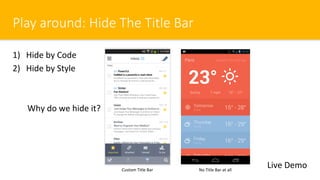
Play around: Hide The Title Bar
1)  Hide by Code
2)  Hide by Style
Why do we hide it?
Live DemoCustom Title Bar No Title Bar at all
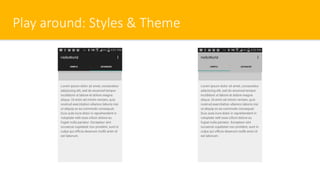
Play around: Styles & Theme
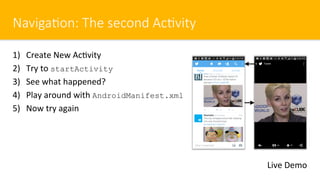
Naviga#on: The second Ac#vity
1)  Create New Ac$vity
2)  Try to startActivity
3)  See what happened?
4)  Play around with AndroidManifest.xml
5)  Now try again
Live Demo
Intent
An Intent is a messaging object
you can use to request an ac$on
from another app component.
Live Demo
?
Lab: Intent & Bundle
Q: Why we need to send data through Intent?
A: Because Ac)vity is independent to each other
… Play Play Play …
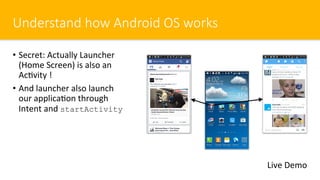
Understand how Android OS works
•  Secret: Actually Launcher
(Home Screen) is also an
Ac$vity !
•  And launcher also launch
our applica$on through
Intent and startActivity
Live Demo
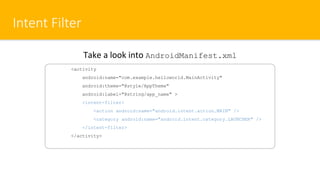
Intent Filter
<activity
android:name="com.example.helloworld.MainActivity"
android:theme="@style/AppTheme"
android:label="@string/app_name" >
<intent-filter>
<action android:name="android.intent.action.MAIN" />
<category android:name="android.intent.category.LAUNCHER" />
</intent-filter>
</activity>
Take a look into AndroidManifest.xml
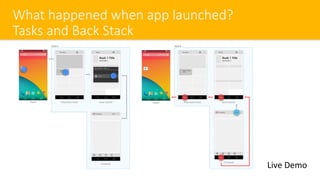
What happened when app launched?
Tasks and Back Stack
Live Demo
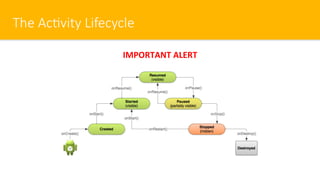
The Ac#vity Lifecycle
IMPORTANT ALERT
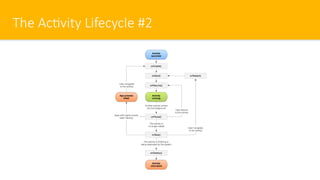
The Ac#vity Lifecycle #2
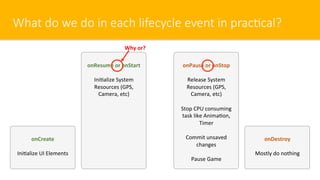
What do we do in each lifecycle event in prac#cal?
onCreate
Ini$alize UI Elements
onResume or onStart
Ini$alize System
Resources (GPS,
Camera, etc)
onDestroy
Mostly do nothing
onPause or onStop
Release System
Resources (GPS,
Camera, etc)
Stop CPU consuming
task like Anima$on,
Timer
Commit unsaved
changes
Pause Game
Why or?
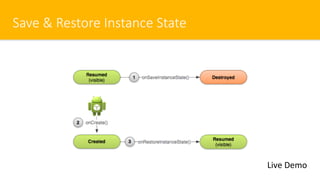
Save & Restore Instance State
Live Demo
You will a liOle bit confuse now
But it will be be^er when you prac$ce more
(and more)
(and more)
(and more)
Best Prac#ces: Ac#vity Code Structure
•  In The Android Cheese Sheet
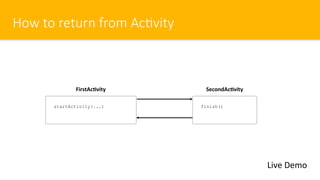
How to return from Ac#vity
Live Demo
finish()
FirstAc)vity
startActivity(...)
SecondAc)vity
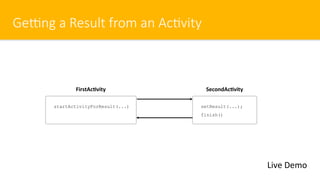
GeRng a Result from an Ac#vity
Live Demo
setResult(...);
finish()
FirstAc)vity
startActivityForResult(...)
SecondAc)vity
The Screen Orienta#on
android:screenOrientation=["unspecified" | "behind" |
"landscape" | "portrait" |
"reverseLandscape" | "reversePortrait" |
"sensorLandscape" | "sensorPortrait" |
"userLandscape" | "userPortrait" |
"sensor" | "fullSensor" | "nosensor" |
"user" | "fullUser" | "locked"]
Live Demo
You can fix the Ac$vity’s orienta$on in AndroidManifest.xml
Sugges$on: Fix Orienta$on to portrait at the beginning
(why?)
SoS Keyboard Mode
android:windowSoftInputMode=["stateUnspecified",
"stateUnchanged",
"stateHidden",
"stateAlwaysHidden",
"stateVisible",
"stateAlwaysVisible",
"adjustUnspecified",
"adjustResize",
"adjustPan"]
Live Demo
You can change behavior of sod keyboard in Ac$vity through
AndroidManifest.xml
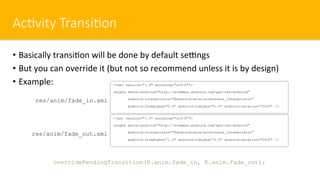
Ac#vity Transi#on
•  Basically transi$on will be done by default seengs
•  But you can override it (but not so recommend unless it is by design)
•  Example: <?xml version="1.0" encoding="utf-8"?>
<alpha xmlns:android="http://schemas.android.com/apk/res/android"
android:interpolator="@android:anim/accelerate_interpolator"
android:fromAlpha="0.0" android:toAlpha="1.0" android:duration="2000" />
res/anim/fade_in.xml
<?xml version="1.0" encoding="utf-8"?>
<alpha xmlns:android="http://schemas.android.com/apk/res/android"
android:interpolator="@android:anim/accelerate_interpolator"
android:fromAlpha=“1.0" android:toAlpha=“0.0" android:duration="2000" />
res/anim/fade_out.xml
overridePendingTransition(R.anim.fade_in, R.anim.fade_out);
Recap
•  Every$me you create a new Ac$vity, declare in AndroidManifest.xml
immediately
•  Ac)vity Lifecycle is very very very important
•  In can effect your lifecycle as an Android App Developer as well
•  Most of the Android Developer doesn’t know about Lifecycle clearly and
that lead to app’s quality problem
•  Crash
•  Malfunc$onal
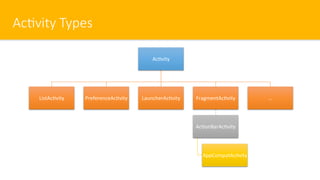
Ac#vity Types
Ac$vity
ListAc$vity PreferenceAc$vity LauncherAc$vity FragmentAc$vity
Ac$onBarAc$vity
AppCompatAc$vity
…

Chapter 12 - Activity Intent

  • 1.
  • 2.
    [Recap] What isAc#vity? Ac$vity Ac$vity class takes care of crea$ng a window for you in which you can place your UI
  • 3.
    Introduc#on to Ac#vity • Ac$vity is one of the core and key system in Android •  Very important, you can’t just know about it, you have to MASTER at it •  Key message to fully understand: •  Lifecycle
  • 4.
    Play around: HideThe Title Bar 1)  Hide by Code 2)  Hide by Style Why do we hide it? Live DemoCustom Title Bar No Title Bar at all
  • 5.
  • 6.
    Naviga#on: The secondAc#vity 1)  Create New Ac$vity 2)  Try to startActivity 3)  See what happened? 4)  Play around with AndroidManifest.xml 5)  Now try again Live Demo
  • 7.
    Intent An Intent isa messaging object you can use to request an ac$on from another app component. Live Demo ?
  • 8.
    Lab: Intent &Bundle Q: Why we need to send data through Intent? A: Because Ac)vity is independent to each other … Play Play Play …
  • 9.
    Understand how AndroidOS works •  Secret: Actually Launcher (Home Screen) is also an Ac$vity ! •  And launcher also launch our applica$on through Intent and startActivity Live Demo
  • 10.
    Intent Filter <activity android:name="com.example.helloworld.MainActivity" android:theme="@style/AppTheme" android:label="@string/app_name" > <intent-filter> <actionandroid:name="android.intent.action.MAIN" /> <category android:name="android.intent.category.LAUNCHER" /> </intent-filter> </activity> Take a look into AndroidManifest.xml
  • 11.
    What happened whenapp launched? Tasks and Back Stack Live Demo
  • 12.
  • 13.
  • 14.
    What do wedo in each lifecycle event in prac#cal? onCreate Ini$alize UI Elements onResume or onStart Ini$alize System Resources (GPS, Camera, etc) onDestroy Mostly do nothing onPause or onStop Release System Resources (GPS, Camera, etc) Stop CPU consuming task like Anima$on, Timer Commit unsaved changes Pause Game Why or?
  • 15.
    Save & RestoreInstance State Live Demo
  • 16.
    You will aliOle bit confuse now But it will be be^er when you prac$ce more (and more) (and more) (and more)
  • 17.
    Best Prac#ces: Ac#vityCode Structure •  In The Android Cheese Sheet
  • 18.
    How to returnfrom Ac#vity Live Demo finish() FirstAc)vity startActivity(...) SecondAc)vity
  • 19.
    GeRng a Resultfrom an Ac#vity Live Demo setResult(...); finish() FirstAc)vity startActivityForResult(...) SecondAc)vity
  • 20.
    The Screen Orienta#on android:screenOrientation=["unspecified"| "behind" | "landscape" | "portrait" | "reverseLandscape" | "reversePortrait" | "sensorLandscape" | "sensorPortrait" | "userLandscape" | "userPortrait" | "sensor" | "fullSensor" | "nosensor" | "user" | "fullUser" | "locked"] Live Demo You can fix the Ac$vity’s orienta$on in AndroidManifest.xml Sugges$on: Fix Orienta$on to portrait at the beginning (why?)
  • 21.
  • 22.
    Ac#vity Transi#on •  Basicallytransi$on will be done by default seengs •  But you can override it (but not so recommend unless it is by design) •  Example: <?xml version="1.0" encoding="utf-8"?> <alpha xmlns:android="http://schemas.android.com/apk/res/android" android:interpolator="@android:anim/accelerate_interpolator" android:fromAlpha="0.0" android:toAlpha="1.0" android:duration="2000" /> res/anim/fade_in.xml <?xml version="1.0" encoding="utf-8"?> <alpha xmlns:android="http://schemas.android.com/apk/res/android" android:interpolator="@android:anim/accelerate_interpolator" android:fromAlpha=“1.0" android:toAlpha=“0.0" android:duration="2000" /> res/anim/fade_out.xml overridePendingTransition(R.anim.fade_in, R.anim.fade_out);
  • 23.
    Recap •  Every$me youcreate a new Ac$vity, declare in AndroidManifest.xml immediately •  Ac)vity Lifecycle is very very very important •  In can effect your lifecycle as an Android App Developer as well •  Most of the Android Developer doesn’t know about Lifecycle clearly and that lead to app’s quality problem •  Crash •  Malfunc$onal
  • 24.
    Ac#vity Types Ac$vity ListAc$vity PreferenceAc$vityLauncherAc$vity FragmentAc$vity Ac$onBarAc$vity AppCompatAc$vity …